Week 3 – Reading Reflection | THE ART OF INTERACTIVE DESIGN

One part of the reading that stood out to me was the distinction between interaction and reaction. It says, “Interaction and reaction are apples and oranges, horses of different colors, tigers of different stripes.” This made me think about how easy it is to mistake a system reacting to the user for a system actually being interactive.

A strongly interactive system, to me, is something that is open to interpretation and interaction in a way where the user is truly connected to the system through an action-reaction ecosystem. The user’s actions should have some meaning within the system, rather than simply triggering a response that could have happened regardless of what they did.

In my current sketches, I only let the user control the local state of the sketch using mouse clicks and drags. The sketch reacts to what the user does, but after reading this, I think there is more I could do to make that interaction meaningful. I could make a sketch that expects a more explicit answer or question from the user and responds back to them in a meaningful way.

It should also involve me, as the developer, communicating a message or feeling that is open to interpretation. The user should be able to affect the sketch while also forming their own interpretation of what the sketch is trying to communicate. That feels closer to the kind of interaction described in the reading, rather than simply making a sketch that reacts to inputs.

Week 3 Assignment

Overall Concept

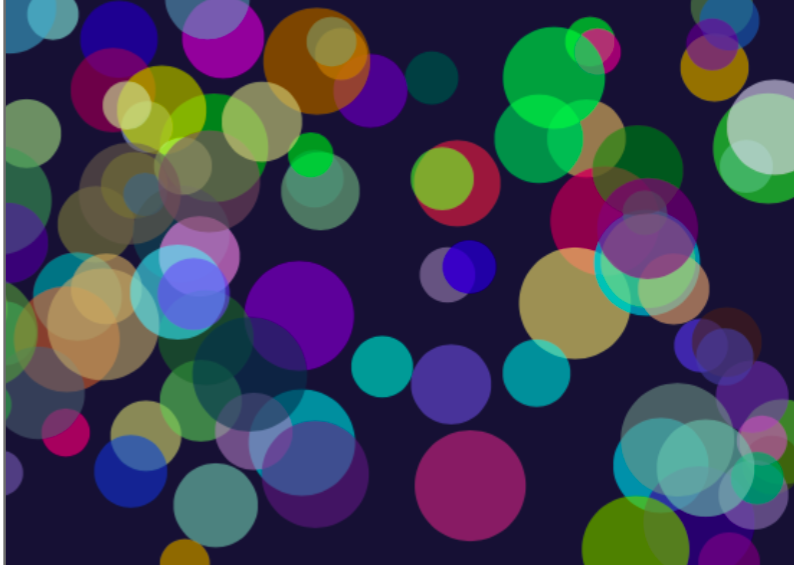
For this assignment, I wanted to create a generative artwork based on colorful bubbles floating around in a dark space. I chose bubbles because they are easy to recognize, but they can still create an interesting image when there are many of them moving together. I wanted the final artwork to feel calm, colorful, and slightly playful rather than looking like a game or a completely still picture.

Every time the sketch begins, the bubbles appear with random positions, sizes, colors, and speeds. Because these values are random, the arrangement is never exactly the same. Some bubbles are large and move slowly, while others are smaller and move more quickly. The random colors also create different combinations each time the program starts. I used a dark blue background to make the brighter colors more visible.

I used Object-Oriented Programming because every bubble needs the same basic information and actions. The Bubble class works as a template that stores each bubble’s position, speed, size, and color. It also contains methods that allow each bubble to move, bounce, and display itself. I then stored all the bubble objects inside one array and used loops to control them. This made it possible to create many bubbles without writing separate code for every one.

Sketch Code

let bubbles = [];

function setup() {
  createCanvas(600, 400);

  // create 100 bubble objects
  for (let i = 0; i < 100; i++) {

    let newBubble = new Bubble(
      random(50, 550),
      random(50, 350),
      random(-3, 3),
      random(-3, 3),
      random(30, 80),
      random(255),
      random(255),
      random(255)) ;

    bubbles.push(newBubble);
  }
}

function draw() {
  background(20, 20, 50);

  // make every bubble move, bounce, and display 
  for (let i = 0; i < 100; i++) {
    bubbles[i].move();
    bubbles[i].bounce();
    bubbles[i].display();
  }
}

class Bubble {

  constructor(x, y, xSpeed, ySpeed, bubbleSize, redValue, greenValue, blueValue) {
    this.x = x;
    this.y = y;

    this.xSpeed = xSpeed;
    this.ySpeed = ySpeed;

    this.bubbleSize = bubbleSize;

    this.redValue = redValue;
    this.greenValue = greenValue;
    this.blueValue = blueValue;
  }

  // move the bubbles
  move() {
    this.x = this.x + this.xSpeed;
    this.y = this.y + this.ySpeed;
  }

  // change direction when the bubbles reaches an edge
  bounce() {
    if ((this.x > width) || (this.x < 0)) {
      this.xSpeed = this.xSpeed * -1;
    }

    if ((this.y > height) || (this.y < 0)) {
      this.ySpeed = this.ySpeed * -1;
    }
  }

  // draw the bubbles
  display() {
    noStroke();

    fill(
      this.redValue,
      this.greenValue,
      this.blueValue,
      150
    );

    circle(this.x, this.y, this.bubbleSize);
  }
}

My main idea was to combine control with randomness. I controlled the canvas, movement, and general appearance, but then the individual colors, sizes, positions, and speeds were chosen randomly. This makes the artwork organised while still allowing each version to look different.


Embedded Sketch

Problems I Ran Into

One problem I noticed was that some bubbles moved very slowly while others moved much faster. This happened because their speeds were chosen randomly. At first, I thought something was wrong with the slower bubbles, but then I understood that they had received a speed close to zero.

Another small issue was that parts of the bubbles sometimes went outside the canvas before they bounced back. This happens because the program checks the center position of each bubble. I decided to keep it because the bubbles still return and continue moving. Chiefly, whenever I ran into a problem, I mainly went back to the Week 3 slides that cover functions, OOP & Arrays, because they explained each of these concept clearly and showed the process step by step.

Assignment #3 OOP

Concept:

When I first thought of art works based on class and object oriented programming, I thought of algorithmic drawings of trees, which I found very interesting and pretty, thus, I decided to base my work on nature, and specifically trees. I made the work to be interactive where the user can “build” a forest with trees of varied heights depending on where they press their mouse and also random colors of green so the forest doesn’t look like one whole block of green, and has more depth and layers. 

Highlight of codes I’m proud of:

I’m really proud of the tree class, especially the specific values of the circles, where each shifts a little based on the trunk’s center. I’m also very happy about the height manipulation where mouseY is used to determine the height of the tree!

class Tree{

  /* using the same x, and different y for the trunk 
  and the size for the tree bush and colors so i can change colors */
  constructor(x, startY, endY, size, colors){
    this.x = x;
    this.startY = startY;
    this.endY = endY;
    this.size = size;
    this.colors = colors; 
  }
  /* using the variables and slight value changes to 
  draw the trunk and circles */
  show(){
    strokeWeight(40);
    stroke('#804242');
  line(this.x,this.startY,this.x,this.endY);
    noStroke();
    fill(this.colors);
    circle(this.x+30,this.endY, this.size);
    circle(this.x+30, this.endY+50, this.size);
    circle(this.x-30, this.endY+50, this.size);
    circle(this.x-20, this.endY-10, this.size);
  }
  
}

Embedded sketch

How Was This Made

I first gained my momentum by laying out the bush class because it was relatively easier in shapes and positioning. I first created the class and all the parameters that’s needed and then tested out the show() method by giving them values on the sketch page and after tweaking the coordinates and it all, I translated the value relationship (the coordinates between each shape) back into variables in the class. 

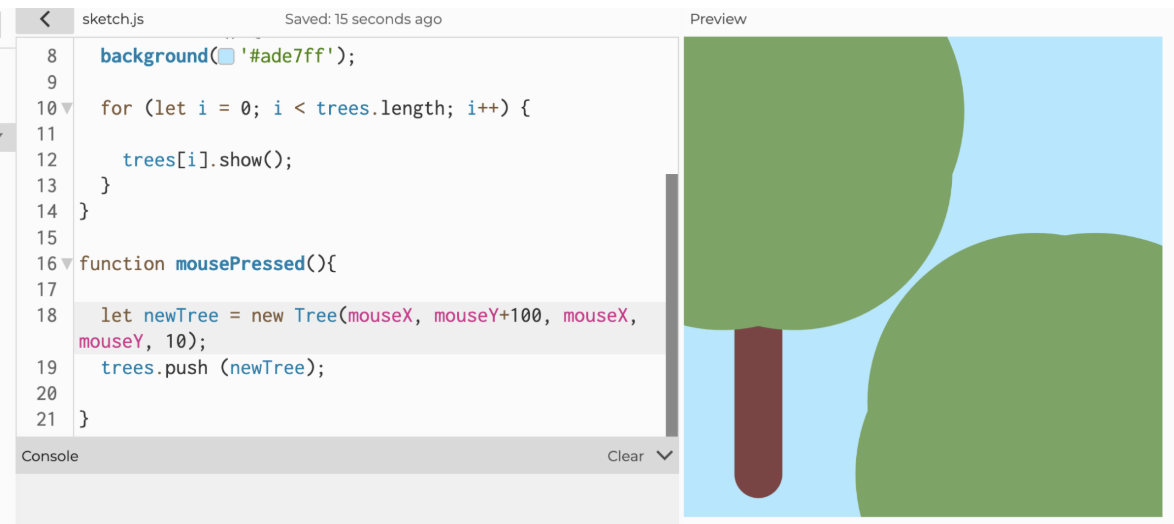
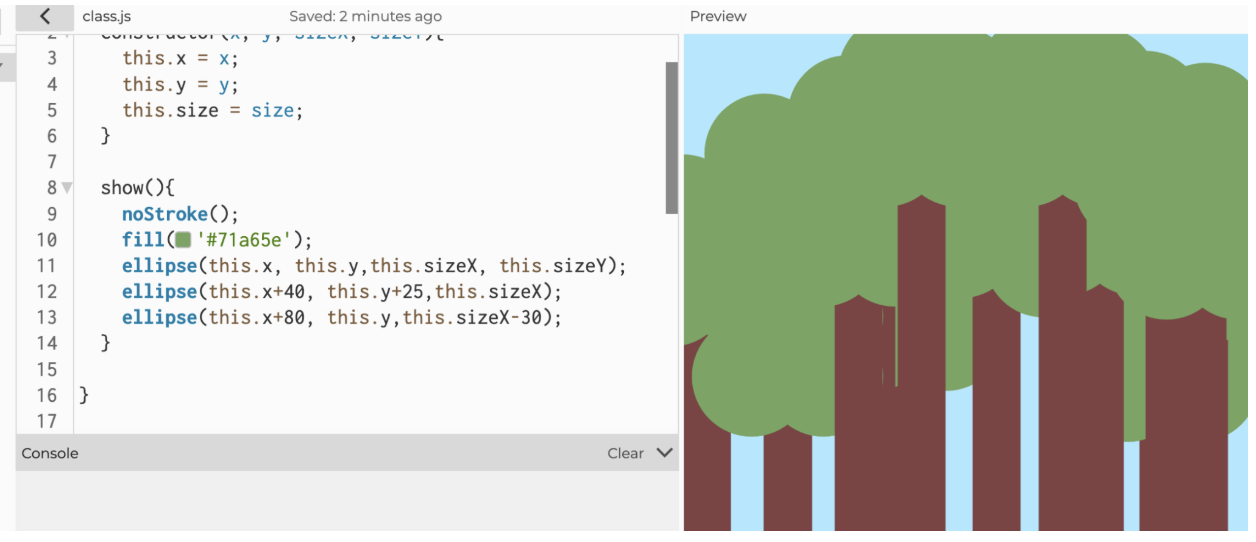
With that experience, I did the same with the trees class where I laid out possible parameters first and then tested them out in the sketch and refined them after testing. For instance, during the testing, I realized that there wasn’t a need to include an endX parameter because the x coordinate for the tree doesn’t move; the trunk’s x coordinate stays the same and the leaf clusters are based on the trunk’s coordinates. Therefore, I removed that parameter and updated the class. Then I started working on the responsive height feature where when the user presses on the screen, the coordinate of the mouse will be used as the height for the tree. To implement this, I relied on the p5js reference library to check on the mousePressed() function. After I placed in all the values, I tried to run it but ran into some confusing problems, which turns out is because of the parameter editing I did previously; I forgot there were only 4 parameters and I entered 5, which then caused the following error where leafs got way too big:

Entered mouseX as a parameter twice because I forgot I removed the “endX” from parameter, therefore mouseX got entered as the “size” value. 

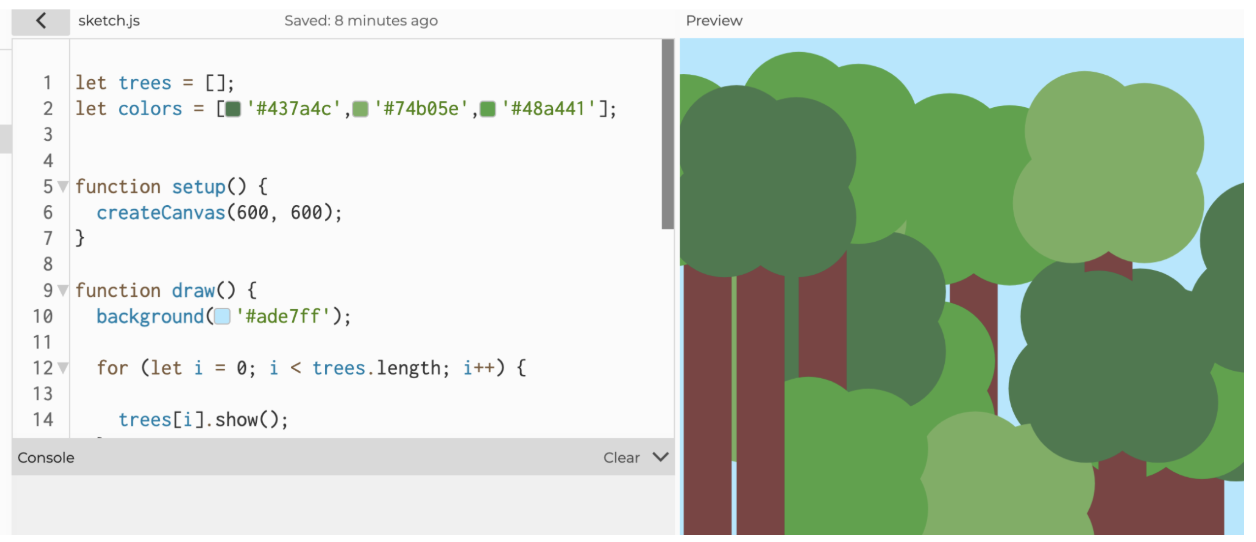
After fixing that I was pretty done with the technical aspects, but as I furthered my “experiment”, I realized that as the user grow more and more trees, the trees start blending into one another because of the lack of borders and same colors. To solve that I tried adding back the strokes, but they didn’t look good, so instead I decided to give the trees random colors by using an array.

Before: Trees blended with each other because too many overlapping of same color

After:

Lastly, I instantiated the bush class and switched the order of drawing so that the bushes are drawn after the trees and stays on top of them. 

Reflection for future work/ improvements: 

I hope to learn more complex features that allow me to expand the forest and allow me to play with more “details”. Also, I should keep track of the classes and their parameters so I don’t make the same mistakes when the parameters increase.

Reading Response – Week 3

I find the concept of interactivity pretty interesting. The author of the book chapter made it very clear that he despises how the meaning of the word has been skewed recently, and I agree with him. The thing is though, at what point is something just my reaction vs at what point am I actually interacting with the thing? I’m wondering because I believe the writer is correct in his assumption that a lot times when people refer to interactivity, they actually mean normal reactions. However, are interactions and reactions not connected in that sense? Reaction is a form of engaging with something you see, not at the level of actual interactivity the author is seemingly looking for, but still, you are engaging with the material in some matter.

When it comes to movies are you just reacting or are you interacting with the creator. If it is just your reaction, then, does that inherently mean there wasn’t a degree of interactivity even through the reaction ? Again, I am not saying the writer is wrong in what he claims, but I just can’t help but wonder what’s the line between reactions and interaction. Does interaction have to entail the characters in the story should hear you when going in a scary house? Is part of the interactivity not your own reaction? Looking beyond the characters of the screen, could we not say there was a level of interactivity when it came to audience and the creator’s hope in bringing in causing your anger and fear to happen?

When I think of strongly interactive systems, I tend to think of systems in which your input can actively change what is happening in a piece of media. Additionally, I think a good way to improve user interaction in my p5 sketches is by having the use play into the piece. Maybe by giving them something to click or by having their addition change the piece in some way.

Reading Reflection Week 3

Interactivity basically means the user can do something and the media responds to them in a way involving thinking and things other than reaction, and interactivity is not a yes-or-no; it’s high and low and subjective to a degree. I think a strongly interactive system is one where the user can actively do something and see a response from the system. The user should feel like their actions matter, rather than just watching something happen. For example, in my p5.js sketch, the bubbles become interactive when I click the mouse because clicking creates a new bubble. I could make my sketch even more interactive by adding more ways for the user to control what happens. For example, I could let the user click on the fish to make them change direction, press different keys to change the background or add new animals, or move the mouse to control the bubbles. I could also add buttons that allow the user to change the speed or appearance of the objects. This would make the sketch feel more interactive because the user would have more control over what happens on the screen.Before reading this, I usually thought that getting lost in a mall was just my own problem or lack of attention.  It makes me think differently about interactive media because I realize that even simple things like buttons, maps, and directions need to communicate clearly with the user. Overall, these principles can make interactive media more intuitive, easier to use, and less frustrating.

Week 3 Assignment – Generative artwork

Concept

For this project, I chose an ocean theme. I wanted something with movement and interaction, so I created fish and bubbles and experimented with waves.

I first started by creating waves using ellipses, playing around with the color and position to create the illusion of waves. I mainly used ellipses to create these shapes, allowing the waves to blend into the sea. Afterward, I added stones and seaweed to the bottom. Finally, I changed the color of the last row of ellipses to match the background color.

I worked on making interactive bubbles. This is where I started using the concepts from this week more directly, especially arrays, functions, and Object-Oriented Programming. I created an empty array called bubbles. An array is basically a list where I can store multiple things. Instead of creating a separate variable for every bubble, I can put all of my bubbles inside this one array.

I then created a class. This connects to Object-Oriented Programming because, instead of manually describing every bubble, I created a template for what a bubble should be and move. I then created different functions inside the class for what the bubble can do. The move function changes the bubble’s position every frame. This makes the bubble move instead of staying in one place. I wanted to limit how high the bubbles can move. So I added an if statement that checks whether the bubble has reached a certain part of the canvas. If it does, its speed changes direction, which makes it bounce. Through a show function, I was able to make the appearance of the bubble I wanted to include 3 ellipses to give the bubble a 3d illusion and make it more realistic.

To make the bubble interactive, I updated the code so it creates a new bubble every time the mouse is pressed. I also set the horizontal speed xspeed to 0, meaning the bubble will not move left or right. Finally, I set the vertical speed yspeed to 2, which allows the bubbles to move straight up and down instead of moving randomly. I also added a pop to remove the bubbles when pressing the keypad.

function mousePressed(){

  interactiveBubble = new Bubble(mouseX, mouseY, 0,2);
  bubbles.push(interactiveBubble);

After the bubbles, I created the fish. I wanted them to be colourful, so instead of making the fish one colour, I used multiple ellipses layered inside each other. For example, I used an ellipse for the main body and a triangle for the tail. Then I added smaller ellipses in different colours inside the body. At first, I had a stroke around all of the shapes, but I realized that this made the fish look messy because you could see the outline around each coloured section. I fixed this by using noStroke for the smaller coloured ellipses while keeping the stroke around the outside and the tail. This made the fish look cleaner.

I created two fish at different positions and gave them different speeds:

let bubbles = [];
let interactiveBubble;

let fish1X = 100;
let fish2X = 100;
let speed1 = 2;
let speed2 = 3;

Every time draw runs, the position increases by the fish’s speed. Since the draw function repeats over and over, the fish looks like it is swimming across the screen.

I also wanted the fish to keep swimming instead of disappearing when they reached the edge. Using an if statement, I was able to check if the fish has gone past the right side of the canvas. If it has, its position is moved back to the left side. This creates a loop where the fish continuously swim across the screen.

The scene combines continuous movement with interaction from the viewer. The fish are intended to swim across the canvas on their own, while clicking adds bubbles at the mouse position. This allows the viewer to contribute to the ocean scene rather than only watch it. The stones and seaweed form the seabed, while the layered colours of the fish and the highlights inside the bubbles add detail to the underwater setting

Code I’m particularly proud of:

The first new thing I tried was learning how to create waves using the sin() function from the p5.js reference. I used:

let y = 15 * sin(x * 0.1) + 5;

I learned that sin creates a smooth up-and-down movement, which makes it useful for creating waves. The 15 controls the amplitude, or how tall the wave is. The 0.1 controls how quickly the wave changes as x increases, which affects how spread out the wave is. The +5 controls the vertical shift, so it moves the whole wave down by 5 pixels.

I experimented with this by creating multiple waves and changing their positions, colours, and stroke weights. This was useful because I learned a new way to create movement instead of only moving objects from one position to another.

However, when I tried combining the waves with the rest of my project, I started getting errors, and some of my other code stopped working. Because of this, I eventually removed the waves from my final version. Even though I removed them, I still wanted to include them in my process because learning how sin works was something new I learned this week.

I learnt this using p5 tutorials: https://p5js.org/reference/p5/sin/.

I would also say this is the code I am most proud of, since it is something new I learned on my own and enjoyed very much. Next time, I would like to learn how to integrate this into my work.

Reflection

In the future, I would like to be able to mix different types of code and try to learn more code on my own. I would also like to add different types of code and designs into my work. For example, in this project, I could have added new animals that were less basic and more challenging to make and make them more interactive.

One challenge in this project was combining separate experiments into a single scene. I explored waves using sin(), but encountered errors when I tried to combine them with the fish and bubbles. I removed that experiment from the final version, so the sine-wave code shown above documents an earlier stage of my process rather than a feature of the final sketch. The ellipse-based shapes described in my concept were a separate approach to creating the appearance of water.

AI documentation 

I used ChatGPT while adding new code to my sketch, mainly to help me understand how to make the bubbles move up and down. This helped me understand the bubble’s movement, its vertical speed, and the conditional statement in the bounce method. I learned that the conditional checks whether the bubble’s y position is above 100 or below height – 100. This allowed for the bubble to bounce within a certain height.

bounce() {
  if (this.y < 100 || this.y > height - 100) {
    this.yspeed = -this.yspeed;

I also used ChatGPT to understand the sin() function and investigate why my wave experiment was not working when I combined it with the rest of the scene. Afterwards, I stayed back to discuss the problem with my professor. We identified the way the background was being redrawn in the draw loop as part of the issue. During the wave experiment, I also noticed that the fish were leaving previous images on the canvas instead of appearing to move cleanly.  I eventually removed the sine-wave experiment from the final version because I had not successfully combined it with the other elements.

I would like to become more independent with coding by testing smaller sections separately and understanding how they work before adding them to a larger sketch.

Reference

sin. (n.d.). https://p5js.org/reference/p5/sin/

Assignment 3: Functions, Arrays, and OOP

Sketch

Concept

The idea for this sketch came to me after recently watching the animated film “Grave of the Fireflies” and I decided to make a sketch with fireflies that move in random directions. To imitate actual firefly behavior, I made them fly away when you bring the cursor closer to them, just like how they avoid human touch. I always thought of fireflies as truly magical creatures, so this idea felt the closest to me.

Grave of the fireflies (1998)

Code Highlight

 this.transp = random(50, 255);
 this.fadeSpeed = random(1, 3);

this.transp += this.fadeSpeed;
    if (this.transp > 255 || this.transp < 50) {
      this.fadeSpeed *= -1;

The most interesting part of this code is the fading fireflies effect. This part creates the pulsing fade effect for each firefly using two values, transp and fadeSpeed. When a firefly is created, transp starts as a random value between 50 and 255, which sets how visible the firefly looks at first. fadeSpeed starts as a random value between 1 and 3, which sets how fast the firefly light fades. Every frame, fadeSpeed is added to transp, making it slowly rise or fall. Once transp goes above 255 or below 50, the fadeSpeed flips direction so it fades back the other way.

Also, a problem I ran into was when the center of a firefly’s circle reached the edge of the canvas, it would just disappear and teleport straight to the opposite side, which looked abrupt and ruined the whole sketch. To fix this, I adjusted the restart function to give the firefly a small buffer of 14 pixels past the edge before it teleported to the other side.

restart() {
    if (this.x > width+14) {
      this.x = 0-14;
    }
    if (this.x < 0-14) {
      this.x = width+14;
    }
    if (this.y > height+14) {
      this.y = 0-14;
    }
    if (this.y < 0-14) {
      this.y = height+14;
    }
  }


How this was made

This sketch was built using two separate classes. The first class, called fli, handles the fireflies, and the second class, called star, handles the background stars. The stars are very simple, as they are just small ellipses with random positions in the background without any movement. Their sizes and transparency or brightness are also random between certain values to create variety. The fli class, on the other hand, is a little more complicated. Each firefly gets random values for position, speed, size, transparency, and fade speed when it is created. In the move function, the firefly drifts slowly across the screen, and its transparency rises and falls between 50 and 255 to create a glow effect. When the mouse comes within 70 pixels, the firefly flies away from the cursor. The restart function makes fireflies wrap around to the opposite edge instead of disappearing when they leave the canvas.

Reflection

While making this sketch I used a lot of randomness across all sorts of parameters. This approach definitely made the whole picture look more natural. Since the main focus of my sketch was fireflies, I had to make sure their behavior felt believable and alive. Adding randomness into parameters like size, speed, and fade timing made the fireflies move and glow at their own pace instead of all acting the same, which created a harmonic, natural looking scene overall.
If I worked on this again I would try to make the glowing effect more realistic, maybe by making a color transition between circles smoother. I would also change how the fireflies avoid the mouse to make that interaction feel more realistic, since the movement feels kind of stiff right now.

Week 3 – Reading Reflection

I think a strongly interactive system would be a system that does more than just react in one simple way. In the reading written by Chris Crawford, he explains that interactivity isn’t always one level but actually can have different degrees, from high to low. One example he gave of strong interactivity is a conversation as it isn’t one way but both ways as both sides do the talking, listening, and responding. From this, I understood that in order for a system to have a high level of interactivity it should understand what the user is actually doing and give a response, so both ways. He also gives the example of low interaction which is the refrigerator light, because it only turns on when the door opens and turns off when it closes, yes, the fridge is responding so its interactive however only in a really simple way. I think if an interactive design is really strong it would respond in different ways depending on what the user does. It should also be able to change its response depending on the users actions instead of just always giving the same response. 

For my p5 sketches, I could improve the level of interaction by giving the user more control over what happens so instead of just having one same response each click I could use the mouse position or the movement to create different outcomes. For example, in my new sketch instead of only one click to open the door and keeping it there I would also add  another click to close the door. From this it would make my sketch feel more like a back and forth conversation between the user and the program rather just one straight simple reaction.

Week 3 – Reading Reflection

Before this reading, I never really gave much thought to what interactivity actually means. I knew when something was interactive, but I never really stopped to think about what makes one interaction stronger than another. I really liked the idea that interactivity can exist at different levels rather than something simply being interactive or not. For example, I obviously knew that a conversation was interactive because you respond and reply to another person, but I never thought about how the way a conversation flows can actually affect the level of interactivity. If one person is doing most of the talking and the other is barely responding, it is very different from a conversation where both people are listening, thinking, and responding to each other. I think this helped me understand interactivity much better because it is not just about getting a response, but about how much of an exchange is actually happening. For me, a strongly interactive system would be one where the users actions actually matter, and the system responds to what they are doing in a way that keeps that exchange going.

Thinking about my own p5 work, I honestly have not really included much interaction in my projects so far. I feel like this is something I need to start adding, even if I begin with really simple interactions. For my project this week, for example, I could use mousePressed() so that the user can pop things on the screen, add more objects, or decide how many they want to add rather than everything already being decided for them. I think even simple interactions like these could make a big difference because the user would actually be participating in what is happening on the screen instead of just watching it.

Week 3 Reading reflection

Since the beginning the reading has been enthralling. The questions asked by the author seem to still be relevant today. I have always thought of interactivity as a way to “communicate” both with other people and HMI. I like to think of it as questions and responses; depending on one’s contribution (the input) they get different answers. When someone declares something to be “interactive” the first thing that pops to mind is technology that communicates back to the person. For example, when I was little I had an interactive alphabet board (in Bulgarian) that when it had its buttons pressed would in turn produce a noise (the sound of the letter that is). Depending on the mode it could also recite the word associated with the letter. I do believe that toys could be interactive, even when the interaction is included in its simplest form, but the Interactive Children’s Rug gives no response to the user and is therefore, not interactive. To this day I still believe that marketing strategies have failed me on multiple occasions with false advertising. Some years ago interactive dolls entered the market with a promise for a new era of playing. What a disappointment it was when the only feature of said dolls was blinking (and only when their heads are tilted). The questions remain: is interactivity subjective, are the objects really interactive? I say yes to both. To a certain extent everything is interactive, but it is the level of interaction that makes it differ. To my mom the washing machine is very interactive, but to me it has a low level of interaction, so I would say that some of the subjectivity may come from previous experience.

The paragraph about books not being interactive was really interesting and it made me think. While I agree with the majority saying that books are indeed interactive, the author’s point should not be overlooked. My proposal is the introduction of a distinction: direct and indirect interaction. What if books are indirectly interactive in the sense that you communicate with the author’s thoughts, but they are not there to respond? At some point the author was doing the “input”, now the reader is accessing existing media and is interacting with the output. With this new idea though we have to be open-minded enough to also accept that interaction could disregard one of the three principles of listening, thinking, speaking (that the author simply deems as participation) and agree that it is indirect interaction.

The tone is notably witty and overall very pleasant and I cannot help but agree with the author on most of the points. I am yet to form my own opinion on what is considered interactive or not, but I definitely am willing to adopt this way of thinking. While reading it, I constantly thought of the different scenarios and examples of questionable interactivity arose. In the future I would try to include more interactivity in my projects like moving elements, sound, change of colors or a combination, in order to explore it (interactivity) from a designer’s standpoint instead of just being the user.