Week 11 – Assignment

I wanted to make a non-traditional music instrument that feels like a game the could be played around with for hours, although it is very simple. It contains different modes but not only does have audio feedbacks, but also visual feedback through the LCD Screen and LED lights. It reminds me of a very simplified and modest version of a music instrument attached to a pedal, which gives different music effects.  The LCD screen showing the hertz and bpm reminds me of a pedal.

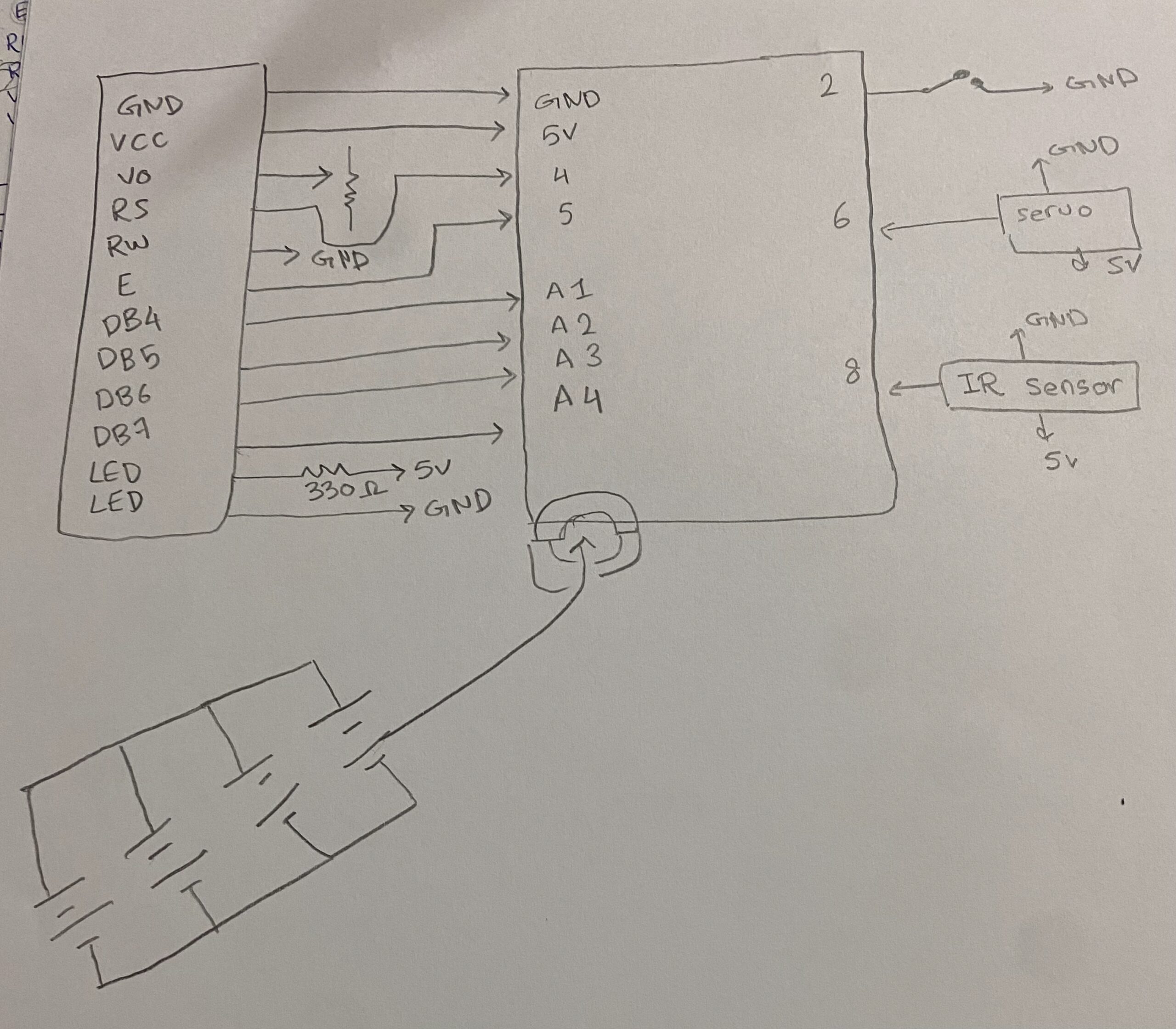
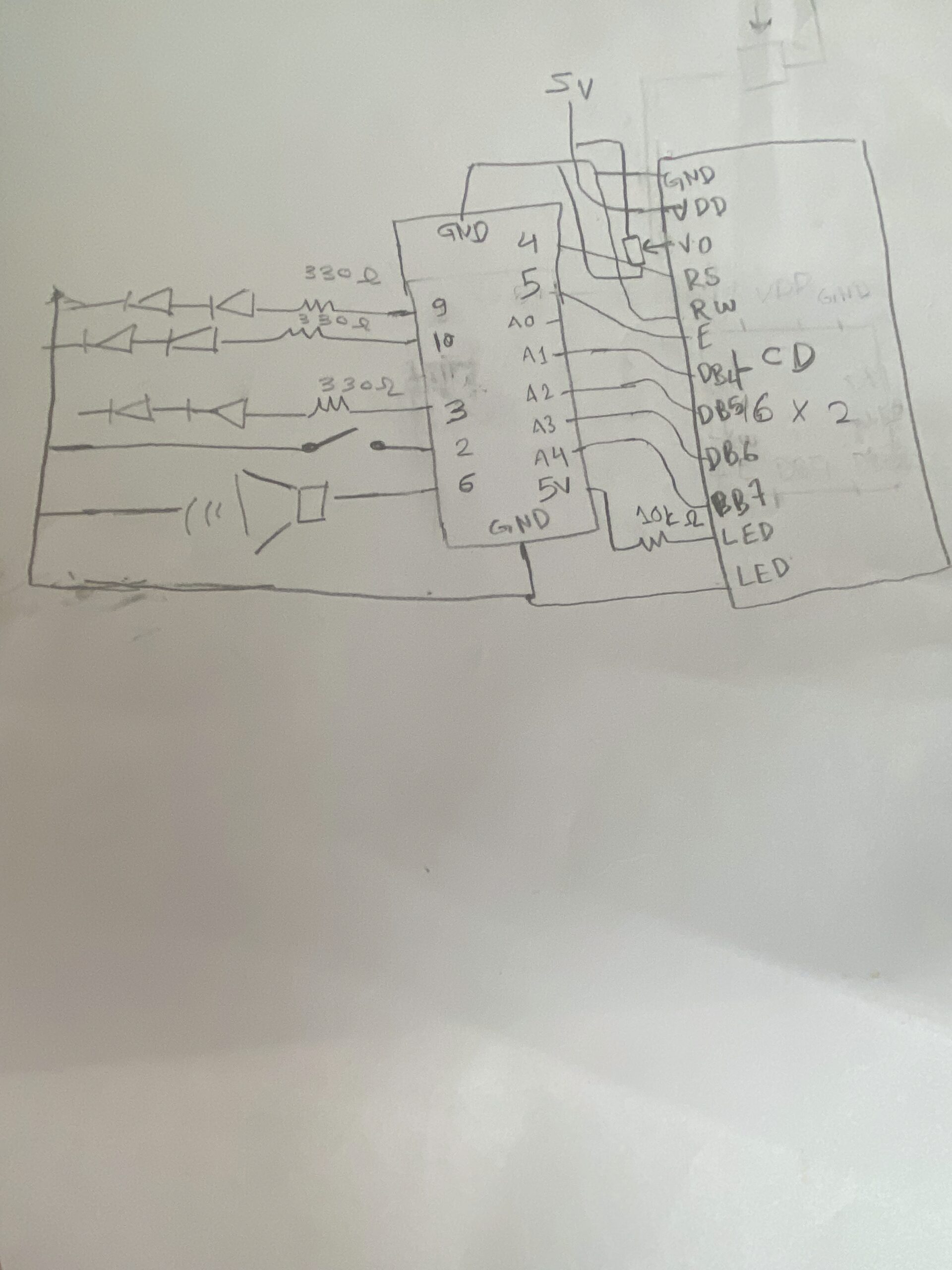
Hand-Drawn Schematics


Simulator

Again, I used the simulator to make sure I wouldn’t accidentally burn any components. When building a circuit, I take it step by step: I test the LEDs first—everything works great—then I add the photoresistor to control them and test again. After that, I add the piezo and repeat the process until I reach the LCD. I build each part in the simulation first, then immediately try it on the physical board. Which helped me realize the wires order connecting to the LCD display were flipped.


Video

How the code works

This code implements a light-controlled theremin with three distinct musical modes on Arduino, using an LDR as the primary input. The core structure reads the analog light value, smooths it with a 20-sample circular buffer, and maps it to different musical parameters depending on the active mode, Theremin, Scale, or Pac-Man. Mode 0 -Theremin- produces continuous pitch with glide and vibrato, generates a pulsing heartbeat animation on the LCD, and sweeps the RGB LED through a color gradient based on frequency. Mode 1  quantizes the light reading to 15 discrete C major notes, displays rainbow colors per note, and shows VU meter bars on the LCD using custom characters. Mode 2  maps light intensity to game speed, runs a side scrolling Pac-Man game on the LCD with ghosts and dots, and plays the classic sound. The button handling supports short-press to cycle modes and long-press to enter/exit sleep mode, while the RGB LED fades smoothly between target colors using a step-based transition. The LCD uses custom character sets loaded on-demand and tracks dirty rows to minimize redraws. A sinus lookup table generates vibrato and LED pulsing, and the audio output on the piezo uses tone() with frequency modulation. The code is organized into modular functions for each mode, character loading, LED fading, and button debouncing, with global state variables tracking everything from heart rate BPM to ghost positions.

Future improvements and Reflection

In the future, I would like to turn this prototype into a PCB and add more components and sensors to transform it into a more realistic musical instrument.

I struggled mainly with connecting the LCD screen. After working for long hours, I started to lose focus and couldn’t fully debug what was going wrong. Eventually, I realized that the two breadboards were not connected to each other, which fixed part of the issue. However, I still faced problems—the display would turn on but only showed strange white boxes.

I then checked the V0 pin on the LCD and noticed it was connected to the potentiometer but not properly connected to ground and power. After correcting the wiring and adjusting the potentiometer, the display sometimes still showed weird shapes and white boxes. I removed the LCD to inspect it and realized the wiring was flipped, since I was using the original LCD from the Arduino starter kit. The characters appeared as numbers at first, and some were reversed.

After fixing the wiring orientation and connections, everything started working properly.

Week 11- Reading Response

A Brief Rant on the Future of Interaction Design

The author emphasizes that human capabilities are important when thinking about designing the future. I have to agree with this part, especially when he mentioned that humans have hundreds of degrees of freedom, which reminds me of my robotics class—our professor highlighted that robotics takes a lot from human nature, like the robotic 3 degrees of freedom (DOF) arm. So, when designing things, we can make use of human capabilities.

But this is not what the author meant; he wanted designs to make use of our already existing capabilities to interact with them. As he mentioned, a hammer’s grip is meant for a human hand. However, when it comes to the future of interactive design and technology, I have to disagree that interacting with it should require using my full human body, because not everyone is able-bodied. Technology has to be accessible to everyone—isn’t that why we have it? To provide access to more things in a more effective, optimized way?

Making mobile phone calls rather than using a phone booth, reading or listening to books and articles anywhere, anytime—before having interactive design at my fingertips, I would not be able to type on a computer; I would have to go to a bookstore and have a professional typewriter write this reading response out. Sometimes, it takes writing things out to realize how truly blessed we are to have these types of things right at our fingertips.

Then, we can adapt this technology to be used by everyone. I also want to mention that I agree that using the full immersive experience with the human body is much more entertaining and fun. So, it depends on the end-use product or idea. I do not think the author is biased, but I think the author should cover different cases where this is not necessary or makes things harder for some people. I do not think the author changed my mind, but it opened me up to more ideas and thoughts on how to truly design good products that try to include everyone. An example of an incredible inclusive interactive design is the Meta Quest 3 and 3S VR headset, which has an option to play while seated, adjust the distance between the eyes, and even add a glasses prescription. If you do not want to pay extra or share it with family members, it also has space to fit your own glasses.

I had a few questions throughout, but I eventually answered them myself by writing my thoughts out, such as: “Technology has to be accessible to everyone—isn’t that why we have it? To provide access to more things in a more effective, optimized way?” Another question I had was: isn’t a good designer someone who considers different cases to make the product or design as effective as possible?


A follow-up article

I thought the author might cover some of the questions and respond to thoughts similar to mine, but he did not. He seemed to express some dislike for “waving hands in the air” when it comes to manipulating things, because you cannot feel what you are manipulating. From an improvement point of view, I agree that this would be beneficial. However, I believe that if researchers were to receive funding for it, it would mainly come from the medical field, to help people with loss of sensation, such as from neuropathy, stroke, or spinal cord injury.

There are mainly two types of gloves; the type depends entirely on whether the goal is therapeutic improvement (relearning sensation) or sensory substitution (using technology to mimic touch), which I believe could later be used in games. It reminds me of audiobooks, which were initially made to assist people with hearing or reading difficulties in accessing information from books, but nowadays are used by a much larger audience—busy parents, people with demanding work schedules, kinesthetic learners, and many more.

A lot of the time, these types of research efforts end up helping a larger group of people than initially predicted. I believe that designers should make good use of what we have, while researchers should continue to expand on what we need and what we already know.


Week 10 – Assignment

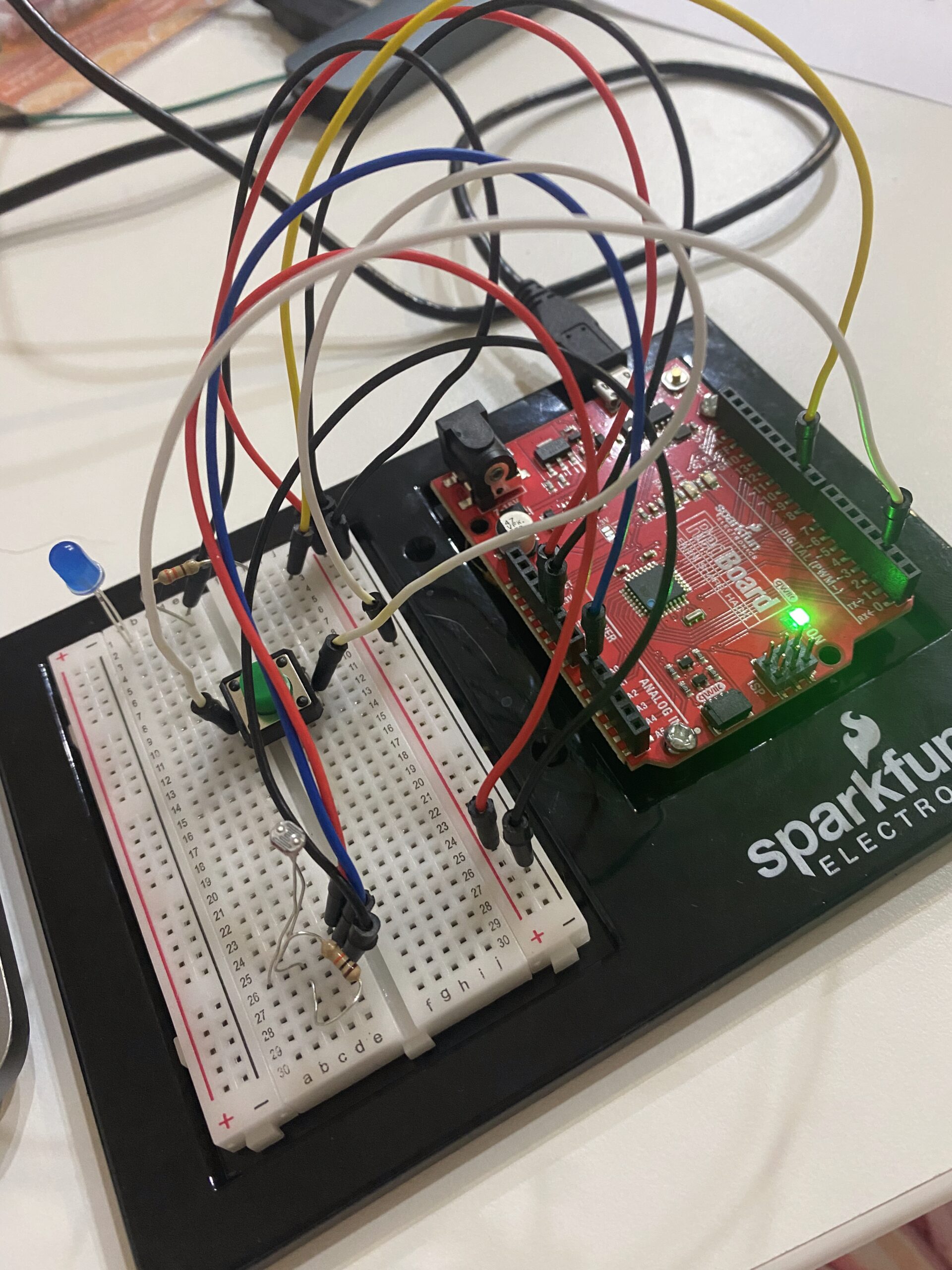
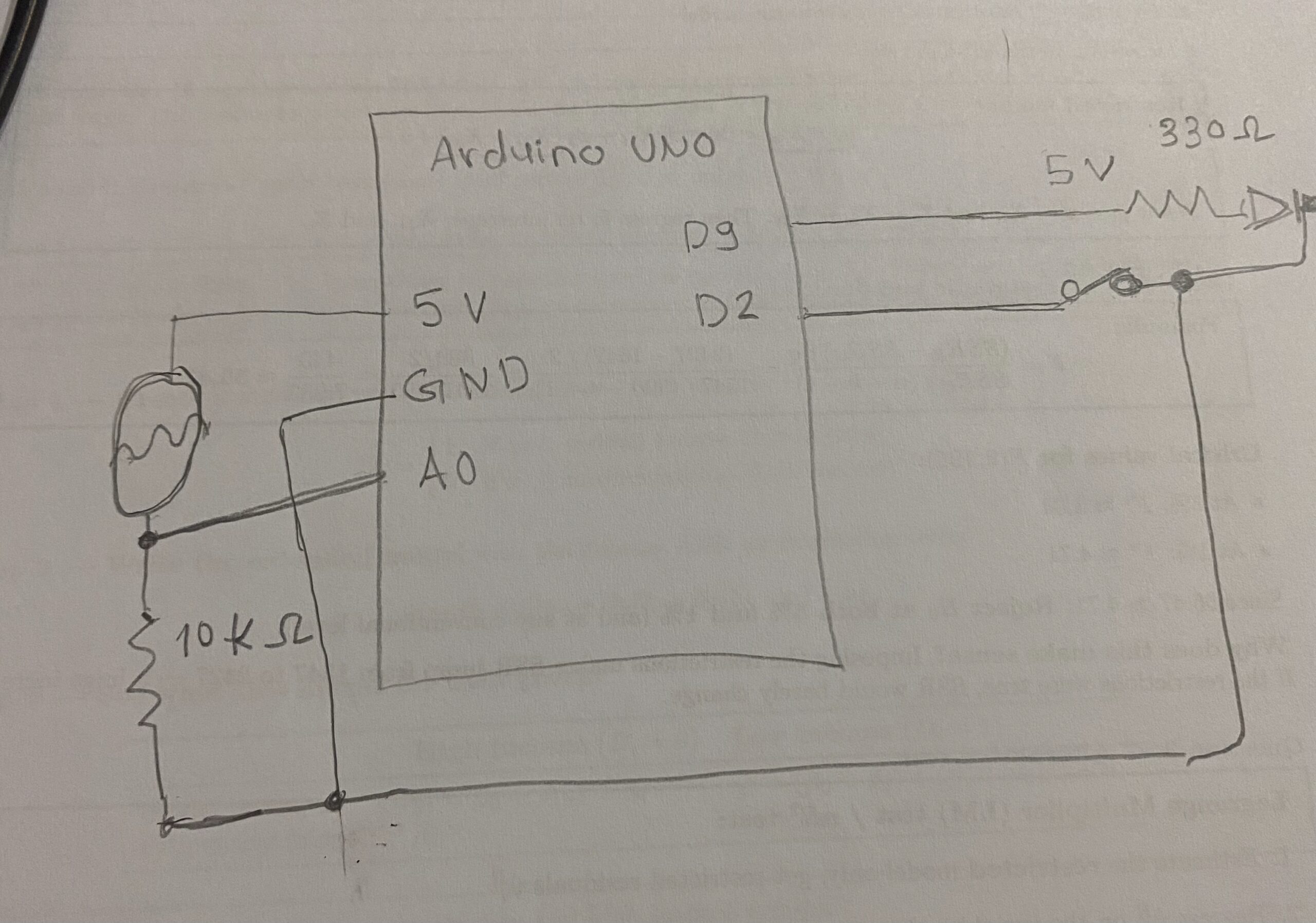
Get information from at least one analog sensor and at least one digital sensor (switch), and use this information to control at least two LEDs, one in a digital fashion and the other in an analog fashion, in some creative way. Include a hand-drawn schematic in your documentation.

Hand-drawn schematic:

I decided to test my design and code in Tinkercad before implementing it into the actual Arduino board to ensure there is no issues with the connectivity or code to help with the debugging. I am glad that I did that because it seems that I made error and when running the simulation is short circulated and showed an image or animation of an explosion, when clicking the push button.

How this code is made:

I added constants for the pins, which represent fixed connections between the Arduino and the components. I also defined lightLimit and darkLimit to set the range where the LDR reading is mapped into LED brightness. In the loop, the LDR value is read and converted into a brightness level using map(), then constrained to stay within 0–255. This makes the LED respond smoothly to changes in light. When the button is pressed, a random jitter is added to the brightness to create a fluctuating effect. Otherwise, the LED follows the normal smooth brightness based on the sensor. The serial monitor is used to track the sensor values and output for debugging.

The part I am most proud of :

// jitter Button

if(buttonPressed){

// Multiply the jitter

// We pick a random number between negative base and positive base

// to create extreme fluctuations around the current brightness level.

int jitterAmount = random(-baseBrightness, 255);

int finalOutput = constrain(baseBrightness + jitterAmount, 0, 255);


analogWrite(ledPin, finalOutput);


// Very fast delay to make the jitter

delay(random(5, 30));

}else{

// Normal smooth operation

analogWrite(ledPin, baseBrightness);

delay(30);

}


Reflection and Future Improvements:

I also tried my project wiring, connections, and code on the Tinkercad before the physical board, because I was worried about burning my board. Overall, I liked my project and I think it has a lot potential and there is a lot I could add to it . I think I might use it for next week’s assignment musical instruments to make like an orchestra with LED lights. I think it will be a really fun experiment.


Week 9- Reading Response

I agree with all of the author’s points that everything has a time, place, and purpose, especially when it comes to design. Sometimes, we need something that balances utility, aesthetics, and practicality. The author highlights that “design is preferable depending on the occasion, the context, and above all, upon my mood.”

The author also emphasizes that in cases of emergency, when people are stressed, they tend to forget how to use things effectively. In this situation, functionality plays a bigger role, which supports his point that design depends on occasion and context. Context plays a major role in many things—it determines how different aspects are prioritized. For example, when designing an emergency exit door, should I focus on making it visually appealing, or ensure that it works effectively in an emergency and does not cause an accidental stampede due to a design flaw?

I do not think the author is biased at all; in fact, I find his ideas and explanations quite objective. My beliefs largely align with his. However, I also think that aesthetics sometimes fail to consider usability. In many cases, we need both. For example, in Qatar, some cities are inspired by European architecture, such as outdoor restaurants or cafés. However, since the weather is not suitable for outdoor seating most of the year, these spaces often go unused about 90% of the time. My question would be when would be a time where functionality is not need or not important in our daily lives?

Midterm project : Bakkar Ramadan Game

Concept:

Oy, “Hello” in the Nubian language , My concept is my favorite Ramadan series teaching students new lessons everyday in the holy month of Ramadan offering wisdom and importance of community as well ass offering awareness to children and adults since it the series was a great success in Egypt and The Arab World. It is also the first 100% created Egyptian cartoon series started in 1998. It also introduces the Nubian culture which on of the rich, unique, and strongly continuing cultures in Egypt.

Bakkar (TV Series 1998– ) - IMDb

So how does it work and what am I proud of:

Initializing all images and assets

let startImg, homeImg, bakkarImg, hassonaImg, mapImg, mapSceneImg;
let teacherImg, rashidaImg, friend1Img, shalabiImg, friend2Img, shalabi2Img;
let storeShelfImg, storeAsset1Img, storeAsset2Img, bagImg, shopSignImg;
let button;
let homeMapStartTime = 0;


Hassona is Bakkar friend guiding him through the game. I added Typetext message. HassonaStoreIdx and hassonaMapIdx starts at 0 and counts up to the full length of the map and home  scene text, making it appear letter-by-letter.

let homeTypeText = "حسونه: يا بكار يلا نجمع فلوس الزينة رمضان\nHassona: Yalla Bakar Lets collect the money for the Ramadan decorations";
let homeTypeIdx = 0;

const hassonaMapText = "حسونة: اضغط Space للتكلم مع أصحابنا والجيران!\nHassona: Press Space to Talk to our Friends and Neighbors!";
const hassonaStoreText = "حسونة: اسحب الأغراض للشنطة عشان تشتري!\nHassona: Click & Drag objects to the Bag to Buy!";
let hassonaMapIdx = 0;
let hassonaStoreIdx = 0;


This is the pinned message at the top giving instruction. I added a white speech box to make it more clear to see the message.

fullText.substring(0, idx) slices the full string to only show characters up to idx, creating the typewriter effect.

function drawHassonaBanner(fullText, idx) {
noStroke();

// Dark semi-transparent backing strip
fill(0, 150);
rect(0, 0, width, BANNER_H);

// Hassona avatar
image(hassonaImg, ICON_PAD, ICON_PAD, ICON_SIZE, ICON_SIZE);

// White speech box
fill(255);
rect(BOX_X, ICON_PAD, BOX_W, BANNER_H - ICON_PAD * 2, 8);

// Typewriter text inside box
fill(0);
textAlign(LEFT);
textSize(14);
text(fullText.substring(0, idx), BOX_X + 12, ICON_PAD + 18, BOX_W - 22, BANNER_H - ICON_PAD * 2 - 10);
}


This function draws the Hassona intro banner on the home screen. It waits 2 seconds after the scene starts. I used Chatgbt to learn more about how to use time countdown before it shows an image or an object as well as typer style of text banner. Also there is a debugMode to help with seeing where the collision boxes are I got it form Claude because I struggle to envision where everything goes.

function drawHomeTypewriter() {
if (millis() - homeMapStartTime < 2000) return;
image(hassonaImg, 10, 10, 100, 100);
fill(255); rect(120, 20, 650, 100, 10);
fill(0); textAlign(LEFT);
text(homeTypeText.substring(0, homeTypeIdx), 140, 50, 600);
if (frameCount % 2 === 0 && homeTypeIdx < homeTypeText.length) homeTypeIdx++;
}


Every frame, updateRashidaTrail saves Bakkar’s current position to a history array, trims it to TRAIL_DELAY frames long, then positions Rashida at the oldest saved position — making her follow Bakkar with a slight delay. drawRashida simply draws her sprite at that calculated position.

function updateRashidaTrail() {
posHistory.push({ x: x, y: y });
if (posHistory.length > TRAIL_DELAY + 1) posHistory.shift();
if (posHistory.length > 0) {
rashidaX = posHistory[0].x - RASHIDA_W * 0.5;
rashidaY = posHistory[0].y + (charH - RASHIDA_H) * 0.5;
}
}

function drawRashida() {
image(rashidaImg, rashidaX, rashidaY, RASHIDA_W, RASHIDA_H);
}


For the collision I used a fixed hitboxoffset  so when my character collides with an object it gets detected, and the it either stops the object from going through the object or transitions to the next scene

The moveCharacter function moves using arrows and it minus the amount of steps towards a specific direction like x or y in negative which the left side or positive side which to the right side. If moving horizontally doesn’t cause a collision, it applies the new X; if moving vertically doesn’t cause a collision, it applies the new Y. This way the player can slide along a wall instead of getting completely stuck when hitting it diagonally.

function checkCollision(cx, cy, ox, oy, ow, oh) {
return (
cx + hitboxOffsetX < ox + ow &&
cx + hitboxOffsetX + hitboxW > ox &&
cy + hitboxOffsetY < oy + oh &&
cy + hitboxOffsetY + hitboxH > oy
);
}

function collidesWithList(nx, ny, list) {
for (let obs of list) {
if (checkCollision(nx, ny, obs.x, obs.y, obs.w, obs.h)) return true;
}
return false;
}

function moveCharacter(obstacles) {
let nx = x, ny = y;
if (keyIsDown(LEFT_ARROW)) nx -= step;
if (keyIsDown(RIGHT_ARROW)) nx += step;
if (keyIsDown(UP_ARROW)) ny -= step;
if (keyIsDown(DOWN_ARROW)) ny += step;
nx = constrain(nx, 0, width - charW);
ny = constrain(ny, 0, height - charH);
if (!collidesWithList(nx, y, obstacles)) x = nx;
if (!collidesWithList(x, ny, obstacles)) y = ny;
}


In the store scene it shows the amount of money collected in the variable  moneyTotal and then we have an object bag with a specific x,y,w, and h to drop object in the bag.

function drawStoreScene() {
image(storeShelfImg, 0, 0, width, height);

image(bagImg, bagZone.x, bagZone.y, bagZone.w, bagZone.h);
fill(255); textAlign(CENTER); textSize(14);
text("Drop to Buy", bagZone.x + 90, bagZone.y + 30);

// Money HUD sits below the banner
fill(0, 180); rect(0, BANNER_H, width, 48);
fill(255, 215, 0); textSize(20); textAlign(CENTER);
text("Money: " + moneyTotal + " EGP", width / 2, BANNER_H + 33);


It loops through storeItems and draws each one that hasn’t been bought or placed yet, then if the player is currently dragging an item it draws it following the mouse. Finally it handles the error message, dialogue, back button, and draws the Hassona banner last so it always appears on top of everything else.

for (let itm of storeItems) {
if (!itm.inBag && !itm.placedOnMap) {
image(itm.img, itm.px, itm.py, 100, 100);
fill(255); textSize(18); text(itm.name, itm.px + 50, itm.py - 10);
}
}
if (dragging && scene === 'store_scene') {
image(storeItems[dragging.idx].img, mouseX - 50, mouseY - 50, 100, 100);
}
if (millis() < statusTimer) { fill(255, 0, 0); text(statusMessage, width / 2, height / 2); }

drawDialogueUI();

fill(255); textSize(18); text("Press 'B' to Return to Map", width / 2, height - 30);

// Hassona banner drawn last — always on top
drawHassonaBanner(hassonaStoreText, hassonaStoreIdx);
if (frameCount % 2 === 0 && hassonaStoreIdx < hassonaStoreText.length) hassonaStoreIdx++;
}


drawBakar draws the player , drawDoor draws a brown rectangle for the home door, drawStoreEntrance draws the shop sign image, and startGame switches to the home scene, hides the start button, records the start time, and resets Rashida’s position and trail history.

function drawBakar() { image(bakkarImg, x, y, charW, charH); }
function drawDoor() { fill(101, 67, 33); rect(doorX, doorY, doorW, doorH, 5); }
function drawStoreEntrance() {
image(shopSignImg, storeDoor.x, storeDoor.y, storeDoor.w, storeDoor.h);
}
function startGame() {
scene = "home_map";
button.hide();
homeMapStartTime = millis();
rashidaX = x - RASHIDA_W - 10;
rashidaY = y;
posHistory = [];
}


Draws a small semi-transparent dark badge in the top-right corner just below the Hassona banner, displaying the player’s current cash total in gold text.

function drawMoneyHUD() {
// In map_scene, cash badge sits just below the Hassona banner
fill(0, 180); rect(width - 190, BANNER_H + 8, 170, 40, 10);
fill(255, 215, 0); textSize(16); textAlign(CENTER);
text("Cash: " + moneyTotal, width - 105, BANNER_H + 30);
}


with each interaction with each store asset and their x,y positions, name, and image that was initialized in the beginning of the code.

function initStoreItems() {
storeItems = [
{ name: "Lantern", img: storeAsset1Img, cost: 10, shelfX: 100, shelfY: 300, px: 100, py: 300, inBag: false, placedOnMap: false, mapX: 0, mapY: 0 },
{ name: "Decor", img: storeAsset2Img, cost: 15, shelfX: 300, shelfY: 300, px: 300, py: 300, inBag: false, placedOnMap: false, mapX: 0, mapY: 0 }
];
}


I wrote the dialogue  with each interaction with each character  and their x,y positions, name, and image that was initialized in the beginning of the code.

function initNPCs() {
npcs = [
{ name: "Teacher", img: teacherImg, x: 100, y: 200, completed: false,
greet: "Bakar! Help with Ramadan decorations?",
opts: [{ text: "Yes! (Collect 10 EGP)", reward: 10, reply: "Good luck!" }] },

{ name: "Friend", img: friend1Img, x: 200, y: 600, completed: false,
greet: "Bakar! I saved some money for the decorations!",
opts: [{ text: "Thanks! (Collect 15 EGP)", reward: 15, reply: "Yalla habibi!" }] },

{ name: "Friend2", img: friend2Img, x: 380, y: 600, completed: false,
greet: "Hey Bakar! I have some money for decorations!",
opts: [{ text: "Thanks! (Collect 15 EGP)", reward: 15, reply: "Happy Ramadan!" }] },

{ name: "Shalabi", img: shalabi2Img, x: 560, y: 200, completed: false,
greet: "Bakar ya basha! Khawd el floos!",
opts: [{ text: "Shukran! (Collect 25 EGP)", reward: 25, reply: "Ramadan Kareem!" }] }
];
}

Sketch:

Areas I would like to improve:

I would to improve a lot of things like the quality of the pixelated, adding more assets to ramadan decoration, more interaction between Bakkar and the NPCs. I honestly, had an idea in mind to make an interactive immersive game, but due to circumstance it was a bit difficult to create it. There so much more things I think I could have added it to my project to make it more unique. I feel the most unique part of it is a simple introduction to Egyptian community and culture. I could also add the music effects from the music series. I also did not end the game because I want to work on improving it and make it into a true RBG game similar to starview valley and add different quests and games. Therefore, I would like to add more dialogues between the character to learn about them and there role and stories in the series.


Week 5: Midterm Progress

Concept:

My concept is based on my favorite Ramadan TV shows, “ظاظا و جرجير” (Zaza w Gargyer) and “بكار” (Bakar). These shows teach children Islamic and Egyptian morals and values in an indirect and engaging way. Bakar is especially important because it was one of the first cartoons to represent Egyptian culture and identity.

I want to create an adventure game where players can choose one of these cartoon characters and go on a journey inspired by the spirit of Ramadan. Throughout the game, players will stop to help others, learn from their mistakes, and make choices that reflect kindness, generosity, patience, and responsibility. The goal is to combine fun gameplay with meaningful lessons, just like the original shows.

Design:

I want my game to give this cozy relaxing feel that you could play anytime like on a portable console or at console. I want it to be as nostalgic as possible. I want it to be similar aesthetic to Stardew Valley. I am currently working on the characters sprite sheets.


Frightening / Challenging Aspects

The most frightening aspect for me is figuring out how to make the game simple, yet fun, while still being a meaningful learning experience. I’m unsure whether I should design it as a pixel-style platformer or a 2D narrative game.

I also want the game to accurately capture and translate the spirit of Ramadan, just like the original cartoons. Can I successfully express that spirit through a cozy, pixelated platform game that can be enjoyed by the entire family?

Risk Prevention

To reduce this risk, I would create a short sample or prototype of the game to test whether it truly fits the idea and essence I have in mind. Most importantly, I would evaluate how the characters and the setting turn out visually.

Then, I would ask people who are familiar with the original cartoons whether they can recognize the characters and understand what they represent in the pixelated version. If a high number of people are able to recognize them and connect them to the original spirit of the shows, I would feel more confident about moving forward with the project.

Week 5: Reading Assignment

Computer vision differs from human vision in that it does not fully understand the context of what it is seeing. Humans rely on memory, context, and storytelling to understand what they see. What stood out to me is that computer vision depends less on artificial intelligence and more on borders, corners, contrast, intensity, and brightness. Computer vision sees pixels in small details, while we as humans might overlook small details and focus more on the bigger picture.

A technique I recently learned about in computer vision is body pose detection, which is used in many games such as Xbox 360 Kinect and Just Dance. The reading made me think that this is a useful tool in the field of interactive art. The author also seems optimistic about democratizing these tools for artists. Like many things in life, it is a double-sided sword—it can be used for good or bad. I am not only talking about computer vision, but also surveillance and tracking in general. These technologies can be used to harm individuals, or they can be used to improve safety within society. Context matters, and that is why humans have the privilege of detecting and evaluating ethical issues.

Week 4 – Reading Response

Reading Norman’s chapter made me realize how often I get frustrated with specific designs, especially ones that lack efficiency in everyday objects. Norman emphasizes that good design should communicate clearly, prevent errors, and provide feedback. I see this principle in some interactive media, where the design makes it easy to use without much explanation—anyone can figure it out quickly. When something is designed well, you don’t even notice it because everything feels natural and intuitive. Unlike the examples the author mentioned, such as the sink that requires pushing down on it or the door that needs a sign to explain that it is a sliding door, good design should not require instructions. If a user has to stop and think about how to use something basic, then the design has already failed.

Something that drives me crazy is the access doors on campus. I walk around carrying two access cards—one specifically for my suite and room, and another for the rest of the campus. It feels unnecessary and inefficient. On top of that, the glass doors are extremely heavy, and the sensors do not work most of the time. Instead of making entry smooth and accessible, the design creates frustration. According to Norman’s ideas, better mapping, clearer feedback, and fewer constraints could significantly improve this experience.

Week 4 – Global Mood (Data Visualization)

Concept:
My concept is based on showing the current global mood, and the world’s current situation. Because whenever I used would google “news” most of the things would is evoke aa negative emotion from me. So, I decided to visualize the news and categorize them into a few different emotions or feelings.

How I created the code:

I used Guardian and NYT API keys in order to get access to live articles, although there are some restrictions, like page requests. Therefore, I added some delay in order to access a larger number of pages and news article headlines. I also used world.json for the country borders.

I then created different arrays: one for the emotional bubbles, one for the country borders, one for the CNN breaking news ticker, and one for tracking articles so they are not shown twice. I also added a timer that updates every 60 seconds and adjusted the speed and position of the news ticker.

Then I added geographical points for a list of countries. I created bubbles for different emotions, with each emotion represented by a color. There is also a map key showing which color represents which emotion. The bubbles have visual effects like glowing and shrinking over time to make the map feel dynamic. Emotions are detected using keywords in article titles to classify sadness, anger, hope, or joy.

It initially gets the last 48 hours of news, then it is updated with live breaking news. I also added fallbacks: if the world map fails to load, a simple grid is shown, and if the API fails, a CORS proxy is used to make sure the news still comes through.

The code:
// Convert guardian format to our format
// Fetch 48 hours of historical news from The Guardian
function fetchHistoricalNews() {
let twoDaysAgo = new Date();
twoDaysAgo.setDate(twoDaysAgo.getDate() - 2);
let fromDate = twoDaysAgo.toISOString().split("T")[0]; // Format: YYYY-MM-DD
console.log("📅 Fetching Guardian news from " + fromDate + " to today...");

let totalArticles = [];
let pagesToFetch = 10; // Get 10 pages of results
let pagesLoaded = 0;
let failedPages = 0;

// Fetch pages sequentially with delay to avoid rate limiting
for (let pageNumber = 1; pageNumber <= pagesToFetch; pageNumber++) {
setTimeout(() => {
let apiURL =
"https://content.guardianapis.com/search?section=world&show-tags=keyword&from-date=" +
fromDate +
"&page-size=30&page=" +
pageNumber +
"&show-fields=webPublicationDate&api-key=" +
GUARDIAN_API_KEY;
console.log("🔄 Requesting Guardian page " + pageNumber + "...");
fetch(apiURL)
.then((response) => {
console.log("📡 Guardian page " + pageNumber + " response status: " + response.status);
if (!response.ok) throw new Error("HTTP " + response.status);
return response.json();
})
.then((data) => {
if (data && data.response && data.response.results) {
totalArticles = totalArticles.concat(data.response.results);
pagesLoaded++;
console.log("✅ Page " + pageNumber + " loaded: " + data.response.results.length + " articles");
if (pagesLoaded + failedPages === pagesToFetch) {
if (totalArticles.length > 0) {
console.log("📊 Total Guardian historical: " + totalArticles.length + " (" + pagesLoaded + "/" + pagesToFetch + " pages successful)");
isShowingHistorical = true;
sourceStatus.guardian.active = true;
sourceStatus.guardian.articleCount = totalArticles.length;
processArticles(totalArticles, true, "guardian"); // true = historical
} else {
console.error("❌ All Guardian pages failed");
sourceStatus.guardian.active = false;
}
}
} else {
console.warn("⚠️ Guardian page " + pageNumber + " returned empty results");
failedPages++;
}
})
.catch((error) => {
console.error("❌ Guardian page " + pageNumber + " failed:", error.message);
failedPages++;
if (pagesLoaded + failedPages === pagesToFetch) {
if (totalArticles.length > 0) {
console.log("📊 Total Guardian historical: " + totalArticles.length + " (" + pagesLoaded + "/" + pagesToFetch + " pages successful)");
isShowingHistorical = true;
sourceStatus.guardian.active = true;
sourceStatus.guardian.articleCount = totalArticles.length;
processArticles(totalArticles, true, "guardian");
} else {
console.error("❌ All Guardian pages failed");
sourceStatus.guardian.active = false;
}
}
});
}, pageNumber * PAGE_REQUEST_DELAY); // Use delay variable
}
}

// Fetch the latest breaking news from The Guardian
function fetchGuardianNews() {
console.log("📰 [" + getCurrentTime() + "] Fetching Guardian news...");
let apiURL =
"https://content.guardianapis.com/search?section=world&show-tags=keyword&page-size=25&show-fields=webPublicationDate&api-key=" +
GUARDIAN_API_KEY;
fetch(apiURL)
.then((response) => {
if (!response.ok) throw new Error("HTTP " + response.status);
return response.json();
})
.then((data) => {
if (data && data.response && data.response.results) {
console.log("✅ [" + getCurrentTime() + "] Guardian: " + data.response.results.length + " articles");
sourceStatus.guardian.active = true;
sourceStatus.guardian.lastUpdate = new Date();
sourceStatus.guardian.articleCount = data.response.results.length;
isShowingHistorical = false; // We're showing breaking news now
processArticles(data.response.results, false, "guardian"); // false = breaking news
}
})
.catch((error) => {
console.log("⚠️ Guardian direct failed, trying CORS proxy...");
tryGuardianWithProxy();
});
}

// Backup method: Try Guardian API through CORS proxy
function tryGuardianWithProxy() {
let apiURL =
"https://content.guardianapis.com/search?section=world&show-tags=keyword&page-size=25&show-fields=webPublicationDate&api-key=" +
GUARDIAN_API_KEY;
let proxiedURL = "https://api.allorigins.win/raw?url=" + encodeURIComponent(apiURL);
fetch(proxiedURL)
.then((response) => {
if (!response.ok) throw new Error("HTTP " + response.status);
return response.json();
})
.then((data) => {
if (data && data.response && data.response.results) {
console.log("✅ [" + getCurrentTime() + "] Guardian via proxy: " + data.response.results.length + " articles");
sourceStatus.guardian.active = true;
sourceStatus.guardian.lastUpdate = new Date();
sourceStatus.guardian.articleCount = data.response.results.length;
isShowingHistorical = false;
processArticles(data.response.results, false, "guardian");
}
})
.catch((error) => {
console.error("❌ [" + getCurrentTime() + "] Guardian completely failed:", error.message);
sourceStatus.guardian.active = false;
});
}


Reflection and ideas for future work or improvements:

Reflection:

Global Mood taught me a lot about combining live data, visualization, and emotion analysis. Seeing emotions vary across regions in real time was fascinating, and effects like glowing and shrinking bubbles made the map feel dynamic. It also taught me how to APIs and json files on P5.js.

Future Work and  improvements:

I would love to present it as an installation to show people the current global situation. For future improvements, I would incorporate Natural Language Processing to classify emotions more accurately, rather than relying solely on specific keywords. I also wish I had greater access to open-source news APIs to expand the dataset.


Week 3- OOP Assignment


Your concept:

I was inspired by my house cats, who always bring joy and happiness when I play with them or when they decide to sit on my lap. I wanted to include them, but wasn’t sure how, so I decided to base it on Nyan Cat, which I used to play when I was younger, when I had to wait for my friends to arrive, didn’t have access to the internet, or just wanted to give my brain a break.

Nyan Cat (Music Video 2011) - IMDb

Code:

I prompted Gemini to add the particles, it used blendMode(ADD) is what makes the magic particles look like they are made of light.

let segments = 8; 
let segLength = 12;
let x = [], y = [];
let fireParticles = [];

const COLORS = {
fur: [255, 235, 245], 
ears: [255, 180, 200],
eyes: [100, 200, 255],
magic: ['#FFD1DC', '#FFECB3', '#B2E2F2', '#D1FFD7', '#E0BBE4']
};

function setup() {
createCanvas(windowWidth, windowHeight);
// Initialize segment positions
for (let i = 0; i < segments; i++) {
x[i] = mouseX; 
y[i] = mouseY;
}
background(0); 
angleMode(RADIANS);
}

function draw() {
// Semi-transparent black rect creates the generative trail
blendMode(BLEND);
fill(0, 0, 0, 30); 
rect(0, 0, width, height);

let mouseSpeed = dist(mouseX, mouseY, pmouseX, pmouseY);

//Follow Logic
dragSegment(0, mouseX, mouseY);
for (let i = 0; i < x.length - 1; i++) {
dragSegment(i + 1, x[i], y[i]);
}

let headAngle = atan2(mouseY - y[1], mouseX - x[1]);
let emissionRate = map(mouseSpeed, 0, 50, 1, 8);

if (mouseIsPressed || mouseSpeed > 2) {
for(let i = 0; i < emissionRate; i++) {
fireParticles.push(new MagicParticle(x[0], y[0], headAngle, mouseSpeed));
}
}


// Tail
drawTail(x[segments-1], y[segments-1]);

// Body
for (let i = x.length - 1; i > 0; i--) {
drawCatBody(x[i], y[i], i);
}

// Glowing Particles
// We use ADD blend mode to make them pop on black
blendMode(ADD);
for (let i = fireParticles.length - 1; i >= 0; i--) {
fireParticles[i].update();
fireParticles[i].display();
if (fireParticles[i].isDead()) fireParticles.splice(i, 1);
}
blendMode(BLEND);

//Head always on top
drawCatHead(x[0], y[0], headAngle);
}

function dragSegment(i, xin, yin) {
let dx = xin - x[i];
let dy = yin - y[i];
let angle = atan2(dy, dx);
x[i] = xin - cos(angle) * segLength;
y[i] = yin - sin(angle) * segLength;
}

function drawCatBody(posx, posy, index) {
push();
translate(posx, posy);
fill(COLORS.fur);
noStroke();
ellipse(0, 0, 50 - index, 45 - index);
pop();
}

function drawTail(tx, ty) {
push();
translate(tx, ty);
stroke(COLORS.fur);
strokeWeight(12);
noFill();
let wag = sin(frameCount * 0.2) * 25;
bezier(0, 0, -15, wag, -30, -wag, -45, 0);
pop();
}

function drawCatHead(hx, hy, angle) {
push();
translate(hx, hy);
rotate(angle);

fill(COLORS.fur);
noStroke();
ellipse(10, 0, 55, 50); // Face

// Ears
fill(COLORS.ears);
triangle(-5, -20, 5, -45, 20, -20); 
triangle(10, -20, 25, -45, 40, -20); 

// Mouth
fill(255, 150, 150);
arc(30, 5, 22, 22, 0, PI);

// Eyes
fill(COLORS.eyes);
ellipse(15, -5, 10, 12);
ellipse(35, -5, 10, 12);
fill(255); 
ellipse(17, -7, 4, 4);
ellipse(37, -7, 4, 4);

// Whiskers
stroke(255, 200);
strokeWeight(1);
line(40, 2, 60, -5);
line(40, 5, 60, 5);
line(40, 8, 60, 15);
pop();
}

class MagicParticle {
constructor(x, y, angle, speed) {
this.pos = createVector(x, y);
// Spread the magic out
this.vel = p5.Vector.fromAngle(angle + random(-0.5, 0.5));
this.vel.mult(speed * 0.2 + random(1, 4));
this.lifespan = 255;
this.c = color(random(COLORS.magic));
this.size = random(2, 7);
}

update() {
this.pos.add(this.vel);
this.vel.mult(0.96); 
this.lifespan -= 4;
}

display() {
noStroke();
let alpha = map(this.lifespan, 0, 255, 0, 200);
fill(red(this.c), green(this.c), blue(this.c), alpha);
ellipse(this.pos.x, this.pos.y, this.size);

// Sparkle effect
if (random(1) > 0.95) {
fill(255, 255, 255, alpha);
ellipse(this.pos.x, this.pos.y, this.size * 0.6);
}
}

isDead() { return this.lifespan < 0; }
}

function windowResized() {
resizeCanvas(windowWidth, windowHeight);
background(0);
}
      • Embedded sketch


    Reflection and ideas for future work or improvements:

  • In the future, I might add interactions or obstacles to make it like an interactive fun game, but I want to be unique and something that have been done previously.