
Concept
My initial concept was an Arduino hardware controller pad paired with a generative audio-visual system in p5, where physical input through knobs and buttons shape a particle world that produces atmospheric jazz sound in real time.
However, as I made the serial communication working, and started experimenting with sound, the synth music ambient was so good I fell in love with it. This type of music I also really like, and I immediately had an idea for the visual p5.js part, so I changed my concept a little bit.
An interactive audio-visual installation with a control panel based on Arduino and a generative p5.js audio and visual system that continuously produces synth ambient sound and visuals in real time. The system is autonomous, so the user just “steers” it since it can already exist on its own. Through knobs and buttons, the user shapes the conditions of the system: changing tension, density, speed, tone, and other behaviors that simultaneously affect both the soundscape and the visual particle environment. The interaction is more like a conducting and not performing or creating.
Recording
Implementation & Proccess
Serial Communication
My serial communication was built on the code we reviewed in class, so I can’t say much about this implementation other than that I adjusted the speed of serial communication from 9600 to 115200 baud, and that I added controls for all of my buttons and knobs.
const int BTN1 = 7;
const int BTN2 = 8;
const int BTN3 = 9;
const int BTN4 = 10;

void setup() {
  Serial.begin(115200);

  pinMode(BTN1, INPUT_PULLUP);
  pinMode(BTN2, INPUT_PULLUP);
  pinMode(BTN3, INPUT_PULLUP);
  pinMode(BTN4, INPUT_PULLUP);
  pinMode(LED_BUILTIN, OUTPUT);
}

void loop() {
  // read all sensors and buttons
  int knob1 = analogRead(A1);
  delay(1);
  int knob2 = analogRead(A2);
  delay(1);
  int knob3 = analogRead(A3);
  delay(1);
  int b1 = !digitalRead(BTN1);
  int b2 = !digitalRead(BTN2);
  int b3 = !digitalRead(BTN3);
  int b4 = !digitalRead(BTN4);

  // send 7 values
  Serial.print(knob1);
  Serial.print(',');
  Serial.print(knob2);
  Serial.print(',');
  Serial.print(knob3);
  Serial.print(',');
  Serial.print(b1);
  Serial.print(',');
  Serial.print(b2);
  Serial.print(',');
  Serial.print(b3);
  Serial.print(',');
  Serial.println(b4);

  delay(50);
}
Audio
The audio system is built entirely in p5.sound, and honestly it was the part of this project I liked the most.
The core is a drone layer made of two sawtooth oscillators running at slightly different frequencies (73.42 Hz and 73.86 Hz). The tiny gap between them creates a natural beating effect that makes the sound feel more alive and warm instead of flat. Both oscillators feed into a shared lowpass filter, which then goes into a reverb. This routing includes everything: knob controls, button effects, so it hits the whole sound at once.
On top of the drone, there’s a triggered note system with three layered oscillators: a triangle wave at the base frequency, another triangle slightly detuned (*1.005), and a sawtooth an octave up (*2). All three fire together on every collision event, with slightly different envelope timings so the sound blooms rather than stabs. The notes are constrained to D Dorian scale, which is why nothing sounds random even though the note selection itself is random — the scale does the harmonic work let dorianScale = [146.83, 164.81, 174.61, 196.00, 220.00, 246.94, 261.63, 293.66];
Each physical control maps to a certain audio parameter:
-
- SCAN RADIUS (knob 1) — shape size, which directly affects collision frequency, which affects how often notes fire
- CLARITY (knob 2) — lowpass filter cutoff, from more muffled (60 Hz) to open (6000 Hz)
- DEPTH (knob 3) — reverb decay time, from dry (0.5 sec) to full cathedral (8 sec)
- ALERT (btn 1, hold) — overrides the filter to a narrow cutoff with high resonance, adding tension
- HOLD POSITION (btn 2, hold) — slows particle movement so notes fire less, also mutes new note triggers entirely
- AMBIENT MUTE (btn 3, toggle) — fades the drone down to near-silence
- INTERFERENCE (btn 4, hold) — pushes osc1 and osc2 apart by 15 Hz each, causing beating/wobble
One thing I learned that made a big difference: the reverb can’t be re-processed every frame or it crashes the audio engine. I had to track the previous knob value and only update reverb when the knob moved by more than a threshold:
if (audioStarted && abs(knob3 - lastKnob3) > 30) {
    let decayTime = map(knob3, 0, 1023, 0.5, 8);
    reverb.process(filter, decayTime, 2);
    lastKnob3 = knob3;
}
Visual
Visual part came to me after I heard the audio, so I immediately had a clear idea of what I wanted to see on screen. I already had a debug panel just to figure out if the Arduino sends anything to my p5 sketch, so I just played around with colors, and some other effects, and left it be.
The shapes is basically the integration of my previous project (Week 2 assignment) with shapes connections. I copied the class inside this sketch, deleted the connection-building parts so only the shapes are floating around the screen with coordinates. I decided to use this sketch because it fit in the style really well and made my life with developing this project a little bit easier with that solid visual foundation.
One fun thing I use there is the CRT scanlines, and it is a really easy built that was a nice detail of the overall design. Basically it just moves a line depending on the y-variable that is changing each frame inside the draw() loop.
scanY += 1.5;
if (scanY > windowHeight) scanY = 0;


stroke(0, 174, 64, 80);
strokeWeight(1);
line(0, scanY, windowWidth, scanY);

stroke(0, 0, 0, 60);
strokeWeight(1);
for (let y = 0; y < windowHeight; y += 3) {
  line(0, y, windowWidth, y);
}
The trail effect tied to DEPTH (knob 3) was actually just changing the background opacity. Instead of background(10)which clears the canvas completely, I use background(10, 10, 10, trailAlpha)where the alpha is mapped from knob 3. Low alpha means the background barely paints each frame, so old shapes linger as ghostly trails. It’s a really simple trick that makes a big visual difference.
Other than that, all the visual responses from the Arduino knobs and buttons was pretty simple and was achieved just by substituting hardcoded values for strokeWeight, backgroung opacity, size etc. for the value received from Arduino.
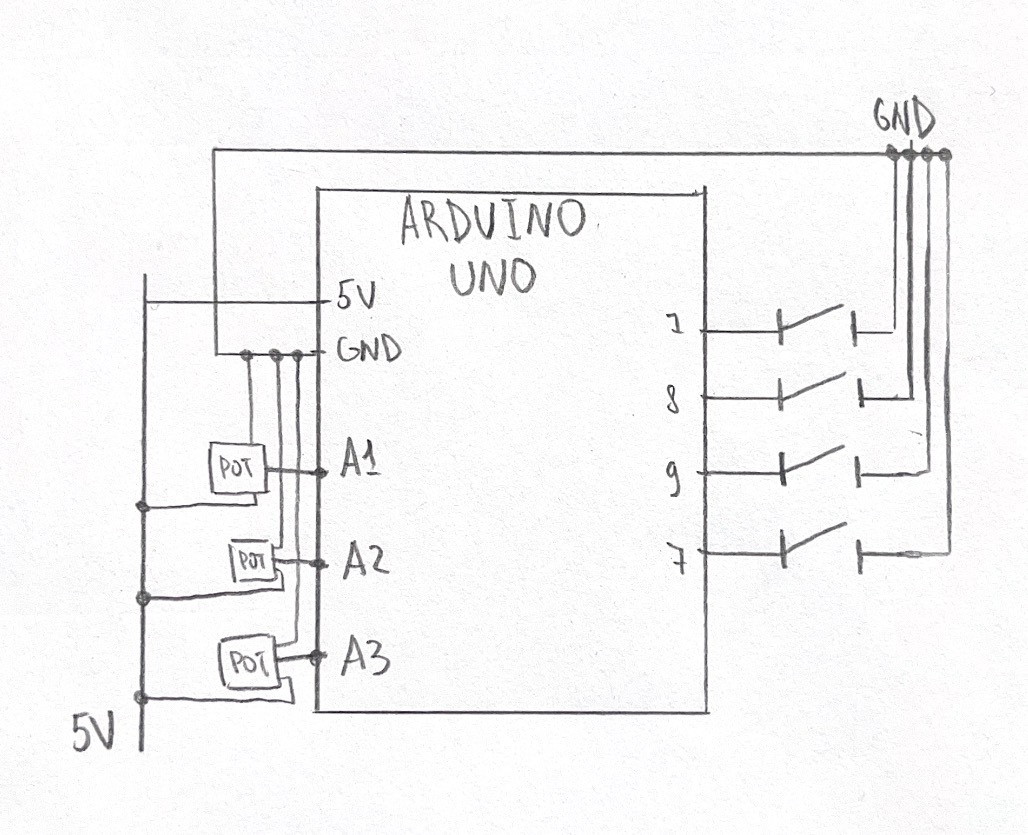
Hardware Setup & Schematic
The setup first was made on breadboard and then mounted on the box. I used hobby-knives to crave out the holes for buttons and knobs, I painted the box, and used POSCO market to write on top.
The Arduino board is hidden under the lid, and is wired to the components in 2 ways:
-
- Big external modular knobs are connected with alligator wires and regular jumper wires with each other; as well as some of the jumper wires (mostly the ground wires) are also connected to one ground jumper wire via both parts of the alligator clip.
- Other than that, the buttons are connected to digital pins via the jumper wire being bent like a hook around the button’s leg, and sticked together with all different types of insulating tape I found in my dad’s instruments. One of the biggest challenges was to maintain good contact of wires and it took me literally HOURS to make it work. Since my cardboard box is quite dense and thick, the button’s legs sticking out were really tiny, so actually connecting them properly with the jumper wires from Arduino kit with thick cap was really hard. The contact was constantly disappearing and it was really annoying and it wasn’t working even with a lot of tape. This is why I switched it with alligator wire where I could, but I ran out of them so I found a stronger tape so it held all the buttons together properly so they were actually working
References
-
- p5.js reference
- p5.sound
- p5.webserial by gohai
- Fullscreen toggle example by Mangtronix
- Serial communication class example by Aaron Sherwood / Mangtronix
- VT323 font
- Layering Sound Theory
- The Coding Train Sound Synthethis Tutorial
- The Coding Train ADSR Envelope Tutorial
- I used Claude for debugging the laggy delay in p5-Arduino communication, and some audio debugging. All final implementation decisions, naming, and creative direction were my own
Parts I’m proud of
The part I’m SO PROUD of is actually the physical setup.
I don’t really like how it look, I believe I could have made it look 10 times better, but with the scarce amount of time and resources it turned out pretty well.
First of all, even though that the overall box is not really neat, I think the way I managed to cover something is actually successful; and the handwritings with my shaky hands are also not the best but it all look together quite well. 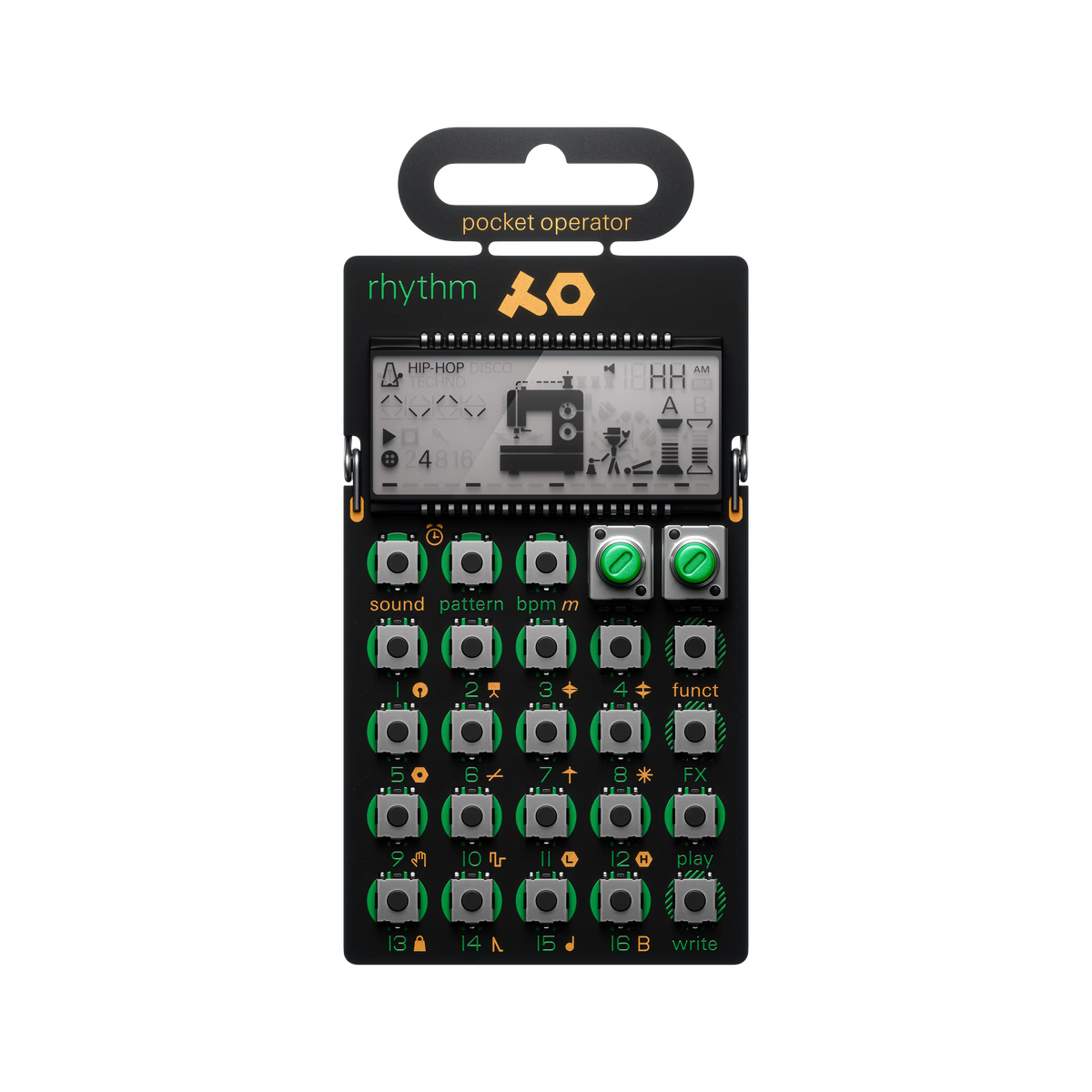 Also, I felt like I managed to maintain the aesthetic I was striving to achieve in the beggining with the design of the panel too. I intentionally left out the buttons on top, and ordered the caps that look very tech-y because it was a great alignment with Teenage Engineering designs, especially their PO series with buttons out.
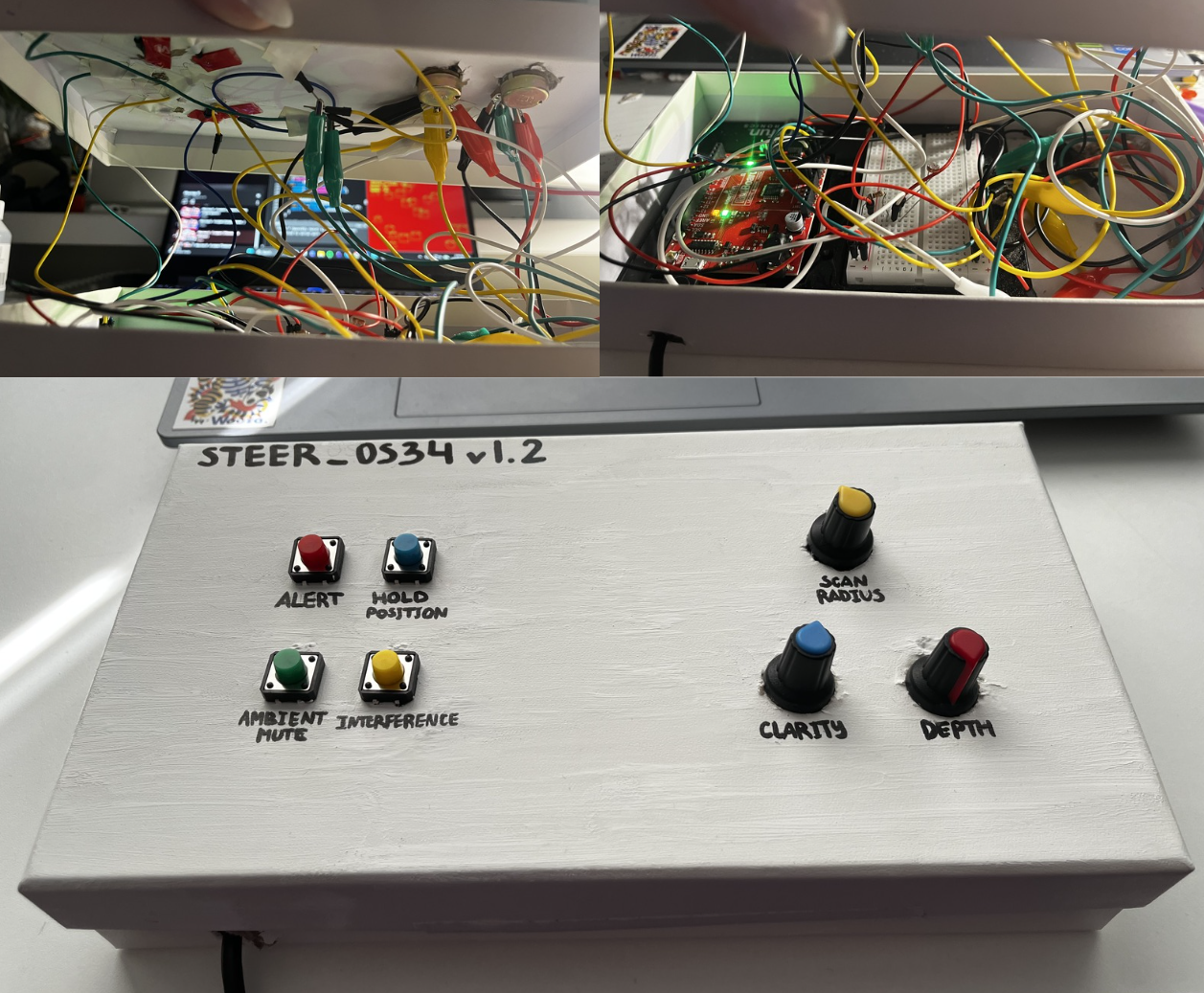
Also, the part I actually think I did very good job is what hidden inside the box. The wiring and making everything have contact with each other, working consistently and not crashing, as well as not being just super-glued to the surface was extremely hard. I spend almost 10 hours on just doing this setup. I had to give up on a lot of features that would elevate the design and idea but the hardware part just didn’t allow it.
I managed to wire it all up somehow, so it doesn’t even look bad, works consistently okay and is responsive at all times, has some management inside, and is not too messy, and is hidden from the user’s eyes! It was the hardest task throughout this semester for me and I’m happy I managed to do this all by myself with literally no help.
This is how the box looks inside and outside, and I think it’s pretty impressive how something so simple and minimalistic has that huge messy wired system inside.
Reflection
I am happy that I managed to experiment with physical sound control, and built such a “synth”. I think it turned out quite good, with coherent style, and the music works really well with the visuals on p5. I feel like the vibe and style I wanted to see was maintained so I’m happy. I’m also proud about the fact that I managed to make the music sound not random but actually in one scale, style, and proper music-like sound with just notes and layering of a few oscillators.
I believe there’s a lot of room for improvement, with visuals mostly. First of all, the physical panel can be much neater and stable, and probably the LEDs as response could be implemented if I had more time. The box can be moved from cardboard box to wooden/plastic one and it would certainly eleveate the project’s overall vibe. Another idea that I’m sad I gave up on is the photoresistor impact of dark/light room, I think it would bring a different edge to the project, especially with that agent/CIA vibe the p5 sketch has.
I also think I could have added more response to the screen. Right now it is not obvious that the note is triggered on the collision of the shapes, so maybe having some feedback like a slight vibration animation or a different color outline would make it more clear.
Great project! Normally we put 5V at the top and GND at the bottom, but your schematic is still correct.