Week 11 – Reading Reflection

A Brief Rant on the Future of Interaction Design

I really liked this text, and I strongly agree with the author. The fact that a lot of people envision our future of interaction and technology as just super-powerful phones and laptops isn’t really encouraging. I believe that even now we have so much technologies and innovative interactive things, that saying that in the future, the superior one, it’s just a phone is really not right.

Even now people use a lot of motion, body, voice driven technology. For instance, scrolling using your head, if I recall it correctly, you bow your head up and down to control the screen. Of course, it’s not the most creative, and obviously not the best way to interact but it is still more interesting than just tapping. Voice input is also really crazy that by commanding we can control devices, even if they’re as simple as smart speakers. This just shows that there’re a lot of ways to interact beside simple “tap here, tap there”.

I also find the author’s point on touching and physical response really interesting. This is true that the senses we have in our hands is something we shouldn’t ignore, since it allows for so many ways to interact and so much new technology and art. However, I find it hard to imagine what exactly “useful” or widespread, as smartphones, we can do using these sensations. Maybe it is the reason the author talks about the future and not the present.

This part about hands made me remember some technologies from Professor Eid’s lab once again. As I wrote in the last week’s reading response, they have a device that also triggers vibrations on the fingertips of the user if they touch the object in the VR.

They also had a really cool technology I think can be expanded a lot and that fit the idea of the author perfectly: there was some kind of a handle, and an app where you can choose a texture, for instance, some kind of hard jelly. So, the handle controls a ball that you see on the screen. As you move the handle, the ball moves also. And the thing is, that this handle was also “mimicing” the texture: when you try to push the ball through the jelly, you have some resistance and even that “bouncy” feeling, and when it finally comes through — lightness and 0 resistance. I find it to be SO COOL, and the fact that it’s made using only one handle is mind-blowing. I think if it’s possible to expand this technology to make this object-control dependent on the hands, and passing these sensations to the hands, it will be exactly what the author of the text was describinng.


*This is a short video I filmed of using this device so you can see how it works

Week 11 – Musical Device

Concept

I really liked the Ultrasonic Distance Sensor, and I really love the idea of using the outer environment and motion capturing. First, I wanted just to make a device controlled by buttons/potentiometer, but then the idea of using something less obvious came to me. I thought that trying to play sound without touching anything can be really interesting. I decided to use Distance Sensor and Photoresistor for this device.

The musical device is pretty simple: the photoresistor has a threshold of 900 (basically the light that it gets if you point the flashlight right at it), and if it receives light that is higher than this value, it will make the device play. Otherwise it will be silenced. The distance sensor converts the distance into frequency: the farther the object is from it, the lower frequency will be played.

Code

The code is pretty simple. It assigns global variables, has some local variables assigned in the loop() (like the distance and the frequency). Frequency that will be output by the buzzer is determined by the distance. I used distance = duration * 0.0343 / 2; to convert the distance to cm depending on the output of the Ultrasonic device, and then freq = map((int)distance, 5, 200, 800, 200); to map the distance to frequency, so that the distance from 5 to 200 is assigned to frequencies from 800 to 200.

There’s a small block in the beggining of my loop() part to turn off and on the buzzer. It’s made like that so it can change the frequency that it will be outputting.

int lightVal = 0;
bool lightOn = false;

int trigPin = 6;
int echoPin = 5;
long duration;
float distance;
int freq;

int soundPin = 8;

void setup() {
  pinMode(trigPin, OUTPUT);
  pinMode(echoPin, INPUT);
  Serial.begin(9600);
}

void loop() {
  Serial.println(lightVal);
  digitalWrite(trigPin, LOW);
  delayMicroseconds(2);

  digitalWrite(trigPin, HIGH);
  digitalWrite(trigPin, LOW);

  duration = pulseIn(echoPin, HIGH);
  // Calculate distance in cm
  distance = duration * 0.0343 / 2;
  freq = map((int)distance, 5, 200, 800, 200);

  lightVal = analogRead(A0);
  lightOn = lightVal > 950;

  if (lightOn) {
    tone(soundPin, freq);
  } else {
    noTone(8);
  }
}

I was mainly referencing tutorials on Arduino website, like this one for the distance sensor and this one for the photoresistor, to figure out how do I mke them work.

Schematic & Preview

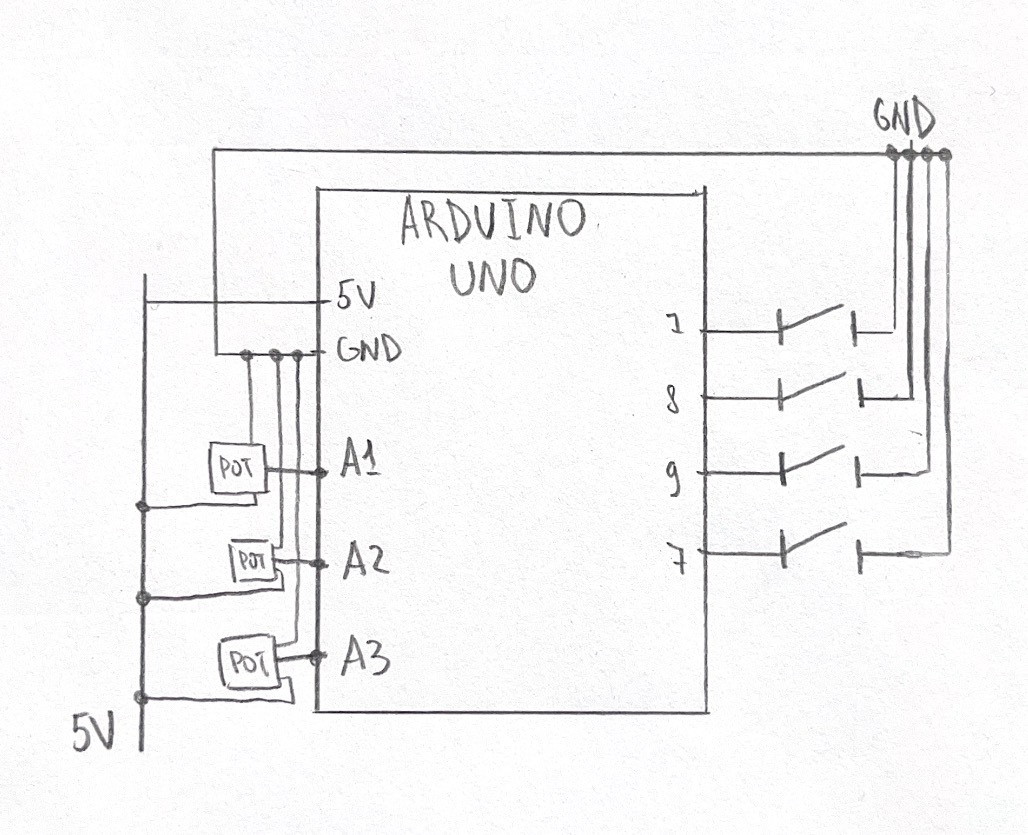
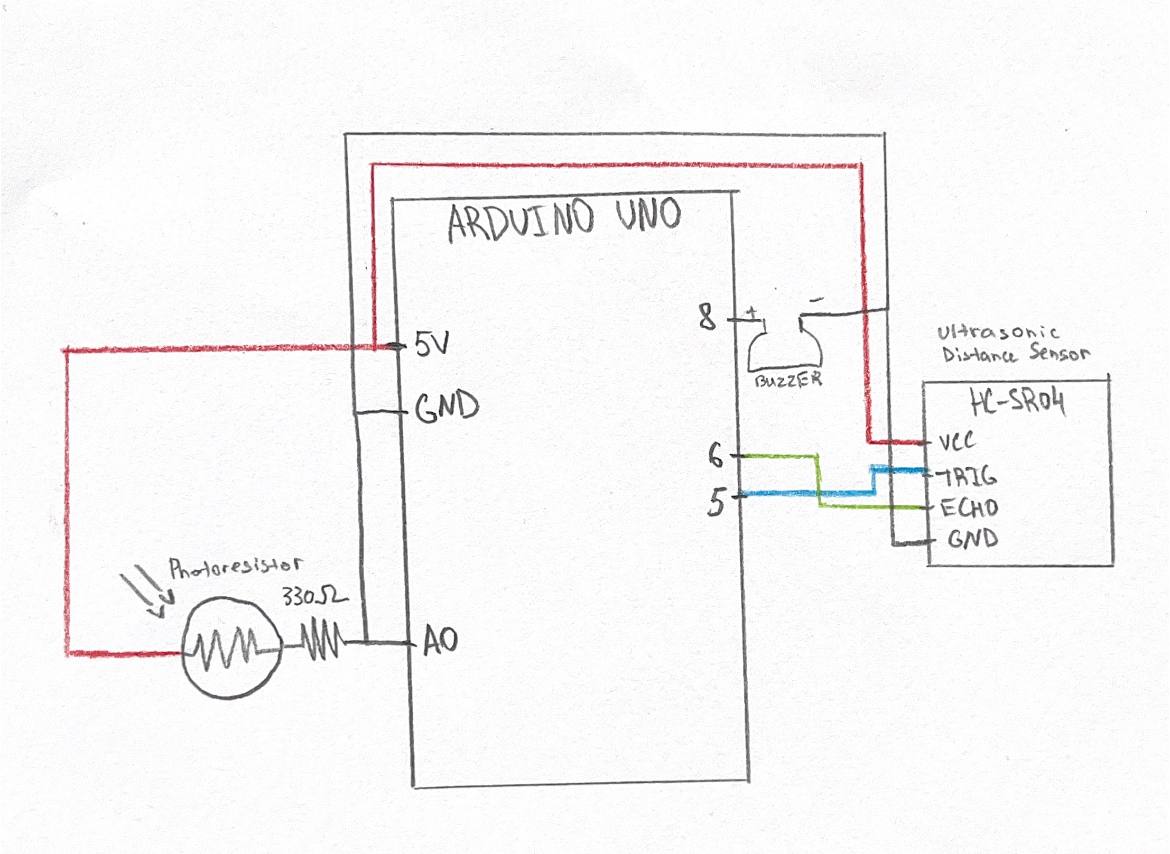
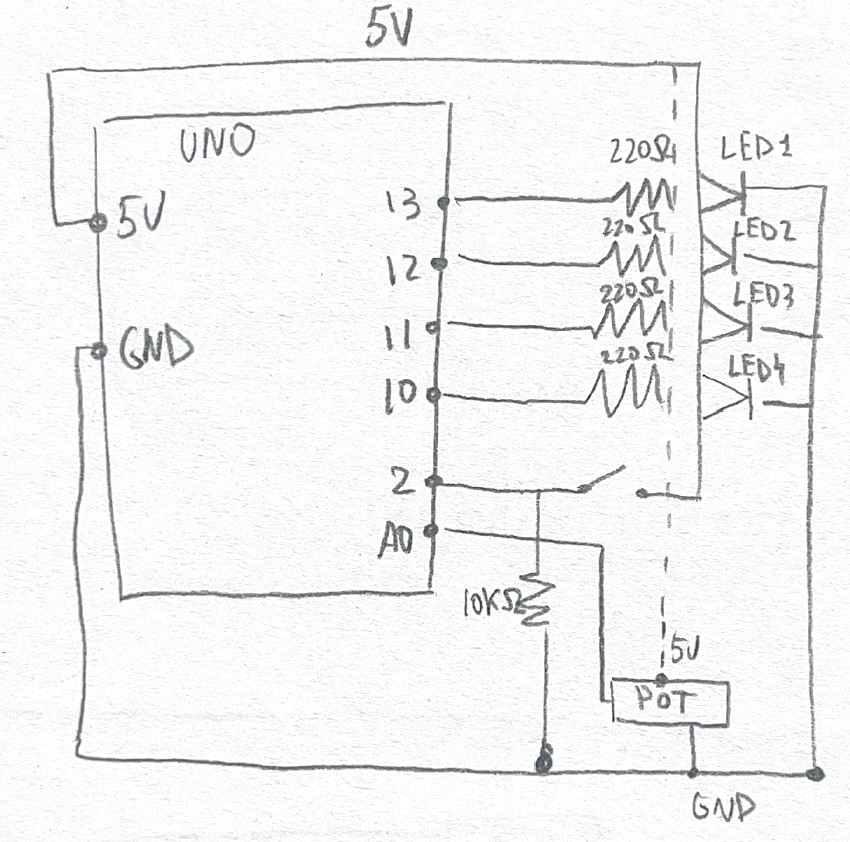
The schematic of the device looks like this (I tried my best to draw it correctly):

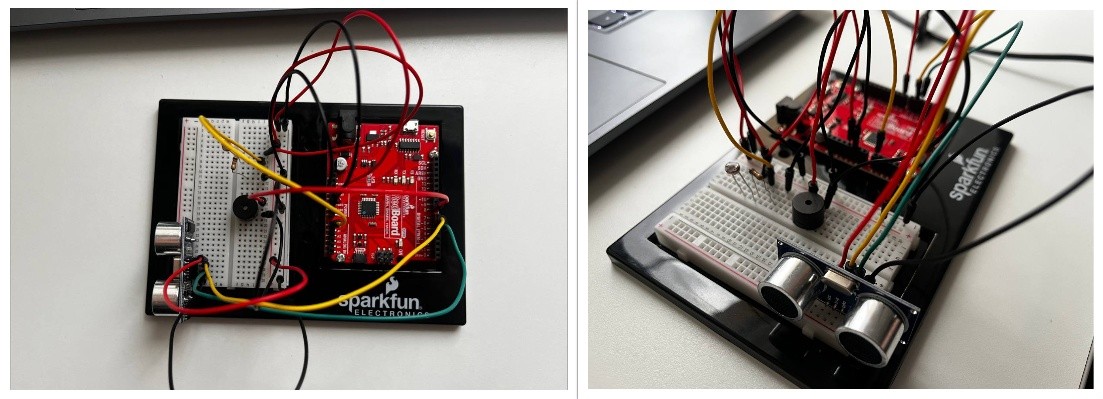
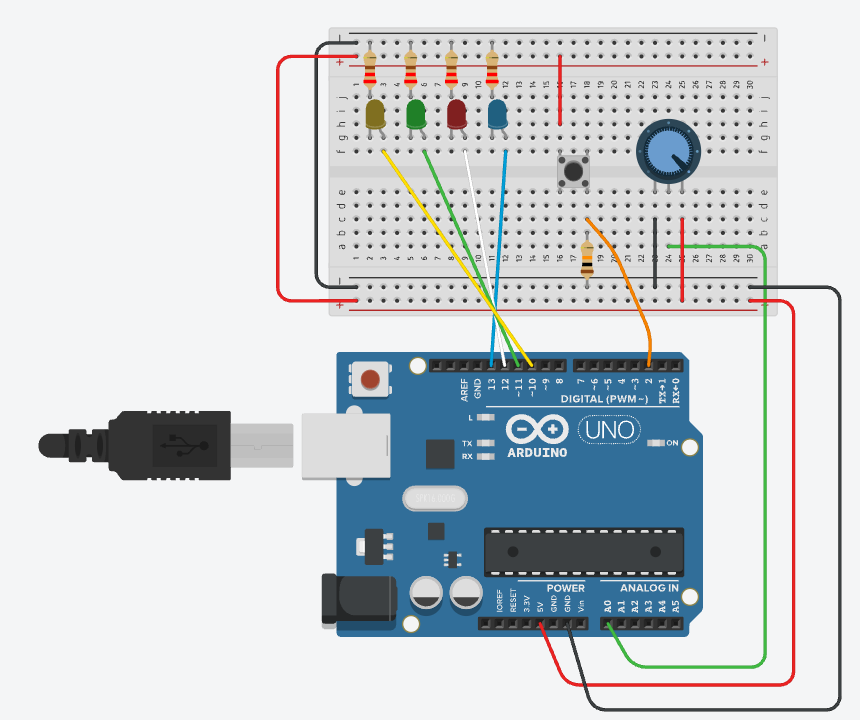
This is how it looks in real life:

And this is how it works:

Reflection

I really like how it turned out. My main goal was to use the components of Arduino we haven’t worked in the class with, so I achieved this objective. I also like the fact that I can actually “play” this instrument without even touching it – I think it’s pretty cool.

For further improvement, I believe I can make the device more “usable” because right now pointing the phone right in the middle of bunch of wires doesn’t seem too good. Also, I think I can work with the short delays the device has because now if I flicker the light, it wouldn’t catch it being turned off.

Week 10 – Reading Reflection

Making Interactive Art: Set the Stage, Then Shut Up and Listen

I strongly agree with the author of this text especially about the fact that the artist should let the audience to experience, interpret, and feel the artwork without any instructed guidance.

Ideally they will understand what you’re expressing through that experience“. I really believe that if the artist wants the audience to really engage with the artwork on a deeper level, they should give them some space. Through the interaction, through emotions and reactions most of them who really make this interaction thoughtful will get the feeling or at least abstract idea behind the artwork, while still having their own interpretation and emotional feeling attached to that. Instructions kill the emotions, and personally I believe that artworks in the first place should make people feel.

What I noted down, it is really important to set up and design the experience in the way that will make people do the interactions that you want them to do. It goes back to our previous readings, and having this concept mentioned again only amplifies its importance.

Physical Computing’s Greatest Hits (and misses)

What’s great about the themes that follow here is that they allow a lot of room for originality

I believe that the “core” concepts that are used in many physical computing works are just like the core concepts and principles of any science or form of traditional art. “Everything is a remix” is basically telling the same thing: core concepts that artists are inspired by becomes the basis to which they add new unique ideas.

As for the works provided in the text, I really like “gloves” concept. I really like the idea of interacting with art and tech with your body, either it’s a projection, or something else, but I find this idea of just using your limbs to produce something without any additional “parties”. I know a lot of projects that are dependent on this technology, or that use kind of similar technique, not only for art but for more practical use. If I recall correctly, in NYUAD at Professor Eid’s Lab around a year ago I saw a project that was basically some training for children with CP transferred from offline to online VR experience. To keep the “senses” in the hands while completing the exercise, they made a technology that sends vibrations to the fingers when you touch something in VR, and depending on the touch, the vibrations frequency and power was adjusted. This is just another example of how the “gloves” concept was used in physical computing, even though it’s not really about art. However, I believe that the same “vibration” or mimicking a certain touch-sense technology can be really wisely applied in immersive and interactive art — letting the user to interact with the object while also letting them “feel” the object even if it’s not real is a really strong and impressive idea one could apply.


Week 10 – Analog and Digital Input

Concept

I wanted to create something we haven’t done yet with potentiometer and multiple LEDs. I thought that it would be cool if I manage to create a circuit that will control multiple LEDs through one input that was mainly used for only one LED. This circuit takes the analog input from potentiometer, and depending on its value chooses which LED to light up, so when you spin it they all light up one by one. If you press a button, all LED light up. This circuit reminded me of DJ-board with these switches and button you can press anytime, so by tinkering with this some nice sequence of lights can be created.

How this was made

To make this circuit, I googled how potentiometer works and what values it can output, and then I reffered to Week 9 tutorials on TinkerCad for references on how to connect buttons and potentiometer, and to remind myself on how this works in code.

// C++ code
//
int sensorValue = 0;
int buttonState = 0;

void setup()
{
  pinMode(A0, INPUT);
  pinMode(2, INPUT);
  pinMode(13, OUTPUT);
  pinMode(12, OUTPUT);
  pinMode(11, OUTPUT);
  pinMode(10, OUTPUT);
}

void loop()
{
  sensorValue = analogRead(A0);
  buttonState = digitalRead(2);


  if (buttonState == HIGH) {
    digitalWrite(12, HIGH);
    digitalWrite(11, HIGH);
    digitalWrite(13, HIGH);
    digitalWrite(10, HIGH);
  } else {
    if (sensorValue >= 0 && sensorValue < 256) {
      digitalWrite(12, LOW);
      digitalWrite(11, LOW);
      digitalWrite(10, LOW);
      digitalWrite(13, HIGH);
    }
    
    else if (sensorValue >= 256 && sensorValue < 512) {
      digitalWrite(13, LOW);
      digitalWrite(11, LOW);
      digitalWrite(10, LOW);
      digitalWrite(12, HIGH);
    }
    else if (sensorValue >= 512 && sensorValue < 768) {
      digitalWrite(12, LOW);
      digitalWrite(13, LOW);
      digitalWrite(10, LOW);
      digitalWrite(11, HIGH);    
    }
    else {
      digitalWrite(12, LOW);
      digitalWrite(11, LOW);
      digitalWrite(13, LOW);
      digitalWrite(10, HIGH);
    }
  }
}

To control 4 LEDs with potentiometer, I wrote a sequence of if-else blocks that light up certain LED depending on the value the potentiometer outputs, and turns off all the other LEDs. These if-else blocks are wrapped into a bigger if-else: if the button is not pressed, these blocks execute, otherwise — all LEDs switch up.

My schematics look the following way:


And here’s the simulation and how it works on physical Arduino:

Reflection

I’m really happy of how it turned out and that I was able to do both online and real version of this small task. It was a bit hard to assenble it all on the Arduino because all the parts are really small, but it works so I’m happy. For further improvement, I wonder if there is a more efficient way with less wires to assemble this project because right now it looks a bit messy.

Week 9 – Reading Reflection

Norman,“Emotion & Design: Attractive things work better”

It is really nice to hear that Don Norman who is making a big emphasis on usability also care a lot about design and aesthetics.
The part that stuck with me most was the teapot example: how he owns three completely different ones depending on his mood and the context. It made me realize that “good design” isn’t this one-size-fits-all thing. Sometimes you need efficiency, sometimes you need beauty, sometimes you need practicality. And the fact that aesthetic appeal actually makes people more tolerant of design flaws is wild to me. It’s not shallow to care about how something looks since it genuinely changes how we interact with it.
I think what Norman’s saying challenges this weird guilt that exists around caring about appearance. Like, designers (or developers, or whoever) sometimes act like prioritizing beauty over pure function is superficial. But he’s providing actual evidence that positive emotion broadens our thinking, makes us more creative, more forgiving. A pleasing interface isn’t just nice to look at, it actually changes your cognitive state, and I believe it is really important to remember when creating designs and art pieces.
The contrast between tools for stressful situations versus relaxed ones was helpful too. I hadn’t thought about it that way before, but it makes sense that your design goals shift based on context. This really shifts the understanding of usability: thinking about how people feel when they’re using something can completely change the interaction in the first place. I believe this is something really usable lesson for us to consider when creating our designs and art pieces.

Her Code Got Humans on the Moon

I really liked this text. Not only because it tells an encouraging story about a woman in a field that is still male-dominated, even decades after the Apollo program, who was a key contributor to something as important as Moon travel, but also because it teaches valuable lessons.

One part that stood out to me was when her daughter accidentally discovered a “bug” in the code. I think error-handling is something that doesn’t get enough attention. If users were perfectly rational and never made mistakes, just like astronauts were assumed to be, then systems wouldn’t need to handle unexpected behavior. But in reality, humans are unpredictable and encountering errors is inevitable.

I think developers don’t always fully account for these cases, which is why serious issues, like the P01 mode problem, can be overlooked sometimes. This shows how important testing is, especially as technical field is growing so much now. Today, developers run huge beta tests for games, and I can’t even imagine how huge testing must be for projects as critical as the Apollo mission that Hamilton worked on.

The fact that such a serious issue was discovered accidentally by a child, and that the assumed “perfection” of astronauts didn’t prevent it, shows that systems should be designed to anticipate anything. There should always be built-in behavior to handle errors, no matter how unlikely they seem.

Midterm “Ladushki”

Sketch

* In order to play the game, go to p5 sketch and give access to the camera!

Concept

I created a game that is controlled by user’s video input. In Russia, we play a clapping game called “Ладушки” (ladushki; in English it’s called Patty Cake), where you need to match the rythm of the other person clapping, as well as their hands (right to right, left to left, two hands to two hands). A cute kind girl in the room welcomes the player to play this game with her, starting the game after a short tutorial.

However, if the player fails to match the girl’s rythm and handpose, she will get more and more upset. With more mistakes, the girl will clap faster, and her anger will distort the environment and sound around her. What happens if you manage to fail so many times that she reaches the boiling point? Play and find out.

Proccess of Development & Parts I’m Proud of
Sprites & Design

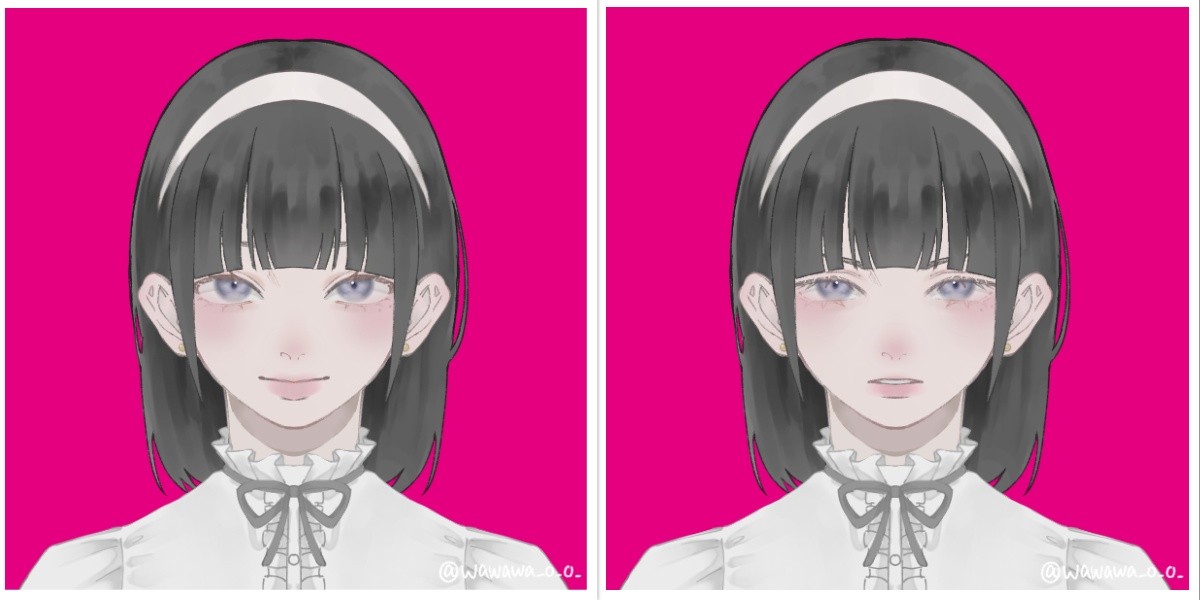
To create the sprites, I first created a character on Picrew, so I can later edit the image of a complete, well-designed in one style character. I chose the design of the girl to be cute-classy to fit the mood of the game.

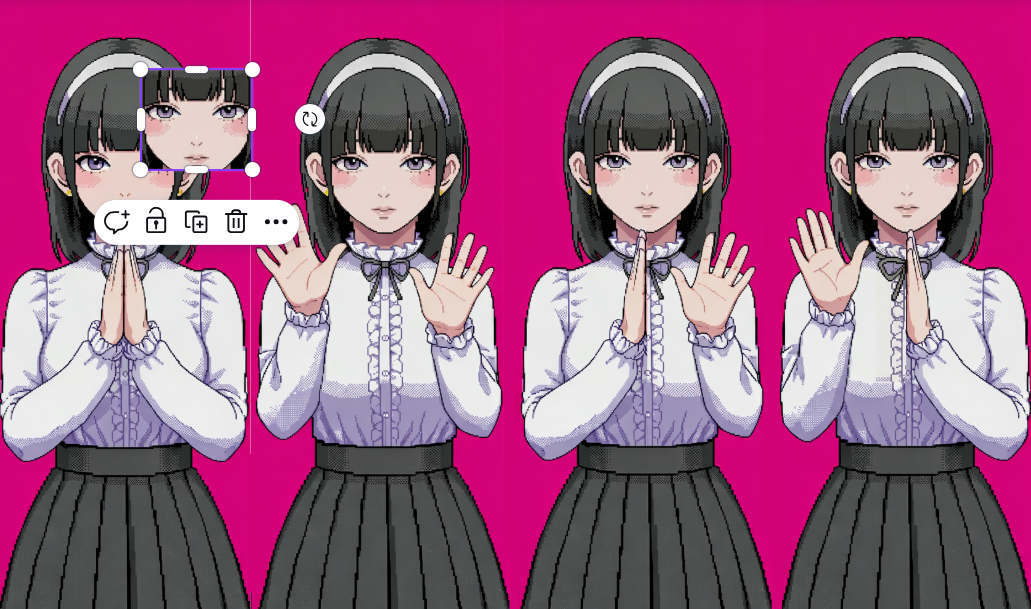
After that, I inserted the photo to Nano Banana to pixelate to 16-bit and extend the image. After that, I edited the image in Canva, so all the faces, hands positions are properly aligned, and the image has all 4 positions with 4 different faces.

Sound

The sounds from the game were generated and/or taken from open-source copyright free resources. The background music was created using Suno AI using the following prompt:

Dreamy chiptune instrumental, midtempo, modular sections built for easy tempo shifts, Playful square leads carry a singable main motif, doubled an octave up on repeats, Soft, bouncy drum kit with rounded kicks and brushed snares; bubbly sub-sine/square bass locks to a simple walking pattern, Light 8-bit arps and gentle pitch bends sparkle at phrase ends while warm, detuned pad layers smear the edges for a cozy, nostalgic arcade glow, Occasional breakdowns thin to arps and pad swells before the full groove pops back in with extra countermelodies for an intensifying, joyful loop, playful, nostalgic, light, warm, soft, gentle, bright

Other sounds, such as clapping sounds, screaming sound were taken from Pixabay.

I had a lot of manipulations with sound for its speeding up/distortion for creepy effect.

update() {    
  //for sounds
  let current_rate = map(this.level, 50, 100, 1.0, 1.3, true);
  soundtrack.rate(current_rate);
  if (this.level >= 70) {
    let intensity = map(this.level, 70, 100, 0, 0.3); 
    distortion.set(intensity); // set the distortion amount
    distortion.drywet(map(this.level, 70, 100, 0, 0.2));
  } else {
  distortion.drywet(0); // keep it clean under level 70
  }

Here, I use few methods from p5.js sound reference page. Background soundtrack is connected to the distortion variable that can be seen in the code. By mapping the rate (speed of the soundtrack) and intensity (the distortion amount), as well as drywet value (for reverbing) and connecting all these values to the background soundtrack, the sound effect and background music slow but noticeable change is created.

ml5

The fundamental part of my project is hands tracking, which was implemented using ml5.js HandPose ML model.

The implementation process was carefully explained in my previous post since it was the first step in the development. I didn’t change this part since then, but I built up on closed palm pose detection: I added the following condition:

//DISTANCE BETWEEN THUMB AND PINKY is also counted for state of the hand
//define what means when hand is open and set status of the user's hand positions
if (hand.keypoints && hand.keypoints.length >= 21) {
  let isHandOpen = (
    hand.keypoints[4].y < hand.keypoints[2].y &&   
    hand.keypoints[8].y < hand.keypoints[5].y &&   
    hand.keypoints[12].y < hand.keypoints[9].y &&  
    hand.keypoints[16].y < hand.keypoints[13].y && 
    hand.keypoints[20].y < hand.keypoints[17].y &&
    abs(hand.keypoints[4].x - hand.keypoints[20].x) > abs(hand.keypoints[5].x - hand.keypoints[17].x));

  if (isHandOpen) {
    if (hand.handedness === "Right" && hand.keypoints[20].x - hand.keypoints[4].x > 0) {
      leftOpen = true;  
    } else if (hand.handedness === "Left" && hand.keypoints[20].x - hand.keypoints[4].x < 0) {
      rightOpen = true; 
    }
  }
}

The condition  abs(hand.keypoints[4].x - hand.keypoints[20].x) > abs(hand.keypoints[5].x - hand.keypoints[17].x));  measures the distance between pinky tip and thumb tip and compares it with the distance between knuckle of index finger and pinky, ensuring that the palm is fully open and not tilted. The condition  hand.keypoints[20].x - hand.keypoints[4].x < 0  checks if the distance between pinky and thumb tip is positive, ensuring that the user shows the inner side of the palm to the camera, not its back side.

Other parts

One part that I’m proud of in this code is the typewriter text effect in pixel dialogue window.

//draw text like a typewriter
function draw_text(t, anger_level) {
  //add shaking for higher anger levels
  let shakeAmount = 0;
  if (anger_level > 40 && anger_level < 100) {
    shakeAmount = map(anger_level, 40, 99, 0, 5, true); 
  }
  // random offset
  let offsetX = random(-shakeAmount, shakeAmount);
  let offsetY = random(-shakeAmount, shakeAmount);

  let currentIndex = floor(text_counter / text_speed);
  if (currentIndex < t.length) {
    text_counter++;
  }
  let displayedText = t.substring(0, currentIndex);

  push();
  translate(offsetX, offsetY);
  
  textFont(myFont);
  textSize(19);
  noStroke();
  
  fill(0);
  textAlign(CENTER, CENTER);
  rect(width/2, height*0.9, width*0.6+15, 40); //lines from side
  rect(width/2, height*0.9, width*0.6, 55); //lines from up/down
  //dialogue window
  fill(237, 240, 240);
  rect(width/2, height*0.9, width*0.6, 40);
  fill(0);
  text(displayedText, width/2, height*0.9);
  pop();
}

Here, if-condition checks on which index in the text we are currently on (default is set to 0 since text_counter = 0), if it’s less that the length of the desirable output string. If it is, it increments a counter. The counter is being divided by text speed (set to 2 frames), and the current index displayed is a rounded to lower number result of this division with the help of floor() function. Substring function converts the initial string to an array of characters using starting index (0) and ending index which is exactly the current index we’re reevaluating every time, and then it outputs the string captured between these indices. This way, a small pause (of 2 frames) between drawing each letter is created, creating an effect of typewriting.

In the final part of the function black rectangles are created under the main gray dialogue window, creating a pixel-style border to it.

Another valuable part of the code here is the shaking. In other parts of the code the shaking technique is almost the same: the offsets by x and y that depends on the anger level are passed to translate() function, changing the coordinates origin. Thanks to that, the whole dialogue window displayed has this new coordinate origin each time the function runs if the condition is satisfied, creating an effect of shaking.


Apart from that, the core of my code is the class “Girl” which controls almost everything connected to the girl charachter, from her speech to comparing handpose states. Also, I have some independent functions, like detect() that recognizes and returns the handpose state of the player and tutorial running that explains the player the rules of the game (by controlling and modifying some class public variables as well).

To control the game state, when it should run the tutorial, when the main part is being played, and when it’s over and needs a restart I use game states. For resseting, player is prompted to press “ENTER” on the final screen to fully restart the game by triggering the resetting function that sets all global variables back to default state and creates a new Girl object with new default attributes:

//reset the whole game upon calling this function
function resetGame() {
  // reset global variables
  game_state = "START";
  state = "CLOSED";
  text_counter = 0;
  screenFlash = 0;
  girlImages = [];
  
  girl = new Girl();
  
  // reset girl's variables
  girl.current_state = 0; 
  girl.level = 0;
  girl.change_state();
  endStage = 0;
  endTimer = 60;

  
  // reset the audio
  soundtrack.stop();
  soundtrack.rate(1.0);
  soundtrack.setVolume(1.0);
  distortion.set(0);
  distortion.drywet(0);
  soundtrack.loop();
}

...

function keyPressed() {
  ...
  if (keyCode === ENTER) {
    if (game_state === "GAME_OVER") {
      resetGame();
    }
  }
...
}

My code is pretty big but I feel like explained parts are the most interesting ones. I believe I have some inefficient parts in my code (such as hardcoded ending speech and its progression) but they all work now without lagging or taking long time to load, so I believe that at least for this projects it is fine to leave them like that.

While writing the code, I used the following resources:

    1. p5.js reference
    2. ml5.js reference
    3. The Coding Train Handpose video
    4. Gemini (Guided Learning Mode) for debugging and searching for functions of p5.js (such as substring function in typewriter, for example)

+just googling some methods and clarifications

Problems

Throughout the development of the project I ran into a lot of problems and small bugs but I will describe one that actually taught me a very useful trick.

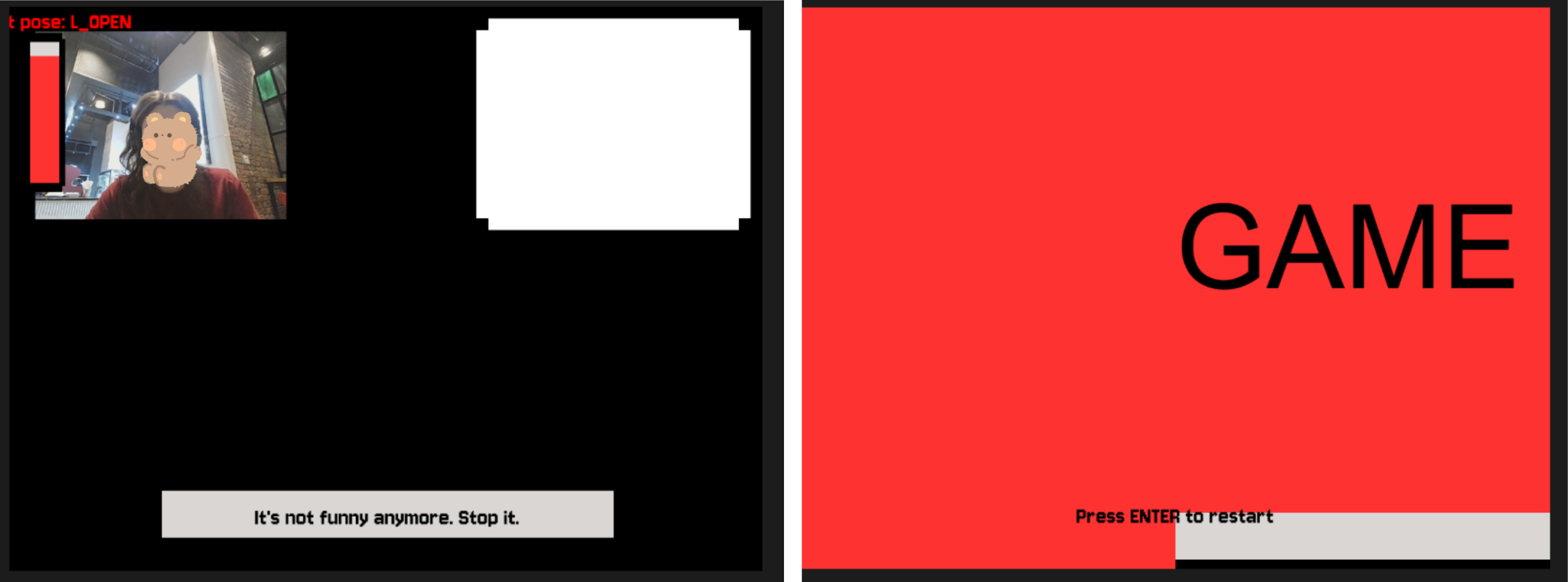
I had a lot of visual parts that required precise positioning of the object, as well as I had different effects applied to them. Offsets of the object that were limiting its shaking, the mode of displaying the object (rectMode, imageMode), aligning, the translating conditions etc. were different for many parts. However, when you assign imageMode in one place globally, and then somewhere else you set another imageMode, and then in the third place you just use it without assigning expecting the default mode — the whole sketch turns to complete chaos. As you can see on the photos, I had video being aligned to another part of the screen, the textMode being set to some weird value, font style dissapearing, and textbox moving out of the screen. I learned how to isolate the styles (with the help of Gemini), as in this example:

function draw_video() {
  push();
  imageMode(CORNER);
  image(bg_img, 0, 0, width, height);
  
  //layer that gets the room darker as the anger level rises
  rectMode(CORNER);
  let mask_level = map(girl.level, 20, 100, 0, 180);
  noStroke();
  fill(0, mask_level);
  rect(0, 0, 640, 480);
  pop();

By surrounding the code block with push() and pop(), the style and code inside the block becomes isolated and doesn’t impact other parts of the code. It was really helpful, so I used it almost everywhere in my project!

Areas for Improvement

There’re some parts of my project that can be significantly improved and parts I don’t really like.

First of all, the final screamer, I feel like it is not scary enough to really make a great impact on the user. The concept was to have that cuteness vs. creepiness contrast. So, in contrast for a small childrens’ game and cutesy design, I wanted to make a really impactful and creepy screamer in the end, additional to other glitch/creepy effects. Turned out that making a scary screamer is actually a very hard job. I tested a few of the screamers versions, asking my friends to test the game so they can tell which one is scarier. I stopped on the current version because it was more unexpected, since it appears mid-sentence and has some stop-frame picture and not zoomed video or something else. Still, I feel like there’re ways to make this part much more surprising and scary that I wasn’t able to come up with.

Another part I could work on more is the design. I can’t draw, so in order to create visual assets I used picrew, editing AI (described earlier). However, I think that sprites created could be more fitting, and maybe I could have added additional sprites for more smooth pose-change, and sprites of a “still” pose. It is a bit hard to do in time-constraits and lack of skill, but I’m sure it’s something I can think about in the future.

Also, I believe I could introduce more unified control system. While playing, the user doesn’t touch the keyboard and only show their hands to the screen, but to progress through the tutorial and ending scene they need to press some buttons. I believe it is not really good to have these two controls systems mixed so maybe one of the improvement can be introducing some additional poses (like peace sign, maybe?) instead of keyboard pressing.

Midterm Progress

Concept & Interaction

What I love more than horror games, is psychological story-based visual novels. Games that hold you in place, extremely focused and afraid to even blink to miss something important (or something that will get you in trouble). Also, I really love when innocent and soft, childlike things are framed in the way that makes you really uncomfortable, creating a really two-sided feeling of nostalgia and comfort with unsettling disturbance.

More than that, for a very long time I wanted to try experiment with computer vision and body capturing, so I decided to combine these two things in my midterm.

What I want to do is a game that is controlled by user’s video input. In Russia, we play a clapping game called “Ладушки” (ladushki; I believe in English it’s called Patty Cake), where you need to match the rythm of the other person clapping, as well as their hands (right to right, left to left, two hands to two hands). I want to make the user to play this game with the computer. There will be a girl in a room that will welcome the player to play this game with her. Her clapping will be consequentive, and player just has to match her hands state with their hands.

The twist is that if the player fails to match the girl’s rythm and hands state, she will get angry. And as the user makes more mistakes, she will get more angry. With the anger level increasing, the whole picture and game will become distorted: video glitching (in later phases: disappearing), rythm becoming unstable and/or much faster, unfair hand detection, intentional mistakes in detecting state of the hands, sound becoming distorted, phrases girl says after mistakes turning to be aggressive, her appearance shifting as well. If the user makes it to the anger level = 100, there will be a jumscare with their video distorted (I figured that out of all jumscares it will make the most impact).

Some details about the concept might be found as comments in my code, and the general outline is planned to be like in the picture below. To create creepy atmosphere, I plan to use really soft colors and cute artstyle that won’t match the gameplay and plot.

Code Outline

Right now I decided to focus on the technical side of the project, making the algorithm work, so after this I will have the core mechanic. After that, I will focus on visual and sound design: drawing sprites, finding suitable sounds, creating glitching effects, scales, text etc.

This is the plan of how I (as of now) think the code should include:

  • class Girl with one object initiated and the following methods:
    • talking method (reaction when user fails to match the girl’s tempo)
    • changing hands states method
    • comparing Girl’s to user’s states method
    • drawing girl method (sprites needed)
    • anger level scale draw method
  • Functions in the general code block:
    • detecting user’s handpose function
    • displaying user’s video
    • video distortion function
    • sound implementation + sound distortion methods
    • final video screamer function
  • Assembled game in setup() and draw() with restart option (maybe pause + exit buttons ?)
Code Made

Sketch requires camera access!

This is my sketch so far and the code I made. As I said, now I’m focusing on the technical part. Now, the code can:

  • detecting user’s handpose function
  • display user’s video in the corner
  • talking method (reaction when user fails to match the girl’s tempo) (Girl Class)
  • changing hands states method (Girl Class)
  • comparing Girl’s to user’s states method (Girl Class)

Instead of drawing, the code now just outputs the anger level and the state of the girl’s hands. The code compares the video input and user’s hands position with girl’s hands state. When user makes mistake, anger level is increased by 10 and there’s text displayed on the screen (3 phrases for each sector: 4 sectors depending on anger level). However, it isn’t staying on it now (to be fixed). Also, the game loop stops once annger level reaches 100.

The base code for hand detection function implementation is copied from ml5 HandPose reference page. I also used this The Coding Train video about Hand Pose.

Complex Part

I believe that the most difficult part of my midterm is working with video input and hand detection. It’s a pretty new concept for me, as well as it’s pretty hard to implement it to use not just as a small interactive component but a core concept around which the game is built. Risk of improper detection of pose, poor video input and glitching is quite high. However, I tried to build this part first and it turned out to not be too difficult. After testing my code for some time, I defined three poses the computer should recognize: two hands open, left hand open, right hand open. Perfectly, to fit my concept and the Ladushki gameplay, I also need to have a pose for clap, but the problem is that when hands are clapped and face their edge to the camera, hand detection disappears. Since it could possisbly break the game and unfairly detect it as user’s mistake when it’s not, I decided to ignore this state fully and check only for claps to the camera, when palm is facing the computer.

Also, to avoid random poses appearing and being detected, I added a confidence level: if the confidence in detection of hands is lower than this set level, the computer won’t register it as a pose. This really helps a lot to not identify some random pose/made up movement as the user’s mistake.

Now, the most challenging part for me would be the visual design. I don’t have much experience in this type of creative work unlike in coding, so creating sprites and building environment that will serve for the goal of the game and suit its atmosphere, as well as arranging everything properly and not overloading, will be a bit hard for me. To check on my progress here and to track the result of the aesthetic impact and suitability, I would ask my friends to give me feedback and interact with AI so it can give me some more theoretical rules about how things should be arranged in final outcome according to some basic design rules.

I believe that this project is really fun and much easier to make than I expected, since the hardest part was mostly completed already!

Some of my inspirations for design, concept and aesthetic are: Needy Streamer Overload and DDLC

Week 5 – Reading Reflection

It’s easy to forget that computers don’t actually see anything. When we look at a video feed, we instantly recognize a person walking across a room. A computer just registers a grid of numbers where pixel values shift over time. Because of this, computer vision is incredibly fragile. Every tracking algorithm relies on strict assumptions about the real world. If the lighting in a room changes, a tracking algorithm might completely break. The computer doesn’t see “general” picture with context, since it only knows the math it was programmed to look for.

Basic Tracking Techniques

To avoid this blindness of the computer, some techniques are used to track/react to things the developers are interested in.

    • Frame differencing: comparing the current video frame to the previous one. If the pixels changed, the software assumes motion happened in that exact spot.

    • Background subtraction: memorizing an image of an empty room. When a person walks in, it subtracts the “empty” image from the live feed to isolate whatever is new.

    • Brightness thresholding: tracking a glowing object in a dark room by telling the software to ignore everything except the brightest pixels.

    • Simple object tracking: This involves looking at the color or pixel arrangement of a specific object and looking for those same values as they move across the screen.

Surveillance in Art

I believe that the fact that people use the technology made for surveillance and military to create art is very interesting. I believe that using technology built for control to create art is truly impressive: flipping the understanding of this technology, or even making it very double-sided. While interactivity that comes with such tracking technology has a huge variety, and sometimes feels magical and extremely emotional, it comes from the computer tracking, analyzing and reacting to every move of the person in front of it. Such art presents the invisible unsettling surveillance we have everyday to a work of art that makes it extremely present.

Honestly, this military baggage explains a lot of computer vision’s blind spots. If you’re designing a system just to monitor crowds or track moving targets, you don’t need it to understand the whole scene and all details. You just need fast analysis of tiny differences, like a shift in pixels.

However, I feel like in interactive media details are very important, and that art runs on them. This way, while computer vision has not yet reached the state when it can analyze everything at once, artists have to come up with algorithms that will try to do it instead.

Week 4 – Reading Reflection

One thing that always confuses me is the variety of modes on some household items. When using an iron, I see that spinning the circle increases the steam production, and for people who have no idea which level is needed for which clothes, they write the names of the materials on the same circle respectively. What drives me mad is that washing machines and dryers are NEVER intuitive. What’s the difference between Cupboard Dry and Cupboard Dry+ if they take the same time and operate at the same temperature? What is the difference between Gentle and Hygiene, and why is the time difference there 3 hours? And to actually figure out the difference, you have to find the name of the machine (which will never match its actual name), look it up in some 2008 PDF file on the very last Google page, and it still won’t answer the question. I always use Mixed washing and Cupboard Dry just because it works, and I have no idea how the other regimes work. And as Norman says, it’s not me being stupid, but the design allowing for these mistakes.

“The same technology that simplifies life by providing more functions in each device also complicates life by making the device harder to learn, harder to use”

I think my example perfectly supports this idea, since the bad design of all these items: with no signifiers, no clear affordances, and no clear conceptual model formed either through life experience or through using the item, just creates more confusion and makes the user always choose one method instead of the huge variety of (probably) useful and functional ones.

I think one way to fix it is to provide some sort of manual, even a tiny table on the edge of the machine would help so much to at least understand which method does what and what the difference between them is. Another way is to display something on the small screen that almost every machine has, like all the characteristics and statistics that are unique to each method, or some short warnings/instructions. Another way to solve this problem is to at least make small illustrations near each method that actually depict what the method does. Genuinely, it would help unleash the potential of these machines and help people use them.

Talking about interactive media, I think the principles Norman talks about are really applicable and foundational.

Sometimes great art pieces with very interesting and complex interactions can be overlooked just because people can’t figure out how to interact with them. I believe that it is very important to design the piece in a very intuitive or guiding way, a way that encourages the user to make the interaction that the author created. As Norman says, humans are really predictable, and in this way, some silent guiding design (not notes, not manuals, but the design itself) should trigger the interaction that is meant to be done in order to experience the art.

Week 4 – Data Visualization

Concept

I am from Moscow, and recently somehow I had a lot of conversations about metro.  Moscow metro has a lot of different lines and more than 300 stations, and I wanted to visualize it in some way.

© Transport.mos.ru, 2025

I found data on all the stations and lines on official dataset by Moscow Government and used it (link doesn’t open without Russia VPN). Sadlly, even this the fullest dataset didn’t have coordinates on stations, so I decided to adjust the concept. Now, my piece displays all the stations with their respective color in the random places on the canvas, and then slowl draws connections between them. This way, it shows how complex the system is and how many connection there are, because at some point it becomes impossible to even differentiate which line is from which points, and I only draw one connection from one dot. I think it perfectly serves to the idea of showing complexity of the metro at my hometown.

Highlight Code

The part I struggled the most in the coding was extracting data: in the row, it was divided by semicolons, not commas, and the language was Russian, of course, and the writing system was cyrillic. I struggled to understand what is written where in the original document and to clear the data so I can properly extract parts that I need.

//clear the data from garbage that prevents from proper extraction of data
function cleanCell(dirtyData) {
  if (!dirtyData) return "";
  let str = String(dirtyData);
  let match = str.match(/value=(.*?)\}/); //The Regex from GEMINI: see if there's repeated character up to the curly braces
  if (match && match[1]) return match[1]; //return actual data from regex
  return str.replace(/^"|"$/g, '').trim(); //replace the quotations from the beggining and the end of the line and clear up additional spaces
}

This was the part I learned from the most. It uses Regex (.*?)\}/ and /^”|”$/g to check the data. Basically these characters represent some pattern the computer is checking. For instance, /^”|”$/g: /^” matches the quotation mark in the beggining of the line, | serves as logical OR, “$/ matches the mark in the end of the line, g allows the program run even after the first match. I didn’t know about this method but I find it really useful in working with data.

Overall, I created a class for stations, so each station object holds the line name and the station name, and has a method for drawing the node as a small circle with color of its line. All stations are added to the dictionary as values for the key that is their line name. Then, by the line name computer accesses all the stations on this line and slowly draws connections one by one in random order using lerp function. Also, the user can access the code and toggle the names of the stations: choose to show them or see the sketch without them at all. Upon click the user can restart the sketch thanks to mouseClicked() function.

Reflection

I think it would be really nice to somehow find data on stations with actual coordinates, so I can display them on canvas as they positioned in real life. After that, I believe it’s possible to experiment with way of connection all them: from real way, to more sharp or abstract style. I believe that this way it will look more like data respresentation and closer to my original idea.

Also I thought about grouping the stations by district and this way sort them by allocation each district a position on the canvas that will be close to its position on the real map.