Reading Reflection Week 11 – Kamila Dautkhan

Honestly, the Victor reading was kind of a trip because he’s basically saying our iPhones are kind of a step backward. It’s wild to think that we have all these nerve endings in our fingers but we’re stuck just swiping on flat glass all day. He calls it “Pictures Under Glass,” and it made me realize how much better it feels to use actual physical tools where you can feel the weight and the edges of things. It definitely makes me want to build something that isn’t just another touchscreen.

Connecting that to the BlinkWithoutDelay thing actually makes a lot of sense now. If you’re trying to build a cool, responsive tool like Victor is talking about, you can’t have your code stuck on a delay() command. It’s like trying to have a conversation with someone who randomly freezes for two seconds every time they blink. Using millis() is basically the only way to make sure the hardware is actually “awake” enough to feel what the user is doing in real-time.

One thing I’m still stuck on is how to actually build the 3D stuff he’s talking about. Like, it’s easy to code a button, but how do you code something that feels like “opening a jar” or sensing weight? I also definitely need to practice the if (currentMillis - previousMillis >= interval) logic more because it’s way less intuitive than just typing delay(1000). It feels like a lot of extra math just to keep the light blinking while doing other stuff.

Week 10 – Reading Response

Reading these back-to-back was honestly a bit of a reality check. I went into the “Greatest Hits” list thinking I might find some cool, niche ideas to borrow, but instead I realized that almost every “original” thought I’ve had as a beginner like: digital mirrors, the MIDI gloves is already something established. It’s a bit humbling but I really liked the author’s idea that it’s not about being the first person to use a sensor, it’s about what you actually do with it after the “wow” effect of the tech wears off.

It made me rethink my own process. Because just because I can make someone wave their hand to trigger a sound doesn’t mean it’s meaningful. If the physical action doesn’t match the emotion of the piece it just feels like a tech demo than art.

In the second reading, I loved the actor/director analogy. You don’t tell an actor exactly how to feel, you give them the props, the lighting, and the space, and let them find the emotion themselves. Our job in physical computing is basically to be the stage manager. Also, what thing that really stood out to me was that I usually see someone using the data wrong as a failure on my part, but now I’m trying to see it as a conversation. If they’re confused, that’s not really a bug, it’s actually a reflection of the design which is extremely helpful.

Week 10 – Production Assignment

Concept

This project demonstrates how an arduino system uses both analog and digital inputs to control outputs in different ways. A digital sensor like a button provides simple on or off input to control an LED, while an analog sensor like a potentiometer provides a range of values that are mapped to adjust another LED’s brightness using PWM. So in simple words, the project shows how real world data can be read, processed and translated into responsive visual feedback.

Sketch

Code

const int ANALOG_SENSOR_PIN = A0;  // Potentiometer or photoresistor
const int DIGITAL_SENSOR_PIN = 2;  // Button/switch
const int DIGITAL_LED_PIN = 13;    // LED controlled digitally
const int ANALOG_LED_PIN = 9;      // LED controlled with PWM 

int analogValue = 0;
int digitalValue = 0;
int ledBrightness = 0;

void setup() {
  pinMode(DIGITAL_SENSOR_PIN, INPUT_PULLUP); 
  pinMode(DIGITAL_LED_PIN, OUTPUT);
  pinMode(ANALOG_LED_PIN, OUTPUT);
  
  Serial.begin(9600);
}

void loop() {
  analogValue = analogRead(ANALOG_SENSOR_PIN);
  
  digitalValue = digitalRead(DIGITAL_SENSOR_PIN);
  
  if (digitalValue == LOW) {  
    digitalWrite(DIGITAL_LED_PIN, HIGH);
  } else {
    digitalWrite(DIGITAL_LED_PIN, LOW);
  }

  ledBrightness = map(analogValue, 0, 1023, 0, 255);
  analogWrite(ANALOG_LED_PIN, ledBrightness);
  
  // Debug output
  Serial.print("Analog: ");
  Serial.print(analogValue);
  Serial.print(" | Digital: ");
  Serial.print(digitalValue);
  Serial.print(" | Brightness: ");
  Serial.println(ledBrightness);
  
  delay(10); // Small delay for stability
}

How it was made 

I built this project using an arduino, a button, a potentiometer, and two LEDs on a breadboard. The potentiometer was connected as an analog sensor to control the brightness of one LED, while the button was used as a digital sensor to turn the second LED on and off. I wrote the code to read both inputs, then used analog(Write) to adjust the LED brightness and digital(Write) to control the on/off LED. I also used the serial monitor to display the values for testing and debugging.

Reflection

Honestly, doing this project was very fun. Through this project, I learned how to use both analog and digital inputs with an arduino. I understood that analog inputs give a range of values which can be used to control things like brightness, while digital inputs only have two states. If I did this project again, I would try to make it more creative by adding more sensors or different types of outputs.

Week 9 Reading Response – Kamila Dautkhan

Response 1: Attractive Things Work Better by Don Norman

What stood out to me the most was Norman’s “heretical” claim that attractive things actually work better. I always thought of usability and beauty as two totally separate things like a tool is either pretty or it’s functional. But the way he explains how positive affect (basically just feeling good) makes us more creative and tolerant of minor glitches really clicked for me. It’s funny how he used to be a “usability bigot” who didn’t even see the point of color screens but now he’s out here admitting he owns teapots just because they’re sculptural art. It made me realize that when I’m happy using a well-designed app or object, I really do find it easier to navigate, even if it has a few flaws.

Response 2: Her Code Got Humans On The Moon by Robert McMillan

The most interesting thing about Margaret Hamilton’s story is how she was essentially one of the guys in a field that didn’t even have a name yet. It’s wild that when the Apollo mission started, software wasn’t even in the budget or the schedule. I loved the detail about her bringing her daughter Lauren to the lab and how a mistake the four year old made while playing actually helped save the Apollo 8 astronauts later on. It shows how Hamilton’s intuition for human error was way ahead of its time, especially since NASA’s higher-ups insisted astronauts were trained to be perfect and wouldn’t make mistakes. She didn’t just write code, she basically invented the rigor of software engineering because she knew that in space, there is zero room for any flops.

Midterm “Nebula Chase” Game – Kamila Dautkhan

Sketch

The Concept

I wanted to make something that felt exciting and had that arcade game tension where you’re always on edge. The idea came from thinking about those old falling-object games, but I wanted to add my own twist, for example, what if the game itself reacted to how much time you have left? What if it got harder as you played? And what if the music changed when things got intense? So Nebula Chase became this space game where you’re flying through a nebula collecting stars while dodging bombs. Simple concept, but I put a lot of work into making it feel engaging.

The Game in Action

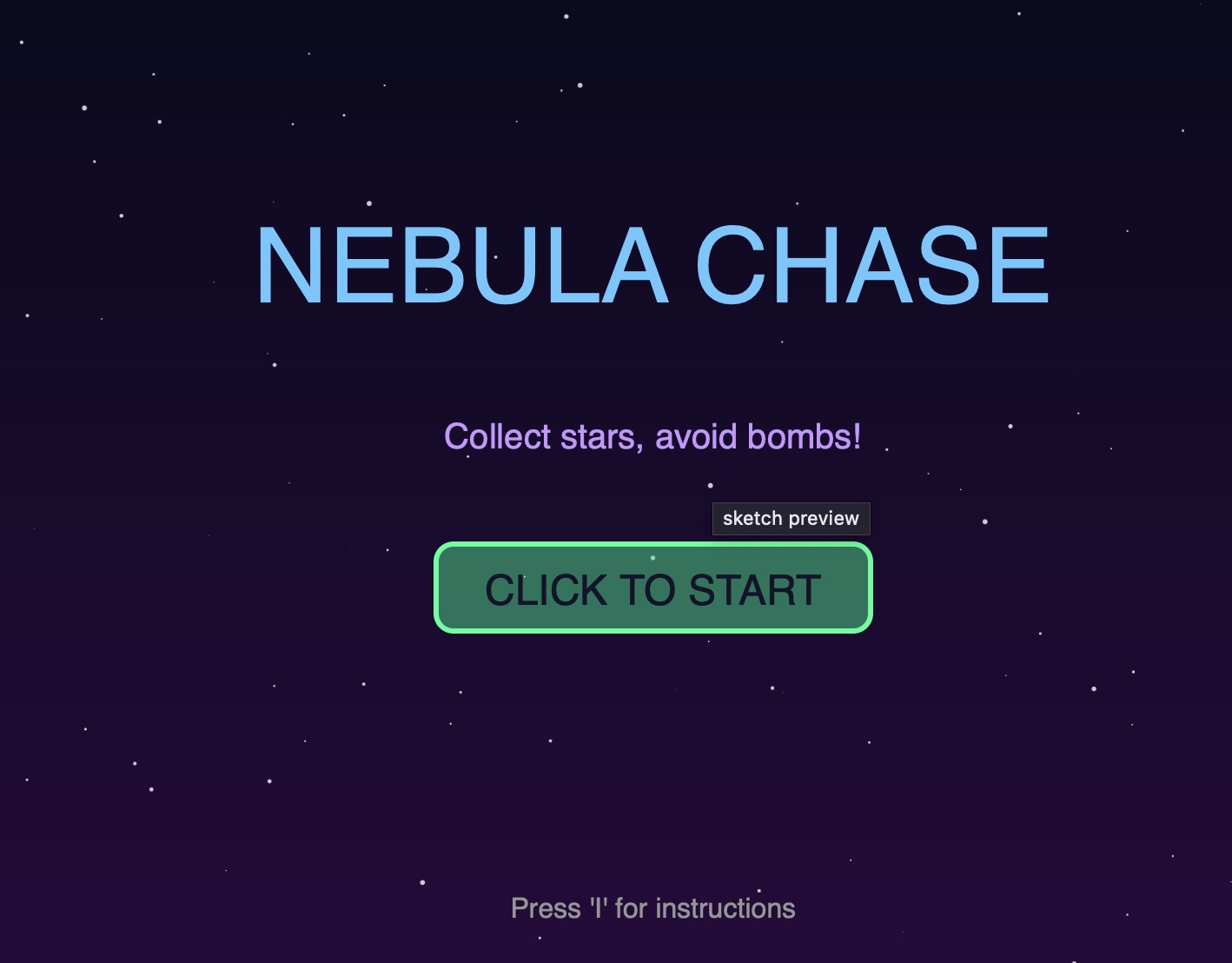
Start Screen: 

When you first load the game, you see the title with this “CLICK TO START” button. I made the title bounce a little using a sine wave. And in order to make it easier for the user to understand the instructions of the game, they can press ‘I’ to see them. 

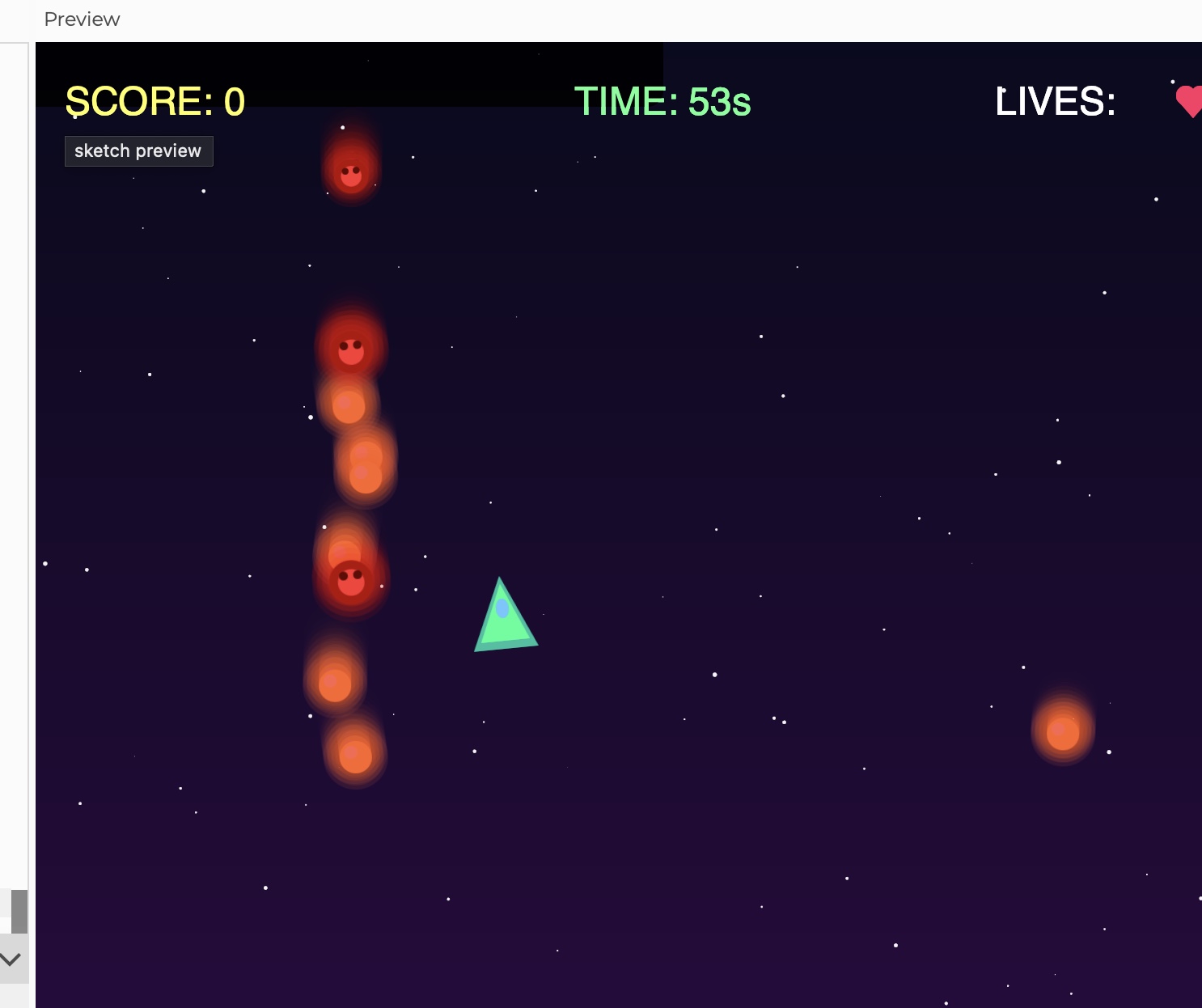
Gameplay:

Once you’re playing, the screen gets busy very fast. Yellow stars fall down, those are the good ones, and red bombs come at you too. Your ship follows your mouse, and you will have only 60 seconds to grab as many stars as possible without hitting bombs. The UI at the top shows your score, timer, and lives. I made the timer turn red and the whole screen flash when you’re under 10 seconds. 

Object-Oriented Design

I used three classes to organize everything:

  1. Star Class 
  2. class Star {
      constructor() {
        this.x = random(width);
        this.y = random(-600, -50);
        this.speed = random(2, 4) * difficulty;
        this.wobble = random(TWO_PI);
      }
      
      move() {
        this.y += this.speed;
        this.wobble += 0.05;
        if (this.y > height + 50) {
          this.y = -50;
          this.x = random(width);
        }
      }
      
      display() {
        push();
        translate(this.x + sin(this.wobble) * 10, this.y);
        tint(255, tintAmount, tintAmount);
        image(starImg, -20, -20);
        pop();
      }
    }
    

    Each star wobbles side to side as it falls which makes them really hard to catch. The speed multiplies by the difficulty variable, so as the game goes on, everything gets faster and it makes everything harder for the user. 

    1. Bomb Class – The obstacles
    class Bomb {
      constructor() {
        this.x = random(width);
        this.y = random(-600, -50);
        this.speed = random(3, 5) * difficulty;
        this.rotation = 0;
        this.pulsePhase = random(TWO_PI);
      }
      
      move() {
        this.y += this.speed;
        this.rotation += 0.05;
        this.pulsePhase += 0.1;
        if (this.y > height + 50) {
          this.y = -50;
          this.x = random(width);
        }
      }
      
      display() {
        push();
        translate(this.x, this.y);
        rotate(this.rotation);
        let pulseSize = 1 + sin(this.pulsePhase) * 0.15;
        scale(pulseSize);
        image(bombImg, -22, -22);
        pop();
      }
    }

    I made the bombs rotate and pulse to make them feel dangerous. They also move slightly faster than stars on average, which created the pressure for the player. 

  3. Particle Class
class Particle {
  constructor(x, y, col) {
    this.x = x;
    this.y = y;
    this.vx = random(-3, 3);
    this.vy = random(-3, 3);
    this.life = 255;
    this.col = col;
  }
  
  update() {
    this.x += this.vx;
    this.y += this.vy;
    this.vy += 0.1;  // Gravity
    this.life -= 5;
  }
  
  display() {
    fill(red(this.col), green(this.col), blue(this.col), this.life);
    ellipse(this.x, this.y, this.size);
  }
}

Whenever you collect a star or hit a bomb, it creates approx 15 particles that spray out in random directions. They fade out over time and fall slightly from gravity. I made this just to make the interactions feel way more satisfying. 

The Spaceship:

I didn’t want to use basic shapes for everything, so I made custom graphics using p5’s createGraphics():

playerImg = createGraphics(60, 60);
// Outer glow
playerImg.fill(0, 255, 200, 100);
playerImg.triangle(30, 5, 10, 50, 50, 50);
// Main body
playerImg.fill(0, 255, 150);
playerImg.triangle(30, 10, 15, 45, 45, 45);
// Cockpit detail
playerImg.fill(100, 200, 255);
playerImg.ellipse(30, 25, 8, 12);

Since to come up with this code was very challenging for me, I used these resources to help me navigate:

https://www.deconbatch.com/2022/01/blendmode-add.html

https://www.youtube.com/watch?v=pNDc8KXWp9E

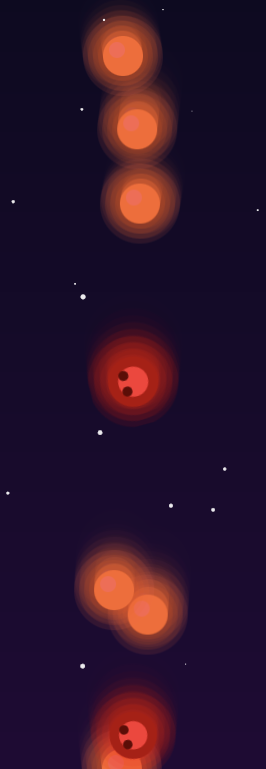
As you can see the stars and bombs have this glowing effects  because I drew multiple overlapping circles with decreasing opacity to create that glow. The stars are yellow or white and the bombs are red with a darker center that kind of looks like a skull.

The code I’m proud of:

It is definitely the sound system since I didn’t want to just upload the mp3 because I didn’t find the suitable one. So, I decided to generate it myself , that’s the reason why I spent a lot of time on it.

function updateBackgroundMusic() {
  if (timer > 10) {
    // Calm ambient music
    bgMusic.amp(0.15, 0.5);
    bgMusic.freq(220 + sin(frameCount * 0.02) * 20);
    bassLine.amp(0.1, 0.5);
    urgentMusic.amp(0, 0.5);
  } else {
    // DRAMATIC URGENT MUSIC FOR FINAL 10 SECONDS
    bgMusic.amp(0.05, 0.3);
    urgentMusic.amp(0.25, 0.3);
    urgentMusic.freq(110 + sin(frameCount * 0.1) * 30);
    bassLine.amp(0.2, 0.3);
  }
}

For most of the game you hear this calm wave that wavers slightly (that’s the sin(frameCount * 0.02) * 20 part, it creates a slow sound in pitch). There’s also a quiet bass line. But when you hit 10 seconds left the music completely changes.  The bass gets louder and the calm music fades. I just wanted to make feel the pressure for the user.

Reflection

I’m really happy with how this game turned out. The music transition at 10 seconds is probably my favorite part because it genuinely makes the game feel more intense and interesting. The particle effects were also surprisingly easy to implement but it added so much to the feel of the game. The biggest thing I learned was about game balance. It’s one thing to make mechanics work, but making them feel good for the user is way harder. I probably spent as much time tweaking numbers like how fast things fall and etc. as I did writing the actual code.


Week 5 – Reading Response – Kamila Dautkhan

I think some of the ways that computer vision differs from human vision is that while we see “meaning”, computer sees only the math behind it. Because human vision is very semantic, for example when we look at a video we instantly see a person, a mood or a story. But for a computer that same video is just a massive dump of pixel data and color coordinates. Because the computer has zero clue if it’s looking at a human or something else until we write an algorithm to prove it. To help the computer see what we’re interested in we can use cheats like  background subtraction, where the computer compares a live shot to a blank photo of the room to spot what’s new or frame differencing to track motion by subtracting one frame from the next.

The fact that computer vision is rooted in military surveillance really colors how it’s used in interactive art. I think because computer vision was born in military and law enforcement labs, they are designed to track and monitor. That’s why they bring a sense of control to interactive arts. For example, in works like Myron Krueger’s Videoplace the tracking is used for play. It turns your body into a paintbrush, giving you a role in the digital world. Also, projects like Suicide Box show that surveillance can be used to track the tragic social phenomena that the government might ignore.


Week 5 – Midterm Intro – Kamila Dautkhan

The Concept 

I’ve decided to create an interactive game called “Star Catcher.” The core idea is a fast paced arcade game where the player controls a collector at the bottom of the screen to catch falling stars. Since I wanted the interaction with the game to feel smooth, I have decided it to be mouse driven. The user starts at a menu screen and has to click to enter the game. My goal is to at the end add more layers but for now, I’m focused on the core loop: fall, catch, score, repeat.

Designing the Architecture

I’ve already started laying the foundation of the code using object oriented programming. 

  • The player class which handles the paddle at the bottom.
  • The star class which manages the falling behavior, the random speeds, and resetting once a star is caught or hits the ground.
  • State management where I implemented a gameState variable to handle the transition from the Start Screen to the Active Game and finally to the Game Over screen.

The “Frightening” Part 

The most scary part for me was asset management and collision logic. I was really worried about the game crashing because of broken image links or the sound not playing.

In order to minimize the risk I wrote a “fail safe” version of the code. Instead of relying on external .png or .mp3 files that might not load, I used: createGraphics() to generate my own star “images” directly in the sketch and p5.Oscillator to implement a synthesized beep instead of an audio file. This helped me to test the collision detection algorithm (using the dist() function) and get immediate audio feedback without worrying about any file paths.


Week 4 – Reading Response – Kamila Dautkhan

1. Something that drives me crazy (not mentioned in the reading) and how it could be improved

One of the problems that drive me crazy is the touch screen controls in cars because many new cars have replaced physical buttons and knobs with a large screen for everything (like changing the AC or the radio). This is frustrating because you have to take your eyes off the road to look at the screen. You can’t feel where the button is like you could with a real knob.

I think the solution for this problem can be bringing back physical knobs for the most important things like volume and temperature. This uses what Norman calls “tactile feedback” so that you can feel the click of the knob and know exactly what you’re doing without looking away from the road.

  1. How can you apply some of the author’s principles of design to interactive media? 

On a website buttons should look like buttons (maybe with a shadow or a bright color). This provides the user a visual cue. When you click “Submit” on a form, the button should change color or a loading circle should appear. This lets you know the website actually giving you an instant response and is actually working. Also, I found natural layout principle very useful because now I know that controls  should be placed in a logical way. For example, I should put important buttons on the right side of the screen because that’s the direction we read and move forward. Moreover, Conceptual I would use icons that people already understand. A trash can icon for deleting files or a house icon for the home page helps users understand how the app works instantly because it is already familiar to them.


Week 4 Project – Kamila Dautkhan

My  concept:

I’ve been messing around with this p5.js sketch that’s basically a visualization of data moving through a network. I call it a packet stream. You’ve got these static “nodes” acting like servers, and then these little “packets” that just zip around the screen. It’s supposed to look like some kind of live monitor for a server. I also made it interactive so you can basically click anywhere to put a new packet into the mix, and if you hover your mouse near one it literally creates a yellow line like you’re intercepting it.

A highlight of some code that you’re particularly proud of:

I am really proud of this code because it isn’t just a simple hover effect, it actually uses a distance check to create a connection.

let d = dist(mouseX, mouseY, dataPackets[i].pos.x, dataPackets[i].pos.y);
if (d < 50) {
dataPackets[i].highlight();
}


How this was made:

I wanted the packets to move around naturally, but the math for the speed and direction was very hard to understand for me. I also couldn’t figure out how to stop them from disappearing into the edges of the screen before bouncing back. So I used AI to help me build the Packet class, specifically to get the physics right so they bounce off the walls smooth.

edges() {
if (this.pos.x > width – this.size/2 || this.pos.x < this.size/2) {
this.vel.x *= -1;
}
if (this.pos.y > height – this.size/2 || this.pos.y < this.size/2) {
this.vel.y *= -1;
}
}

Reflection and ideas for future work or improvements:

I am really proud of this work, however, to make it even more interactive I would make the packets actually travel between Node_1 and Node_2 instead of just floating aimlessly.

Week 3 – Reading Response – Kamila Dautkhan

After reading this, I realized how important immediate and meaningful feedback is. Because a strong interactive system is not just one to a user’s input but one that feels like there’s an actual back and forth interaction between the user and the system. When the user takes an action the system has to respond right away so that it makes it clear what caused that response. I think that really gives a user a sense of control instead of confusion that might sometimes appear. Another concept that’s really important is agency because strong interactivity happens when users think that their choices actually matter. For example, if the system always reacts in the same repetitive way no matter what user inputs, it can feel very boring. Interactions become more engaging when different inputs lead to different outcomes and users can get the freedom to explore them and experiment. 

Now when I look at my own p5 works, I realize that the level could definitely be improved. As for now a lot of the interaction are basically rely on simple key presses. In my future work I’d like to use things like mouse movement, speed or direction to make visuals more dynamic and engaging. That’d definitely make my works feel more responsive to the user’s actions.  I’m also interested in trying state-based interactions, where the sketch remembers what the user did before and changes gradually instead of instantly resetting. Another thing I want to try is adding constraints or small goals, so the user feels like they’re interacting with a system rather than just watching an effect on the screen. Overall, my goal is for future p5 sketches to feel less like technical demonstrations and more like interactive experiences where the user’s actions shape the output.