Final Progress

While the Infrared senors are on their way, I worked a bit on the P5 part of the project.

Sketch

I created a simple welcome screen and and ambience controller with 9 options. Each options is basically a image which acts as a button as well. Clicking on any will cause the following on P5 and Arduino

  • A visual on the screen in correspondence to the chosen ambience
  • An Audio played on computer speakers
  • RGB tape lights around adjusting according the chosen ambience in terms of there color and blink rates

There is a back button on top left of each ambience to exit from it.

I tried to follow OOP. I made two classes one for the button and one for the main app and but them in the separate files. Button handles representing the images and buttons while app handles the transition between the pages and rendering of animation for each ambience. Then they both are combined in sketch.js.

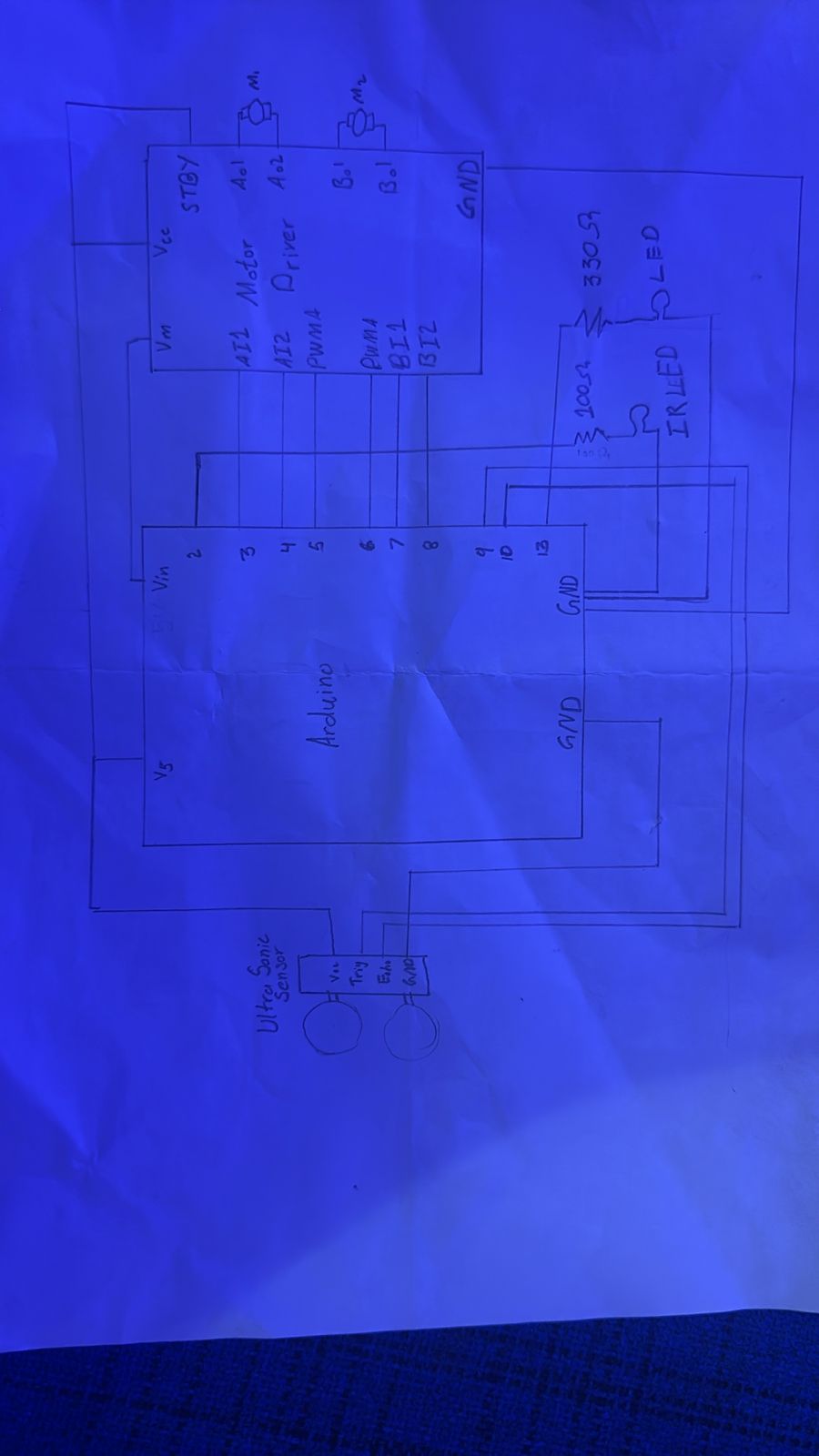
The communication from P5 to Arduino will be about the light control and the display on the LCD. While the the communication from Arduino to back would be in from of distance sensor readings. I am planning on using it as way to communicate by gestures. The idea is the sensor will be at a fixed place so the reading will be constant. If a hand is placed in front of it for two seconds, everything will pause, and if a hand in waved in front of the P5 will trigger a different ambience. Also something I can add is the heat sensor and have the light take some input form it but I don’t think that I can generate enough of temp difference in the room to see it’s effects.

Here is the part of P5 code I am most proud of

chill() {
    background(0);

    let pulse = 150 + sin(this.t) * 60;

    noStroke();
    fill(180, 220, 255, 80);
    ellipse(width / 2, height / 2, pulse);

    for (let i = 0; i < 8; i++) {
      let x = width / 2 + sin(this.t + i) * (100 + i * 10);
      let y = height / 2 + cos(this.t + i) * (80 + i * 8);

      fill(255, 255, 255, 80);
      circle(x, y, 6);
    }
  }

I use of sign function have a motion that is not exactly repetitive was the most hard but fun part. I had the idea of using sin but how it to make it work was proved to be very tricky

I used AI for coming up with Animations for the ambience on screen. I will refine it later to match the lights, but only when I am working with lights. Other than that I used AI to tidy up the code.

Final Project Draft

For the final project, I want to make room ambience controller. I have a rgb light ribbon which runs around my study table. it lights are controlled by a a remote. There are different colors, blinking modes and brightness controls. I will communicate to that using a infrared LED. Firstly Ill map those controls to P5. Then I will define different setting for different ambiences. The user will be able to choose from them. I will also add music to it, I am still thinking of where to get the sound output from. Next I will have songs mode which will make the lights’ blinking corresponding to the song’s tempo, amplitude etc. This is core concept of my project

I want to add a gesture to pause everything. I plan to use the distance sensor for it. I also want to incorporate the LCD but I am not sure if that will go with it because the whole experience is light dependent.

Week10

This reading reminded me of when I was getting my first glasses. I was well aware that even thou I need glasses to see things clearly. They are gonna be much more than that. They will become an integral part of my outlook. Which directly aligns with the authors idea of eyewear being a from of expression and how they overlap in terms of fashion and disability. Glasses in specific have a far greater effect of ones well being. but then thinking about it in a way that such a self expression can become mandatory. It is a scary idea. because then it is something that cages the freedom of self expression. The second aspect of the reading was hiding disability. It is indeed a psychological take that hiding something extra to give a sense that its not there. It reminds me of a saying that “The more you try to fill a shoe that is not yours , the emptier the look” What is intended to be a assistance can backfire in worse way. A solution can create a problem that is far more problematic then the original problem.


Bidirectional

EXERCISE 01: ARDUINO TO P5 COMMUNICATION

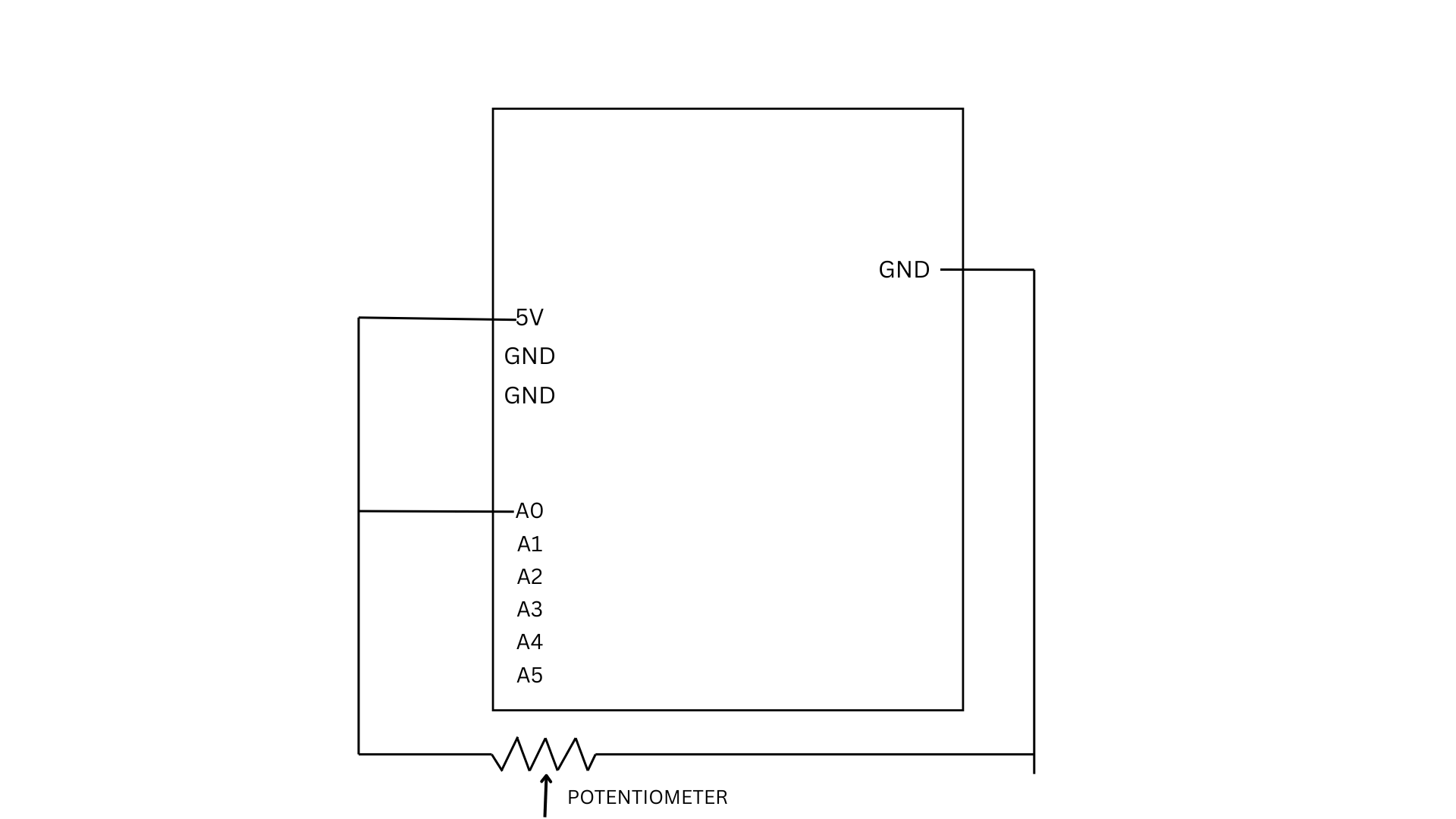
For this exercise, we used a potentiometer as our sensor to control an ellipse in p5.js. As the knob is turned, the Arduino reads the changing analog values and sends them to p5 through serial communication.

let x = map(sensorValue, 0, 255, 50, width - 50);

  ellipse(x, height / 2, 50, 50);

The values are mapped to the x-position of the ellipse, allowing it to move horizontally across the screen while staying centered vertically.

P5 Code | Demo  | Github

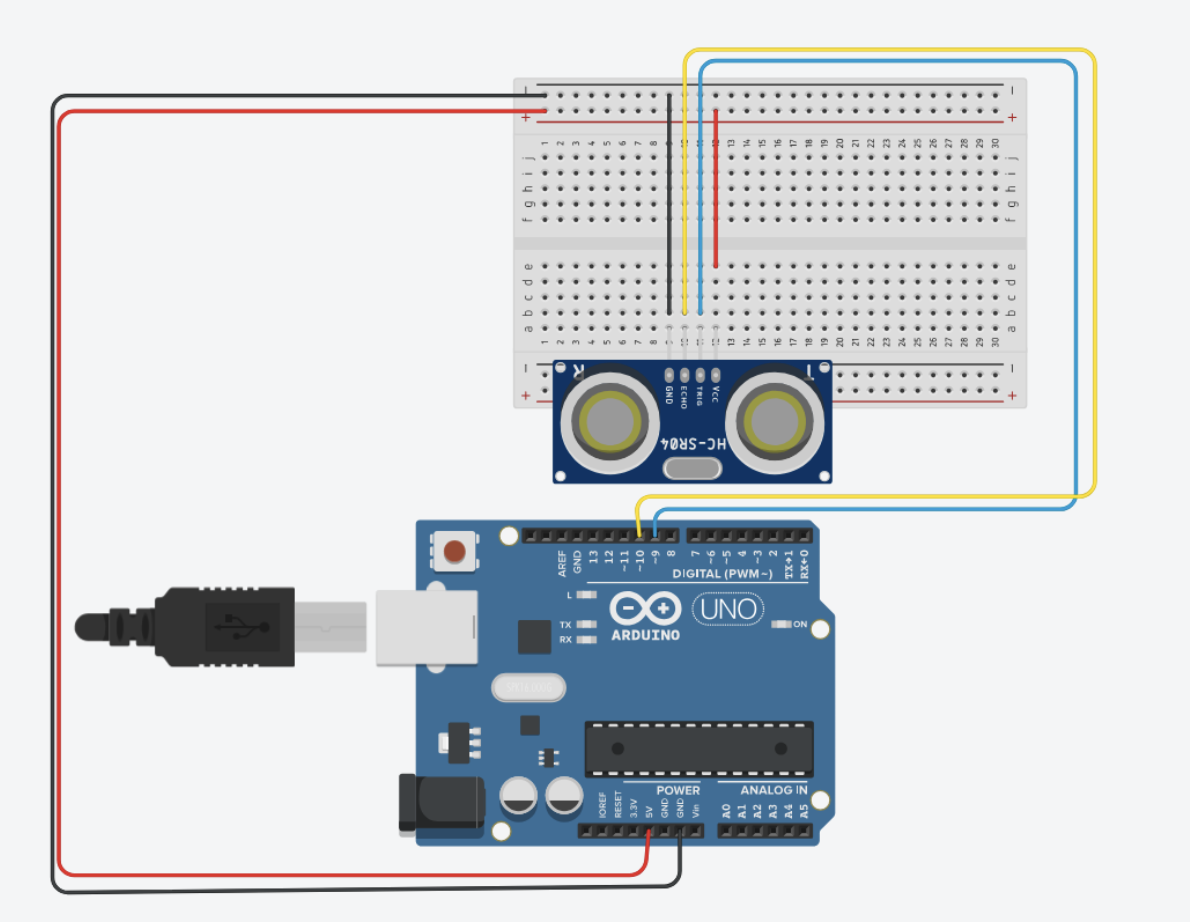
We also did another version of it which basically uses an ultrasonic sensor. The P5 code is same for both, just the mapping is different. You comment out the one user using for a smoother response. The ball movement is corresponding to the the distance detected by the sensor.

Arduino:

Sketch:

EXERCISE 02: P5 TO ARDUINO COMMUNICATION

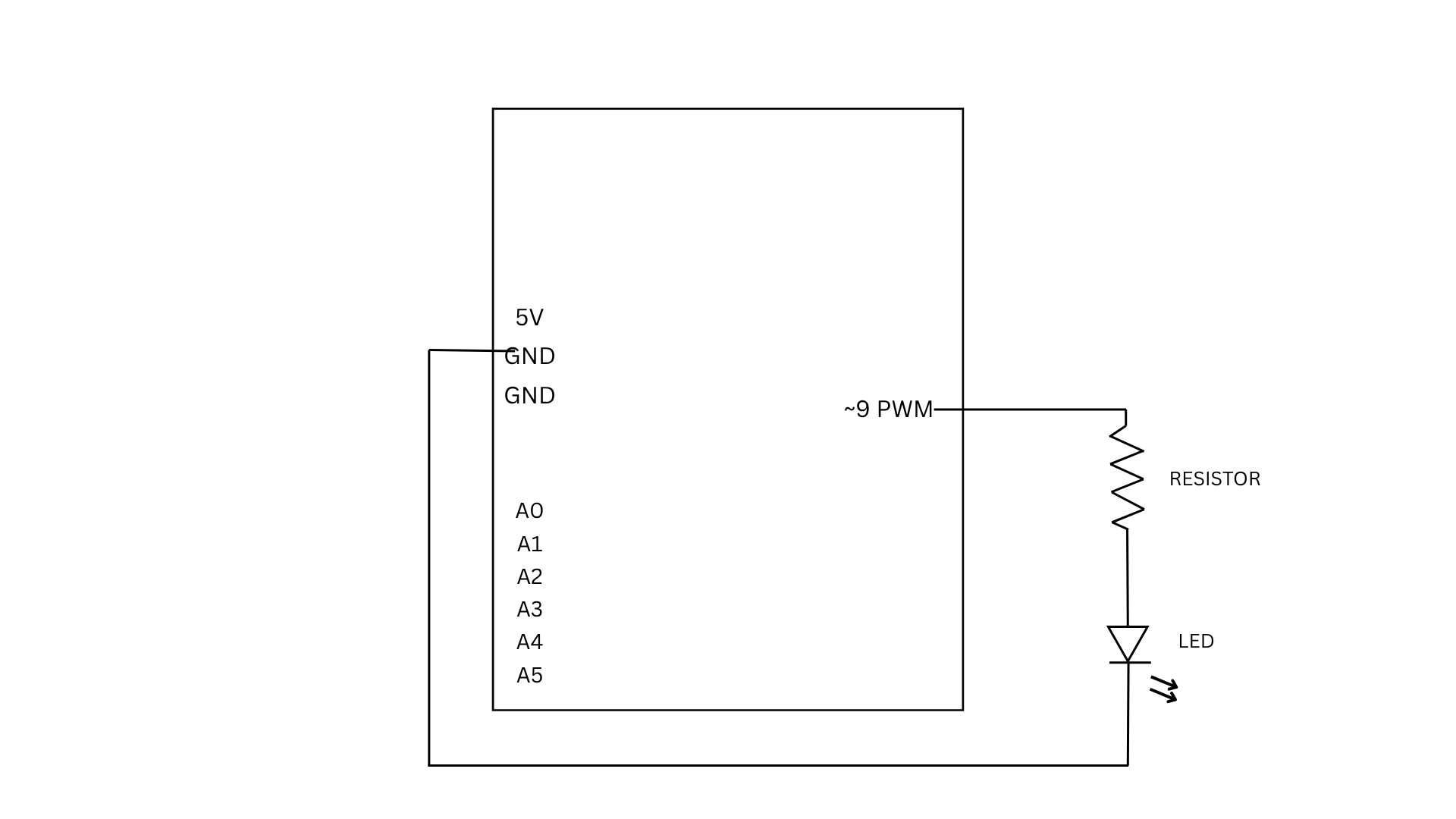
For Exercise 2, we used a slider in p5 to control the brightness of an LED connected to the Arduino. As the slider moves, it sends values from 0 to 255 through serial communication. The Arduino reads these incoming values and uses them to adjust the LED brightness using PWM, making the LED appear dimmer or brighter depending on the slider position.

if (Serial.available() > 0) {

int brightness = Serial.parseInt();

analogWrite(9, brightness);

This part of the code checks if there is incoming data from p5. When a value is received, it reads the number using parseInt() and uses it to control the LED brightness through analogWrite, which determines how bright or dim the LED will be.

P5 Code | Demo | Github

EXERCISE 03: BI-DIRECTIONAL COMMUNICATION

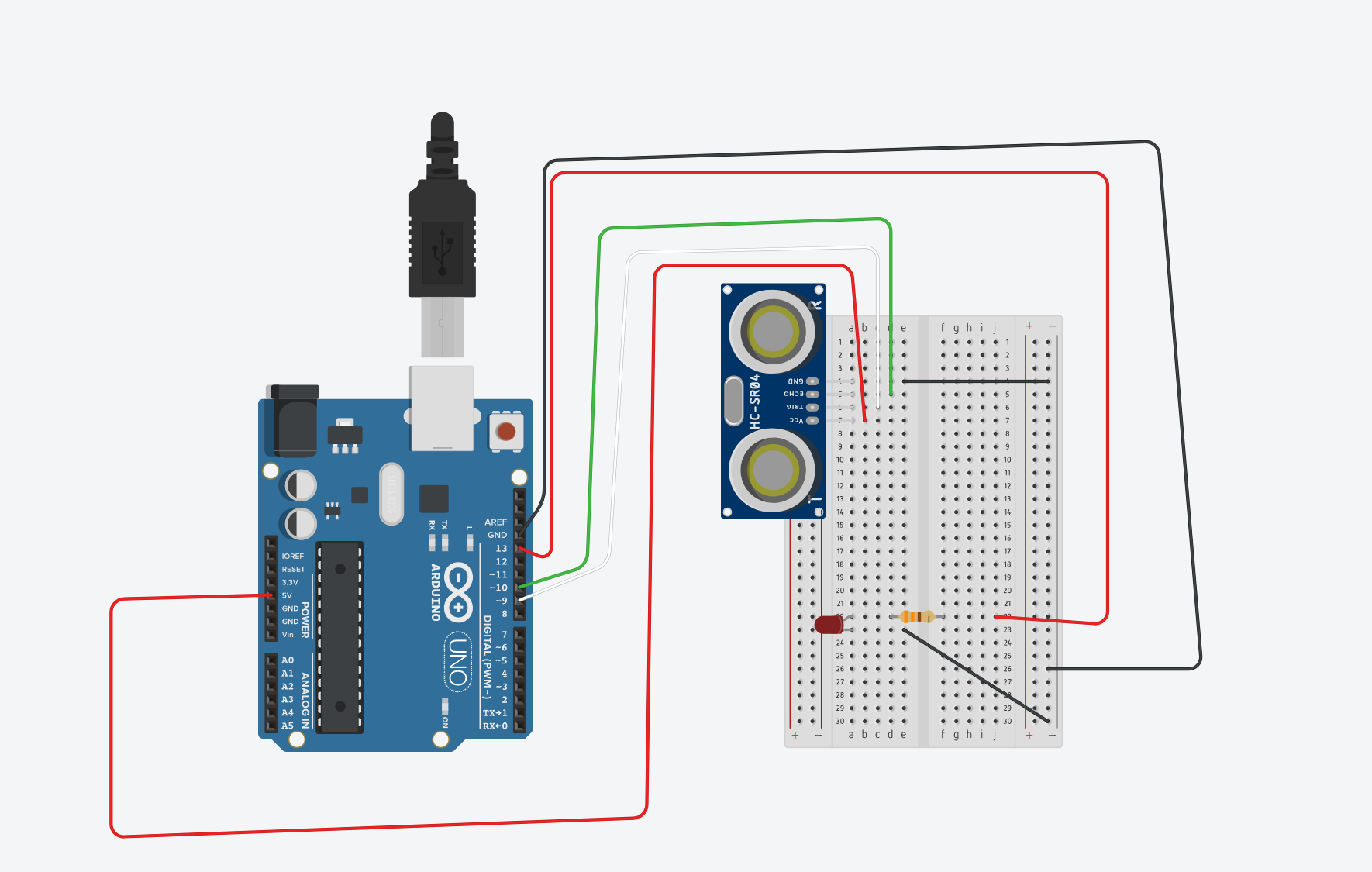
For Exercise 3, used a simple setup of an LED, a 330 ohm resistor and an ultrasonic sensor. The core logic is the LED is by default on and turns off for the split second when the ball touches the ground giving a blinking effect. The wind is mapped to the distance detected by the sensor. A distance of less than 40cm cause left winds and vice versa. The wind strength is proportional to the distance. The ball is meant to bounce off the walls. There is some issue about the right wall, we couldn’t fix it because of lack of understanding of the velocity method.

The arduino code is rather simple, if an object is detected the distance is written to the serial communication, and if an input is read on serial communication the light is blinked. The most interesting part about the arduino code is how the distance is measured using the pulse

  long duration = pulseIn(ECHO, HIGH, 30000); // 30 ms timeout

On the P5 ending smoothening of the input by the distance sensor was important because otherwise the the was getting abrupt

        latestData = lerp(latestData, val, 0.2);

This was suggested by Chatgpt. It defines a number between basically gets an average but using linear interpolation.

The most challenging part of the code was managing the movement of the ball when the bounce is dying off. As in the last second there were a lot of bounces happening. We dealt with that by instead of blinking the LED on each bounce, we kept the led on and just turned it off when the ball was in contact with the ground.

Sketch

DemoP5| Arduino

Week10 Reading

The first thing that came to my mind after reading both was how accepting were re off the the new tech thrown at us. not objecting the the pace of development but the the limited interaction capabilities do have an effect on us. I never though about touch screens as described the author “Pictures Under Glass”. It made me realize how much interaction is reduced to simple swipes and taps which negligble to what our hands do everyday . It made me rethink whether convenience has come at the cost of richness in interaction.

I felt a bit conflicted about the lack of concrete direction. While I understand that the goal is to inspire research rather than propose a fixed solution, it still leaves a gap between critique and application. Still, the reading succeeds in making me more critical of existing designs and more aware that the “future” of interaction is not inevitable, but something we actively choose to shape.

Lastly the comparison of what humans can do and what technology can do was meaningful debate beacuse of the way it focus on everyday tasks which are often deemed small

Keyboard Piano

Concept

For this production assignment,  was working with Zaid. We came up  with a simple design of making a piano using the keyboard and the buzzer. the idea was to assign notes to each key and have the input form it. We also added the lcd to see which note is  being played, and the a potentiometer to control the contrast of the lcd.

Code

https://github.com/MuhammadArhumSraw/IntrotoIM-MuhammadArhumAzeem

The are two files for this assignment labelled as week9file1 and week9file2. The python file is reading input form the keyboard and while the other is Arduino logic. The part I am most proud of is the serial communication at 9600.

try:
    arduino = serial.Serial('COM5', 9600, timeout=1)
void setup() {
  Serial.begin(9600)


At the moment its a single click piano. I can;t handle multiple keys Pressed at once. This can a be a future improvement.

Demo

Week 9 Reading

I really liked the second reading, because I am always curious about movies that leave things to the audience to interpret and also poetry; how everyone have their own meaning of the same couplet. The fear of not being able to convey what I am trying to convey is something I notice everyday everywhere. The author touched on the opposite where we ignite a thought and let other people drive anywhere. Thou this is a scary idea at the beginning, it uncover so many new possibilities which I might to have never thought about before. I wonder if I can in corporate in the Arduino assignments.  In the P5, it was easy to let the audience contemplate but with this I think there it harder but can be done. And if done properly, it can have a far greater impact as we can have all the sensory inputs here.

On the other hand, the first reading highlighted something which I feel during every assignment, even thou room for creativity is infinite, one often feels limited with when working with primitive shapes or two LEDs. I understand it possible to create a mural out of primitive shapes but that also requires mastery in it. My take away from that reading is a quote by Martin Scorsese that is “The most creative is the most personal”

Lighting Loop or Disco

Github

Concept

I was initially thinking of making a a lamp which turns on in dark and can be manually turned on. But that seemed very boring. Then I thought that why don’t I use a light from one LED and use it as an input to for the LDR which can ultimately effect a second LED. While thinking about this, I thought that I can just create a switch like that using code. Along the lines, It came to me what I can do is make the light light fluctuating by making it fade in and out. So the LDR reading will change within a range and I can make the second LED a blink. This reminded me a party or disco lights where  different lights turn on and off at different rates.

Work

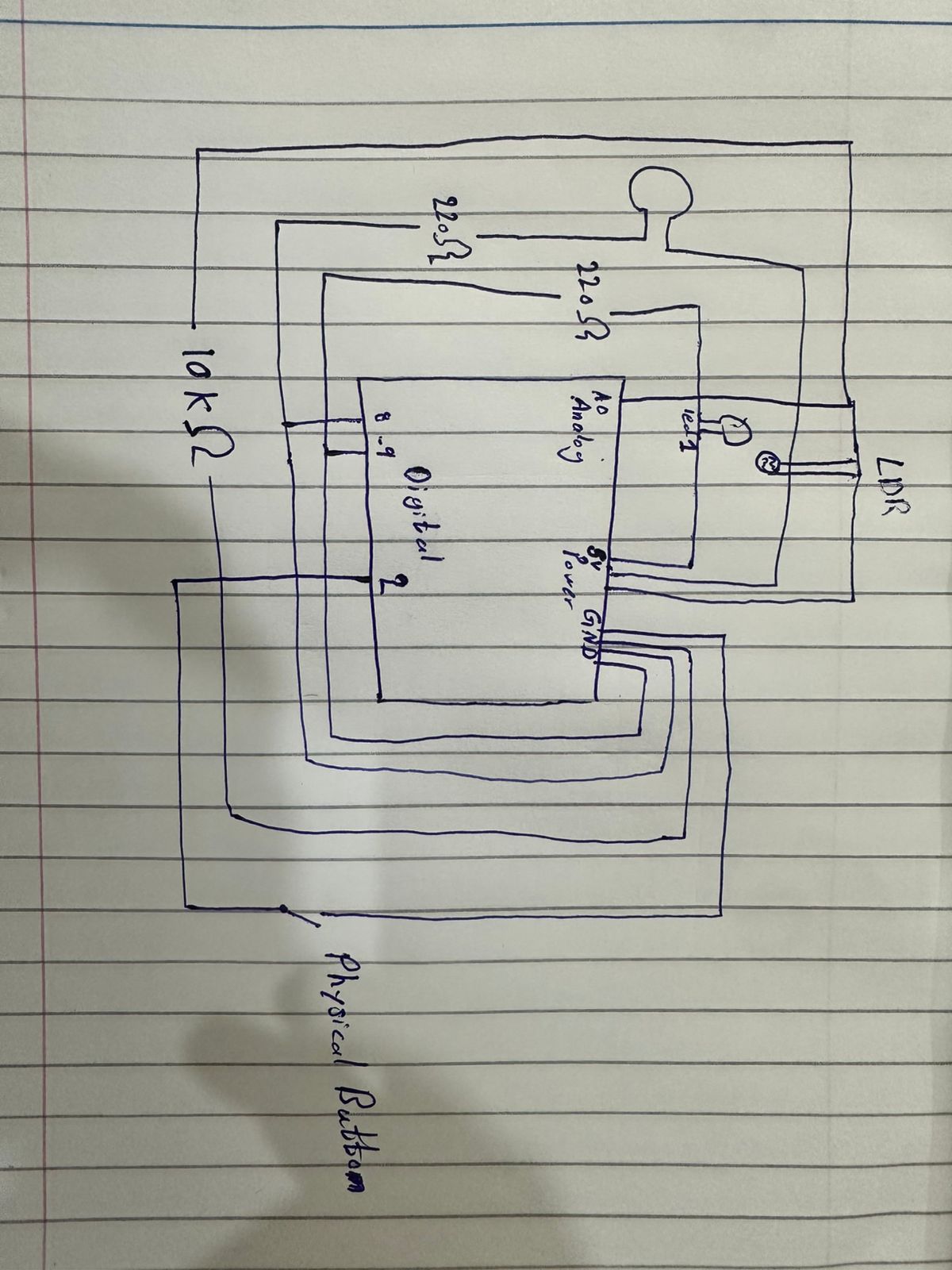
Both circuits were relatively simple as we did in the class, and the connection between them was through the code. To add more to it I used INPUT_PULLUP instead of a resistor. I had a conversation with GPT about this. It took me some time to get a grasp of regarding how it work. The next was putting the led close to the LDR. Now this was a bit tiring because the LDR was also detecting the room light. So I couldn’t have a fixed range, and the code needs to be updated if the location changes and new light in the room is introduced. I would regard this as the most challenging part.

On the other hand the part I am most proud of is dealing with multiple kinds of input. I was indeed relieving when my design did not require mapping of analog inputs and outputs. Initially I thought that I had to deal with all these multiple inputs but with just few lines of code, I was able to accomplish what I had in mind without nest if and loop blocks.

Sketch


Working Demo


handless Switch

Github

For this assigment the most difficult part was figuring out, how to send a signal without hands, I tried to chatgpt this but most of the ways need a an aluminium  foil to conducct electricity which i didn’t have. The next one was using my body as a conductor but I assume beacuase of the  resistance it counldn’t. After that I looked in to the kit to find something that I can use. I found the ultrasonic sensor. I looked it up to see what it does exaclty. It seemed fairly simple so  I decide to make a switch that turns once it detects something at a certain distance.

This where I got the most about it the sensor
https://projecthub.arduino.cc/Isaac100/getting-started-with-the-hc-sr04-ultrasonic-sensor-7cabe1

It had mulitple code sinipets about its usage, I put all of those to chatgpt and asked it explain each line by line in order to understand its basics. I got most of it except why we are using serial.begin(9600). I don’t get why we used this specific number. I kept it as it is(clarified in class).

Work

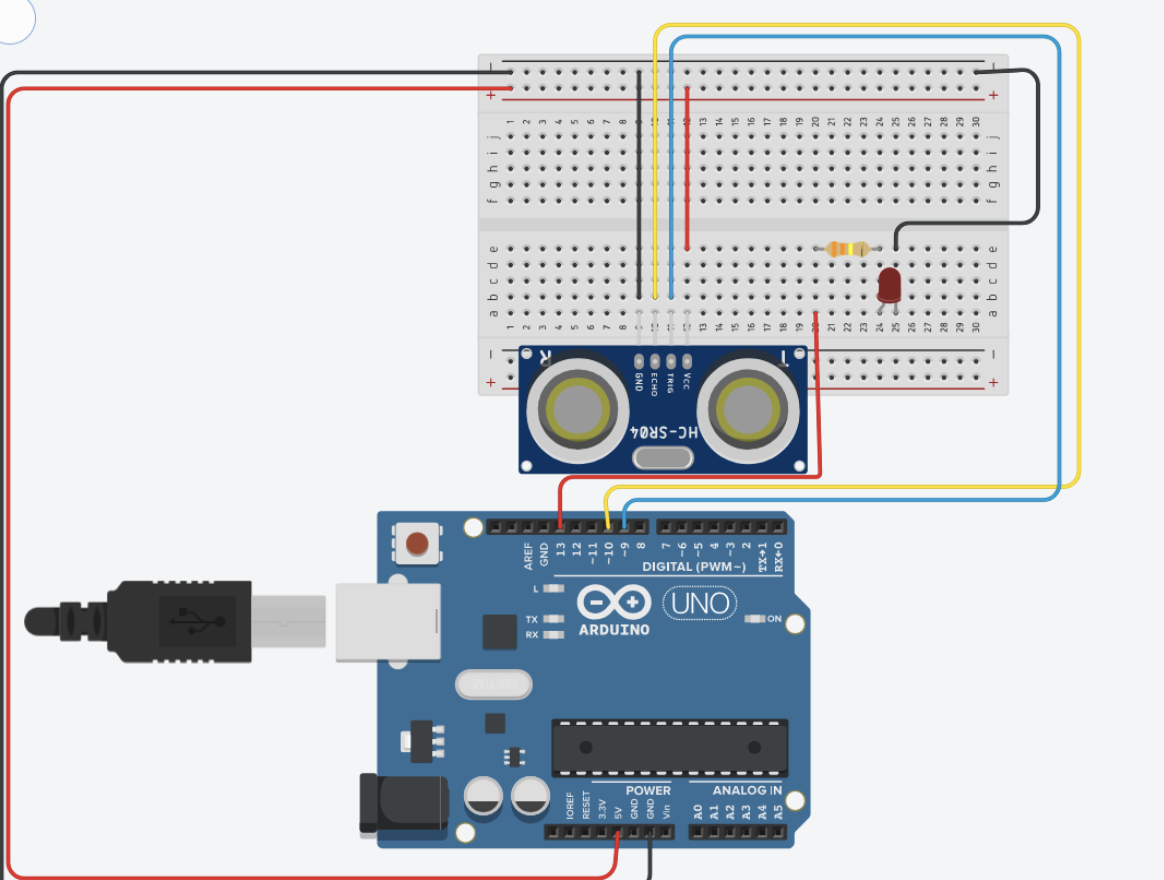
I kept the orginal from last class where we made the reverse swtich. The idea was as following; “I have the led asking for an input already in place, all I need to do is give a HIGH signal from somewhere”. Next I step the ultra sonice sensor, I tried to follow the semnitic from the above arduino project hub. In order to check if it is working properly I put the print statements to check which prints the distance

if (distance != -1) {
  Serial.print("Distance: ");
  Serial.print(distance);
  Serial.println(" cm");
once It was working, all I had to do was to put an if block in the loop(), if it detects something in the distance it will send a trigger for the light and turn it on.
Challenging and the part I am most proud of it

For this assignment coding was relatively easy. There wasn’t any challenging part specifically. I believe it because of the way I approched learning about of the new sensor. This is also the part Im most proud of because I didn’t have any difficulty while setting it up. I was also suprised by how straight forward it was. The whole thing took me 15 minutes to accomplish. later on I was just playing with distance and trying put as an intruder detector in my room.

here is the circuit sketch

One of the the ways I  could use to detect how close Im to the screen, I set the distance to 70cm, and this is result


Week 8 Reading Response

Design and Usability

The main Idea of the reading was, a positive effect can make people  worry less about minor discerpencies and make them think out of the box which is called “breadth-first” thinking. On the other hand, a negative effect results in “depth-first'” thinking which in essentialya a more narrow and  conecentrated approach.  The author elaborated this point, by examples of his teapot set and stress situations. A good asthetic might become an obstacle when the task at hand needs to be done in a hurry. I was thinking about can there be a case where both, usabiltiy and design, can be a problem. The first thought was gift packaging. In  situation where some one gives you a present in rather fancy packaging at your birthday, a bunch of people are sitting there waiting  for you to open to see what is inside. But that ancy athetic box doesn’t seem to have an opening. its top and bottom are both the same. This leads me to think that why it is preassummed in the reading that the more we lean to the asthetic side, we are losing usabitly. A good example  to my argument is fancy coffee machine. it has only two user interactions i.e. putting the cup and pressing the dessired button. Now no matter how glamorous the coffee making is happening (imagine there are long glass canals all over the place which alll fall in to you cup.) if the the two user interactions are easy to access, then we have both a good design and usbailty.


Hamilton

The article demonsatrated her foundational role in the Apollo 11 mission. She introduced the idea of Software Engineering. I was surprised by the fact that at that time they didn’t that software engineering as a key factor as there was no budget for it. Her failsafe mechanisms and asynchrousus modelling proved to be a saviour during the mission. it also reflected a gender bias. Despite her work, not a lot of acknowledgement was given.

The key take away from it was how people interact with systems and how the system should be ready of exceptional circumstances within the given resources. Most of the time when I have written some for a  program and I let a friend use it, they come up with use cases I have never thought before. A system can crash, they do normally but there should be a way to recover from it. This reading gave an insight about how anticipation of faliure is just half of the work.