This article was really interesting when talking about about physical implements and how they affect user. This goes back to the recurring theme of designing interactive system where the user should be the center of the design and user feedback. The idea of pictures under glass in my opinion creates a pseudo-realistic feeling where everything is meant to imitate the actual objects not not give the user the actual feeling and new design principles are becoming more and more virtual which makes I question how much humans will be involved with tools or implements in the coming period and we may actually lose touch with what we deem as reality now. The reading itself was very self-explanatory so I do not have much to say but it was just a simple reminder to keep in touch with physical things when designing interactive systems.
Month: April 2026
Week_11_Reading Response
The most interesting idea raised by the article is shifting assistive devices from hiding the disability to embracing design. Glasses were used as an example of a good design that became a fashion trend rather than a clinical tool. But apart from its simple structure and variability in shapes and forms, I would tend to believe that another reason classes is such a success is because nearsightedness is increasingly common, and the variety of design came from the variety of needs. This idea could also insipire designerd to look at what the disabled group actually want for their assistive devices.
The other idea mentioned about not overburdening the device with features relates to one of the other readings in the past weeks about the realationship between mood, design and usability. Keeping the design simple would make it easy and good to use, but would lack emotional function. Adding design to the devices would add emotional support, which would also help bring a more possitive view to disabilities, making it less of a thing to be ashamed of. This would in turn generate more interest in design of diasbility aid and actively catalyze and inspire broader design culture.
Week 11 – Reading Response Zere
I resonate with the argument made by the author, as in my opinion, the notion of touchscreens being the “ending point” of a technological revolution seems a little odd to me. I believe that there is much more to the technological development of the future than an object that resembles a phone.
What I found most interesting was the part about hands. The author makes a great point about how useful our touch senses are. Human evolution can be strongly tied to the senses that are on the tip of our fingers. Touch is an extremely powerful “tool”, if we could call it that, and we’ve basically designed it out of our tools entirely.
This reading reminded me of our time in class, when the professor showed us simple motion detectors and control using p5js. This technology is not touch-related directly, but still presents a more futuristic/alternative concept rather than touchscreens. This transitions into my thought that interactions that involve your whole hand, your movement, your body, basically, other additional parts of our body (also including touch), are much more interesting and feel more “alive”, compared to just sliding your finger across a surface.
To conclude, I think that it’s easier to make the argument than to solve the problem. It’s one thing to say “we should use our hands more” and another to design something that’s actually as convenient and as accessible as a smartphone. He kind of admits this in the responses page , he doesn’t have the answer, just the problem. Which is fair, but also frustrating at the same time.
Reading Reflection
The readings made me rethink what interaction design is and what it could become. Bret Victor’s main idea that computers should help people think, not just react stood out to me the most. It made me realize that many of my own projects focus on simple interactions, like clicking or triggering events, rather than supporting deeper understanding. This distinction between reactive systems and thinking tools feels important, especially for someone studying interactive media.
Another key idea is visibility in design. Victor argues that systems should show how they work instead of hiding their processes. I strongly relate to this from a learning perspective when I can see changes happen in real time, I understand concepts much faster. This connects interaction design with education, suggesting that good design is not just about usability, but also about helping users learn and explore. At the same time, I found myself questioning some of Victor’s ideas, especially about using the full human body in interaction. While designing for human capabilities is powerful, it can also exclude people who are not able-bodied. I agree with my peer’s point that accessibility should be central to design. Technology exists to expand access, not limit it. For example, devices like the Meta Quest offer adjustable and inclusive features, showing that immersive design and accessibility can coexist.
I was also interested in discussions about touch and sensory interaction. Technologies like haptic feedback and VR controllers show how physical sensation can enhance digital experiences. The example of devices that simulate textures or resistance demonstrates how interaction can go beyond screens and become more embodied. However, these ideas still feel experimental, and it is unclear how widely they can be applied in daily life.
Week 11 Assignment
The Concept
My idea for this stemmed from a desire to have instruments that among easy to operate; are tangible when it comes to playing around with them; and produce tones similar to that of a flute, which is actually remarkably difficult to reproduce digitally, due on part to how the actual flute material reverberates and deforms on a micro level to every finger placement and note produced.
For this task, a force sensor seemed to be the closest option to finger placements over a flute. Its ability to vary voltage across it based on applied force allowed for the ability to vary the sound produced depending on the pressure applied.
Since we are talking about electricity, I decided adding an oscilloscope across the piezo would enable for the user to ‘see’ the sound they are producing. I added a NeoPixel ring of lights around the pressure sensor as well, which subtly change color from a red-hue to a blue/purple hue as pressure increases.
How It’s Made
Decorations aside, the force sensor connects from the 5V port to the analogue port A0 with a resistor across it. The program measures if a change in force (voltage across the sensor) is present, and then emits a sound by using the voltage measured, thus allowing for a varied frequency.
The output given from the digital pin 8 connection to the Piezo passes first though a potentiometer to allow for volume control, and then through two capacitors to smooth the varying voltage out, producing a more cohesive sound, instead of something jumpy and discordant.
#include <Adafruit_NeoPixel.h>
Adafruit_NeoPixel pixels(12, 7, NEO_GRB + NEO_KHZ800);
float force = 0;
float oldForce = 0;
int curve = 50;
float reduce = 100.0;
int frame = 0;
void setup()
{
pinMode(8, OUTPUT);
pinMode(A0, INPUT);
Serial.begin(9600);
pixels.begin();
}
void loop()
{
frame++;
//noTone(8);
force = analogRead(A0);
for (int i=0; i < 12; i++) {
pixels.setPixelColor(i, pixels.Color((int(force/914 * 255) + i * frame)%255, 0, 255 - (int(force/914 * 255) + i * frame)%255));
}
pixels.show();
if (oldForce != force) {
tone(8, 440 * pow(2.0, ((force * curve/914)) / reduce), 50);
oldForce = force;
}
delay(50); // Delay a little bit to improve simulation performance
}
What I Like
I must confess, my favorite part is definitely the oscilloscope. Being able to see the sound one is producing as a wave is a cool feature I would love to expand in the future.
What I Could Do Better
I would like to make this in the real world, using real components, instead of using a simulator. For one, the simulator has audio issues and disruptions. Secondly, being able to actually feeling and interacting with the components would be better encompassing of my initial concept.
Week 11 – Assignment
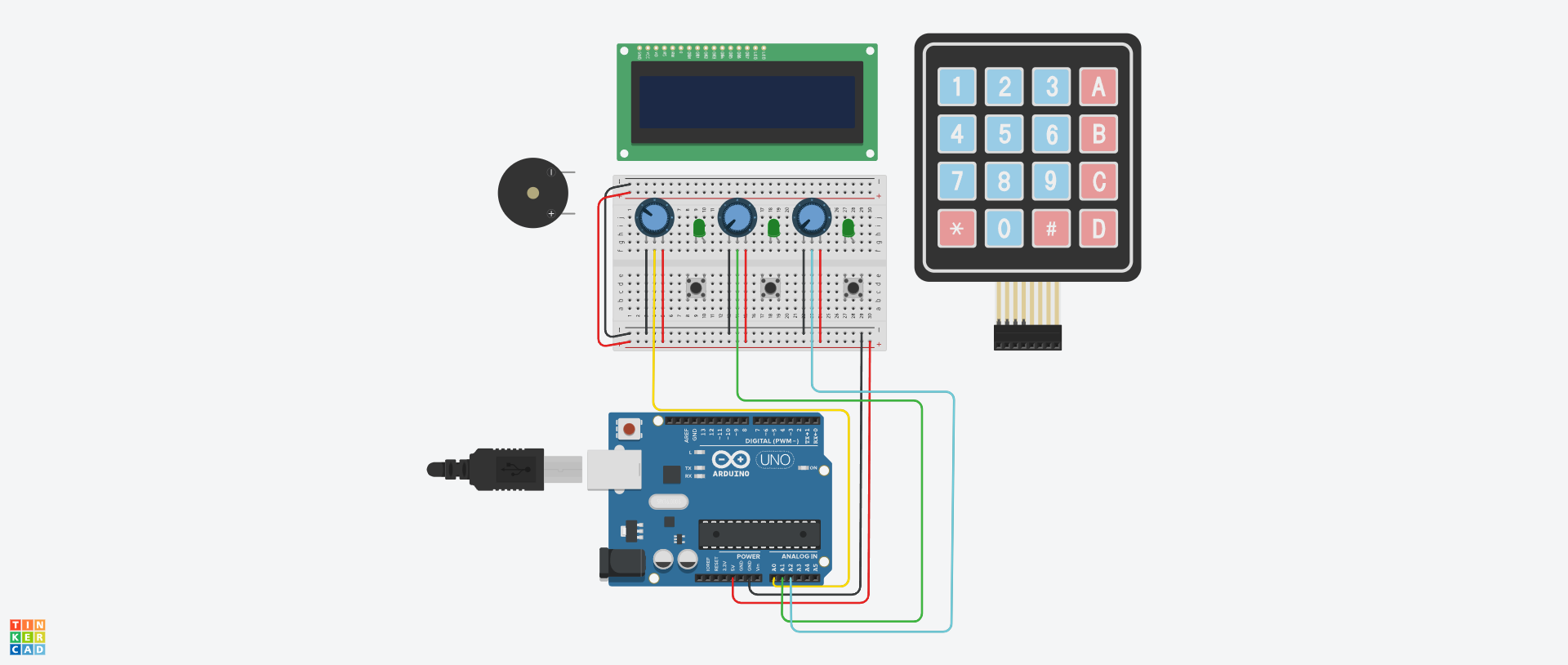
I wanted to make a non-traditional music instrument that feels like a game the could be played around with for hours, although it is very simple. It contains different modes but not only does have audio feedbacks, but also visual feedback through the LCD Screen and LED lights. It reminds me of a very simplified and modest version of a music instrument attached to a pedal, which gives different music effects. The LCD screen showing the hertz and bpm reminds me of a pedal.
Hand-Drawn Schematics
Simulator
Again, I used the simulator to make sure I wouldn’t accidentally burn any components. When building a circuit, I take it step by step: I test the LEDs first—everything works great—then I add the photoresistor to control them and test again. After that, I add the piezo and repeat the process until I reach the LCD. I build each part in the simulation first, then immediately try it on the physical board. Which helped me realize the wires order connecting to the LCD display were flipped.
Video
How the code works
This code implements a light-controlled theremin with three distinct musical modes on Arduino, using an LDR as the primary input. The core structure reads the analog light value, smooths it with a 20-sample circular buffer, and maps it to different musical parameters depending on the active mode, Theremin, Scale, or Pac-Man. Mode 0 -Theremin- produces continuous pitch with glide and vibrato, generates a pulsing heartbeat animation on the LCD, and sweeps the RGB LED through a color gradient based on frequency. Mode 1 quantizes the light reading to 15 discrete C major notes, displays rainbow colors per note, and shows VU meter bars on the LCD using custom characters. Mode 2 maps light intensity to game speed, runs a side scrolling Pac-Man game on the LCD with ghosts and dots, and plays the classic sound. The button handling supports short-press to cycle modes and long-press to enter/exit sleep mode, while the RGB LED fades smoothly between target colors using a step-based transition. The LCD uses custom character sets loaded on-demand and tracks dirty rows to minimize redraws. A sinus lookup table generates vibrato and LED pulsing, and the audio output on the piezo uses tone() with frequency modulation. The code is organized into modular functions for each mode, character loading, LED fading, and button debouncing, with global state variables tracking everything from heart rate BPM to ghost positions.
Future improvements and Reflection
In the future, I would like to turn this prototype into a PCB and add more components and sensors to transform it into a more realistic musical instrument.
I struggled mainly with connecting the LCD screen. After working for long hours, I started to lose focus and couldn’t fully debug what was going wrong. Eventually, I realized that the two breadboards were not connected to each other, which fixed part of the issue. However, I still faced problems—the display would turn on but only showed strange white boxes.
I then checked the V0 pin on the LCD and noticed it was connected to the potentiometer but not properly connected to ground and power. After correcting the wiring and adjusting the potentiometer, the display sometimes still showed weird shapes and white boxes. I removed the LCD to inspect it and realized the wiring was flipped, since I was using the original LCD from the Arduino starter kit. The characters appeared as numbers at first, and some were reversed.
After fixing the wiring orientation and connections, everything started working properly.
Reading Reflection Week 11 – Kamila Dautkhan
Honestly, the Victor reading was kind of a trip because he’s basically saying our iPhones are kind of a step backward. It’s wild to think that we have all these nerve endings in our fingers but we’re stuck just swiping on flat glass all day. He calls it “Pictures Under Glass,” and it made me realize how much better it feels to use actual physical tools where you can feel the weight and the edges of things. It definitely makes me want to build something that isn’t just another touchscreen.
Connecting that to the BlinkWithoutDelay thing actually makes a lot of sense now. If you’re trying to build a cool, responsive tool like Victor is talking about, you can’t have your code stuck on a delay() command. It’s like trying to have a conversation with someone who randomly freezes for two seconds every time they blink. Using millis() is basically the only way to make sure the hardware is actually “awake” enough to feel what the user is doing in real-time.
One thing I’m still stuck on is how to actually build the 3D stuff he’s talking about. Like, it’s easy to code a button, but how do you code something that feels like “opening a jar” or sensing weight? I also definitely need to practice the if (currentMillis - previousMillis >= interval) logic more because it’s way less intuitive than just typing delay(1000). It feels like a lot of extra math just to keep the light blinking while doing other stuff.
Week 11: Reading Response
A Brief Rant on the Future of Interactive Design + Follow-up
The first article is essentially arguing that the dominant vision of future technology, which is everything being a flat glassy touchscreen you slide your finger across, is not actually visionary at all. It is just a timid extension of what already exists, and what already exists ignores almost everything that makes human hands remarkable. His point is that our hands do two things extraordinarily well, they feel things and they manipulate things, and touchscreens strip both of those capabilities away in exchange for a visual interface that he calls Pictures Under Glass. I reflected on his example of making a sandwich. He asks you to pay attention to how many tiny adjustments your fingers make without you even thinking about it, switching grips, sensing weight, feeling texture, and then he asks whether we are really going to accept a future interface that is less expressive than that. That question reminded of the time I tried learning drums through one of those tablet apps, and the difference between that and sitting in front of a real kit is almost laughable. On a real drum the stick bounces back after you hit it, and that rebound produces important information. Your wrist reads it and adjusts the next stroke automatically, and I could feel even as a beginner that my hands were supposed to be learning something from that response. On the app there is nothing. You tap a flat surface, it makes a sound, and that is the entire relationship. I was learning the pattern but I was not learning to actually play, and from what I can understand, that distinction is what the author is getting at.
About his response to pushback, I actually found it more interesting than the original rant. In the part when someone asked about voice interfaces and he said he has a hard time imagining a painter telling his canvas what to do. That, again, reminded of the drums. There is no way to describe with a voice or replicate on a screen the feeling of a snare cracking back against your stick, or the way a cymbal responds differently depending on where and how hard you hit it. That knowledge is supposed to live in your hands built up over time, and I genuinely felt the absence of it every time I went back to the app and realized my fingers were learning nothing they could transfer to a real instrument. It felt like I was practicing the appearance of playing drums without any of the physical intelligence that actually makes someone a drummer.
Reading Reflection Week 11: The Touchy Touchscreen
Bret Victor makes a really good point about the so called “Pictures under glass” concept of technology. I mean, as a bit of a fun fact, in my elementary school, our books were so in need of an update that the latest technology the textbooks about computer science, mention touchscreens as the latest technology. It’s quite laughable thinking about it. But I do have to agree, in a generation and era where we’re living a touchscreen oriented life, the magic does get lost along the way.
But thing is I think right now we have at least one example of trying to make technology adapt to fit our human body, being the reMarkable paper tablet. Initially when I was looking to buy some new technology I had this one goal in mind; that it can have a touchscreen for me to draw and write on. I primarly was looking at laptops that had touchscreens when I was introduced to the reMarkable. Now I thought, I mean its nothing special when it came to what it is and what it lacked as opposed to a conventional laptop. But after testing it out, it was astounding. It felt so natural to write on it, like I was writing in a notebook. I didn’t get that artifical feel that iPads give me and genuienly is what sold me on buying the reMarkable in the end.
At some point, we do have to ask ourselves, at what point is our life simulated by screen or whether our reality is literally a headset we can’t take off? (obviously I’m joking but it is getting quite dystopian no?)
Week 11 – Arduino Music Megan
Arduino – Harry Potter Music Box
Concept
For this project, I decided to create a mini music pad that can play the Harry Potter theme. The idea came from a small Harry Potter music box that I was gifted when I was younger, since I have always loved Harry Potter and I am a big fan. I also play the piano, so I wanted to design something that felt similar to an instrument and could simulate specific notes like a simplified keyboard.
Process
For the hardware, I used four colored buttons, a potentiometer, and a buzzer to produce sound. I connected each button to a digital pin, the potentiometer to 5V, GND, and analog pin A0, and the buzzer to another digital pin. All components were connected to ground appropriately.
For the coding part, it was a bit challenging at first to find the right notes. I experimented with a basic Arduino buzzer note library and helped myself with Chat GPT to adjust different frequencies until they sounded closer to the melody I wanted. Since the Harry Potter theme has more than four notes, I used the potentiometer as an analog input to change the pitch of the notes. This allowed me to expand the range of sounds using only four buttons. Although it is not perfectly accurate, the result is still very recognizable and captures the essence of the original theme.
// ==============================
// MINI MUSIC PAD - HARRY POTTER SONG
// ==============================
// BUTTON PINS
int b1 = 2; // E
int b2 = 3; // G
int b3 = 4; // B
int b4 = 5; // C
// BUZZER
int buzzer = 8;
// POTENTIOMETER
int pot = A0;
// NOTES
#define E4 329
#define G4 392
#define B4 494
#define C5 510
// ==============================
// SETUP
// ==============================
void setup() {
pinMode(b1, INPUT_PULLUP);
pinMode(b2, INPUT_PULLUP);
pinMode(b3, INPUT_PULLUP);
pinMode(b4, INPUT_PULLUP);
pinMode(buzzer, OUTPUT);
}
// ==============================
// LOOP
// ==============================
void loop() {
int potValue = analogRead(pot);
// HIGH / LOW pitch mode
bool highPitch = potValue > 512;
float multiplier;
if (highPitch) {
multiplier = 1.3; // slightly higher pitch
} else {
multiplier = 0.85; // slightly lower pitch
}
if (digitalRead(b1) == LOW) {
play(E4, multiplier);
}
else if (digitalRead(b2) == LOW) {
play(G4, multiplier);
}
else if (digitalRead(b3) == LOW) {
play(B4, multiplier);
}
else if (digitalRead(b4) == LOW) {
play(C5, multiplier);
}
else {
noTone(buzzer);
}
}
// ==============================
// FUNCTION
// ==============================
void play(int note, float mult) {
tone(buzzer, note * mult);
}
Thing That I’m Proud Of
One part of the project I am especially proud of is how I used the potentiometer to control the pitch. This idea allowed me to overcome the limitation of having only four buttons. Initially, I tried pressing multiple buttons at once to create different sounds, but it did not work as expected. Then I realized I could use the potentiometer to dynamically change the pitch, which was a much more effective solution. I am also proud of the overall design of my mini music pad, as it is intuitive to use and much cleaner than my earlier versions, where the wires were more disorganized.
// HIGH / LOW pitch mode
bool highPitch = potValue > 512;
float multiplier;
if (highPitch) {
multiplier = 1.3; // slightly higher pitch
} else {
multiplier = 0.85; // slightly lower pitch
}
Overall Reflection
Overall, I really enjoyed this project. It allowed me to combine something personal, like my love for Harry Potter and music, with technical skills such as coding and circuit design. The process involved a lot of experimentation and problem-solving, especially when trying to match the melody. This project also made me feel nostalgic, since the song reminds me of my childhood. I am very happy with the final result and how I was able to turn a simple Arduino setup into an interactive musical experience.
Reading Reflections
Reading A Brief Rant on the Future of Interaction Design and the Response honestly changed the way I see technology in a way I did not expect at all. I agree with the author, but what surprised me the most is that I had never even realized this was a problem in the first place. It is not that our devices are bad, but more that they are limiting us from using our full potential, especially when it comes to how we physically interact with the world.
One thing that really stuck with me was when I started thinking about the idea of using devices with your eyes closed. I asked myself what I could actually do like that, and the only thing I could come up with was typing on my laptop keyboard. And then I realized that typing is one of the only truly tactile interactions we still have, and it is not even part of the screen itself. Everything else, especially touchscreens, feels like just sliding your finger on glass with almost no physical feedback. The reading describes this as “Pictures Under Glass,” and I think that is such a perfect way to put it, because it really does feel disconnected from what you are doing.
It also made me think about why we keep simplifying technology more and more. At first it seems like progress, because everything becomes easier and more accessible, but at the same time, it feels like we are reducing the way we interact with the world to something very basic, almost like we are being treated as toddlers. And that idea really stayed with me, because I had never questioned it before. I never thought that maybe we actually deserve more complex and richer ways of interacting, instead of everything being reduced to tapping and swiping.
I also kept thinking about the comparison between the real world and digital interfaces. In real life, our hands are constantly feeling, adjusting, reacting. The reading gives examples like holding a book or a glass and understanding things like weight and position without even thinking about it. That made me realize how much information we are losing when everything becomes flat and two dimensional. It made me wonder if we are actually moving forward or backward by making everything more and more screen based.
At the same time, I thought about things like movie theaters. It took so long for us to even be able to record and display images, but now we have 3D, 4D, and experiences where you can feel water or heat from what is happening on screen. That feels like a step toward engaging more of our senses. But then I started thinking, what if we did not need glasses to see in 3D, or what if devices could actually communicate through touch in a more real way? Something closer to real life, like materials that change shape or give feedback. That is kind of what the author is pushing for with the idea of a “dynamic medium that we can see, feel, and manipulate.”
At some point, though, I also started questioning how far this can really go. If we keep trying to make technology more and more like real life, are we just trying to recreate reality itself? Because the real world is already the most advanced “interface” we have. So it made me think about where the limit is, and whether the goal should be to replicate reality or to create something entirely new.
Overall, this reading really opened my mind. It made me realize that interaction design is not just about making things look nice or easy to use, but about deeply understanding human capabilities and not ignoring them. I had never questioned touchscreens before, but now I cannot stop thinking about how much more is possible and how much we might be missing out on by staying with what we have.