Week 11 – Reading Response Zere

I resonate with the argument made by the author, as in my opinion, the notion of touchscreens being the “ending point” of a technological revolution seems a little odd to me. I believe that there is much more to the technological development of the future than an object that resembles a phone.
What I found most interesting was the part about hands. The author makes a great point about how useful our touch senses are. Human evolution can be strongly tied to the senses that are on the tip of our fingers. Touch is an extremely powerful “tool”, if we could call it that, and we’ve basically designed it out of our tools entirely.

This reading reminded me of our time in class, when the professor showed us simple motion detectors and control using p5js. This technology is not touch-related directly, but still presents a more futuristic/alternative concept rather than touchscreens. This transitions into my thought that interactions that involve your whole hand, your movement, your body, basically, other additional parts of our body (also including touch), are much more interesting and feel more “alive”, compared to just sliding your finger across a surface.

To conclude, I think that it’s easier to make the argument than to solve the problem. It’s one thing to say “we should use our hands more” and another to design something that’s actually as convenient and as accessible as a smartphone. He kind of admits this in the responses page , he doesn’t have the answer, just the problem. Which is fair, but also frustrating at the same time.

Week 11 Assignment – Zere

Concept

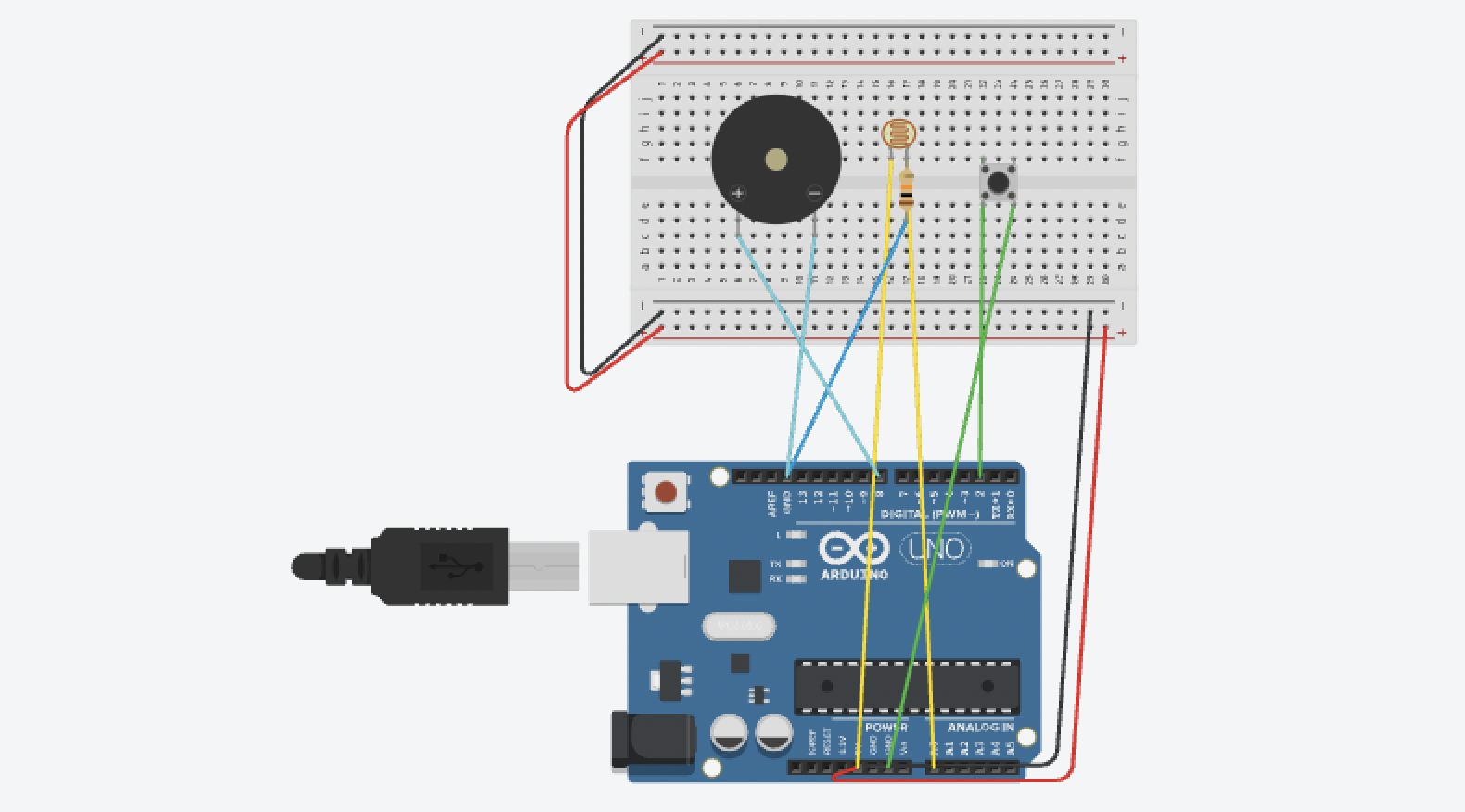
The concept of my project is to create a light-controlled musical instrument using Arduino. Instead of buttons or keys, the player controls pitch by covering or exposing a photoresistor to light, like waving your hand over it. A pushbutton switches between a low octave and a high octave, making the instrument feel expressive and playful. I wanted the interaction to feel unusual and fun, more like a theremin than a traditional instrument.

const int LDR_PIN = A0;
const int BTN_PIN = 2;
const int BUZZ_PIN = 8;

void setup() {
  pinMode(BTN_PIN, INPUT_PULLUP);
}

void loop() {
  int lightVal = analogRead(LDR_PIN);
  int btnState = digitalRead(BTN_PIN);

  int freq;
  if (btnState == LOW) {
    freq = map(lightVal, 0, 1023, 500, 2000);
  } else {
    freq = map(lightVal, 0, 1023, 100, 500);
  }

  tone(BUZZ_PIN, freq);
  delay(10);
}

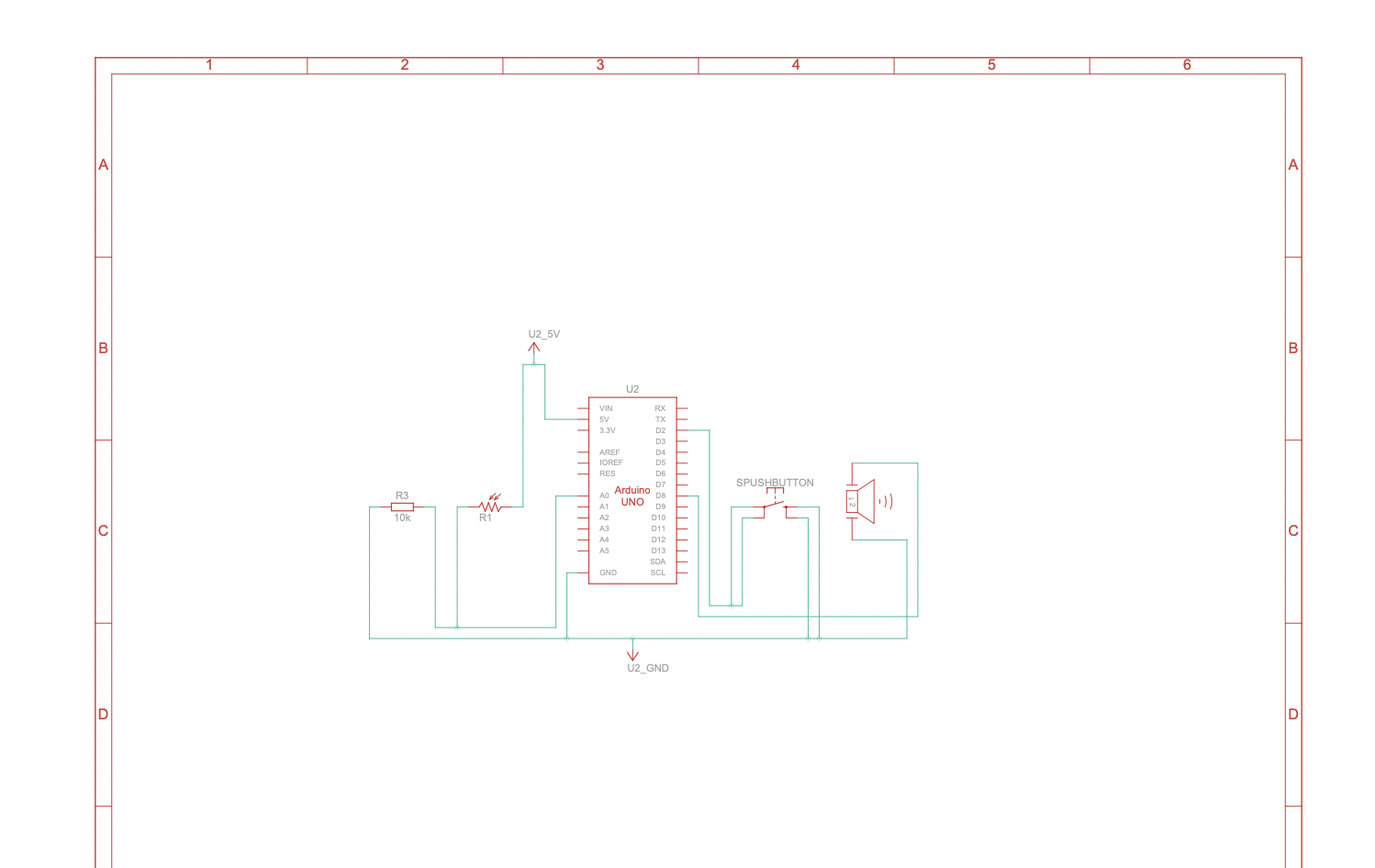
I started by placing a photoresistor on the breadboard with a 10kΩ resistor forming a voltage divider, which lets the Arduino read changing light levels through A0. At first the buzzer played the same tone constantly, later I discovered through the serial monitor that A0 was reading 1023 the whole time, which meant that the resistor was not properly connected to the photoresistor. Once I fixed that, the pitch started responding to light.

What I’m proud of

The part I’m most proud of is figuring out the button wiring. This was incredibly frustrating, as I spent a long time confused about which legs of the button connect internally, which pins on the Arduino were digital versus analog, and why the signal kept reading the wrong values. I watched a YouTube tutorial to better understand how the process, it was quite challenging to be honest. https://www.youtube.com/watch?v=gj-H_agfd6U

What I can do better next time

Next time, I want to map the light values to specific musical notes rather than continuous frequencies, so it sounds more like a real scale than a smooth slide between pitches. I could also add an LED that lights up when the button is pressed for visual feedback, or use multiple photoresistors to create distinct pitch-control zones. I could also arrange the wires more neatly next time.

This is the video of me testing the sound: IMG_2491


Midterm – Zere Kystaubayeva

View only link: https://editor.p5js.org/lunaland/full/lguzYiIJr

1. Concept of the game: I decided to create an interactive piece called “Day in the Life of a Cat”, where the user gets to experience normal cat stuff that cats get to do throughout their days.

  • I have a hairless cat, Luna. I miss her a lot since she lives with my grandparents, and I decided to remind myself of her by creating this interactive experience. Everything that the game includes is pretty much all she does every day – eat, play with random things, terrorize insects outside, and poop.
  • What and how: The user gets to experience morning, day, and night as a cat, clicking on different items and discovering what they can do with them. I decided to keep the interface very simple, since overcomplicating things would make it hard for me personally to produce a good interactive experience. Each part of the day has its own mini-game to complete in order to transition into the next part of the day. The user collects points for completing the mini games. You get 30 points in total. You can play the game again after finishing it.
  • Additional stuff: Initially, I wanted to draw all of the backdrops myself or create them using code, using simple shapes and colors. Then I remembered a game I always wanted to play called Animal Crossing, and wanted to create a similar atmosphere – cute and simple background decor. I wanted to use images from the internet, but none were “flat” enough for a backdrop, and I couldn’t insert my own images in there due to a lack of space. In the end, I decided to generate Animal Crossing and other cute mini-games-inspired backdrops, as well as all of the items that are needed to complete the game. I generated everything through ChatGPT image generation.

2. Code that I’m proud of and why

The part of my code that I am most proud of is the scene system and the way the game moves from one part of the day to another. I used different game states like the instruction screen, morning scene, day scene, night scene, and ending scene. This made the project feel real and interactive, as if it’s truly a cat that goes about its day. I am proud of this because it helped me organize the game clearly and made it easier to control what the user sees at each moment.

3. What I found challenging

The most challenging part for me was making the different scenes connect smoothly. At first, I struggled with where the player should go after each interaction. I had to think carefully about how to move from the instruction screen to the morning scene, then to mini-game scenes, then back again, and finally to the ending, without making it confusing for the user and me. This taught me that you need to have both the idea and the execution planned to detail before starting the process, because I had to redo a lot of stuff to create mini-game scenes in between the bigger scenes.

Week 5 Reading Response Zere

What are some of the ways that computer vision differs from human vision?

While humans use their eyes and brains to interpret the information about the scenes they see, computer vision utilizes cameras and algorithms to analyze images. Computers can’t understand images or videos without specific algorithms that assign meaning to the pixels.

What are some techniques we can use to help the computer see/track what we’re interested in?

  1. Frame differencing: Motion is detected by comparing consecutive video frames. This works well when objects or people are in motion.
  2. Brightness thresholding: This separates foreground and background based on the light/dark values. This helps in environments where there is a strong visual contrast.
  3. Simple object tracking: This finds the brightest/darkest pixels in an image/scene and follows the object’s position.

How do you think computer vision’s capacity for tracking and surveillance affects its use in interactive art?

You can create responsive interaction artworks, as there is opportunity to track objects/bodies/faces/gestures etc. Additionally, some artworks use surveillance techniques to comment on power and monitoring in a social perspective. This gives room for critique and opinion, something that is crucial in any form of art.

Week 5 – Midterm Progress Zere

Concept of the project: I decided to create an interactive piece called “Day in the Life of a Cat”, where the user gets to experience normal cat stuff that cats get to do throughout their days.

Why did I choose this concept? Well, I have a hairless sphynx cat named Luna, and I love her VERY MUCH. I miss her a lot since she lives with my grandparents, and I decided to remind myself of her by creating this interactive experience.

What and How: The user gets to experience morning, day, and night as a cat, clicking on different items and discovering what they can do with them. I decided to keep the interface very simple, since overcomplicating things would make it hard for me personally to produce a good interactive experience. Here is my sketch for now:
I think one of the most important part of the sketch is the “meow” sound that is played when users click on the paw. That is why I created a test program for sound playback. It may be simple and flawed for now, but I think it’s an easy solution to the problem if it arises. Here is the link for the program: LINK. 

Week 4 Reading Response Zere

  1. Something that drives me crazy and how it can be improved: “automatic doors” across campus! Primarily, the ones in D2, they drive me crazy every day. These so-called “automatic doors” are not even automatic at times, and are super heavy. A lot of the times they simply do not work, and I have to manually open them or wait until somebody opens them for me. It is especially frustrating when you want to have a nice lunch/dinner outside of D2, but carrying the heavy tray in and out of the cafeteria is made almost impossible if you are by yourself. These automatic doors could be improved by making their behavior consistent and by adding clearer signifiers and feedback to show when they are working. Since people in D2 often carry trays, the doors should be designed to open every time and stay open long enough to accommodate real use. This would provide a clear conceptual model of those “automatic doors”.
  2. How can I apply some of the author’s principles of design to IM?

    The main lesson from the reading is that interactive media should not make users stop and think, “What is going on here?” or “What am I supposed to do here?” Instructions, explanations, or repeated trials directly affect the user experience of what is meant to be interactive and understandable. In my opinion, interactive systems should clearly signal what actions are possible and what will happen after those actions are taken. Design has to be good – buttons clickable, interactions should respond quickly to the user. That is why feedback is important. I believe that IM should work with normal human expectations, that way there would be more people interested in it or pursuing it.

Week 4 Generative Text Artwork Zere

Concept: I felt inspired by the generative text artworks we reviewed in our last class. I decided to construct the scene using repeated words, rather than the usual shapes or images.

Process: I really tried to simplify my task of creating this piece, as I think that my skills with JavaScript are quite limited. The challenging part for me was trying to understand how to map out/divide the canvas into regions for text. It’s not a shape with particular coordinates, and that is why it was a little hard for me. Here is an example from the code:

// sky
function drawSky() {
  fill(100, 160, 255);
  textSize(14);

  for (let y = 0; y < height / 2; y += 20) {
    for (let x = -50; x < width; x += 60) {
      text("sky", x + offset % 60, y);

My code:

let offset = 0;

function setup() {
  createCanvas(400, 400);
  textFont('Arial');
}

function draw() {
  background(255);
  offset += 0.5;

  drawSky();
  drawSun();
  drawBuildings(); //  static buildings!!!!!
  drawRoad();
  drawCars();     
}
// sky
function drawSky() {
  fill(100, 160, 255);
  textSize(14);

  for (let y = 0; y < height / 2; y += 20) {
    for (let x = -50; x < width; x += 60) {
      text("sky", x + offset % 60, y);
    }
  }
}
// sun
function drawSun() {
  fill(255, 180, 0);
  textSize(16);

  for (let y = 40; y < 120; y += 18) {
    for (let x = 250; x < 350; x += 40) {
      text("sun", x, y);
    }
  }
}
// bldngs
function drawBuildings() {
  fill(80);
  textSize(12);

  for (let y = height / 2; y < height - 80; y += 18) {
    for (let x = 0; x < width; x += 55) {
      text("building", x, y);
    }
  }
}
// road
function drawRoad() {
  fill(120);
  textSize(14);

  for (let y = height - 80; y < height; y += 20) {
    for (let x = -40; x < width; x += 60) {
      text("road", x - offset % 60, y);
    }
  }
}
//cars 
function drawCars() {
  textSize(16);

  let colors = [
    color(255, 0, 0),     // red
    color(255, 200, 0),   // yellow
    color(0, 180, 0)      // green
  ];

  let roadTop = height - 80;

  for (let i = 0; i < 3; i++) {
    fill(colors[i]);

    let y = roadTop + 25 + i * 15;
    let speed = 6 + i * 2; // FAST
    let x = (frameCount * speed) % (width + 80) - 80;

    text("car", x, y);
  }
}

Reflection: I constantly mention this, but I feel that, due to my limited ability with JavaScript, I’m unable to create pieces that match my imagination, which is why I tend to stick to safer and simpler options for the sake of my sanity. I will try to do more elaborate artworks in the future and expand my coding skills.

Week 3 Homework Zere Kystaubayeva

Concept: This sketch depicts a group of ladybugs crawling across the screen, represented by emojis. Each ladybug is an object with its own position and movement, and randomness makes the composition generative and slightly different every time it runs. I chose the concept to be simple, focusing more on the motion and repetition of visuals.

Code I’m proud of: I am proud of using the “move” and “display” functions inside an array that stores the ladybugs:

for (let i = 0; i < ladybugs.length; i++) {
  ladybugs[i].move();
  ladybugs[i].display();

Code:

 Reflection: I feel like it is getting more and more complicated with each lesson, but I am trying my best to include the required functions into our homework codes. That is why this week’s sketch feels very basic to me.

Week 2 – Zere – Creative Reading Response

  Casey Reas’s talk made me look at the concept of randomness differently. In my prior opinion, randomness was something that took away the “magic” of art, as it took away the artist’s control over what their piece will look like. Yet, Reas’s speech gave a new perspective of randomness, as in, that it can be used with intentionality, utilizing logical rules given and created by the artist, therefore giving them a sense of control over their work. Generative art is exactly that in my opinion. I think that the “magic” of art in this case is the artist designing the structure, giving the rules, setting the limits on variations etc. Artists in this case, I think, showcase that code can be used as an art medium much like chalk, acrylic paint, colored pencils and various other types of mediums. If looked from the perspective that computers and generative tools were created by humans for humans, the same as paint and canvas, generative art is art. An artist can control the limits of the “random” decision made by the computer, and it can be exciting. Art is meant to be exciting, at least in my perspective of it. I am not saying it is meant to reach a deep part of your soul every time, but one of the reasons many people create art is for that sense of excitement it brings you. 

       Generative art is unique because of its randomness. One of the things that kept appearing in my head is chance operations in dance. I have taken Intro to Modern Dance last semester, and our professor introduced us to Merce Cunnigham’s work. His idea was to have a set of moves, number each of them, then randomly select the numbers and therefore build a unique dance each time. I feel like this is one of the examples of how I would like to utilize random elements in my work – having a set of elements that I adhere particular meaning to, then randomizing their order to see how many new and unique combinations I can get. In my opinion this is also an example of balancing randomness and control – you give an algorithm/ a machine a set of elements/variables that matter to you as an artist, but leave the combinational part up to the machine.

Week 2 Generative Art Post Zere

    • My concept of this week’s generative art task is an apartment building in a big city. Using the “random” function, I made the windows show different colors each time the mouse is clicked, reflecting that each resident has different stories happening to them every day.
    • I came about this idea when experimenting with functions and watching YouTube tutorials for gen. art.  . YouTuber Patt Vira created a tutorial on random smiley faces generative art, and the changing colors reminded me of lights reflected in people’s windows at night. I chose Starry Night by Vincent Van Gogh as the background. I saw the original painting at MoMA in NYC, and I was reminded of New York when creating this piece of work, which is why I chose this painting as the background.
    • Piece of code that I am proud of: the changing of the window’s colors. There’s a dynamic change in art, as well as loops used, that prevented me from creating each rectangle manually.
    • Embedded sketch:

  • let bg;
    
    function preload() {
      bg = loadImage("starrynight.jpg");
    }
    
    function setup() {
      createCanvas(400, 400);
      noLoop();
    }
    
    function draw() {
      // Starry Night background
      image(bg, 0, 0, width, height);
    
      // Building
      fill(51, 0, 0);
      noStroke();
      rect(10, 20, 300, 390);
    
      // Door
      fill(255);
      rect(135, 300, 60, 90);
      //Doorknob
     stroke(0);
      strokeWeight(2);
      circle(190,345,10)
      // Windows
      stroke(0);
      strokeWeight(2);
    
      for (let y = 40; y < 260; y += 60) {
        for (let x = 40; x < 280; x += 60) {
          fill(random(200), random(200), random(200));
          rect(x, y, 40, 40);
        }
      }
    }
    
    function mousePressed() {
      redraw();
    }


  • Reflection and ideas for future work or improvements: I’m proud of this sketch because it creates a colorful grid of windows that changes every time you click, making it interactive and fun. In the future, I’d like to make the colors change gradually or add more shapes to make it even more dynamic.