Arduino/P5 Exercises

https://drive.google.com/drive/folders/17BOPjKsdqArQirTPjNIaXM87Vg7DWi_E?usp=sharing

Exercise 1: change horizontal position of ellipse

https://github.com/da3755-ui/intro-to-im/blob/4715fd118fa2091c8d727f6e3131c1cfebcfeccd/p5_to_ardunio_example1.ino

references:

https://stackoverflow.com/questions/1133770/how-can-i-convert-a-string-to-an-integer-in-javascript

Exercise 2: control led brightness from p5

https://github.com/da3755-ui/intro-to-im/blob/4274788ff7e0d80f2de29f5b4b86e653817c0fcc/P5_arduino_exercise2.ino

Exercise 3: bidirectional

https://github.com/da3755-ui/intro-to-im/blob/b749d30cee9ae91995d3ad61607f140d6e2135fd/P5_AND_ARDUINO_EX3.ino


COMPOSER OF THE OPERA – Final Project Proposal

Concept

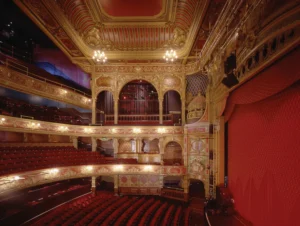
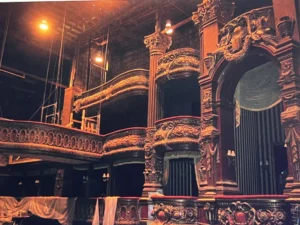
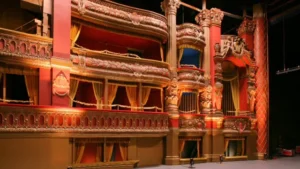
For my final project I had an idea inspired by the musical/film The Phantom of the Opera minus the obviously really weird creepy part. The idea is that you are a composer at an opera, and you have to be able to compose at least a good amount of the music while jump scares happen in the game.

I will be using my Arduino to create and connect the composer’s batons to my code and will connect the batons’ position to certain notes or volume or pitches or tempo (still unsure about what I want to do with this since its very complex) so when you try to move the sticks the position will translate to musical notes.

I will use p5 to code the design and the UI of the game and translate motion of the batons to actual events in the game.

I’m still unsure if I want to keep the jump scare component or if I want to keep it so that you just try to compose the music,  but for now this is the main concept I have in mind.

Visuals


Week 11 Reading Reflection

Design Meets Disability

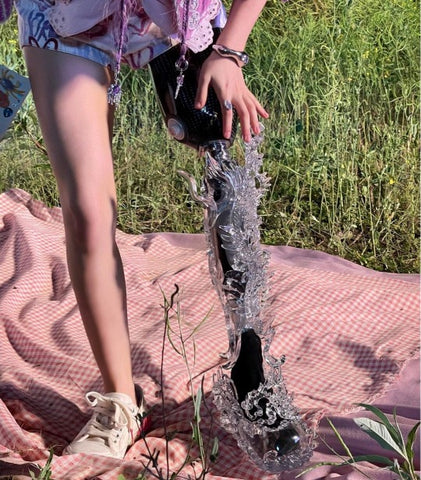
The first thing I thought of when reading the text is when Chinese jewelry brand YVMIN designed prosthetics for the Chinese model Xiao Yang. They were honestly like no other prosthetic I had ever seen attached below are only some of the designs:

This text coupled with my memory of the model made me think about how inclusivity, design, and functionality should be combined in a product. A lot of the times people with disabilities face problems with self-esteem and self-image, so incorporating incredible designs to me feels like an important aspect of building any product. Especially when looking at how glasses are seen as fashionable items; I even remember hearing people tell me about how they would fake not being able to read letters at the doctor’s office to get glasses.

Nonetheless, I feel that a product without all three elements is incomplete. A lot of the times you see certain elements incorporated into a product for the sake of aesthetics that just end up making using the product much more difficult. Or sometimes the design just looks ugly altogether.

This reading was really eye-opening and made me reflect on how I should incorporate all three elements into my designs to make them most effiicient and accessible.

Also yes I forgot to mention, including fashion with products made for disabilities is brilliant whether its in glasses, hearing aids, prosthetics, or bionics.

Week 10 Musical Instrument – Deema & Dina

Github Link

https://github.com/da3755-ui/intro-to-im/blob/c068b1ccbdb5f327243be9640104c9f9cde83fe1/IntroToIM_MusicalInstrumentAssignment.ino 

Demo on Deema’s page

Concept

For this week’s assignment, we had to create a musical instrument that incorporates both digital and analog input. The concept we came up with was inspired by the floor piano tiles that play notes when you step on them. So, we built a similar concept where we created tiles that produce musical notes when stepped/pressed on AND we incorporated a potentiometer that changes the pitch of the note depending on how you twist and turn it. 

We created three tiles in total. We built it so that no specific tile is linked to a specific note. Just that when you press any tile, a note plays; and if you step again on any other tile, the next note in the sequence plays.

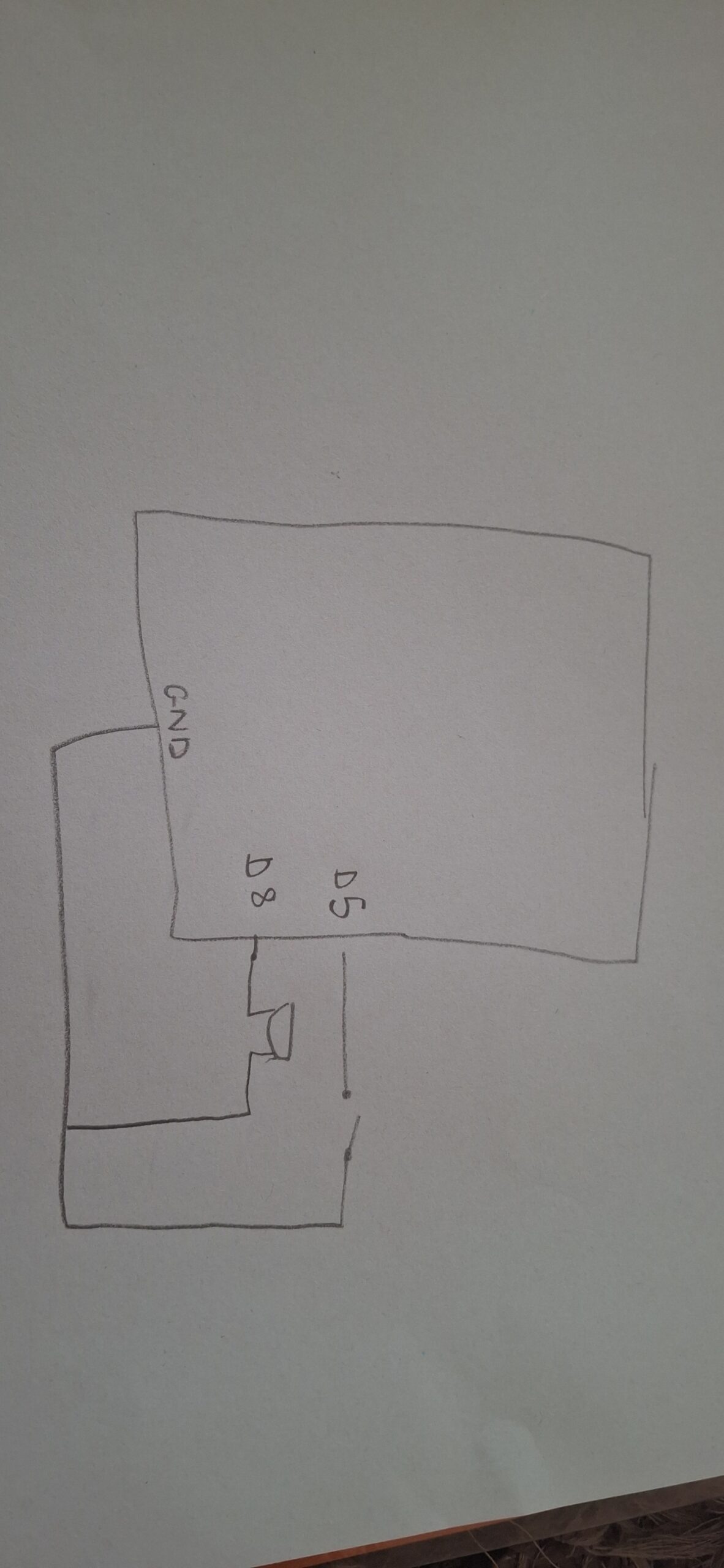
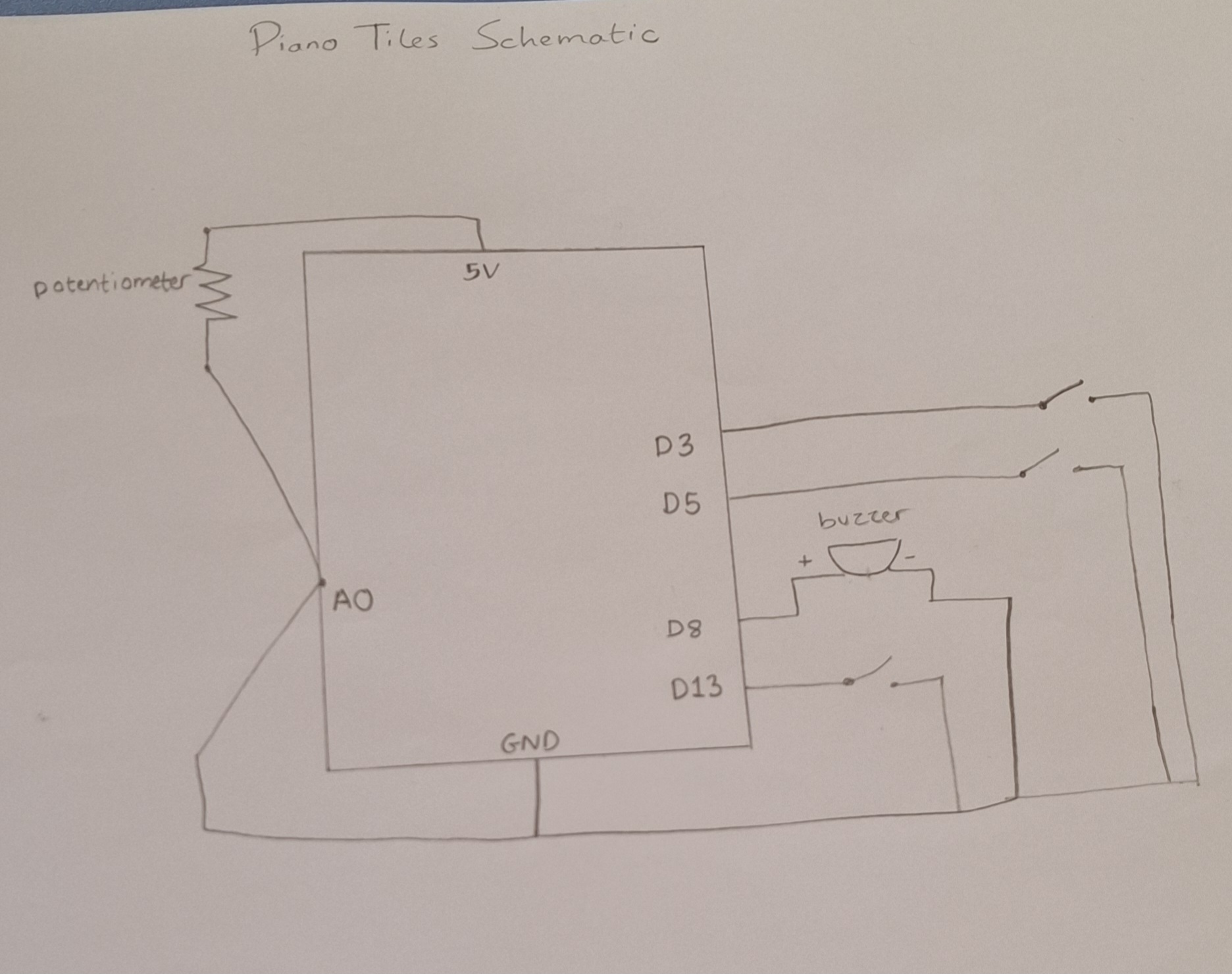
Schematic 

The Process

First, for the piano tiles, we decided to follow the same logic we used in the invisible switch assignment: foils attached to wires that generate power when they make contact, once that was complete, we moved on to incorporating the analog component. We placed the potentiometer and connected it to an analog pin, a 5V pin, and a GND pin. 

For the code:

In order for the arduino to not translate every single LOW reading from a single step into multiple notes, we included a lastTileState component, where the buzzer will only translate the LOW reading to a note if the previous state of the tile was HIGH. This would prevent the tiles from playing multiple notes in one single press.

We had to figure out a way to change the pitch of the notes without completely changing what the note was. Since there is a trend among the notes where if you want to move from a note from higher pitch to a lower or vice versa, the note’s pitch value/frequency would need to either be divided by 2 or multiplied by 2. 

For example: standard Do sound = C4; a lower pitch would be C3. The difference between the pitch of the two is that C4 is double C3

For that we mapped the potentiometer’s input values (0, 1023) to (50, 200) and divided by 100, this allows us to shift between notes and their pitches smoothly using the potentiometer. 

We multiplied this factor to the original note that would have been played and set the tone to include the multiplied value as the frequency in the tone statement.

Originally I had the pitch and factor as just mapping the potentiometer values to the values of all the notes (31, 4978) so the note that is played would correspond to the values of the potentiometer. But then I realized this would change the notes altogether instead of just changing the pitches of the specific notes I chose, that’s when I used chatgpt and it suggested creating a factor component which is where I got the idea from.

I also initially tried keeping the analog and potentiometer section separate from the digital section of the code, adding a separate tone statement for the pitch and another one for the regular notes, but it caused an error, so I had to resort to figuring out a way to incorporate the pitch and analog section in the same section as the digital input.

I also tried incorporating a step counter within the if statement, but it practically added nothing and was not communicating anything to the code so I just removed it entirely.

Code Snippet

I’m personally proud of this if statement snippet because it helped me solve the problem of when to detect if the tiles were JUST pressed instead of if it’s pressed in general, which helped me avoid many problems. It also helped me to get rid of many variables I tried to include to keep track of the steps and presses.

if (
  (tileOneState==LOW && lastTileOneState==HIGH) ||
  (tileTwoState==LOW && lastTileTwoState==HIGH) ||
  (tileThreeState==LOW && lastTileThreeState==HIGH)
)


Week 10 – Reading Report

A Brief Rant On The Future Of Interaction Design

I enjoyed this reading because what he described is something I have actually experienced first-hand with my younger brother, who had to start KG (kindergarten) online due to COVID. Multiple of children who started their developmental learning stage online lack certain motor skills  which definitely could have been better had they experienced their early learning stage physically.

Although I am not fully against the idea of technology, I do believe it can alter and impact development, especially for younger people; it inhibits your body and brain’s full capabilities. Which is something we can see happening more commonly nowadays, especially with the rise of AI, where people are becoming less capable of doing certain tasks in one sitting without reliance on AI models or taking interval breaks in between 15 minutes. To some extent this text made me reflect on my own usage of certain technologies and media platforms; they should be a supplement and influence and not a replacement to my own capabilities. The text allowed me to reflect on how I should be using the technologies at hand.

I think I particularly enjoyed the reading more because it was more casual than academic. I think when someone speaks from more experience, it becomes more relatable and understandable.

Responses: A Brief Rant on the Future of Interaction Design

I think the people who gave such responses to the post took it to heart a little too much. I’ve heard too many people nowadays who are given a pen and paper say that they haven’t written something by hand in so long. It would be too repetitive if the author gave solutions because then again, the author cannot control how the users use technologies; that’s up to them to decide.  The author should not have to answer every single detail and spoon-feed the readers how to act, which, come to think of it, is what the previous reading was discussing: giving users hints instead of direct instruction.

I don’t honestly believe the questions posed were even meaningful.

WEEK 9 HAPPY BIRTHDAY CONCEPT

https://github.com/da3755-ui/intro-to-im/blob/904200aaa8c70e0606c6851ffc5c46abe5d63b96/BirthdayConcept_IntroToIM_Week9.ino


The Concept

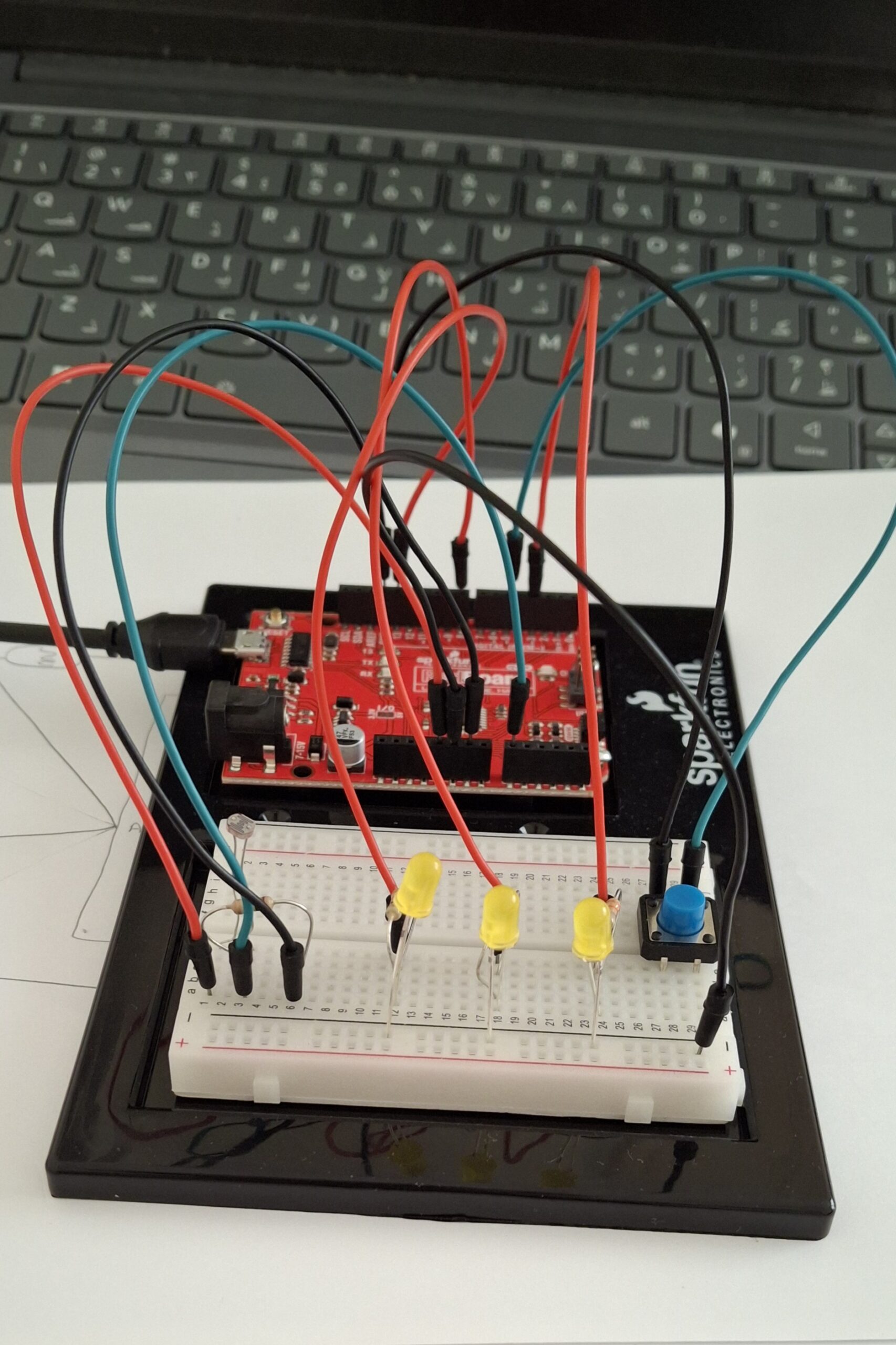
For this week’s assignment, I decided to incorporate the concept of birthday candles (lighting them up and blowing them out). My LEDs act as my candles, my button acts as a lighter, and the LDR/photocell senses my blowing (will explain).

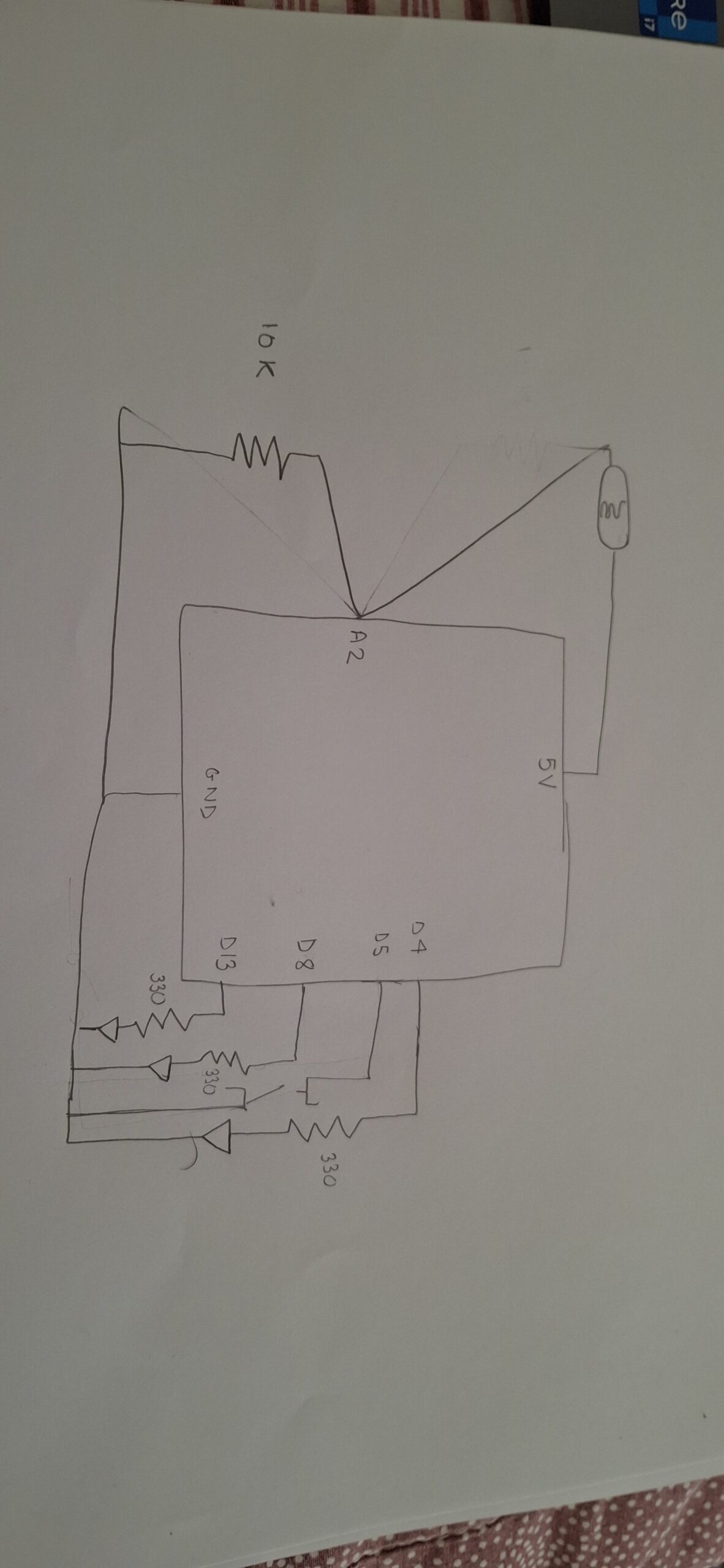
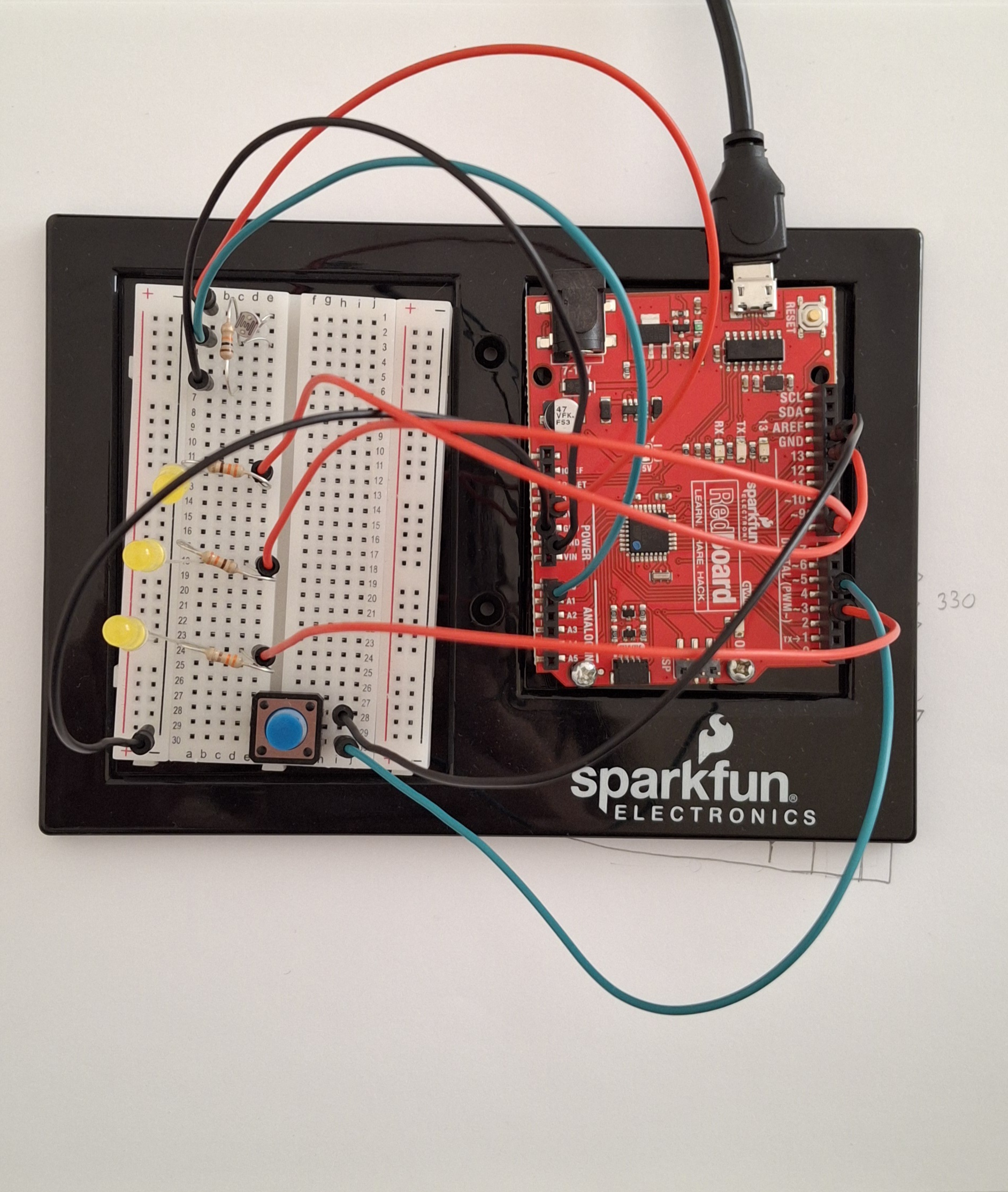
I used a button (digital input) to be able to control my 3 LEDs. Once I hit the button, the LEDs turn on one after the other. The blowing concept works through my photocell. When you put your face closer to the photocell and the LEDs to blow, the light from the LEDs reflects on your face; this light reflection is further read by the photocell, and the reading increases. Once my photocell takes in that higher reading, the candles/LEDs turn off one after the other as well.

Process and Challenges

To do my led set-up, I followed a diagram I found online, but I altered some of it to how I wanted it to fit my set-up.

I first started by setting up my LED system before adding in my photocell, just to make sure the base part is working. I built the system successfully and moved on to add my photocell.

Adding in the photocell and getting its readings was the most challenging part of the process. I set up my photocell and connected it to a 10k resistor and an analog pin. However, the readings were not accurate at all. For example, covering the photocell would not decrease the reading. At that point, I decided that maybe because I’m testing it during the day, there is no dramatic shift in lighting for the photocell to read (that was wrong).

After a while had passed, I was thinking about my project, and I realized I had forgotten to attach a 5V pin to my photocell, and I forgot to attach my photocell to ground. That explained a lot of why the readings were inaccurate.

Once I plugged in the wires correctly, the readings were still inconsistent and inaccurate. Thats when I decided to fully take down the entire system and start with the photocell first.

I watched a YouTube video to ensure I have the right connectivity and rebuilt my voltage distributor and photocell system. The readings then became accurate. I added in my LED system that I removed and it worked.

I originally wanted each LED to light up after each singular clip so it would be:

  • first button press = turn on first led
  • second button press = keep first led on and turn on second led
  • third button press = keep first and second leds on and turn on the third

but that would have required me to use specific array functions which were difficult for me to implement.

Code Highlight:

I’m happy with the way I let the led lights light up one after the other after hitting the button

if (state == LOW) {   // if the button is pressed, the leds/candles will light up one after the other
  digitalWrite(led1Pin, HIGH);
  delay(2000);
  digitalWrite(led2Pin, HIGH);
  delay(2000);
  digitalWrite(led3Pin, HIGH);
  delay(2000);
}


Circuit Schematic

Circuit look

References

Because my photocell readings would only keep decreasing no matter what, I used Gemini AI to explain to me whether the reading from my photocell should increase or decrease when the area gets brighter. It also told me to check my connectivity, because if my photocell’s resistor was connected to one of the wires, the readings would be flipped, but that was not the case for me.

Arduino Push Button with Multiple LEDs [Tutorial]


Week 9 Reading

Physical Computing’s Greatest hits and misses

This was definitely an interesting read. I was surprised at how many of the experiences we have, such as the dancing game at the arcade, incorporate the concepts we learned in class. This definitely made me think of just how simple some of these experiences really are built when I actually once thought they were extremely complex to build. Especially since we touched over some of the concepts in class such as the hand cursor. It helped me gain some inspiration of what I may want to include in this week’s assignment. I was confused by the title of the text after I finished reading it, because of all the examples mentioned in the text, I didn’t find an example or theme mentioned that would be considered a “miss.”

Making Interactive Art: Set the Stage, Then Shut Up and Listen

This reading made me reflect back on the text we read in the first half of the semester about giving users indicators of how to use certain systems. I remember when I read that specific reading, I fully agreed with the author that indicators should definitely be included in designs, but after reading this text, my opinion has changed.

I think the idea of just giving hints to the users of what to do, instead of fully spoon-feeding it to them, makes an experience much more entertaining and fulfilling.

I think what fully changed my opinion is when I thought of my previous experiences in an interactive space, which was TeamLab, in order to fully decide whether I would have enjoyed explicit indicators or not. I remember in one the zones, you had the opportunity to write your name on a lizard or drawing of your choice, and it would be scanned and projected on the ground. Naturally, I followed my lizard, and was completely surprised when my lizard was “killed” when I stepped on it. I definitely think my discovering of this on my own made it much more entertaining experience than it would have if someone had told me that this is possible. It made it feel more fun as I felt that I “discovered” or “achieved” something new.


Unusual Switch

https://github.com/da3755-ui/intro-to-im/blob/84cc7d7002b1b2e0cfad3839631bc4e4fa16566c/UnusualSwitchAssignment_IntroToIM.ino


The Concept

For this assignment I had two attempts and changed my concept. my first concept was a switch that lights up when you put glasses on. I ended up changing it to a led that lights up when a book is closed.

The Process

I used the same process for both concepts. Connected to my breadboard was an led with a jumper wire connected from the longer leg to a digital pin, and from the shorter leg a resistor then a wire connecting to ground.

For my conductor I used aluminum foil. I put aluminum foil on two pages of the book and placed a jumper wires on each foil. the first wire is connected to ground while the second to a digital pin. When the book closes, the foils touch the led lights up.

Challenges

The main challenge was in my glasses concept. ALthough my wiring and code were correct, I had a problem with connecting the foils and the wires together and getting them to light up the LED. After removing the wires from the foils and putting them towards each other I realized the issue. To fix this for my book concept, I made sure the tips of the wires were properly secured to the foil to ensure proper conduction for the foils.

I also  had to watch many Youtube videos after my failed attempt to get a full understanding of the difference between digital pins and power, understanding how LEDs work, and how circuits open and close with the arduino. I also watched many tutorials on digital read, write, and inputs to understand how it works. I also rewatched the lectures and decided to switch my code from using INPUT to INPUT_PULLUP after I heard someone  in class say it helps since arduino already has a built in resistor and this makes it mroe stable.

Code snippet

  if (state == LOW) {   
    digitalWrite(ledPin, HIGH);
  } else {
    digitalWrite(ledPin, LOW);
  }
  // digitalWrite(ledPin, HIGH);
}

I am actually most proud of the commented out code. This code is what helped me understand whether the problem in my failed attempt was because of wiring or because of the foils. After commenting out almost everythung out, leaving only relevant code, and adding this final line of code, I realized the led was working and the issue was with the foil.

Reflection

For future works I would love to create something with other forms of sensors like a sound sensor so the switch can light up with sound.

References

I also cant figure out how to move the code to github so here is the code

int book = 2;
int ledPin = 13;

void setup() {
  pinMode(book, INPUT_PULLUP);
  pinMode(ledPin, OUTPUT);
}

void loop() {
  int state = digitalRead(book);

  if (state == LOW) {   
    digitalWrite(ledPin, HIGH);
  } else {
    digitalWrite(ledPin, LOW);
  }
  // digitalWrite(ledPin, HIGH);
}


Week 8 Reading Reflection

Emotion & Design: Attractive things work better

This was definitely an interesting reading, which, in summary, discussed the positive relationship between aesthetics and usability. Norman makes the point that although aesthetics do not play a role in the function of a certain design, they allow the user to forgive or overlook certain shortcomings in a design.

I will admit, initially, I was skeptical about his idea. I assumed that it doesn’t matter if a design is aesthetically pleasing; if it works, then that’s what matters. But my perspective shifted when one of the lines mentioned a clean versus a dirty lookng car, especially since cars are things I look at much more frequently than I analyze designs. That made me realize that even without realizing it, we are drawn to more aesthetically pleasing designs and are almost tricked into thinking that something works better when it looks better. As I think back on my mid-term project, I also make a connection where if I had included more graphics and visual elements, I would have been able to overlook certain drawbacks in the game.

Overall, I gradually got more and more convinced by his idea the more I read, and I fully believe in his idea.

Her Code Got Humans on the Moon

I really appreciated how this reading highlighted the idea of Hamilton being the backbone of software programming and space exploration, especially the part that emphasized that she and the team were practically inventing key concepts of programming.

One of the things I particularly liked was the labelling of her as a positive radical and her ability to foresee certain mistakes before they happen. It really portrayed her passion towards programming and that she took it as more than just a career. It also still made me think about her motivations when programming and her meticulous nature. Especially since she faced ridicule as she mentioned for being a working mother. It made me question whether her detail-oriented nature was a result of her passion or fear of further ridicule and facing even further criticisms and blame.

I thought the text was concise, straight to the point, and delivered an important message in a beautiful way. I loved how it didn’t stop at just the process of Hamilton programming before the Apollo launch, but even mentioned what happened during the Apollo launch and how Hamilton had to quickly find a way to fix the error that occurred despite her constant warnings. It focused on both the process and the outcome.

Midterm Project

CODE LINK: https://github.com/da3755-ui/prevent-the-fall-of-anakin/tree/0bb35bd64d3ea936cd7af481df04f440cf2f55b8/js

The Concept

For my midterm project, I decided to create a choice-making game based on the Star Wars film series. The concept is that you have the choice to control the events in the film Revenge of the Sith, following up to Anakin Skywalker becoming Darth Vader. You get to control key events in the film to try to prevent Anakin Skywalker from becoming Darth Vader.

The Process and Challenges

I first started out by creating the starting page of the game on p5. I downloaded an image that I had and added a sound in the background in the draw function. I added the full-screen option and resized the window accordingly. My initial plan for the instructions page was for you to click an instructions button, and a box would appear telling you the instructions. I built the instructions button and the box appearing, but then I didn’t end up liking it as much as I thought I would. That’s when I decided to make the instructions appear in the same way the opening crawl appears at the beginning of every Star Wars film. I found a website that creates crawls and made one. The only problem was that the video was 90 MB, and p5 only supports up to 5 MB. I tried cutting up the video into several videos and playing them one after the other, but that was not working. It would only play one video, or it would play each one under the other in the same window at the same time. That made it extremely difficult to create the idea I wanted, and it made running p5 very uncooperative, as the page would refuse to load and p5 would crash.

That’s when I decided to switch to VS Code.

After switching to VS Code, I uploaded the instructions video, and it worked perfectly. A problem I faced however was that the background audio kept running overitself over and over again, so I switched its location to the setup() function and it worked. My sister told me afterwards, to include a way to skip the instructions because that would make debugging easier and playing much more enjoyable. I created a Skip button and a start button, but I ended up removing the skip button altogether since the start button served the same purpose.

I then began creating the nodes and game states. To do that, I decided to incorporate Object-Oriented Programming to create each question in its own seperate class instead of repeatedly writing down the questions and option buttons. I created my first question class and used it as a template. I attempted to use a for loop to run through the class because that’s what I assumed I had to do. Then I decided to completely omit the for loop and just accessing the classes without loops.

After accessing the question from my class, I started working on the conditional aspect of changing the node after clicking the choice you want. I tried doing a typical option1Button.mousePressed(xyz), but it wasn’t working. So I asked ChatGPT and it told me it’s because I’m not accessing the class itself so I had to include the array name before.

Following that, I started actually working with my game states. (since my game is a choice-making game, I had to incroporate a state for every single node). I used the following code example: if (firstQuestion[0].option1Button.mousePressed()){ gameState===’node2′; }. I used this because my if statements in the beginning of my game call to draw the other nodes once the game state changes. This did not work and I was not able to access my other node/question when I clicked the choice button..After multiple attempts at debugging like trying to make the background black to cover over the previous start page,  I resorted to ChatGPT which suggested I make a seperate transition function to be called when the buttons are pressed. This transition function would change the game state successfully and allow me to switch between nodes/questions since this was the structure of my game states:

function draw(){
//creating the conditions that will allow to switch between nodes
 if (gameState === 'start') {
    drawStartScreen();
  } else if(gameState==='instructions'){
    drawInstructions();
  } else   if (gameState==='node1'){//what happens in the first node and so on
    drawNode1();
  } else if (gameState==='node2'){
    drawNode2();
  } else if (gameState==='node3'){
    drawNode3();
  } else if(gameState==='node4'){
    drawNode4();
  } else if(gameState==='node5'){
    drawNode5();
  } else if(gameState==='node6'){
    drawNode6();
  } else if(gameState==='node7'){
    drawNode7();
  } else if(gameState==='sithEnding'){
    drawSithEnding();
  } else if(gameState==='deathEnding'){
    drawDeathEnding();
  } else if(gameState==='happyEnding'){
    drawHappyEnding();
  }
}

I then wrote the specific draw functions for each node. The concept of the transition node was extremely helpful and I used it repeatedly across my code. I proceeded to repeat the pattern of transition functions —> changing the node —> writing my drawNode functions.

I repeated this cycle across my timeline until I had to code the endings. Once I finished my endings, I had to incorporate a method to reset the game. At the endings of my timeline, I included a restart button. This button would call a transition function. This transition function would change the node back to ‘start’ again, effectively reseting the game.

Part I’m Most Proud Of

I’m most proud of using OOP for my questions and choice buttons. I think that was one of the most effective and efficient ways I could have run my code. It saved me so much time that could have been wasted debugging and searching for which question in particular to fix. It kept everything organized and structured.

class Question1{
    constructor(question, option1, option2){
        this.question = question;
        this.option1 = option1;
        this.option2 = option2;
    
        this.option1Button=createButton(this.option1);
        this.option1Button.style('font-size', '18px');
        this.option1Button.style('font-family', 'titleFont');
        this.option1Button.style('color', 'white');
        this.option1Button.style('background-color', 'black');
        this.option1Button.style('text-align', 'center');
        this.option1Button.style('border', 'none');
        this.option1Button.size(500, 80);
        this.option1Button.position(width*0.25 - 250, height/1.5);
        this.option1Button.hide();
    
    
        this.option2Button=createButton(this.option2);
        this.option2Button.style('font-size', '18px');
        this.option2Button.style('font-family', 'titleFont');
        this.option2Button.style('color', 'white');
        this.option2Button.style('background-color', 'black');
        this.option2Button.style('text-align', 'center');
        this.option2Button.style('border', 'none');
        this.option2Button.size(500, 80);
        this.option2Button.position(width*0.75 - 250, height/1.5);
        this.option2Button.hide();
    
    
    }


    display(){
        fill('white')
        textFont(titleFont); 
        textSize(34);
        textAlign(CENTER, CENTER)
        text(this.question, width/2, height/3);
    }
    show(){
        this.option1Button.show();
        this.option2Button.show();
    }
    hide(){
        this.option1Button.hide();
        this.option2Button.hide();
    }
}

AI Disclosure

I used Gemini to produce the backdrop images of the nodes. I used ChatGPT to debug issues such as:

  1. The soundtrack playing repeatedly, ChatGPT told me to move my soundtrack.play to setup() since draw() runs 60 times a second
  2. The nodes would not switch but that was because I did not know the difference between = and ===. ChatGPT explained the difference to me, and I was able to know when to use = and ===
  3. I was not able to change nodes when I click buttons, this was the structure I tried incorporating:
    (firstQuestion[0].option1Button.mousePressed()){ gameState==='node2'; }
    

    but it did not work and it refused to switch nodes. ChatGPT told me to incoroporate the transition nodes. That was I believe the most beneficial and efficient parts that ChatGPT told me to incorporate. Without it my code would be extremely chaotic and difficult to debug. It was extremely beneificial, and it allowed me to create the pattern I would use to switch out the node and game states. It was a one time suggestion, but it was something I repeatedly included in multiple parts of the code. Even within restarting  the game I used it. And also, towards the end of coding my instructions video was changing its position differently than I coded it. So, I applied the transition function to only call the video when the instructions button is pressed.

  4. My buttons would not be in the correct position until I hit full-screen, so ChatGPT told me to put their code in my windowResized function
  5. I used the CoPilot extension in VS Code to change stylistic components of my buttons. After I finished the project and posted the github link, I realized that I had been working on the project with my computer zoomed out to 33% instead of it being at the default 100%. So I asked the extension to change all the text and button sizes 66% smaller to fit the frame correctly. I did this to save time instead of going to every singular text and button and manually changing the sizes which would have been extremely time consuming. I made it lower the positions of my buttons and change the background colors instead of manually doing it for every button and text.

All the code was written entirely by me, all AI tools were used as a supplement to debug.

Reflection:

For the future I would love to incorporate the idea of creating and animating the actual characters and allowing the users to move the characters around with the mouse, choosing which other characters to speak to and picking choices from the dialogue themselves. I would want to give it a video game style. I would have loved to create more storylines and endings for the game as well.

GAME LINK: https://da3755-ui.github.io/prevent-the-fall-of-anakin/