
Concept:
The concept of my game is a ballet opera simulation where the user controls the ballerina’s movements. Using padding on their finger tips, whenever the user presses their fingers together, the ballerina changes positions. If the user is idle or as they call it AFK for too long, the ballerina will fall and the buzzer connected with make a noise
Sketch:
https://editor.p5js.org/da3755/sketches/Za6gDoYXq
Arduino Code:
https://github.com/da3755-ui/intro-to-im/blob/da20ed409cd10566c8e7bb00e641c957f72e08c1/IntrotoImfinalproject_.ino
Visuals and More User Testing and Circuit Set Up:
https://drive.google.com/drive/folders/1mwulAEwvxRT4E3LnXxp-2LjqP0v3otrT?usp=drive_link
Schematic
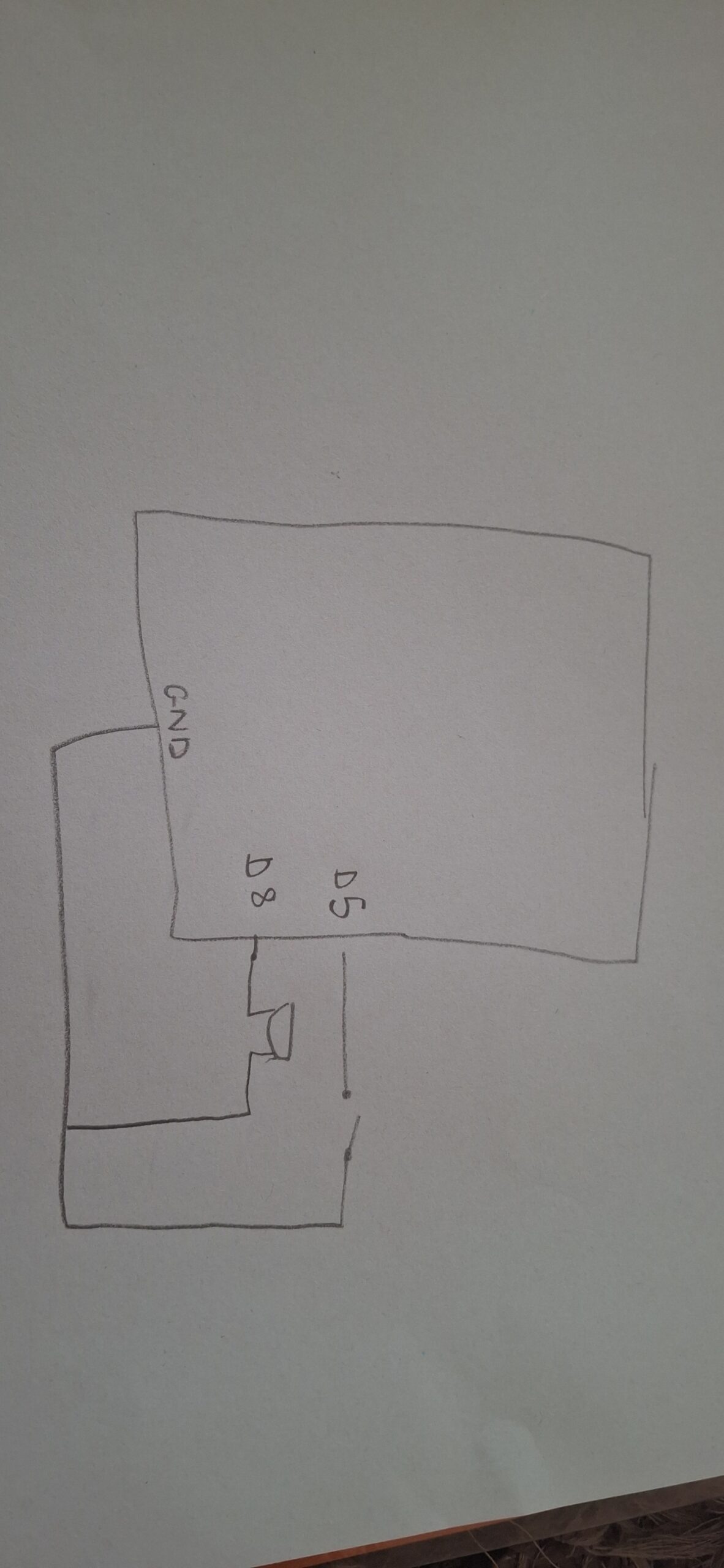
Description of interaction design
The game follows a typical bi-directional sequence. The pads of the fingertips are wires connected to aluminum foils that act as a switch when in contact. Once they make contact, for each contact, the spritesheet iterates through itself and plays the next sprite in order.
From p5’s side, I have designed it so that if you go idle for 10 seconds or more, a new spritesheet plays where the ballerina falls, and I send a signal to Arduino to play the buzzer as a “warning”
My p5 code relies on the same game state functions we had in our midterm project, where I move from start –> instructions –> game —> end. I did not use OOP in my project, which I realized a bit too late that it would have been better if I had. I used many, many if statements, which were confusing at times because of their frequency. For my first dancing spritesheet I used the typical nested loop structure we took in class, however for my second falling spritesheet I used a technique I found on YouTube that almost rapidly swipes through the sprites creating the seamless motion.
let data = port.readUntil("\n");

if (data.length > 0) {
  fromArduino = Number(trim(data));

  // Glove touched (movement detected)
  if (fromArduino === 0 && lastGloveState === 1) {
    lastTime = millis();       // reset inactivity timer
    step = (step + 1) % 6;     // advance animation
    gloveCount++;

    if (step === 0) {
      direction = (direction + 1) % 3;
    }
  }

  lastGloveState = fromArduino;
}
From Arduino, I actually faced a lot of problems with my buzzer, it was just constantly ringing the whole time, regardless of me uploading my code onto it or not. I was also initially using the tone() that we took in class but it was honestly just ringing throughout the entire house. I used ChatGPT to ask what the issue was, and it told me I have an active piezo buzzer. So I went on YouTube to understand how to use it and watched a tutorial I used. I found out that active buzzers use digital readings.
int songStatus = digitalRead(changePoses);

Serial.println(songStatus);

delay(100);

if (Serial.available()) {
  digitalWrite(LED_BUILTIN, HIGH); // led on while receiving data

  int warning = Serial.parseInt();

  if (Serial.read() == '\n') {
    digitalWrite(buzzer, warning);

}
The most challenging part was getting both spritesheets to work. I watched several tutorials on how to iterate smoothly between the sprites but it was either they were using p5.play or something called canvas. I kept going through trial and error until I found the right video tutorial. Also sometimes the sprites would not have equal distance between them, so splitting up the spritesheet was difficulty and I had to manually do it using Canva and a spritesheet maker online. Another difficult aspect was the p5 to arduino connection that made the ballerina fall and the buzzer ring. I had the right logic but it was not working correctly until several trial and error and research.
I think I’m most proud of the finger touch detection because it took a lot of trial and error to figure out how to get the detection and I remembered the lastXstate we used in our musical instrument assignment.
An early challenge I had was that the page would not load ever. I tried switching to VS Code to test out if the problem is with p5 or the code. After switching over to VS it still didn’t work. I tried Googling what I could do but it didn’t work. I then played another audio instead to check if the issue is with p5 or with the file, and the other audio played. I then asked ChatGPT and it told its because my audio file’s name is too big.
I also watched a video about how to animate on JavaScript and tried implementing it but it did not work. That’s when I found out it’s because the user was using an application called Canvas which uses certain functions p5 does not have. The code is available on my sketch under index.js but it’s commented out.
Also my buzzer was just constantly constantly ringing without me doing anything, but I was messing around with the wiring before I fixed my code and realized that the buzzer activates itself with just wiring even if I don’t put in code. After I uploaded my code it stopped making a noise.
AND my ballerina refused to fall. After asking CoPilot it told me to incorporate a modulo which is similiar to my time elapsed feature. This way the frames don’t move too fast to see (approx changing in 0.08 seconds).
Future Reflection:
For the future I would love to implement a way to actually be able to assign beats to the finger presses, so the buzzer and falling is more linked to missing or adding a beat than just being idle.
I also wonder if there’s a way to wirelessly connect something to my Arduino, it would have made using the finger pads much easier without having to carry the breadboard and Arduino with me the whole time.
Also I will be fixing certain aesthetic elements such as the font.
References:
AI DISCLOSURE:
AI was used for the following:
- generating images, sprites, and backgrounds. It honestly didn’t do the best job with spritesheets. Every sprite was super stuck to the other and the spacing between the sprites were iconsistent, which I had to fix myself.
- detecting issues with buzzer. ChatGPT told me its an active piezo buzzer, and gave me ways to troubleshoot and figure out if my buzzer is broken, if there’s a wiring problem, or a problem with the code. It was none of them
- debugging code such as declaring booleans i forgot to declared before
- fixing animation timing (the ballerina would either never fall or fall then disappear or fall quickly)
- I tried using frameRate because that’s what I used when testing out my animation on another sketch, but AI (not sure whether it was ChatGPT or CoPilot) told me that I can’t use frameRate in my code because it resets it for everything in the sketch.
- My logic was correct, but not ordered correctly I’m assuming. Honestly, I’m not really sure, I used pretty much the same logic as CoPilot I had more things included but mine didn’t work. I think it’s because the CoPilot added a modulo feature in order to time the animation of falling correctly. This is because when I was adding and removing elements from my code and CoPilot’s, the modulo component was the one that made the difference.
- From my observations CoPilot helps better than ChatGPT
https://projecthub.arduino.cc/SURYATEJA/use-a-buzzer-module-piezo-speaker-using-arduino-uno-cf4191
https://forum.processing.org/two/discussion/12119/removing-an-image-once-it-s-drawn.html
https://stackoverflow.com/questions/52133058/how-to-make-my-countdown-timer-dont-start-from-the-beginning-when-refreshing-th
https://p5js.org/reference/p5/background/
https://p5js.org/reference/p5/frameRate/
https://p5js.org/reference/p5/image/
https://github.com/fahadhaidari/game-code-bites/blob/master/spritesheet-animation/index.html
https://forum.processing.org/two/discussion/23003/how-to-use-millis-to-display-images-every-x-seconds.html
https://forum.arduino.cc/t/counting-incoming-signal/663387
https://spritesheetgenerator.online/editor
https://docs.arduino.cc/built-in-examples/digital/toneMelody/