Inside Your Mind – Interactive Fluid Typography Experience
Introduction
Imagine how many thoughts are running through your mind every day. How many memories are replaying without your permission. How many feelings are sitting quietly beneath the surface, waiting. How many processes – conscious and unconscious – are happening all at once, shaping how you see the world, how you move through it, how you feel.
We talk about the mind constantly, but we rarely feel it. We describe it in words but what if you could actually move through it?
That’s what this project asks. Let’s have a look – together.
Project Description
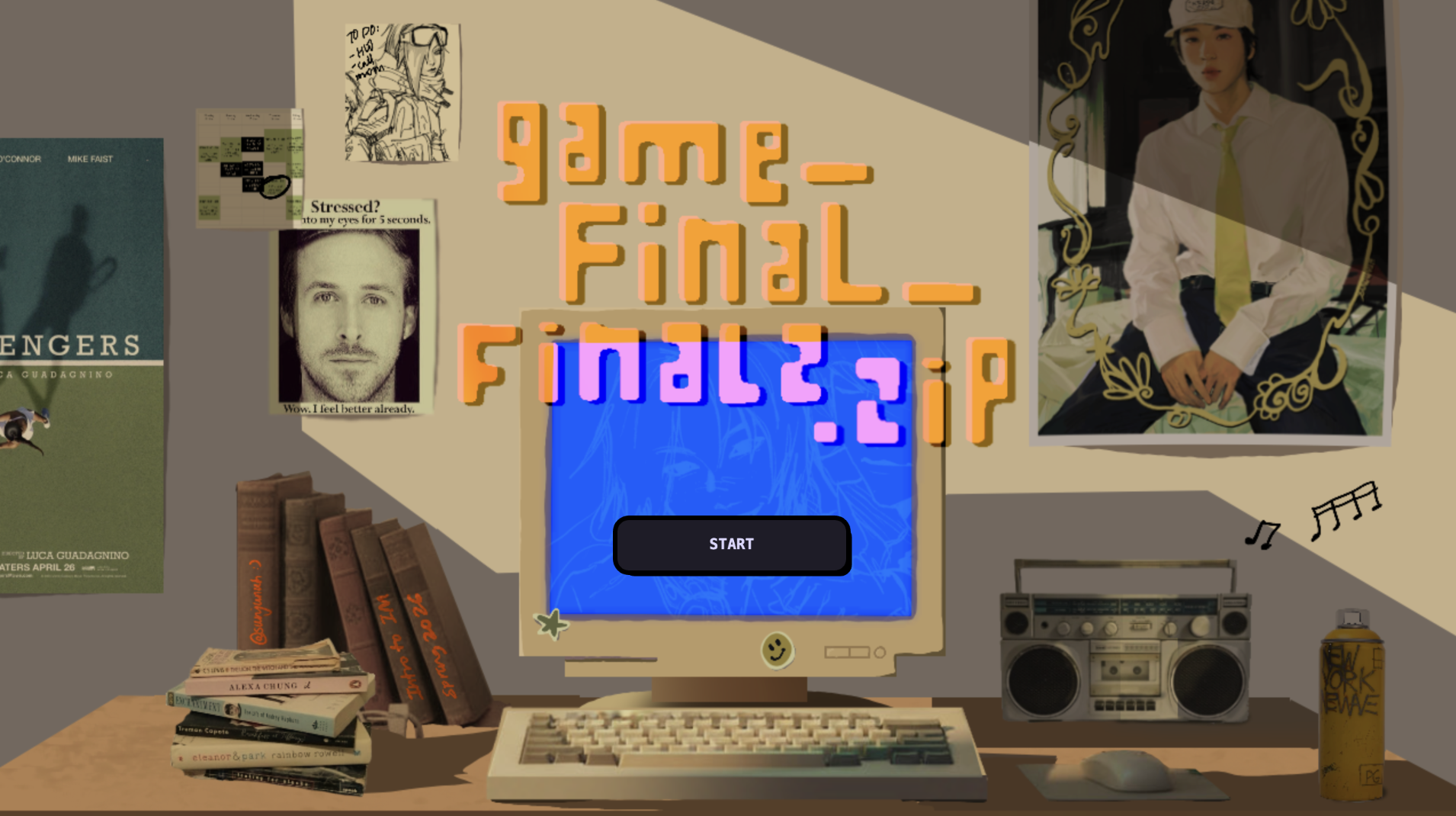
Inside Your Mind is an interactive fluid typography experience built in p5.js. It is not a game. There are no rules, no score, no way to win or lose. It is a guided journey through four psychological stages of the mind rendered through particle-based text and cursor interaction and sound. The experience opens with a cinematic intro sequence: a personal greeting, a typewriter reveal of my name, a search bar that slowly types “inside your mind” before the background fades to black and the particle world begins. From there, users navigate four chapters by scrolling:
Stage 1 – Noise: The state of mind this stage represents is the one most people know intimately but rarely name: moment when there are too many thoughts happening at the same time. Not anxiety exactly just overwhelm. The cognitive noise of existing. Everything arriving at once with equal urgency.
The design decision for this stage was to make the particles rain. They fall from above, guided by Perlin noise so their path is irregular and organic rather than mechanical each particle taking a slightly different route down, bumping and drifting as it descends. Once they land and form the text, they don’t rest. A constant random jitter force kicks each particle slightly every single frame, meaning the text is technically legible but permanently restless. It holds its shape just enough to be read, but never settles. You can feel it trying to stay coherent and failing slightly, constantly.
The cursor scatters particles on approach, because that is exactly what external input feels like in this state one more thing arriving, breaking whatever fragile order existed. The soundscape is a deep. It is the sound of pressure. Of weight. The cursor sound is wind: a pink noise burst filtered through a bandpass, airy and formless. You are moving through something thick.
The color palette is deep violet and soft lavender, the color of a headache, of overstimulation, of a mind working too hard at the wrong hour.
Stage 2 – Overthink: “you replay every moment”
Overthinking is not the same as noise. Where noise is chaotic and arriving, overthinking is circular. It is the experience of returning, repeatedly and involuntarily, to the same thought, the same conversation, the same moment, unable to leave it behind or fully process it.
The particle behavior for this stage is orbit. Every single particle loops a small ellipse around its home position continuously, the orbit radius and speed are randomized per particle, but the character is circular. Going around. Coming back. Going around again. The ambient sound is a slow pad chord progression. It is not unpleasant, but it is repetitive by design. You start to recognize it coming around again. The cursor sound is a soft water drop. Small. Like a single thought landing. And then another. And another.
The color palette shifts to ice blue cooler, more cerebral than Stage 1.
Stage 3 – Break:
“it’s too much you shatter”
Every state of overthinking and overwhelm eventually reaches a threshold. Stage 3 is that threshold. The design principle here was simple and deliberate: before the breaking, I thought there must be stillness. Tension requires silence before it can release.
When you arrive in Stage 3, nothing moves. The particles sit perfectly at their home positions, forming the text with complete stillness. The spring force in this stage is the strongest of all four as particles snap back to home almost instantly if disturbed. The text holds. Then the user clicks and the wave fires from the cursor position. An expanding ring of force radiates outward, hitting each particle as it passes through them and sending them flying. In the wave, particles at different distances react at different times, which created an effect of shattering rather than a single simultaneous blast. The spring forces pull everything home afterward, so the text reforms. It always reforms.
I think this stage is the most interactive because breaking is an active thing. You have to choose to do it. You have to click. The experience gives you the tension and then waits for you. The cursor sound is distorted white noise. The color palette is deep crimson and warm pink. The only warm colors in the entire experience, and they are the color of something going wrong.
Stage 4 – Quiet:
“finally silence”
After noise, after breaking – quiet. Quality of silence that follows intensity. The silence that has weight because of what came before it.
The particle behavior in this stage is breathing. Each particle oscillates slowly outward and inward along the radial vector from the canvas center to its home position pushed by a wave timed with a personal phase offset so the motion feels organic. The result is that the entire text gently expands and contracts, like a chest rising and falling feeling. It is the only stage where the motion is cyclical. The cursor behavior inverts here. In every other stage, the cursor repels particles, In Stage 4, the cursor gently attracts nearby particles toward it. You can gather them. Hold them. A warm golden glow appears under the cursor. The relationship between the user and the text changes from conflict to softness.
The cursor sound is a bell chime. The color palette is amber and warm white. After the cool blues and violent reds of the earlier stages, I wanted to design and show the warmth of silence.
For full experience click the embed </> for audios to work,
Demo Video Link:
https://drive.google.com/file/d/1pU6o5wXnE2DPwy-biGNz1qMbYGnZOFqN/view?usp=sharing
Process
The Idea – Fluid Typography
My starting point was my new obsession: fluid typography. I had come across a tiktok video examples of text that showed letters that flow and that was fluid typography and I was completely drawn to it. I wanted to make my own version. But as I started building it, I realised that fluid typography on its own, as beautiful as it is, is like a visual demo and for my project it needed a reason to exist, a stpry.
what story would make this feel necessary?
The mind. A mind felt like the most honest container for this kind of experience. Thoughts scatter when you try to hold them. They orbit obsessively. They shatter under pressure. They eventually go quiet. I wrote 4 stages once I had that theme. And, the theme meant that the fluid text was a tool of metaphor. The particles are the thoughts.
Adding Sound
Once the visual system was working, I experimented with adding sound and it was the right decision. Without sound, the experience was impressive but slightly cold . With sound, it gave a feelinf you were inside something.
I built the audio system using Tone.js, giving each stage its own soundscape and its own cursor sound. The cursor sounds were particularly important wind for Stage 1 (the noise, the overwhelm), water drops for Stage 2 (the repetition, the dripping thought), glitch crackle for Stage 3 (the breaking point), and bell chimes for Stage 4 (the clarity, the resonance after silence). Every time you moved the cursor you were making sound specific to where you were in the emotional journey. The sounds definetenly deepened the preoject at some point.
The Intro Sequence
As I was developing the project, I noticed a pattern on my social media feeds, motion design ads for brands, cinematic, typographic intro sequences that brands and motion designers were using to create instant atmosphere and identity. I was watching a lot of these and I thought: this is what my project needs. I don’t want just a start button, but an experience that begins before the experience begins.
So I built a full kinetic typography intro using a separate canvas: a large “hi!” that scales into view, a medium line “first lemme introduce myself” that slides up, then a typewriter effect that slowly reveals “madina” letter by letter with a blinking cursor, and finally a minimal search bar that expands from the center and types “inside your mind” before the whole screen fades to black and the landing screen unfurls. That intro turned my sketch into an authored experience and i liked it.
The Result
And then there it was. Four stages, a full narrative arc, a kinetic intro, generative sound, and 7000 particles all moving with intention. I was genuinely proud of it.
Code Deep-Dive
How the Fluid Typography Works
The core technique behind the fluid text is particle-based font sampling. it works like this:
- The text is rendered invisibly onto an offscreen p5.js graphics buffer at full canvas size
- Every pixel of that buffer is scanned, and any pixel that is lit (part of the rendered letter) becomes a target point a “home position” for a particle
- Each of the 7,000 particles is assigned one of these home positions
- Every frame, physics forces are applied, and then a spring force pulls each particle back toward its home. It took my quite time to understand the physics of it, hah.
The text only exists as the collective shape of 7,000 individual points, each with their own velocity and position.
function sampleText(lines) {
  var W  = sk.width;
  var H  = sk.height;
  var pg = sk.createGraphics(W, H);
  var lh, sy, pts, y, x;

  pg.pixelDensity(1);
  pg.background(0);
  pg.fill(255);
  pg.noStroke();
  pg.textAlign(sk.CENTER, sk.CENTER);
  pg.textStyle(sk.BOLD);
  pg.textSize(FONT_SZ);

  // render each line of text centred on the canvas
  lh = FONT_SZ * 1.32;
  sy = H / 2 - (lines.length - 1) * lh / 2;
  lines.forEach(function(l, i) { pg.text(l, W / 2, sy + i * lh); });

  pg.loadPixels();
  pts = [];

  // scan every 4th pixel — lit pixels become home positions
  for (y = 0; y < H; y += STEP) {
    for (x = 0; x < W; x += STEP) {
      if (pg.pixels[(y * W + x) * 4] > 128) {
        pts.push({ x: x, y: y });
      }
    }
  }

  pg.remove(); // clean up offscreen buffer
  return pts;
}
The next piece of code is what I’m proud of. Each stage changes the physics personality of every particle. Four different motion systems, selected by a r string:
Particle.prototype.update = function(mx, my, t) {
  var beh = CHAPTERS[currentCh].beh;

  // ── NOISE: rain from top, then constant random jitter ──
  // Feels overwhelming — particles never fully settle
  if (beh === 'noise') {
    if (this.falling) {
      this.y += 3.6 + sk.noise(this.x * 0.005, t) * 2;
      this.x += (sk.noise(this.y * 0.004, t + 99) - 0.5) * 1.2;
      if (this.y >= this.hy) { this.falling = false; }
      return;
    }
    // random kick every frame — text is alive but unstable
    this.vx += (Math.random() - 0.5) * 0.50;
    this.vy += (Math.random() - 0.5) * 0.50;
    this.vx += (this.hx - this.x) * 0.018; // very weak spring
    this.vy += (this.hy - this.y) * 0.018;
    this.vx *= 0.88; this.vy *= 0.88;

  // ── ORBIT: each particle loops a small ellipse around home ──
  // Feels obsessive — thoughts that won't stop circling
  } else if (beh === 'orbit') {
    this.orbitAngle += this.orbitSpd;
    var tx = this.hx + Math.cos(this.orbitAngle) * this.orbitR;
    var ty = this.hy + Math.sin(this.orbitAngle) * this.orbitR * 0.55;
    this.vx += (tx - this.x) * 0.055;
    this.vy += (ty - this.y) * 0.055;
    this.vx *= 0.82; this.vy *= 0.82;

  // ── FRACTURE: completely still — tension before the click ──
  // Strong spring, high damping: text holds its shape perfectly
  } else if (beh === 'fracture') {
    this.vx += (this.hx - this.x) * 0.10;
    this.vy += (this.hy - this.y) * 0.10;
    this.vx *= 0.78; this.vy *= 0.78;

  // ── BREATHE: slow radial sine pulse from canvas centre ──
  // The entire text expands and contracts like breathing
  } else if (beh === 'breathe') {
    var pulse = Math.sin(t * 0.62 + this.breathePhase) * 6.5;
    var cx2   = sk.width  / 2;
    var cy2   = sk.height / 2;
    var dhx   = this.hx - cx2;
    var dhy   = this.hy - cy2;
    var dhLen = Math.sqrt(dhx * dhx + dhy * dhy) + 0.001;
    // target = home position + outward pulse along radial direction
    var btx   = this.hx + (dhx / dhLen) * pulse;
    var bty   = this.hy + (dhy / dhLen) * pulse;
    this.vx  += (btx - this.x) * 0.026;
    this.vy  += (bty - this.y) * 0.026;
    this.vx  *= 0.88; this.vy *= 0.88;
  }

  this.x += this.vx;
  this.y += this.vy;
};
Reflections
I actually didn’t start with this idea. My original plan was to build my final project in Tinkercad – a 3D interactive game. I started the initial stages of it and then stopped: what is this going to feel like? And I didn’t love the answer. A game in Tinkercad felt too rigid for me, and I realized that what I actually care about in design is feeling. Evoking something. Making someone feel.
Aaaand this led me to p5. And once I chose it, I never looked back. Not once did I regret the pivot.
The Hard Parts
The hardest technical challenge was the fluidity itself, figuring out how to decompose text into a particle system that still read as text, while also having enough physical personality to feel alive. Getting the balance between spring force (which pulls particles home) and behavioral force (which gives each stage its character) took a lot of iteration. Too much spring and the particles snap back robotically. Too little and the text becomes unreadable. The current values are the result of many hours of tuning.
The second major challenge was performance. After building the full experience with 10,000 particles and the Tone.js audio system running simultaneously, I noticed the experience would start to lag particularly in the final Quiet stage, which has the most computationally gentle motion but was hitting the limit of what a standard laptop could handle. I solved this with two techniques: reducing the particle count from 10,000 to 7,000, and implementing a frame-rate adaptive physics system that skips physics updates on alternate frames if the frame rate drops below 40fps.
What I Learned
This project taught me that the most powerful interactive experiences are the ones where the interaction means something where what you do with your cursor is narrative. Every movement in Inside Your Mind is part of the story. That’s the principle I want to carry forward.
References

 game demo