Week 1 – Self Portrait by Aljazei Alkaabi

Concept

For this project, I created a self-portrait using p5.js that represented some of my main physical features. Since this was my first time creating a portrait completely through code, I decided to keep the design relatively simple and use basic shapes to build up the different parts of my face. I focused on features that make the portrait recognizable as me, such as my brown hair, glasses, eyelashes, eyebrows, and the pink color of my clothes and lips, i also added glasses to draw the part of me that I don’t usually show to others (I wear contacts). I also chose a bright cyan background because its one of my favorite colors. What I found interesting about this project was having to think about my face differently. Instead of drawing normally, I had to break each feature down into shapes and coordinates with colors.

How this was made

I made this self-portrait using p5.js and JavaScript. I started by creating a 500 × 500 canvas and then built the portrait step by step using basic shapes such as ellipses, rectangles, triangles, and lines. I mainly worked by changing the coordinates, sizes, stroke weights, and colors of each shape until they were positioned correctly and looked like the features I wanted to include. For learning how to work with colors in p5.js, I used The Coding Train’s YouTube videos as a reference. I also used Google to look up specific color values, especially for the brown tones in my hair and eyes and the colors that were closest to my skin tone.

While working on the code, I ran into an issue where changing the strokeWeight() for my eyelashes was also making all of the other lines in the portrait bold. I wasn’t sure why this was happening, so I used AI to troubleshoot the problem and understand how the stroke settings were affecting the rest of the code. This helped me realize that strokeWeight() continues to apply to the shapes and lines that come after it unless it is changed again. I then adjusted where I placed the stroke weight so that the thicker lines were only used for the eyelashes and glasses.

Code I’m proud of

//glasses
noFill()
stroke(0)
strokeWeight(4);
line(237, 233, 263, 233);
ellipse(300, 233, 75, 75);
ellipse(200, 233, 75, 75);
line(163, 233, 133, 225);
line(337, 233, 367, 225);

One part of my code that I am particularly proud of is the code I used to create my glasses. Although the code itself is quite simple, I found making the glasses symmetrical and positioning them correctly on my face surprisingly difficult. I had to think a lot more about the math and coordinates than I expected, which was challenging for me because math is not something I am very good at. Since everything is based on coordinates, I had to think about how far each part should be from the center of the canvas and from each other. I spent a lot of time changing the numbers and checking how the glasses looked until I finally got them to line up properly.

Reflection

I really enjoyed making this project, especially because it was my first time using p5.js and actually creating a drawing through code. At first, I found it a little confusing having to use coordinates and numbers for basically everything, especially because I am not very good at math. However, the more I changed the numbers and saw how they affected the portrait, the more I understood how everything worked. For my next project, I would like to make something more interactive instead of just having a static image. I think it would be really interesting to have something on the screen change when the user clicks or moves their mouse especially since I’ve mostly understood the basics now.

Week 1 – Self Portrait Nidhish

Concept

For my first assignment of making a self-portrait, I wanted to create a drawing that looked as much like me as possible using the basics I learned in p5.js this week. I included details such as my hairstyle, face, ears, eyes, eyebrows, moustache, beard, and clothing to make the portrait recognizable and personal. I also added sunglasses because ever since I came to Abu Dhabi, I have had to mostly wear sunglasses when I go outside because it is often very sunny and bright here. To make this detail more interesting, I programmed the sunglasses to appear when the mouse is pressed.

Since this was my first time coding in p5.js, I wanted to challenge myself while working with the techniques I had learned. I tried to include enough details to represent my appearance without making the drawing too complicated. The interactive sunglasses also allowed me to connect the portrait to my everyday life in Abu Dhabi. Overall, I aimed to create a simple but personal self-portrait that shows both what I look like and a small part of my experience living here.

Press the mouse!

Implementation

I implemented my self-portrait in p5.js using a combination of different shapes, arcs, and lines. I used ellipses to create the face, ears, and eyes, rectangles and triangles for the neck and shirt, and arcs for the hair, eyebrows, mouth, and beard. I also used lines to create the moustache, hair details, and the sunglasses. I used different colours for the skin, hair, shirt, mouth, and background to make the portrait more detailed and visually appealing.

One of the more difficult parts of the implementation was determining the exact x and y coordinates for placing each figure in the correct position. I then thought of displaying the x and y coordinates of the mouse on the screen. This made my work much easier because I could move my mouse to the exact position where I wanted to place a point or shape and then use those coordinates in my code. This helped me position the different parts of the portrait more accurately.

I also used if and else statements to make my portrait interactive. I used an if…else statement to change the background colour depending on whether the mouse was being pressed. When the mouse is pressed, the background changes to a yellow colour indicating sunlight, and when it is not pressed, the background returns to default grey. I also used an if statement with mouseIsPressed to make sunglasses appear on the portrait when the mouse is pressed. This allowed me to make my self-portrait more interactive rather than having it remain as a static drawing.

Code I am Proud of

  function draw() {  
  if (mouseIsPressed){
    background(250, 222, 133);
  }
  else{
    background(220);
  }
// Sunglasses when mouse is pressed
  if (mouseIsPressed){
    strokeWeight(4);
    line(126,198,146,227);
    line(274,198,254,227);
    line(170,235,230,235);
    fill(50);
    ellipse(165,235,50,40);
    ellipse(235,235,50,40);
  }
}

The code I am most proud of is the part of my draw() function that uses mouseIsPressed to add sunglasses to my self-portrait. I am proud of this because it allowed me to make my portrait interactive. When I press the mouse, the sunglasses appear on the face, while the background changes from grey to a bright yellow colour. The yellow background represents the bright sunlight in Abu Dhabi, which is why I connected it with the sunglasses. I liked how I was able to use an if…else statement and the mouseIsPressed function to create an interaction that also has a personal meaning. Since this was my first time coding in p5.js, I was especially proud that I was able to create this effect and connect it to my own experience.

Reflection

I enjoyed experimenting with different shapes, colours, arcs, and lines to see how they could be combined to create different facial features. I was also really happy with how the interactive sunglasses turned out. Something I would still like to improve is to make my sketch more detailed. At the moment, I mainly relied on basic shapes, but in the future I’d like to work with new shapes and explore different ways of creating more interactive and aesthetic sketches. I also think it would be a good idea to add animations in the future, as this could make my sketches more engaging and bring them more to life.


Week1–self portrait

My concept

My goal was to represent not only my appearance, but also some aspects of my personality that are important to me.

Before this assignment, I had no experience with programming or p5.js. Since I wanted to do a good job on my first assignment, I spent a lot of time learning the basics, experimenting with the code, and using different resources, including AI, to help me solve problems and develop my ideas.

I realized that simply drawing myself could not fully represent my personality. Therefore, I added an interactive element using words that are related to me. Through these interactions, I wanted to give the audience more information about my personality and make the representation of myself more complete.

How this was made?

interactive–words

//Chinese
  if(mouseIsPressed && dist(mouseX,mouseY,100,120)<40){
    text("Chinese",72,125);}
  
  //Creative
  if(mouseIsPressed && dist(mouseX,mouseY,60,250)<40){
    text("Creative",32,255);}
  
  //Hungry
  if(mouseIsPressed && dist(mouseX,mouseY,60,400)<40){
    text("Hungry",34,405);}

My goal was to make some words describing my personality appear when I press the mouse over the circles. Since I did not know how to create this interaction, I used AI to help me figure it out. Through this process, I learned how to use an if statement with mouseIsPressed and the distance between the mouse and the circle to control when the text appears. I also understood the logic behind this type of interaction, rather than just using the code without knowing how it works.

Color

For the colors, I used a website called Color Picker. I could adjust the color using its color wheel and get the corresponding RGB values. I then used these RGB values in my p5.js code to choose the colors for my project.

Shapes

For the shapes, I also used AI to help me understand how to use coordinates to control the position of different shapes. One of the most useful things I learned was how to create an arc. I learned that, besides defining its position and size, I also need to specify its start and end angles to control the direction of the arc. I found this part quite interesting.

Reflection and ideas

Reflection

I enjoyed working on this project, but it also took me a lot of time. One part that took especially long was designing the hair. Originally, I wanted to make it look more like my actual hair, with bangs and a round shape on top. I tried to use curves to create this shape, but I realized that I did not fully understand how curves work. I did not want to use code that I did not understand, so I decided to use two quarter circles instead. However, this made the top of the head look more square, and I am not completely satisfied with the result. In the future, I would like to learn how to use curves better so that I can create more complex shapes.

Another thing I noticed was that I spent a lot of time adjusting the coordinates of different elements. I often had to move them little by little and guess where they should be. For example, if an element was slightly too high or too low, I would have to keep changing its coordinates until it was in the position I wanted. I would like to learn a more efficient way to locate and adjust positions in the future.

Overall, I think this project gave me a good starting point for learning programming, and I hope that I can use these skills to create more interesting and interactive projects in the future.


Assignment 1 – Self Portrait

Concept

My goal for this assignment was to create a semi-realistic portrait of myself using the primitive shapes we explored in class such as: circles, ellipses, rectangles, quads, etc.

How this was made

I first started by mapping out where the face would be, then I added the hair underneath. Next I mapped out the shoulders and torso. Once that was done I started mapping out the facial features and adding my desired colors. For the colors, I searched up an rgb color picker that allowed me to easily customize my colors and extract the rgb components. In order to make sure that I wasn’t getting confused throughout the process, I added comments separating different parts of the drawing.

Other than the rgb picker and the p5js reference, no other tools were used.

Highlight of some code

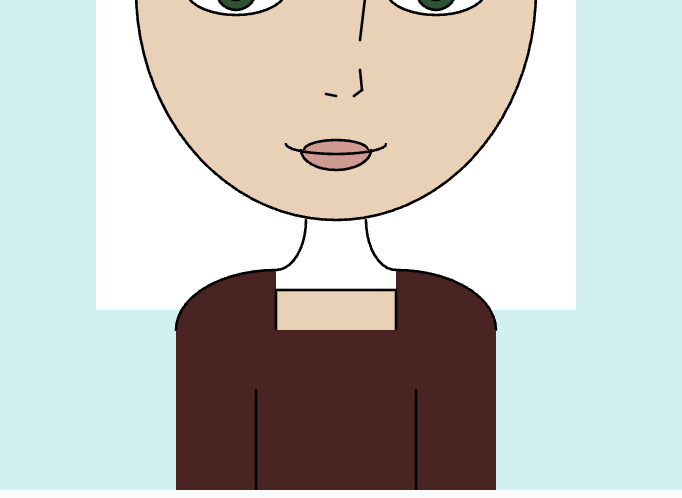
After mapping out certain areas I began with filling in with color. I found the bangs and neck area especially difficult for different reasons. For the bangs, I noticed that using multiples of PI for the start and stop would result in awkward gaps across the forehead or would extend past the hair, so I experimented by incrementing different values of PI to see what looked best. As for the neck, it was made by two arcs facing outwards which I quickly realized meant that I couldn’t simply fill the space in between. To fix this, I incorporated the use of triangles and quadrilaterals in between which took some trial and error to find the exact coordinates needed to fill in the area.

Code for bangs:

//bangs
fill(79, 55, 32);
arc(395,155, 200, 140, HALF_PI-0.1, PI+0.3);
arc(220,135, 200, 140, 0-0.1, HALF_PI+0.2);

Below is an image before I filled the neck:

Code for neck:

//neck
stroke(0);
noFill();
arc(270,365, 30, 50, 0, HALF_PI);
arc(330,365, 30, 50, HALF_PI, PI);
noStroke();
fill(237, 208, 180);
quad(291, 365, 309, 365, 331, 400, 269, 400);
triangle(285, 364, 291, 365, 283, 378);
triangle(309, 365, 315, 364, 317, 378);

Reflection

I am proud of my attempt at drawing myself using p5.js. I now have a better understanding of the syntax used and the possibilities that can be achieved using p5.js. In the future I aspire to improve my code by changing certain aspects that would make it cleaner and easier to understand. For example, I would store the rgb components for each color in different variables so that its easier to use throughout. I would also create functions that draw repeating features, mainly the eyes, eyebrows, shoulders, and neck. Furthermore, I would also want to challenge myself by adding animations and more detail to certain parts of the drawing.

References:

Week 1 Assignment: Self-Portrait on p5.js

My Sketch

My concept

For this project, I wanted to depict a regular “headshot” of myself using different p5.js functions. My preference for aesthetic leans toward minimalism and simplicity, so I tried to make the portrait look “clean” and “slick” instead of super realistic. I chose a pink-green color scheme since one of my favorite drinks is strawberry matcha, and I want to incorporate parts of my personality into the portrait.

Ultimately, my goal for this project was to explore a variety of features on p5.js, so I practiced with the different primitive shapes we learned in class, as well as researched some other functions on my own.

My highlight code

As ironic as it may sound…my favorite part about my portrait is my background! Initially, I had a 1-color pink background, but it seemed too boring and I wanted some personality! I decided to create a checkered background with 2 different shades of pink. In order to create this, I worked with nested for loops, running variables i and j until the canvas width/height and having them as the (x,y) coordinates for the colored squares. I had previous coding experience with python and java, so I only really had to refer to p5 reference for the correct syntax.

//print checkered background
  //loop 1 -- prints odd numbered rows
  for (let i =0; i<width; i += 100 ) {
    //ROWS--loop until width of canvas, increment by 100 each time to "skip" a block as it goes from left to right
    for (let j =0; j<height; j += 100 ) {
    //COLUMNS--loop until height of canvas, increment by 100 each time to "skip" a block as it goes from top to bottom
      fill("#ffb8bb")
      noStroke()
      //the top x,y coordinate is the i & j that increments
      square(i,j,50);
    }
  }
  //second loop-print even numbered rows
  /* similar logic to previous loop except this time i start i from 50 to create the "checkered" effect*/
  for (let i =50; i<width; i += 100 ) {
    for (let j =50; j<height; j += 100 ) {
      fill("#ffb8bb")
      noStroke()
      square(i,j,50);
    }
  }
the bean-shape mouth!

I’m also really proud of how I made the mouth. I knew I wanted a blob for an open-mouth instead of a smiley line because it looks cuter (and also less creepy). However, a blob isn’t a primitive shape and therefore I couldn’t figure out how to create the mouth the way I had envisioned. Then, it suddenly clicked that I can totally make it a super small arc with a huge stroke (I felt like a genius), which is exactly what I did to achieve the darker red mouth.

//mouth -- blob is created using an small arc with huge stroke
  stroke("#a20b0b")
  strokeWeight(25)
  noFill()
  arc(200,240,50,50,(PI/3),(2*PI/3));

How this sketch was made

the bangs (transparent green)

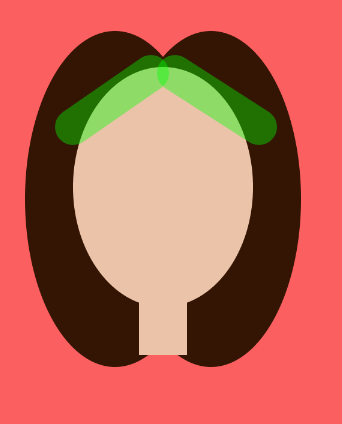
I started by planning out what would be the bottom-most layer (excluding the background), which would be the hair. The hair is simply 2 overlapping ellipses, which creates the middle hair part. Then, my head looked like an egg so I had to put some bangs. I did this by having 2 lines with a huge stroke, covering the top diagonally. The photo aside illustrates this, with the bangs being a transparent green for demonstration.

The eyes are just many circles placed on top of one another, while the eyelid is a half-circle arc (no fill) that sits behind the white of the eye. Because most of the features on this portrait (not my face :)) are symmetrical, it was quite easy to duplicate something twice. The nose is, also, just a small arc positioned in the center of the face.

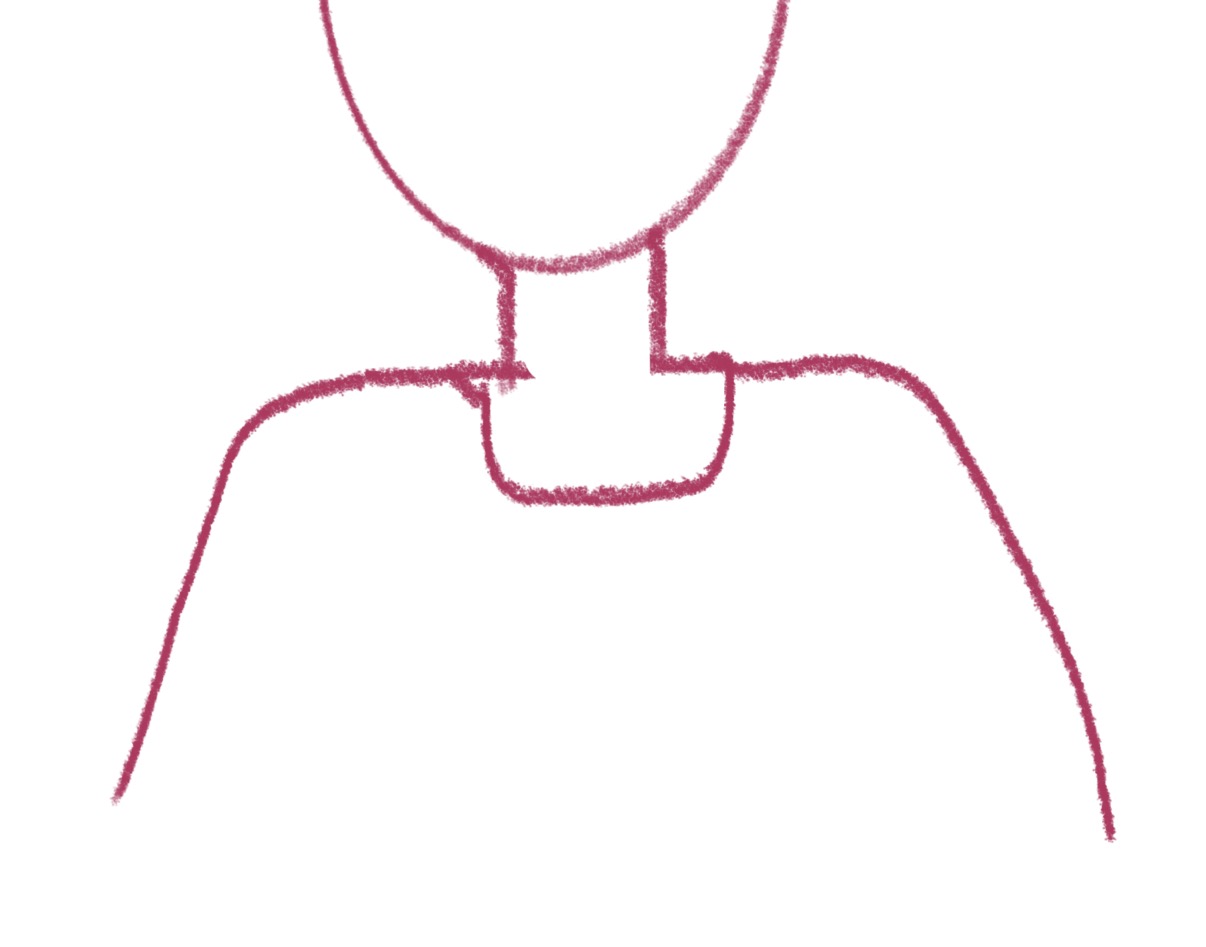
This was what I wanted to do with the quadrilateral

The neck has two parts to it: a rectangle and the collar part, which is the bottom half of a circle. In between the neck and the collar is a green shirt, which I created by using a rectangle. I was really contemplating on whether to use a rectangle or a quadrilateral, since with a quadrilateral, I can make the slant of the arms, which I prefer a lot more. However, I then realized that the corners of these shapes are too sharp, which makes the body boxy and therefore less coherent. This could be fixed with border-radius, which allows for rounded corners, but there were only available as a parameter for rectangles, which I decided to stick with at the end.

function wink() {
  //first I cover the original eye using an ellipse the blends with the face
  fill("#d9a582");
  noStroke();
  ellipse(230,195,60,60);
  stroke("#341504")
  strokeWeight(3)
  noFill();
  //then the 2 lines
  line(245,175,212,191);
  line(245,210,212,191);

  //after wink() runs for 500 milliseconds, openEye() runs for the rest of the setInterval which would be 2.5 secs in this case
  setTimeout(openEye, 500);
}

I created a function wink() to also play around with animation. This function draws a large ellipse on top of my right eye in the same color as my face, which covers it. Then, 2 lines created the “<” which indicates a wink. Then, I put setInterval(wink, 3000) in my setup function so that it winks after 3 seconds. But then, I stumbled upon a bug as the person wasn’t winking when I ran the code at all! I then realized that the draw function, which currently contains all of my code, immediately redraws the face on top of my winked eye. Since the portrait was completely static at this point, I moved all of my drawing to setup(). This solves the issue, but then my person stays winked. I tried solving this issue by having another function that draws the original eye, called openEye() and add setTimeout(openEye, 500) to my wink(). What this does, essentially, is have the person wink for 500 milliseconds and then the normal eye appears for 2.5 seconds, and then another interval happens where it winks again. I’m not sure if this is the most optimized way to create this animation, but I had fun playing around with the facial expressions for sure!

Reflection

Overall, I’m really happy with how my portrait turned out! I think I have, in general, achieved the “clean” look I was aiming for. I also love how colorful and vibrant the sketch is, I feel like it captures my energy really well. One thing I feel like I could improve if I had more time is to make it more like me! This would be a bit of a challenge since I don’t like anything that is too detailed, but I’d like to put myself through those challenges some time! I could try having little blushes/freckles, or a different accessory (since I never wear bows).

Also, a mistake I made in the beginning was not determining the appropriate canvas size. I kept it at the default size, 400×400. I only realized after sketching the head and the hair that this wouldn’t leave me enough space for the body, so I had to change the height to 500 pixels. In future projects, I would like to avoid this mistake as I could have to manually shift everything up/down/left/right by a certain value (which is kind of a hideous thing to do :)).

Resources I Used

https://developer.mozilla.org/en-US/docs/Web/API/Window/setTimeout
https://www.w3schools.com/jsref/met_win_setinterval.asp
https://p5js.org/reference/p5/for
https://p5js.org/reference/p5/arc/
https://coolors.co/f58484-ffb8bb-d9a582-12631c-68d34a

No Artificial Intelligence was used in the making of this sketch or its documentation.

Week 1 – Self-Portrait


Overview

Following the sessions on Week 1, our first assignment was to create a self-portrait using p5.js. Last semester I took Communications Lab, so I was familiar with the website, but I haven’t gone into such depts before, and for this assignment I decided to create my self-portrait with a little additional information about me, which is that I don’t like the rain.

I really wanted to use as many of the available 2D shapes as possible, such as the arc, the ellipse, the circle, the line, and the rectangle, along with some of the other resources like mouseX, mouseY, the mouseIsPressed, or constrain. I have tried to create myself a little challenge but also not put too much pressure on myself to put absolutely everything into this first assignment.


Process

For this assignment I decided to create an entirely new project and make my portrait out of scratch. I was sure that I wanted to add some basic interaction, just for a little practice and to make it more fun. I made the biggest components first, my head, my body, and my hair, and then moved on to the smaller details like my bangs, my eyes, nose, mouth, and my glasses. For all of these elements, I relied heavily on the p5.js references, but didn’t use any other external sources. I also decided after my body was fully made to put something in the background as well, just to make it a little less plain, and then came the idea that I will use my interaction here and show how much I don’t like standing in the rain. As a last touch, I also added some shading, just to play a little with the layers as well, and to add a little depth to it.

The Code

function setup() {
  createCanvas(400, 600);
}

function draw() {
  background("lightblue");

//Sun
  fill("yellow");
  circle(50, 50, 60);
  
fill("black");
textFont('Courier New');
text('click and see what happens', 110, 60);
  
noStroke();


//Hair Shadow
  fill(127, 80);
  rect(104, 203, 200, 210,); 


//Hair
  fill("yellow");
  rect(100, 200, 200, 210,);

//Body Shadow on BG
  fill(120, 120);
  triangle(209, 300, 110, 600, 300, 600);
  
//Body
  fill("brown");
  triangle(200, 300, 110, 600, 300, 600);

//Shadow on Body 
  fill(127, 70);
  noStroke();
  ellipse(200, 400, 60, 30);
  
//Head
  fill("#F7D4C4");
  circle(200, 300, 200);
  
//Glasses
  noFill();
  stroke(0);
  strokeWeight(2);
  rect(145, 283, 45, 35, 5);
  rect(205, 283, 45, 35, 5);
  line(190, 300, 205, 300);

//Eyes
  fill(255);
  stroke(-2);
  circle(170, 300, 30);

  let px = constrain(mouseX, 165, 175);
  let py = constrain(mouseY, 295, 308);

  fill (0);
  circle(px, py, 10);

  fill(255);
  stroke(0);
  circle(225, 300, 30);
  
  let px2 = constrain(mouseX, 222, 230);
  let py2 = constrain(mouseY, 295, 310);
  
  fill (0);
  circle(px2, py2, 10);
  
//Nose
  stroke(1);
  strokeWeight(2);
  line(197, 315, 197, 330);

//Bangs shadow
  noStroke();
  fill(127,30);
  arc(100, 205, 200, 200, 0, HALF_PI);
  arc(300, 205, 200, 200, HALF_PI, PI);
  
//Bangs
  noStroke();
  fill("yellow");
  arc(100, 200, 200, 200, 0, HALF_PI);
  arc(300, 200, 200, 200, HALF_PI, PI);


//Mouth
  noFill();
  stroke(255, 0, 0);
  strokeWeight(4);
  arc(200, 340, 60, 40, 0, PI);
  
//Hand shadow
  noStroke();
  fill(127, 127);
  rect(164, 473, 20, 50);
  rect(229, 473, 20, 50);
  
//Hands
  fill("#F7D4C4");
  rect(160, 470, 20, 50);
  rect(225, 470, 20, 50);


  if(mouseIsPressed){
  background(220);
  noStroke();

//Clouds
  fill(255);
  circle(60,50,40);
  circle(85,50,50);
  circle(108,50,40);
  circle(210,120,60);
  circle(245,120,70);
  circle(280,120,60);

//Rain
    stroke("blue");
    strokeWeight(3);
    line(70, 90, 80, 120);
    line(90, 110, 100, 140);
    line(100, 90, 120, 150);
 
 noStroke();  

//Hair Shadow
  fill(127, 80);
  rect(104, 203, 200, 210,); 
    
//Hair
  fill("yellow");
  rect(100, 200, 200, 210,);

//Body Shadow on BG
  fill(120, 120);
  triangle(209, 300, 110, 600, 300, 600);
    
//Body
  fill("brown");
  triangle(200, 300, 110, 600, 300, 600);

//Shadow on Body 
  fill(127, 70);
  noStroke();
  ellipse(200, 400, 60, 30);
    
    
//Head
  fill("#F7D4C4");
  circle(200, 300, 200);

//Glasses
  noFill();
  stroke(0);
  strokeWeight(2);
  rect(145, 283, 45, 35, 5);
  rect(205, 283, 45, 35, 5);
  line(190, 300, 205, 300);

//Nose
  stroke(1);
  strokeWeight(2);
  line(197, 315, 197, 330);

//Bangs shadow
  noStroke();
  fill(127,30);
  arc(100, 205, 200, 200, 0, HALF_PI);
  arc(300, 205, 200, 200, HALF_PI, PI);

//Bangs
  noStroke();
  fill("yellow")
  arc(100, 200, 200, 200, 0, HALF_PI);
  arc(300, 200, 200, 200, HALF_PI, PI);

//Eyes
  fill(255);
  stroke(0);
  circle(170, 300, 30);

  fill (0);
  circle(170, 300, 10);

  fill(255);
  stroke(0);
  circle(225, 300, 30);
  
  fill (0);
  circle(225, 300, 10);

//Mouth
  noFill();
  stroke(255, 0, 0);
  strokeWeight(4);
  arc(200, 365, 60, 40, PI, TWO_PI);

//Hand shadow
  noStroke();
  fill(127, 127);
  rect(164, 473, 20, 50);
  rect(229, 473, 20, 50);

//Hands
  noStroke();
  fill("#F7D4C4");
  rect(160, 470, 20, 50);
  rect(225, 470, 20, 50);

  }
  

}


I can be a rather messy person in real life, and to compensate that I try to keep my online life a little more organised. I tried my best to divide all parts of the code, make it clear what piece of code is which part of the portrait and that made it a lot easier to later go back to it and adjust or correct certain things. It came in very handy for example when I was adding the shadows, especially the bangs, because it was a lot easier to find the “Glasses” and the “Bangs” chunks, between which I wanted to place my shadow.

Something that took a little more time but made me very happy to see it work were the moving eyes. I used the constrain calculation, which I had to try multiple times to work. I had to understand which parameter constrains which side, but after I figured that out, I was able to constrain my “pupil” to stay in the “eye” but still move.

//Eyes
  fill(255);
  stroke(-2);
  circle(170, 300, 30);

  let px = constrain(mouseX, 165, 175);
  let py = constrain(mouseY, 295, 308);

  fill (0);
  circle(px, py, 10);

  fill(255);
  stroke(0);
  circle(225, 300, 30);
  
  let px2 = constrain(mouseX, 222, 230);
  let py2 = constrain(mouseY, 295, 310);
  
  fill (0);
  circle(px2, py2, 10);


Reflection and Ideas

As a reflection, I had a lot of ideas for this project that I couldn’t do in the end. For example, I originally wanted my bangs to move as if it were the wind messing them up (which is another very important part of my everyday life), but I found it a little too difficult. I would love to explore more libraries in the future to find out about new techniques that could have also made the process of making this portrait easier or just different. Another thing I would also love to learn is how to make the movements smoother. I really love the eyes, however I would prefer them to move smoother than they do right now. But despite knowing that there is a lot of room for improvement, for this first project, my goal was not to go overboard but rather to explore the basics of p5.js, so overall I am happy with the results.