Week 3 OOP Artwork

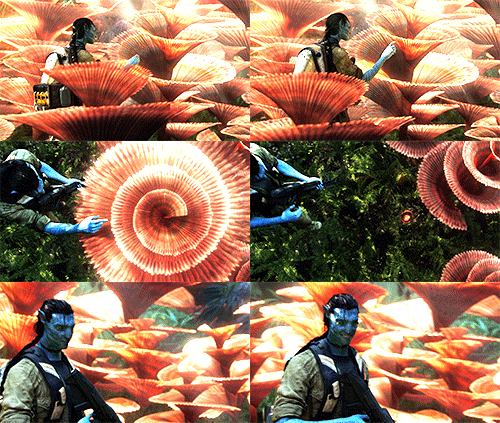
For my artwork, I decided to take inspiration from the Avatar movies and try to replicate Pandora’s bioluminescent plants using arrays and interactive functions that follow the mouse. I tried to recreate the plant’s behaviour from the scene below, where Jake Sully (the main character) tries to interact with the plants, which change size depending on touch.

The part that I am most proud of is how I used a class that acts as a blueprint in my code and stores information about plant sizes and positions, which are all randomized due to nature’s unpredictable tendencies. Moreover, it also controls the reactions to the mouse and how the plants become larger when the it gets closer

class GlowPlant {
constructor(x, y, size) {
this.x = x;
this.y = y;
this.size = size;
this.originalSize = size;
this.blue = random(180, 255);
this.green = random(80, 200);
}
// makes plants react to mouse
react() {
let distance = dist(mouseX, mouseY, this.x, this.y);

if (distance < 80) {
this.size = 35;
} else {
this.size = this.originalSize;
}
}
// plant shapes
display() {
fill(30, 180, 255, 40);
ellipse(this.x, this.y – this.size / 2, this.size / 2, this.size);
ellipse(this.x, this.y + this.size / 2, this.size / 2, this.size);
ellipse(this.x – this.size / 2, this.y, this.size, this.size / 2);
ellipse(this.x + this.size / 2, this.y, this.size, this.size / 2);

circle(this.x, this.y, this.size / 2);
fill(30, 180, 255);
ellipse(this.x, this.y – this.size / 2, this.size / 2, this.size);
ellipse(this.x, this.y + this.size / 2, this.size / 2, this.size);
ellipse(this.x – this.size / 2, this.y, this.size, this.size / 2);
ellipse(this.x + this.size / 2, this.y, this.size, this.size / 2);

circle(this.x, this.y, this.size / 2);
}

I created this code using object-oriented programming. I made a glowPlant class which stores the position and size of the objects, then used an array and a for loop to generate 40 randomly positioned plants with different sizes. Each plant has a display method and a react method to track the mouse, making them bigger or smaller depending on its position.

What I would like to improve on in the future are my artistic skills in making more realistic objects. I would also like to improve my code labeling and organization skills while learning how to do more complicated interactions with arrays.

Week 3 Reading response

A system is strongly interactive when the user can change its outcome. Crawford simplified interactivity as listening, thinking, and speaking, which can also be understood as input, processing, and output. For example, take a storybook. A book is not interactive, as the reader cannot influence anything that happens in its narrative. A video game, however, is interactive because the player can control the character with an input, altering its journey. In my opinion, this is what makes a strong interactive system: the user’s input has a noticeable impact on the system’s response.

While making future sketches, I plan to incorporate interactivity by using functions on P5.JS such as mousePressed and mouseX/mouseY to give my projects more interactivity. I have already started this in my last artwork, as I used mousePressed and a boolean variable to change the color of the piece.

Week 2 Generative Art

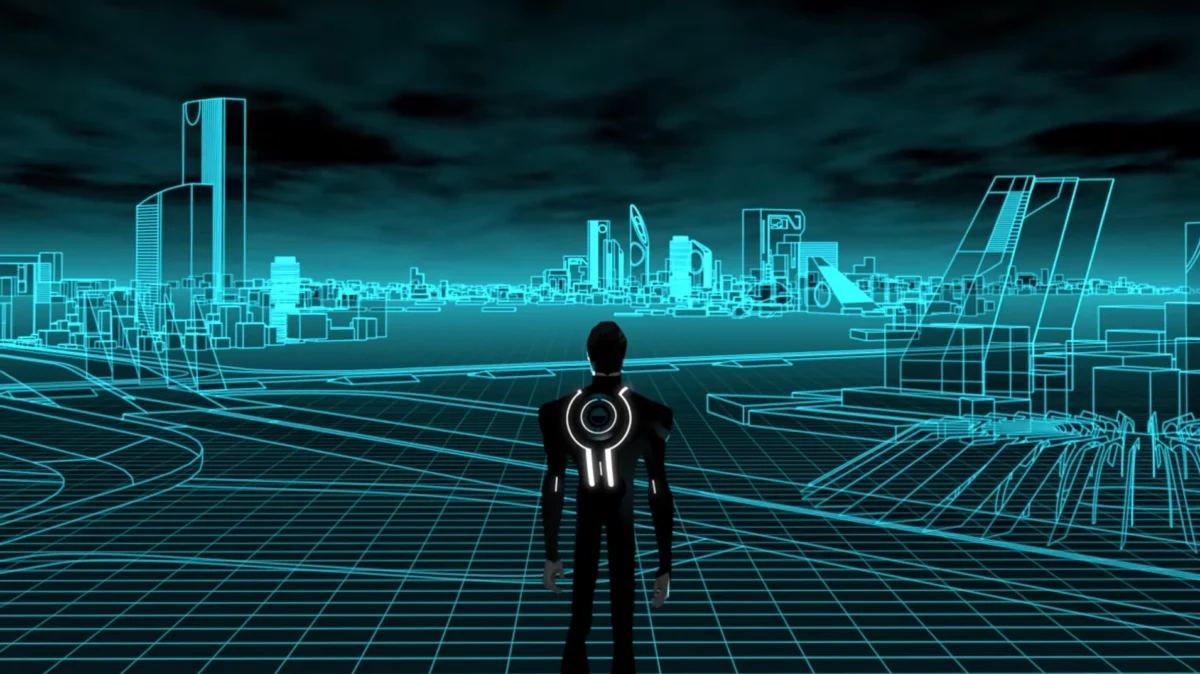
For this assignment, I decided to create a Tron-inspired piece that is a digital environment resembling the Grid in the movie. At first, the sketch starts out with cyan perspective lines, which, when the user clicks, change to an orange color scheme inspired by Clu, who is the villain of the movie. I also added random particles to the top of the grid, which are supposed to give that computer-bit aspect. I wanted to experiment with what I heard in the Casey Reas talk and used randomness in my piece while still being in control.


The part which I am most proud of in my code is the color-changing toggle. Originally, I wanted to use only the mouseIsPressed function, but that wouldn’t work because it would only appear when the mouse is held down. This is why I created a boolean variable called cluMode, which solves that issue.

function mousePressed() {
cluMode = !cluMode;
}
if (cluMode === true) {
fill(255, 165, 0);
} else {
fill(176, 224, 230);


I started by creating a 700×700 canvas, then used two for() loops to crate the vertical and horizontal lines. After that, I used a global variable called gridMove to animate them by increasing its value inside draw(). This value is added to the y position of the horizontal lines, making them move down the screen but stopped by a conditional to make them repeat.

I used another for() loop to create the randomized particles by using random() in the coordinates of my circle code. Finally, I added the cluMode boolean and mousePressed() function so clicking the canvas cycles from cyan to orange.

My main references were the Grid and its color schemes from Tron. I also referenced the p5js concepts covered in class. Including loops, conditionals, animation, mouse interaction, and random()

I am happpy with how my final sketch turned out by using moving objects rather than static ones like last time. In the future, I would like to experiment more with arrays to give particles positions and try to make the animations smoother.


Reading Reflection Week 2

One way that I would like to incorporate randomness into my work is by allowing some visuals to change independently while keeping the main elements under my control. What interested me most about Reas’ talk was how some aspects of the composition can be left to the computer to randomly generate, resulting in the creation of distinctively unique artwork. For example, I could control the main shapes and structures while leaving other aspects like color and size to the computer. This would allow different versions of the artwork to emerge while keeping my original intentions.


For me, I believe that there needs to be an equal mix of artist input and randomness. Total randomness could produce interesting results but would tarnish the original intent of the artist and make it less meaningful. Complete control could also feel bland, as the human imagination can only go so far. Randomness can create new ideas and maybe set some new trends in the digital art world, though keeping it at bay is also important. I think the best balance is giving the computer enough freedom to create something unexpected while still allowing the creator to shape the general direction of the piece.

Week 1 Self Portrait

For this project, I created a portrait of myself wearing a raccoon onesie using basic primitive shapes in the p5.js editor.

The part that I am most proud of in my portrait is the raccoon tail, which I used many variations of ellipses to create. It was also one of the most challenging, as I had to experiment with the coordinates to get the proportions right.

// tail
fill(120, 125, 130);
ellipse(285, 330, 90, 40)
fill(65, 70, 75);
ellipse(275, 330, 15, 40)
ellipse(295, 330, 15, 40)
ellipse(315, 330, 10, 30)

How it was made. I used many shapes such as the ellipse, triangle, circle  rectangle, and arc to create the features of the person. I also messed around with the reference page in p5 and used AI for color accuracy.


>

What I would like to improve upon in the future are my proportion and shape variety skills. i would also like to learn how to use the translation and rotation commands to make my designs more life-like. Additionally, I would also like to strengthen my documentation on the blog.