
Overall Concept
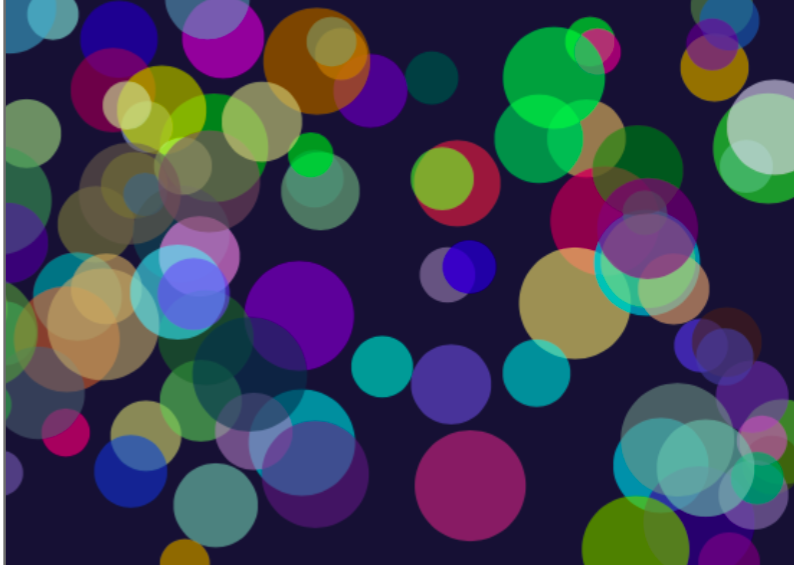
For this assignment, I wanted to create a generative artwork based on colorful bubbles floating around in a dark space. I chose bubbles because they are easy to recognize, but they can still create an interesting image when there are many of them moving together. I wanted the final artwork to feel calm, colorful, and slightly playful rather than looking like a game or a completely still picture.
Every time the sketch begins, the bubbles appear with random positions, sizes, colors, and speeds. Because these values are random, the arrangement is never exactly the same. Some bubbles are large and move slowly, while others are smaller and move more quickly. The random colors also create different combinations each time the program starts. I used a dark blue background to make the brighter colors more visible.
I used Object-Oriented Programming because every bubble needs the same basic information and actions. The Bubble class works as a template that stores each bubble’s position, speed, size, and color. It also contains methods that allow each bubble to move, bounce, and display itself. I then stored all the bubble objects inside one array and used loops to control them. This made it possible to create many bubbles without writing separate code for every one.
Sketch Code
let bubbles = [];

function setup() {
  createCanvas(600, 400);

  // create 100 bubble objects
  for (let i = 0; i < 100; i++) {

    let newBubble = new Bubble(
      random(50, 550),
      random(50, 350),
      random(-3, 3),
      random(-3, 3),
      random(30, 80),
      random(255),
      random(255),
      random(255)) ;

    bubbles.push(newBubble);
  }
}

function draw() {
  background(20, 20, 50);

  // make every bubble move, bounce, and display
  for (let i = 0; i < 100; i++) {
    bubbles[i].move();
    bubbles[i].bounce();
    bubbles[i].display();
  }
}

class Bubble {

  constructor(x, y, xSpeed, ySpeed, bubbleSize, redValue, greenValue, blueValue) {
    this.x = x;
    this.y = y;

    this.xSpeed = xSpeed;
    this.ySpeed = ySpeed;

    this.bubbleSize = bubbleSize;

    this.redValue = redValue;
    this.greenValue = greenValue;
    this.blueValue = blueValue;
  }

  // move the bubbles
  move() {
    this.x = this.x + this.xSpeed;
    this.y = this.y + this.ySpeed;
  }

  // change direction when the bubbles reaches an edge
  bounce() {
    if ((this.x > width) || (this.x < 0)) {
      this.xSpeed = this.xSpeed * -1;
    }

    if ((this.y > height) || (this.y < 0)) {
      this.ySpeed = this.ySpeed * -1;
    }
  }

  // draw the bubbles
  display() {
    noStroke();

    fill(
      this.redValue,
      this.greenValue,
      this.blueValue,
      150
    );

    circle(this.x, this.y, this.bubbleSize);
  }
}
My main idea was to combine control with randomness. I controlled the canvas, movement, and general appearance, but then the individual colors, sizes, positions, and speeds were chosen randomly. This makes the artwork organised while still allowing each version to look different.
Embedded Sketch
Problems I Ran Into
One problem I noticed was that some bubbles moved very slowly while others moved much faster. This happened because their speeds were chosen randomly. At first, I thought something was wrong with the slower bubbles, but then I understood that they had received a speed close to zero.
Another small issue was that parts of the bubbles sometimes went outside the canvas before they bounced back. This happens because the program checks the center position of each bubble. I decided to keep it because the bubbles still return and continue moving. Chiefly, whenever I ran into a problem, I mainly went back to the Week 3 slides that cover functions, OOP & Arrays, because they explained each of these concept clearly and showed the process step by step.