Week 4_Reading Respone


While reading The Design of Everyday Things, I found the author’s principles of good design agreeable, but I felt that he was a bit biased. He mainly put the blame on the machine and the design, including the engineers and designers, but said little about the user. I think everyone contributes to a product’s efficiency because there are many people who can be oblivious to simple instructions and fail to utilize the product properly. However, some of his examples were exaggerated. For instance, he made the door example seem like a bigger problem than it actually is. On top of that, he kept repeating many of the same points, which felt distracting to me.

One of the design failures that drives me crazy is oversimplification. The author touched on it, but I want to dive deeper into it. I think minimalism is one of the reasons for this. It has become a new aesthetic to avoid having many labels and other visual elements, which can lead to little to no signifiers. You can barely find symbols on some devices, let alone clear instructions. Because of this, I think simple designs do not necessarily equal effective designs. We need to move away from prioritizing the minimalist aesthetic and instead include understandable signifiers. It may not result in the simplest-looking design, but it would make the design more understandable.

I think the principles mentioned in the reading are incorporated directly into interactive media because having good design means creating a better interactive experience, as long as those principles are applied correctly. Feedback, for example, directly relates to interactivity because it makes the system seem like it is responding to the user’s input. It can be applied through audio, or through a visual change, which enhances the overall experience and satisfaction. But to me, discoverability is the most important one because if this principle is not applied correctly, then everything that comes after loses importance. If you never understand how the device is supposed to work, then why would you give attention to the other principles? This is especially important in interactive design, where mutual understanding is an important factor to consider.

Week 4 – ask the magic ball for your future


Overview

Honestly I have no idea where this idea came from. I’ve been scrolling a lot on Pinterest, and I saw a lot of these kinds of images, and also my mom just found recently our old Magic 8 Ball, so I thought why not combine the two?

I just wanted to create something fun as well. I have been having some pretty bad days, and making this not super serious helped a lot with my mood, and I really enjoyed coming up with all the responses for the Magic Ball. I also made some of my friends try it out once it was ready and they also really enjoyed it.

Process


Originally, I really wanted to make it look very cool, and make it 3D, but I saw that I can only draw a sphere in a WebGL mode, so I just stayed with circles and a triangle. I had to resize them a lot so that the text won’t be tiny, it is not that big like this either, but much better than originally.

I ALSO wanted it to have some magical background, BUT the preload function was not working here either. I have no idea what I did wrong, but it just wouldn’t work at all, so in the end I just stayed with this background.

The Code + a LOT of problems

Now, even though the code is short, I had the most amount of problems with it so far. The first thing I did, even before writing a CSV file was to draw the main object, so the Magic ball. This was really easy and I had some fun even by adding some shade to it:

function draw() {
  background(220);

  //the structure of the ball, drawing a bunch of circles, a triangle and the shadow to make it look fancier 
  fill('grey')
  noStroke();
  ellipse(300, 530, 500, 120);
  fill('black');
  circle(width / 2, height / 2, 500)
  fill('white');
  circle(width / 2, height /2, 400)
  fill('black');
  circle(width/2, height/2, 300);
  fill('white');
  triangle(300, 420, 200, 220, 400, 220);

After creating this, I strated on the actually challenging part of the code. This is how the start of the code looks like now:

let question; //inputfield
let submitQuestion; //button
let responses = []; //csv of possible responses
let currentResponse = ""; //store current response on the screen

//async_await, the code waits until the full CSV file is fully loaded, and only then continues and creates the canvas and everything below
async function setup() {

//try and catch, because I had SO many errors with loading the CSV, and could not figure out where it went wrong
  try {
    responses = await loadStrings('responses.csv');
  console.log('Loaded responses:', responses);
  } catch (error) {
    console.error('could not load', error);
  }
  
  createCanvas(600, 600);

Well it didn’t look like this always. After the drawings, I created a CSV file in p5.js for all the responses, and when I was done I made a preload function before setup, so I could preload that CSV. BUT. For some reason, I have no idea why, the text just wouldn’t appear. I tried to figure it out with a console.log, and it turns out that it was for some reason returning an empty array. I tried everything to make it work, I quadruple checked the came of the file, that my browser was allowing it to read it, I changed the loadStrings function to loadTable, but it just didn’t work. So, after some meditation to calm myself down, I asked ChatGPT, what I should do. It suggested to try the things I already tried, but it also mentioned the try and catch as well. I did learn some C# back in high school, and I remembered it slightly, but I decided to search it up just in case and try it out after. Previously, when I was searching for answers among the p5.js references, I also found the async_await function, so I combined the two together, AND IT WORKED. I was so happy, I didn’t dare touch it anymore.

The reason why I know it worked after, and only after that is because while I was waiting for the Javascript fairy to solve my problem, I made a little question field and a button for submission. Since the Magic Ball needs a question for it to answer, and for the user to be able to actually interact with it, I made this, directly below the previous code:

 //Create an input field to ask a question
  question = createInput('');
  question.attribute('placeholder', 'Ask a question from the Magic Ball!');
  question.position(170, 5);
  question.size(150, 30);

  submitQuestion = createButton('GOO!');
  submitQuestion.position(330, 5);
  submitQuestion.size(50, 36);
  
  //when the button is pressed it calls the giveAnswer function
  submitQuestion.mousePressed(giveResponse);
}

// if checks if there is any user input, and if there is it goes through the CSV file and choses a random response
function giveResponse(){
  let userQuestion = question.value().trim();

  if (userQuestion.length > 0) {
  currentResponse = random(responses);
  } 
}

The giveResponse function works with a simple if. I am not exactly sure of this is the most elegant way to do this, but it worked so I accepted it. As the last step to give my text a few attributes I added this in the draw function:

  //the reponses in the triangle
  fill('black');
  textStyle(BOLDITALIC);
  textAlign(CENTER, CENTER);
  textSize(12);
  text(currentResponse, 220, 230, 160, 120);
}

The piece if code I am the most proud of, however remains that little try and catch part, just because of the absolute misery it gave me.

And finally, here is the full code:

let question; //inputfield
let submitQuestion; //button
let responses = []; //csv of possible responses
let currentResponse = ""; //store current response on the screen

//async_await, the code waits until the full CSV file is fully loaded, and only then continues and creates the canvas and everything below
async function setup() {

//try and catch, because I had SO many errors with loading the CSV, and could not figure out where it went wrong
  try {
    responses = await loadStrings('responses.csv');
  console.log('Loaded responses:', responses);
  } catch (error) {
    console.error('could not load', error);
  }
  
  createCanvas(600, 600);
 
  //Create an input field to ask a question
  question = createInput('');
  question.attribute('placeholder', 'Ask a question from the Magic Ball!');
  question.position(170, 5);
  question.size(150, 30);

  submitQuestion = createButton('GOO!');
  submitQuestion.position(330, 5);
  submitQuestion.size(50, 36);
  
  //when the button is pressed it calls the giveAnswer function
  submitQuestion.mousePressed(giveResponse);
}

// if checks if there is any user input, and if there is it goes through the CSV file and choses a random response
function giveResponse(){
  let userQuestion = question.value().trim();

  if (userQuestion.length > 0) {
  currentResponse = random(responses);
  } 
}

function draw() {
  background(220);

  //the structure of the ball, drawing a bunch of circles, a triangle and the shadow to make it look fancier 
  fill('grey')
  noStroke();
  ellipse(300, 530, 500, 120);
  fill('black');
  circle(width / 2, height / 2, 500)
  fill('white');
  circle(width / 2, height /2, 400)
  fill('black');
  circle(width/2, height/2, 300);
  fill('white');
  triangle(300, 420, 200, 220, 400, 220);

  //the reponses in the triangle
  fill('black');
  textStyle(BOLDITALIC);
  textAlign(CENTER, CENTER);
  textSize(12);
  text(currentResponse, 220, 230, 160, 120);
}


For the future

I feel like I learnt a lot from this assignment, for some reason even more than from any previous one. I feel like I know a little more about how I have more ways to start a certain problem, but also that I am able to ask AI for help without asking it to solve it for me. Even though it was hard, I am proud to have finished it. In the future, I would love to make a more refined ball as well, but non of the images were loading in the preload function, so I ended up drawing it myself.

Resources

I took these as base for the responses:
https://magic-8ball.com/magic-8-ball-answers/

Creating the button and the question field:
https://p5js.org/reference/p5/createInput

https://editor.p5js.org/Samizdat/sketches/eUsieMk6j

The async_await function, after the preload() was not working:

https://p5js.org/reference/p5/setup/

https://p5js.org/reference/p5/async_await/

Text style:

https://p5js.org/reference/p5/textStyle/

Some help to debug the problem:

I asked ChatGPT to help me figure out what the problem was, after the preload() function kept returning my array as empty, and it suggested the try and catch solution, so I did some research on that:

https://www.w3schools.com/js/js_errors.asp

https://www.geeksforgeeks.org/javascript/javascript-errors-throw-and-try-to-catch/

The final code was written by me, the AI only helped in terms of suggetsing me this solution.


Reading Response – Week 4

I was surprised at just how many parts of design I was not considering! The reading makes so many things a lot clearer. Logically, I know that machines can be difficult to use, and that there is a learning curve when it comes to them. But for so long, I had just dismissed difficult to work with machines as something humans just had to deal with. Professionals are more likely to understand how to use certain machines, and older people may not understand how to use newer technologies. That’s understandable, and feel like simple facts of life, some people are just not capable of understanding machines. But of course, that shouldn’t be true! Machines should be designed with user experience in mind, engineers should not be dismissing people’s confusion.

I am curious about what the line is though. At what point should humans understand machines and devices. If we follow this logic, should I not know how to fix my devices if they break? Does it not make sense for me to have the tools available in order to not be reliant on anybody else when it comes to my own devices? Should I leave repairs such as this to the professionals? There’s just a ton to consider when it comes to how much we do and should understand about devices.

The reading had me thinking about certain designs I may struggle to use or find myself continuously frustrated with, and something that came to mind was sinks. I always felt that sinks are, for some reason, the one thing hotel bathrooms cannot get right (hotel bathrooms as a whole are designed badly, but I am specifically referring to sinks now). Which is crazy to me, considering there are so many sinks out there that work perfectly fine. What some hotels do however is they decide to make their sink have a fancier design. This usually means changing the sink’s faucet to look more fancy and ‘clean’, or by changing the bowl that collects the water (see the picture below). This ends up creating a few problems, the one I am used to encountering is when a sink’s faucet is too far back for the bowl. So the water is only falling in the very back of the bowl, and you have to stretch your arms over the unreasonably big bowl that serves no purpose other than to block your way. Additionally, some sinks have the bowl be on the table rather than embedded into it. This not only makes the sink uncomfortable to use, but it also puts the soap at an awkward place. Now you can’t place the soap near where the faucet is, it has to be put at the side, which means anytime you need to use it, you will naturally be getting water onto other part of the table.

I don’t think the design for sinks needs to be that crazy. If hotels really did want sinks to look fancy, then they should just change the countertop and maybe the color of the faucet, but leave the actual sink alone. Any designs to improve on the look only harms the design.

When it comes to interactive media, the main thing to think about is obviously, the interactions with technology, so it makes sense to focus on the connection between humans and how to make technology more accessible to them. If you want to create something that people can interact with, they need to know exactly how to interact with it. First of all, human-centered design (HCD) should be a priority, if the entire point is for people to interact with it, then we need to keep the people in question in mind. Additionally, if people are not able to figure out the design, then that ruins the experience of using the design. No matter how cool it is, if people deems it too annoying to try out, they will be less likely to care for it. A good way to do this is by introducing signifiers to designs, just to make the overall experience of using them much simpler. All other principles he mentions are also important in the general sense, things like affordances, mapping, signifiers, feedback, etc. all should just be a normal part of the design process, especially when it comes to interactive media.

Week 4 reflection and data project

Reading Reflection

This is the first time I have came across literature on design, and it is refreshing to read about design principles which ground artistic choices in a project. I believe technology itself is both a mode and barrier to communication; a barrier because human connection is supposed to be real, felt, and not interrupted, and a mode because of its ability to reach so many across the world just through sophisticated internet systems.  Norman discusses this as well with how machines are rule based and rigid, but humans are flexible and develop relationships over understanding. The principles of discoverability and understanding are great design principles to begin with. Especially with code, I believe a well-commented code can actually get across the developer’s thinking process, and also makes the codebase a place for others to collaborate. I believe a well-commented code adds up to the discoverability of the code, such as what feature attributes to what code line specifically. I think this is a major part where it co-relates to interactive media.

I also find it interesting how Human Centered Design is called a philosophy and not an area of focus. I think this argument isn’t developed enough in the reading, as the reading refers to this as a philosophy but the rest are referred to as areas of focus.

Something that drives me crazy is delivery riders trying to find buildings on campus. Almost every time I order food the rider calls me because they are lost somewhere on the Highline. All the residences look the same from outside and the names are not visible from the road. There are basically no signifiers for them, so they go in circles until someone comes down to get the food. A map at each entrance (a stair leading from the ground floor or every road connection to the high line) that is laid out the same way the buildings actually are so the map and the real space match. It is such a small thing but it wastes time for both the rider and the student, and by Norman’s logic it is not the rider’s fault at all, it is the design.

For interactive media, feedback is the principle I keep coming back to. If a user clicks on something in a sketch and nothing happens right away, they just keep clicking, same as people pressing the elevator button over and over. A color change or a small sound is enough to tell them the program got their input. The user should also know what to click or press without me explaining it; a button has to look like a button. Mapping is the easy one in a sketch since moving the mouse up can move something up on the screen and nobody has to think twice. The system image part stayed with me the most though. The user can never ask me what I meant while they are using my project. Whatever is on the screen is all they get.

Coding Assignment

I decided to make a room simulation by using the data of the CO2 and temperature from an office room. I used the Occupancy Detection dataset from Kaggle, where they taken in different motion readings from the day including the CO2, temperature, and timing of the day. I map a graph directly below the simulated “room” to give us an idea of the CO2 levels of the room as the time of the day changes. I have also made a window which changes color as the time of the day changes, and then the color of the room changes as CO2 levels get higher or lower (Red for high CO2 and blue for lower).

Code I am proud of

The part I’m most proud of is getting the room to change color with the CO2 level. Each frame I take the current minute’s reading and use map() to turn it into a number between 0 and 1, where 400 ppm (roughly outdoor air) is 0 and 1400 ppm is 1. I wrap it in constrain() so a reading above 1400 can’t push the value past 1 and break the color. That number then goes into lerpColor(), which blends between a calm blue and a warm red, so the room slowly shifts from blue to red as the air gets stuffier over the day.

What I like about this is that one line of math carries the whole idea of the project. You don’t need to read the numbers to know the air is getting worse, you can just see the room turning red. It also made the lag really visible. People arrive around 7:36 but the room doesn’t turn noticeably red until after 9, because CO2 takes time to build up.

let r = rows[idx];

  // ROOM: floor color follows CO2 (blue = fresh, red = stuffy)
  let t = constrain(map(r.co2, 400, 1400, 0, 1), 0, 1);
  fill(lerpColor(color(120, 180, 230), color(230, 90, 80), t));
  stroke(60);
  strokeWeight(4);
  rect(100, 40, 600, 260);

How this was made

I started with importing the datatest.txt and cleaning it. There were a few errors with empty lines which I got rid off. To be particular, there was one less column header compared to the number of columns in the file, and when I was parsing each line to get each column value into the array, I ran into an error. There was an empty row, so I had to look for such things in the dataset too. Then I looked at the names of the headers, and assigned variables to each one.

Since the headers were shifted by one, I couldn’t rely on the names, so I read each value by its column number instead. I only kept the rows from February 3 because it’s a full day, midnight to midnight, which gave me 1440 readings, one for every minute. When I printed the first line of data, I noticed the file starts at 14:19 on February 2, so that day was incomplete. The file also stops partway through February 4, which left February 3 as the only full day, so I kept just that one. I saved each minute as an object with its time, temperature, light, CO2 and occupancy so the rest of the code would be easier to read.

After that I built the visual in layers. First the room, with the floor color changing from blue to red as CO2 goes up. Then the window, which gets brighter with the light reading, and two people who show up at the desks when the room is occupied. Under the room I drew a line graph of CO2 for the whole day, with a dashed line at 800 ppm since that’s around where ventilation usually kicks in. Last, I added the timeline so the day plays on its own, and you can hover over the canvas to scrub to any minute.

Embedded Sketch

Reflection and Improvement

I would want to make this simulation for dataset2 too, which was in the kaggle dataset. Those readings were taken with a closed room and therefore CO2 builds faster compared to this where it is slower. I would also love a 3d model of the room with actual sunlight changing as the day changes and the sunlight coming in from the window. I would probably make a comparison between the both.


Reading reflection – Week #4

After completing the reading, I now have a better understanding of the factors that go into making an everyday product. I will admit, the more I read, the more overwhelmed I got as the requirements needed to make a useful and understandable product became more extensive. I never thought about all the different components that go into design and how different perspectives and cultures can also have an impact. One thing that personally drives me crazy is my oven back at home. It is a newer model and therefore has many features that are not directly visible. Me and my mom only know how to change the temperature and where the heat comes from (up, down, up and down, etc). However, there is a QR code on the side of the oven with a manual that is 30 pages long with all the different settings you can turn on. Some of these involve holding different buttons, rotating a wheel, etc. It is very confusing! Every time I wanna use it I end up scanning the QR code to read the manual.

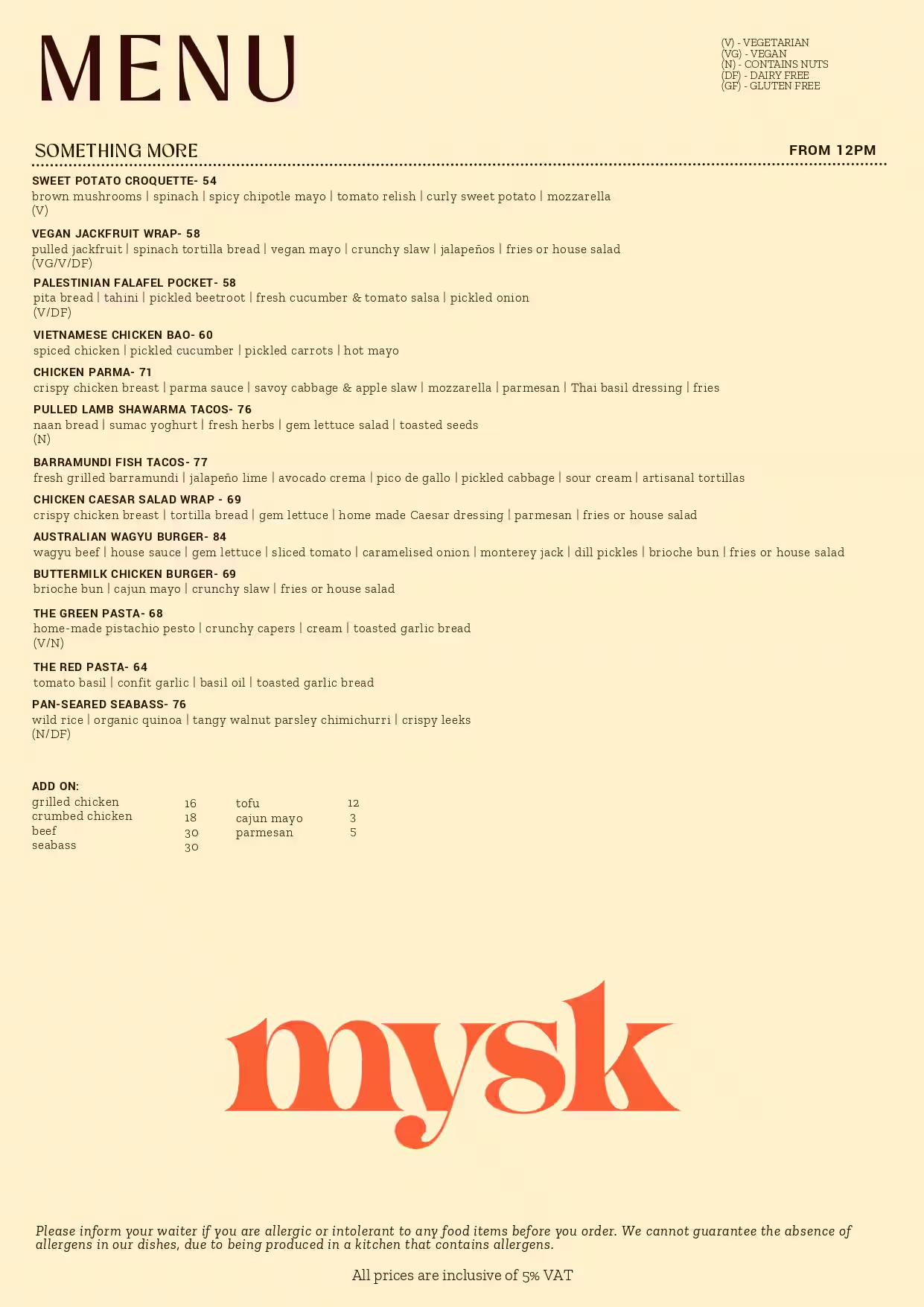
Consequently, this has got me thinking about how whether or not my assignments are easy to understand and interact with. For this weeks assignment, I recreated mysk’s menu. It is displayed on the screen where the user can hover over different menu items. If they click on it, the menu will slide down revealing food on the table. If they click on the menu again (in the bottom left corner of the screen) it will slide back up. I will admit, unless you read my blog post or this reading response, you may not know how to navigate through the artwork. However, I think my work allows for ‘discoverability’ like Norman mentions. If the user simply moves the mouse across the screen, they will see that the menu items enlarge (signifier for the affordance) when hovered over. Hence, they would then try clicking on it which results in the sliding menu. What I think is less intuitive is how to display the menu on the screen again. This is a discoverability failure because there is no signifier indicating that the menu can be reopened by clicking it. Unlike the hover-enlarge cue for individual items, there is no visible signal that the closed menu remains interactive. However, I think after multiple tries, the user would eventually think to click on the menu again which reveals it. But this has definitely got me thinking as to how I can develop my future work.

Assignment 4 – Loading Data, Displaying text

Concept

This week, we were told to create an artwork containing text. I initially struggled to think of something that would include text, then I thought, why not recreate the mysk menu! I really enjoy going there so this was fun to recreate. I wanted to create an artwork that displays the menu, lets the user click on an item, then the menu slides down and displays the food item (in this case I had a burger for all items but in the future I would expand this). For the menu, I have a table with multiple menu items that are randomly selected on execution. When the user clicks an item and the menu slides down, new ones appear when the menu is clicked again.
Here are some reference pictures:


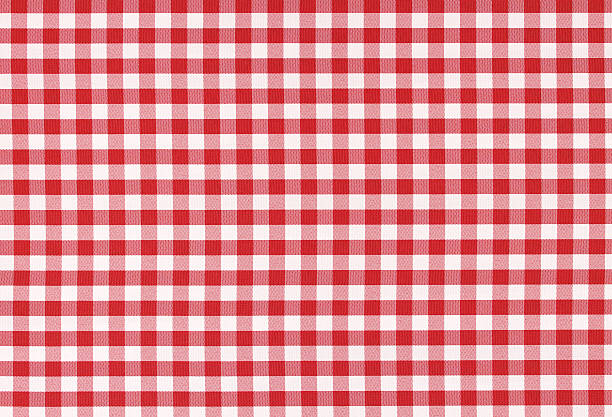
Red and white classic checked tablecloth texture with copy space

How this was made

I first started by recreating the menu. This was done using rectangles (for the base) and text. I then realized that in order for me to be able to do the animations, I will need to store each menu item as an object. So I created a class called MenuItem and used it to store each items’ name, description, tags (if any) as well as x and y positions. I then created a Menu class that stores a list of these items, x and y positions, and other variables. Within the MenuItem class, I have a function that draws the item on the menu. Certain values such as text size will vary depending on whether or not the mouse is hovering over the item. Another function exists called checkHover(), which takes x and y positions and checks to see if it is within the range of the menu item, if so hover = true.
I had a table with each menu item and their type (breakfast, greens, main) I loaded these value into an array then created an object for each item and stored it into an array called allItems. I then call a method called refreshItems() which shuffles the array and selects the first 11 items. Then I added them to the Menu class.
Within the Menu class, there is a function called checkMouseInMenu(), this was created because initially when I was testing the hover the coordinates were not matching onto the menu. This is due to the menu being displayed at an angle, so I asked Claude to help with writing a function that takes mouseX and mouseY and maps it onto the menu. The display function draws the menu on the screen and translates and rotates the menu depending on varying x,y and angle parameters.
In the update function, it checks to see if the menu is being displayed (this is a variable called state) and checks if the user is hovering over any item. In addition, it checks if the menu is currently hidden, if so it will check if the user is hovering over the menu at the bottom of the screen (this is to allow for the user to click on the menu so it reappears). The menu can also have 2 states, “sliding” or “returning”. If the user clicks on a menu item, the angle and y position of the menu will go from 330 -> 360 degrees and 70->290 respectively. I initially had it so that these values were incremented by a constant value, however I didn’t like how that looked, so I asked Claude if there was a way to increase by a percentage of the remaining distance each frame, so it naturally slows down as it approaches the target. Claude showed me the Lerp function. So in the code below you can see that Lerp() takes 3 values, this is the start position, end position and the increment. So in each frame the angle and y position increase by that percentage. This created a smoother animation. Once the angle of the menu is approximately 360, the angle and y value will be locked to the final positions and the state will be moved to “hidden”. The menu items will also be refreshed/randomly selected again.

Code:
// if sliding, moves the angle and y position of the menu
// to create a sliding effect down , once done, menu is now in
// the hidden state
if (this.state === "sliding") {
    this.angle = lerp(this.angle, 360, 0.08);
    this.y = lerp(this.y, this.startY + 220, 0.08);
    if (abs(this.angle - 360) < 0.05) {
        this.angle = 360;
        this.y = this.startY + 220;
        this.state = "hidden";
        this.refreshItems();
    }
}

For the returning state, this is the exact same, except instead of moving down, it moves up.
I also had functions for when the mouse was pressed, this checked that if the mouse was pressed, the menu was display, and it was over a menu item, then the menu would be moved to the sliding state. Otherwise, if the mouse was clicked, the menu was hidden, and the mouse was within the menu range, it would be moved to the returning state.

I then drew the background using nested for loops to created a checkered tablecloth.
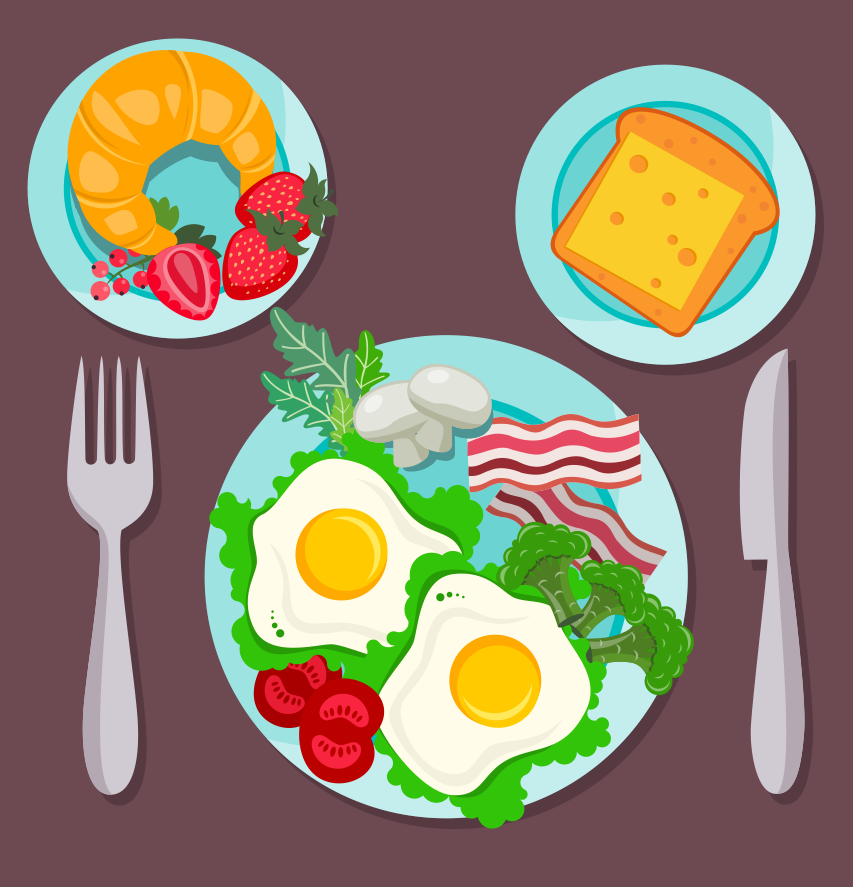
I also drew the plate using circles and the fork and knife using beginShape(), vertex(), and endShape().

Final result

Reflection

Overall, I am really happy with how this turned out! I feel like the menu looks very similar to the real thing, and after the help of Claude, I am also satisfied with the sliding animation. In the future, I would add that when the user clicks on a menu item, it would then display that item on the plate instead of the same burger emoji for each item. This would obviously take some time, but I believe it would make the result more statisfying.

Reading Reflection – Week #4

A few lines into this paper and all I could think of were the Campus Center doors. They are my “Norman doors” (1): always knocking me over to the side or even shutting on me when I pull the handle (of these supposedly automatic doors). I am 3 semesters in, and I have seemingly not understood how to use these doors despite their outrageous yellow signs. I used to think this was just me being scatterbrained. However, Norman’s opening chapter somehow redirected my self-blame back onto their design. By claiming, “I push doors that are meant to be pulled, pull doors that should be pushed, and walk into doors that neither pull nor push, but slide” (1), Norman helped me feel a strange kind of relief. What I did not expect was how technical the rest of the chapter would get about why doors fail. I understood his viewpoint that everyday objects are supposed to be simple to understand and mundane to use. For instance, he notes, “With complex devices, discoverability and understanding require the aid of manuals or personal instruction. We accept this if the device is indeed complex, but it should be unnecessary for simple things” (2).

He develops a fuller framework to make his case (affordances, signifiers, mapping, feedback, and conceptual models), all in service of what he calls “human-centered design” (5): the idea that design should accommodate people rather than the reverse. While I can relate affordances and signifiers to where the Campus doors fail, I want to push back on how tidy Norman makes this framework sound. His framework is almost too persuasive. It retroactively explains every ‘badly designed’ object I have ever used. I keep wondering whether this is the sign of a genuinely good theory, or just a very flexible vocabulary that can be draped over any complaint. His refrigerator story, for example, proves my point. While he seems to be right that the two controls suggest a false mental model, he also admits that even knowing the correct model did not let him operate the fridge properly. This is because the design gave him no way to act on that knowledge. This is the part I find more interesting. Correct understanding and actual usability can come apart entirely. I personally do not think Norman fully resolves that gap. He just treats it as another design failure to be fixed with better mapping.

Nonetheless, I believe that what he discusses is important. When it comes to my work (my generated artworks up to week 3), he made me realize that, so far, I have not been using signifiers. As a result, the user might not discover the full function of the interactivity I tried to incorporate. Without my written documentation, a user might not know that, for example, my first p5 sketch allowed for a change in character as the mouse is dragged. From now on, I will keep this in mind and try to put this into practice as I progress in the course.

Week 4 – Reading Response

Something that drives me crazy actually happened when I was playing Hogwarts Legacy, which is a video game. I was doing a side quest where I had to get to another area that I could see on the map, but every time I tried to fly there, I would just reach the border of the map and could not go any further. Usually, there are checkpoints that let you travel to different areas, but because I had not discovered this area yet, I had to figure out how to get there myself. Eventually, I found out that I had to go through an underground tunnel to reach it. It was so frustrating because I knew where I needed to go, I just had no idea how I was supposed to get there. I think even a small hint telling me that I needed to go underground would have made it much easier. This made me think about the idea of discoverability in the reading because the game showed me where I needed to go, but did not really help me understand how to get there.

For interactive media, I think one thing I took from the reading is thinking more about whether people actually know how to interact with what you make. There are so many ways someone can interact with something, like clicking or even moving, and I think it can be easy for the person making it to assume that people will just know what to do. This actually made me think about some of my p5 projects because I obviously know how they work since I made them, but someone seeing them for the first time might not. Even adding small instructions or text telling someone what they can do could make the interaction clearer. Once they interact, there should also be some kind of response so they know that what they did actually worked.

Week 4 Assignment: Flights and Airports Visualization

My Sketch

Important Note: The dataset is HUGE and sometimes it takes a couple of seconds for the sketch to load. Please do not SPAM the checkboxes, and kindly wait 1 to 2 seconds before clicking/unclicking a checkbox.

My concept

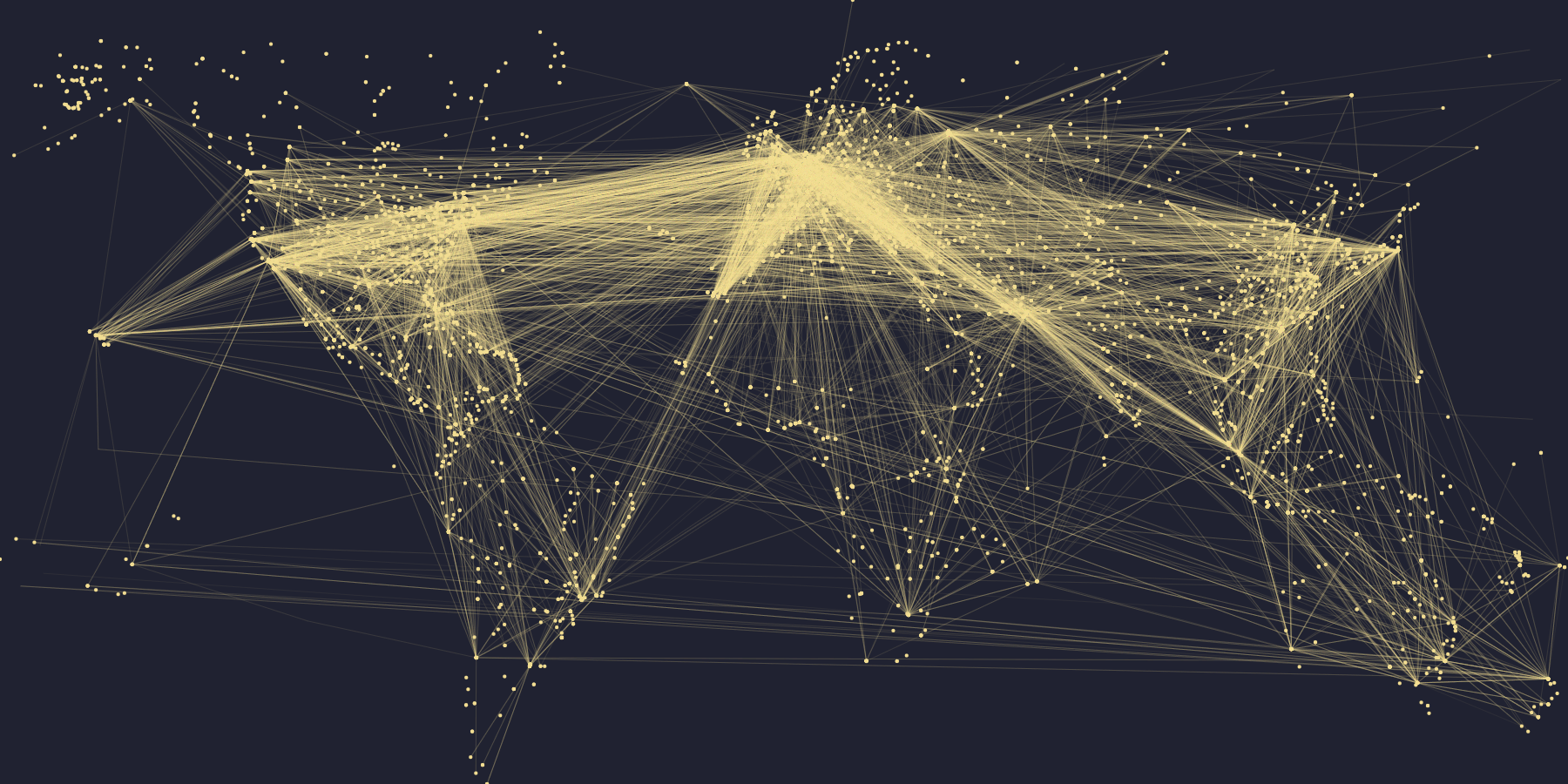
I was inspired by the demo of world population we did in class and I really wanted to try something similar yet still distinct. The moment I thought of flight pathways, I knew I had to do this. I love traveling and flying and I knew that visualizing all the flight pathways could create the outline of the world map, and create a neural-network-looking artwork.

One of the difficulties I had was searching for a comprehensive dataset. I simply wanted the coordinates of the starting point and coordinates of the ending point for every flight, but most datasets I found organized the data a bit differently. I asked ChatGPT to help me find a dataset that has the structure I was looking for, and it suggested me this dataset on DataBazaar, which I end up did using.

what my sketch looks like with both checkboxes checked!

My highlight code

The highlight of my code is my checkboxes and how they function. There are 2 checkboxes, one to show the airports (as dots) and one to show the flight routes (lines). You can check none, one, or both. The checkboxes are in the setup() function, and I essentially want the map to change depending on which box(es) are checked.

check_routes = createCheckbox("SHOW ROUTES", true);
check_routes.changed(() => {
    loop();
  });

Normally, I could have if check_routes.checked() in the draw() function to indicate what I want to happen based on the status of the boxes. However, I have a noLoop() at the end of the draw(), otherwise it would be too computationally expensive to have dots and lines being mapped out and drawn 60 times every second. But because I had noLoop(), the draw() function only draws once and stops, which means that checking the checkboxes does not have any effects. This was also a major bug in my code, so I had to ask ChatGPT for help and it taught me about the changed() function! So, when the checkboxes are changed (aka clicked/unclicked), the sketch draw() will resume in looping. It has a noLoop at the end though, so technically it only loop once.

How this was made

My dataset has 4 columns: the longitude and latitude for the start, and the longitude and latitude for the end (destination). I extract each column into their respective arrays: start_lng, start_lat, dest_lng, dest_lat.

The next step was to find the maximum and minimum of the latitudes and longitude. Because I had 2 arrays for latitudes and 2 arrays for longitude, I had to repeat this process 3 times for each value. For example, in the code below, I find the maximum latitude value in start_lat and the maximum latitude value in dest_lat, then comparing them to get the actual maximum latitude. This process is then repeat for min_lat, max_lng, min_lng.

let max_start_lat = max(start_lat);
let max_dest_lat = max(dest_lat);
let max_lat = max(max_dest_lat, max_start_lat);

Then, with these values, I can draw the flight lines and airport endpoints using the map() function. I loop from 0 to the numRoutes (the number of rows = the number of flight paths in the dataset) and in every iteration, I extract the coordinates into x1, x2, y1, y2. These x and y variables are then used to draw a line that resembles one flight route.

if (check_routes.checked()) {
    //loop every entry in numRoutes
    for (let i = 0; i < numRoutes; i++) {
      //save the coordinates in a variable and print the line connecting the points
      let x1 = map(start_lng[i], min_lng, max_lng, 0, width);
      let y1 = map(start_lat[i], min_lat, max_lat, height, 0);
      let x2 = map(dest_lng[i], min_lng, max_lng, 0, width);
      let y2 = map(dest_lat[i], min_lat, max_lat, height, 0);
      line(x1, y1, x2, y2);
    }
  }

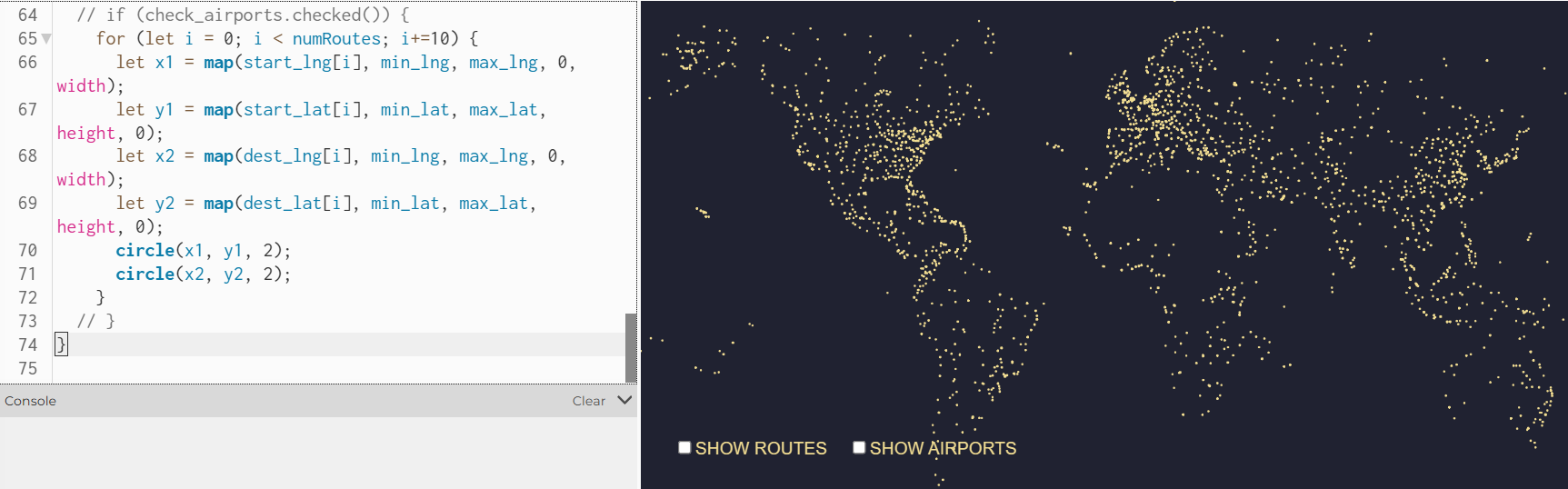
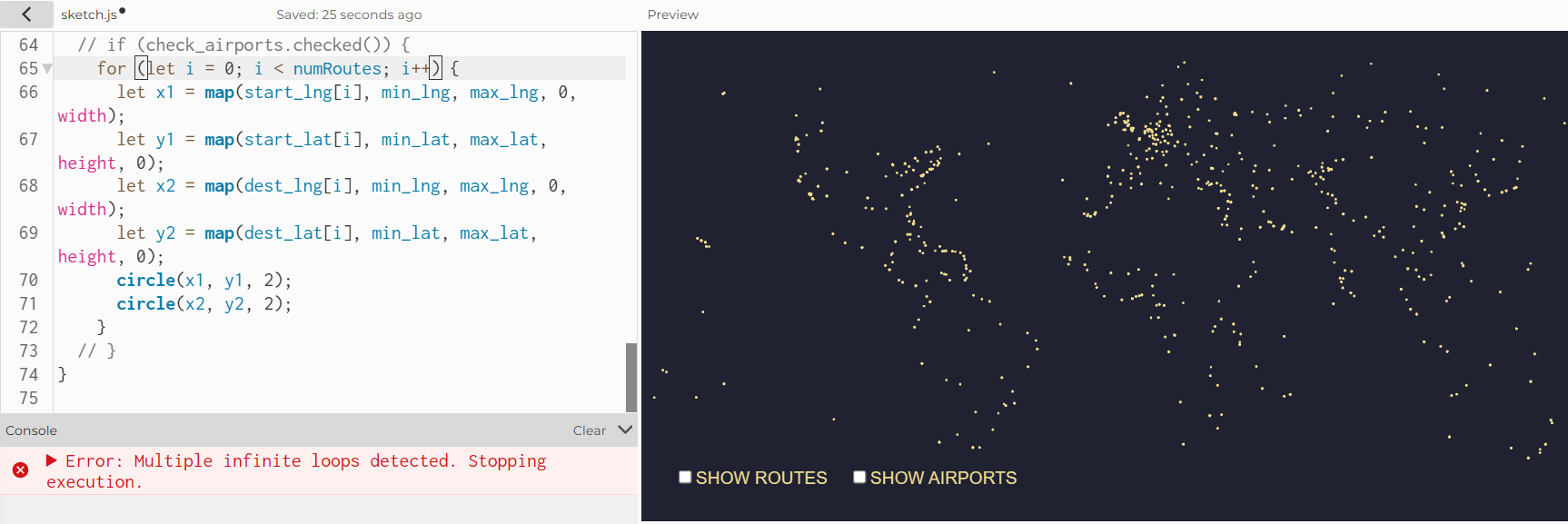
The block of code to draw airports is also very similar; instead of drawing the line, I draw 2 circles with radius of 2, whose centers uses (x1, y1) and (x2, y2). There was one bug, though. For some reason, the p5 editor is unable to handle the amount of iterations in the drawing of the circles. If the loop had i increment by 1 (i++), the p5 would only draw some of the circles. When I changed it to i+=10, I reduced the number of circles it has to draw by 1/10, and ironically it displays more circles than when I had i++. I decided to keep it at i+=10, and I think this bug is most likely because my dataset has ~66K rows, which is a lot to handle.

when I had “i+=10”
when I had “i++”

Reflection

I think it looks incredibly cool, and I personally like how abstract the sketch is with just the routes mapped. I was a bit worried that my assignment would be quite similar to what we did in class initially, so I incorporated the checkboxes as a way to 1) challenge myself and take the visualization a step further, 2) encourage meaningful interactivity, and 3) create an opportunity to learn about new things. Compared to the demo population example you have us in class, drawing the flight pathways is also quite different. Most importantly, I learned new things in the process of this assignment, which is always a win :))

If I had more time, I would love to have a search bar where the user types in the code of the departure and arrival airport (e.g.: DXB, JFK, LAX), and the sketch would make that route a different color if a direct flight is available. I think that this is feasible, since the original dataset does come with airport codes. It would be quite complex though, since it involves searching, I think.

Resources I Used

Original Dataset: https://www.databazaar.io/datasets/71f62319-b8c7-42f1-be03-c7eb69308335
My edited dataset (via Google Sheets): https://docs.google.com/spreadsheets/d/187gIhSrk3LXHEgqG_BxJ3_Gz9WVtgrXmvUJ0kJV333s/edit?gid=2055795158#gid=2055795158
https://p5js.org/reference/p5/createCheckbox/

How Artificial Intelligence was used:
  • to find my original dataset
  • suggested to me the changed() function which I used for the checkboxes in setup()

Artificial Intelligence was not used in any other part of this assignment.

Week 4 – The Psychopathology of Everyday Things


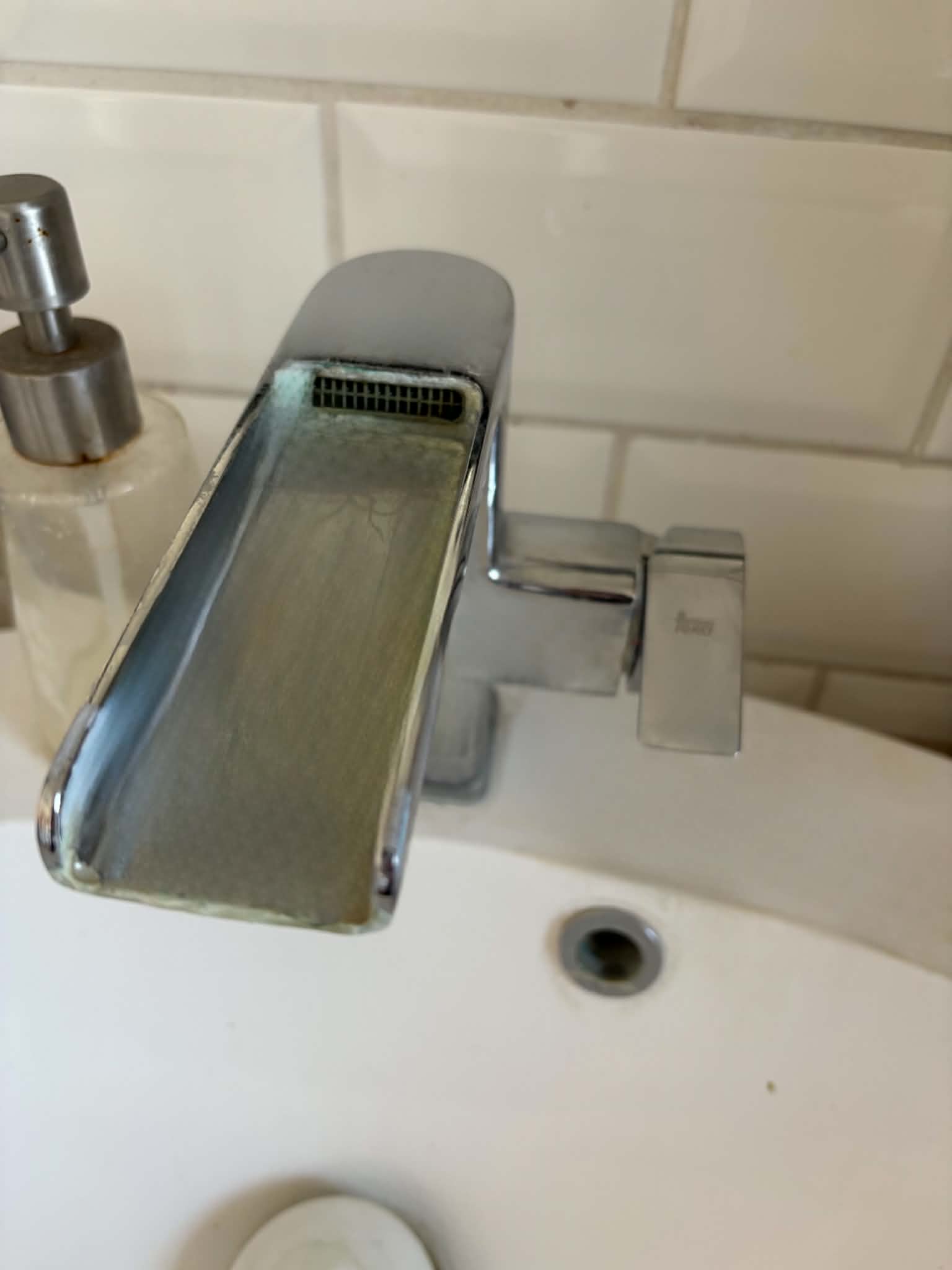
To start with, the reading, especially the examples of the sink in the hotel and the pull-push doors, made me think of a personal example, actually. We have a sink at home in the bathroom, and whoever visits us for the first time, they are always so confused by it, because you have to turn the faucet to the side, not up, to turn it on. (Figure 1) Now, it is on the side and not the top, but other than that nothing really indicates how it should be used. My family and I only know it because we have been living there for years, and I always get surprised when someone asks for help with it, but now that I think of it, it really lacks a good signifier.

Figure 1 – Our sink has the tap on the right side, which confuses a lot of people how to use it. You have to turn it to the side to turn it on. (Photo by my Mom)

For something else that really bothers me with products other than the things mentioned is probably when they overexplain something relatively easy-to-understand function, at the cost of describing something that ACTUALLY needs some description. In the past, whenever I tried to connect a wireless device to my phone or laptop I always had to look it up online how to actually connect it, because each of them has different methods to do so. The reason why I always have to go online is that in the instruction manual, they were too busy talking about how the button with the “plus” signal increases volume and how the one with the “minus” decreases. I understand that this also needs to be said in case someone is having their first time, but I feel like some designers are literally feeding all the information to me. These instruction manuals sometimes make me feel so stupid, and sometimes I think I am the actual designer and maker of the product and know everything about it. I have rarely come across a digital product that gives me proper infomration about the actualy usage of the product and doesn’t talk about the designer, their family and how this is the best product in the world for at least three pages.

To maybe make it more HCD I feel like all these informations could be put to a way more visible place. For example,  I sometimes see products that have a little instruction manual on the box itself, so even before buying it I can see and decide if a product like this what I actually need. I knwo that today, everything can be just looked up on the internet, but I don’t think that should replace proper documentation on the product itself.

For IM, I feel like whenever I had to design a website for example, the most common feedback was that “So what do I do now?”.  On the web, especially, where you can do SO many things, click your right, left mouse buttons, go up, down, enter, I feel like designing a UI that is either explained how it is dedicated to use, or it can be easily figured out by the user while using. It is easier to lose interest in a website that you can find hundreds of in 5 seconds on the very same device you already have, than a product that you had to spend a lot of money for, waited for delivery, and now finally is in your hands. I feel like for this reason, designing a website, a game or anything like that is even more important to take into consideration the role of affordances and signifiers, as the author mentions. They need to comunicate what can be done (like, if I click my right mouse button, will anything happen, or am I just wasting my time) and how that can be done. I think a good example of that was the menu for the restaurants. Using symbols can help, as they are not bound by language, colours (as usually red indicates wrong and green correct) or anything that can be understood by a large amount of people.