Week 2 – Reading

Before finishing the video, I genuinely thought that randomness in code is something that simply makes the outcome unpredictable. I didn’t think of randomness as something that could be controlled by the artist, as for the name, random. But throughout watching the video, the idea that stood out to me the most was the relationship between rules and chance. In the middle of the video the lecturer included a quote. “Above all, it’s never a blind chance, it’s a chance that is always planned but always surprising.” I found this saying very interesting because it almost sounds like a contradiction at first. In the beginning I didn’t really get it because how can something planned be considered something with chance. However as the video went on I started to understand that an artist can plan the boundaries without actually planning the exact outcome. Even when a computer is producing different results, the artist is still the person who creates the system and decides what is allowed and what is not allowed.

This concept started to really make sense to me because I feel like it really connected with what I am doing in class the past few weeks. In my work I would want to incorporate randomness through things like colors, sizes, positions, or patterns. I personally would still not give up complete control because I would still have an idea of what I want my artwork to look like, however adding randomness can balance out into something more artistic than it seems. The video made me realise that randomness does not necessarily mean losing control. Instead I can control the rules while allowing the computer to surprise me with what happens within them. Overall, this video made me feel a sense of spontanousness with a balance of structure. All the examples given in the video really inspired me and opened my eyes to new forms of code and graphic designs.  
Week 2 – Animation, Conditionals, Loops

My concept: 

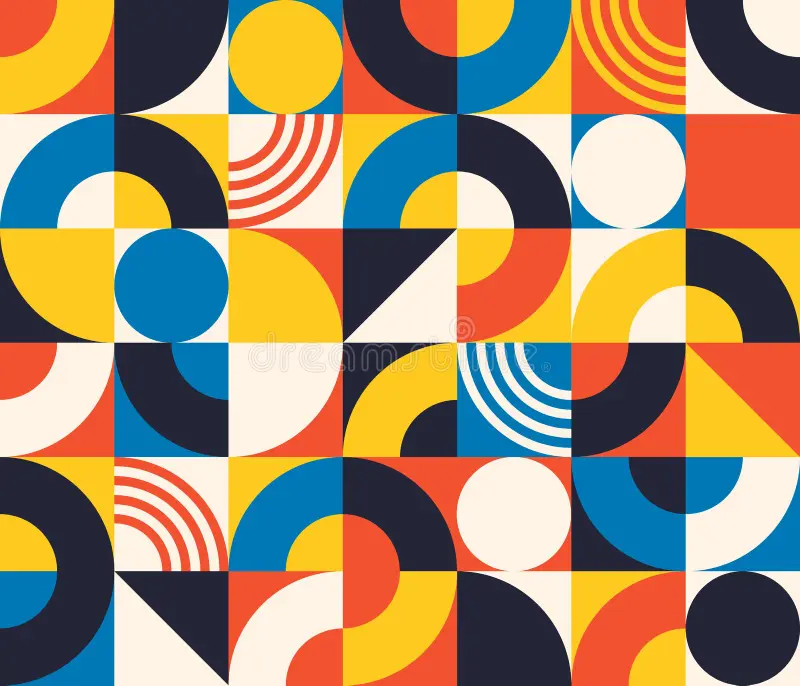
For this assignment, I wanted to create a simple yet impressive work of art. In order to make it visually interesting, I decided to emphasize the geometric patterns using different colors and shapes. I got inspired by a graphic design I found while searching for magazines. The reason why it stood out to me is because of how the simplicity of shapes created a complex looking outcome. I also incorporated what we learned in class, including loops, the circleSize pulses, and if/else statements. I decided to add the pulse effect to make my art work feel less flat. An interactive element was also used, where the user could click the screen to change the theme of colors. There are 4 different color themes, after it goes through all 4, it goes back to repeat.

Highlight of my code:

I’d like to say my favorite part of my code has to be the interactive element. Every time you click, the theme number increases and the colors of the artwork change. The reason why I’m proud of this specific part of my code is mainly because I got to incorporate something I learned in high school into my work. It’s a pretty simple code, yet it led to the most creative part of my project. I numbered every shape, and depending on how many times you click, decides what color theme is picked. Because I didn’t want to make the code confusing and overwhelming with a huge list of colors, I made some shapes set as a permanent color. I filled the half circles and a rectangle to a beige color to somehow still have a link or unity to all the themes.

// ORIGINAL COLORS
  if (theme == 0) {
    color1 = "#f45132";
    color2 = "#ffca28";
    color3 = "#0781b7";
    color4 = "#202236";
  }

  // PURPLE COLORS
  if (theme == 1) {
    color1 = "#74a7fe";
    color2 = "#874efe";
    color3 = "#b18cfe";
    color4 = "#7b219f";
  }

  // BURGUNDY COLORS
  if (theme == 2) {
    color1 = "#5c0700";
    color2 = "#791a3e";
    color3 = "#9a244f";
    color4 = "#00364a";
  }

  // B&W COLORS
  if (theme == 3) {
    color1 = "#d6d6d6";
    color2 = "#7a7a7a";
    color3 = "#444444";
    color4 = "#232323";
  }
function mousePressed() {
  theme = theme + 1;

  if (theme > 3) {
    theme = 0;
  }
}


Embedded sketch:


How was this made:

I started off my code by dividing the screen into 4 rows. I started creating my shapes, alternating between rectangles and ellipses, depending on which shape I want to be overlapped. When I decide to add the pulsing effect on the ellipse, I add the circleSize code into the coordinates. When it came to the third row, i wanted to add repeated lines. I thought that was the perfect time to practice my loop code. Instead of coding every line individually, i only had to coordinate the first line, and duplicate the rest. It moved 10 units to the right until I got all my lines in order. When it came to the clicking to switch the theme part, I had to google how to do. Fortunately, the first like I found was the reference page teaching me how to use mousePressed. https://p5js.org/reference/p5/mousePressed/ And of course, the whole inspiration to my art was an abstract patterned magazine design that immediately caught my eye. I tried my best to match the colors as well. https://www.dreamstime.com/bauhaus-seamless-pattern-abstract-square-tiles-circle-triangle-retro-print-minimal-style-geometric-figure-vector-image217690822 After some advice from my professor, I later added another loop to create the rectangles in the background. Instead of coding each rectangle individually, the loop automatically moves 100 pixels across and down the canvas, making my code shorter and more efficient.


Reflection:

I really enjoyed this assignment but if I had to change something, it  might be to change the shapes and experiment a bit more. I would decrease the size of the shapes in order to make it look more pixelated, and give it an old computer effect. I would also try to add a new moving effect that doesn’t require any input from the user. Like moving shapes or changing colors. After watching the video as well, I would’ve liked to incorporate more randomness. Overall, I’m very proud of my work and use of class material. I’m happy with how interesting it is to look at and how much effort i put in order for that to happen.


Week 2 – Assignment (Animation, Conditionals, Loops)

My Concept
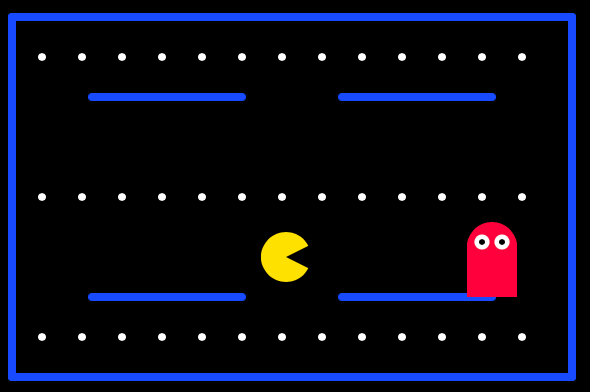
When I thought about making a good piece of art using a for loop, the first idea that came to my mind was a Pac-Man design map. Pac-Man maps contain many repeated dots, so I thought a loop would be a useful way to create something similar without drawing every dot separately. My goal was not to recreate the original game exactly. I wanted to make my own simple maze-chase artwork inspired by it. I used blue lines for the maze, repeated white dots, a yellow player, and a simple red enemy. The yellow character follows the mouse, which makes the artwork interactive.


Code Highlight
The code I am particularly proud of is the loop that creates the dots:

for (let x = 50; x <= 550; x += 40)
circle(x, 60, 8);
circle(x, 340, 8);

I am proud of this part because I did not need to write a separate circle() command for every dot. The variable x starts at 50 and increases by 40 every time the loop repeats. This places the dots across the canvas with equal spaces between them. I used another similar loop to create the row of dots in the middle:

for (let x = 50; x <= 550; x += 40)
circle(x, 200, 8);

function setup() {
  createCanvas(600, 400);
}

function draw() {
  background(0);

  // Maze walls
  stroke(0, 100, 255);
  strokeWeight(8);

  line(20, 20, 580, 20);
  line(20, 380, 580, 380);
  line(20, 20, 20, 380);
  line(580, 20, 580, 380);

  line(100, 100, 250, 100);
  line(350, 100, 500, 100);
  line(100, 300, 250, 300);
  line(350, 300, 500, 300);

  // the top and bottom dots
  noStroke();
  fill(255);

  for (let x = 50; x <= 550; x += 40) {
    circle(x, 60, 8);
    circle(x, 340, 8);
  }

  // another loop to draw dots through the middle
  for (let x = 50; x <= 550; x += 40) {
    circle(x, 200, 8);
  }

  // Player
  circle(mouseX, mouseY, 50);

  // Player's mouth
  fill(0);
  triangle(
    mouseX,
    mouseY,
    mouseX + 30,
    mouseY - 15,
    mouseX + 30,
    mouseY + 15
  );

  // The Enemy
  fill(255, 60, 80);
  circle(500, 250, 50);
  square(475, 250, 50);

  // Enemy eyes
  fill(255);
  circle(490, 245, 15);
  circle(510, 245, 15);

  fill(0);
  circle(490, 245, 6);
  circle(510, 245, 6);
}

Embedded Sketch

How Was This Made?

I first made a black background and used blue line() commands to create the outside border and the simple walls of the maze. I used for() loops to repeat the small white circles across the map. The player was made with a yellow circle() and a black triangle() for its mouth. I used mouseX and mouseY as its coordinates, allowing it to follow the mouse. I also used an “if” and “else” statement to change the player from yellow to orange when it moves from one side of the canvas to the other. The enemy was created from a red circle and square, with smaller circles for its eyes. I referred to the loop and conditional examples from our class materials, specifically from the class Power Points from Week 2. I also used the official p5.js reference to understand the basic drawing commands.


Reflection and Future Improvements

This project helped me understand why loops are useful. Drawing every dot with a separate command would take a long time, but the loop made it shorter and easier to adjust. I also learned that changing the starting position, ending condition, or increment changes how many dots appear and how far apart they are. A challenge I would like to mention is when choosing the coordinates for the maze walls and making sure the dots stayed inside the canvas. I kept the maze simple because I just wanted to use the basic techniques that we covered in class. However, in the future I would like to make the player stay inside the maze walls instead of moving anywhere on the canvas. I could also make the enemy move, add more paths, or make the dots disappear when the player touches them. Chiefly I would like to make it a more realistic and applicable game and theme 

Week 2: Reading Reflection

As a perfectionist, the word “chaos” would always evoke negative emotions in me. It is a word that feels like the direct antonym of my favorite word, “perfection,” and so it never quite sat right with me. However, listening to Casey Reas’ speech made this word more tolerable, as the examples of work he showed made me see a certain beauty in randomness.

For me, the most meaningful takeaway was that adding elements of randomness can sometimes help keep a work alive and dynamic. Previously, when I tried to incorporate randomness into my work, it would usually result in a messy, overwhelming chaos. But now I realize that to avoid that kind of mess, you need to set certain limits and keep a balance, something like 75% control and 25% chaos. My mistake was that I overemphasized and exaggerated the chaos, turning my work into an uncontrollable mess.

In a recent assignment for this class, I ran into something similar. I created a perfect grid of squares, but that perfection made the sketch look dead and homogenous. Then I experimented with spacing and movement, and eventually found my ideal ratio of randomness to order, something I’d call “controlled mess.” This change made the sketch look more alive and visually interesting.

In my future projects, I plan to expand my use of chaotic elements, but with the same rules in mind. I am eager to experiment and discover ways in which I can add random elements to parameters like size, rotation, or even frameRate to create unorthodox projects that still feel ordered and meaningful.

Week 2 – Reading Reflection

After watching Casey Reas talk, it made me think deeper into randomness in art. At 27:25 Casey Reas says something in the lines of “somewhere in between here is the space from order to chaos.” This made me stop and think that randomness does not always mean completely uncontrolled, but instead that I can set the rules in my work and let parts of it change or behave unexpectedly.

I specifically found how he mixes structure with variation, what I mean by this is that he makes the shapes move or appear in ways that are so unpredictable but still it feels connected and put together because it follows a specific system. I loved that the work could look random but not messy.

This made me really think about randomness and that with a good system it could flow really well. I wanted my work to look organized but at the same time not predictable. So I used this idea mainly through the colors and shapes, so when I move my mouse to the left side the design changes to cool colors but if I moved it to the right side it changes to warm colors. I still control the colors which appear in both sides, so even if the appearance changes it’s still organized. As well as the shapes, I used repeated shapes and a clear pattern to give the design structure. I found out the best designs comes from a clear plan and then as I’m working I can leave space for unexpected changes but still making sure the final design looks intentional and not messy.

Assignment 2: Animation, Conditionals, Loops

Sketch

Concept

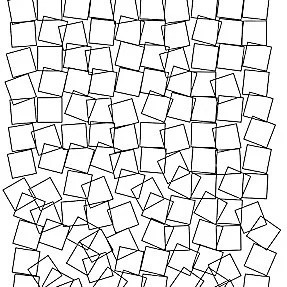
Fun fact: my work was unintentionally inspired by Georg Nees’ “Schotter“.
My first Idea was to recreate colorful bathroom tiles, like the ones in old style houses, and I built a grid of squares in perfect order. But as I worked through the project, that perfect order started to feel boring to me. So I decided to add some chaos by making the squares move and rotate. Later, I realized that I had subconsciously taken inspiration from one of the artworks I had reviewed earlier before starting my sketch. Once I noticed that, I began taking inspiration from that work on purpose. Obviously, it is not a 1 to 1 copy of Georg Nees’ work, but my own version with animation that resembles the flow of a waterfall.

George Nees “Schotter”

Code Highlight

for (let x = 0; x <= width; x += 25) {
  for (let y = 0; y <= height; y += 25) {
    
    push();
    //The lower it gets, the more it moves
    translate(x + random(-y / 30, y / 30), y + random(-y / 30, y / 30));

    // The lower it gets, the more it rotates
    rotate(radians(random(-y / 10, y / 10)));
    
    stroke(random(150, 255), 100, 220);
    strokeWeight(random(1, 2.5));
    rect(0, 0, 22, 22);
    pop();
  }
}

The hardest part was creating a falling effect where the movement increases as the squares go down. To do that I used:

translate(x + random(-y / 30, y / 30), y + random(-y / 30, y / 30)) rotate(radians(random(-y / 10, y / 10)));

So as the Y axis value increases, the range of movement gets larger too. As you can see the first row squares are not moving at all. But the squares further down drift and rotate randomly.

How was this made

First, I set up a basic grid with two nested for loops, one for x and one for y, and spaced the squares 25 pixels apart across the whole canvas. Next, to create the progressive breakdown effect, I used translate() and rotate(), and divided my y value inside the random() functions. Because y value is small at the top of the canvas, those squares barely move at all. But as y increases going down the canvas, the range passed into random() gets wider, so the lower squares shift and rotate more. To accomplish this I had to look up translate() and rotate() functions on p5js reference page.

Reflection

Looking back, this project turned out quite different from what I initially planned. At the start, my idea was simply to make an artwork similar to colorful bathroom tiles. But as I kept working on my code, my plan swerved in a direction I wasn’t expecting. If I had more time, I would definitely experiment more with the color palette and add some sort of fading effect as the squares “fall down.” It would also be interesting to add elements of interactivity, like letting the mouse position affect how the squares fall apart.

Week 2 Reading Assignment

Original video: https://vimeo.com/45851523
Quotes and ideas referenced from the video comes with a timestamp in purple: (MM:SS)

When I first started making things in code…every line of code was precisely determined by myself and it produced something exactly as I wanted it to be.
– Casey Reas, (0:22)

I connect to this so incredibly well and in fact, it’s quite visible in my Week 2 assignment (hehe). I feel like randomness and chaos often comes with the feeling of “uncontrollable mess” which is intimidating. However, after watching this video, I have the impression that with art, perhaps randomness can produce what is beyond (and even better than) my imagination.

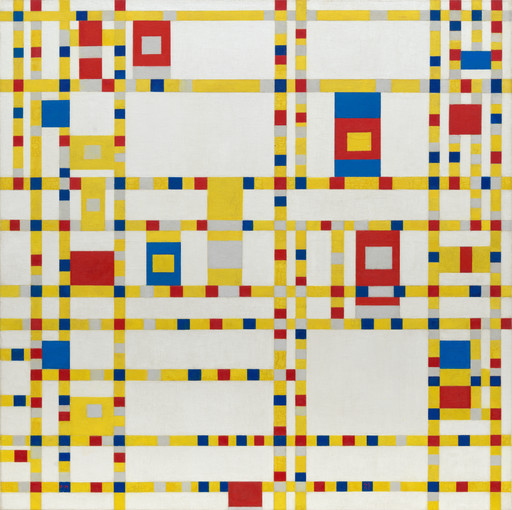
Piet Mondrian. Broadway Boogie Woogie. 1942–43

One of the most eye-opening and interesting facts I learned from the video is on Piet Mondrian’s grid paintings. I’ve come across these so many times, and they look like one of those “anyone can do that” paintings at first. I, personally, felt emotionless every time I saw them, so I was surprised when Reas said that these paintings contain brush strokes of “emotional, human-quality (21:54).”  I learnt that Mondrian was indirectly inspired by boogie-woogie music, a repetitive, persistent, and repeating bass on the piano.

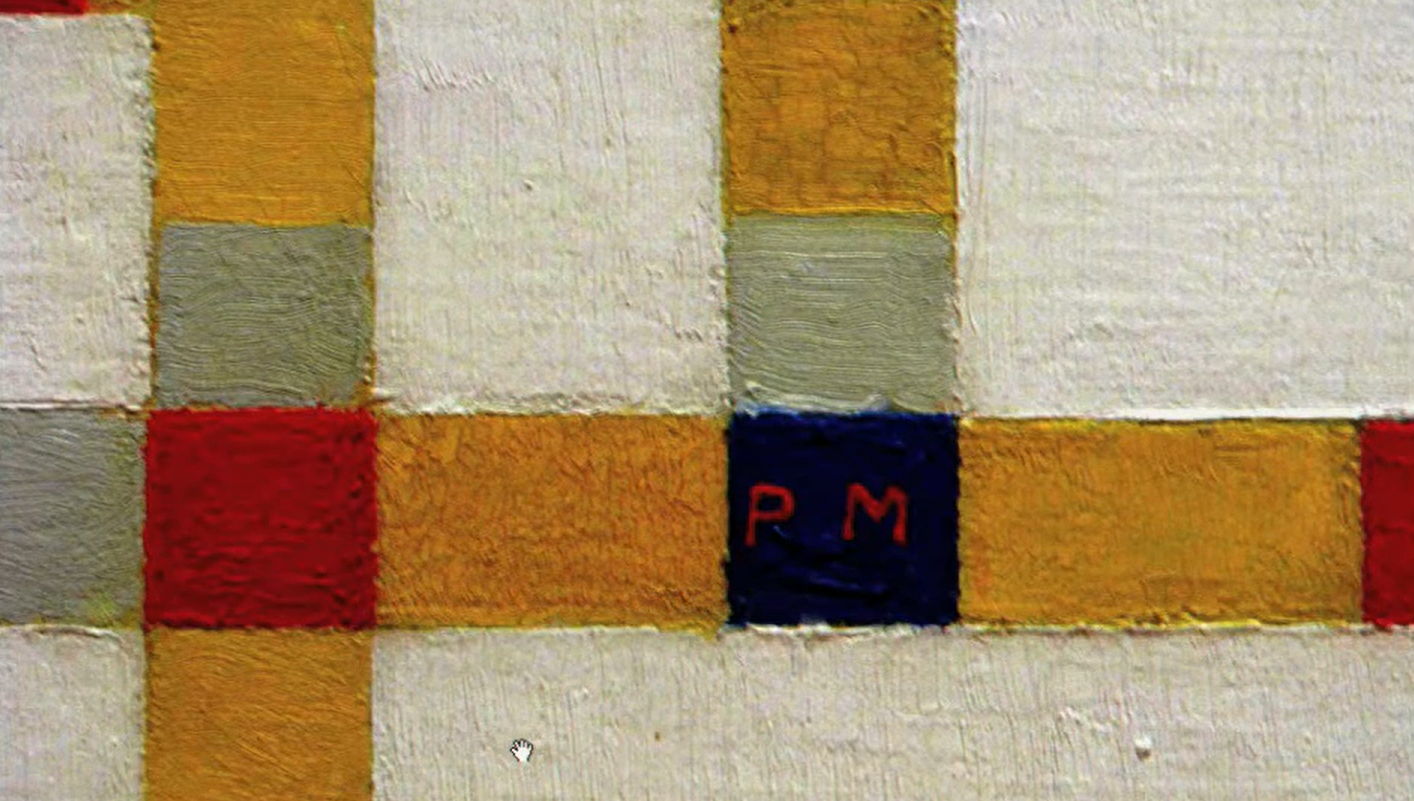
texture of Mondrian’s painting; screenshot from video

Yet, if looked closely in person, one can notice the visible and thick brush strokes, and the wobble at the edges of the line (21:10). When I learned that Mondrian did not use masking tape for clean edges and wanted to, instead, retain the human texture, my view of his grid paintings completely changed. 

Listening to the lecture also reminds me of something I was told as a kid: that real artists don’t use erasers, rulers, or drawing compasses. I never really understood why, but as a child, I thought that it’s because professionals don’t make drawing “mistakes.” After this video lecture, I’m reminded that art is more about embracing humanness, the imperfections, the nuanced and delicate strokes.

Above all, it’s never a blind chance; it’s a chance that is always planned but also always surprising.
– Gerhard Richte (18:30)

On to the guiding question of “where is the optimum balance between total randomness and complete control,” I think it’s difficult and arguably impossible to come up with the “optimum balance,” since it varies by artists and what they’re comfortable with. However, with me personally, I think incorporating random elements would certainly add some “spice” to my work, as it provokes curiosity and excitement. Some of the ideas I came up with ironically involve controlling the randomness:

  • Random combinations of colors from a list/array of colors that are on-themed.
  • Shapes/elements appearing/moving at random coordinates/speeds within the canvas boundaries
  • Random number of shapes/elements but there is a lower limit and upper limit.

This way, I can have some “randomness” within my sketch without making them total chaos.

Resources I Used

[photo] https://www.moma.org/collection/works/78682

Casey Reas response by Daniel Green

After giving Casey Reas’ presentation a watch on behalf of my consideration for what to try out within a coding artwork of mine, it has led me to think about how I wish to incorporate random elements into my works. Perhaps one way that I can incorporate random elements in my work is if there are certain shapes and/or colors that I find myself stuck with or wish to keep as simple as possible. For instance, if I were to try creating an art pattern of lines that I wish to be originally different but don’t know how, I would turn to my code and attempt to apply requests for random elements to be used within each line. Whether it be the shapes that shall be chosen to be featured in each alternative line or the colors randomly given a separate line to represent, the random elements at hand will still share the purpose of helping make my artwork look somewhat original in a sense. But of course, this will be after I share with the coding certain rules of what boundaries/minimum limits to respect and how to at least stay on track. I am still giving the code freedom to create each line featuring an alternate shape/color of the code’s random choice; I am simply letting the computer know the rules of what lines not to cross and how to stay in touch with the goal of creating the artwork without going off-track.

With this in mind, this is why I believe that the optimum balance between randomness and complete control is the presence of rules/expectations of you, yourself, the artist. If one technically thinks about it, without any rules/expectations set for the computer to follow and remember while writing the code for your masterpiece, the computer is going to get convinced that it is free to do whatever it believes is best, and thus create an artwork that is the complete opposite of what you could be looking for. Sure, it will score enough points for trying to be unique and original with its choices of art style on your behalf, but it will lose points in acting with such intention in a careless and rather messy manner. Not to mention that in the world of art, it is almost impossible to execute the concept of artwork that represents some sort of meaning despite its messy appearance. That still doesn’t mean that the chance to create a compelling yet kind of messy artwork can be never reached; it just needs to meet the requirements of how to not go overboard with its creation in which it all lies on your hands to place forth for the computer to take note of.

The bottom line is that any artwork is still free to incorporate random elements into their work for the sake of thrilling mystery, it just calls upon you, the artist, to monitor the workings of the computer in order to see if its random choices are going along with your plan. It can point towards checking how far in height/width the computer is expected to reach while conducting its random outcomes, or even the amount of ordinary elements that it uses and how many times they’ve used otherwise. It all comes down to the idea of being fair with not just yourself but also with the computer as well. It perhaps can be seen as an example of equal collaboration that any artist should always open towards. Overall, this is all of my thoughts in regards to the idea coming from Casey Reas’ presentation.

Week 2 – Generative Art

Concept

For this assignment, I wanted to create something that felt like rain, but also resembled microorganisms under a microscope. After watching Casey Reas’ talk, I became more interested in creating a system rather than manually designing every part of the image. I wanted to start with a clear structure, rain falling downward, and then introduce randomness and interactions between the particles.

The particles are loosely inspired by microorganisms because they have translucent shapes around them and move in groups. However, I did not want to directly draw bacteria or cells. Instead, I wanted the biological feeling to come from the way the particles behave. Each particle reacts to nearby particles by attracting, repelling, and slightly aligning with them. This means that even though I set the rules, I cannot completely predict the patterns they will create.

I also added mouse interaction so that the viewer becomes part of the system. Moving the mouse pushes nearby particles away and creates a disturbance. I liked this because it makes the artwork feel less like an animation that is simply being watched and more like an environment that the viewer can affect.

Code I’m Proud Of

The part of my code I am most proud of is the interaction between particles. Instead of giving every particle a specific path, I made them respond to their surroundings.

if (distance < 70 && distance > 0) {
  nearbyCount++;
  attractionX += distanceX / distance;
  attractionY += distanceY / distance;
  alignmentX += otherParticle.velocityX;
  alignmentY += otherParticle.velocityY;

  if (distance < 18) {
    repulsionX -= distanceX / distance;
    repulsionY -= distanceY / distance;
  }
}

This checks for particles that are nearby and gives them different behaviors depending on how close they are. They are slightly attracted to particles that are farther away, while particles that get too close repel each other. They also look at the movement of nearby particles and slightly align with them. I liked this part because a fairly small amount of code can create much more complicated movement when it is repeated across hundreds of particles.

How Was This Made?

I started by creating an array of 250 particles. Each particle has an x and y position, a velocity, and a size. I initially gave all of them a downward velocity so that the overall system would resemble rain.

After that, I added the particle interactions. For every particle, the code checks the other particles within a certain distance. Based on those distances, the particles attract, repel, and align with one another. I also added random() to their movement so that they do not behave exactly the same way every time.

The background is dark purple and slightly transparent, which allows previous frames to remain visible. This creates trails behind the particles and makes the canvas itself become part of the artwork.

Finally, I added mouse interaction. When the mouse gets close to a particle, the particle is pushed away. Moving the mouse quickly creates a stronger disturbance, so the viewer can influence the behavior of the system.

Reflection and Ideas for Future Work

I think this assignment helped me understand Casey Reas’ idea of balancing structure and randomness more clearly. I started with a very controlled idea, which was simply particles falling like rain, but then allowed the system to become less predictable through randomness and particle interactions. I liked that I was defining the rules without directly defining the final image.

One thing I found interesting was that the particles sometimes begin to move together and form patterns even though some of their movement is random. This relates to Reas’ discussion of swarm dynamics and made me think more about how systems can create order on their own.

I am fairly happy with the final result, especially because the viewer can disturb the system with the mouse. In the future, I would like to experiment with changing the rules while the artwork is running, so the system itself could gradually become more unpredictable.

Week 2 – Reading Assignment (Eyeo2012 – Casey Reas)

In the video, Casey Reas talks about moving from total structure toward slowly introducing randomness within a controlled environment, and eventually giving up even more control to the canvas itself. I particularly liked his discussion of structured order, including the structure within his own work, as well as the way he critiques the philosophy behind each artist he presents.

When he says, “I wanna make my own reality,” and begins talking about imitating biology, I understood exactly where he was coming from. As a visual artist, he seems to move from thinking about objects to thinking about behaviors, and then to thinking about the individual elements that make up those behaviors. Once those elements begin interacting according to certain rules, they can produce outcomes that are difficult to predict, what he describes as a form of “chaos.”

I also found his discussion of swarm dynamics interesting. Even when each individual element behaves somewhat randomly, the system can eventually synchronize and settle into a pattern. That raised an interesting question for me: how do you design a system that continues to feel random and alive rather than eventually becoming predictable?

My biggest takeaway from the video was the idea of applying these concepts to multisensory artwork, especially when Reas brings up John Cage’s use of chance in music. A computer can take a simple set of rules or sounds and multiply them millions of times, creating something far more complex and extraordinary than what was originally defined. At first, I might see something like that as just noise or background. But as Reas demonstrates, that “background” can be given its own behavior and brought to life in unexpected ways.