What are some of the ways that computer vision differs from human vision?
When compared to human vision, computer vision is much simpler. The reading discusses a few methods that are used to accomplish computer vision; however, the computer can’t tell the difference between a person/living creature and an inanimate object placed in its view. In comparison, human vision uses a complex system of nerves, sensors, signals, and communication between our brain and eyes, allowing us to see in much greater detail than a computer, as we are able to see in much greater detail, allowing us to more easily distinguish the objects we are looking at, as well as things like color and distance.
What are some techniques we can use to help the computer see / track what we’re interested in?
In the reading, the author mentions three main methods for computer vision: frame differencing, background subtraction, and brightness thresholding. Frame differencing locates items by detecting their movements. Background subtraction uses pixels to identify objects based on differences in an established background. Lastly, brightness thresholding uses differences in luminosity to distinguish between people and objects in the foreground vs the background.
How do you think computer vision’s capacity for tracking and surveillance affects its use in interactive art?
I think the inclusion of computer vision in interactive art allows for many creative ideas to come to life, but it could also raise a lot of concerns for privacy, especially when a piece may be on display. For audiences, they may be worried about where recordings or images are being captured and where those recordings are going. On the other hand, having computer vision as a tool for creativity opens the doors for all kinds of projects and adds a really interesting kind of interaction to art, where the audience is not only interacting with something by clicking some buttons but rather they can interact through body movements, allowing them to really feel immersed in the work.
Coming into the midterm project, I had zero ideas about what I wanted to do. While looking for inspiration, I came across a Save the Oceanhttps://intro.nyuadim.com/2023/03/08/midterm-project-save-the-ocean-game/ game made by a prior student which really inspired me. I really liked the ocean aspect because one of my favourite games growing up was Sky Whale, and I felt like that resonated with me. I wanted to create something that had a playful, game-like feeling while also being connected to something I personally enjoy. I have always loved the ocean and the beach, and even my phone and iPad wallpapers are beaches so I knew I wanted my project to be underwater and ocean-oriented.
I then wanted to connect this idea to Emirati culture and the UAE’s history. I wanted my project to explore what the UAE’s economy looked like before oil, particularly the traditional pearl-diving industry. Before the discovery of oil, pearl diving was an important part of the region’s economy and supported many families. I wanted to show what this traditional activity was like and how difficult and humble the process was. Divers did not have the equipment that modern divers have today. They would spend months away from their families on pearl-diving boats, with some ships carrying around 100–120 people depending on their size. Divers could go down to depths of around 7–30 meters and had to navigate and understand the ocean without modern technology. The experience was also unpredictable because weather and sea conditions could change quickly making pearl diving extremely dangerous.
I also wanted to include some of the cultural elements surrounding pearl diving rather than focusing only on the diving itself. For example, the nahham or traditional ship singer, would sing and chant to motivate the divers and sailors, helping distract them from fatigue during the long journeys. I want to incorporate recordings or recreations of these traditional songs and chants into the game.
Start Screen and Instructions
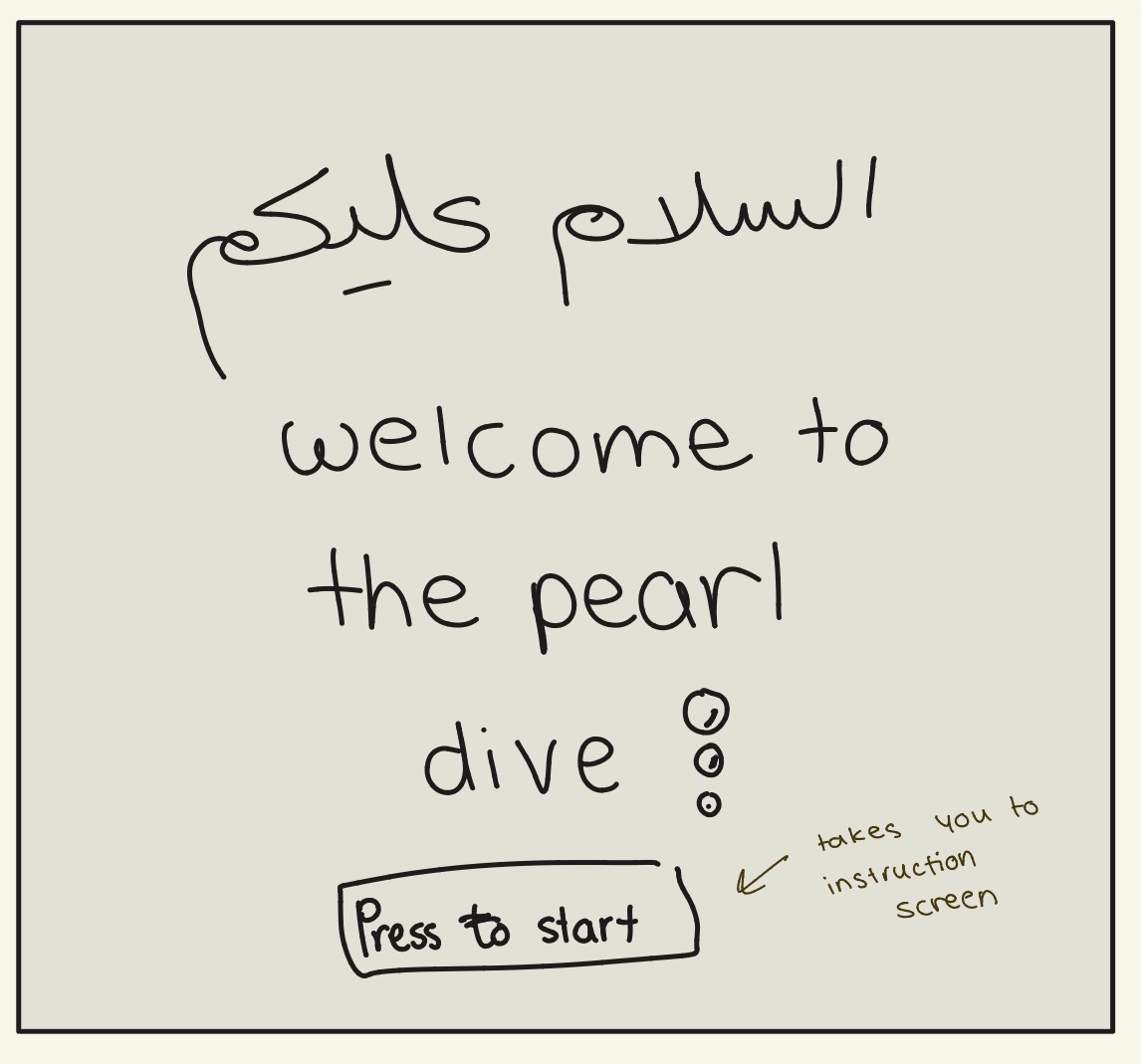
The first sketch shows the starting screen of the game. It will be very simple and will say: “Salam Alaykum, Welcome to the Pearl Dive” The user will then press a Start button, which will take them to an instruction screen explaining how to play the game and what they need to do. After reading the instructions the player will enter the main game.
#1
Main Game Interface
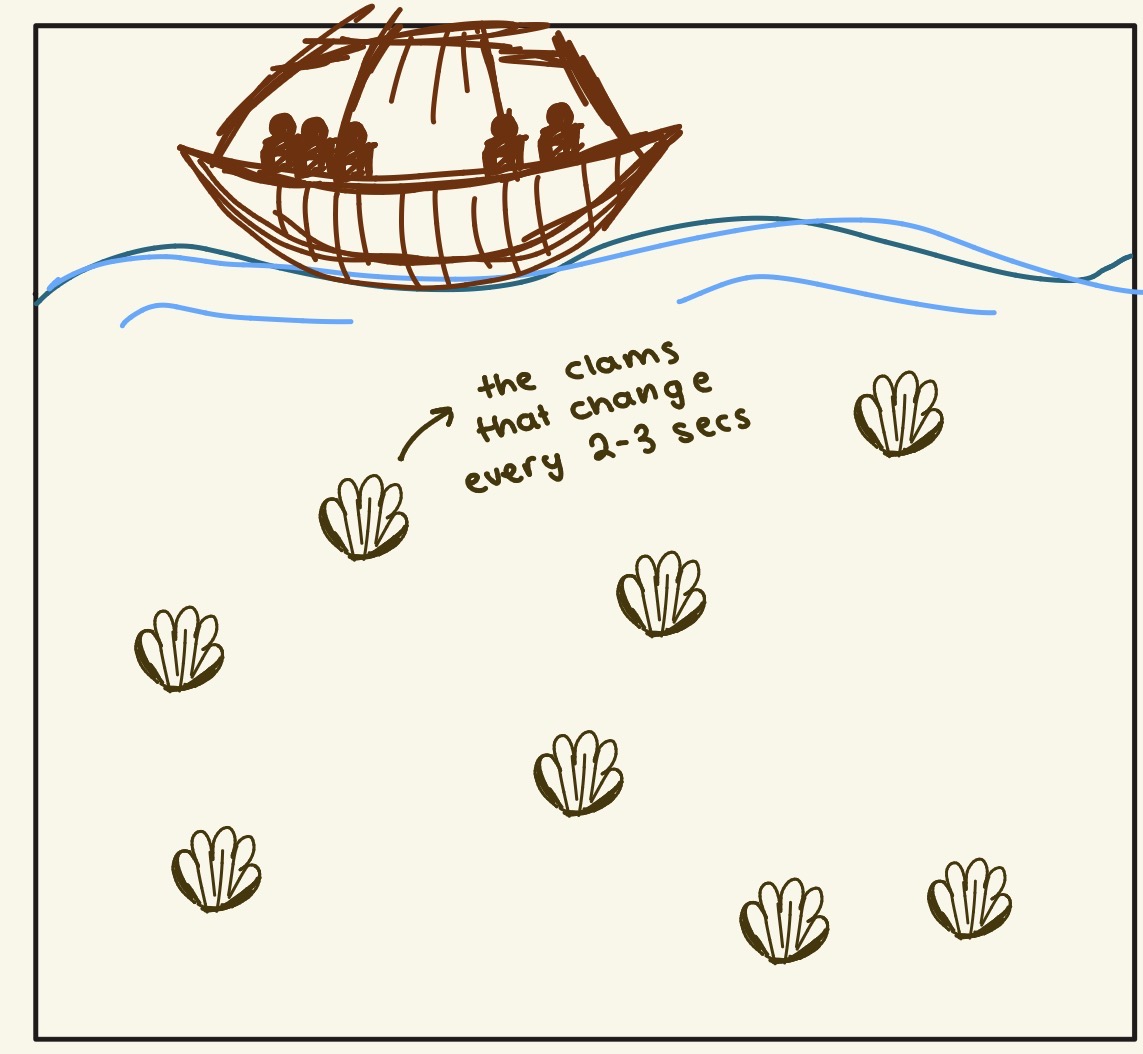
The second sketch shows the main game interface. At the top, there will be a pearl-diving boat, followed by the surface of the ocean. Underwater, there will be clams that the diver has to collect. The clams will regenerate every 2–3 seconds. This is meant to represent the unpredictability and difficulty of pearl diving. Conditions at sea could change quickly, with periods of strong wind or difficult weather making the dives more dangerous. I want to represent this difficulty through the randomness of the clam spawning rather than simply making the game progressively harder. The player will control the diver underneath the boat and will need to collect the clams before they run out of time underwater.
#2
Game Mechanics and Cultural Elements
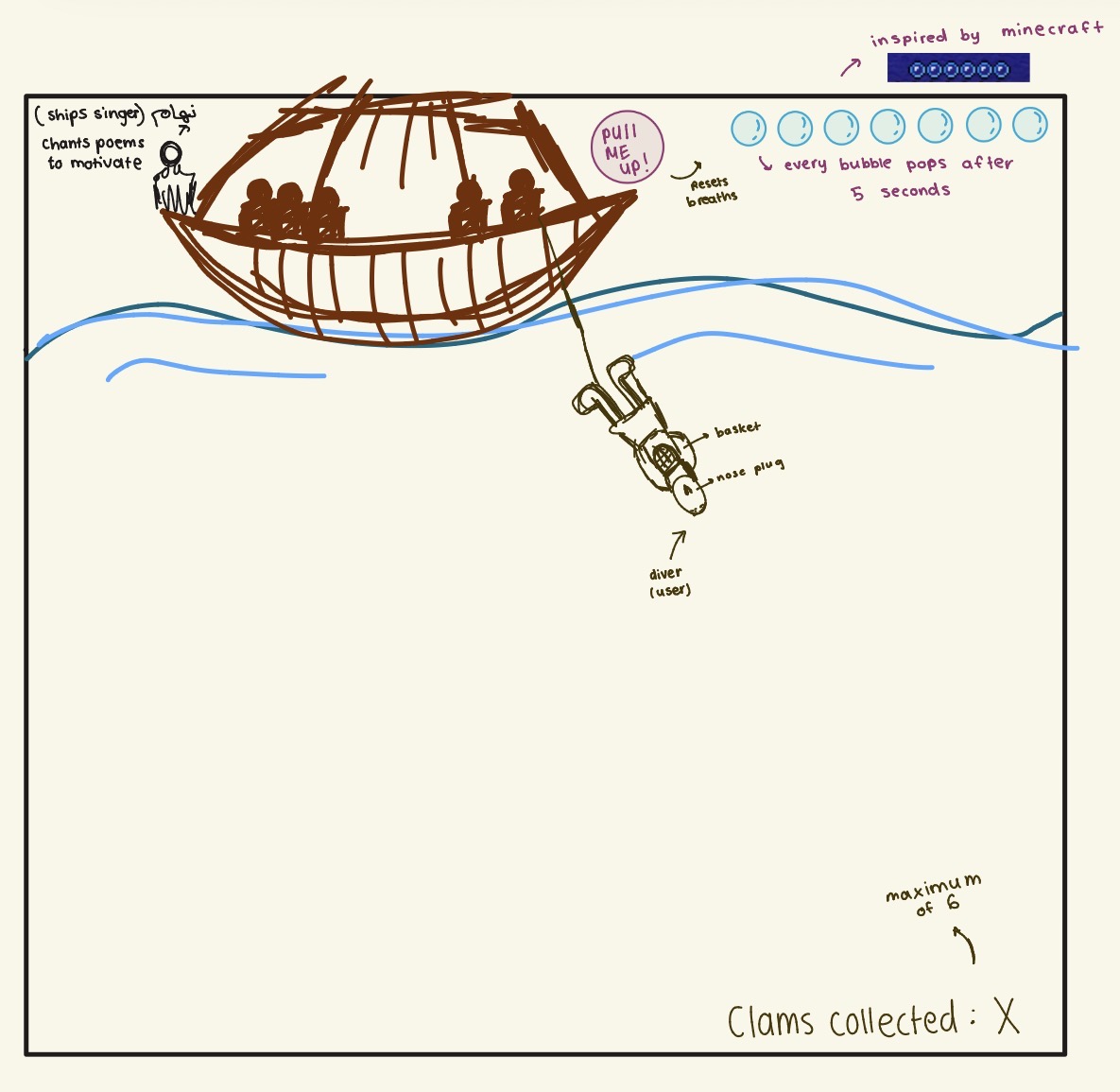
On the boat, there will be a nahham, the traditional ship singer. He will sing traditional songs and chants to motivate the sailors and distract them from their fatigue. I am planning to look for recordings or examples of traditional nahham songs and potentially use an old recording or recreate the audio for the game. I also want to incorporate Islamic-inspired chants/nasheeds where appropriate. On the top right of the screen, there will be seven bubbles representing the seven emirates. Similar to the underwater timer in games like Minecraft, the bubbles will represent how long the diver can remain underwater. Each bubble will disappear after approximately five seconds. Next to the boat, there will be a “Pull Me Up” button. The player can press this button at any point to bring the diver back to the surface, but they must do so before all seven bubbles disappear. The diver himself will also reflect the traditional pearl-diving process. He will have a rope around his neck, a basket for collecting oysters, and a nose plug. He will then dive underwater to collect the clams. At the bottom right of the screen, there will be a clam counter showing the number of clams collected. The maximum will be six clams. Once the player collects all six, they will move on to the pearl auction.
Pearl Auction
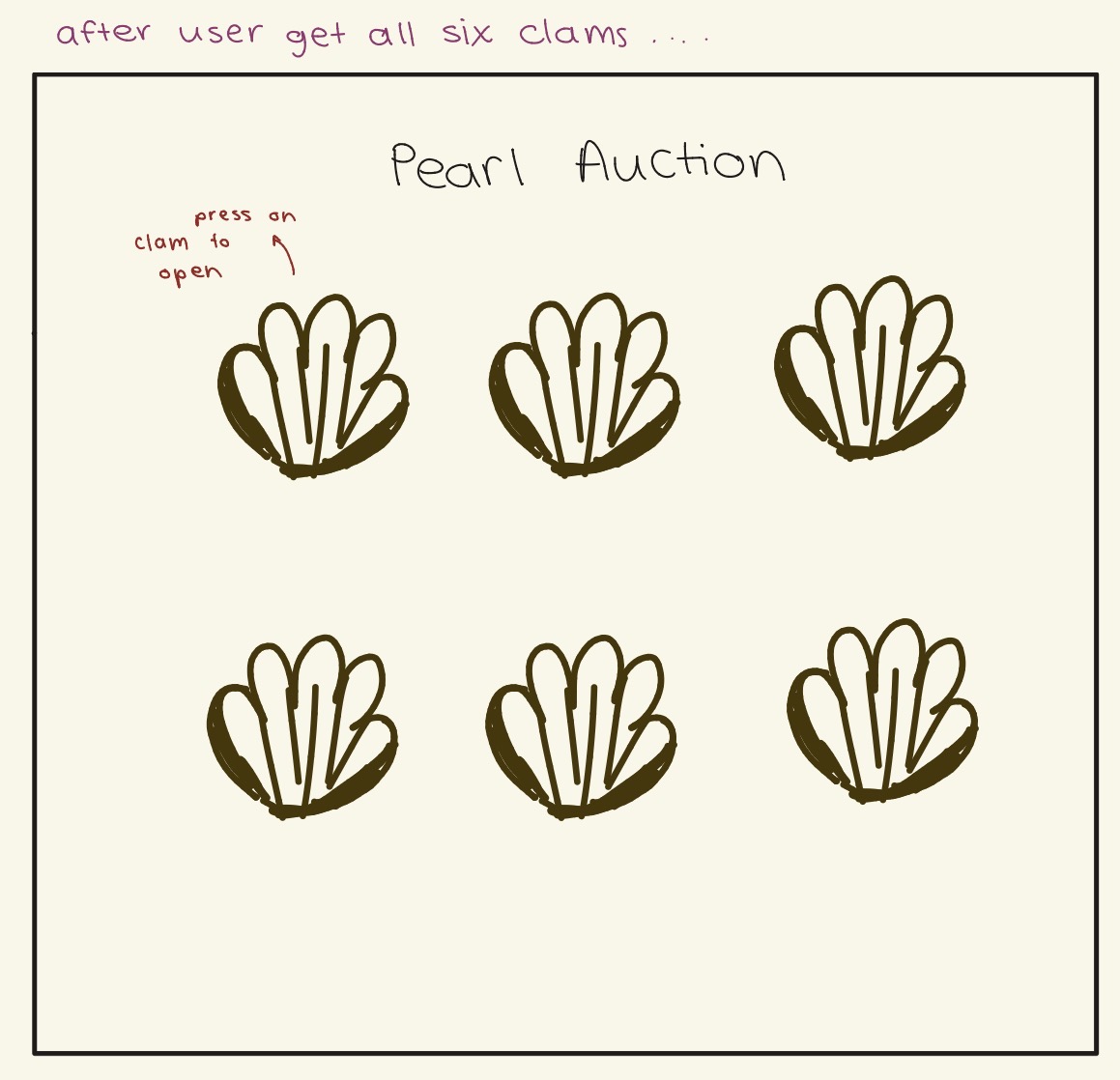
Once the player collects all six clams, the game will transition to a Pearl Auction screen. The screen will have “Pearl Auction” as the title, with the six collected clams displayed underneath in a 3 × 2 layout. The instructions will tell the player: “Press on a clam to open it.” When the player clicks on a clam, it will randomly reveal the weight/size and colour of the pearl inside. The different pearl characteristics will determine its value. The pearl colours will include traditional and rarer variations such as pearly white, slightly pink and grey, with each colour having a different value. The weight of the pearl will also affect its price, with heavier pearls being more valuable. This will introduce a random element to the auction and show how the value of the pearls could vary.
#4
That’s my game so far as of now I don’t know what to do with the value of the pearls, As I’m trying to make the value of the pearl be an interactive element to the game!
The part of my project that I am most uncertain about is the pearl auction and how the value of each pearl will work as an interactive element. I know that I want the player to open each clam and receive a pearl with a randomly generated size, weight and colour, but I am still figuring out how these characteristics should affect the value of the pearl. I also want the auction to feel like an actual part of the game rather than just showing the player a random number. Another concern is making sure that the random generation feels balanced. If the valuable pearls appear too often, the game will become too easy, but if they are too rare, the player might feel like their score is based completely on luck. I therefore want to test different combinations of pearl colours, sizes and weights and see how they affect the final value.
What I Did to Reduce the Risk
To reduce this risk, I started testing the random generation of the pearls in p5.js. My goal is to have the game randomly generate the characteristics of each pearl when the player opens a clam. For example, the pearl could randomly receive a colour and a weight, and these two characteristics can then be used to calculate its value. I am testing the idea of giving each pearl colour a different base value and then adding to that value depending on the weight of the pearl. This gives me a simple system that I can adjust as I continue developing the game. I can also test the random results multiple times to make sure that different pearl values appear and that the player has a reasonable chance of getting both common and rare pearls. This is important because the pearl auction is one of the main interactive parts of my game. By testing the randomization and value calculation now, I can make sure that the system works before I build the rest of the auction interface around it.
For my midterm project, I have planned to create a game where the player controls a fish swimming through a river. The main goal of the game is to survive for as long as possible. While swimming through the river, the fish will encounter different food objects and garbage objects. The player needs to eat the food to keep the fish healthy while avoiding the garbage.
The game is also intended to communicate a message about pollution in freshwater environments. Pollution in rivers can seriously affect the aquatic animals living there. By making this the main idea of the game, I want the player to experience this problem through the gameplay rather than simply being told about it.
The player will control the fish using the up and down arrow keys. The fish will have three lives, and eating garbage will cause the player to lose a life. Once all three lives are lost, the game will end. I also plan to add a health system where the fish’s health continuously decreases if it does not eat food. A health bar will show the player how much health the fish has remaining. I am also thinking to using left and right arrow keys to make the fish go front and back if the game feels really static.
Progress So Far
So far, I have created the basic game window and the river environment using p5.js. I have also added a fish as an ellipse that the player can control using the keyboard. I added moving water lines and bubbles to make the river feel more active rather than having a completely static background.
I have also started working on the objects that will appear in the river. At the moment, I am using simple circles as placeholders instead of actual images. There are three types of food: shrimp, small fish, and algae. There are also three types of garbage: plastic, bottles, and cans. Each object has a different size and color so that I can easily tell them apart while testing the game.
Another important part I have worked on is spawning and collision detection. The objects are currently spawned from the right side of the screen and move towards the left, similar to how objects would flow through the river. When an object reaches the fish, the program checks whether the two objects have collided. I have used the distance between the fish and the object to determine whether they are close enough to count as a collision.
let fish;
let objects = [];

let lastSpawnTime = 0;
let spawnInterval = 1500;

let foodTypes = [
  {type: "shrimp", color: [255, 160, 50], size: 15},
  {type: "small fish", color: [255, 220, 80], size: 22},
  {type: "algae", color: [80, 210, 100], size: 30}
];

let garbageTypes = [
  {type: "plastic", color: [255, 255, 255], size: 18},
  {type: "bottle", color: [0, 0, 0], size: 25},
  {type: "can", color: [255, 50, 50], size: 32}
];
function setup() {
  createCanvas(700, 500);

  // Create the fish
  fish = {x: 200, y: height / 2, size: 40, speed: 4};
}

function draw() {
if (millis() - lastSpawnTime > spawnInterval) {
  spawnObject();
  lastSpawnTime = millis();
  }

  drawObjects();

  // Draw the fish
  drawFish();
}
// Function for drawing the fish
function drawFish() {
  fill(255, 180, 50);
  ellipse(fish.x,fish.y,fish.size * 1.5,fish.size);
}

function spawnObject() {
  let objectType;
  if (random(1) < 0.5) {
    objectType = random(foodTypes);
  } else {
    objectType = random(garbageTypes);
  }

  let object = {x: width + 20, y: random(80,380), size:objectType.size, color: objectType.color, type: objectType.type, speed:random(2, 4)};

  objects.push(object);
}

// Function for drawing objects
function drawObjects() {
  for (let i = objects.length - 1; i >= 0; i--) {
    let object = objects[i];

    // Move object from right to left
    object.x -= object.speed;
    // Set the object's color
    fill(
      object.color[0],
      object.color[1],
      object.color[2]
    );
    // Draw the object
    circle(object.x,object.y,object.size);

    // Remove object when it leaves the screen
    if (object.x < -object.size) {
      objects.splice(i, 1);
       }
    if (checkCollision(fish, object)) {
      objects.splice(i, 1);
      }

  }
}
// Function for checking collision
function checkCollision(fish, object) {
  let distanceBetween = dist(fish.x,fish.y,object.x,object.y);
  return distanceBetween < fish.size / 2 + object.size / 2;
}
The Most Uncertain Part
One of the parts of the project that I was most uncertain about was collision detection. I knew that the game would depend heavily on detecting when the fish eats food or garbage, but I was not sure how I would implement this in p5.js. I decided to work on this part early because it is an important part of the game’s main interaction.
I implemented a collision detection function that uses the distance between the fish and each object. If the distance is smaller than the combined sizes of the fish and object, the program considers them to have collided. Testing this early has reduced some of the risk because I now have a working foundation for the main gameplay mechanic.
Another part I am uncertain about is how I will make the game become harder as the player progresses. I want the game to start relatively easy and gradually become more difficult so that the player has to react faster and pay more attention as they continue playing. One idea I plan to try is changing the probability of spawning food and garbage as time passes. At the beginning, there could be a more balanced chance of getting food or garbage. As more time passes, I plan to increase the probability of garbage spawning while decreasing the probability of food spawning. This would make it harder for the player to maintain the fish’s health and avoid losing lives.
Next Steps
My next focus will be designing the home screen and the game-over screen so that the game feels more complete. I also plan to replace the simple colored circles with images for the fish, food, and garbage objects. I would like to add sounds as well, such as sounds for eating food, hitting garbage, and losing a life.
After that, I will continue developing the health and life systems. The final game will have three lives, a health bar, a scoring system, and increasing difficulty as the game continues. I also want to make the objects more visually interesting while keeping the controls simple enough for the player to understand easily.
Overall, I have now moved from planning the idea and have started building the core mechanics of the game. Having the fish movement, object spawning, and collision detection working gives me a basic foundation that I can build the rest of the game around.
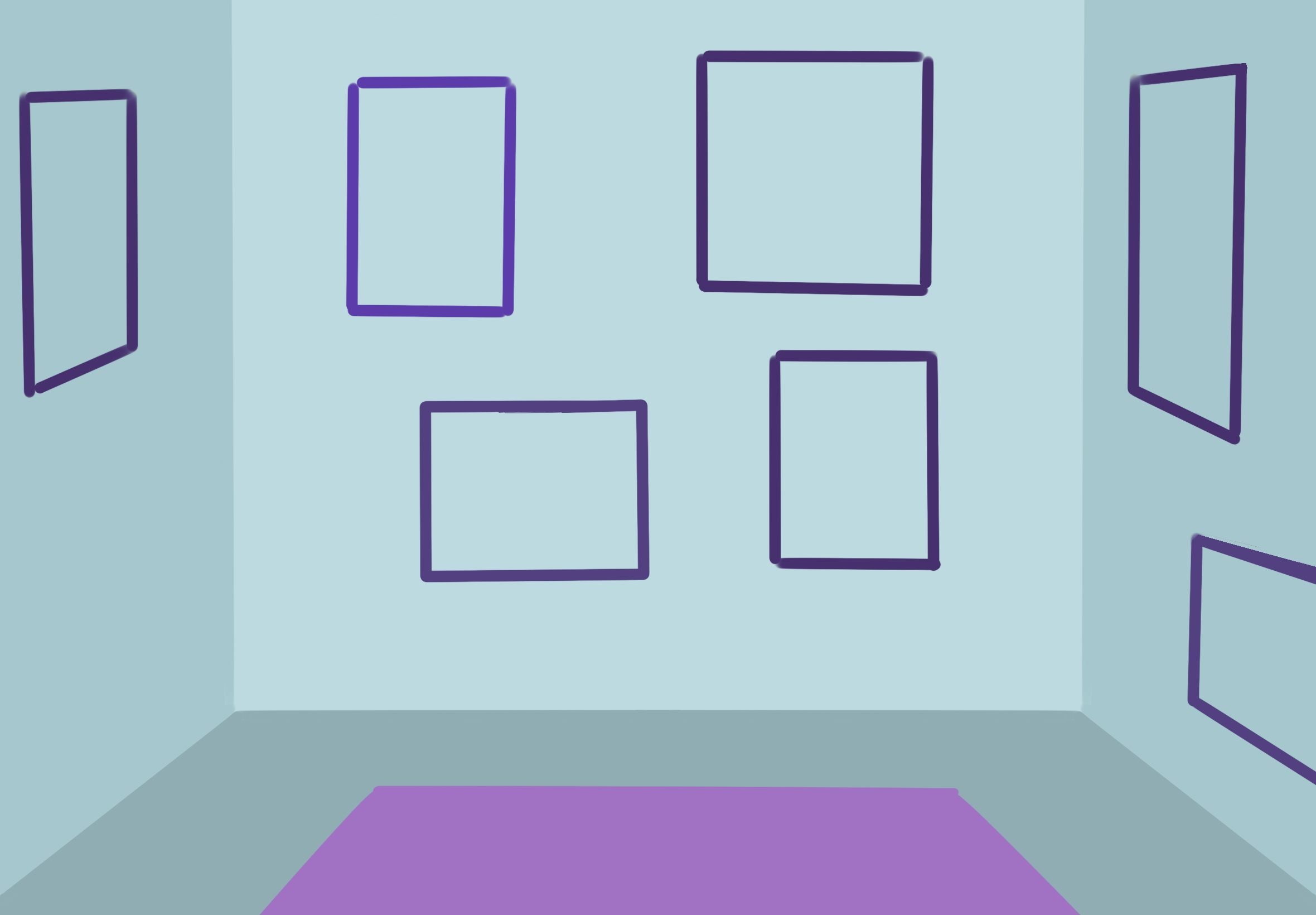
For the concept, I was inspired by the coffee shop example and got the idea to make an interactive art gallery using my own drawings to make it feel more personalized. I also want it to be a chill experience where you click on one of the paintings and interact with it as if it was alive. It’s like having people step into the story of each painting, and showing how a simple interaction can change the mood.
This is the concept that I am going for. Four main interactive pieces, and other drawings for decoration. I chose four to focus on the quality of the interaction.
Progress
Before beginning to work on the code, I first chose four different paintings that I want to make interactive and decided on how they will be interacted with. One of the things I felt was complex is putting multiple and different interaction styles in the same artwork, so I started by working on each painting separately, so it will be easier to add them all together at the end. Having each interaction as separate code will keep everything more organized and easier to modify later.
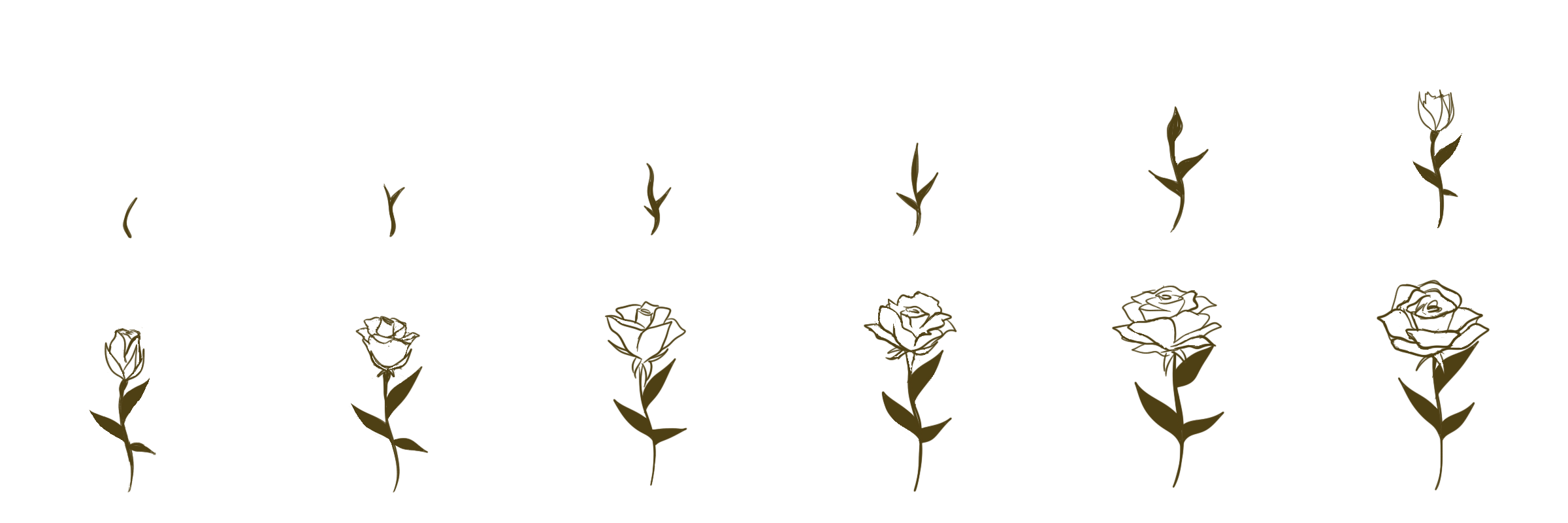
To maintain the painting feeling and style, I decided to do animations for some parts of the drawings when necessary. I did a few tests to make sure the placements were correct and the animations were running smoothly.
This is the first lineart of the animation frames.
Computer vision is different from human vision because humans can just look at something and know what it is, but a computer basically just sees a bunch of pixels. It does not automatically know that something is a person or a hand unless we give it a way to recognize it. Humans also understand things based on context which is something computers have a harder time doing.
Some ways we can help the computer see and track things are frame differencing, background subtraction, and brightness thresholding. Frame differencing can tell when something moves by comparing different frames, while background subtraction looks at what is different from the background. Brightness thresholding can also help if the thing we want to track is much lighter or darker than everything around it which i found really interesting and the reading does a good job of exmplaining this to me. I thought it was interesting that sometimes we can make the computer see better just by changing the environment like the lighting or the background instead of making the code more complicated.
I think the tracking part of computer vision makes interactive art really cool because the artwork can actually react to you. Your body or movement can change what happens but I also think it can get a little creepy because the same technology can be used for surveillance ( I have talked about this a lot in Understanding IM class).
There is a difference between walking up to an artwork and choosing to interact with it, and being somewhere where a camera is tracking you without you really knowing what it is doing. I think that makes computer vision interesting but also something artists have to be careful with.
Human vision is one of the most mysterious things about the human brain. We don’t completely understand how the brain takes information from light reflecting off objects and turns it into something we can understand. Humans can look at what is in front of them and distinguish between different things in split seconds. However, computer vision is different because it works with digital images as pixels and uses specific rules and algorithms to understand what it is seeing. Because of this, computer vision is more restricted in what it can distinguish and is more dependent on the conditions of the environment.
As mentioned in the article, there are multiple techniques that can be used to track things, and I think the most important thing to take into consideration is the contrast of colors, light, etc. If there is a noticeable difference in these values, then the computer will be able to tell things apart more easily. The second most important thing is to tailor the rules and “physics” to the purpose of the program. For example, the frame differencing technique detects movement by comparing each frame to the previous one and looking for differences in the pixels, so to detect these changes a high contrast would be better.
I think computer vision has a huge capacity as long as you have lots of cameras and processing power, which is good when an interactive work requires lots of detail. For example, in virtual reality, to be able to detect your body movements, you may need multiple angles. Also having a big capacity can make the outcome more accurate and sensitive to small movements. But it also has its cons, because to some people it may be a breach of privacy. Doesn’t it make you uncomfortable to know that a computer has all the data of your body movements? That’s one of the reasons I liked the use of silhouettes in some of the interactive art examples. I think it’s a better way to give the same interactive experience but in a more comfortable way.
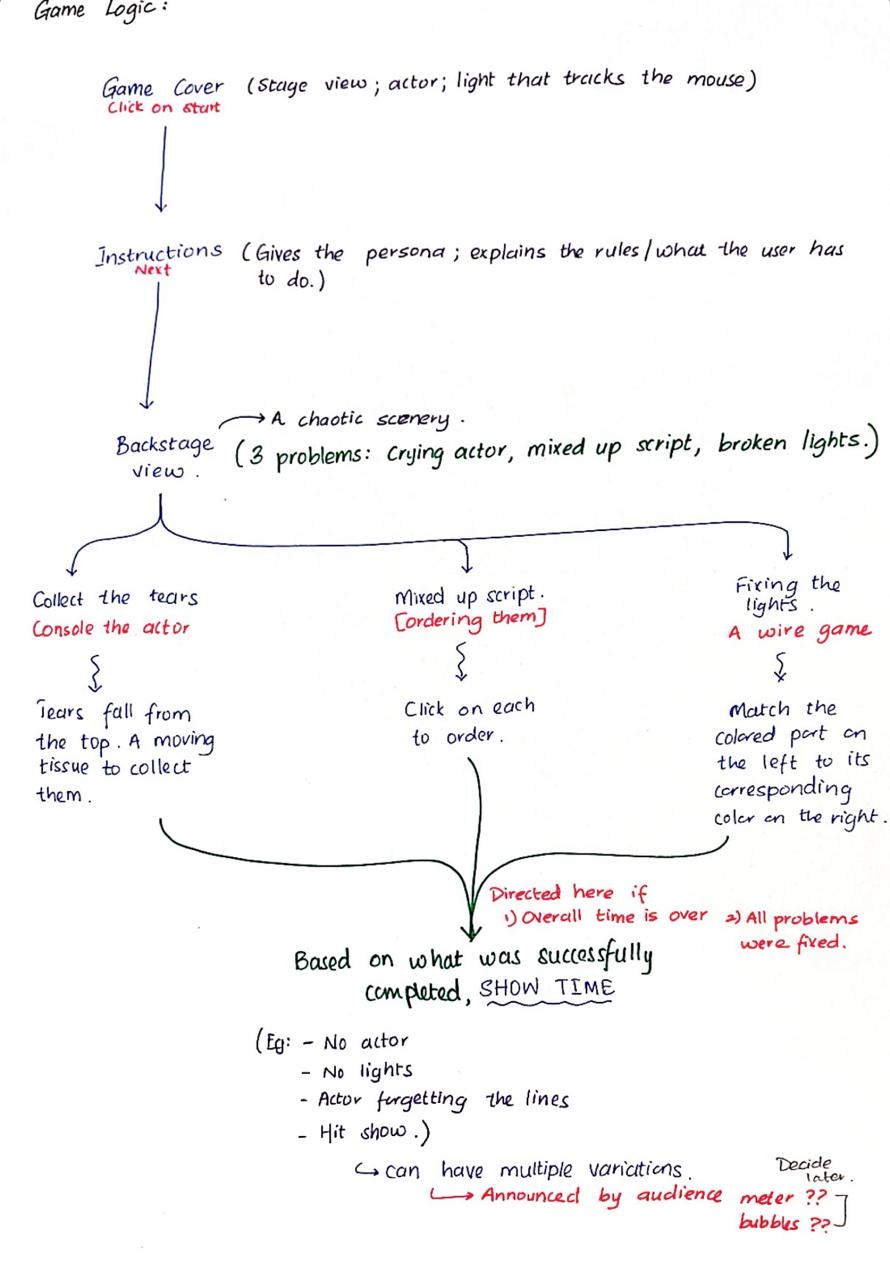
For my midterm project, I thought of doing a theater management experience. This idea stems from our assigned Crawford reading on interactivity. Crawford argued that activities like reading a book or theater are not actually interactive. A person can only react to them. I decided to do this experience not as a counter to his argument, but rather to give the commoner a playful way to interact with the theatrical world by stepping into the shoes of a stressed director. To be honest, coding this small game is by far the most time-consuming and complex coding I have done so far. At first, I was so full of ideas that I was finding it difficult to ground myself. This is when I came up with my colorful pens and paper. Believe me, this traditional mind-mapping method does wonders! I was able to make a game plan of what I wanted and could do.
Since it was very intimidating to code everything at once, I divided the task into different levels. I started off by making the cover and the 3 sub-games. This way, I did not have to scroll endlessly to find particular snippets of code, and I could debug instantly. Also, seeing some working parts of my code gave me more confidence in my work. However, as of now, I do have 4 different p5 windows. (Sorry if this is making the blog post long.)
Embedded Sketch:
1. Game Cover:
2. Wires Game:
3. Tears Game:
4. Script Game:
The Process:
To save time and focus only on the small games that I wanted to do, I opted to generate my backgrounds using Claude and my characters using pixler.dev (Link – an online tool for generating game characters and props). As for the sound effects I have used so far, I downloaded them from an online library called ‘Pixabay’ (Link). Now, coming to my code, I am really proud of my progress so far. I focused more on polishing my little games (and I have been able to add sound!) I learnt to use new functions like ceil and blend as and when I encountered a few problems. Crucially, I am happy that I was able to implement loops and nested ifs. Here are some code snippets:
This is from the wire game.
function mouseReleased() {
  if (DraggingWire != -1) { //checking if the mouse was let go on a right terminal
    for (let j = 0; j < 4; j++) {
      if (dist(MouseXPosition(), MouseYPosition(), WireRightX, WireY(j)) < 40) {
        if (RightOrder[j] == DraggingWire) {
          ConnectedWire[DraggingWire] = true; //checking matching colors
        }
        else {
          WireTimeLeft = WireTimeLeft - 2; //wrong color costs 2 seconds
        }
      }
    }
    DraggingWire = -1;
  }
}
And this one is from the tears game (after countless crashouts, actual tears and trial and error).
if (TearResult == "playing") {
  //timer
  TearTimeLeft = TearTimeLeft - deltaTime / 1000;
  if (TearTimeLeft <= 0) {
    TearTimeLeft = 0;
    finishTears(false);
  }

  //a new tear every half second
  if (frameCount % 30 == 0) {
    Tears.push(new Tear(random(20, Width - 20), 0));
  }

  //the tissue follows the mouse
  TissueX = constrain(MouseXPosition(), TissueW / 2, Width - TissueW / 2);

  //check if the tear was caught or missed
  for (let i = Tears.length - 1; i >= 0; i--) {
    Tears[i].update();
    let caught = Tears[i].y > TissueY - 15 && Tears[i].y < TissueY + 15 & abs(Tears[i].x - TissueX) < TissueW / 2;
    if (caught) {
      CalmLevel = CalmLevel + 7;
      Tears.splice(i, 1); //the tissue caught it, so the tear disappears
    }
    else if (Tears[i].y > Height) {
      CalmLevel = CalmLevel - 4
      Tears.splice(i, 1); //it fell off the bottom, so removing it
    }
  }
  CalmLevel = constrain(CalmLevel, 0, 100);
  if (CalmLevel >= 100) {finishTears(true);}
  else if (CalmLevel <= 0) {finishTears(false);} //the calm bar ran out before the timer
}
Reflection:
The next step is to create the backstage scenario where all the problems will be, merge all my code, and work on the final show. As I am writing this sentence, I am realizing how much more work my project is demanding. I also remain a bit worried about whether all my uploaded files will slow down the interface once I merge the code. But, well, I am determined to have a fully working midterm project in one more week. And I believe my strong-will will indeed keep me going.
So for the midterm, I wanted to create an interactive artwork of my desk. I have a very very crowded desk if I can describe it like that, I have a lot of things on it from a lot f different parts of my life, and I thought it would be interesting to create an artwork about it. A lot of people who have seen my desk or my room said that this is exactly how they see me, so I also thought it would be a great way to get to know me, or just to have a little glipse of my life!
Design & Interactivity
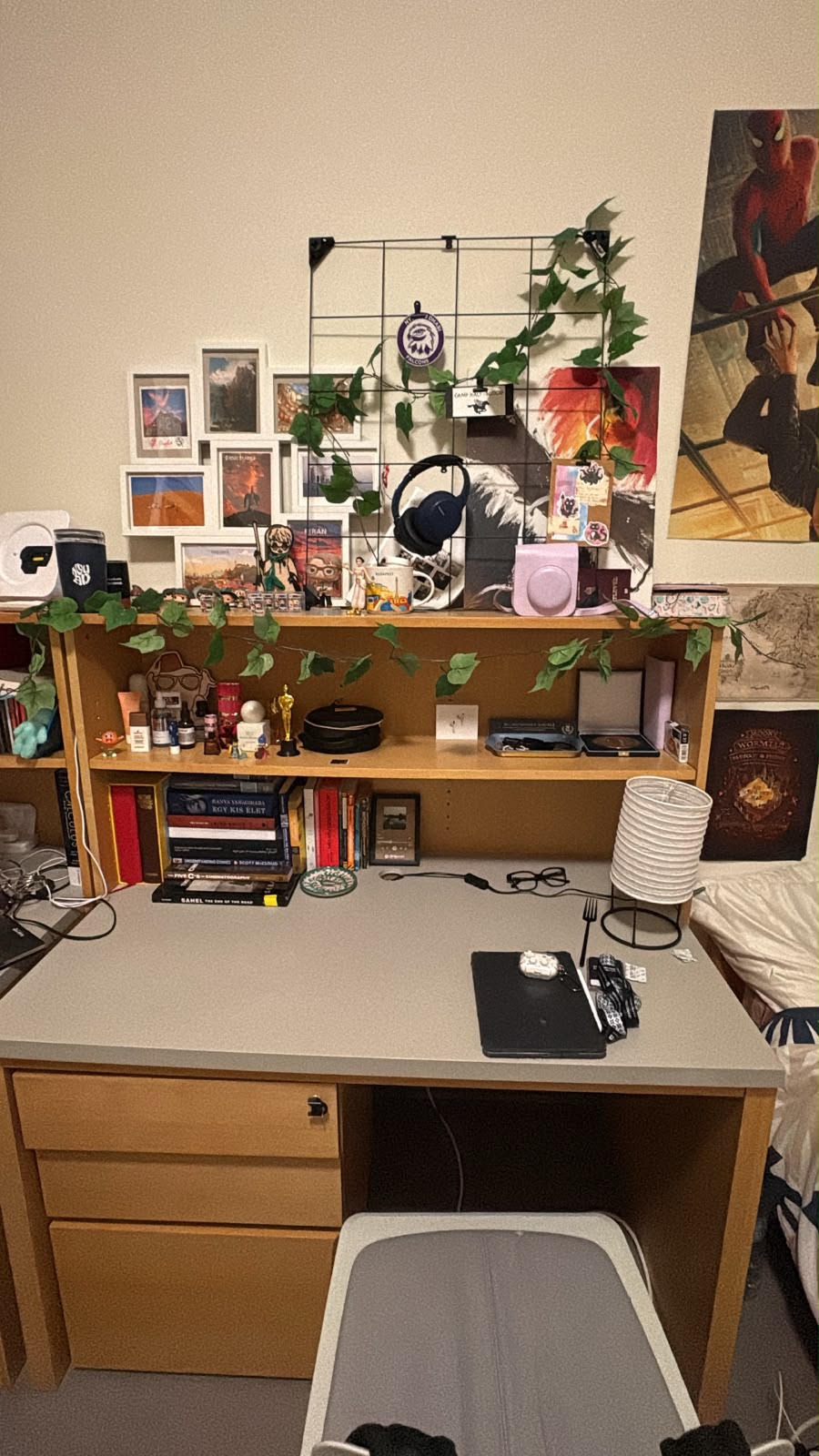
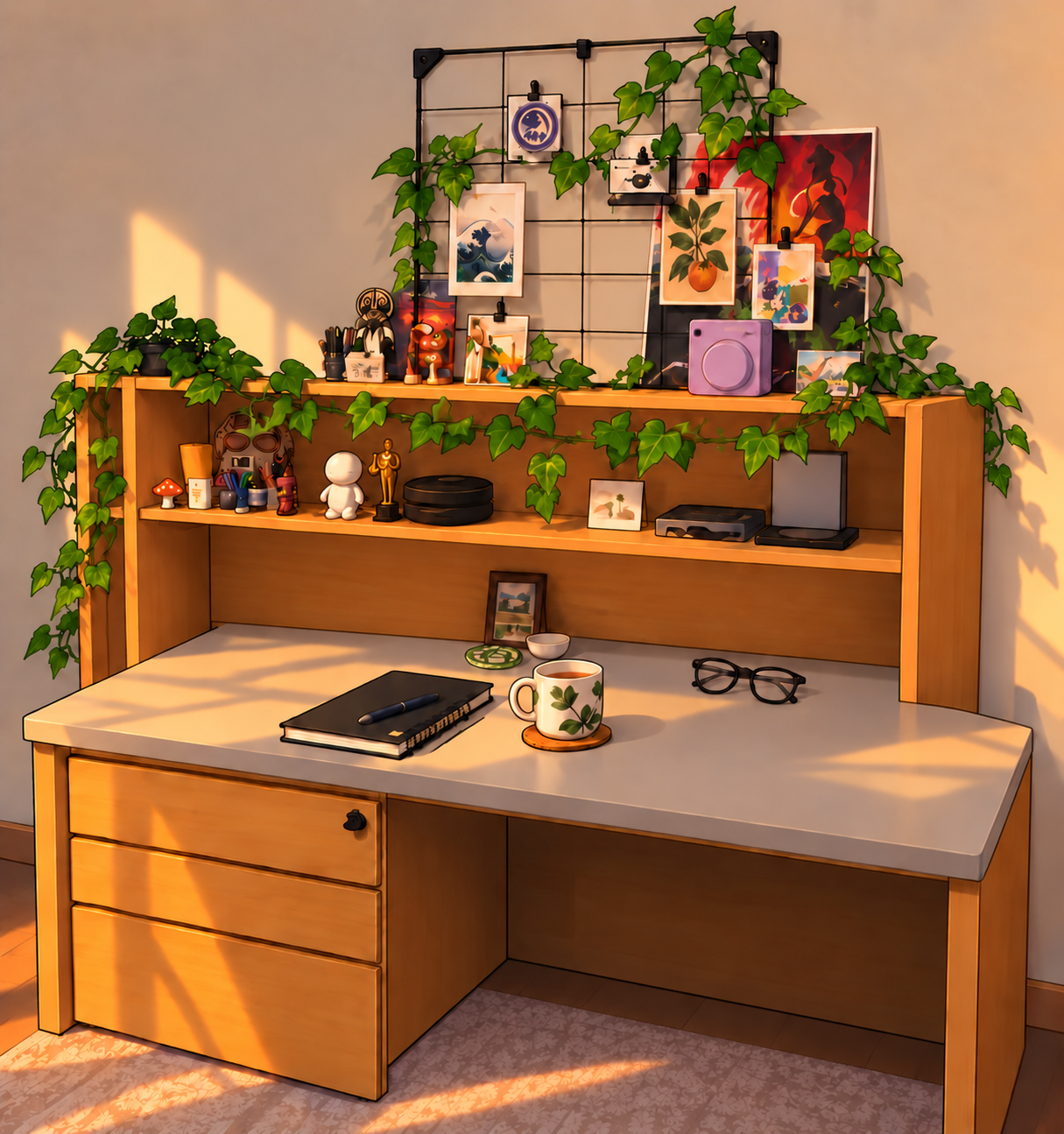
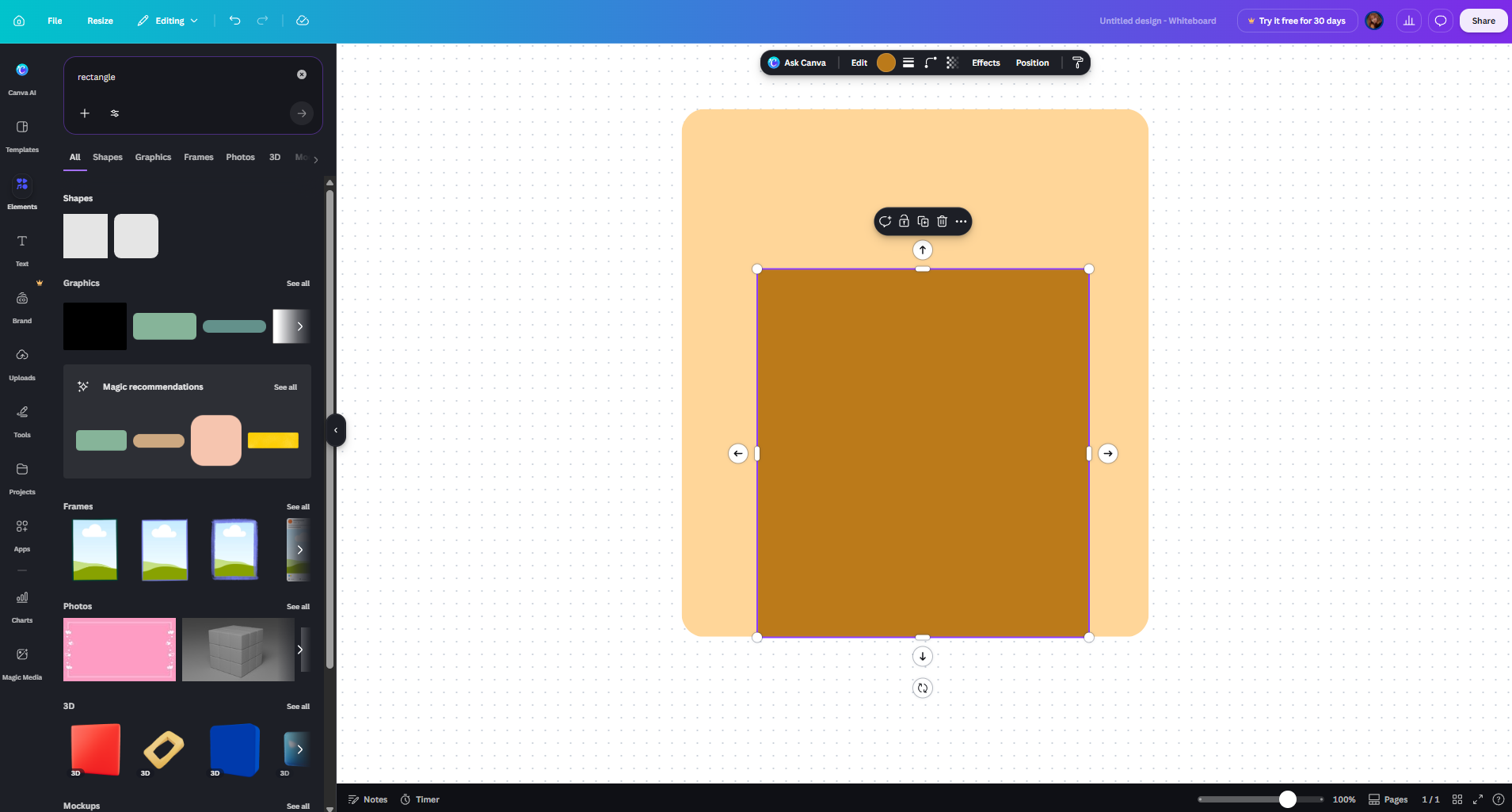
So far, I have created the design with AI, meaning that I asked ChatGPT to generate me some images based on the reference I gave it (Figures 1-2). It is important, that I only intend to use the AI generated one until I am able to make one myself, but I didn’t have time so far to make one that I could use to test my code and my vision, so I decided to make one with AI as a stand-in. At first I started making the images with Canva (Figure 3) but I realised how LONG that would take, and as I am perfectionist I would not have been able to work onthe code becuase I would have been too focused on how unfinished the background looks.
Figure 1: an actual photo of my deskFigure 2: the one that AI generated based on it, and my prompt
Figure 3: My pathetic try to make something on Canva
I also wanted to not have a 2D look to it. I imagined it in a comic-kind of style, and gahve this image to ChatGPT as well to match the style to this. I actually really liked it. I am determined to change it to something handmade, but I really do like the result.
More about desgin, I was imagining that the different items on my desk would be the interactable parts, such as the lamp, my headphones, the postcards, the books and maybe even the coffee. The lamp would be just a fun little touch, but the others would all present something through their interactivity that is very close to me. Like the postcards would show pictures of me and my family, my actual postcards, the headphones my favourite songs, etc. They are not on the AI image, because they are used as separate icons later.
When the person would click on each item it would bring up a new window, or like a new canvas. For the headphones I want to turn it into an Ipod, or an mp3 player or something, and I want the music to be able to be played through that. The postcards I want to put into either a big pile and each can be looked individually OR I would make like a ‘carousel’ of them, but I feel like that would be a little boring. With the books I want to include some of my favourite books, I am entirely sure how yet.
And just jumping back to the very beginning, before the user could see my desk, I would want a screen telling them something like hi, welcome to my desk, feel free to look around! And of course also soemthing about to use your mouse to interact with my stuff as well. I want to use a purple background for that because that is my favourite colour (yes, it was my favourite even before I knew what NYU was).
Excluding the lamp, the icons would bring up different pages basically. The lamp is just a little fun, that the people could turn on and off. I am a HUGE fan of using only small lamps in my room, so I think that also resonates with me.
Code + The most frightening part of it
I started working on my code as well, hence why I needed the images. I knew for a fact, that I needed to start with the OOP part, or at least with defining as many classes as possible. I knew where I wanted to add the shapes, the sound, the text, everything, and I knew that the base of all would be how I organise my code and my classes, so I started with that. And thank everyone that I did, because it took an awful lot of time. Just to figure out to load the background image took 2 hours, because I realised that I probably need a class for that too, if later I want to add more icons. I had a lot of trouble with the image not showing in the right way, but in the end I got it:
//Defining the main class, which is also the background
class Desk {
    constructor(backgroundImg) {
    //Adding all the interactable images, so that they are also part of the background, giving them their attributes, how big they are, where they are, etc
      this.backgroundImg = backgroundImg;
      this.lamp = new Lamp(385, 320, 95, 110, lampImgOff, lampImgOn);
      this.headphones = new Headphones(235, 100, 80, 80, headphonesImg);
      this.books = new Books(75, 290, 150, 70, booksImg);
      this.postcard = new Postcard(50, 20, 150, 150, postcardImg);
    }

  //Actually displaying them on the screen
    show() {
        image(this.backgroundImg, 0, 0, width, height);
        this.lamp.show();
        this.headphones.show();
        this.books.show();
        this.postcard.show();


    }

  //When mouse is pressed, it calls the mousePressed part of the lamp class
    mousePressed() {
        this.lamp.mousePressed();
    }

  //IF cursor hovers over the image, call the corresponding part of each individual class + change the cursor look so it is even more obvious that that object is interactable
    checkHover() {

       cursor(ARROW);

       if (this.lamp.isHovered()) {
            cursor(HAND);
        }

        if (this.headphones.isHovered()) {
            cursor(HAND);
        }

        if (this.books.isHovered()) {
            cursor(HAND);
        }

       if (this.postcard.isHovered()) {
            cursor(HAND);
        }
    }
}
Creating the first class after the main Desk one also took another 2 hours to figure out. I made the backgrund without the lamp, so I could later add it as a separate icon, as mentioned before. The Lamp class (as all other classes linked to icons, as they were all based on this Lamp class) have a show and isHovered part. Both contain elements that make it easier to notice that the item is interactable, such as the gold glow and the cursor changing, or the image zooming in. After out last OOP project, when I made the balls bouncing off the wall, it was much easier to write the isHovered, because that basically check the borders of the image.
I also wanted to start with the lamo because it was the only one that had a function which didn’t require a new page or a new look, as it was only a matter of switching the images once the mouse is pressed. I wanted to make that first, and I did so by giving the Lamp class two images not only one, and giving it a boolean to determine which one is showing. (I explain it in the code way better I think).
In the end I managed to make a class for the lamp with all the instructions I wanted for it, because that was the easiest and I just wanted to see if it would work:
class Lamp {
    constructor(lx, ly, lwidth, lheight, lampImgOff, lampImgOn) {
        this.x = lx;
        this.y = ly;
        this.width = lwidth;
        this.height = lheight;
        this.imgOff = lampImgOff;
        this.imgOn = lampImgOn;
        this.isOn = false;  //first the constructor loads the image where the lamp is off, and I am storing this information in a boolean
    }


    show() {
      let img = this.isOn ? this.imgOn : this.imgOff; //checks if the boolean is true, if it is it loads the image where the lamp is on, if not the one where it is off
    //If checks if the cursor is hovered over the selected territory defined in isHovered below, which is the image itself
      if (this.isHovered()) {

      //the glowing area around the images when hovered over them
        drawingContext.shadowBlur = 50;
        drawingContext.shadowColor = color(255, 220, 100);
      //Zooming in on the image, so it pops out more
        image(img, this.x - 5, this.y - 5, this.width + 10, this.height + 10);
      //Resets the shadow blur to zero
        drawingContext.shadowBlur = 0;

        } else {
      //Else loads the image without the shadow blur and the zoom in, if the cursor is not on the territory defined by isHovered
          image(img, this.x, this.y, this.width, this.height);

      }
   }
  //Defines the territory of the image, the boundaries of the image
    isHovered() {

        return (
            mouseX >= this.x &&
            mouseX <= this.x + this.width &&
            mouseY >= this.y &&
            mouseY <= this.y + this.height
        );
    }

  //If mouse is pressed while the cursor is on the image, the boolean changes its value from true to false, or false to true -> turns the lamp on/off
    mousePressed() {
        if (this.isHovered()) {
            this.isOn = !this.isOn;
        }
    }
}
The most frightening thing about all this, besides everything, that in the beginning the images just wouldn’t load, because I think I wanted to load too much with the await, one by one. I got scared that it would take too long to load, or wouldn’t at all. So, as a solution, I searched a little and found so called promises, which I found out is perfect for when I want to execute many asynchronous parts before my code begins:
async function setup() {
    createCanvas(500, 600);
  //loading all the images
    [
      backgroundImg,
      lampImgOff,
      lampImgOn,
      headphonesImg,
      booksImg,
      postcardImg
    ] = await Promise.all([
        loadImage("desk.png"),
        loadImage('lampOff.png'),
        loadImage('lampOn.png'),
        loadImage('headphones.png'),
        loadImage('books.png'),
        loadImage('postcard.png'),

    ]);
Full code so far (with the sketch. click on the lamp, and hover over some objects):
All instructions will be added later as well. I will make a starting screen where it will all be displayed.
//Variables to store the images
let desk;
let backgroundImg;
let lampImgOff;
let lampImgOn;
let headphones;
let books;
let postcard;


async function setup() {
    createCanvas(500, 600);
  //loading all the images
    [
      backgroundImg,
      lampImgOff,
      lampImgOn,
      headphonesImg,
      booksImg,
      postcardImg
    ] = await Promise.all([
        loadImage("desk.png"),
        loadImage('lampOff.png'),
        loadImage('lampOn.png'),
        loadImage('headphones.png'),
        loadImage('books.png'),
        loadImage('postcard.png'),

    ]);


  //load background music on loop
    bgMusic = await loadSound('backgroundMusic.mp3');

  //Creating the desk so the main background
    desk = new Desk(backgroundImg);

}

function draw() {
    desk.show();
    desk.checkHover();
}


function mousePressed() {
    desk.mousePressed();
    redraw();
}

//Defining the main class, which is also the background
class Desk {
    constructor(backgroundImg) {
    //Adding all the interactable images, so that they are also part of the background, giving them their attributes, how big they are, where they are, etc
      this.backgroundImg = backgroundImg;
      this.lamp = new Lamp(385, 320, 95, 110, lampImgOff, lampImgOn);
      this.headphones = new Headphones(235, 100, 80, 80, headphonesImg);
      this.books = new Books(75, 290, 150, 70, booksImg);
      this.postcard = new Postcard(50, 20, 150, 150, postcardImg);
    }

  //Actually displaying them on the screen
    show() {
        image(this.backgroundImg, 0, 0, width, height);
        this.lamp.show();
        this.headphones.show();
        this.books.show();
        this.postcard.show();


    }

  //When mouse is pressed, it calls the mousePressed part of the lamp class
    mousePressed() {
        this.lamp.mousePressed();
    }

  //IF cursor hovers over the image, call the corresponding part of each individual class + change the cursor look so it is even more obvious that that object is interactable
    checkHover() {

       cursor(ARROW);

       if (this.lamp.isHovered()) {
            cursor(HAND);
        }

        if (this.headphones.isHovered()) {
            cursor(HAND);
        }

        if (this.books.isHovered()) {
            cursor(HAND);
        }

       if (this.postcard.isHovered()) {
            cursor(HAND);
        }
    }
}

//the Lamp class

class Lamp {
    constructor(lx, ly, lwidth, lheight, lampImgOff, lampImgOn) {
        this.x = lx;
        this.y = ly;
        this.width = lwidth;
        this.height = lheight;
        this.imgOff = lampImgOff;
        this.imgOn = lampImgOn;
        this.isOn = false;  //first the constructor loads the image where the lamp is off, and I am storing this information in a boolean
    }


    show() {
      let img = this.isOn ? this.imgOn : this.imgOff; //checks if the boolean is true, if it is it loads the image where the lamp is on, if not the one where it is off
    //If checks if the cursor is hovered over the selected territory defined in isHovered below, which is the image itself
      if (this.isHovered()) {

      //the glowing area around the images when hovered over them
        drawingContext.shadowBlur = 50;
        drawingContext.shadowColor = color(255, 220, 100);
      //Zooming in on the image, so it pops out more
        image(img, this.x - 5, this.y - 5, this.width + 10, this.height + 10);
      //Resets the shadow blur to zero
        drawingContext.shadowBlur = 0;

        } else {
      //Else loads the image without the shadow blur and the zoom in, if the cursor is not on the territory defined by isHovered
          image(img, this.x, this.y, this.width, this.height);

      }
   }
  //Defines the territory of the image, the boundaries of the image
    isHovered() {

        return (
            mouseX >= this.x &&
            mouseX <= this.x + this.width &&
            mouseY >= this.y &&
            mouseY <= this.y + this.height
        );
    }

  //If mouse is pressed while the cursor is on the image, the boolean changes its value from true to false, or false to true -> turns the lamp on/off
    mousePressed() {
        if (this.isHovered()) {
            this.isOn = !this.isOn;
        }
    }
}

//the Headphones class

class Headphones {
  constructor (hx, hy, hwidth, hheight, headphonesImg) {
    this.hx = hx;
    this.hy = hy;
    this.hwidth = hwidth;
    this.hheight = hheight;
    this.hImg = headphonesImg;
  }

  show (){
  //If to check if cursor is over image
    if (this.isHovered()) {
      //Blur effect around the image
        drawingContext.shadowBlur = 50;
        drawingContext.shadowColor = color(255, 220, 100);
      //Change cursor
        cursor(HAND);
      //Draw zoomed-in image
        image(this.hImg, this.hx - 5, this.hy - 5, this.hwidth + 10, this.hheight + 10);
        drawingContext.shadowBlur = 0;
        } else {
      //Draw normal (not zoomed in) image
        image(this.hImg, this.hx, this.hy, this.hwidth, this.hheight);
      }
  }

//Define the territory of the image, the boundaries of the image
  isHovered() {

        return (
            mouseX >= this.hx &&
            mouseX <= this.hx + this.hwidth &&
            mouseY >= this.hy &&
            mouseY <= this.hy + this.hheight
        );
    }
}

//The books class

  class Books {
    constructor (bx, by, bwidth, bheight, booksImg) {
      this.bx = bx;
      this.by = by;
      this.bwidth = bwidth;
      this.bheight = bheight;
      this.bImg = booksImg;
    }
    show (){
    //If to check if cursor is over image
      if (this.isHovered()) {
      //Blur effect around the image
        drawingContext.shadowBlur = 50;
        drawingContext.shadowColor = color(255, 220, 100);
      //Change cursor
        cursor(HAND);
      //Draw zoomed-in image
        image(this.bImg, this.bx - 5, this.by - 5, this.bwidth + 10, this.bheight + 10);
        drawingContext.shadowBlur = 0;
      } else {
      //Draw normal (not zoomed in) image
        image(this.bImg, this.bx, this.by, this.bwidth, this.bheight);

        }
    }

//Define the territory of the image, the boundaries of the image
  isHovered() {
    return (
        mouseX >= this.bx &&
        mouseX <= this.bx + this.bwidth &&
        mouseY >= this.by &&
        mouseY <= this.by + this.bheight
    );
  }
}


class Postcard {
   constructor (px, py, pwidth, pheight, postcardImg) {
      this.px = px;
      this.py = py;
      this.pwidth = pwidth;
      this.pheight = pheight;
      this.pImg = postcardImg;
    }

    show (){
    //If to check if cursor is over image
      if (this.isHovered()) {
      //Blur effect around the image
        drawingContext.shadowBlur = 50;
        drawingContext.shadowColor = color(255, 220, 100);
      //Change cursor
        cursor(HAND);
      //Draw zoomed-in image
        image(this.pImg, this.px - 5, this.py - 5, this.pwidth + 10, this.pheight + 10);
        drawingContext.shadowBlur = 0;
      } else {
      //Draw normal (not zoomed in) image
        image(this.pImg, this.px, this.py, this.pwidth, this.pheight);

        }
    }

//Define boundaries of image
  isHovered() {
    return (
        mouseX >= this.px &&
        mouseX <= this.px + this.pwidth &&
        mouseY >= this.py &&
        mouseY <= this.py + this.pheight
    );
  }
}
I also used ChatGPT to generate the placeholder images for now. I however gave it my real photo of my desk, so it had a real reference. I will most likely change the AI generated images for the final version.
Some ways in which I think computer vision differs from human vision are through how quickly we are able to understand what we see. When I look at an image, I can usually understand or identify what I am looking at almost immediately. I can recognize a person, understand their actions, and interpret the situation without consciously thinking about individual pixels. However, computers don’t naturally understand the meaning of an image. Computers have to analyze information such as changes in pixels, brightness, color, and movement. I found this interesting because it shows that computers do not actually “see” in the same way that humans do. Human vision allows us to interpret not only what is physically present in an image, but also the meaning and context behind it, whereas computer vision depends on how we teach the computer to interpret the visual information it receives.
To help a computer see and track what we are interested in, we need to give it specific information that it can identify. The reading discusses techniques such as frame differencing, background subtraction, and brightness thresholding, which allow a computer to detect things like movement or objects that stand out from their surroundings. Improving computer vision is not always about making the software more complicated. We can also change the physical environment for the computer so that the things we want to track becomes easy for the computer to detect. This made me think about computer vision as a combination of programming and design, where we are not only telling the computer what to look for but also creating the right conditions for it to find it.
Moreover, I think computer vision’s ability to track people creates both interesting possibilities and concerns for interactive art. Tracking allows an artwork to respond to a person’s movements and makes the experience feel more personal and interactive. At the same time, I think there is a clear difference between someone choosing to interact with an artwork and being tracked without fully realizing it. The reading’s discussion of surveillance made me think about how the same technology that makes an artwork interactive can also make people feel observed. Because of this, I think artists need to think carefully about how they use tracking and whether participants understand what the system is observing.
Computer vision is interesting. Despite computers being created by people, the way a computer sees versus the way a human sees is different. I’m especially interesting in how computer vision isn’t ‘general’ like human vision is, i.e, computers do not have a set function for its visual inputs. Computer vision relies on assumptions, and it uses those assumptions to analyze the world. If the assumptions are not met, then the computer cannot see. Humans do not have the problem of relying on assumptions of the real world, we see what we see. Any assumption of what we might see does not change what our vision can perceive.
Some of the assumptions we can place on the computer are ways to emphasize the contrasts of people. Basically, explain to the computer what makes humans different from each other, and what makes objects different from humans. Maybe an assumption you must set for a computer is that humans have heat to them, which makes it so that the computer can ‘see’ humans because it can see the heat they exude.
I think the limitations set on computer vision has actually cause people to be a lot more creative in interactive arts. If a computer needs certain arguments to see, then you can hide things from the computer, and you can make the computer only see what you want it to. A really silly example is maybe making the computer only ‘see’ if a human raises their arms in the air, which means that the human can ‘hide’ themselves from the computer. Having the human be an active participant in what the computer can see makes the artwork creative in a way we probably would not have considered if computers just had normal human vision.