Week 2 – Generative Art

My concept
Of all the things we were shown in class, the moment in which I felt the most intrigue came from the showcase of colors moving using the mouse. The idea of movement changing the artwork got me really excited, and I dove straight into trying to find a way to do that with some code. Sure the assignment itself required randomness to be used, but the idea of having randomness be controlled, both human and machine working in tandem to make something new, was really interesting to me!

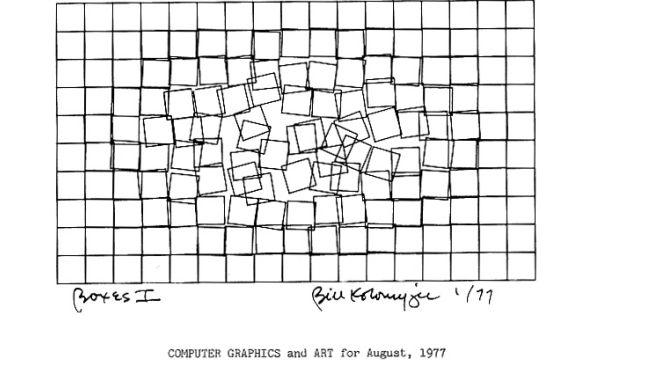
For inspiration I went ahead and looked at computer generated art examples and ended up picking this piece in specific.
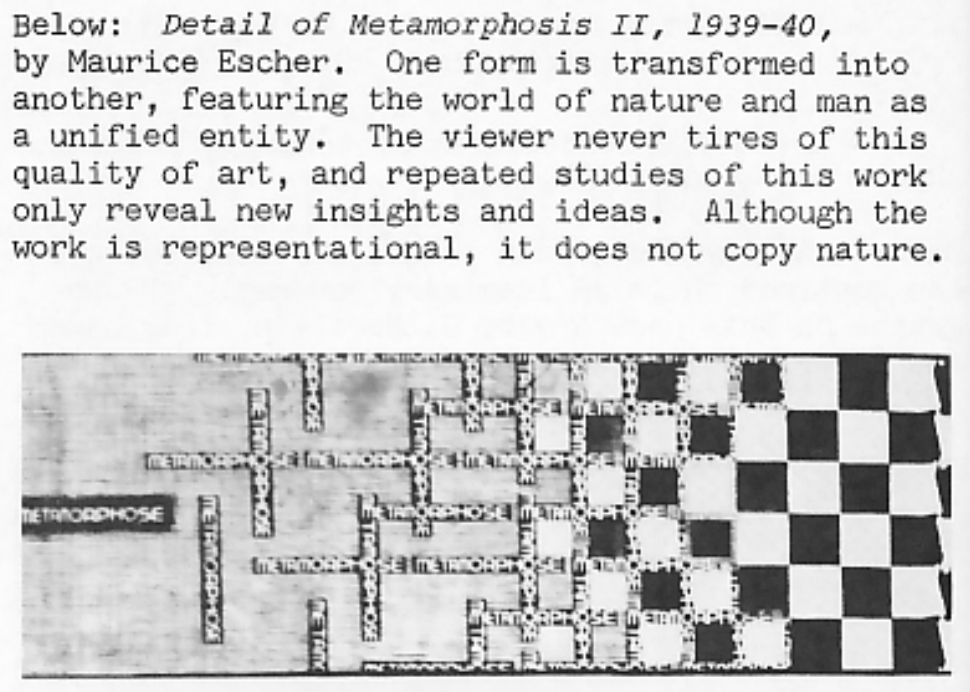
As said here, in this art piece, one form is transformed into another. I wanted that element to be an aspect of the art I made. Your input transforms the piece into something else. Though in my case, I wanted the input to be due to color rather than changing the shape of the piece. For my inspiration of that, I looked at movies I watched, and decided on one particular scene from the first  Spider-verse movie.
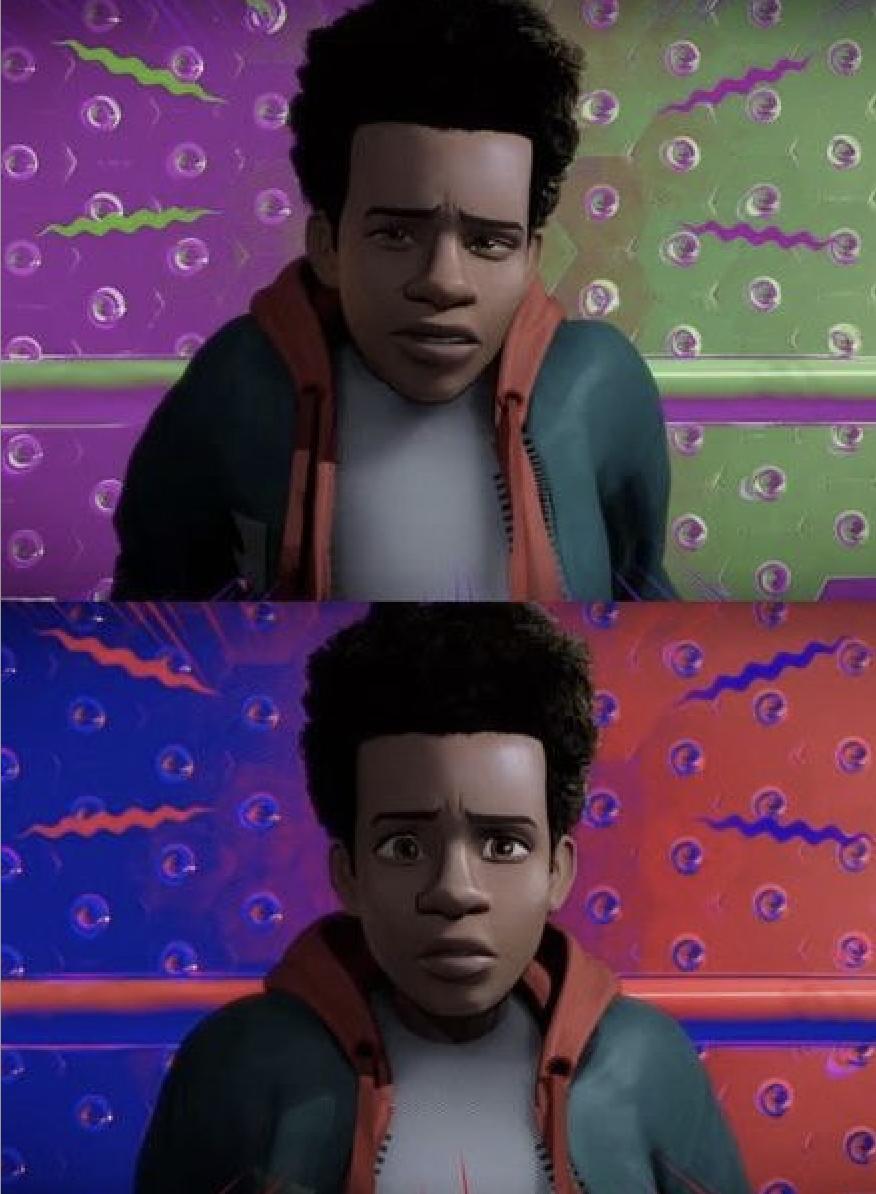
In this scene, the animators showcase the main characters switch in his story through colors. We understand at this point that the character of Miles Morales is officially on the road to becoming, well, Spider-man (as seen by the blue and red colors). I wanted my piece to have that complete flip from ordinary colors to something bright and flashy. Just so that I could get the same type of excitement from the change in colors.

A highlight of some code that I’m particularly proud of

for (var x = 5; x <= width; x = x + 50) {
  for (var y = 5; y <= height; y = y + 50) {
    fill(0, random(255), mouseX); //green is random, blue is dependent on the x-value of the mouse
    rect(x, y, 25, 25);
  }
}

I’m honestly surprised I even understood how to do a nested loop, and what exactly were the parts I put inside the blank [for ()]. The video I watched  showed a ‘while’ loop first then crunched it all up in a ‘for’ loop, which made me pretty confident when it came to writing this particular loop. Additionally, I didn’t have to search anything up to do the mouseX & mouseY thing to do the colors. I tried it out and was shocked it worked out! So I was really happy about that.

Embedded sketch

‘How Was This Made’ section 

Like 99% percent of this was made because I watched a ton of ‘The Coding Train’ videos. It was recommended to watch the 4 videos about functions, but I went ahead and watched lessons 4, 5, and 6 just in case. I didn’t want to use any AI to figure it out, so I forced myself to learn from the videos. The specific video that helped the most were:

2.5 The random() Function

4.1 while and for Loops

4.2 Nested Loops

5.2 Function Parameters and Arguments

Other than, the rest came from trial and error. I would switch the colors around, change the frame rate (which I learned from class), tried to figure out how I wanted the mouse to play into the piece (it was originally a mouseClicked function), and so on.

Reflection and ideas for future work or improvements

I really wanted to add a mouse click function! And also wanted to make it so that the colors only changed for like 4-5 squares surrounding the mouse. I found a video showcasing how to draw with the mouse, but couldn’t figure out how to do exactly what I wanted, which was unfortunate. But I at least understood (through much trial and error) why I couldn’t do the feature I wanted to add. I also think I’d like to add a bit more variety in the piece, rather than just having the color change be a feature.
Week 2 – Reading Reflection

Reflection:

After watching Casey Reas’ Eyeo talk, I found it very close to my own thinking. I grew up with an artist as a dad, and not just any artist, a cubist. What is cubism, you may ask? It’s a unique and funky type of art that blends different shapes and can be read differently depending on the angle you look at it from. The kind of cubism I grew up seeing also packed ideas, experiences and emotions into a single painting, leaving the viewer to guess what is going on and to find an angle nobody else had found.

That shaped how I look at art. My dad used to bring his work home and make me guess what was happening in it, so I learned to read a painting emotionally and from a perspective different from everyone else’s. This is why the talk resonated with me: art is not cold or unemotional. Every piece carries its own meaning and its own way of thinking about how the artist wanted it to reach people. What’s funny is that sometimes I would see something in his work from a perspective he hadn’t considered himself, and that is exactly what makes it beautiful.

I intend to use randomness to give my work the spark it needs. Random motion in one of the shapes, or a sudden loop of shapes overlapping the piece, could make it better than it already was. It would also create a kind of illusion, pushing viewers to think more deeply about the work instead of just staring at a controlled image, and having the viewers look at my art at different angles.

As for the balance between randomness and control, I don’t think it’s something to stress over. Writing the code is the same exchange I grew up watching: you set the rules the way my dad set his shapes, and what comes out can still surprise you, just as I sometimes found things in his paintings he had never intended. Control gives a piece the stamp of the artist’s own style, while randomness can push it somewhere nobody imagined. A piece can look like it only has one way of being seen, but the beauty comes from people finding perspectives the artist never did.


Week 2- Reading Reflection

The idea of randomness in art is an interesting concept. On one hand, art in itself does already incorporate random elements (ex. watercolor painting). On the other hand, computer art and algorithms provide a new kind of ‘randomness’. You are pretty limited in what kind of artworks you can do in code, but the code you do make you tend to have a good amount of control over. The random elements in the code have to be inserted by your hands.

In that case, how much of the piece is true randomness and chance? How much of the piece comes from your own hand, and how much of it comes from the machine?

These two questions showcase my main worry when approaching randomness in art. I personally tend to agree with Rosalind Krauss’s critique of grid art. “It is not just the sheer number of careers that have been devoted to the exploration of the grid that is impressive, but the fact that never could exploration have chosen less fertile ground.” When Casey Reas bring this quote up, they explain Krauss’s stance against this type of art. “She sees it as the moving away from humanity, moving away from the narrative, and basically making art of its own, rather than our largest intellectual and social discourse.” This art moves away from humanity and becomes its own thing.

I find myself agreeing with this idea, because when art is considered to be random, how much of the art is of the artist and how much is it of the machine? Is it all the artist because the artist is the one typing the code, and controlling what parts of it is random and what isn’t? Or is it the machines’ because the machine brings in the most crucial element of the art– the random aspect of it.

With all that being said, I’m not against the idea of randomness in this sense. I do think that there is still a human hand in the process when creating art such as this. There is still intent in the piece, there is still effort, and there is still discourse to be said about it. My thoughts are just a bit too complicated, and I don’t have an exact answer to the question. I find myself critiquing this art but also not having that big of a problem with it.

When I approach my piece, I honestly want the random elements in my work to be limited. I don’t want my piece to get away from me, it still needs to be my piece. That thought alone implies there needs to be a certain balance between randomness and control in this kind of art. What that would be I am not sure, since despite my worry over control in art, of all the pieces in the reading, I did not at any point think a piece could not be considered art. Maybe its because of intent, or maybe it is because the act to make art is in itself, the best showcase of humanity.

Week2–video reflection

For me, I feel that every artwork needs to represent something that the artist wants to express. An artwork should communicate an idea or feeling.Therefore, I do not want randomness to decide what my work is trying to express. Instead, I want randomness to help me decide what my work looks like.

For example, when I am creating a project, I can first decide what I want to express and what kind of overall atmosphere I want the work to have. Then, I can use randomness to control certain elements, such as shapes, lines, or color. In this way, randomness is not replacing my creative decisions. Instead, it helps me discover forms that I might not have thought of on my own.

As for the optimal balance between randomness and control, I think it is difficult to define. I do not think a 50/50 balance is necessarily the best one. It depends on the final form of the artwork and on how much randomness the artist wants to allow. In other words, I think the important question is not how much randomness we use, but how much of the final result we are willing to give up control over.

I also think randomness can help us discover things we did not know we liked. randomness can produce a result that we did not  choose at first. When we see that unexpected result, we might actually like it. In this sense, randomness expands the possibilities we can choose from.


Week 2 – Generative Art


Overview

To be honest, I was really worried about this assignment because I remember when I was studying C# I struggled a lot, especially with the for loop. I went over the practice exercises that we did during the week a lot and also looked at the books uploaded to search for some inspiration. I didn’t even start the code until I saw the Casey Reas video and went through the given books to look over for some inspiration, because I felt a little lost regarding what I am expected to do. But in the end, of course, I managed to make something that I actually quite like and am proud of.


Process

First Inspo

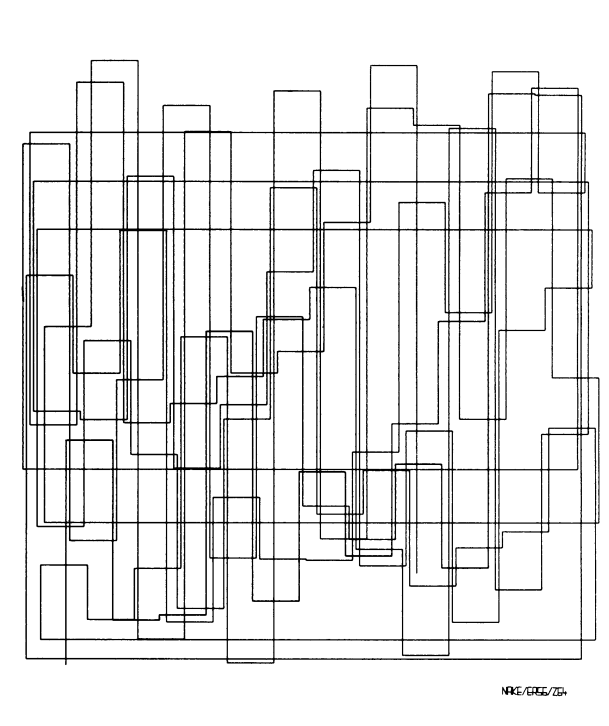
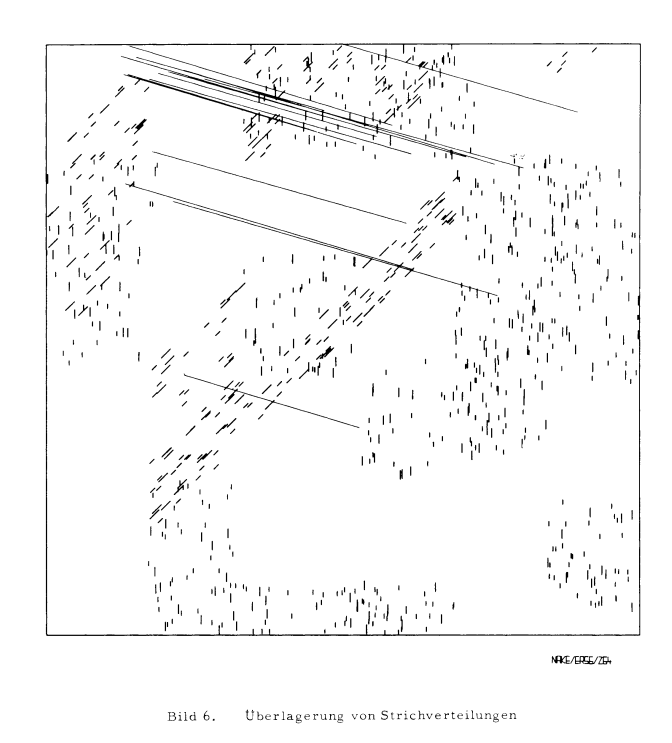
At first I wanted to make it just a grid of rectangles as seen in the image, which was my first inspiration photo that I picked out, and when a user would click somewhere, those rectangles would move to a random spot. I started working on that code, but I found it a little too complex for me right now, so I decided to look for another inspiration image. From the very beginning, this image of rectangles has stood out to me a lot, and I found this one with just a lot of random lines across the screen, and I thought, “What if I combined the two?”

Inspiration images for the final

I was very sure at this point that I wanted to work with lines and rectangles, but also, that I wanted to incorporate colours in some way. At first I had the idea of filling in the rectangles each time with a different colour, but when I tried it out it basically filled in the whole screen, so later I decided on just colouring the strokes. I also decided on that, because halfway through the code I realised that lines can’t have a fill, only a stroke.

It was also a very small fragment of the job, but I really loved picking out the colours that appear.

The Code

let colourPalette = ["#4B0082", "#FFF0F5", "#ADD8E6", "#808000", "#DB7093", "#FFFAFA", "#F0E68C", "#DAA520", "#FF1493", "#8B0000"]; //the array containing

function setup() {
  createCanvas(500, 500);
}

function draw() {
  background("grey");
  frameRate(2); //how many frames are drawn per second


let numLines = random(30); //randomising how many lines are drawn on each frame
let num = 0; //how many I start with

  
while (num < numLines) {
  //randomising where each line starts and where they end
  let firstPointX = random(width); 
  let firstPointY = random(height);
  let secondPointX = random(width);
  let secondPointY = random(height);

  //drawing the line itself
  stroke(random(colourPalette)); //chooses a random colour for the lines each time from the array
  line(firstPointX, firstPointY, secondPointX, secondPointY);
  num++; //increase the num variable so the loop eventually stops
  }
console.log('hellooo');

let numRects = random(15); //giving how many rectangles I wanted to draw
  
for (let num2 = 0; num2 < 15; num2++){ //same structure but with a for loop nos so I can see both kindsat the same time
  let xCoord = random(width);
  let yCoord = random(height);
  let widthRect = random(width);
  let heightRect = random(height);
  noFill();
  rect(xCoord, yCoord, widthRect, heightRect);
}
  console.log ('went through');
  
}

The code is not too long or complicated, but it still took me a little to figure out. I am particularly proud of the way I realised that I can change the framerate of the code so I can control how many images get generated each second. At the start it was going very fast, but now I really like the pacing of it. I also feel proud of just the fact that I managed to incorporate both a while and a for loop, just so I am able to practice both a little. Like in the previous code, I also tried to make everything quite organised, and give the variables names that I would be able to recognise later.

I really enjoyed experimenting with the random variable. I used it for the colours and the drawing of the shapes, and honestly I didn’t expect it to work so well. There are also some console.log’s because in some previous codes I was practicing on they came in very handy.


Reflection and Ideas

As a reflection, I actually feel really proud of this exercise, not necessarily because I managed to write a long and complicated code but because I was finally able to understand the for and while loops. I had a really bad CS teacher back in high school, and I didn’t really learn anything from him, which made me really stressed to start this course. I thought I would be again just very confused about these loops, but I actually understand both of them now. I also quite like how the end result looks.

For the future, I think I will try to challenge myself a little more with both the code and the creative part. For this I had to use some reference images, but I would love to just think of something on my own.

References

For the colours:

https://www.w3schools.com/cssref/css_colors.php


Week 2 – Casey Reas Video Reflection


Casey Reas’ talk made me think about questions about authorship when chance and randomness are the producers of the final output. If a program “fips a coin” to generate an image, who truly owns the reuslting work? While generative experiments like the Commodore 64 maze patterns or the Simulation of the Conception Vehicles (as Reas called them) rely heavily on the randomness of the program, I think the code itselfreflectst human control. The artist still defines the rules, boundary conditions and the parameters of the system, and the only thing being done by the computer is listening to these inputs and actually generating an image. I think, an optimal balance lies in using randomness not to replace artiistic intent but to introduce unexpected images  or variations within the parameters designed by a human. Reas also mentions at the beginning of the video that they created a program for a show where they can “tailor and customise how much they want to leave it to chance,” and I think that this is a very good example of balance.  I would also love to include random elements in my work, especially with colours. I would love to give my work the chance to be randomly colourful, rather than me deciding on specific colours or objects.

On the other hand, I also think that it is very easy to lose control and authorship over these works and flip the balance. In my opinion, authorship includes the artist being able to express their emotions and desires through the art piece itself. If we leave the final output for a program, despite us owning the code, the product might not resonate with the artist and deliver the wrong message. I thought of this while watching the example of the Fractal Invaders. Until then, I felt really confident in myself, that it is completely okay to use a computer program for drawings. That, though, made me really wonder where the line could be. If I really let my program create something random, the chance that it will create something I don’t want to or can’t resonate with grows a lot and statistically will happen. Do I still own that even if I don’t resonate with it? I do, in my opinion. But do I want to? I think the balance is probably between letting the program execute my vision, but maybe not over and over again.

Week 1 Self-portrait

The Concept:

I am ambivert by nature. What does this mean? I am the reserved, quiet person who listens to everyone in a room full of strangers. Yet, when you ask my friends and family, they will tell you I am the most energetic and outgoing person they know. I wanted to capture this concept for my self-portrait.

The idea was to create a character that looks like a normal person (aka the introverted self) at first, but once you get to know her, or rather take the time to get to know her, you discover another version. I thought a lot about what could create a stark difference between the introverted and outgoing self. The answer? My ‘Spiderman’ addiction. So, I made (or at least tried to recreate) a version of ‘SpiderGwen’ that is revealed underneath the normal person graphic as you hover the cursor around. I love the fact that the picture is revealed pixel by pixel since that represents “the effort” of getting to know me. To be honest, I am very proud of going for the idea itself (which some might say was very daring for someone who has never coded before.)

Embedded Sketch:

Implementation:

First, I played around with the different shapes and colors. In this process, the p5js website was really useful because it had visual examples alongside the code. One of my biggest achievements was discovering how to use “bezier()”. Along the way, I was inspired and learnt from the codes of several students who already had their self-portraits published.

For the sake of representing two selves, I had to create two different graphics so I could layer one on top of the other. Once my graphics were ready, I used the p5js website to write this part of code, which I am really proud of:

  //Drawing each version into the buffer
  drawNormalPerson(topImg);
  drawSuperhero(bottomImg);

  ///The interaction
  cursor(brush,0,0);

  // Load the top image
  image(topImg, 0, 0);
}

function mouseDragged() {
  copy(bottomImg, mouseX, mouseY, 20, 20, mouseX, mouseY, 20, 20);
}

Here, I used two global variables to load two different images into the buffer so they can be called when I want them to. The mouseDragged() is a special p5 function that automatically runs every time the mouse moves while a button is held down.

I am also proud of my lips and middle part because I took much time figuring out how to make them look good enough. Here is an extract for the middle part:

//middle part - hair
  img.fill('#2b1203');
  img.bezier(120,200,170,170,190,190,200,119.5);
  img.bezier(120,200.5,122,147,147,122,200,120);
  
  img.bezier(280,200,230,170,200,200,200,119.5);
  img.bezier(280,200.5,280,150,250,120,200,120);

Reflection:

For this assignment, time was my biggest enemy. I wanted to incorporate more things like building in the background of the introverted self and a sky with clouds for when the SpiderGwen appears. What I also tried doing was to replace the normal cursor with a spider (I think that would have been really cool). After countless trial, I could not do it. (I even asked Claude to help me figure this part out, but I still could not do it.) Nonetheless, I am very proud of my work and enjoyed every bit of the creative process I had behind the project. I hope my work inspires someone or reminds them of themselves (to my ambiverts out there!) and makes them smile.

Weel 1 Self Portrait photo

During my time of creating the self-portrait, I had to use the code practice from last class for reference; the reason being that the code would allow me to remember certain commands that I ended up using to make my portrait. For example, the commands from the practice code, “// Body fill(‘orange’) rect (etc.)” allowed me to get an idea of how I can create a body for my portrait which is then followed by creating said-rectangular body. This proved to be very helpful for me because what I was aiming for within my portrait was a kind of modern look; by modern look, I mean by how in most social media platforms, some people choose to have a blank profile picture that only depicts an almost rectangular body and circular head. It may sound boring, but I personally like to think of it as a reminder of how times around the world are so drastically different than how one can imagine. Speaking of circular head, i was originally going to use the “circle()” command to create my head, until I found out that the command best suitable for the requirement is the “ellipse” command since it had proven to me that it can create a far more accurate shape of the head for me. This wasn’t the only time I replaced a shape during the whole process, because when I was creating the nose, I almost went with an oval circular shaped nose. However, some part of me felt as if it were “too clownish” to say the least; hence why i decided to go with the triangle since it just felt more respectful with the nonchalant tone that i have been trying to keep up rather than a tone similar to that of an off-brand circus. As for eyes, my original goal was to create 2 big white circles and then create 2 smaller black circles that would be placed on top of the white ones in the middle; yet I remembered the “ellipse” command and how it would prove to be a more beneficial tool if it slipped horizontally, shrinked by eye-size, and then be placed in their respective spots all while the idea of 2 smaller black circles being centralized within the 2 white sclera of the eyes remained. Lastly, with the hair, this the most difficult for me, since I could not figure out which series of commands to use in order to replicate my hair as need be. Since I am not the most experienced artist in the room, I had no choice but to go forward with the decision to create those lines of hair that perhaps would at least resemble my short bangs.

Despite the headache from all the creation of shapes after shapes, a code series that I can’t help but feel happy about is the creation of the smiling mouth that you may see in the portrait. Before the mouth was even formed, I nearly went with the idea of using the “line()” command to form my mouth and perhaps stretch upwards. But of course, I would come to realize that the lines are meant to be nothing more than straight, thus enabling as incapable of being bent/altered further. When hope seemed lost, that is when I stumbled upon the command of “arc()” from the coding’s list of references. There, I would discover how certain arcs of line in this different command can be altered just in the way I desired! Thus, that is how I was able to get the smiling mouth as you would see here in the portrait!

Despite the work being done, I do want to mention that not only did I use the code practice and the coding site’s references as my guide, but I also had ai (one that I paid for), check my work to see if I must either change a coordinate or correct a common usually wrongly. This is because I saw that through my time working, my weakness has been second-guessing certain coordinates for certain shapes for too many unnecessary times. I just could not tell which coordinate was the right way to write in order to set the shape and/or color as I wanted. Therefore, that is why for each coordinate of each part of the portrait that I write, I would share it with the AI and simply hear its advice of what I can keep and what I must modify. Even though it has helped me recognize my mistakes, it still serve as a signal for me that what I should be working on for this class is a better understanding of how shapes must be correctly positioned/modified as for each project I work on. After all, this idea of improvement should help prepare me for possibly more complex projects that require more shapes somewhere in the future.

function setup() {
  createCanvas(640, 580);
}

function draw() {
  // background set-up
  background(135, 206, 235);
  // sun at the top right corner
  noStroke();
  fill("yellow")
  circle(40,40,180);

  // Head
  fill("tan");
  ellipse(300, 300, 250, 300);

  // Body
  noStroke();
  fill("green");
  rect(210, 430, 180, 220);
  
  // Hair 
  stroke("Black");
  strokeWeight(5);

  line(260, 190, 250, 150);
  line(280, 180, 275, 140);
  line(300, 175, 300, 135);
  line(320, 175, 320, 135);
  line(340, 180, 345, 140);
  line(360, 190, 370, 150);

  // Sclera of eyes
  fill("white");
  ellipse(250, 300, 65, 38);
  ellipse(350, 300, 65, 38);

  // Pupils of the eyes
  fill("black");
  circle(250, 300, 14);
  circle(350, 300, 14);

  // Nose
  fill("brown");
  triangle(300, 320, 285, 335, 315, 355);

  // Smiling mouth
  noFill();
  stroke("black");
  strokeWeight(5);
  arc(300, 370, 90, 60, 0, PI);
}


week 1 self-portrait

Concept

For this assignment, I decided to approach the project from a more artistic perspective. My vision was to create an abstract artwork using a variety of shapes and colors. Therefore, I focused more on the visual composition and construction of the shapes rather than on interactivity.

Progress

Before beginning to work on the code, I sketched what I had in mind in a sketchbook. This made it easier to plan and determine where each part would be placed. I then went on YouTube to look for tutorials on how to code curves, which are a major part of my assignment. After finishing the line art, I began working on the colors and adding different shapes. I also decided to create some of my own shapes, such as the flower, which was fun to experiment and try out. Lastly, I wanted to add something more to the background, so I looked up different pattern examples for inspiration.

My code highlight

A part I am proud of is the pattern I created for the background. It was something new and interesting for me to learn, and I enjoyed seeing how a simple pattern could make the overall artwork feel more complete. I wanted to experiment with different types of patterns and explore how they could change the mood of the artwork, but unfortunately, I did not have enough time to try them out.

background(80,150,70, 150)
  fill(80,150,0);
  strokeWeight(3);
  rectMode(CENTER);
  let space = 50;
  for (x=0;x<width+50;x+=space){
    for (y=0;y<height+50;y+=space){
       line(x,y,x+space,y);
       line(x,y,x,y+space);
      circle(x,y,5)
      stroke(200,100,150,150)
      circle(x,y,15)
    }
  }

Reflection

There were many things I was hoping to add to my project. One of them was an interactive element, which unfortunately was not working for some reason. I also wanted to add more details and elements to make the artwork feel even more abstract and visually interesting. For my future projects, I hope to learn more about animation and explore different ways to make my projects more interactive. I also want to learn more tips and techniques that can help me code more efficiently and speed up my workflow.

Week 1 – Self Portrait by Ghaya Algurg

My Concept
For our first assignment for IM, we had to make a self portrait of ourselves using some skills we learned in class. I was originally planning to do just a normal self portrait of me outside, maybe with the sun or grass. But, due to the pure amount of time spent coding, I thought it’d be fun to portay myself working on the computer. Almost as if the self-portrait is really just me sitting at the desk coding myself.

Highlight of Code I’m Proud of: 

//mouth
noStroke();
fill (0)
arc(200, 240, 60, 50, TWO_PI, PI);
//inside mouth 

fill(1000)
rect(200, 242, 40, 5)
//teeth
fill(255, 105, 180)
arc(200, 260, 25, 15, PI, TWO_PI);
//tongue

The reason why I was so proud of the mouth is because it was the last thing I worked on, so it ended up being a good showcase of everything I had learned. It took me so much less time to do compared to every other facial feature and it made me happy to see that I had gotten somewhat comfortable with the coding process.

Other parts of the sketch may have been harder to do but this one felt important to highlight because it was so easy. I was incredibly happy to see myself improve.

Embedded Sketch

How This Was Made:
The code was made by looking at the references page on p5js and by watching the first four videos on Youtube by The Coding Train. The videos were extremely helpful since they gave me a good starting point when I got on the website. The videos also helped explain some things I was a bit unsure about (specifically how to do the the order of the code, but also helped with pointing out certain features that ended up being incredibly helpful and made the program so much easier to work on [such as the high contrast feature!])

There were some times when I couldn’t figure something out so I tried searching on google or reddit to see if they had an answer, but those didn’t really help much so I wouldn’t consider them a part of the process. All of the credit should be attributed to the youtube videos and the references on p5js.

Reflection:
Truthfully, I struggled a bit when it came to how I wanted to portray myself. A part of me considered pulling out all the stops and trying to do a full pixel art rendition of myself as a challenge. However, I realized that going that route would be more limiting than challenging. I wanted my portrait to have a multitude of shapes and colors. I wanted to play around with code I couldn’t figure out in class and make sure I properly understood every line of code I was typing. Pixel art would only limit me to squares and squares only.

So I decided to do a very simplified version of myself. The more I coded the more I stopped caring about how I looked and the more I cared about what code I was learning and whether I was actually retaining the information. A lot of emphasis was put on understanding what exactly the numbers represented in each shape. I didn’t want to just insert multiple numbers together and pray they worked out in the end, I wanted to prove I actually understood what I was doing.

While maybe not obvious at a first glance, there are a few parts of the portrait I can attribute to my exploring. The bit of hair under the hijab was my way of playing around with arcs since I did not understand how they worked at all. Meanwhile the eyelashes were me figuring out how lines worked and whether I could easily move them around if I so please. I even got the colors from learning about RGB and playing around till I saw a color that fit. Overall, I’m pretty happy with the end result!

However, a part of me does wish I also tried my hand at adding an interactive section, but I was worried that doing so would cause me to stress out over the assignment rather than use it as an opportunity to learn. Hopefully I’ll be able to add a bit of interaction and movement in the next assignment!