
Concept
For this project, I was honestly feeling a little lost at first because I did not know what I wanted to create. I was staring at my laptop wallpaper, which has jellyfish that slowly move around, and that gave me the idea to make my own version of it. I wanted to create a simple underwater scene with jellyfish floating upward. I made each jellyfish slightly different by giving it a random position, size, speed, and color. I also added a small interaction where clicking the screen creates another jellyfish.
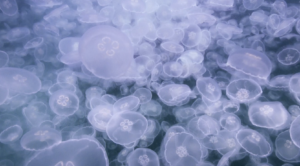
(My wallpaper)
My Artwork – Jellyfish
Click the screen!
Code I’m Proud Of
I am most proud of the code I made for the jellyfish tentacles. At first, I was confused about how to place the lines so they would stay connected to the jellyfish when it moved. I used this.x and this.y with different numbers to place the three tentacles under the body. I like this part because it makes the jellyfish actually look like jellyfish instead of just being a circle.
// Draw the three tentacles underneath the body
  stroke(this.jellyColor);
  line(this.x - 8, this.y + 10, this.x - 8, this.y + 30);
  line(this.x, this.y + 10, this.x, this.y + 30);
  line(this.x + 8, this.y + 10, this.x + 8, this.y + 30);
}
Debugging
I struggled a lot with understanding how the class, objects, and array were connected because this was still pretty new to me. At first, I understood how to make one jellyfish, but I did not really understand how to make multiple jellyfish from the same class and have each one be different. I also got confused by this.x and this.y and what the numbers like +8, +10, and +30 were doing when I was making the tentacles. To help me, I went back to the car sketch code we did in class and looked at the way the class was structured. I also used the Ball Class Example 2 – using a class (p5editor) and Ball Class Example 3 – multiple instances using a class (p5editor) to understand how classes can be used to create objects and how multiple objects can exist at the same time. Looking at these examples helped me understand that each jellyfish can use the same class while still having its own position, size, speed, and color. I had to keep going back to the examples while coding because I am still getting used to this way of programming and it was quite frustrating.
Reflections
This project helped me understand objects and classes more because before this I was confused about how one class could create multiple things that are still different from each other. The bouncing ball example from class helped me understand how this.x and this.y belong to each individual object. I also struggled a little with understanding the array and how it connects to the objects, but once I understood that the array holds all the jellyfish it made more sense. I kept the artwork simple because I am still getting comfortable with coding, but I like that it still has movement, randomness, and interaction. If I continued working on it I would probably make the jellyfish look more realistic or add more interaction to their movement especially the tentacles.