
This week, I spent more time debugging than actually coding. After countless exasperated sighs and ‘break’ walks, I finally came up with something I am satisfied with. Looking back now, I feel like I got a better grasp of object-oriented programming after going through this debugging process.
Concept:
For this assignment, I was inspired by Giovanni Giacometti’s artwork, titled “Vue de Capolago” (View of Capolago). I came across this painting during my visit to Louvre Abu Dhabi. Its playful use of repeated, colorful lines stuck with me.
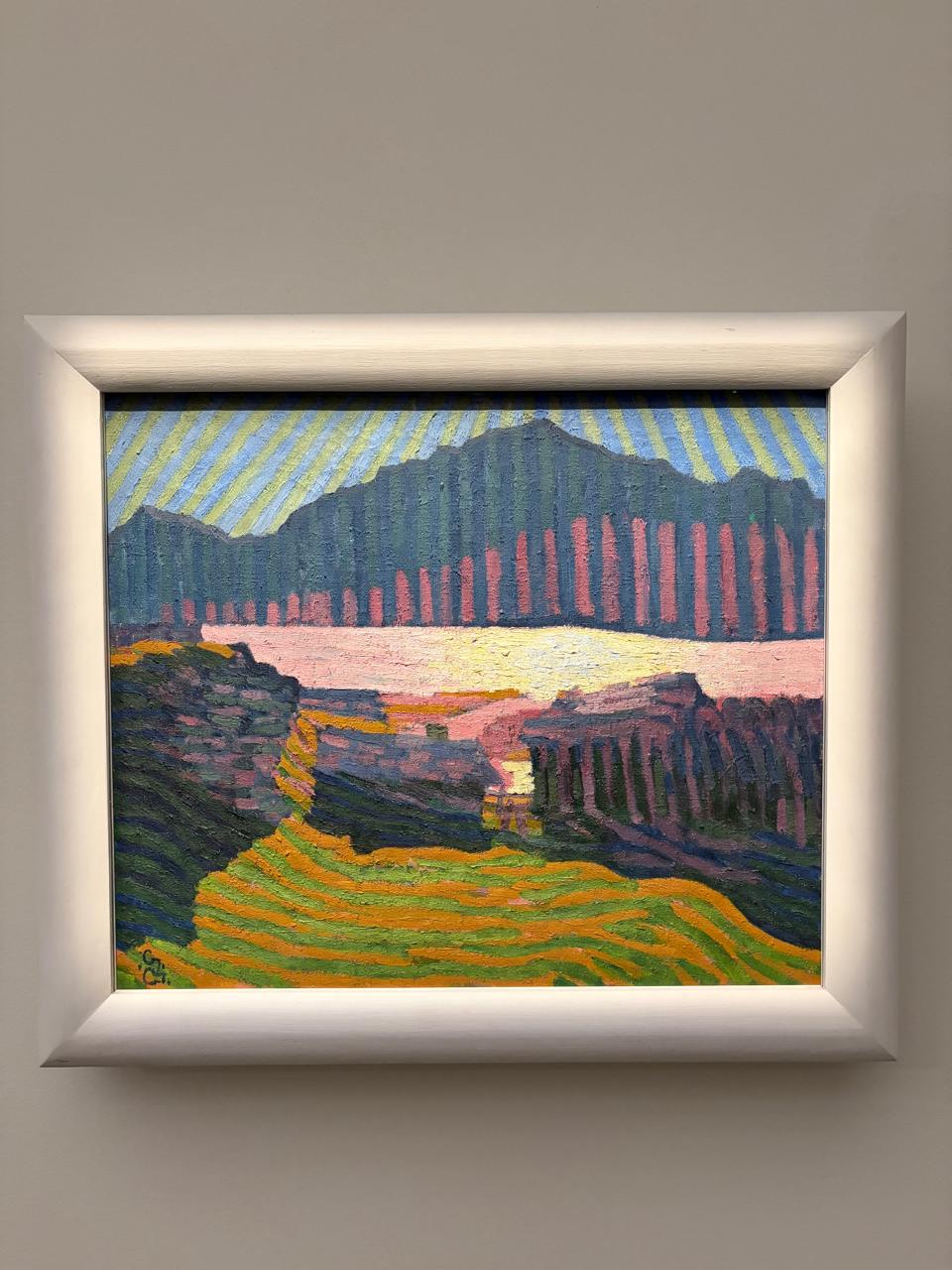
I tried to recreate the sky, mountain, and field in p5. Since we were assigned the Crawford reading this week, I also tried to incorporate some level of interactivity (‘fridge light level’, so it does not overpower my intention of staying true to the feelings evoked by the original painting). Therefore, I tried to create a change of hues as the user makes the sun set behind the mountains. Clicking anywhere regenerates the whole composition with new random stripe counts, widths, and heights, so each click produces a different but similarly-styled painting.
Embedded Sketch:
Process:
I had so many tabs open in the creation process of this week’s sketch. I referred to articles like this one (Link) and the p5 website in order to use functions like map. This Coding Train video (Link) and this Patt Vira video (Link) were particularly useful in exploring classes and changing gradients. Simply speaking, I built a small set of functions, each describing how to draw one shape given its size, position, and color. Then I used randomness to stamp out a bunch of these shapes with slightly different sizes and positions, and kept them all in lists. Every time, the program walks through each list and redraws every shape in it, but recalculates each shape’s color by blending two preset color sets together. What I am really proud of is how the blend ratio depends on where your mouse currently is on the screen. Clicking throws out all three lists and randomly generates a brand new set of shapes, so you get a totally different layout to look at. Here is a code excerpt of the color blend:
//Mixing the colors according to position of cursor
function drawSky(Mood, HorizonY) {
  background("#cfe3ea");
  for (const s of SkyStripes) {
    const from = color(SkyMidDay[s.ColorChoice % SkyMidDay.length]);
    const to = color(SkySunSet[s.ColorChoice % SkySunSet.length]);
    s.display(lerpColor(from, to, Mood), HorizonY);
  }
}

function drawMountain(Mood, HorizonY) {
  for (const r of MountainStripes) {
    const from = color(MountainMidDay[r.ColorChoice % MountainMidDay.length]);
    const to = color(MountainSunSet[r.ColorChoice % MountainSunSet.length]);
    r.display(lerpColor(from, to, Mood), HorizonY);
  }
}
It took me a while to figure out this logic. This is why I am so proud of it.
Reflection:
I would have loved to spend more than a week on this assignment. This is only because I believe it would have allowed me to experiment more with the aesthetics after having figured out the logic of things. For instance, I imagine changing the fields into a sea with wavy lines as the user clicks on the screen. Nonetheless, I believe I have learnt a lot through this assignment.