
My concept:
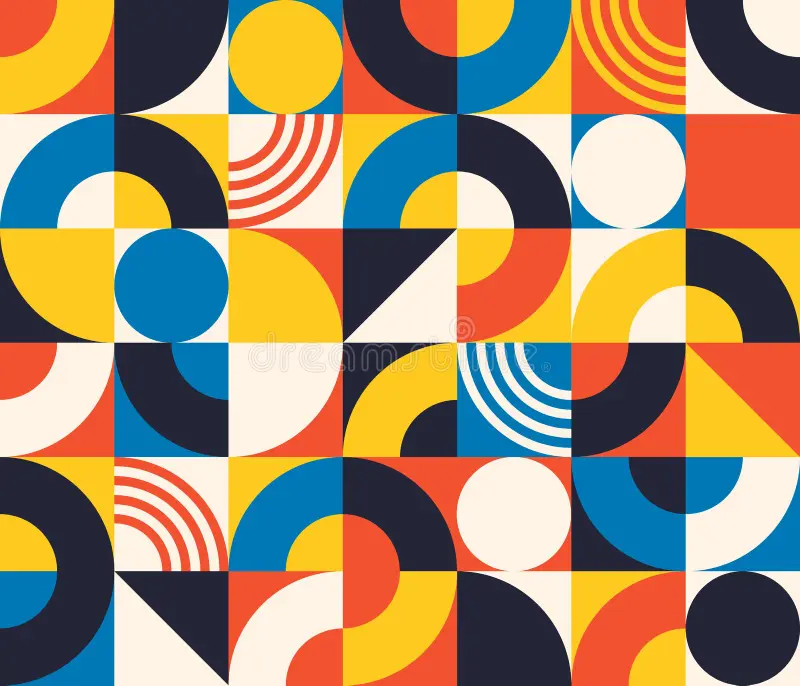
For this assignment, I wanted to create a simple yet impressive work of art. In order to make it visually interesting, I decided to emphasize the geometric patterns using different colors and shapes. I got inspired by a graphic design I found while searching for magazines. The reason why it stood out to me is because of how the simplicity of shapes created a complex looking outcome. I also incorporated what we learned in class, including loops, the circleSize pulses, and if/else statements. I decided to add the pulse effect to make my art work feel less flat. An interactive element was also used, where the user could click the screen to change the theme of colors. There are 4 different color themes, after it goes through all 4, it goes back to repeat.
Highlight of my code:
I’d like to say my favorite part of my code has to be the interactive element. Every time you click, the theme number increases and the colors of the artwork change. The reason why I’m proud of this specific part of my code is mainly because I got to incorporate something I learned in high school into my work. It’s a pretty simple code, yet it led to the most creative part of my project. I numbered every shape, and depending on how many times you click, decides what color theme is picked. Because I didn’t want to make the code confusing and overwhelming with a huge list of colors, I made some shapes set as a permanent color. I filled the half circles and a rectangle to a beige color to somehow still have a link or unity to all the themes.
// ORIGINAL COLORS
  if (theme == 0) {
    color1 = "#f45132";
    color2 = "#ffca28";
    color3 = "#0781b7";
    color4 = "#202236";
  }

  // PURPLE COLORS
  if (theme == 1) {
    color1 = "#74a7fe";
    color2 = "#874efe";
    color3 = "#b18cfe";
    color4 = "#7b219f";
  }

  // BURGUNDY COLORS
  if (theme == 2) {
    color1 = "#5c0700";
    color2 = "#791a3e";
    color3 = "#9a244f";
    color4 = "#00364a";
  }

  // B&W COLORS
  if (theme == 3) {
    color1 = "#d6d6d6";
    color2 = "#7a7a7a";
    color3 = "#444444";
    color4 = "#232323";
  }
function mousePressed() {
  theme = theme + 1;

  if (theme > 3) {
    theme = 0;
  }
}
Embedded sketch:
How was this made:
I started off my code by dividing the screen into 4 rows. I started creating my shapes, alternating between rectangles and ellipses, depending on which shape I want to be overlapped. When I decide to add the pulsing effect on the ellipse, I add the circleSize code into the coordinates. When it came to the third row, i wanted to add repeated lines. I thought that was the perfect time to practice my loop code. Instead of coding every line individually, i only had to coordinate the first line, and duplicate the rest. It moved 10 units to the right until I got all my lines in order. When it came to the clicking to switch the theme part, I had to google how to do. Fortunately, the first like I found was the reference page teaching me how to use mousePressed. https://p5js.org/reference/p5/mousePressed/ And of course, the whole inspiration to my art was an abstract patterned magazine design that immediately caught my eye. I tried my best to match the colors as well. https://www.dreamstime.com/bauhaus-seamless-pattern-abstract-square-tiles-circle-triangle-retro-print-minimal-style-geometric-figure-vector-image217690822 After some advice from my professor, I later added another loop to create the rectangles in the background. Instead of coding each rectangle individually, the loop automatically moves 100 pixels across and down the canvas, making my code shorter and more efficient.
Reflection:
I really enjoyed this assignment but if I had to change something, it might be to change the shapes and experiment a bit more. I would decrease the size of the shapes in order to make it look more pixelated, and give it an old computer effect. I would also try to add a new moving effect that doesn’t require any input from the user. Like moving shapes or changing colors. After watching the video as well, I would’ve liked to incorporate more randomness. Overall, I’m very proud of my work and use of class material. I’m happy with how interesting it is to look at and how much effort i put in order for that to happen.