
Text Generator – Matches Results
My Concept
For this assignment, I decided to make a generative football results screen. Football is something I admire, so I wanted to connect the assignment to something personal instead of generating random poems or unrelated sentences.
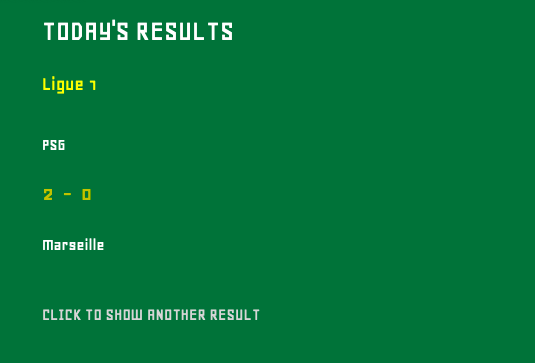
The sketch displays a match result, the two teams, and the competition or in other words, the country league. When the user clicks the canvas, a different result appears. The green background represents a football pitch, while the yellow and white text make the information clear and easy to read. The results are sample results stored in my CSV file, not live results from the internet.
My Highlight Code
The part of the code I am most proud of is where the program randomly selects one match and separates its information:
  singleMatch = splitTokens(
matches[int(random(matches.length))],",");
random(matches.length) chooses a random position from the matches array. int() changes it into a whole number that can be used as an array index. The selected CSV row is then separated at every comma using splitTokens(). This allows me to access the teams, scores, and competition separately.
I also used:
function mouseClicked() {
  loop();
}
This allows draw() to run again after a click and display another match result.
My Embedded Sketch
You can click the sketch to display another result.
How This Was Made
I created a file called matches.csv. Every row contains the first team, its score, the second team, its score, and the competition/league. I loaded this file with loadStrings(), which stores its rows inside an array.
I assigned an index number to each category, such as TEAM1, SCORE1, and COMPETITION. After selecting and splitting a random row, I used these index numbers to retrieve the correct information.
I used loadFont() to load the Geo.ttf font that I chose and uploaded to the p5.js editor. I then used text(), textSize(), and fill() to design the results screen. Finally, noLoop() stops the results from changing automatically, while loop() allows a new result to appear after a mouse click.
I made this assignment fully based on the Week 4 class slides, and specifically the functions shown in each slide and the sketch examples given in the slides to see how everything works and use examples for ideas. Particularly, the generative poetry examples. I adapted the structure of such examples to display my football matches results texts.
Reflection
The biggest challenge was understanding how one CSV row becomes an array after using splitTokens(). At first, the index numbers were slightly confusing, but labeling them as TEAM1, SCORE1, TEAM2, SCORE2, and COMPETITION made the code easier to follow.
I also needed to make sure that the CSV and font filenames matched the filenames written in the code. If one letter was different, the file would not load. Whenever I had a problem, I returned to the week 4 slides because they explained the process step by step and in a very detailed way.
I am happy that I connected the assignment to football. In the future, I would like to learn how to load real match results automatically instead of entering sample results manually.