
Concept: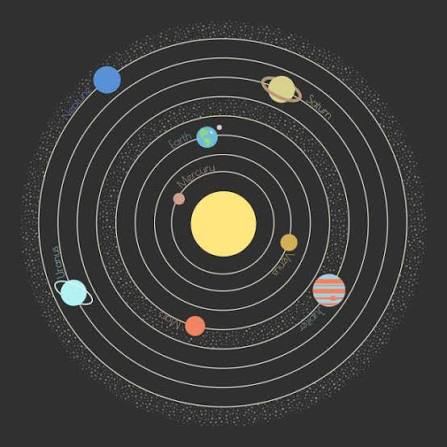
I have always loved space, especially anything to do with stars and the solar system, so for this assignment I decided to build a small generative solar system in p5.js using object oriented programming. Each orbiting body is a Planet object with its own distance from the sun, speed, size and color, all stored in an array so I could build and animate the whole system with loops instead of writing out five separate planets by hand. The exact stats for each planet are randomized within set ranges, so it looks a little different every time you refresh it, which felt fitting since no two solar systems out there actually look the same either.
How this was made:
I split the code into two files: sketch.js for the main setup/draw loop and the sun, and planet.js for the Planet class, which handles one planets data (distance, speed, size, color, current angle) plus its own update() and display() methods. In setup() I loop through and create 5 planets, spacing their orbit distances out with map() so they do not end up overlapping and giving each one a random speed, size and color. In draw() I loop through the array every frame so that update() moves each planet a little further along its orbit and display() draws it along with a faint ring showing its orbit path.
Code Highlight:
update() {
    this.angle += this.speed;
  }

  display() {
    push();
    //translate() shifts where (0,0) is on the canvas.
    //normally (0,0) is the top-left corner, so every shape would need
    //width/2 and height/2 added to its position to appear centered.
    //instead I move the origin itself to the center of the canvas once,
    //so I can treat the sun as sitting at (0,0) and calculate every
    //planets position relative to the sun instead of the corner
    translate(width / 2, height / 2);

    //orbit ring just a circle showing the path this planet travels
    //drawn centered on the new (0,0) which is now the canvas center
    noFill();
    stroke(255, 60);
    strokeWeight(1);
    ellipse(0, 0, this.distance * 2, this.distance * 2); //*2 because ellipse() takes diameter

    //this is the actual orbit math.
    //this.angle is a value in radians representing how far around
    //the circle the planet currently is (a full loop = TWO_PI, about 6.28)
    //cos(angle) and sin(angle) both output a number between -1 and 1 -
    //multiplying by this.distance scales that up to the actual orbit radius
    //I want turning it into a real pixel offset from the center.
    let x = cos(this.angle) * this.distance; //horizontal offset from center
    let y = sin(this.angle) * this.distance; //vertical offset from center

    //every frame angle increases slightly (from update()) which changes
    //the result of cos/sin slightly which moves x and y slightly
    //that is what creates the smooth circular motion over time

    noStroke();
    fill(this.col);
    ellipse(x, y, this.size, this.size); //draw the planet at its calculated position

    pop(); //restore the coordinate system back to normal (undoes the translate)
           //so the next planet in the loop does not inherit this shift
  }
This is the part of the code in Planet class I am happy about, since it is where the actual orbiting motion happens. update() just nudges the planets angle forward a tiny bit every frame, like a slowly ticking clock hand. In display(), I use translate() to shift the canvas’s origin point to the center, so I can treat the sun as sitting at (0,0) instead of constantly adding width/2 and height/2 to every position. Then cos(this.angle) and sin(this.angle) calculate where a point at that angle would land on a circle, and multiplying by this.distance stretches that out to the planets actual orbit radius. Since the angle keeps increasing frame by frame, this position keeps recalculating slightly differently each time, which is what produces the smooth circular motion. I wrap the whole thing in push() and pop() so the translate only affects this one planet and does not carry over and throw off the position of the next planet in the loop.
Problems I ran into:
The orbit math was the main thing I struggled with like I understood conceptually that I wanted planets to move in circles but I could not figure out on my own how to turn an increasing angle into an actual x/y position on screen. I ended up going back to Claude multiple times to work through the logic and the translate() part step by step until it actually clicked. I also ran into an issue with the orbit rings not lining up with the planets real path. I had unfortunately forgotten that ellipse takes a diameter and not a radius, so my rings were drawn at half the size they should have been. On top of that, I had to switch from fully random orbit distances to using map() to space them out evenly since random values kept causing planets to spawn too close together or right on top of the sun.
Embedded Sketch:
Reflection and ideas for improvement
This was honestly one of my favorite assignments so far because of the subject matter. Using classes also made a lot more sense once I actually built something with them, since having each planet manage its own data felt way cleaner than juggling separate arrays. For future improvements, I would really like to make the orbits a little more realistic by making them elliptical instead of perfect circles and maybe add small moons orbiting the planets themselves and also add fading trails behind each planet so you can actually see the path it has traced instead of just a plain guide ring!!!
References:
https://p5js.org/reference/p5/translate
https://p5js.org/reference/p5/cos
https://p5js.org/reference/p5/sin
https://p5js.org/reference/p5/push
https://p5js.org/reference/p5/pop
https://p5js.org/reference/p5/map