
Concept:
For this second assignment we were instructed to code an artwork using the concepts we have learned in class this second w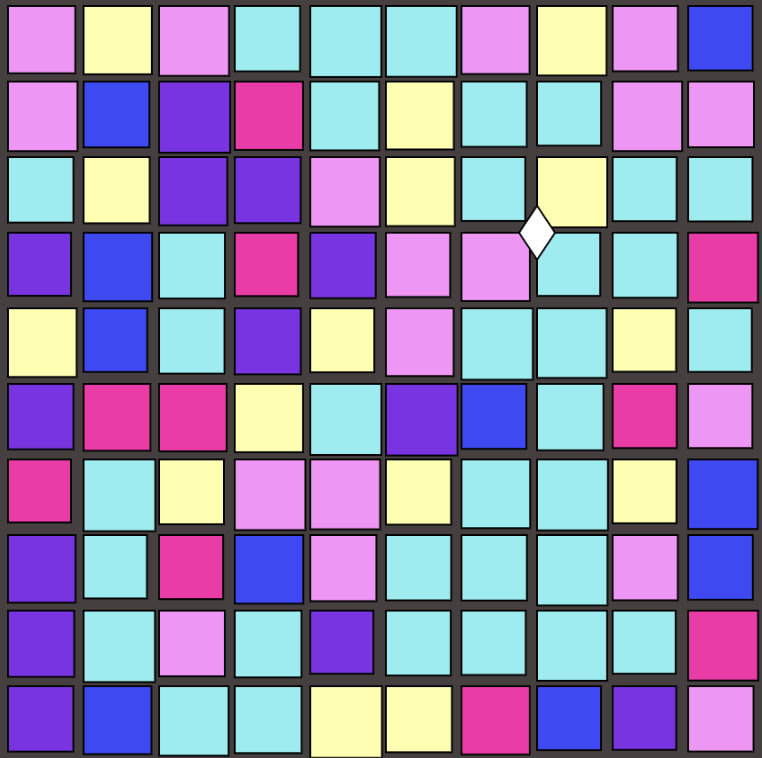 eek. Initially, my concept was inspired by the atmosphere of a disco dance party where the grid of squares represent a disco ball.
However, when I added the diamond shape to appear based on the mouse position to represent the sparkles when light reflects off it, it reminded me of a different idea. Seeing the grid of squares, the colors changing, and an object moving using my mouse gave me a sense of deja vu and reminded me of when I used to play Club Penguin. Specifically, the night club dance floor. So, I pulled up a reference image to hel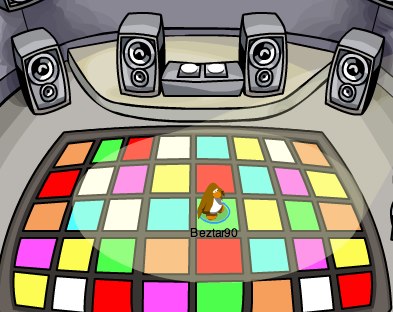 p me tweak a few things like changing the color scheme to match it and changing the diamond shape to appear into the closest penguin I could code that looked like a Club Penguin.
I liked this idea and direction because it allows my project to be interpreted in multiple ways and combines both my initial idea and my current one. When the mouse is not in use, it can still be portrayed as anything within the realm of dance, parties, and disco based on the perception of the viewer. This is why I kept the sizes of the square to be random even though it is static in the club penguin dance floor, I felt like it made it visually dynamic and added energy like how a real, lively dance floor is and also how disco ball patterns rapidly change as though it is spinning fast and reflecting the different colorful lights of the vibrant environment usually in parties.
Highlighted Code:
// random color + size 4 the rect/tiles
  let color = random(7);
  let size = random(35, 40);

      if (color < 1) {
        fill("#ffffff");
      } else if (color < 2) {
        fill("#d970ff");
      } else if (color < 3) {
        fill("#ff2e1f");
      } else if (color < 4) {
        fill("#3ef226");
      } else if (color < 5) {
        fill("#f4f830");
      } else if (color < 6) {
        fill("#3ef9ca");
      } else {
        fill("#ee9f5d");
      }

      rect(x, y, size, size);
This code assigns color a random number between 0-7 and size a random number between 35-40 and based on that it fills the rect() a certain color and width/height. I am particularly proud of it because I had previously known about the random generator code I just had to see how it worked in p5js as my knowledge was from python. Knowing now that I can set up random() to be in between a certain amount of numbers by setting the maximum amount within the parameter made it pretty easy to code the rest with simple if/elseif/else statements. So, if the random() let color to be 2 then the rect() would be filled with the color red because (color < 3) would be finally true. I liked that I was independently applying something I had learned from before rather than just following an example and seeing my vision come to life.
How This Was Made?
To create the grid of squares I used the help of Week 2.2’s classwork example for the nested loop and I just played around with the x and y values to get the squares as close as I want them to be. Then before the rect() executes, I had the random size and color if/else statements that I explained in the Highlighted Code section to fill it a random color and give it a random width and height. For the penguin part, in order to make it appear based on mouse position and within a certain part of the canvas, I used Week 2.1’s example of the && logical operators. The mouseX and mouseY part makes sure that the mouse is within the boundaries of each grid square and I used the same number (42) that I used in the nested loop in order to have matching spacing. This is what makes the penguin appear right above each tile that the mouse is hovering over. For the penguin part, It was just multiple ellipses stretched out in different widths and heights based on the body part. It took a bit as I had to keep going back and forth checking with the mouse then adjusting the x, y values but it worked out in the end.
Overall, I used the Club Penguin reference image, the random() p5js reference, Week 2.1 examples, and Week 2.2 examples.
Reflection:
I am happy with how my artwork turned out because the whole development was fun to work with. I started with a disco ball-inspired art then ended up with a mix of both that and a Club Penguin dance floor. My previous work was SpongeBob SquarePants and I really enjoy the assignments when I make them more personalized to my likings, yet still abiding by the instructions. The final artwork is more than just a visual idea, but a nostalgic memory to I am sure many people.
For future developments, I have a couple of suggestions for myself if I had more time and that would be maybe to add multiple penguins in the dance floor. I could have them placed on a certain grid when the mouse is pressed and have them change colors like how the real Club Penguin actually is. I could also have the tiles change colors when the penguin is hovering over them kind of like the penguin (user) is activating the dance floor. It would make the final piece more interactive and playful for the user, yet still preserving the main concept of the artwork.