
Concept
This week in class, we learned about conditionals, and I really wanted to incorporate this new concept into my assigment, One of the examples we looked at in class showed us how we could change color when the mouse interacted within a certain area of the screen in that case it was a sqaure turning pink. I wanted to take this and make the color change happen across 50% of the screen.
My canvas is 600 x 600 pixels, so I knew that 50% of the width would be 300 pixles and once the mouse went past 300, the colors would change, and if the mouse was before 300, the colors would change back. This created an effect where the colors appear to swap between the two sides of the canvas as i moved the mouse from right to left.
I also incorporate the last weeks color and shapes we learnt and i mixed that with this weeks for loop. I used the for loops to help with the squares repeating every 50 pixels i did this with the + 50. This created a repeating pattern that filled the entire canvas. By combining the repeating sqaures with the conditional color change i was able to create an interactive pattern that changes when i move the mouse.
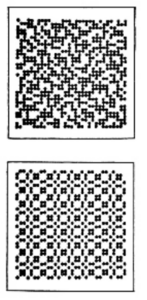
Overall I wanted my artwork to demonstrate new concepts we learnt this week while also the inspiration behind the look of the art work was from the compute graphics art work i saw in the article August 1977 issue of ComputerGraphics and Art as seen in the figure to the left . (Hertlein, 1977)
Code particularly proud of
// Left half
     if (x < 300 && mouseX < 300) {
       fill('#ed0763');
     }
     // Right half
     else if (x >= 300 && mouseX >= 300) {
       fill('#ed0863');
     }
     // original colour
     else {
       fill('#f41aba');
     }
I was particularly proud of this code as it enabled for the color change to take place. In this code it says when the mouse are is on the left and the squares on the left side then the color will change however if its on the right change again but if its neither it will stay the otherwise, keep the original color. This code also allowed me specifically to practice carrying out conditional code .
How this was made
I started by setting the screen to 600 × 600 pixels. Then I created a for loop, which allowed the squares to repeat across the screen every 50 pixels. After that, I added conditional statements. The if checks if the square is on the left half of the screen, meaning its squares are positioned where the x is less than 300, and if the mouse is also on the left half. If both things are true, the square change the color. I did the same thing for the right half of the screen.I also added an else code so that when the mouse is not on the same side as the square, the square stays its original color. I used AI only to help me figure out why my else was not working, and I realized that I needed to include the else to keep the original color.
Reflection
In the future, I would like to create more complex designs, use different shapes, and incorporate animation, as that is something I did not do this time. However, I am overall impressed by how such simple code was able to create an interactive design. Next time, I would also like to learn how to repeat squares in specific parts of the screen instead of having them cover the whole screen. This would allow me to create more complex and interesting patterns.
Reference
Hertlein, G. C. (Ed.). (1977, August). Computer graphics and art (Vol. 2, No. 3). Berkeley Enterprises, Inc. https://doubleobelisk.s3.amazonaws.com/COMPUTER_GRAPHICS_AND_ART_Aug1977.pdf