
Finalized Concept
My final project is called Spacecraft Mission Control System. It is a fast paced spacecraft control game inspired by Bop It, where the player has to react quickly to different commands. The game will use different physical inputs like colored buttons, a buzzer, a keypad, a light sensor, and hopefully a distance sensor.
The player will receive tasks from the p5.js screen, such as pressing a specific button, entering a code on the keypad, covering the light sensor, or moving their hand near the distance sensor. I want the game to feel like the player is controlling a spacecraft under pressure, where every action matters. If the player gets the task correct, a green LED will light up. If they get it wrong, a red LED will light up. The buzzer will also give sound feedback so the game feels more interactive.
Arduino Program Design
The Arduino will control the physical part of the game. It will read inputs from the colored buttons, keypad, light sensor, and distance sensor. The colored buttons will act as simple commands, like pressing the red, blue, or yellow button when the screen tells the player to. The keypad will be used for code based tasks, where the player has to type a number code to complete the mission. I ordered a keypad from Amazon, and I will try to implement it. If l struggle with the keypad.
For the light sensor I plan on creating a cover, so the player can physically cover and uncover it as part of the game. The distance sensor can be used for tasks like moving the hand closer or farther away. The Arduino will also control the buzzer, red LED, and green LED. It will send the player’s actions to p5.js and receive signals back about whether the answer was correct or incorrect.
P5.js Program Design
The p5.js program will be the digital screen for the game. It will show the title screen, game instructions, current mission, timer, score, and warning messages. The visual style will be a space mission control screen, with a moving star background and a full screen option. p5.js will send the current task to Arduino, such as “press red button, “cover sensor,” or “enter code.” It will also receive information from Arduino about what the player did. For example, if the player presses the red button, Arduino sends that input to p5.js. Then p5.js checks if it matches the current task. If it is correct, the score increases and p5.js sends a correct signal to Arduino so the green LED and success sound can turn on. If it is wrong, p5.js sends an incorrect signal so the red LED and error sound can turn on.
Progress So Far
So far, I finalized the main concept and decided that the project will be a spacecraft themed reaction game. I also planned the main inputs and outputs I want to use. I ordered the keypad and other materials from Amazon, and I will test whether | can connect the keypad properly. My next step is to test each input separately first, then combine them into one working game system.
Breakdown of things I ordered
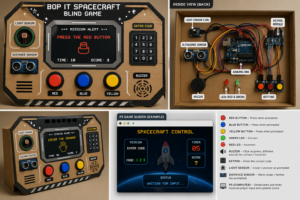
For my project, I bought a push button kit, keypad module, and an active buzzer to create the main game interactions and feedback. I also purchased a pre wired multicolor LED for clear visual responses, along with jumper wires and a sensor starter kit for connections and extra components. Additionally, I got a display module to show simple messages or tasks. For the physical design, I will use cardboard and colored paper to build the spacecraft control panel.
Generated image of how it would look physically:
Amazon links
https://amzn.eu/d/0hpevbaT 22.6USD
https://amzn.eu/d/00tJPOo5 4.9USD
https://amzn.eu/d/06RK8ekP 4.08USD
https://amzn.eu/d/03ujSIRs 12.52USD
https://amzn.eu/d/05gqbmon 6.26USD
Total 50.37USD
P5js:
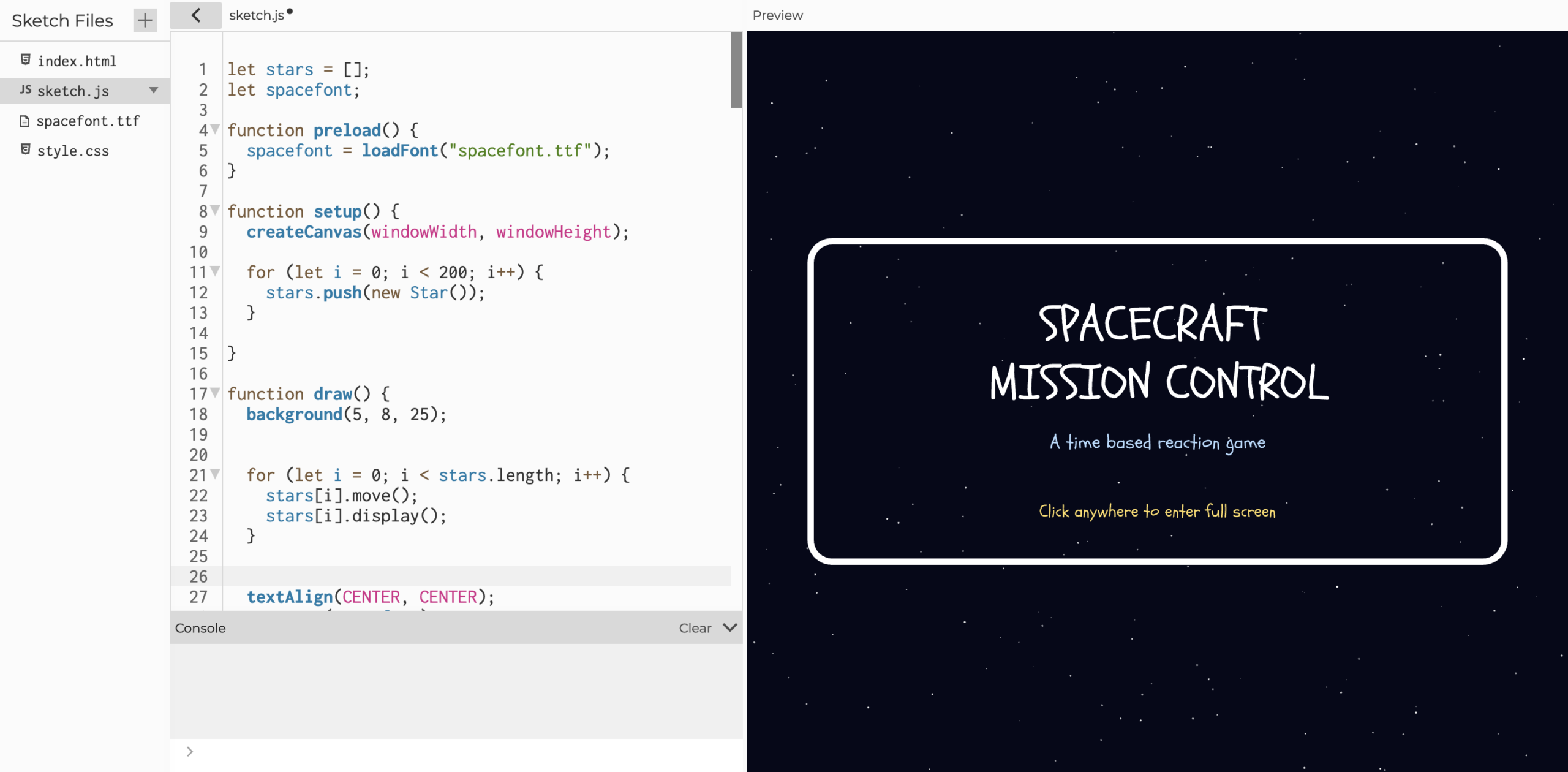
I began working on the home screen and instructions page and added the full screen feature and font.
Arduino:
I began setting up the basic inputs and outputs for the Arduino focusing on reading button inputs and triggering LED and buzzer feedback for the correct or incorrect responses.
https://github.com/MouzaAlMheiri/Intro-to-IM/blob/main/draft.ino
Sources so far:
Fullscreen:
https://p5js.org/reference/p5/fullscreen/#:~:text=fullscreen,such%20as%20a%20mouse%20press.
Stars background:
https://editor.p5js.org/pavly/sketches/hzCu0enCy
Game concept:
https://editor.p5js.org/skgmmt/sketches/Sk5VaX2yN
For Keypad: