Week2- Reading Reflection

This reading affected me by helping me understand that the coded system itself is the creative act. Which led me to the question “What point does the computer go from being a tool to a collaborator helping in the creative process?” .When randomness is introduced, the outcome is no longer fully controlled by the artist, and this lack of control is actually very intentional. The artist writes instructions, but the results can be unexpected, and that uncertainty becomes part of the artwork. I noticed this idea reflected clearly in the code I wrote for the assignment. I created a system with rules for line width, square size, and color, but each of these elements was randomized within certain limitations. For example, the line width was random between one and four, and the square size was random between 20 and 45. This allowed me to maintain some control over the overall structure while still allowing the visuals to remain unpredictable. The outcome felt more alive and dynamic because it was never exactly the same.I planned to incorporate random elements into my work by using color, line weight, and shape size. As the speaker Cassie Reas explains, us, me, the artist (coder), designs the rules of a system rather than controlling a single outcome, treating the code as a set of rules that guide the work instead of controlling exactly how it turns out.

The optimum balance is achievable by controlling the rules without limiting the outcomes. Setting constraints allows the work to stay coherent while still being unpredictable. I feel that the ideal balance exists when I can predict the behavior of the system, but not the final visual result. In my work, I was able to control what elements could vary and the range in which they changed, but I could not predict the exact combinations of square size, line width, and color that appeared every two frames.

 Casey Reas mentions the term system based art, which is when the artwork functions as a system defined by behaviors rather than a single image. In this approach, the work exists as an ongoing process instead of a finished product. This idea connects closely to my piece, since it generates new variations every time it runs, making no single outcome the definitive version of the artwork.
Week 2 Assignment – Loops

Concept

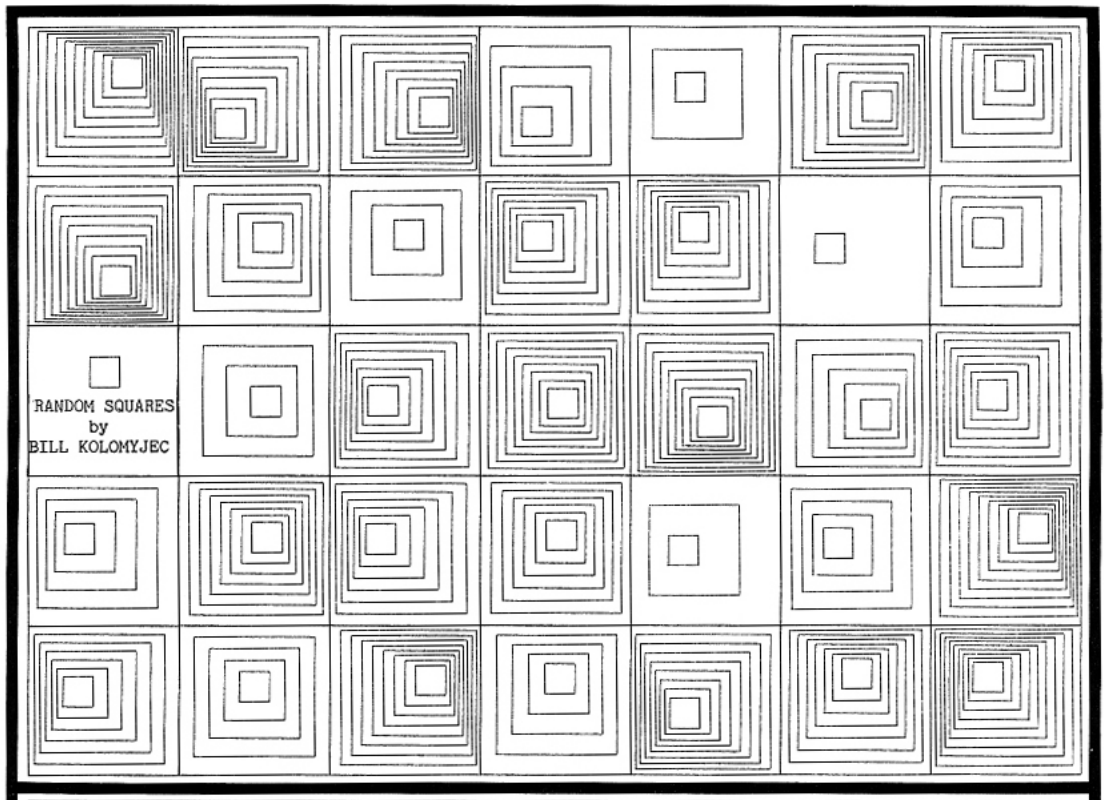
For this assignment, I took inspiration from the computer graphics pdf attached to this assignment’s description (photo below).

Building on this graphic, I made a simple grid with squares inside it. I initially wanted to create the moving graphics, but I could not figure out how. Therefore, I decided to use some skills we learned in class on changing colors when the mouse is inside the squares. Finally, I ended up with my final design, where the group of squares changes to the colors of the rainbow when the mouse hovers over them, keeping all the other cells still white.

Here is my final sketch:

Code I am Proud of:

for (let r = 0; r < 5; r++) {
    for (let c = 0; c < 7; c++) {
//calculates where each cell should start based on the row and column and shifts by cell size
      let cellX = c * 80;
      let cellY = r * 80;

      square(cellX, cellY, 80);
      square(cellX + 10, cellY + 10, 60);
      square(cellX + 20, cellY + 20, 40);
      square(cellX + 30, cellY + 30, 20);
  }
}

I am particularly proud of my code which creates the grid, because I optimized it. Initially, I set up the grid with four different for() loops, which basically keep printing a grid but make it smaller each time to create the inner squares effect. Then, I realized I could combine them all into a single for loop by storing each outer square’s starting X and Y locations, and then writing multiple square() functions, shifting each one according to how inner the square is. This also allowed me to select a different color for each square when the mouse hovers over it.

Reflection and Future Improvements:

Overall, I am quite happy with my sketch and enjoyed the process of creating it. For the future, I would definitely like to implement some automatic motion into my sketch. I would probably want to recreate the original sketch I took inspiration from, with the moving inner squares. Additionally, I would like to work on a second version of this sketch where the color of the inner squares only changes if the mouse is directly over it, not if the mouse is generally inside any of the squares within that group of squares.

Reading Reflection – Week 2

In my work, I plan to incorporate randomness as a major element, as I believe having it consist solely of order and rigid structure will yield a boring, fixed outcome. As the speaker mentions in his talk, randomness breaks the artist’s habits, and I completely agree. Randomness allows for a more lively and lifelike outcome. Reas mentions that when an artist sticks to controlling evrything they tend to repeat patterns and styles, so randomness allows the artist to break free from patterns they plan. In my own work, I tend to be more satisfied with my outcomes when randomness is a strong component, as it adds an element of surprise and spontaneity, which, in my opinion, deepens the work through the unexpectedness of the results. Reas’s speech allowed me to appreciate randomness more and helped me understand my tendency to be more satisfied with my code when elements of randomness are involved.

Although I find randomness a very important and desired element of my work, I do believe there needs to be a balance between total randomness and complete control. When working on a piece, finding that sweet spot of fixed and spontaneous is important. If the code consists of too much randomness, it becomes too chaotic or even messy. However, if it is completely controlled by the artist, there is a sense of. rigid and repeated patterns. Finding the balance between the two depends on the specific work, but for the most part, an equal share of both elements allows for a perfectly balanced piece. Reas also agrees that pure randomness alone in art is not enough to make a good piece. Sure, it may improve a very rigidly structured piece, but some control is necessary. Reas’s speech supports the idea that randomness allows for variation and a less predictable outcome; however, order and structure are what make art artistic and not accidental. 

Is it me?

After all the classes, that made me go by the golden rule “If it works don’t touch it”, it was hard to register that I am to create something that should be looking good. In the absence of a well documented passing rubric, every choice had to be questioned. But against what; The effort I put in, the creativity I come up with, or what my person sitting next to me thinks of it? I began on the rather escaping choice, a computer screen. Indeed a typical computer science student’s choice, how I think of it as an escape. Giving myself some time by spending that drawing the keyboard, and mouse. Well that was the moment I had the first thought shouting “It should look good to me”. The Buttons. So many buttons, (I did that before we studied for loops). Initially I planned 2 big white blocks to represent the buttons. When I went from 2 to 57, its hard to point out. My best guess is when I looked as my laptop’s keyboard and it had all the character to it and one I drew in P5 did not.
//keyboard
  line(250, 600, 200, 400)


  fill(0)
  rect(20, 500, 470,140)
  fill(220)
  rect(25, 510, 20,20)
  rect(45, 510, 20,20)
  rect(65, 510, 20,20)
  rect(85, 510, 20,20)
  rect(105, 510, 20,20)
  rect(125, 510, 20,20)
  rect(145, 510, 20,20)
  rect(165, 510, 20,20)
  rect(185, 510, 20,20)
  rect(205, 510, 20,20)
  rect(225, 510, 20,20)
  rect(245, 510, 20,20)
  rect(265, 510, 20,20)
  rect(285, 510, 20,20)
  rect(325, 510, 20,20)
  rect(345, 510, 20,20)
  rect(365, 510, 20,20)
  rect(405, 510, 20,20)
  rect(425, 510, 20,20)
  rect(445, 510, 20,20)
  rect(465, 510, 20,20)
  
  rect(25, 540, 20,20)
  rect(45, 540, 220,20)
  rect(265, 540, 40,20)


  rect(25, 560, 20,20)
  rect(45, 560, 240,20)
  rect(285, 560, 20,20)
  
  rect(25, 580, 20,20)
  rect(45, 580, 220,20)
  rect(265, 580, 40,20)
  
  rect(25, 600, 20,20)
  rect(45, 600, 40,20)
  rect(85, 600, 120,20)
  rect(205, 600, 20,20)
  rect(225, 600, 20,20);
  rect(245, 600, 20,20);
  rect(265, 600, 40,20)
  
  
  rect(325, 540, 20,20)
  rect(345, 540, 20,20)
  rect(365, 540, 20,20)
  
  rect(325, 600, 20,20)
  rect(345, 600, 20,20)
  rect(365, 600, 20,20)
  rect(345, 580, 20,20)


  rect(405, 540, 20,20)
  rect(425, 540, 20,20)
  rect(445, 540, 20,20)
  rect(465, 540, 20,20)
  
  
  rect(405, 560, 20,20)
  rect(425, 560, 20,20)
  rect(445, 560, 20,20)
  rect(465, 560, 20,20)
  
  
  rect(405, 580, 20,20)
  rect(425, 580, 20,20)
  rect(445, 580, 20,20)
  rect(465, 580, 20,40)


  rect(405, 600, 40,20)
  rect(445, 600, 20,20)


Then came the scary part, what to draw inside the screen frame. I had a lot of interest in cybersecurity or to honest in HACKING. It’s funny to me that my sketch looked more of like a imprisoned thief. Well this reminded me of an other golden rule form the high school i.e. “Don’t get caught” and I just kept going on with that. Lastly the glasses, they felt like a creating something from nothing. Even thou I did them in the loving memory of my classes I lost last semester, I was a happy experience. For future I want to add more colors, I did not add them this time because I wanted to very specific about each color I am adding and what it will represent. Did I not do it out of laziness or lack of understanding of relationships of colors with emotions? My answer to this question is biased but as the semester proceeds, it will probably hopefully go away. here is the website I used to read p5.js documentation; https://p5js.org/reference/ The sketch

Assignment 2 :Loop Art

Your concept:

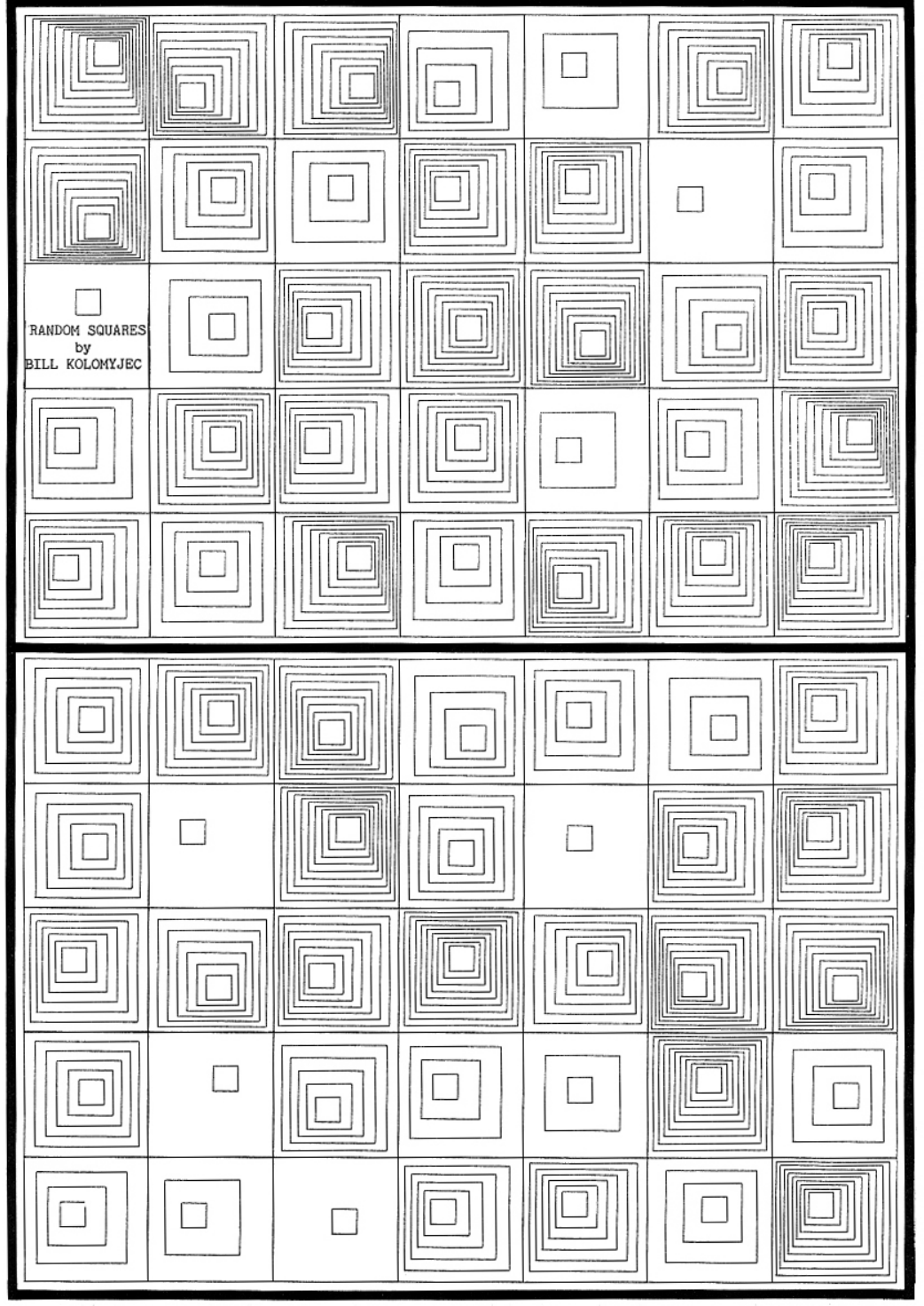
The concept of my drawing comes from the early generative art from the 1970s from the Computer Graphics magazine, specifically pages 14 and 30, which used simple geometric shapes and repetition. Something I liked specifically about this piece was how it used grids, and how I can envision myself using the grid coding we learned in class and apply it. I wanted to create a retro piece using the P5JS tool, focusing on grids, squares, and random variation. The artwork I created changes every 2 frames through random color, random line weight, and random square size, creating a  glitch like pattern. I watched a youtube tutorial which helped me understand how the random() code works which allowed me to apply it to my piece. Instead of static shapes, I wanted the grid to feel unpredictable and constantly changing, but I didn’t want it to be overwhelming, so I set the frame rate to 2.

Another thing I wanted to do was set the background as black, so when you hover over the squares, depending on which square you hover over, it will become black and essentially give the effect of it disappearing. This is the small interactive element of mouse hover, which I adapted from our class code.

Page 14 from the magazine that inspired my work:

A highlight of some code that you’re particularly proud of:

//random square size+lineWidth from youtube video + color from p5.js example
       let squareSize= random(20,45);
       let lineWidth= random(1,4);
       strokeWeight(lineWidth);
       stroke(random(255),random(255),random(255));
       
       
       //When mouse hovers inside the square boundaries the stroke changes to black using the same condition we learned in class
       if(mouseX > x&& mouseX <x + 50 && mouseY > y && mouseY < y +50) {
         stroke (0);
       }
       
       //draw square the first square is the main one for this grid and the second square is smaller and centered within the first square using simple math and experimentation to find the correct placement of the second square 
       rect(x,y,squareSize,squareSize);
       rect(x+10,y+10,squareSize-20,squareSize-20);


A part of the code I’m proud of specifically is how I was able to incorporate the random () effect, especially the part of the code where the squares have random size variation, as well as random stroke weight and color variation . All o these affects become more noticeable because my sketch runs at 2 frames per second.

I’m proud of this because I was able to learn the random size and line weight from a YouTube tutorial and successfully adapt it to my own square design. I used the random color idea from a p5.js example, but I changed it from fill() to stroke() to match my outline based work. By combining all three random elements size, line weight, and color the pattern becomes visually interesting, even though the grid structure stays the same. I’m proud of how I was able to mix what we learned in class with new techniques I found on my own. Im also proud of how I was able to adjust the square sizes using simple math adding to x/y and subtracting from some to create a clean square within square effect.

For the mouse hover condition I was able to adjust it to work inside the grid and change the stroke () to a fill(), as a beginner I was able to take a concept we learned in class and adapt I to my code. I referenced directly from what we coded during class but adjusted it to my code:

    (Code in class)

if (mouseX > 50 && mouseX < 400 && mouseY > 100 && mouseY < 200) {

    fill(‘pink’);

}

In my version I replaced the fixed numbers with the loop variables X and Y so the hover effect works for every square in the grid instead of just one rectangle

Embedded sketch:

Reflection and ideas for future work or improvements:

Working on the second P5JS assignment, I was able to understand how simple shapes can become interesting and how code can become more interesting when it is combined with randomness. Even though the grid I created is very structured, I think the addition of random size, color, and line weight makes every frame feel more unique. Through this assignment, I was able to mix different ideas from different places: inspiration from the 1977 Computer Graphics and Art magazine, the YouTube example, the p5.js example, and the hover condition from our class code. I was also able to acknowledge the importance of the draw loop. Because my sketch runs at two frames per second, I was able to clearly apply and see each new variation. An idea for a future improvement I can make is experimenting with different shapes or mixed geometry to see how randomness affects them. I could also try adding rotation or movement so the squares slowly shift or spin over time and experiment with more complex mathematical code. Another idea is adding more layers of shapes and seeing how I can adapt this style to more complex code.

References:

Inspiration from Graphic magazine:

COMPUTER GRAPHICS AND ART Aug1977 Page 14 and Page 30

Random Color from this example :

https://editor.p5js.org/aferriss/sketches/HJKCR03uG#:~:text=1,let%20shapeColor%3B&text=2,%E2%80%8B&text=3,function%20setup()%20%7B&text=4,createCanvas(400%2C%20400)%3B&text=5

Random Line weight and shape size :

https://youtu.be/POn4cZ0jL-o?si=D8w6gaTpVwLFj8qH

Week 2 – Blurry Starry Night

Concept

This work was inspired by painting of famous Dutch painter Vincent van Hogh’s painting, The Starry Night. The Starry Night painting is the background image of this program. Using curves and colors, an illusion of the blurriness is created. For and while loops where used to create the curves. The mouse can be pressed to switch between two modes: Random mode and Controlled mode. In the natural state, the work in the a random state where translucent curves are randomly placed on the painting to create the illusion effect. When the mouse is pressed, the image changes into controlled state where the user can control the parts of the painting to blur by moving the mouse.


Code I’m proud of

This is the function used to create the controlled and random translucent curves. In the controlled curves, the mouse input is used to control the movement of the curves and in the random curves, random numbers are generated to shape the curve.

// Controlled curves in the y axis
function create_curves_y(startx) {
  let a = mouseX;
  let b = mouseY;
  noFill()
  strokeWeight(20)
  stroke(c)
  bezier(startx, 0, a, b, (a + startx), (b + startx), startx, 400);
}

// Curves in the x axis
function create_curves_x(startx) {
  let a = mouseX;
  let b = mouseY;
  noFill()
  strokeWeight(20)
  stroke(c)
  bezier(0, startx, a, b, (a + startx), (b + startx), 600, startx);
}

// Random curves in the y axis
function r_create_curves_y(startx) {
  let a = random(600);
  let b = random(400);
  noFill()
  strokeWeight(20)
  stroke(c)
  bezier(startx, 0, a, b, (a + startx), (b + startx), startx, 400);
}

// Random curves in the x axis
function r_create_curves_x(startx) {
  let a = random(600);
  let b = random(400);
  noFill()
  strokeWeight(20)
  stroke(c)
  bezier(0, startx, a, b, (a + startx), (b + startx), 600, startx);
}


Code

Here is the work of art I created:

Reflection

The code can be improved by mapping colors to the curves to make the translucent effect stand out more. More shapes and curves can be added to enhance the effect. This can method can also be transferred to other images.

Week 2 – Generative Art

Concept

Generative art seems very modern and new to me: creating art using your computer and element of randomness sounds like something that has no association with older times.

I wanted to create a minimalistic piece that will carry the atmosphere of the age when a laptop at home was a rare find, and when old Windows 7 and DVD players were considered super cool.

I found my inspiration in Klim Type Foundry art-piece and wanted to recreate something similiar.

I decided to make my art minimalistic and more “mathematical”: I have only two colors, blue and white, strokes and lines, shapes, and a lot of numbers which display the coordinates of the figures.

The computer randomly chooses the type and the coordinates of the figure and draws it, then randomly connecting it with other figures by making it either the endpoint of the bezier curve, or the endpoint of its control line. The figures and lines appear slowly, and move around, displaying their coordinates on top.

Code

Implementing the animation of line drawing was the most difficult part for me, so I want to highlight it:

//draw connections between objects
for (let c of connections) {
  // animate t from 0 to 1 
  // existing lines stay at 1 (fully drawn)
  c.t = min(c.t + 0.02, 1); 

  noFill();
  stroke(255);
  strokeWeight(1);

  beginShape();
  // draw the curve based on the current value of t
  //the loop will increment t, therefore moving (x,y) to the second enpoint, allowing a smooth animation
  for (let t = 0; t <= c.t; t += 0.02) {
    let x = bezierPoint(c.a0.x, c.p0.x, c.p1.x, c.a1.x, t); 
    let y = bezierPoint(c.a0.y, c.p0.y, c.p1.y, c.a1.y, t); //save coordinates of a segment of the curve being drawn
    vertex(x, y); //add x,y up to which the curve will be drawn
  }
  endShape();
  
  //do the same for the control lines: it also will be drawn slowly based on t
  let h1x = lerp(c.a0.x, c.p0.x, c.t);
  let h1y = lerp(c.a0.y, c.p0.y, c.t);
  line(c.a0.x, c.a0.y, h1x, h1y);

  let h2x = lerp(c.a1.x, c.p1.x, c.t);
  let h2y = lerp(c.a1.y, c.p1.y, c.t);
  line(c.a1.x, c.a1.y, h2x, h2y);
}

To animate the connections smoothly, I used a normalized time variable, t. Here, t = 0 is the start of the path, and t = 1 is the end. Every frame, value of t of every connection is being incremented by 0.02, revealing 2% more of the path.

For the straight lines I used method lerp(), and for the curves I used bezierPoints(). In the loop coordinates of the current endpoint are slowly increasing from 0 to 1, in the end connecting the first point with the last one, as the coordinates of incremented moving point become the same as the endpoint’s. This creates the illusion of the curve being drawn over time.

Beside that, the structure of the code is pretty simple. I created a class for the figures with methods to create, draw, and move the figures around. After that I connected the figures with lines, and stored all the objects and connections between them in arrays. There’s a lot of randomness in the code: the choice of the velocity of the figure, its shape and which figures it will be connected with lies on the computer, not the user.

Reflection

I find this minimalistic and simple art piece very hypnotizing and interesting. Even though it’s super simple, I can feel the emotions and atmosphere I wanted it to have.

However, I think that improving connection between figures and making it more smooth and less crunchy would be great. Also, finding an algorithm that would allow these figures to move around without overlapping would make the art less messy.

For further improvement, I think that adding sound effects and gravitating the points and lines in a certain pattern that creates some clear shapes of animals/objects would be extremely cool.

Week 2 Casey Reas Reading

What is randomness? The way people describe it will always be different from one another. Yet it boils down to the same general boiler phrase, “it is unpredictable.” We say it is, but at the same time, randomness can be predicted over a large sample. We say random often in day-to-day life, intentionally or unintentionally, like “oh! this randomly happened today!” or “I just thought to do this today randomly!” It never really is random, is it? There is always something behind an event. This brings me to something Casey Reas said, and that is true randomness. He mentions it multiple times, saying that it has been used. However, at most, it is pseudo-random, and we can delve deeper into this and discuss causation and so on, but that is not my point here. I am aware that I might be nitpicking here; however, to me, “random” implies a lack of a proper explanation relative to a model or an event. Or to simplify it, it’s lawful unpredictability.

For my second assignment, my sketch was a 3D version of Conway’s Game of Life. Which, funnily enough, is how cells interact when they are given a certain set of rules. I created this before watching the lecture, so while I was watching it, I kept thinking about the sketch. The result of running such a sketch may seem random to some person you choose off the street, but at a deep level, they are following a set of rules that the person may not know. And that is what randomness to me is, a “random” event or randomness is never truly random, as it will always follow a set rule; we call it random because we do not know what that rule is. The lecture made me realize that I was already treating randomness as epistemic, but I hadn’t articulated it this clearly until seeing generative systems framed this way.

Week 2 Reading Response

I see randomness as introducing freedom into structured codes when the main goal is to actually create art. When the code serves a practical purpose. However, randomness should remain a functional tool rather than a defining element. I am not interested in letting randomness dominate a work or become its central focus as it should only be a function tool. In my own work, I would incorporate randomness through variations like line density and spacing.

The video shows that randomness are novel artistic strategies, seen as a departure from traditional understandings of art. This contradicts with what I imagine about artistic creation. The speaker treats randomness in a pure, unbiased unpredictability. I find this definition too narrow. To me, randomness is not something just related to machines. But artists, especially abstractionists, embody a human form of randomness. This kind of randomness is enriched with emotion, intention, and expression, rather than just about meaning.

This relates to why I think I struggle to connect with how the speaker uses randomness in their work. As I believe art should exist beyond only certain shapes. Its beauty lies in the emotions it conveys, also the expressions it carries. There should be a sense of presence, or soul, behind the canvas, whether it is physical or digital. The speaker’s approach feels excessive, turning the work into an exploration of randomness rather than emotionally resonating artistic expressions.

In my opinion, the optimal balance is to be in the middle between complete control and randomness, and this is where unpredictability comes but it is always leading towards both emotional and expressive goals.

The scale of randomness I find meaningful is one that is guided towards expression. For example, a composition made of dense, chaotic lines which are generated through controlled code and being refined later could actually express the pressure of modern life more with moments of openness appearing as wider gaps in the structure. This balance of control and unpredictability represents what I think of randomness which is one that supports emotional meaning without overwhelming it.

Assignment 1: Self-Portrait

For my self-portrait, I decided to create a dancing flower instead of a literal portrait. I initially attempted to work on an actual self-portrait, but with the skills I have so far, it kept looking unrealistic, and my hair ended up looking like a mushroom (no, literally). Rather than forcing a mushroom-headed portrait, I chose to represent myself through a dancing flower. This allowed me to focus on practicing primitive shapes, simple animation, and overall composition.

The sketch shows a dancing flower in a simple grass field. The petals include four main petals and diagonal petals placed around the corners of the flower. I kept the background minimal, and focused mostly on the flower itself. I also tried to make the petals feel slightly more three-dimensional by changing their colors and shades, and I added a subtle border around the center of the flower to enhance that effect, but I don’t think it’s noticeable.

fill(245, 120, 160); //background petals color
 angleMode(DEGREES);
 rotate(45);
 ellipse(270 + Petals, -59 - Petals, 35, 55); //right base
 ellipse(270 - Petals, -59 - Petals, 35, 55); //right base
 ellipse(270 + Petals, -59 + Petals, 35, 55); //right top petals
 resetMatrix();
 rotate(145);
 ellipse(-60 + Petals, -225 - Petals, 35, 55); //left base
 ellipse(-60 - Petals, -225 - Petals, 35, 55); //left base
 ellipse(-60 + Petals, -220 + Petals, 35, 55); //left top petals


I’m proud of this section of my code because the most challenging part of the sketch was creating the diagonal petals. I learned that in p5.js, shapes are rotated by rotating the canvas itself rather than rotating individual ellipses. I figured out how to use angleMode(DEGREES) and rotate() by referencing this forum post: https://forum.code.org/t/ellipse-rotate-on-an-axis/35650 .

After that, I just experimented and adjusted the values manually to place each petal correctly. I also searched online to learn how to use resetMatrix(), since each group of petals needed a different rotation angle. Honestly, this part involved a lot of trial and error, but I got to understand how transformations work.

Embedded sketch:

I mainly used the concepts I learned in class, except for the diagonal petals, which I learned to do using the forum post I referenced earlier. I also google-searched how to reset the rotation so that I could adjust each group of petals seperately.

Overall, this assignment was a nice introduction to how p5.js works and how to use code to create and manipulate visual elements. While working on this assignment, I realized that there is more than one way to create something, and that sometimes the process involves a lot of trial and error. I’m excited to see what I come up with next in my sketches and how I (hopefully) continue to improve.