Reading Reflection-Week#4

I&M Reading
Reading this chapter made me really think how I would interact with everyday objects in a very personal way. As I used to assume that if I struggled with something simple such as a confusing door, a complicated appliance, or a strange interface I now think it was my own fault. The reading argues that these frustrations usually come from poor design, not user incompetence, which felt astonishing and an eye opener. The examples about doors and household devices made the ideas feel very realistic, because they reflect small annoyances we experience almost daily without questioning them. It made me realize how much of my behavior is lead by intuitive signals from objects, and how frustrating it becomes when those signals are kind of unclear or misleading. What drives me crazy is when everyday interfaces have too many unclear buttons, hidden functions, which could be improved by using clearer signifiers, simpler layouts, and immediate feedback so users do not have to guess what to do.

What I found especially meaningful is the emphasis on human-centered design and the idea that designers should adapt to human psychology, not expect humans to adapt to machines. This perspective feels very relevant in today’s technology-heavy world, where many products are powerful but not intuitive. The discussion about discoverability, signifiers, and feedback made me more aware that good design should communicate naturally without needing long instructions. Overall, I think the reading is insightful because it shifts the way we see mistakes as instead of blaming users for the confusion, it encourages us to critically evaluate the design itself, which feels like a more human and realistic approach to technology and everyday life.

Week 4 Reading Psychopathology of Everyday Things

One thing that drives me crazy that was not mentioned in the text is when I go to a bathroomm at a restaurant or any other place and I try to use the sink, but the sink does not turn on/I don’t know how the sink turns on. I believe one way that could be fixed is by having clear symbols on the handles or visible handles to indicate where and what motion to do. Or a poster on the wall to show how to open the sink.

One way I would incorporate some of Norman’s principles of design into my work is by having more indicators of what the user is supposed to do to activate my sketch’s interactive element. For instance, in my bubble-pop design, it is unclear for my users what to click or what to try to do as there are no indicators that the bubbles are meant to pop. I would therefore include more explicit instructions.

Assignment 3: Dancing hearts

For this assignment, I decided to continue developing the heart theme from my previous sketch. In Assignment 2, I created a structured heart wallpaper where all the hearts moved together when pressed. This time, I wanted to test my abilities more and make the interaction feel more refined and independent rather than controlling everything at once.

Instead of using one shared movement variable, I used arrays and object-oriented programming to create a grid of Heart objects. Each heart now has its own properties, such as position, size, and animation phase. I used nested loops again to build the grid, but instead of shifting the entire grid together, each heart updates individually using its own update() function.

To create smoother movement, I used sin() and cos() to make the hearts pulse and slightly wiggle when the mouse hovers over them. The hearts remain structured in a grid, but when the mouse gets close, they move in a controlled sinusoidal motion. I also created the heart shape using beginShape() and bezierVertex() instead of ellipses and a triangle, which made the hearts look more developed and smooth.

The part of my code that I am most proud of is the section where the hearts move when hovered over:

if (this.isMouseNear()) this.x = this.baseX + sin(frameCount * 0.18 + this.phase) * this.wiggleAmount; this.y = this.baseY + cos(frameCount * 0.18 + this.phase) * this.wiggleAmount; }

This part controls the interactive movement. I learned that frameCount acts like time, and using sin() and cos() creates smooth back-and-forth motion instead of random movement. Adding phase also prevents all the hearts from moving in sync, which makes the animation feel more natural.


Overall, I’m happy with how this sketch developed from the previous one. It feels more structured and intentional, especially since each heart now behaves independently. The most challenging part was understanding how to separate update and display logic, and how to keep the original grid position while still allowing movement. For future improvements, I would like to experiment with how nearby hearts respond to interaction, and create a ripple effect instead of only affecting one/two hearts at a time.

Reading Reflection

In the reading, Crawford does not directly state that interactivity must include technology, but he clearly frames it within digital systems and computational design. Most of his examples revolve around computers, simulations, and structured input-response systems. While I understand his definition of interactivity as a “cyclic process of listening, thinking, and speaking,” I think his focus on digital media slightly narrows how we understand the concept.

Personally, I don’t think interactivity necessarily has to involve technology. I think something can be interactive simply by changing how we perceive or respond to it. For example, a physical artwork that shifts depending on where you stand, or a space that makes you question your perspective, still creates interaction, even without code. This reading made me question whether interactivity is really about technology, or if it is more about creating a meaningful exchange between a system and a participant, regardless of medium.

Reading Reflection – Week 4

One thing that drives me crazy is the car touch screens and buttons that are used to control things like the air conditioning and volume. I have to literally look away from the road just to figure out which button to press. I get so frustrated and end up pressing everything just to see what would change. From what I understood in Norman’s reading, it is the failure of signifiers and mapping. I used to think they were the same thing, but with all of his examples, he made it clear that affordances are what actions are possible, while signifiers are what show those actions to the user. The car buttons do not communicate their function, and their icons are quite confusing. I think this could be improved by adding clear labels, rearranging icons, or even having words instead of icons, so I could predict what will happen before I press it. 

I can apply Norman’s design principles by making sure the buttons actually look clickable and that the interactive elements and directions stand out visually so users do not have to guess. I will incorporate mapping, where the controls match their results spatially and conceptually, so that people can predict what will happen. I noticed that when mapping is unclear, I hesitate before acting because I do not trust what will happen. I would also probably prioritize feedback or make sure to show a loading animation or confirmation message so people know their action worked. I think I would also design my sketches with the assumption that users will make mistakes, by including undo options or very clear instructions. The reading made me realize that good design isn’t about the visual aesthetics of something, but about making sure people understand how to use it; otherwise, it would be really annoying to use.

Reading Reflection Week 4: The Experience of the Interactivity

This reading made me question more so the everyday designs that are prominent in our lives in terms of usability and understanding. I feel as if, the more modern and contemporary a design is, the less funcationality and even instructions behind it are. I mean, just as a real life example, when I go to Galleria mall, the bathroom was quite confusing to use. They had some new faucets, where they output water, soap, and also you can blow dry your hands. Of course, this is great in terms of efficiency and spacing, in order to have all you could need at your fingertips. But not only was it, a little odd to understand, it was also a bit inconsistent, as depending on where you put your hands, you could get splashed with water when you wanted to blow dry them, or soap when you wanted water. I applaud of course the ease of convience for it, but simply put, better labelling and also a bit of a larger design would be appreicated.

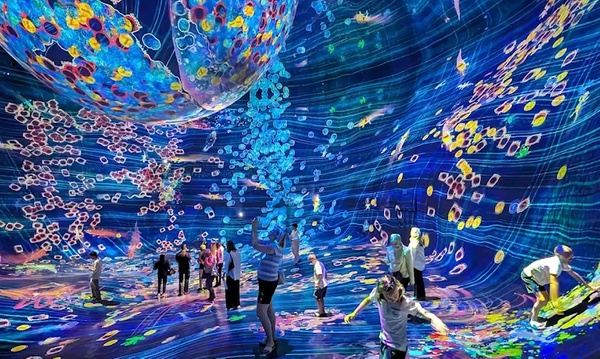
In terms of interactive media, I would agree with the three design concepts he presents and I’d go as far as to say that, more emphasis should be on the  experience design. When I notice think about interactive media, it is paramount that interactivity is a key part of designing a enagaging and unique bit of media. But if I’m honest, most of the time, I feel a bit underwhelmed from the experience I get from most interactive designs, say in museums or art galleries. It’s not to say there is a lack of interactivity, but I’d argue that memorability of the given piece of interactive media matters a lot, especially if you want to be remembered. One person I can name who I’d say masters the experience is Scott Snibe’s Boundary Functions . You still interact but also take in the experience behind the art, and the actual meaning as well. Another place I’d say is places like TeamLab, where you truly are surrounded by this experience of art that I think you can lose yourself in it as easily as you can interact with it. Even theme parks like Super Nintendo World have a lot of interactive games, where you can feel challenged but also enjoy the experience.

To close off, I would say it matters a lot in how you frame the experience of interactivity. It needs to speak to our human emotion and to really provoke us to get the feeling of which the curator of that bit of media, was trying to convey.

Week 3: Reading Response

I think a strongly interactive system is one where users feel like their actions genuinely matter and produce meaningful responses. The interaction goes beyond just getting any reaction, and to actually getting responses that feel thoughtful and varied based on what you actually do. A strongly interactive system gives you agency almost like you feel like you’re having a conversation with it rather than just triggering pre-programmed effects. The fridge light example really clicked for me here. Sure, the light turning on is necessary for seeing inside, but what would make it strongly interactive is if different lights indicated whether the fridge is full, running low on food, or out of ice. That kind of communication transforms a basic function into something that actually responds to your needs in a meaningful way.

Honestly, I’ve been prioritizing aesthetics way too much with my designs, and I want to flip that relationship entirely. I want interaction to be the main focus, with visuals supporting it rather than the other way around. I also really want to give users actual choice in what they interact with. I could add memory too, where the sketch remembers your previous interactions and elements behave differently based on that history. I want the goal is to surpass just making pretty things that happen to be clickable and instead create experiences where meaningful interaction is actually the heart of the piece.

Week 3- OOP Assignment


Your concept:

I was inspired by my house cats, who always bring joy and happiness when I play with them or when they decide to sit on my lap. I wanted to include them, but wasn’t sure how, so I decided to base it on Nyan Cat, which I used to play when I was younger, when I had to wait for my friends to arrive, didn’t have access to the internet, or just wanted to give my brain a break.

Nyan Cat (Music Video 2011) - IMDb

Code:

I prompted Gemini to add the particles, it used blendMode(ADD) is what makes the magic particles look like they are made of light.

let segments = 8; 
let segLength = 12;
let x = [], y = [];
let fireParticles = [];

const COLORS = {
fur: [255, 235, 245], 
ears: [255, 180, 200],
eyes: [100, 200, 255],
magic: ['#FFD1DC', '#FFECB3', '#B2E2F2', '#D1FFD7', '#E0BBE4']
};

function setup() {
createCanvas(windowWidth, windowHeight);
// Initialize segment positions
for (let i = 0; i < segments; i++) {
x[i] = mouseX; 
y[i] = mouseY;
}
background(0); 
angleMode(RADIANS);
}

function draw() {
// Semi-transparent black rect creates the generative trail
blendMode(BLEND);
fill(0, 0, 0, 30); 
rect(0, 0, width, height);

let mouseSpeed = dist(mouseX, mouseY, pmouseX, pmouseY);

//Follow Logic
dragSegment(0, mouseX, mouseY);
for (let i = 0; i < x.length - 1; i++) {
dragSegment(i + 1, x[i], y[i]);
}

let headAngle = atan2(mouseY - y[1], mouseX - x[1]);
let emissionRate = map(mouseSpeed, 0, 50, 1, 8);

if (mouseIsPressed || mouseSpeed > 2) {
for(let i = 0; i < emissionRate; i++) {
fireParticles.push(new MagicParticle(x[0], y[0], headAngle, mouseSpeed));
}
}


// Tail
drawTail(x[segments-1], y[segments-1]);

// Body
for (let i = x.length - 1; i > 0; i--) {
drawCatBody(x[i], y[i], i);
}

// Glowing Particles
// We use ADD blend mode to make them pop on black
blendMode(ADD);
for (let i = fireParticles.length - 1; i >= 0; i--) {
fireParticles[i].update();
fireParticles[i].display();
if (fireParticles[i].isDead()) fireParticles.splice(i, 1);
}
blendMode(BLEND);

//Head always on top
drawCatHead(x[0], y[0], headAngle);
}

function dragSegment(i, xin, yin) {
let dx = xin - x[i];
let dy = yin - y[i];
let angle = atan2(dy, dx);
x[i] = xin - cos(angle) * segLength;
y[i] = yin - sin(angle) * segLength;
}

function drawCatBody(posx, posy, index) {
push();
translate(posx, posy);
fill(COLORS.fur);
noStroke();
ellipse(0, 0, 50 - index, 45 - index);
pop();
}

function drawTail(tx, ty) {
push();
translate(tx, ty);
stroke(COLORS.fur);
strokeWeight(12);
noFill();
let wag = sin(frameCount * 0.2) * 25;
bezier(0, 0, -15, wag, -30, -wag, -45, 0);
pop();
}

function drawCatHead(hx, hy, angle) {
push();
translate(hx, hy);
rotate(angle);

fill(COLORS.fur);
noStroke();
ellipse(10, 0, 55, 50); // Face

// Ears
fill(COLORS.ears);
triangle(-5, -20, 5, -45, 20, -20); 
triangle(10, -20, 25, -45, 40, -20); 

// Mouth
fill(255, 150, 150);
arc(30, 5, 22, 22, 0, PI);

// Eyes
fill(COLORS.eyes);
ellipse(15, -5, 10, 12);
ellipse(35, -5, 10, 12);
fill(255); 
ellipse(17, -7, 4, 4);
ellipse(37, -7, 4, 4);

// Whiskers
stroke(255, 200);
strokeWeight(1);
line(40, 2, 60, -5);
line(40, 5, 60, 5);
line(40, 8, 60, 15);
pop();
}

class MagicParticle {
constructor(x, y, angle, speed) {
this.pos = createVector(x, y);
// Spread the magic out
this.vel = p5.Vector.fromAngle(angle + random(-0.5, 0.5));
this.vel.mult(speed * 0.2 + random(1, 4));
this.lifespan = 255;
this.c = color(random(COLORS.magic));
this.size = random(2, 7);
}

update() {
this.pos.add(this.vel);
this.vel.mult(0.96); 
this.lifespan -= 4;
}

display() {
noStroke();
let alpha = map(this.lifespan, 0, 255, 0, 200);
fill(red(this.c), green(this.c), blue(this.c), alpha);
ellipse(this.pos.x, this.pos.y, this.size);

// Sparkle effect
if (random(1) > 0.95) {
fill(255, 255, 255, alpha);
ellipse(this.pos.x, this.pos.y, this.size * 0.6);
}
}

isDead() { return this.lifespan < 0; }
}

function windowResized() {
resizeCanvas(windowWidth, windowHeight);
background(0);
}
      • Embedded sketch


    Reflection and ideas for future work or improvements:

  • In the future, I might add interactions or obstacles to make it like an interactive fun game, but I want to be unique and something that have been done previously.

Week 3 – Flower Garden

My project is an interactive generative artwork featuring a digital garden where flowers bloom and fade over time while butterflies move toward them. The user can interact by clicking anywhere on the canvas to plant new flowers.

My inspiration came from teamLab Phenomena in Abu Dhabi I visited, where there was an immersive environment allowing people to draw butterflies, snakes, and other animals that then came to life in a shared space. That experience brought me back to childhood memories of imagination, and I wanted to capture a similar feeling through code. In future versions, I plan to expand this project by adding sound elements for the atmosphere to be richer and more immersive. I also hope to introduce more types of creatures and possibly explore touch or motion-based interaction.

Inside teamLab Phenomena Abu Dhabi | Condé Nast Traveller Middle East

Explore TeamLab Phenomena General Admission for Adults and Youths - Pt Tourism | Groupon

The program begins in the setup() function, which creates the canvas and spawns an initial set of flowers and butterflies in random positions across the screen. The draw() loop serves as the heartbeat of the sketch. It first draws a smooth vertical gradient sky using the lerpColor() function, transitioning from soft blue at the top to gentle green near the bottom. Then, it updates all active flowers, allowing each one to grow and eventually fade as time passes. Meanwhile, the butterflies search for nearby flowers, moving toward them. The sketch also displays basic information such as the number of flowers and user instructions on planting new ones.

// Arrays to store objects
let flowers = [];
let butterflies = [];

function setup() {
  createCanvas(700, 600);
  
  // start flowers
  for (let i = 0; i < 8; i++) {
    flowers.push(new Flower(random(width), random(height)));
  }
  
  // start butterflies
  for (let i = 0; i < 6; i++) {
    butterflies.push(new Butterfly(random(width), random(height)));
  }
}


function draw() {
  // Draw gradient sky background
  for (let y = 0; y < height; y++) {
    let c = lerpColor(color(135, 206, 235), color(180, 220, 160), y / height);
    stroke(c);
    line(0, y, width, y);
  }
  
  // Update and draw flowers
  for (let i = flowers.length - 1; i >= 0; i--) {
    flowers[i].grow();
    flowers[i].display();
    
    // Remove old flowers
    if (flowers[i].age > flowers[i].lifespan) {
      flowers.splice(i, 1);
    }
  }
  
  // Update and draw butterflies
  for (let butterfly of butterflies) {
    butterfly.moveTowardFlowers();
    butterfly.display();
  }
  
  // Instructions
  fill(255, 200);
  noStroke();
  fill(60);
  textSize(14);
  text("Click to plant flowers", 20, 30);
  text(`Flowers: ${flowers.length}`, 20, 45);
}

// mouse interaction

function mousePressed() {
  flowers.push(new Flower(mouseX, mouseY));
}

// flower class

class Flower {
  constructor(x, y) {
    // Position
    this.x = x;
    this.y = y;
    
    // Size (starts small, grows)
    this.size = 0;
    this.maxSize = random(30, 60);
    
    // colors (random pastels)
    this.petalColor = color(random(200, 255), random(100, 200), random(200, 255));
    this.centerColor = color(random(200, 255), random(180, 220), random(50, 100));
    
    // Life
    this.age = 0;
    this.lifespan = random(600, 1000);
    
    // Look
    this.petalCount = floor(random(5, 9));
    this.angle = random(TWO_PI);
  }
  
  // make flower grow each frame
  grow() {
    this.age++;
    if (this.size < this.maxSize) {
      this.size += 0.5;
    }
    this.angle += 0.005; // Slow rotation
  }
  
  // draw the flower
  display() {
    push();
    translate(this.x, this.y);
    rotate(this.angle);
    
    // Fade out when old
    let alpha = 255;
    if (this.age > this.lifespan * 0.7) {
      alpha = map(this.age, this.lifespan * 0.7, this.lifespan, 255, 0);
    }
    
    // draw petals
    fill(red(this.petalColor), green(this.petalColor), blue(this.petalColor), alpha);
    noStroke();
    for (let i = 0; i < this.petalCount; i++) {
      let angle = (TWO_PI / this.petalCount) * i;
      let px = cos(angle) * this.size * 0.4;
      let py = sin(angle) * this.size * 0.4;
      push();
      translate(px, py);
      rotate(angle);
      ellipse(0, 0, this.size * 0.6, this.size * 0.3);
      pop();
    }
    
    // draw center
    fill(red(this.centerColor), green(this.centerColor), blue(this.centerColor), alpha);
    ellipse(0, 0, this.size * 0.4);
    pop();
  }
}

// butterfly class

class Butterfly {
  constructor(x, y) {
    // Position
    this.x = x;
    this.y = y;
    
    // movement
    this.vx = random(-1, 1);
    this.vy = random(-1, 1);
    this.speed = 1.5;
    
    // wings
    this.wingAngle = 0;
    this.wingSize = random(15, 25);
    
    // colors (random)
    this.wingColor = color(random(150, 255), random(100, 200), random(150, 255));
  }
  
  // move toward nearest flower
  moveTowardFlowers() {
    // Find closest flower
    let closestFlower = null;
    let closestDist = 999999;
    
    for (let flower of flowers) {
      let d = dist(this.x, this.y, flower.x, flower.y);
      if (d < closestDist && flower.size > 20) {
        closestDist = d;
        closestFlower = flower;
      }
    }
    
    // move toward it if close enough
    if (closestFlower && closestDist < 200) {
      let dx = closestFlower.x - this.x;
      let dy = closestFlower.y - this.y;
      this.vx += dx * 0.0002;
      this.vy += dy * 0.0002;
    }
    
    // randomness
    this.vx += random(-0.1, 0.1);
    this.vy += random(-0.1, 0.1);
    
    // limit speed
    let currentSpeed = sqrt(this.vx * this.vx + this.vy * this.vy);
    if (currentSpeed > this.speed) {
      this.vx = (this.vx / currentSpeed) * this.speed;
      this.vy = (this.vy / currentSpeed) * this.speed;
    }
    
    // update position
    this.x += this.vx;
    this.y += this.vy;
    
    // wrap around edges
    if (this.x < 0) this.x = width;
    if (this.x > width) this.x = 0;
    if (this.y < 0) this.y = height;
    if (this.y > height) this.y = 0;
    
    // flap wings
    this.wingAngle += 0.2;
  }
  
  // draw the butterfly
  display() {
    push();
    translate(this.x, this.y);
    
    // point in direction of movement
    let angle = atan2(this.vy, this.vx);
    rotate(angle);
    
    // wing flapping (0 to 1)
    let flap = sin(this.wingAngle) * 0.5 + 0.5;
    let wingHeight = this.wingSize * (0.5 + flap * 0.5);
    
    // wings
    fill(this.wingColor);
    noStroke();
    ellipse(-5, -wingHeight, 12, wingHeight * 1.5);
    ellipse(-5, wingHeight, 12, wingHeight * 1.5);
    
    // body
    fill(40);
    ellipse(0, 0, 8, 15);
    
    pop();
  }
}


Every flower is represented by an instance of the Flower class. Each flower starts small and increases in size frame by frame until it reaches its maximum. Colors are chosen randomly from pastel ranges to keep the palette gentle. Each flower contains several petals arranged uniformly in a circle and slowly rotates over time. The petals fade as the flower ages. The Butterfly class handles behavior for each butterfly’s movement, which combines randomness with directed motion toward flowers.

One of the challenges I encountered was controlling butterfly motion. At first, they moved too chaotically. By adjusting acceleration toward flowers and capping their speed, I achieved a more graceful flying style. I also experimented with the fading  for flowers to make the transition from bright color to transparency appear gradual and organic.

Visually, the project is calm and immersive as I wanted it to be. The background gradient,  flower and butterflies all work together to create an environment that feels alive yet peaceful.

Week 3 – Snake Game

Describe the overall concept of your artwork

The idea for my artwork came from a conversation with my friend, I felt that I wanted to start looking into gamifying my code and so she gave me the idea to do the snake game! I looked for photos online to kind of get an idea of what it would look like. Below is one of the photos that I used as inspiration.

Ngu Update #1: A twist to the classic Snake game - Home

This photo made the concept feel more approachable as I knew I could just use built-in shape functions for the snake, adding more as the snake gets larger. I did want to add some of my own touch so I decided to use fruit images for the food. I imported 4 pictures, orange, strawberry, apple, and banana, and randomly spawned the fruits for the snake to eat. Including an array in my code was easy as I used it to store the 4 images of the fruits. I also knew that I would use a class for the snake as it had many functions unique to it, however, I did struggle a bit to get started on the code for the class. I started by watching the videos on Classes by The Coding Train which helped me wrap my mind around the idea. I also found that he had a video where he coded the snake game as well, so I watched a bit of it and used his code as reference for a few of the snake functions. I also referred to the p5.js reference page to understand the built-in functions he used in his code, and also made some of my own edits and changes to the food aspect of the game.

Embedded Sketch

Use your arrow keys to move the snake!

Week 3 – Written response

In the text I found a new meaning to the term interactive. I understood what will make a work interactive and how I can possibly apply it to my work. The author focused a lot on using feedback from the user to change the work. In other words, the work should be able to react to the user. When it comes to computers, how can we tell if computer is using our feedback to do some work or just following a set of instructions.