Keyboard Piano

Concept

For this production assignment,  was working with Zaid. We came up  with a simple design of making a piano using the keyboard and the buzzer. the idea was to assign notes to each key and have the input form it. We also added the lcd to see which note is  being played, and the a potentiometer to control the contrast of the lcd.

Code

https://github.com/MuhammadArhumSraw/IntrotoIM-MuhammadArhumAzeem

The are two files for this assignment labelled as week9file1 and week9file2. The python file is reading input form the keyboard and while the other is Arduino logic. The part I am most proud of is the serial communication at 9600.

try:
    arduino = serial.Serial('COM5', 9600, timeout=1)
void setup() {
  Serial.begin(9600)


At the moment its a single click piano. I can;t handle multiple keys Pressed at once. This can a be a future improvement.

Demo

Week 10: Reading Response

This week’s first reading, A Brief Rant On The Future Of Interaction Design, made me realize something deeper about the things I do, and what everyone does every day. Starting by watching the video, I initially thought it was just about technology, and I found it interesting, especially with all the futuristic functions they included such as the window screen and others. What I didn’t notice or really think about was the fact that everything was done on screens, because that is our reality and something we do every day for almost everything. After reading the text, I started to realize how true this is, and how most of what I do happens through flat screens using my fingers, even for things that could be done physically, such as the reading example. I did agree with that point, that some things do not have to be done on a screen. However, I also thought about how people do not actually do everything through screens, as we still move, go outside, and use our bodies for different tasks. But since the author is talking about the future, I do agree that this should be considered so it does not reach a point where everything is done through a flat screen.

This week’s second reading, the responses to the brief rant, clarified many of the thoughts I had while reading, and also introduced aspects I had not considered, which made me go from partially agreeing to agreeing more with the author’s concern. I did think about the common idea that devices can be harmful, especially for children, but the responses helped me understand that while current technology is useful, it could become problematic if it becomes too dominant in the future. I also found the hologram example very helpful, as it made the main idea clearer, that technology should continue to develop, but in a way that is more interactive and three-dimensional, matching the environment we live in. Additionally, the quote by neuroscientist Matti Bergström about the effects of constant touchscreen use from a young age made me realize that this could become harmful if it reaches the future vision being discussed.

Both readings were interesting to read, especially because they address real situations and possible future developments. They made me think more about how we use screens in everyday life and how many things have already shifted to digital formats, such as borrowing books or using services that were once physical. I also thought about how it would be interesting and beneficial if future technologies included more physical interaction and engagement with the human body. This connects to the work we do in this class, where our Arduino projects involve physical interaction, while our p5 sketches are mostly screen-based using buttons and touchpads. Since our final project will combine both, I feel like that is a strong example of how technology can be improved by balancing physical interaction with screen-based systems.

Reading Reflection – Week 10

A Brief Rant on the Future of Interaction Design + follow-up

Reading this article made me rethink how I usually imagine the future of technology. I realized that I tend to accept touchscreens and the sleek interfaces without really questioning whether they actually improve human interactions. I really liked the author’s idea of pictures under glass, because it reframes devices like phones and tablets as limiting rather than advanced. I had never really considered how much tactile feedback shapes my everyday actions, like holding a cup or turning a page, and how it completely disappears when interacting with digital screens. This made me more aware of how much current technology prioritizes visual simplicity over physical engagement.

I wonder whether designers will continue to rely on interfaces that ignore the full capabilities of the human body. If our hands and bodies are so complex and expressive, why is most technology reduced to tapping and swiping? His point about finger blindness really is scary to think about, especially if we lose the ability to feel and understand our objects. This makes me wonder whether convenience and market trends are prioritized over innovation, or if designing for full-body interactions is simply too difficult to do for every single person. It is interesting to see how we adapt to our devices rather than devices adapting to us. Overall, the reading challenged my assumption that technological progress is always linear and improving.

I think the follow-up was quite interesting. I understand that his goal was to highlight a problem and push others to explore it. I am not sure why people expect an immediate answer rather than seeing critique as the starting point for innovation. I was also surprised that removing the body from interaction, like through voice or brain interfaces, might actually reduce human experience. I had not thought about how much physical interaction shapes understanding. To be honest, this made me reflect on how passive I have become in using technology and whether easier always means better.

Arduino/Tinkercad (1)

Don’t Dim Your Light

Concept:
I wanted to work with LED lights and experiment with different objects to create a dimming effect. I was also inspired by lights and spotlights in general -ever since I was a kid but I also remember Professor Mang mentioning how lights work and function which made me think about it more because I always wondered the same thing too. For this project, I focused on creating a light setup that explores control and brightness through the use of a potentiometer (dial) and a push button. The user gets to decide when the light turns on and how bright it becomes. The idea connects back to choosing when to let your own light shine instead of dimming yourself for others.

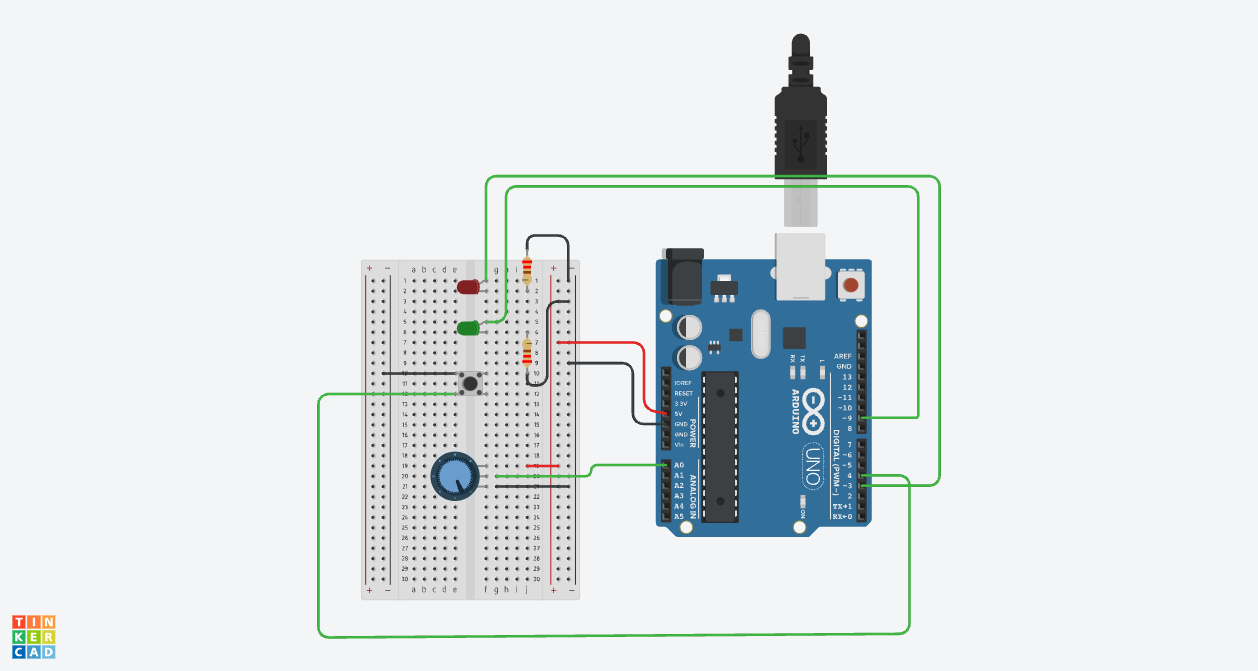
Image: Link
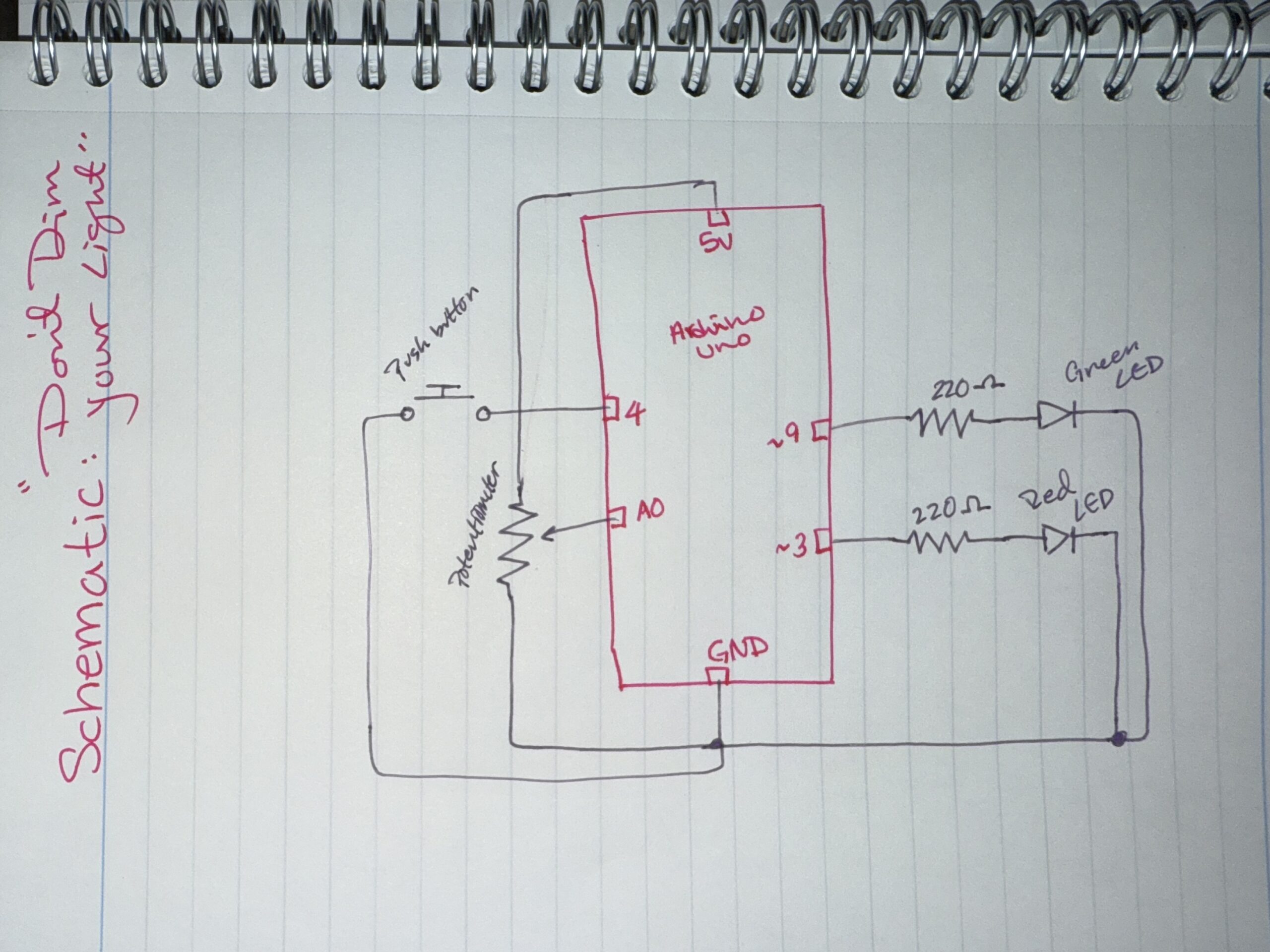
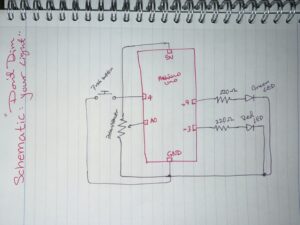
Hand-drawn schematic:
How this was made:

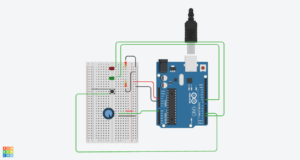
Setup: I started off by putting my resistors and LEDs on the breadboard and choosing the amount and colors of each which I used one red LED and one green LED with 220Ω resistors for both so I could protect the current and flow. After the LEDs were set and connected to Pins 3 and 9 so I could control their brightness, I focused on connected the push buttons and connecting the potentiometer to A0 and the push button to Pin 4. I also watched this video a while ago when we were first introduced to Tinkercad which I found was actually helpful: Tinkercad Circuit Diagram.

Code: While I was doing that, I also focused on the code, which surprisingly was the easiest part. I learned how to use analogRead() to read the potentiometer values and understand the overall idea of how to use the kit. I found out that the potentiometer gives values from 0 to around 1023, but the LED brightness only goes from 0–255 which is why I divided the value by 4 so the brightness would match correctly. For the [INPUT_PULLUP] code, I looked at this example (https://www.tinkercad.com/things/gfxVutEZ1QQ-inputpullup-example), which helped me learn and understand how to use the push button with the code. It made things easier because I didn’t need an extra resistor for the button since the code uses the Arduino’s built-in pull-up resistor.

full code

// C++ code
//
void setup()
{
  pinMode(3, OUTPUT); //the button pin for Red LED
  pinMode(9, OUTPUT); //the button pin for Green LED
  pinMode(4, INPUT_PULLUP); //the pushbutton to make it easy to wire
}

void loop() //for when the button is pressed
{
  int dialValue = analogRead(A0); //to read the dial
  int brightness = dialValue /4; //make the green light match

  if(digitalRead(4) == LOW) {
  analogWrite(9,brightness); //light brightness -green
  analogWrite(3,brightness); //light brightness -red
  } else {
    digitalWrite(3, LOW); //button will be off if not pressed
    digitalWrite(9, LOW); //button will be off if not pressed
  }

  delay(10); //Wait for 10 millisecond(s)
}


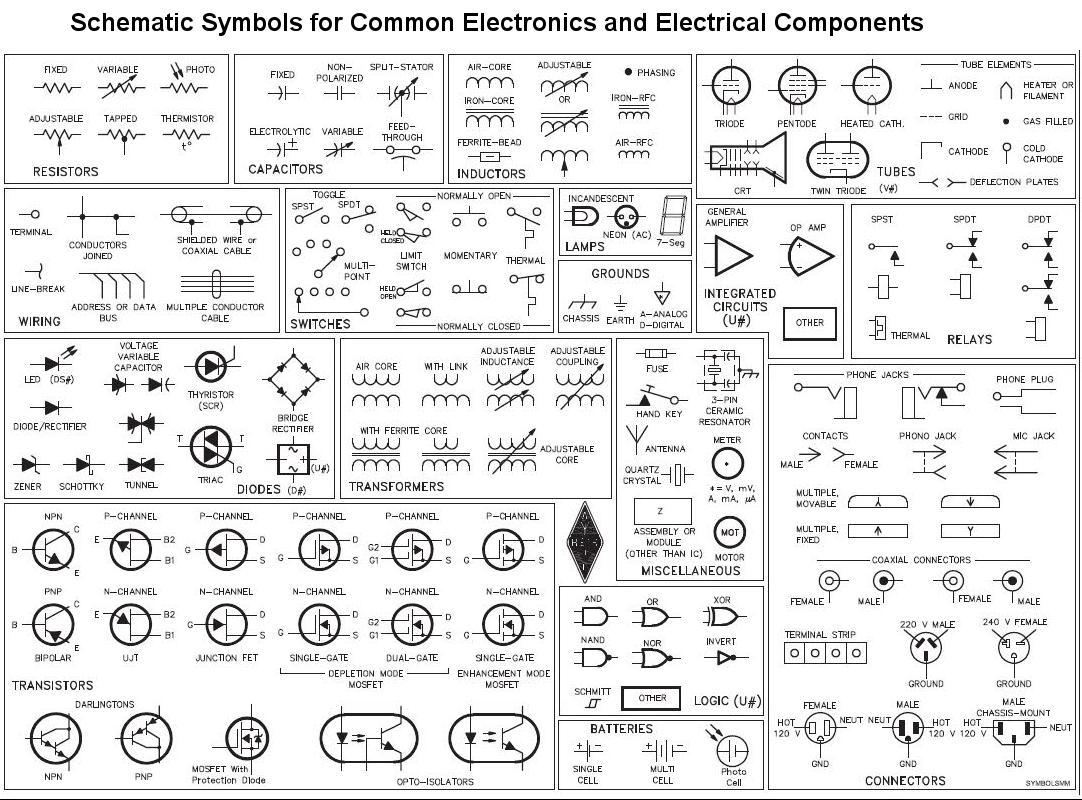
The hardest part out of all this was definitely the schematic. For some reason as a visual person I found this so confusing. I think because I’m used to thinking first, during, and after, the schematic required me to think and “brain dump” during the process, which is something I don’t usually do which is why I referred back to some Zoom call recordings and Collin’s Lab: Schematics. I also used an image of “cheat codes” to help me with the symbols since they’re different from the actual circuit.
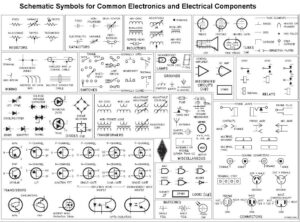
Overall, I did look at some research before experimenting by myself because its our first time doing this I didn’t want to mess anything up so I practiced, did some tutorials, looked over examples before I did my final work. I watched videos about each part I wanted to work with, like the buttons (Pushbutton Digital Input With Arduino in Tinkercad) and also the potentiometer (TinkerCad Potentiometer with LED).

Reflection:

Making the schematic was honestly the hardest part because it forced me to understand the circuit as a system instead of just colored wires connected together. At first I found it really confusing but I actually started to like writing schematics because they helped me understand Arduino better and made me understand my own project more clearly. For future improvements, I would like to make the LEDs react differently instead of both doing the same thing? so maybe one LED could fade in while a few others fade out, or I could add sound so the project feels more interactive and creates more of a sensory experience.

Reading Reflection – Week 10

When I thought about touchscreens before this assignment, I always felt they were fun and easy to use. I liked exploring things by touching the screen instead of using buttons or a mouse. Because of that, I assumed touchscreens were already the best version of future technology. After reading the texts, I started to notice how limited screens actually are. They only let me use one finger, even though my hands and body can do much more. This made me think about how technology does not really use our full abilities.

One idea that made me think was how the author described touchscreens as flat and numb. I never thought about how everything feels the same when I touch my phone. There is no real physical feedback. When I read that, I realized that I also feel limited by screens and I hope technology develops into something more than just glass surfaces. It made me wonder what it would feel like if my phone could respond physically, not just visually.

The readings also made me think about creativity. I believe creativity can be fully digital, like movies, where you do not need to touch anything to understand or enjoy it. But at the same time, I noticed that when I work on physical computing projects in class, using sensors and real materials feels more engaging. It uses more of my body, not just my eyes.

Another part that stayed with me was the idea of children using iPads. I think it can be bad because of radiation, but it can also be very educational if used the right way. The reading made me think more deeply about how screens might affect development, especially if kids only interact with flat surfaces.

Overall, these readings made me question my assumptions about future technology. I used to imagine better screens, but now I imagine tools that involve more of the body. It made me think that maybe the future should not be limited to touchscreens, and that we should explore new ways of interacting that feel more natural and physical.

Week 10 – Creative Reading

“Vision of the Future” videos have been a thing since the early 21st century, the amazing hologram screen, or people waving their hands in the air to move digital windows around (I mean we have augmented reality for that now). It looks futuristic, sophisticated and innovative, but from an interaction perspective, it is actually incredibly timid.

I agree with what Bret is saying, a tool is supposed to amplify human capabilities, converting what we can do into what we want to do, and if that entire principle is gone, then it isn’t just not a good tool, it is not a tool at all.

Most modern devices ignore the two things hands do best, feeling and manipulating, so how can we call these ideas revolutionary if its going backwards?

Bret’s point about “finger-blindness” is actually terrifying to think about, what we do for granted the future generation may struggle with. If we do not use our hands to feel texture, weight, and pliability, we lose the ability to understand the “inner meaning” of objects. We are building a world where we can spend our entire lives immobile, starting at a “hokey visual facade” that has no physical connection to the work we are doing.

If the future of interaction does not let us see, feel, and manipulate space simultaneously, then it is not a future worth building or investing it.

Week 10 – Piano

Demo Below:


Concept:

We came up with a piano that utilizes your keyboard presses and a buzzer, using keys from A-L allows you to play 9 different notes. We added an LCD that displays the note of each key and the frequency of that note.

Implementation:

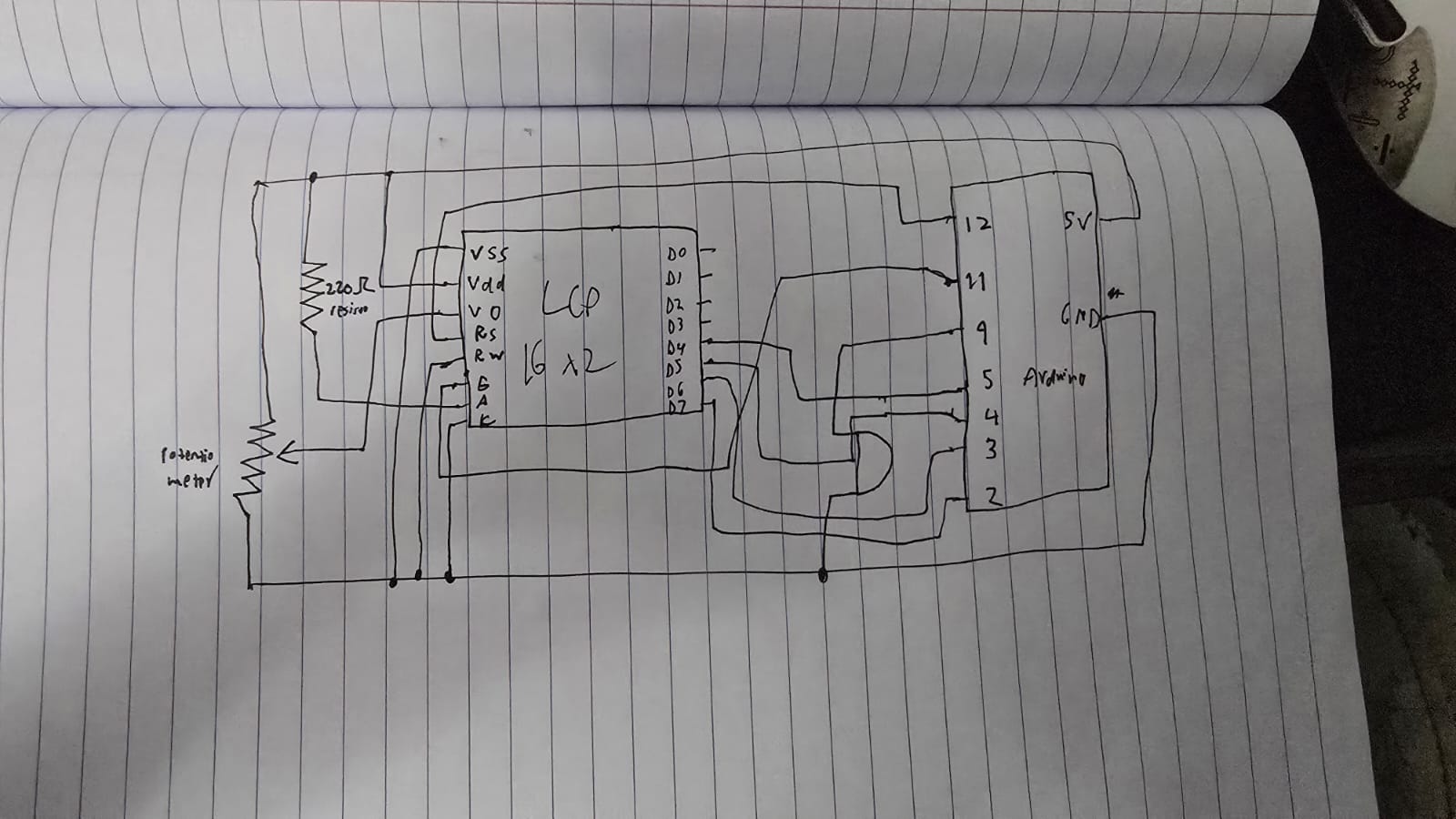
Schematic:

The components used are pretty simple, just being an LCD device and a buzzer. We wrote 2 files of code for this, a python file and an c++ file. As typing the letter into the serial monitor every time you wanted to play a note would be counter-intuitive, we wrote a python file that listens to your key presses, and if you press a key between A and L, then it will send that key press to the arduino which ends playing the note that correlates to that key press.

try:
    arduino = serial.Serial('COM11', 9600, timeout=1)
    ...
except:
    ...

while True:
    if keyboard.is_pressed('a'):
        arduino.write(b'A')
        time.sleep(0.15) 
    elif keyboard.is_pressed('s'):
        arduino.write(b'S')
        time.sleep(0.15)
    elif keyboard.is_pressed('d'):
        arduino.write(b'D')
        time.sleep(0.15)
    elif keyboard.is_pressed('f'):
        arduino.write(b'F')
        time.sleep(0.15)
    elif keyboard.is_pressed('g'): 
        arduino.write(b'G')
        time.sleep(0.15)
    elif keyboard.is_pressed('h'):
        arduino.write(b'H')
        time.sleep(0.15)
    elif keyboard.is_pressed('j'):
        arduino.write(b'J')
        time.sleep(0.15)
    elif keyboard.is_pressed('k'):
        arduino.write(b'K')
        time.sleep(0.15)
    elif keyboard.is_pressed('l'):
        arduino.write(b'L')
        time.sleep(0.15)

    if keyboard.is_pressed('esc'):
        print("Closing...")
        break

arduino.close()

Here we first try to connect to the arduino using the port and the buad rate that is on the arduino IDE, then until the program stops, we check for any key presses, and if it matches one of our conditional statements, we write that letter to the arduino.

switch (key) {
  case 'A': frequency = 262; noteName = "C4"; break;
  case 'S': frequency = 294; noteName = "D4"; break;
  case 'D': frequency = 330; noteName = "E4"; break;
  case 'F': frequency = 349; noteName = "F4"; break;
  case 'G': frequency = 392; noteName = "G4"; break;
  case 'H': frequency = 440; noteName = "A4"; break;
  case 'J': frequency = 494; noteName = "B4"; break;
  case 'K': frequency = 523; noteName = "C5"; break;
  case 'L': frequency = 587; noteName = "D5"; break;
  default: return; // Ignore any other keys
}

Here we have a switch statement which checks whether we got a matching letter, which then returns the respective frequency and note. We got these frequencies for each note from here: https://en.wikipedia.org/wiki/Piano_key_frequencies as we wanted it to sound as similar as possible to a piano. The LCD shows the note you play and the frequency of that note when you play it. A potentiometer is used to control the contrast of the LCD!

GitHub Link!

Reflection:

Currently this is a single press piano meaning you can’t play multiple multiple notes at once, so an improvement that can be made is to find some way to be able to play multiple notes at once, otherwise this works perfectly, and is simple and accessible to anyone!

Week 10 – Reading Response

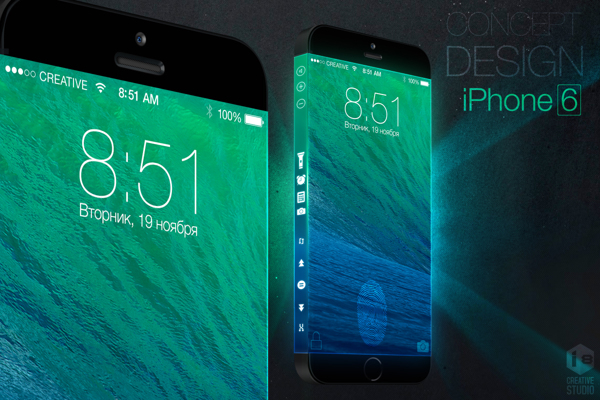
I found this week’s readings quite eye-opening. The video at the beginning of the article was accurately how I imagine the “future” of technology: exactly what it is now, but unlocks more gesture possibilities and projects onto anything. This reminds me of a rumored concept for the iPhone 6 that I got quite excited over in 2013, deeming it to be innovative and futuristic.

Video: iPhone 6 concept with Three-Sided Display that Apple will never  build - iPhone Hacks | #1 iPhone, iPad, iOS Blog — WordPress

While I was upset that Apple did not end up releasing this concept as the iPhone 6, this article made me hope they never release such a phone.

I feel like the article made me realize innovation has kind of paused in the last few years. My friends and I often discuss this question of “if we wanted to invent something new, what could we invent?” because we feel like everything we need, that has a realistic solution, has already been invented. However, this article made me think, what if videos and visions like the ones presented in the article are the reason we are unable to think outside of the box and invent new ideas. The vision for the future often consists of simply combining different existing technologies into one, or expanding current technologies, halting the invention of ground-breaking inventions. It almost feels like phones with a touch screen was the last time humanity witnessed a truly impressive and shocking invention.

Reading Reflection Week 10: Reboot it and Mute it

Tom Igoe really presents some interesting messages surrounding about our own projects. Firstly, a core message of not being discouraged if an idea has “been done before”. I like a lot of his submissions that he showed off and how we require the limitations part of our projects (and also the feedback that Mang presents for us 😊). I can see this in this in light of my own work in content creation for YouTube.

Much of the time I struggle with determining an idea for a video, especially in the niche community that I’m in where most ideas have already been “made before”. But sometimes I like taking a different approach and look at an idea from a different prism. It helps me build on the ideas that the original creator has made, and of course providing credit, whilst injecting my own spin on the idea and creating a different product in the end. Our imagination isn’t a limitation, the critical thinking we don’t do is.

And his next message is around not interpreting our own work. Honestly, after visiting multiple art galleries and even being an usher for Abu Dhabi Art Exhibition 2025 for an Interactive Media artist, I can definitely agree with this.

For some context, I was a volunteer for the Abu Dhabi Art Exhibition 2025, held at the Manarat Al Saadiyat Gallery, with my task being to usher people to an exhibition hosted by reImagined Art. Now, even though the person there only gave me the responsibility to usher people, I also decided to talk to the guests about the artworks and give them a bit of background.

The artworks mainly revolved around the Ethirium blockchain and represented it in different forms (I’ll upload some pictures below 😉). And as guests were coming in, they were astounded by some artworks. I didn’t want to intrude into their experience of the artworks and wanted to give them time to sink in.

Later, some would come up to me and ask for me to explain to them what the artwork meant. I gave them a decent rundown but also was a bit ambivilous as most aren’t tech savy to know about blockchain (I mean they hear crypto or bitcoin and everyone goes “ahh”). Still I can say that they definitely felt astounded as to how something like a ledger for records can be art.

And I think with this, I let more so the guests the agency to interpret the work, rather than letting me being the post it note describing it in detail. So definitely we should be a bit ambivilous in what we say about our work and let others experience it. That in of itself is the crux of imagination, seeing our world from a different prism of thought.

Reading Response-Follow Up

It was interesting to see that the author wasn’t trying to provide a solution, but instead wanted to raise awareness of the problem and push further research. He emphasizes that current tools aren’t fully taking advantage of human capabilities, and when discussing things like physical keyboards or styluses, he dismisses them as not being “dynamic mediums.” This made me think about interactive media, where we experiment with more dynamic forms of interaction by combining physical inputs, sensors, and outputs to create systems that respond in real time.

However, I don’t fully agree with his view on voice. While he limits it to simple commands, I think voice has potential as a more dynamic form of interaction, especially when combined with other inputs. When he talks about the three categories of gestures, it reminded me of things like voice assistants, where we use a kind of “vocabulary” to communicate with the system, similar to saying commands like “Hey Siri.” The idea of spatial gestures at a distance also connects to examples we briefly saw in class, where movement controls objects on a screen, even if it can feel indirect. The last example, directly manipulating a virtual 3D space like Iron Man, was a bit confusing to me, but it shows a more ambitious and futuristic idea of interaction. Overall, even though he critiques these methods, I think they still have potential, especially when combined together, rather than being dismissed individually.