
Demo Below:
Concept:
We came up with a piano that utilizes your keyboard presses and a buzzer, using keys from A-L allows you to play 9 different notes. We added an LCD that displays the note of each key and the frequency of that note.
Implementation:
Schematic:
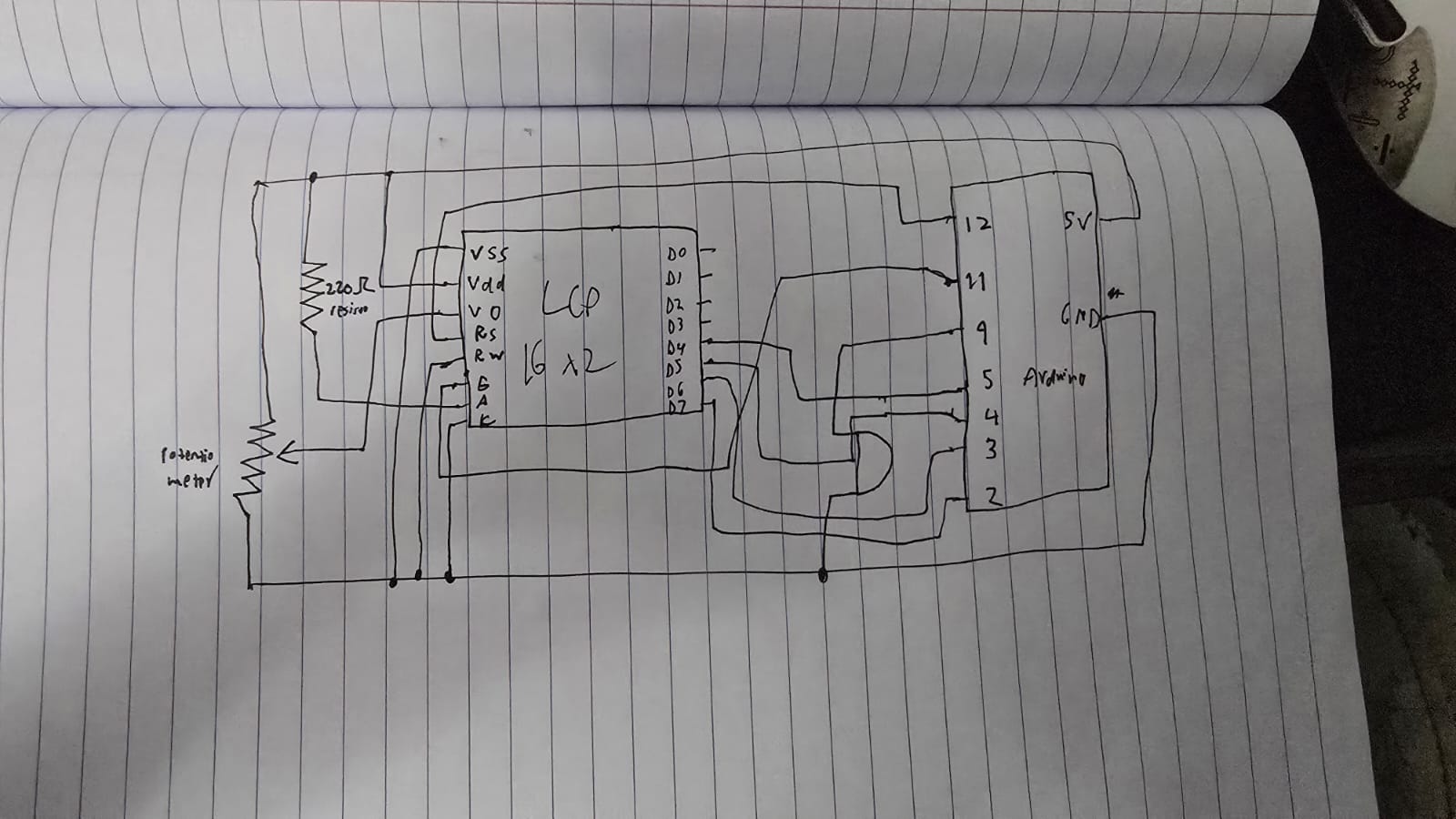
The components used are pretty simple, just being an LCD device and a buzzer. We wrote 2 files of code for this, a python file and an c++ file. As typing the letter into the serial monitor every time you wanted to play a note would be counter-intuitive, we wrote a python file that listens to your key presses, and if you press a key between A and L, then it will send that key press to the arduino which ends playing the note that correlates to that key press.
try:
    arduino = serial.Serial('COM11', 9600, timeout=1)
    ...
except:
    ...

while True:
    if keyboard.is_pressed('a'):
        arduino.write(b'A')
        time.sleep(0.15)
    elif keyboard.is_pressed('s'):
        arduino.write(b'S')
        time.sleep(0.15)
    elif keyboard.is_pressed('d'):
        arduino.write(b'D')
        time.sleep(0.15)
    elif keyboard.is_pressed('f'):
        arduino.write(b'F')
        time.sleep(0.15)
    elif keyboard.is_pressed('g'):
        arduino.write(b'G')
        time.sleep(0.15)
    elif keyboard.is_pressed('h'):
        arduino.write(b'H')
        time.sleep(0.15)
    elif keyboard.is_pressed('j'):
        arduino.write(b'J')
        time.sleep(0.15)
    elif keyboard.is_pressed('k'):
        arduino.write(b'K')
        time.sleep(0.15)
    elif keyboard.is_pressed('l'):
        arduino.write(b'L')
        time.sleep(0.15)

    if keyboard.is_pressed('esc'):
        print("Closing...")
        break

arduino.close()
Here we first try to connect to the arduino using the port and the buad rate that is on the arduino IDE, then until the program stops, we check for any key presses, and if it matches one of our conditional statements, we write that letter to the arduino.
switch (key) {
  case 'A': frequency = 262; noteName = "C4"; break;
  case 'S': frequency = 294; noteName = "D4"; break;
  case 'D': frequency = 330; noteName = "E4"; break;
  case 'F': frequency = 349; noteName = "F4"; break;
  case 'G': frequency = 392; noteName = "G4"; break;
  case 'H': frequency = 440; noteName = "A4"; break;
  case 'J': frequency = 494; noteName = "B4"; break;
  case 'K': frequency = 523; noteName = "C5"; break;
  case 'L': frequency = 587; noteName = "D5"; break;
  default: return; // Ignore any other keys
}
Here we have a switch statement which checks whether we got a matching letter, which then returns the respective frequency and note. We got these frequencies for each note from here: https://en.wikipedia.org/wiki/Piano_key_frequencies as we wanted it to sound as similar as possible to a piano. The LCD shows the note you play and the frequency of that note when you play it. A potentiometer is used to control the contrast of the LCD!
Reflection:
Currently this is a single press piano meaning you can’t play multiple multiple notes at once, so an improvement that can be made is to find some way to be able to play multiple notes at once, otherwise this works perfectly, and is simple and accessible to anyone!