week 9 reading response – Making Interactive Art

I definitely agree with this, and I think it applies to art as a whole to some extent as well. I believe that artist interpretation matters less than the viewer’s, because one of the greatest things about art is the creativity and inspiration it can spark in people. Some of my favorite movies (listed below) are ones that are so confusing and surreal to the point where I have to construct my own narrative afterwards to put the pieces together. Like waking up and trying to recall a dream.

  • Possession (1891) (Also indirectly introduced me to Sonic Youth, my favorite band of all time, via a youtube edit)
  • Stay (2005)
  • I Saw the TV Glow (2024)
  • Climax (2018) (this one has a more defined plot, but it’s such a dizzying movie I had to include it)
  • Enter the Void (2009) (VERY mixed feelings abt this one..)

Reading Reflection – Week 9

Physical Computing’s Greatest Hits (and misses)

This was an interesting read, especially looking through all of the different projects. What stood out to me was the author’s point that many physical computing projects repeat the same themes every year. At first, this surprised me because I usually think that in creative fields, you are supposed to come up with something new and original. But reading this made me realize that originality does not always mean starting from scratch. It could be taking a familiar idea and just approaching it in a different way, which can still lead to something unique. I think this perspective makes me feel a bit better about the physical computing projects, because I was always afraid that my idea would have already been created or would be too similar to someone else’s concept. I also thought that these projects were too complex, but they actually come from simple concepts, some of which we even covered in class.

I also really liked the discussion about thescooby doo painting and the video mirror, where it was visually impressive but sometimes limited because people mostly just stand there and wave their hands. I thought this was interesting because it points out that something can look cool, but still does not create a very deep, meaningful interaction. Overall, I think this reading helped me think more about the relationship between creativity and physical interactions. It made me realize that the most interesting projects come from designing meaningful ways for people to interact with it. I think this reading also helped me get some inspiration from others for this week’s assignment.


Making Interactive Art: Set the Stage, Then Shut Up and Listen

This reading definitely made me think differently about what interactive art actually is. I loved how the author argued that artists should not interpret their own interactive work, it something I never thought about. I always assumed that explaining your concept was needed so the audience would understand what you mean, but it is the opposite. The artwork should allow people to form their own interpretations through their experience with the work. I found this idea interesting because it shifts the focus away from the artist and instead lets the audience become part of the creative process.

I also liked the way the author described interactive art as a conversation between the artwork and the participant. It reminds me of the constant point in my understanding IM class, where the artwork is not the finished piece, but it is only complete through the audience’s interaction. The end result of the artwork could be different for some people, even all of the small design choices, like whether something looks touchable or has indicators, can guide how people interact with the piece, and can influence the end result. So sometimes we should limit the guidance, if the goal is to make the experience full and meaningful for each person.

Reading Reflection Week 8: Aesthetics, Auto-Saving and Appeal

Norman makes a really interesting argument that I see throughout daily life of how a positive mood is really a partnership of the aesthetics vis a vis the usability of the product. I mean, whenever I upgrade my own technology, I see a lot of benefits from the upgrade and with that, I can see how it does influence my thinking. As an example, with my previous Xiaomi phone, I found a lot of workarounds for say installing apps that aren’t available in my region or even some hidden features that made my use of the device much more intuitive.

However I’d like to extend his argument by saying that brand loyalty does also play a factor in our thinking. I upgraded to a Google Pixel phone and I think I mostly got sold on it, because of the abudance of features and the whole Google brand. I mean, I’m enjoying the phone don’t get me wrong, but when I encunter a minor issue, it doesn’t really appaul me, more so I’m patient but particularly because I strongly side with Google as the brand value of it. So there’s definitely an argument to made there that if you are loyal and trust a brand, then your thinking is based off it.

With regards to Hamilton, I think it’s really interesting that there was a time where people thought that humans didn’t need support or help because NASA just assumed that astronauts are equipped with a higher degree of knowledge. Nowadays, we constantly make mistakes (I mean even writing this I almost forgot to save my work 😭) and I couldn’t imagine living with technology without error checks. And I think some people do get offended or at least frustrated with error check screens as they’re so constant and everywhere. But man, imagine if we didn’t have them. What kind of society would we live in?

Week 9:

int brightness = 0;
int buttonState = 0;


void setup()
{
  
  pinMode(13, OUTPUT);
  pinMode(11, OUTPUT);
  pinMode(2, INPUT_PULLUP);
}

void loop()
{
  
  buttonState = digitalRead(2);
  if (buttonState == LOW) {
  digitalWrite(13, LOW);
} else {
  digitalWrite(13, HIGH);
}
 
int sensorValue = analogRead(A1);
brightness = map(sensorValue, 0, 1023, 0, 255);
analogWrite(11, brightness);

  delay(10); 
}

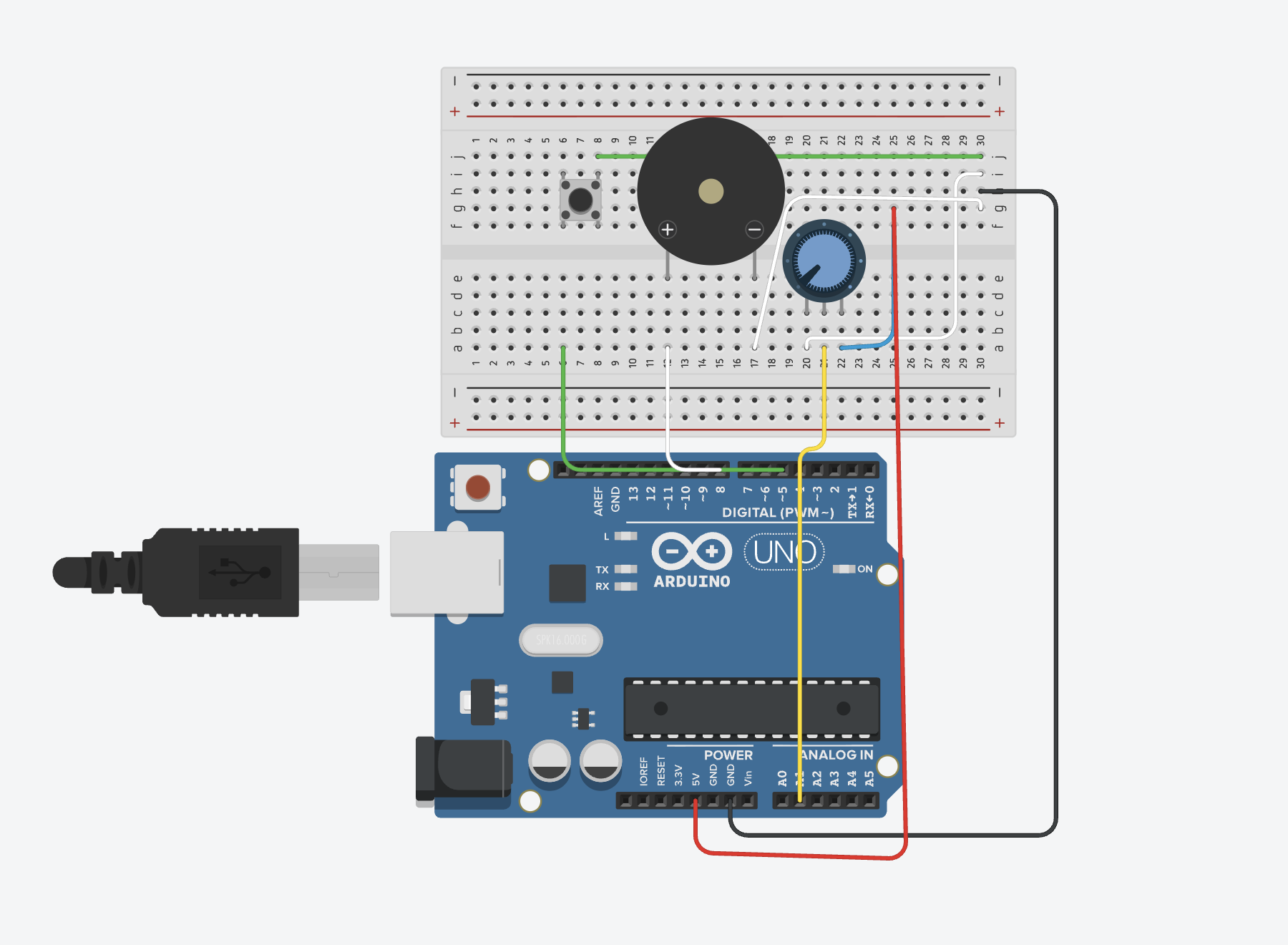
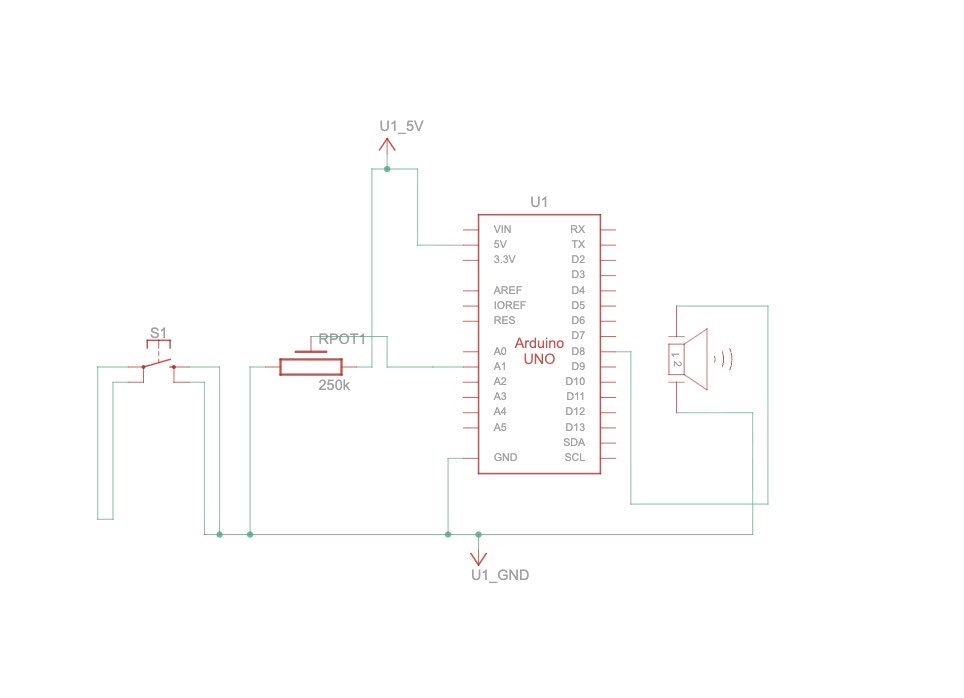
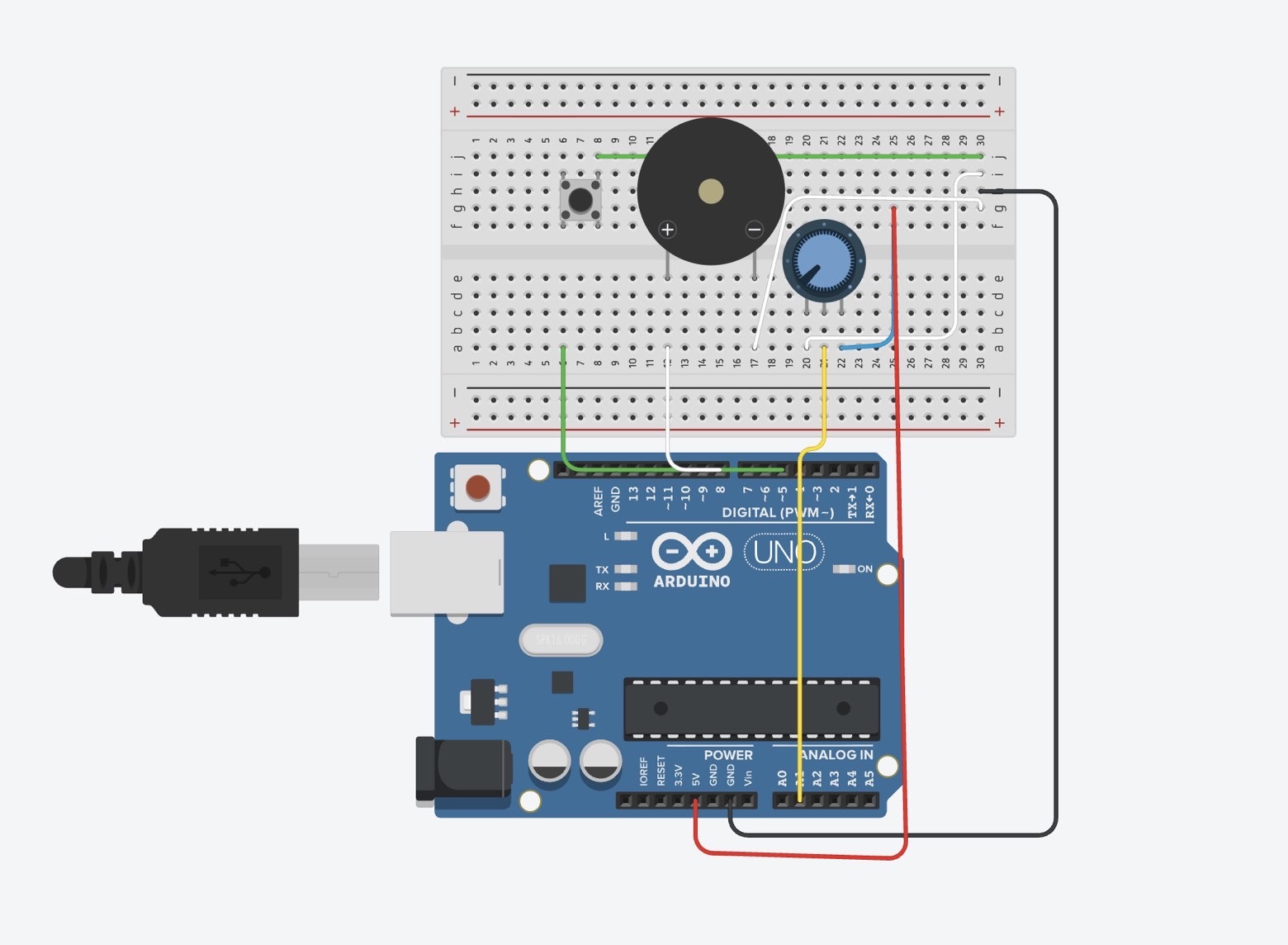
I don’t have my arduino yet, so i had to do this on tinkeCcad.

One led is triggered by a button, which acts as a digital sensor, and the other is controlled by a photoresistor, and increases in brightness the more light in the environment is detected. Not really creative, but I’m crunched on time.

UPDATE

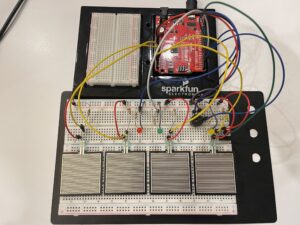
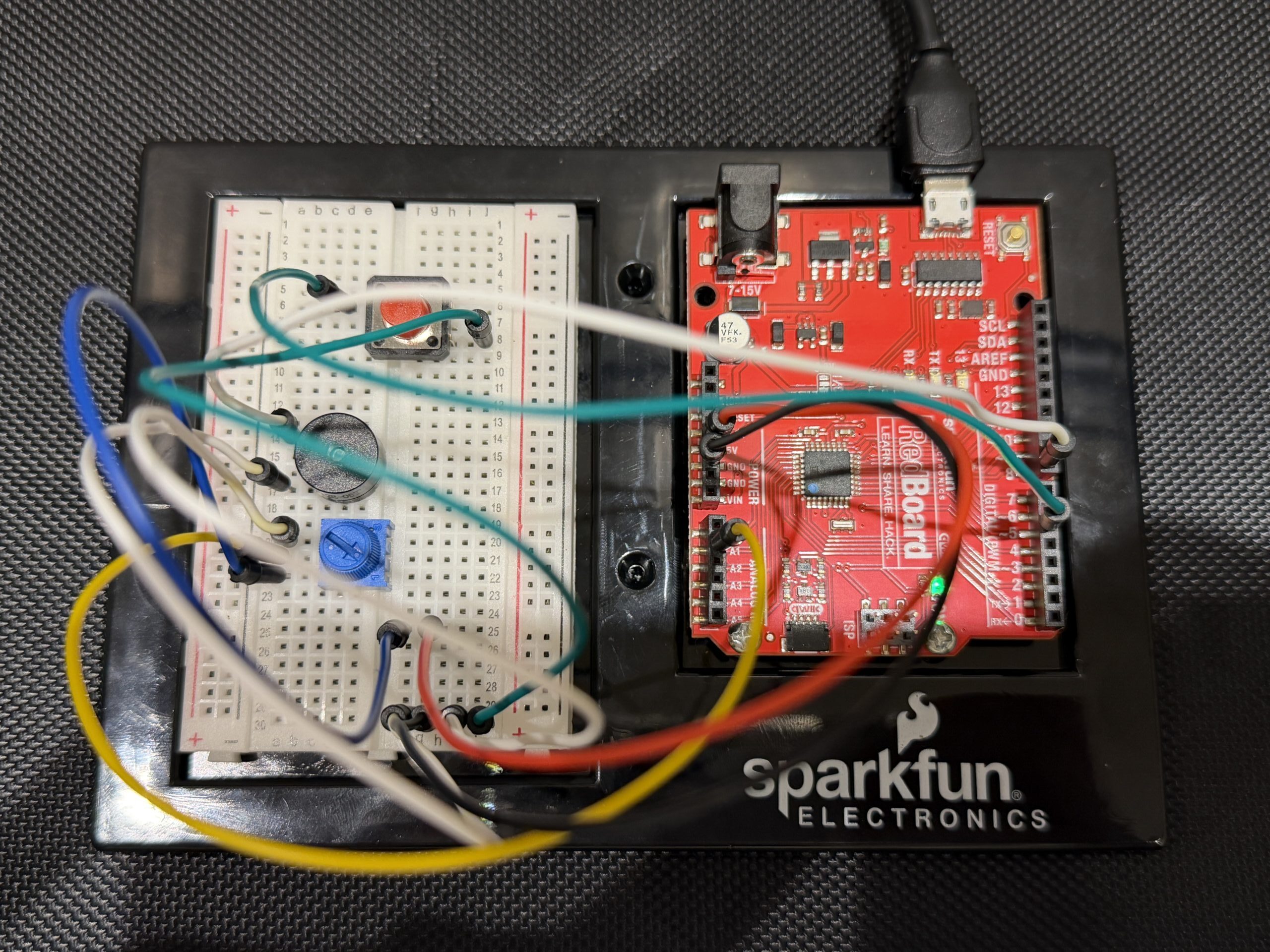
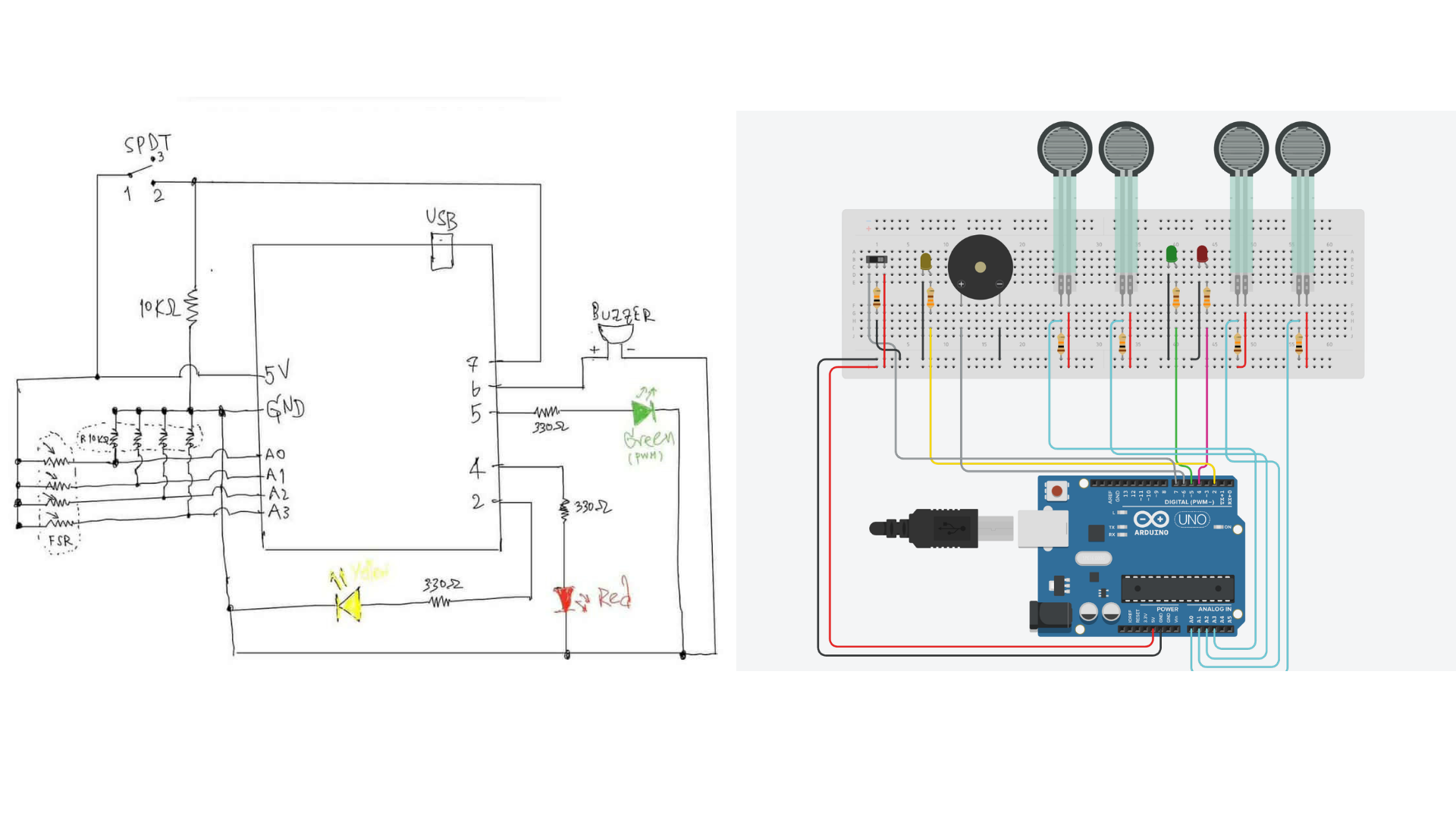
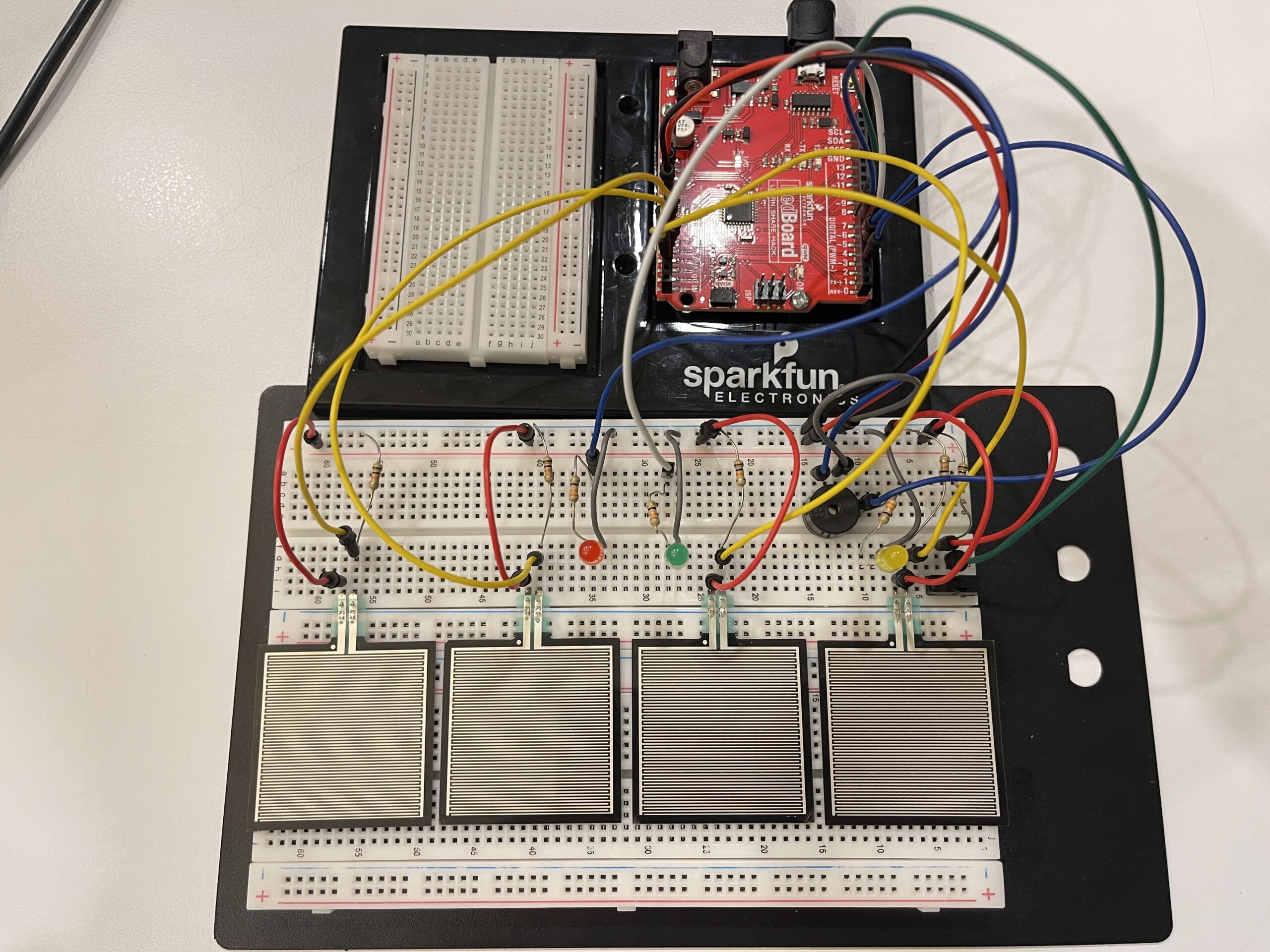
That was TERRIBLE, I didn’t know what I was doing. Anyways, I finally got my Arduino kit, so I made a quick alternative version:

I completely forgot there had to be two sensors, but I hope that the previous iteration can make up for that. Please have mercy.

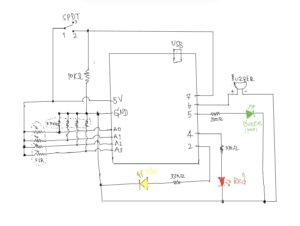
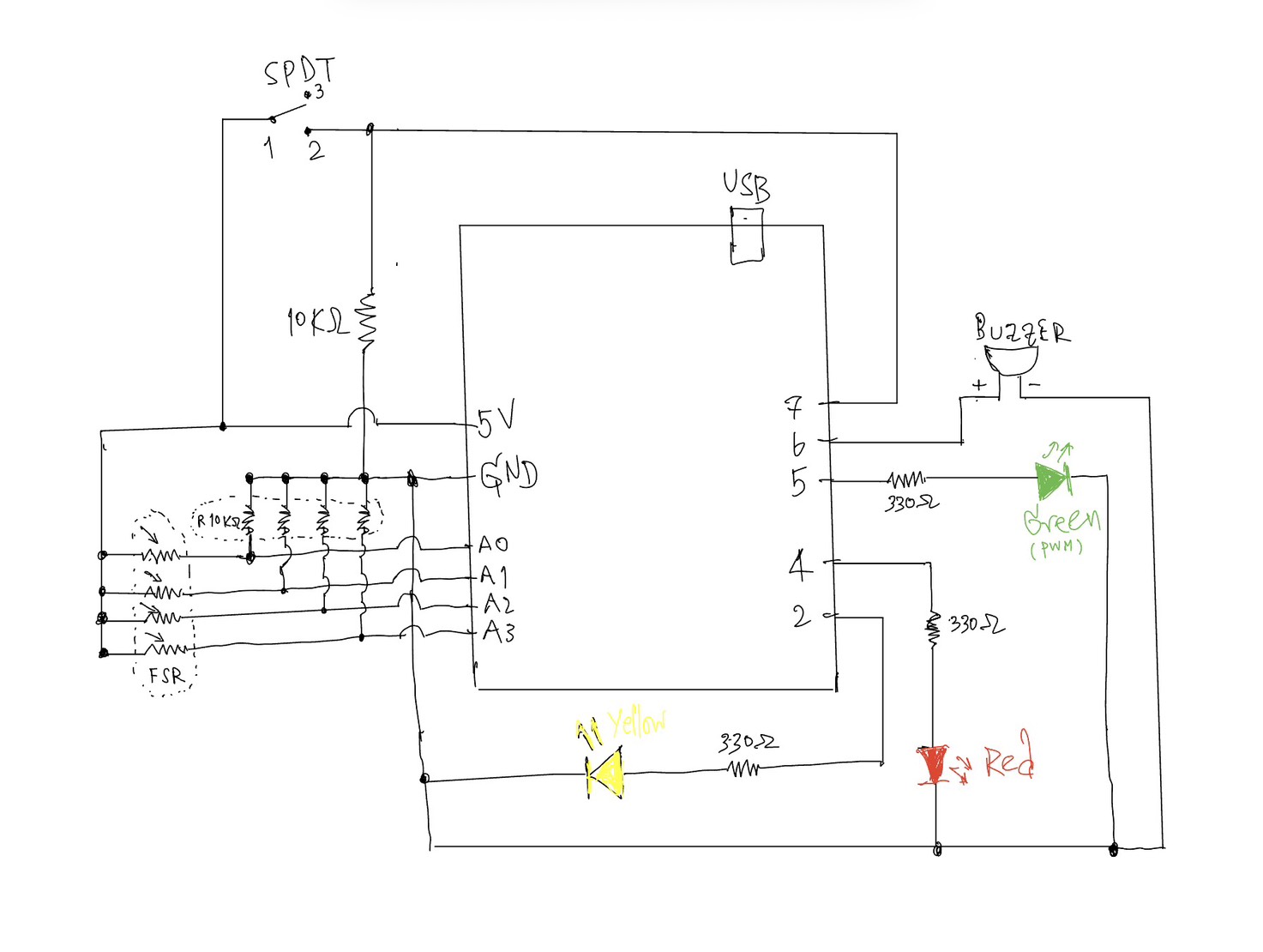
Here’s a video of the circuit in action, and below is the schematic.

Here’s the GitHub link.

int brightness = 0;
int buttonState = 0;


void setup()
{
  pinMode(12, OUTPUT);
  pinMode(11, OUTPUT);
  pinMode(2, INPUT);
}

void loop()
{
  // timing yellow lED
  for (brightness = 0; brightness <= 255; brightness += 5) {
    analogWrite(11, brightness);
    delay(30);
  }

  // triggering red LED if button is pressed
   buttonState = digitalRead(2);
  if (buttonState == HIGH) {
    digitalWrite(12, HIGH);
  } else {
    digitalWrite(12, LOW);
  }
  delay(10);
}

Reading Reflection- Week 9 Physical Computing’s Greatest Hits

One idea that stood out to me in Physical Computing’s Greatest Hits and misses is the author’s challenge to the assumption that how commonly used project ideas lack originality. Before reading, I often felt that repeating familiar interaction concepts such as sensors, mirrors, or gesture-based inputs was somehow “less creative.” However, the text argues the opposite that recurring themes actually provide a foundation for innovation, since variation and context are what make a project meaningful. This really shifted my perspective on creativity. Instead of just focusing on being completely original, I now see value in how a project frames interaction and meaning. For instance, the discussion of theremin-like instruments highlights how simple gestures (like waving a hand) can feel empty unless they are placed within a meaningful context. This made me reflect on my own projects, where I sometimes prioritize technical implementation over the meaning of interaction. The reading makes me think, am I designing interactions that actually “mean” something to the user, or just demonstrating functionality?

Another idea that I found particularly interesting is the critique of “low-structure interaction,” especially in examples like video mirrors or body-as-cursor systems. The author points out that while these projects are visually appealing, they often lack depth because they only mirror user input without really encouraging intentional or meaningful engagement. This made me rethink what really makes an interactive system successful. I used to assume that responsiveness alone such as tracking movement or generating visuals was enough. But now I realize that interaction design also requires structure, constraints, or a clear “language” of interaction, This connects to the guideline of reflecting critically rather than just describing, because it really challenges my assumption that having more technology = better interaction. But instead, the reading suggests that simplicity with intentional design can be more powerful. It leaves me with an important question: how can I design interactions that guide users toward meaningful experiences, rather than just reacting to their presence?

Reading Reflection- Week 9 Making Interactive Art

One idea that strongly challenged my assumptions in Making Interactive Art: Set the Stage, Then Shut Up and Listen is the argument that artists shouldn’t interpret their own work for the audience. The statement “don’t interpret your own work” (page 1) directly confronts how I usually approach creative projects, where I often need to explain my intentions to make sure people get it. This reading made me realize that over-explaining actually limits the audience’s freedom to engage with the work. If I pre-script how users should think or act, I am essentially controlling their experience rather than designing for interaction. This connects to my own experience in IMA projects, where I sometimes prioritize clarity over openness. The reading pushes me to rethink this balance instead of ensuring understanding through explanation, I should design interactions that naturally guide interpretation. But this leaves me with how much ambiguity is productive before the interaction becomes confusing rather than meaningful?

Another idea that stood out to me is the concept of interactive art as a “conversation” rather than a finished statement in pages 1-2. The author emphasizes that once the work is built, the creator should “shut up” and listen to how users respond through their actions, interpretations, and even misunderstandings  . I found this particularly interesting because it reframes user interaction as something dynamic and evolving rather than something to be controlled. The comparison to directing actors in pages 2-3 helped me understand this more deeply just like actors must find their own emotional meaning whereas users must discover their own way of engaging with the work. This idea challenges my tendency to design interactions that are a bit too rigid.

Week 7 – Midterm Project! – Megan Del Villar

“Salteñada”

Concept

For this project I wanted to create something that actually represents me. I thought about my culture and also something I really enjoy which is cooking. So I asked myself what are my favorite Bolivian dishes and which one feels the most iconic. For me that is the salteña. It is a type of empanada but very unique because it is juicy and has a mix of different ingredients inside.

From that idea I decided to turn it into a game where people can learn how to make salteñas. I was also inspired by a game I used to play when I was younger called Papa’s Pizzeria, where you receive orders and have to complete them correctly. I liked that structure a lot so I adapted it into my own concept but based on Bolivian food.

The main goal of the game is to complete four salteñas correctly by following the recipes shown in the tickets. Each time you play the orders are random so the experience changes every time.

Implementation

I started by thinking about the aesthetic of the game. I wanted it to match the same style I have been using in my other works which is clean, flat, and stylized with shadows made using shapes instead of realistic textures. That is why I built everything using p5.js shapes instead of drawing or importing detailed images.

I created different classes like Ingredient, Dough, and Order so I could organize the logic better. This helped me control how things move, how they are displayed, and how the player interacts with them.

One of the hardest parts at the beginning was figuring out how to drag the ingredients and the dough. I wanted it to feel smooth but also controlled. Designing the ingredients was also challenging because I wanted them to be recognizable but still look like part of a stylized game.

Then I worked on the main mechanics of the game. I created a system where orders are randomly generated so every game is different. I also built a system that stores the ingredients inside each dough and then checks if they match the recipe. This is a simplified version of how salteñas are actually made but it still represents the main ingredients.

For the visual part I used an image of an aguayo as the background and applied a pointillism effect to make it look more organic and consistent with the rest of the aesthetic. I also added a custom font that matches the vibe of the game and background music to make the experience more immersive.

I did not rely too much on external sources. Most of what I used was the p5.js library for things like collision detection and interaction, class notes, and inspiration from Papa’s Pizzeria and Bolivian cooking. I also spent a lot of time experimenting to make everything look visually consistent.

Another important source was actually my younger brother. I made him play the game when it was almost finished to see how a real user would interact with it. This helped me realize several issues like missing instructions or unclear elements. Because of that I ended up spending more time improving the tutorial than the game itself, since I wanted the player to clearly understand what to do and feel rewarded when they succeed.

I also used AI tools like ChatGPT and Claude mainly for debugging (a big part of this project was honestly debugging haha) and understanding certain technical problems and knowing what function, variable or tool would be useful for what I wanted to do.

Code that I am proud of

The part of the code I am most proud of is the recipe validation system. I had to create a way to store all the ingredients that the player places inside each dough and then count them correctly. After that I needed to compare those counts with the order requirements.

This was challenging because it connects multiple parts of the game. The interaction of dragging ingredients, storing them inside the dough, closing the salteña, and finally checking if everything is correct. Making all of that work together correctly took me a lot of time to understand and debug.

function checkRecipe(dough, order){
  let counts = {};

  for(let ing of dough.ingredients){
    counts[ing] = (counts[ing] || 0) + 1;
  }

I am also proud of the full game logic that decides if the player wins or loses. It checks if all salteñas are closed, if they have the correct ingredients, and also handles the timer and the Done button.

for(let d of doughBalls){
  if(!d.closed){
    loseReason = "Some salteñas are not closed";
    endGame(false);
    return;
  }

Finally, one that seemed so simple but it took soooo much time out from me was this multi – clicking to close the salteña

if(now - d.lastClickTime < 400){
  d.clickCount++;
}

Reflection

I really enjoyed making this project and I think I challenged myself a lot. There are still things I would improve. For example there was a moment where I did not like the dragging interaction and I wanted to change it to a pick and release system. However that was very difficult to implement and I was already deep into the project and felt like I was going down a rabbit hole while debugging that, so I decided to keep the drag system to avoid breaking everything.

It bothered me because when I played the game myself I noticed that dragging a lot can get tiring, especially because you are trying to finish quickly. So I think a different interaction system would make it more user friendly.

I also would have liked to add sound effects and more steps to the cooking process. Right now when you close the salteña it is assumed that it already has the juice and is baked. Ideally I would add another stage where the player adds the juice and then bakes the salteña to make the experience more complete.

Another challenge I faced was organization. Because of time changes and breaks in between working on the project, my coding process was not as consistent as before. Sometimes I would go a long time without looking at the code and then come back and work for many hours. That made the code feel a bit disorganized and sometimes I would get lost.

I also struggled at the beginning with making the design responsive to different screen sizes. I could not rely on fixed dimensions like before, so I had to adapt everything to the window size. That was difficult at first but I eventually got used to it.

Overall I am very proud of this project. Even though there are things I would improve, I feel like it represents me, my culture, and my interests. It is also a game that I would actually enjoy playing and I think my friends and family would too.

Midterm Project – Strawberry Yurt Cafè

Concept

For my midterm, I created Strawberry Yurt Cafè, a cozy cafe game. I was inspired by a vlog by Gazi (https://youtu.be/eBt0nV0Y1Y0?si=4Hjy9PetN7n4hHwU) where she coded a game in one night, and that made me want to create a game for my own project too. I did not make mine in one night, but that idea encouraged me to build atmospheric game. I was also inspired by lo-fi playlists, and I wanted the game to feel soft and calm.

This project ended up being very different from what I originally thought I was going to do when I first posted my midterm ideas. My direction changed a lot during the process, but I think that actually helped me find a project that I enjoyed. Since I have been studying in cafes a lot recently, I liked the idea of making a cafe game ran by someone who loves strawberries.

Process

I started by outlining the main parts of the game that I would need to make:

  1. The cafe environment
  2. The kitchen area,
  3. The drinks,
  4. The recipe book, the ingredients
  5. The customers

After planning those pieces, I moved into sketching.

I first drew the strawberry-themed cafe, the seller. I decided that the cafe would sell cakes and drinks, but the player would be the barista helping the seller prepare drinks for customers. Since the cafe has a dome-like shape, it reminded me of a yurt from my home country, Kazakhstan, which is a traditional home that my ancestors used to live in, so that is why I decided to call the game Strawberry Yurt Cafè.


After that, I chose the main color palette of the project. I focused mostly on pink, brown, and beige tones because I wanted the game to look warm and cozy.


Then I started drawing the individual assets so the drinks, ingredients, and customers. I also sketched the different stages of making drinks, so the player could visually see the process step by step.


I sketched the ingredients for the drinks like strawberry jam, matcha, milk, ice cream, strawberries, tea, whipped cream.


After I designed a variety of animal customers and ended up making nine different versions. I also created the recipe book logo in Adobe, which helped give the interface a more finished look.

How the Project Works

The game begins on an intro screen with instructions. After the player clicks Start Shift, the game moves into the cafe scene, where a customer appears with an order bubble. The player can open the recipe book, choose a drink, and then move into the kitchen scene. In the kitchen, the player has to click the ingredients in the correct order to prepare the drink before the timer runs out. If the correct recipe is followed, the customer reacts happily; if the wrong ingredient is added or time runs out, the customer reacts negatively.

One part I am proud of is how the game combines visuals, interaction, and sound to create a full atmosphere. I used my drawings to build the aesthetic of the game, and I also found sound effects for the ingredients, recipe book interactions, and customer mood changes. The game includes cozy background music when it starts, which helps support the feeling I wanted the player to have. Even though the gameplay is simple, I think it succeeds in giving the user a cute and relaxing experience.

Code Snippets

I structured data for the drinks so each one could have its own recipe and ingredient positions:

const DRINKS = {
  "strawberry latte": {
    steps: ["tea", "strawberry milk", "cold milk"],
    ingredients: [
      { target: "strawberry milk", ingredient: "strawberry milk", x: -155, y: -110 },
      { target: "cold milk", ingredient: "cold milk", x: -4, y: -107 },
      { target: "tea", ingredient: "tea", x: 139, y: -109 },
    ],
  },
};

By I creating a DRINKS object where each drink stores its ingredient order and the positions of the ingredient icons in the kitchen scene. Each drink has a recipe, and the game checks whether the player clicks the ingredients in the same order as the steps array. The ingredients array also tells the game where to place each ingredient on the screen. Because of this, I could add multiple drinks without rewriting the whole game logic every time.

Another code section I found important is the function that handles what happens after the player delivers a drink.

function finishDrink(deliveredCorrectDrink) {
  state.scene = "cafe";
  state.recipeBookOpen = false;
  state.ingredientsVisible = false;

  if (deliveredCorrectDrink) {
    state.goodDrinksMade += 1;
    state.reactCostume = "love";
    playEffect("sound-effect-twinklesparkle-115095", 1);
  } else {
    state.badDrinksMade += 1;
    state.reactCostume = "mad";
    playEffect("551543__philracoindie__8-bit-denyerror-sound", 1);
  }

  clearCurrentDrink();
  scheduleNextCustomer();
}

This function basically controls the result of the player’s action. After the player delivers a drink, the game goes back to the cafe scene. Then it checks if the drink was correct or not. If it was correct, the game adds one point to the good drinks counter, changes the customer reaction to happy, and plays a positive sound. If the drink was wrong, it adds one point to the missed drinks counter, changes the reaction to mad, and plays a different sound.

Reflection and improvements

One of the main problems I ran into was with the visual side of the project. At first, I wanted to create and draw some of the assets directly with code, but the results looked off and did not match the soft, cozy style I imagined. Because of that, I decided to draw the assets myself instead. After that, I also had some issues with image transparency, since some files showed unwanted white backgrounds or did not blend well into the game at first. Fixing those problems took time, but it helped me understand that sometimes hand-drawn assets and image cleanup work better for a project like this than trying to build everything only through code.

There are still many things I would like to improve in the future. I would like to add more drinks, more customer reactions, and more animations in the environment. I also think the game could cooler if I added more interactions in the cafe itself. Still, I am very proud of this project because it gives the exact kind of cozy experience I wanted to give to the user.


Week 9 Reading

Physical Computing’s Greatest hits and misses

This was definitely an interesting read. I was surprised at how many of the experiences we have, such as the dancing game at the arcade, incorporate the concepts we learned in class. This definitely made me think of just how simple some of these experiences really are built when I actually once thought they were extremely complex to build. Especially since we touched over some of the concepts in class such as the hand cursor. It helped me gain some inspiration of what I may want to include in this week’s assignment. I was confused by the title of the text after I finished reading it, because of all the examples mentioned in the text, I didn’t find an example or theme mentioned that would be considered a “miss.”

Making Interactive Art: Set the Stage, Then Shut Up and Listen

This reading made me reflect back on the text we read in the first half of the semester about giving users indicators of how to use certain systems. I remember when I read that specific reading, I fully agreed with the author that indicators should definitely be included in designs, but after reading this text, my opinion has changed.

I think the idea of just giving hints to the users of what to do, instead of fully spoon-feeding it to them, makes an experience much more entertaining and fulfilling.

I think what fully changed my opinion is when I thought of my previous experiences in an interactive space, which was TeamLab, in order to fully decide whether I would have enjoyed explicit indicators or not. I remember in one the zones, you had the opportunity to write your name on a lizard or drawing of your choice, and it would be scanned and projected on the ground. Naturally, I followed my lizard, and was completely surprised when my lizard was “killed” when I stepped on it. I definitely think my discovering of this on my own made it much more entertaining experience than it would have if someone had told me that this is possible. It made it feel more fun as I felt that I “discovered” or “achieved” something new.