Week 10 reading response: A Brief Rant on the Future of Interaction Design & it’s follow up

This was the first time I’d ever seen that Microsoft Productivity of Future vision video, and though I know it wasn’t their intention, it felt incredibly depressing and even somewhat dystopian to me. Something about a world so sanded down in its aesthetics and devoid of any rich sensory experiences – all in the name of efficiency.

It makes me think of the minimalism movement that’s been slowly eating away at our world for the past several decades. Creative shapes and textures and architecture have been replaced by simple, monotone geometric shapes and plain, shiny surfaces. You may have seen these a bunch of times already, but just take a look at what popular businesses like McDonald’s and Hot Topic used to look like a couple of decades ago or so:

And compare that to what they look like now.

It’s not just technology; everything is turning as flat and smooth and understimulating as possible. But why? I mean the answer is the same as it always is: money. It’s easier to sell blank slates, so it’s safer to keep your real estate as generic as you can get away with than to allow room for creativity and differentiation. And speaking of money, I think the reason technological advances are continuing to shift towards the “pictures under glass” format the author was talking about is probably, in part, due to the fact that it just sells better.

Humans are fundamentally lazy creatures, in an adaptive sense. We subconsciously try to spend fewer resources for the same results – and those resources includes mental and physical energy. It’s an evolutionary trait obviously, the more efficient we are the more resources and energy we have to shift focus to other things (the industrial revolution, for example). So it follows that the simplest, most brain-rotting designs that require the least amount of physical and mental effort will sell the best.

We’ve almost given up on the body already. We sit at a desk while working, and sit on a couch while playing, and even sit while transporting ourselves between the two. We’ve had to invent this peculiar concept of artificial “exercise” to keep our bodies from atrophying altogether.

It won’t be long before almost every one of our daily activities is mediated by a “computer” of some sort. If these computers are not part of the physical environment, if they bypass the body, then we’ve just created a future where people can and will spend their lives completely immobile.

This applies to you and me just as much as it does anyone else. We have to make an active effort not to get sucked in by the allure of algorithms that spoon-feed us simple mind-numbing social media content, (which, by the way, is associated with gray matter atrophy*). In a way, this instinct for efficiency is what keeps us advancing as a species. However, if left unchecked, we might end up giving up things we value about ourselves, our creativity and imaginations… or our ability to think critically.

Also, the author accidentally predicted AI slop:

Creating: I have a hard time imagining Monet saying to his canvas, “Give me some water lilies. Make ’em impressionistic.”


*Not to imply a causal relationship, there isn’t enough data to come to any severe conclusions.

Week 10 – Reading Report

A Brief Rant On The Future Of Interaction Design

I enjoyed this reading because what he described is something I have actually experienced first-hand with my younger brother, who had to start KG (kindergarten) online due to COVID. Multiple of children who started their developmental learning stage online lack certain motor skills  which definitely could have been better had they experienced their early learning stage physically.

Although I am not fully against the idea of technology, I do believe it can alter and impact development, especially for younger people; it inhibits your body and brain’s full capabilities. Which is something we can see happening more commonly nowadays, especially with the rise of AI, where people are becoming less capable of doing certain tasks in one sitting without reliance on AI models or taking interval breaks in between 15 minutes. To some extent this text made me reflect on my own usage of certain technologies and media platforms; they should be a supplement and influence and not a replacement to my own capabilities. The text allowed me to reflect on how I should be using the technologies at hand.

I think I particularly enjoyed the reading more because it was more casual than academic. I think when someone speaks from more experience, it becomes more relatable and understandable.

Responses: A Brief Rant on the Future of Interaction Design

I think the people who gave such responses to the post took it to heart a little too much. I’ve heard too many people nowadays who are given a pen and paper say that they haven’t written something by hand in so long. It would be too repetitive if the author gave solutions because then again, the author cannot control how the users use technologies; that’s up to them to decide.  The author should not have to answer every single detail and spoon-feed the readers how to act, which, come to think of it, is what the previous reading was discussing: giving users hints instead of direct instruction.

I don’t honestly believe the questions posed were even meaningful.

Assignment – Week 9

My concept: 

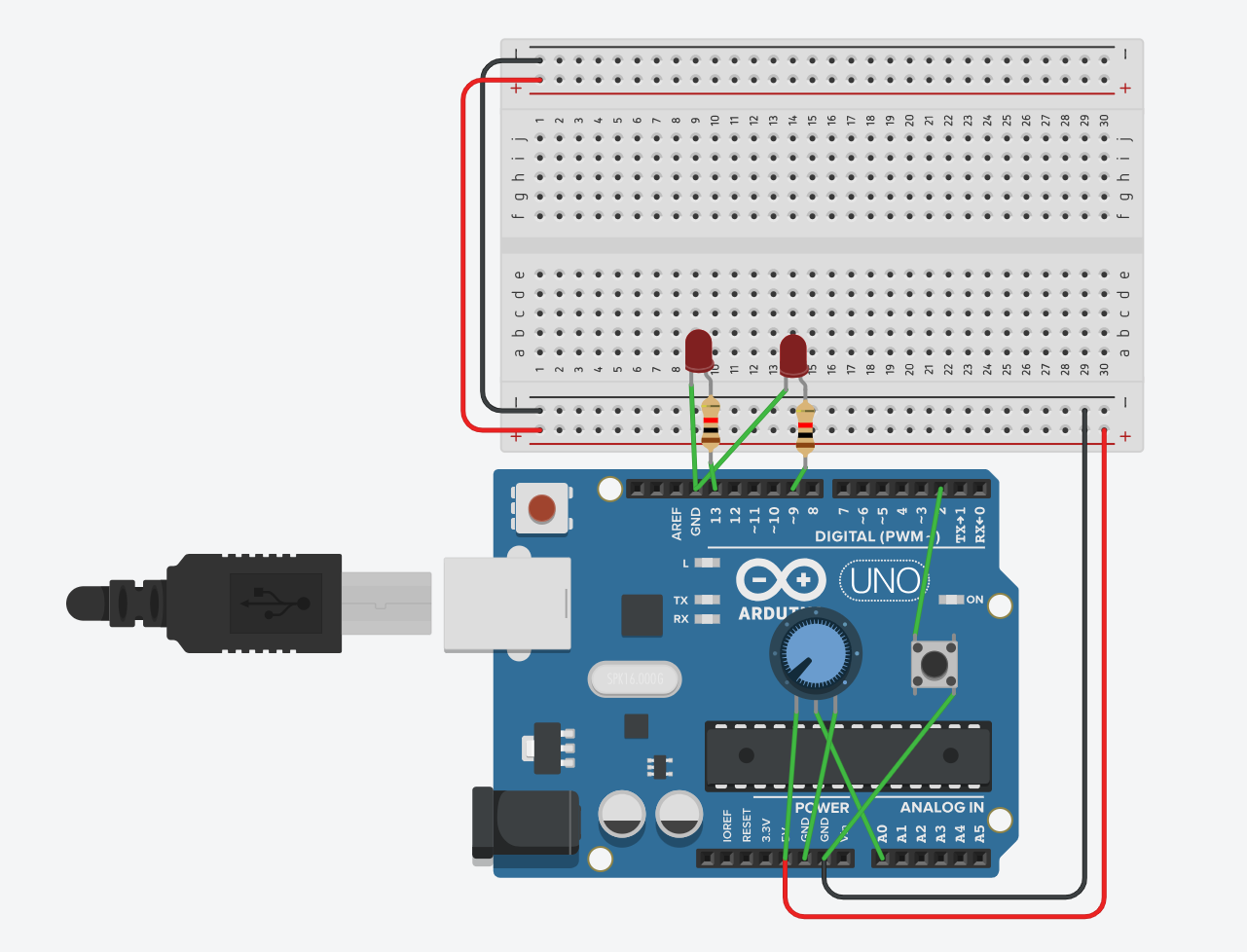
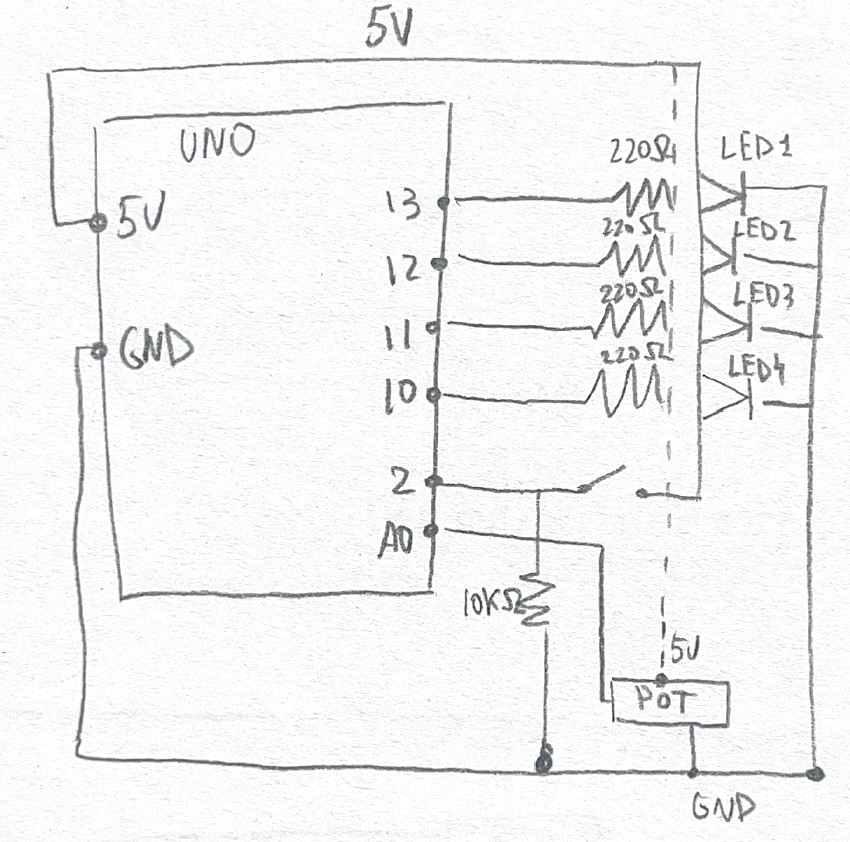
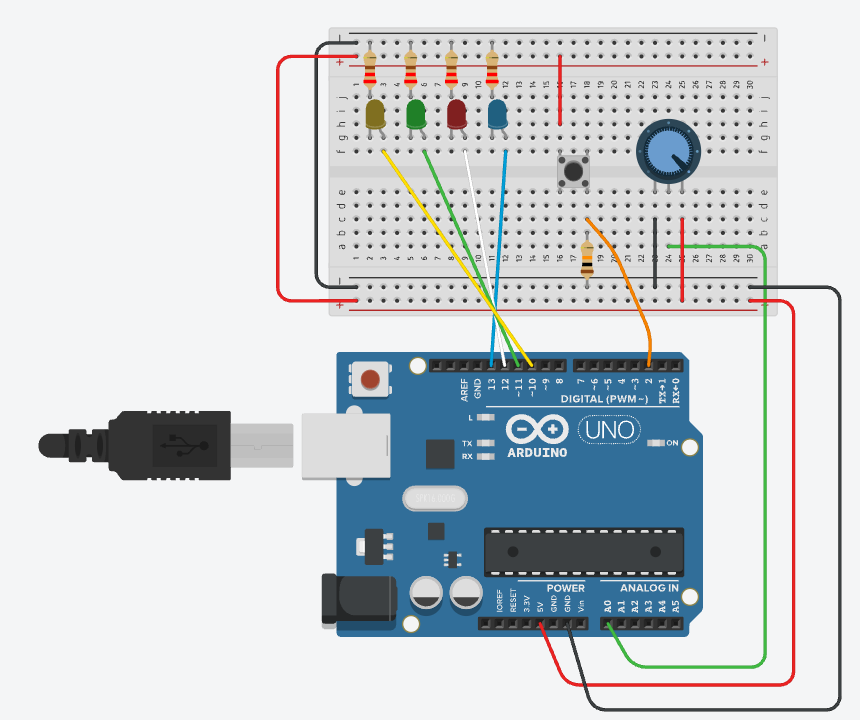
For this week’s assignment, I worked on a small circuit that uses a button and a potentiometer to control two LEDs. The button works as a digital input, so the LED connected to it only turns fully on or fully off. The potentiometer is an analog input, so it gives a range of values, and that lets the second LED fade smoothly instead of switching instantly. Seeing both of them together helped me understand the difference between digital and analog in a very clear way. One is fixed, and the other changes gradually.

Code Snippet I’m Proud Of:

int potValue = analogRead(potPin);
int brightness = potValue / 4;
analogWrite(fadeLed, brightness);

This part made the most sense to me once I understood what PWM actually does just like how i learned on the slides. The potentiometer gives a value from 0 to 1023, but the LED only uses 0 to 255.  When I saw the LED fade smoothly as I turned the knob, it finally clicked for me how analog control works.

Process

I started this assignment by deciding which inputs and outputs I wanted to use. Since the goal was to work with both analog and digital inputs, I chose a pushbutton for the digital part and a potentiometer for the analog part. I wanted each one to control a different LED so I could clearly see the difference between the two types of signals.

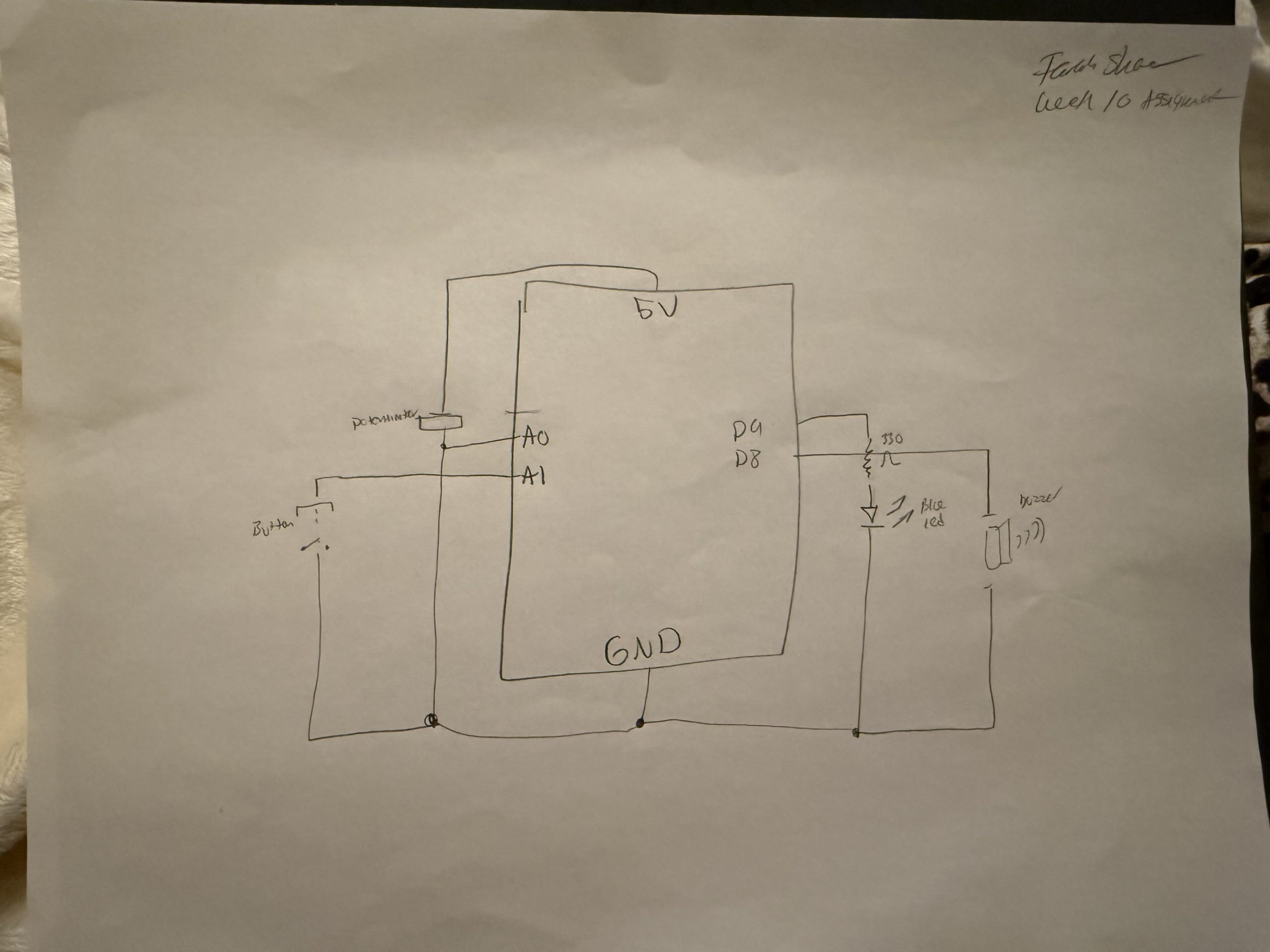
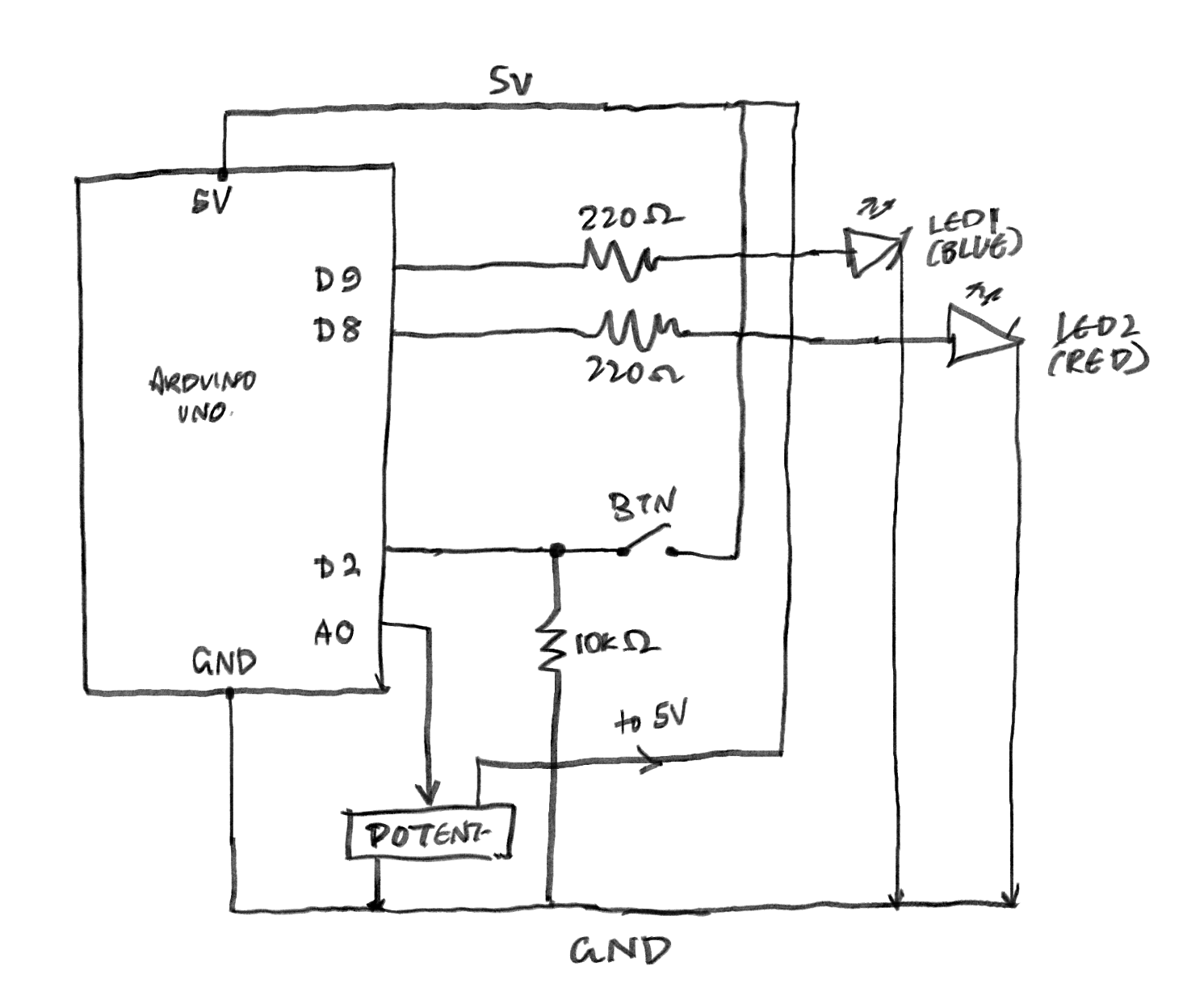
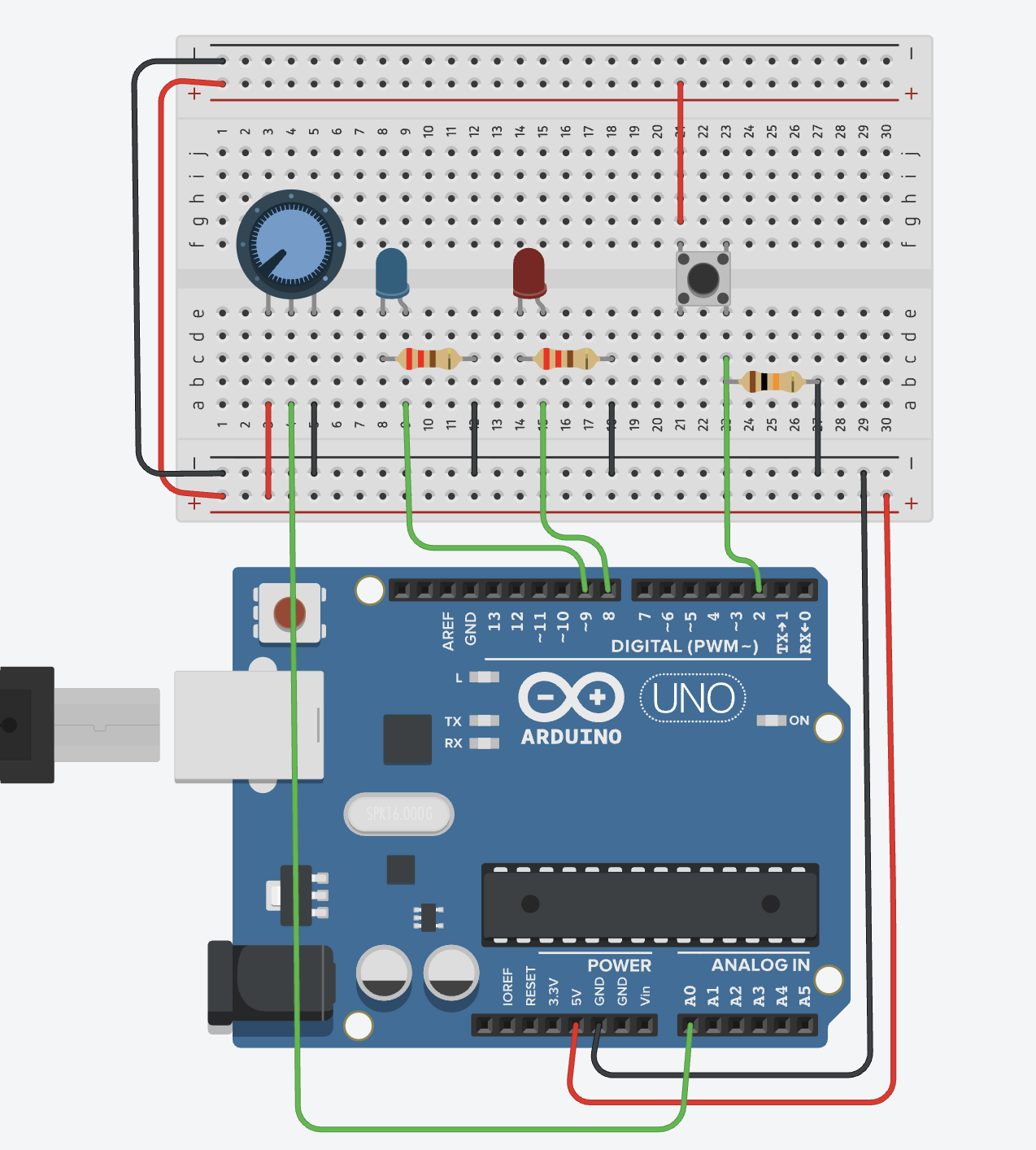
I began by setting up the breadboard and making sure it had power. I connected the 5V pin from the Arduino to the positive rail and the GND pin to the negative rail. After that, I wired the button to pin 2 and added the 10k resistor to ground so it could work as a pull‑down. Then I connected the potentiometer to A1 and made sure the middle pin was going to the analog input. Once both inputs were connected, I added the two LEDs with 330 resistors to protect them.

At first, I tried to test everything on the physical Arduino, but the board started acting in a way that it wasn’t working and connecting to the laptop and kept shutting down, the green light would blink for a second and then everything will go off, and I wasn’t able to find the cable option on the ports shown to connect the code with my arduino, so that’s why it wasn’t working. After a lot of troubleshooting, I realized the problem was not my code or my wiring. The board itself was not responding properly. Because of that, I moved the project to Tinkercad so I could finish the assignment without dealing with hardware issues I could not fix. In Tinkercad, the circuit worked the way it was supposed to, and it helped me understand the logic more clearly.

My tinkercad:

https://www.tinkercad.com/things/b5J0eHZInWx/editel?lessonid=EFU6PEHIXGFUR1J&projectid=OGK4Q7VL20FZRV9&collectionid=undefined&title=Editing%20Components&sharecode=UdELcMJJ9AZbknNHQbrLb1glfjri4FwRHka6vCkfr5U

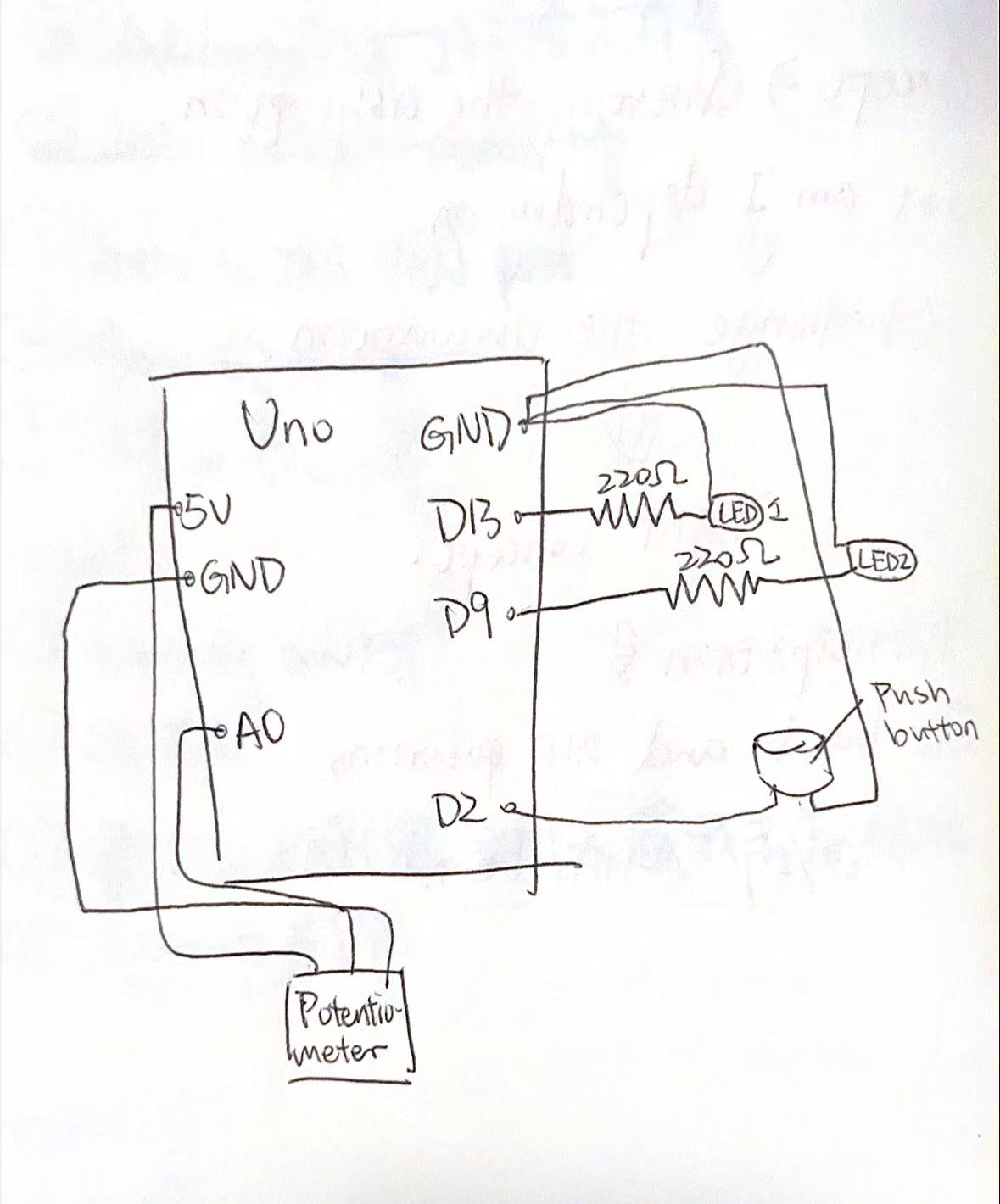
Sketch:

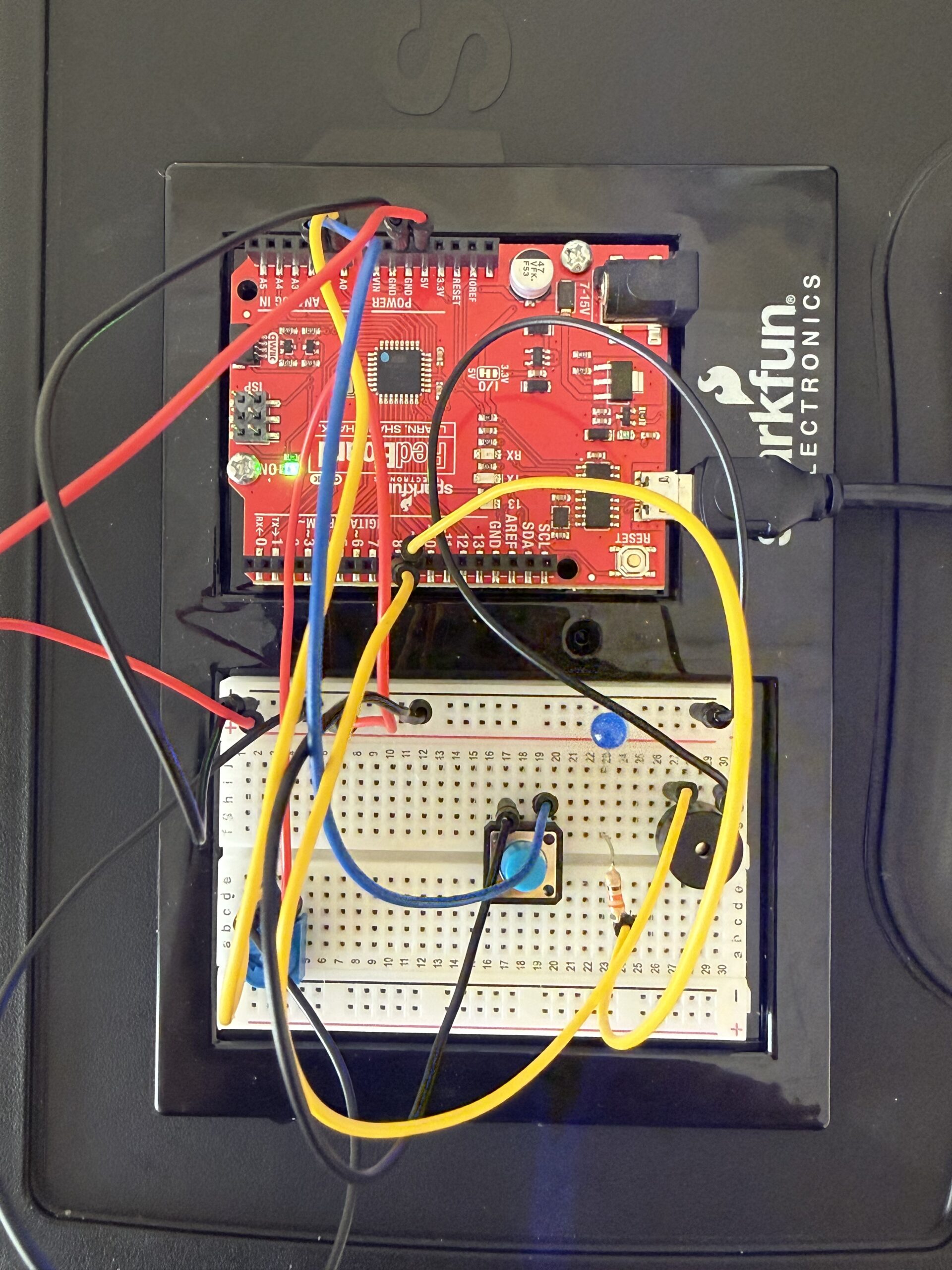
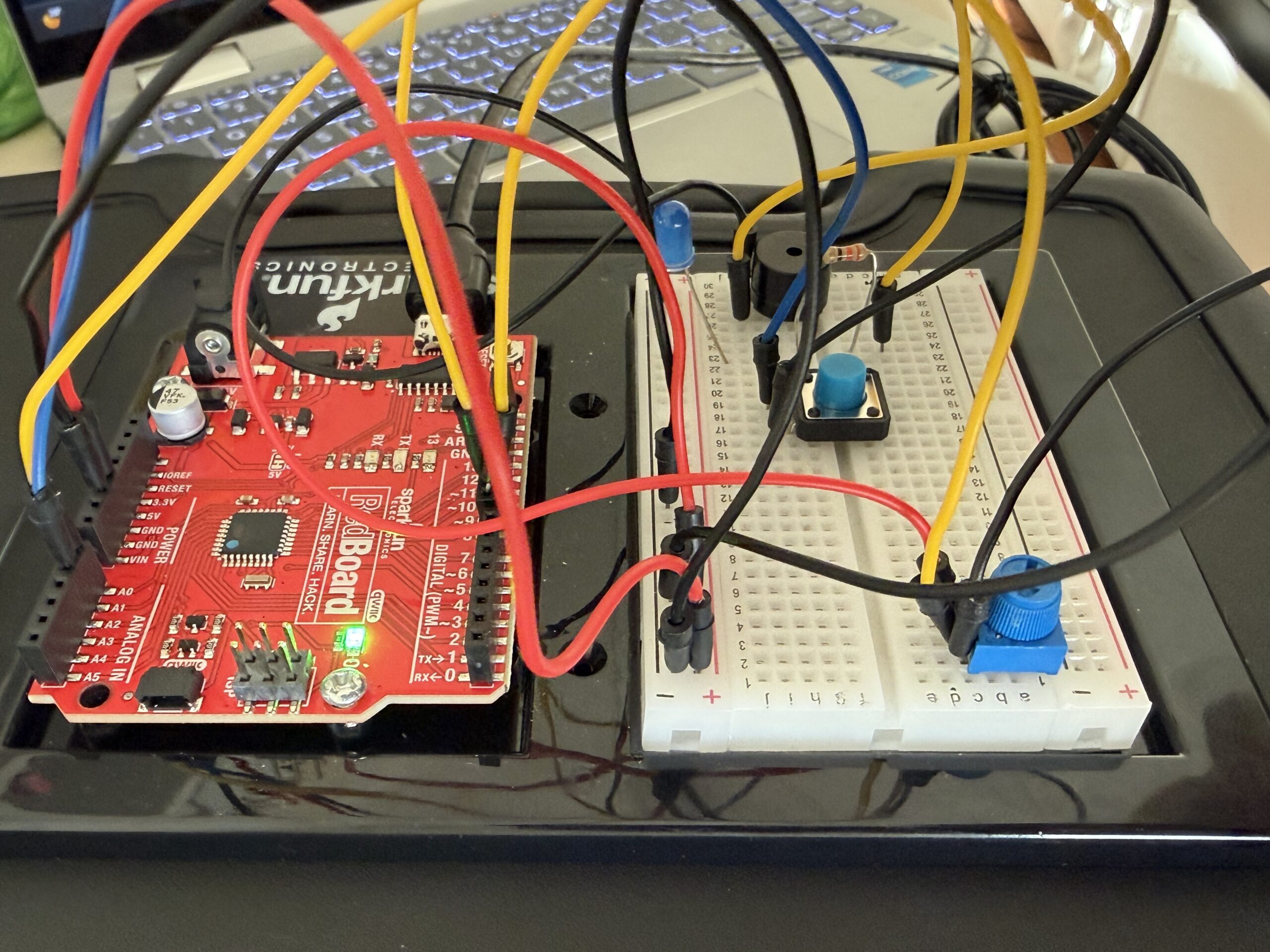
My circuit:

My code:

int buttonPin = 2;     // the button
int ledPin = 13;       // the digital LED
int fadeLed = 11;      // the fading LED
int potPin = A1;       // the potentiometer

int buttonState = 0;   // to store what the button is reading
int potValue = 0;      // to store what the potentiometer is reading
int brightness = 0;    // to store LED brightness

// pinMode( tells the Arduino how each pin will be used)
void setup() {
  pinMode(buttonPin, INPUT); //the button is an INPUT because I’m reading from it
  pinMode(ledPin, OUTPUT); // the LEDs are OUTPUTS because the Arduino controls them
  pinMode(fadeLed, OUTPUT); //this runs once when the Arduino starts
}

void loop() {

  buttonState = digitalRead(buttonPin); // this checks if the button is pressed or not, t will be HIGH when pressed and LOW when not pressed


// if the button is pressed this means the LED on pin 13 turns on
// if the button is not pressed this means LED turns off

This is a simple if/else condition.
  if (buttonState == HIGH) {
    digitalWrite(ledPin, HIGH);
  } else {
    digitalWrite(ledPin, LOW);
  }

  // the pot gives a value between 0 and 1023
// this depends on how much I turn the knob

// I store it in potValue so I can use it for brightness
  potValue = analogRead(potPin);

  //analogWrite() only accepts values from 0 to 255 so dividing by 4 converts the 0–1023 range into 0–255
  brightness = potValue / 4;

//this sends a PWM signal to pin 11,the LED brightness changes smoothly based on the pot
// the higher pot value means brighter LED
  analogWrite(fadeLed, brightness);
}

Reflection / Future

This project helped me understand analog and digital inputs in a more real way. I already knew the definitions, but seeing how each LED reacted made it easier to get it. The digital input was very straightforward because the LED only turned on or off. The analog input felt more interesting because the brightness changed slowly when I turned the potentiometer. Using both at the same time made me feel more comfortable with how the Arduino reads different signals.

I also learned a lot about wiring and how small mistakes can mess up the whole circuit. I kept running into problems on the breadboard, and even when the wiring looked right, things still didn’t work. When the physical board stopped responding completely, I had to switch to Tinkercad. Even though that was frustrating, it helped me focus on the logic instead of fighting with hardware issues. It also showed me how important it is to check every connection carefully.

In the future, I want to try using more sensors and making the interactions more interesting. I also want to keep my wiring cleaner because it makes debugging so much easier. Now that I understand the basics better, I feel more ready to try bigger projects and see how these components can work together in different ways.

Week 8

The Concept:

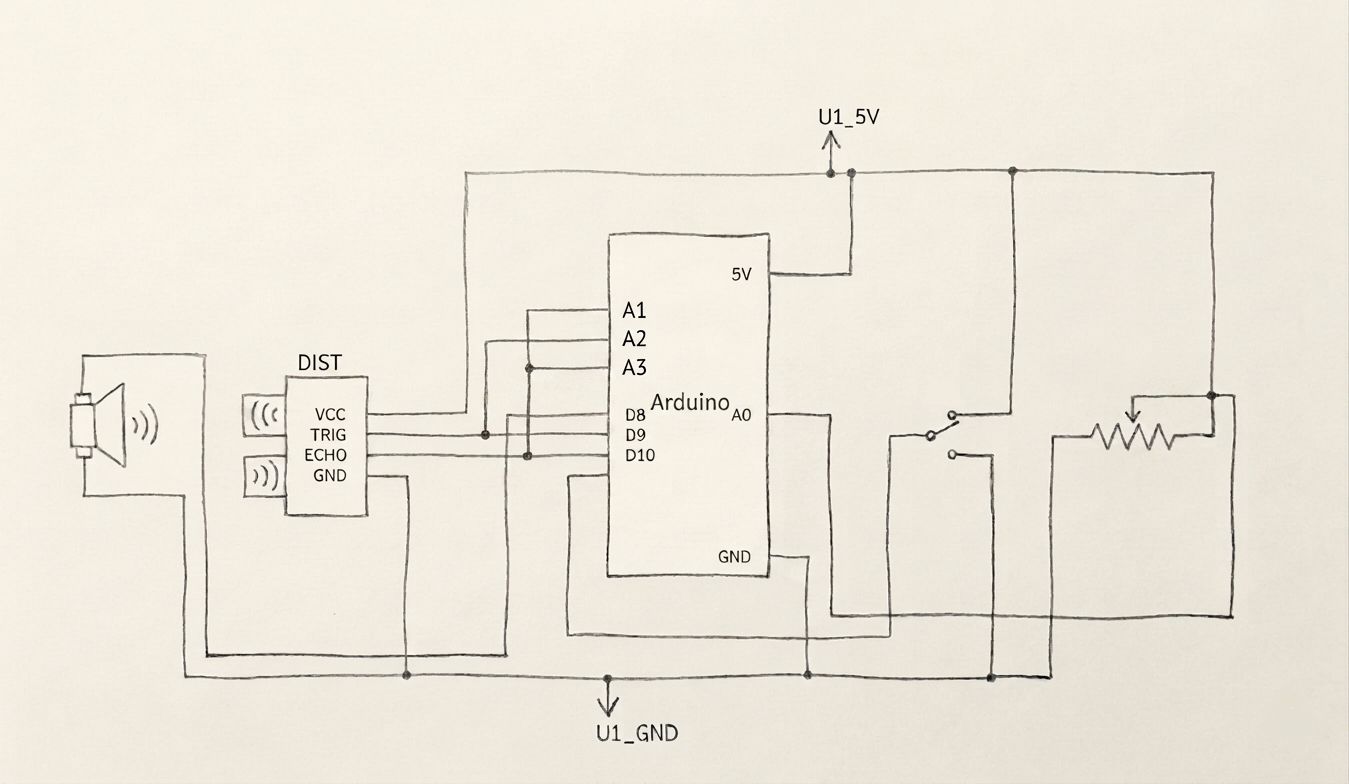
Using three LED lights and an Ultrasonic sensor, I made a little traffic light thing that goes from green to yellow to red the closer you get to it.

Here’s the (crudely drawn) schematic sketch:

Unfortunately, I encountered an error trying to upload my sketch to the Arduino that persisted throughout every single troubleshooting method and fix I could find.

This means that, while I can show the physical Arduino wiring, I’ll have to use Tinkercad to demonstrate it in action.

Here’s the Arduino:

Here’s the video demonstrating Tinkercad circuit:

The code:

As for the code itself, I used a public domain tutorial for some help because I had no idea how to get the ping received from the sensor and convert it to centimeters.

Here’s the GitHub link.

int cm = 0;
int triggerPin = 7;    // TRIG pin
int echoPin = 6;
int red = 12;
int yellow = 11;
int green = 10;    // ECHO pin
int ping = 0;
int close = 50;
int far = 100;

void setup()
{
  pinMode(red, INPUT);
  pinMode(yellow, INPUT);
  pinMode(green, INPUT);
  pinMode(triggerPin, OUTPUT);
  pinMode(echoPin, INPUT);
  Serial.begin(9600);
}

void loop()
{
  digitalWrite(triggerPin, HIGH);
  delayMicroseconds(10);
  digitalWrite(triggerPin, LOW);

  // measure duration of pulse from ECHO pin
  ping = pulseIn(echoPin, HIGH);

  // calculate the distance
  cm = 0.017 * ping;
  // measure the ping time in cm
  Serial.print(cm);
  Serial.println("cm ");
  Serial.print(ping);
  Serial.println("ms");
  delay(100); // Wait for 100 millisecond(s)
  
  digitalWrite(green, LOW);
  digitalWrite(yellow, LOW);
  digitalWrite(red, LOW);

  
  if(cm < close){
    digitalWrite(red, HIGH);
  }
  if(cm < far && cm > close){
    digitalWrite(yellow, HIGH);
  }
  if(cm > far){
    digitalWrite(green, HIGH);
  }
  
  delay(100);
}

Week 9 – Reading Response

Her Code Got Humans On The Moon

This reading changed how I think about the Moon landing. I used to focus on rockets and hardware. The text shows software played a central role. At first, NASA did not even include software in the plan or budget. Later, engineers understood software controlled critical operations during the mission. What stood out most was Hamilton’s thinking about human error. NASA assumed astronauts would not make mistakes. Hamilton assumed the opposite. She designed systems to handle failure. During the Apollo 11 landing, the computer became overloaded and produced errors. Her software focused on the highest priority tasks and allowed the landing to continue.

This idea still applies to programming today. Systems must handle incorrect inputs and unexpected actions. At the same time, the reading focuses strongly on Hamilton. The project involved hundreds of engineers. Her role was critical, but the mission depended on teamwork.

Attractive Things Work Better

This reading made me think about how design affects behavior. The author explains that positive emotions improve thinking. People become more flexible and open to solutions. Negative emotions narrow attention and reduce creativity. I see this in daily use of apps and devices. When a design looks clean and organized, I spend more time using it. I feel more patient with small issues. The reading explains this effect. People tolerate minor problems when they feel comfortable. The teapot example shows how people choose based on context. Some designs look appealing but are less practical. People still use them depending on mood.

At the same time, the idea has limits. I think design must also focus on clarity. For example emergency tools use simple and direct layouts. Users need fast understanding, not only visual appeal. Both readings focus on human behavior. Hamilton accounts for human error in systems. Norman explains how emotion shapes interaction with design. Together, they show that good design must consider how people think and act.

Week 9 – Reading Reflection

Norman,“Emotion & Design: Attractive things work better”

It is really nice to hear that Don Norman who is making a big emphasis on usability also care a lot about design and aesthetics.
The part that stuck with me most was the teapot example: how he owns three completely different ones depending on his mood and the context. It made me realize that “good design” isn’t this one-size-fits-all thing. Sometimes you need efficiency, sometimes you need beauty, sometimes you need practicality. And the fact that aesthetic appeal actually makes people more tolerant of design flaws is wild to me. It’s not shallow to care about how something looks since it genuinely changes how we interact with it.
I think what Norman’s saying challenges this weird guilt that exists around caring about appearance. Like, designers (or developers, or whoever) sometimes act like prioritizing beauty over pure function is superficial. But he’s providing actual evidence that positive emotion broadens our thinking, makes us more creative, more forgiving. A pleasing interface isn’t just nice to look at, it actually changes your cognitive state, and I believe it is really important to remember when creating designs and art pieces.
The contrast between tools for stressful situations versus relaxed ones was helpful too. I hadn’t thought about it that way before, but it makes sense that your design goals shift based on context. This really shifts the understanding of usability: thinking about how people feel when they’re using something can completely change the interaction in the first place. I believe this is something really usable lesson for us to consider when creating our designs and art pieces.

Her Code Got Humans on the Moon

I really liked this text. Not only because it tells an encouraging story about a woman in a field that is still male-dominated, even decades after the Apollo program, who was a key contributor to something as important as Moon travel, but also because it teaches valuable lessons.

One part that stood out to me was when her daughter accidentally discovered a “bug” in the code. I think error-handling is something that doesn’t get enough attention. If users were perfectly rational and never made mistakes, just like astronauts were assumed to be, then systems wouldn’t need to handle unexpected behavior. But in reality, humans are unpredictable and encountering errors is inevitable.

I think developers don’t always fully account for these cases, which is why serious issues, like the P01 mode problem, can be overlooked sometimes. This shows how important testing is, especially as technical field is growing so much now. Today, developers run huge beta tests for games, and I can’t even imagine how huge testing must be for projects as critical as the Apollo mission that Hamilton worked on.

The fact that such a serious issue was discovered accidentally by a child, and that the assumed “perfection” of astronauts didn’t prevent it, shows that systems should be designed to anticipate anything. There should always be built-in behavior to handle errors, no matter how unlikely they seem.

Week 9 – Reading response

Her Code Got Humans On The Moon

The story of Margaret Hamilton was really inspiring. I was especially intrigued by her resilience to work even though she had a little daughter and she brought her to the lab to do her work. Her story about leaving a party to make a correction is something I can relate to. I recall countless times I have been at social events and a new idea or a realization on something I am working on just pops to my head. I may not be as enthusiastic about my work to leave the event but I really admire her for that.

This reading highlighted the difference between a computer and a human in when it comes to making mistakes. NASA trusted their astronauts not to make a mistake and be “perfect” but as Hamilton’s instincts proved right, one can make mistake irrespective of the training they have received so she designed a way out even though her superiors said that would never happen. This is something we will take into account when designing future projects. It should be based on the assumptions that the user is not perfect and can make some mistakes so a fail safes or a way out should be designed to ensure the program or device works as it is supposed to.

Looking back at the Artemis II mission launched a few days ago, I can only imagine the sophisticated software and computing used in this mission. If Hamilton and her team were able to design a whole software with such limited memory and storage and they were still successful I wonder what would be designed for the current mission with all the computing power and artificial intelligence available to the team. I am sure it will also contain groundbreaking innovations can usher humanity into a new age just as Hamilton’s “software” did.


Norman,“Emotion & Design: Attractive things work better”

The reading spoke about something which is usually unspoken of. The design element of objects. These designs if done right can make a user overlook all the flaws of a product or completely change the idea the user has over the product. Take for instance, popular brands like apple. Although there is no substantial change in the yearly iphones they released, when they change the colour of the phones or just position to camera in a different way, they are able to appeal to the beauty sense of the customer and ride on this to sell their products.

Reflecting on this reading, I go back to the first half of the semester where I used to design programs just for the sake of working. I did not pay much attention to the beauty and aesthetics of the program. Which the first encounter a user will have with my project. A boring interface can push a user away eventhough the logic or idea behind the program is amazing. This can also be seen in flashy adds and flashy designs companies make on their products. These are all strategies to reel customers in and focus their attention on exactly what they designers what them to focus on and overlook all the possible flaws of their program a

Week 9 – Reading Response

Her Code Got Humans on the Moon

I really enjoyed this reading, learning about Margaret Hamilton and her impressive contributions to the field of software engineering, especially at such a young age is truly inspirational. As someone who semi-aspires to be a software engineer, but sometimes feel that it’s not a welcoming environment for women, this reading really changed my perspective and gave me some hope and motivation. A few things stood out to me in this reading. First, Margaret felt a lot of pressure to avoid any mistakes. Mistakes are normal, but obviously, in such a high stakes environment, any mistake can be catastrophic. More than that, if she made a mistake, it would only worsen the image about women in “male-dominated fields,” and it would set a bad impression for future women scientists. For instance, the reading mentions a time where she suddenly remembered a bug in the code one late night, and immediately went to fix it, out of fear that any mistakes in the code would be blamed on her is a sad, but plausible scenario. Despite it being a team effort working on the Apollo software, any mistakes would’ve most likely pointed back to her. Luckily, that didn’t happen!

Another thing I found interesting is her attention to detail, implementing back-up plans for any scenario. Even when others on her team claimed that no astronaut would make such mistake, she still insisted on planning for every worst-case scenario. And it paid off. This reminds me of whenever I if-else statements, sometimes even though there are only two possibilities (true or false, for example), I still feel the need to write the second statement as an else if, JUST IN CASE. Obviously, this isn’t the same thing, but this two situations kind of related in mind.

Norman,“Emotion & Design: Attractive things work better”

This reading made me reflect on a lot of everyday things that we use. While I cannot think of any examples of the top off my head, I’m sure there are so many times where I’ve chosen the more aesthetic item, even when it is not functionally better. I think social media trends also contribute to these phenomena nowadays. Overall, I think Norman brings up some great points about how there sometimes always a trade-off between functionality and aesthetics, even though that is not necessary. His example about tools used during hazardous and stressful situations make sense, I guess that’s probably why emergency exits and fire extinguishers all look the same and work the same. Most emergency exit doors are “push” doors because that’s the fastest way to get everyone OUT, and it’s important that any tools needed to facilitate this escape are standardized and straightforward to use (fire extinguishers, ‘hammers’ in buses to break the window, etc.).

However, the balance between functionality and aesthetics still stands in calmer situations. Let’s say someone wants to pick up a new hobby and they buy a pottery kit. The packaging is aesthetic, the brand is well-known and trendy, and everything LOOKS good. Then, they go home and try to start working on their new pottery and nothing makes sense. The instructions are so short because they were trying to keep a minimalist aesthetic, and everything is organized really well but the user does not understand how to use anything. Now, this calm situation has become a frustrating one because what was supposed to be a relaxing, unwinding evening is now a confused, annoyed evening. This might not be what Norman meant by his explanations, but this is kind of what I understood. And this continues to apply in so many aspects of life, when an app developer makes a new app, the interactions should be built on user standards and shouldn’t require the user to think twice, or else the user will just delete the app and go back to what they know. The learning curve to adapt to something new shouldn’t be so high that the user abandons the experience.

Week 9- Reading Response

I agree with all of the author’s points that everything has a time, place, and purpose, especially when it comes to design. Sometimes, we need something that balances utility, aesthetics, and practicality. The author highlights that “design is preferable depending on the occasion, the context, and above all, upon my mood.”

The author also emphasizes that in cases of emergency, when people are stressed, they tend to forget how to use things effectively. In this situation, functionality plays a bigger role, which supports his point that design depends on occasion and context. Context plays a major role in many things—it determines how different aspects are prioritized. For example, when designing an emergency exit door, should I focus on making it visually appealing, or ensure that it works effectively in an emergency and does not cause an accidental stampede due to a design flaw?

I do not think the author is biased at all; in fact, I find his ideas and explanations quite objective. My beliefs largely align with his. However, I also think that aesthetics sometimes fail to consider usability. In many cases, we need both. For example, in Qatar, some cities are inspired by European architecture, such as outdoor restaurants or cafés. However, since the weather is not suitable for outdoor seating most of the year, these spaces often go unused about 90% of the time. My question would be when would be a time where functionality is not need or not important in our daily lives?

Week 9 Reading Response – Kamila Dautkhan

Response 1: Attractive Things Work Better by Don Norman

What stood out to me the most was Norman’s “heretical” claim that attractive things actually work better. I always thought of usability and beauty as two totally separate things like a tool is either pretty or it’s functional. But the way he explains how positive affect (basically just feeling good) makes us more creative and tolerant of minor glitches really clicked for me. It’s funny how he used to be a “usability bigot” who didn’t even see the point of color screens but now he’s out here admitting he owns teapots just because they’re sculptural art. It made me realize that when I’m happy using a well-designed app or object, I really do find it easier to navigate, even if it has a few flaws.

Response 2: Her Code Got Humans On The Moon by Robert McMillan

The most interesting thing about Margaret Hamilton’s story is how she was essentially one of the guys in a field that didn’t even have a name yet. It’s wild that when the Apollo mission started, software wasn’t even in the budget or the schedule. I loved the detail about her bringing her daughter Lauren to the lab and how a mistake the four year old made while playing actually helped save the Apollo 8 astronauts later on. It shows how Hamilton’s intuition for human error was way ahead of its time, especially since NASA’s higher-ups insisted astronauts were trained to be perfect and wouldn’t make mistakes. She didn’t just write code, she basically invented the rigor of software engineering because she knew that in space, there is zero room for any flops.