Tigoe’s “Greatest Hits” taxonomy is useful precisely because it reframes recurring project themes not as signs of creative exhaustion, but as flexible starting points. The most interesting tension in the piece is between projects that offer structured interaction — drum gloves, floor pads, tilty controllers — and those that are essentially aesthetic spectacles you wave at, like video mirrors and mechanical pixels. Tigoe is honest about this distinction without being dismissive, and that balance feels right. The example that stuck with me most is the Digital Wheel Art project, designed for a patient with limited mobility — it reframes a “body-as-cursor” trope into something genuinely purposeful, which suggests that what makes a recurring theme worth revisiting is often the specificity of the context, not novelty for its own sake. The piece raises a question though: if these themes keep recurring, is that because they represent something deeply natural about how humans want to interact with physical systems, or just because they’re the easiest things to build with the available tools?
“Set the Stage, Then Shut Up and Listen” makes a compelling case that interactive art is fundamentally a conversation, and that over-explaining your work is a way of refusing to have that conversation. The director analogy is apt — you can set conditions for an authentic response, but you can’t prescribe the response itself. That said, Tigoe’s argument assumes a fairly confident, well-resourced designer. In practice, people often over-explain their work not out of arrogance but out of anxiety that the interaction won’t be legible at all — a real concern, especially for newer designers. There’s a tension between “shut up and let the audience interpret” and “design clearly enough that people know how to engage.” The “Greatest Hits” piece is actually a useful companion here: it shows that certain gestures — tapping, tilting, waving — are already culturally legible, which makes it easier to step back. The question both readings leave open is how much context is enough, and how you know when you’ve crossed from helpful framing into over-interpretation.
Month: April 2026
Week 9 – Reading Response Megan
Norman,“Emotion & Design: Attractive things work better”
In my opinion, the most interesting takeaway from the reading is when it talks about this “gut feeling” we have, like a sixth sense that immediately tells us what we want or do not want to deal with just based on how something looks. It is like a small light turns on in your brain from the beginning, and that already affects how willing you are to interact with something and how you are going to deal with it.
I also found the connection to the debugging video we saw earlier in class really clear. We talked about how when you are stressed or anxious, your thinking becomes very narrow and you get stuck. The reading explains this as “tunnel vision,” where you focus too much on one thing and cannot see other solutions. That might be useful in a survival situation, but for debugging or any kind of creative problem solving, it is the worst mindset to be in. It makes a lot of sense now why working while stressed feels so unproductive, because your brain is literally limiting your ability to think creatively.
Again, what stood out to me the most, especially because I am interested in design, is the idea that emotions happen before conscious thought. Because of course your brain is already reacting to a design before you even process it. I used to think usability and aesthetics were kind of separate, like one is how it works and the other is how it looks, but now I see that they are actually connected. This quote: If something makes you feel good, you are more likely to overlook small issues and just have a better experience overall. Is actually crazy to me, because I think this applies to many thinks, like for example the apple ecosystem. because of the aesthetics of it and how smoothly it runs even when it it loading, you could be waiting more time for something to download in a mac than on a windows laptop and you would feel like the mac is working better just for the aesthetics of it.
In future projects, I want to use design to influence how the user feels from the beginning. Since as the reading shows us, if I can make someone feel calm and comfortable, they will probably think more clearly, be more flexible, and have a much smoother experience using what I create.
Her Code Got Humans on the Moon
Reading about Margaret Hamilton really blew my mind. It is honestly incredible that a woman, and a working mother at that, was the one who made the moon landing possible during a time when women were not even encouraged to go into technical fields. What is even crazier to me is that she was the only one thinking about a backup plan or worst case scenarios. NASA literally told her that error checking code was not necessary because “astronauts were trained to be perfect.” To me, that is such a wild assumption because humans make mistakes all the time, but back then they just ignored that reality.
It actually makes so much sense to me that a mother would think this way. She saw her daughter, Lauren, accidentally crash a simulator by pressing a button that was not supposed to be used during flight, and she immediately understood that users will eventually do something they are not supposed to do. She used that to try to protect the astronauts from themselves, and it is honestly lucky she did. An astronaut on Apollo 8 made that exact same mistake, and Hamilton’s team had to spend nine hours figuring out how to fix it and get them home safely.
This whole idea of debugging and making systems intuitive for the user basically started with her. Before she came along, software was not even included in the official Apollo budget or schedule. She had to fight for her work to be taken seriously, even creating the term “software engineering” so it would be respected like other fields. It is insane to think that this one woman, working in what she called the “Wild West” of coding, helped create an entire field that now impacts the whole world. She did not just help us get to the moon, she helped shape the foundation of the modern digital world.
Week 9 — Input Output
1. Repository
2. Overview
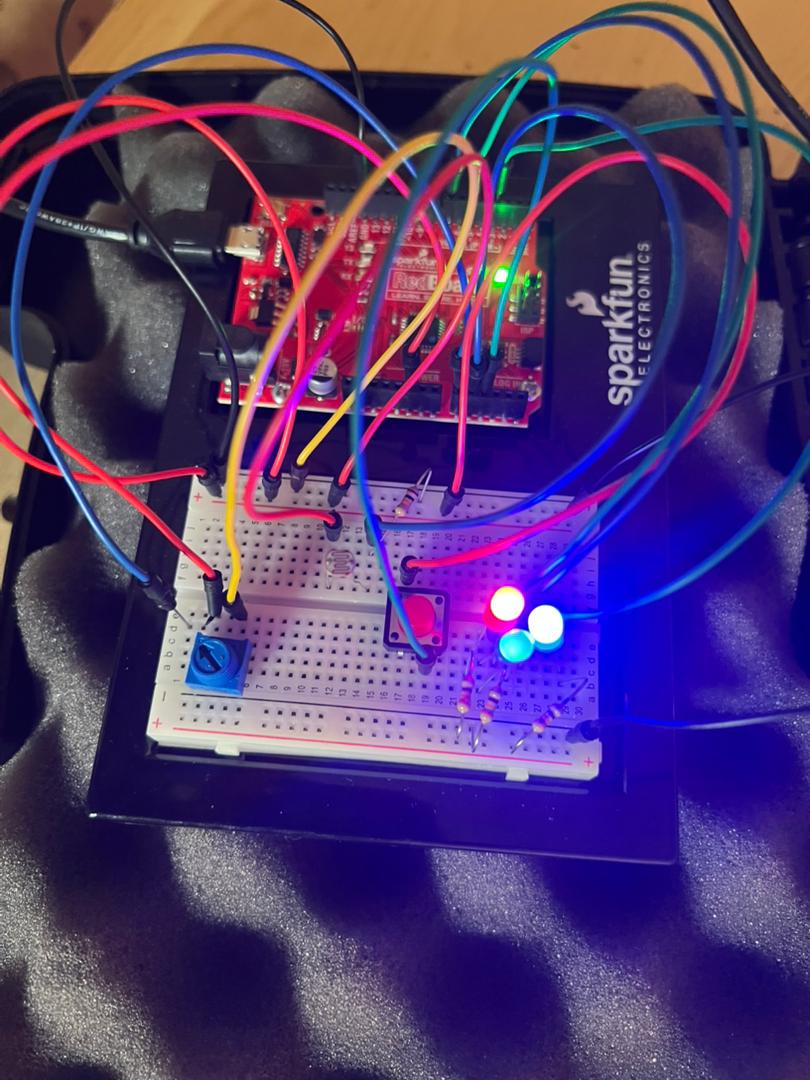
This project is an interactive color-matching game. A random RGB color is displayed on a target LED. The player uses a potentiometer to dial in their best guess across three channels — red, green, then blue — cycling between them with a button. A second RGB LED shows the guess in real time. When the player is satisfied, they press a lock button to submit their answer. The game scores the result based on how closely the guess matches the target across all three channels combined.
3. Concept
The idea came from thinking about how humans perceive color — we rarely see RGB values, we just see a color and react to it intuitively. The game puts that intuition to the test. By isolating each channel and forcing the player to set them one at a time, it makes visible a process that normally happens instantly in our brains. The constraint of the potentiometer (a single knob controlling one value at a time) creates a deliberate, almost meditative interaction. It’s also just a fun game to play, matching colors without needing to understand what’s happening electronically.
4. Process and Methods
-
- The potentiometer is read every loop using analogRead, which returns a value from 0 to 1023. This is mapped to 0–255 using map() to match the range that analogWrite expects for PWM output.
- A state machine (currentState) tracks which channel is active. Only the active channel updates when the pot is turned — the other two hold their last value. This lets the player build up the color incrementally without losing previous adjustments.
- The Next button increments the state from Red to Green to Blue to Finished. If the player keeps pressing beyond Finished, the state wraps back to Red so they can refine any channel without restarting the round.
- The Lock button only accepts input when currentState >= 3, preventing the player from accidentally locking in an incomplete guess.
- randomSeed(analogRead(A5)) seeds the random number generator using electrical noise from an unconnected pin, ensuring a different target color every round.
5. Technical Details
-
- Both buttons use INPUT_PULLUP mode — the pin is held HIGH internally and reads LOW when pressed. No external resistors are needed.
// Pin reads HIGH normally, LOW when pressed pinMode(nextBtn, INPUT_PULLUP); pinMode(lockBtn, INPUT_PULLUP);
-
- The guess LED uses analogWrite (PWM) on pins 9, 10, 11 — this is the analog output requirement. The target LED uses the same approach on pins 5, 6, 7.
// analogWrite sends a PWM signal (0 = off, 255 = full brightness) analogWrite(redG, guessR); analogWrite(greenG, guessG); analogWrite(blueG, guessB);
-
- Scoring uses the sum of absolute differences across all three channels rather than a per-channel check. This gives a single number (0–765) representing total color distance, which maps naturally to a three-tier result.
// Total difference: sum of how far off each channel is (max possible = 765) int diff = abs(targetR - guessR) + abs(targetG - guessG) + abs(targetB - guessB);
-
- A simple delay(250) after each button press acts as debounce, preventing a single physical press from registering multiple times.
6. Reflection
This project was the most game-like thing I’ve built with the Arduino so far and it pushed me to think about user experience as much as electronics. The biggest design challenge was the state machine — figuring out how to let the player cycle back through channels to refine their guess without losing their previous values took a few iterations. I also underestimated how important the real-time feedback from the guess LED would be; watching the colour change as you turn the pot makes the whole interaction feel alive in a way that a number on a serial monitor never could. If I were to extend this, I would add a scoring history across multiple rounds and a visual indicator on the LED itself to show which channel is currently active (perhaps pulsing the active color) rather than relying entirely on the Serial Monitor for guidance.
7. Resources
Week… 9? 10? – Reading Response
Since I don’t have that much time this week (staying with my Aunt means I do, in fact, need to go see all of her Cricket matches and record them), my reading responses are going to be significantly shorter than usual… sorry!
Her Code Got Humans On The Moon
- Looking at the Artemis II mission is making me a bit sentimental.
- Also she’s so cool, her programming job at MIT was a temporary thing… what…? And accidentally invented the concept of software engineering…?
- Lauren once simulated playing astronaut and crashed it by hitting the wrong program, and then it got flagged as a real risk. Then, NASA said astronauts wouldn’t do that… and… well…
- This reading was pretty self-explanatory and easy to understand so I don’t. have anything to say which would not clash with the reading’s text, but she’s really, really cool. I was contemplating double majoring in IM and Mathematics and I think this confirmed it for me. 🙂
Emotion & Design: Attractive things work better
- I would like to see all of his teapots… and why would he buy them if they weren’t that functional… Why would you make a Carelman pot impossible to use? What is the actual function of a tea pot? What makes a teapot desirable? Why would you buy a teapot that makes you work harder than you should? He uses all of these teapots too… (actually mood makes sense…)
- “Usable but Ugly” does make sense. Would I rather have a cup that looks cute and takes me a bit longer to finish, or a cup that takes me very short to finish but looks really ugly? What if you find a solution that’s cute but also works well?
- In MYP Product Design, we learnt about ACCESSFM when designing anything, which featured A(ccessibility) and F(unctionality). Why do we think we can compromise on either when we can find a solution that fits both at once? People DO judge books by their covers, so we should work towards that.
- Psychology is everywhere! You study what people like to make a product that they will use. I didn’t know we had a judgemental system that tells us what’s good or bad, so it’s cool how you can literally trigger positive affect by pleasing design. Pleasing design makes you feel more creative while negative design makes you focus less on the design and more on the contents. That’s probably why important signs are very basic.
- There’s three levels – visceral (does it look/feel/sound good instantly), behavioral (is it actually usable) and reflective (what does owning this mean to me, what does it say about me). I never thought about the third one consciously.
- Norman wrote The Design of Everyday Things (yay!) and then admitted that he wrote it too focused on logic and missed the emotional side completely, and then wrote this to fix it HAHAHA.
- I guess TL;DR is that pretty and functional are not opposites… and nice-looking things do perform/get treated better. That’s literally also how it works with people as well (unfortunately).
Week 9 – Light Show Charging
Demo Below:
Concept:
The idea of this is that, you “charge” up a light show by shining a really bright light on the photo resistor, once you charged it up for a good 10 seconds, a light show happens! A yellow RGB light slowly brightens up as the percentages reaches to a 100 while charging. I implemented a physical button that resets everything to stop the light show and so that you are able to charge it again.
Implementation:
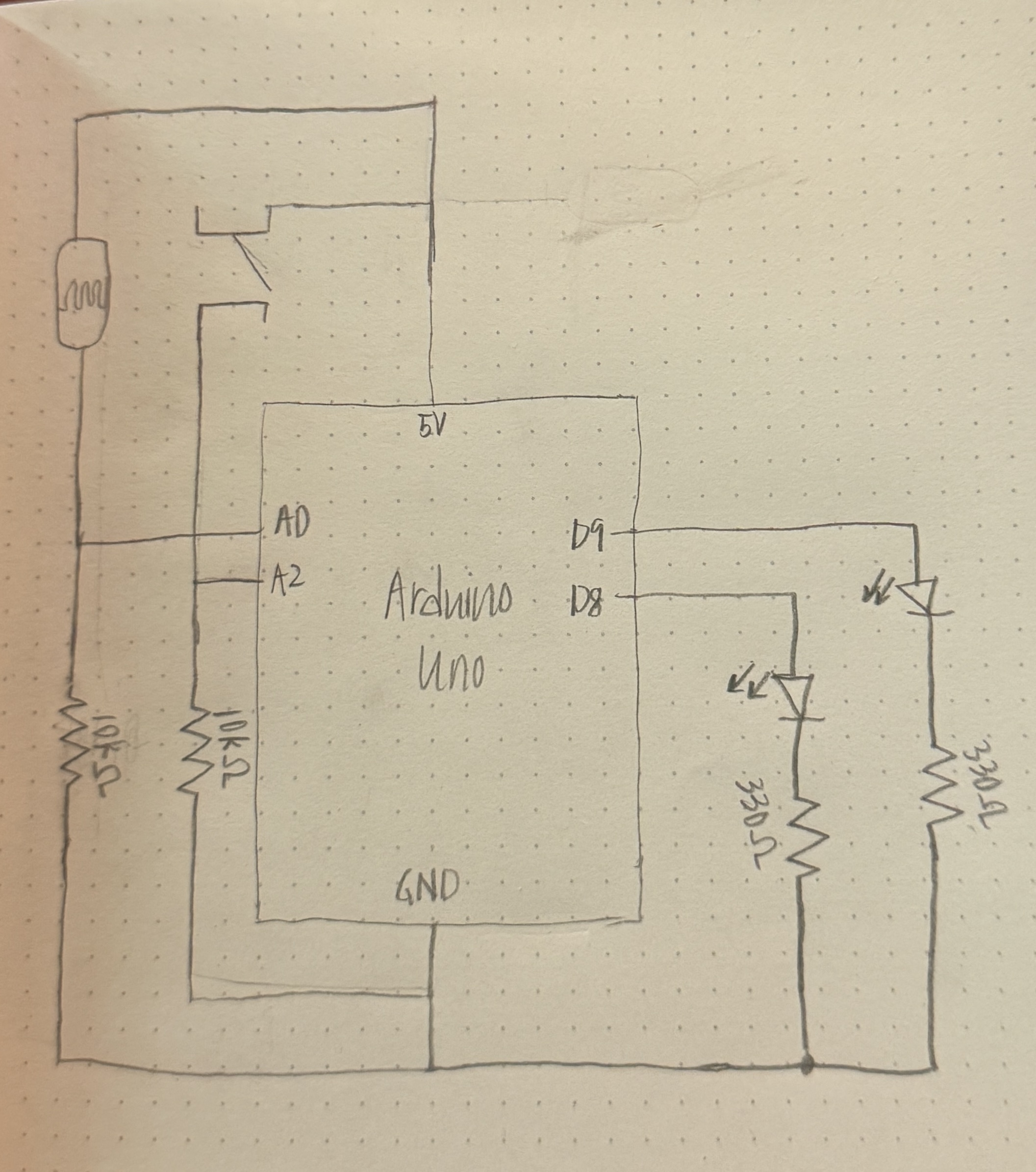
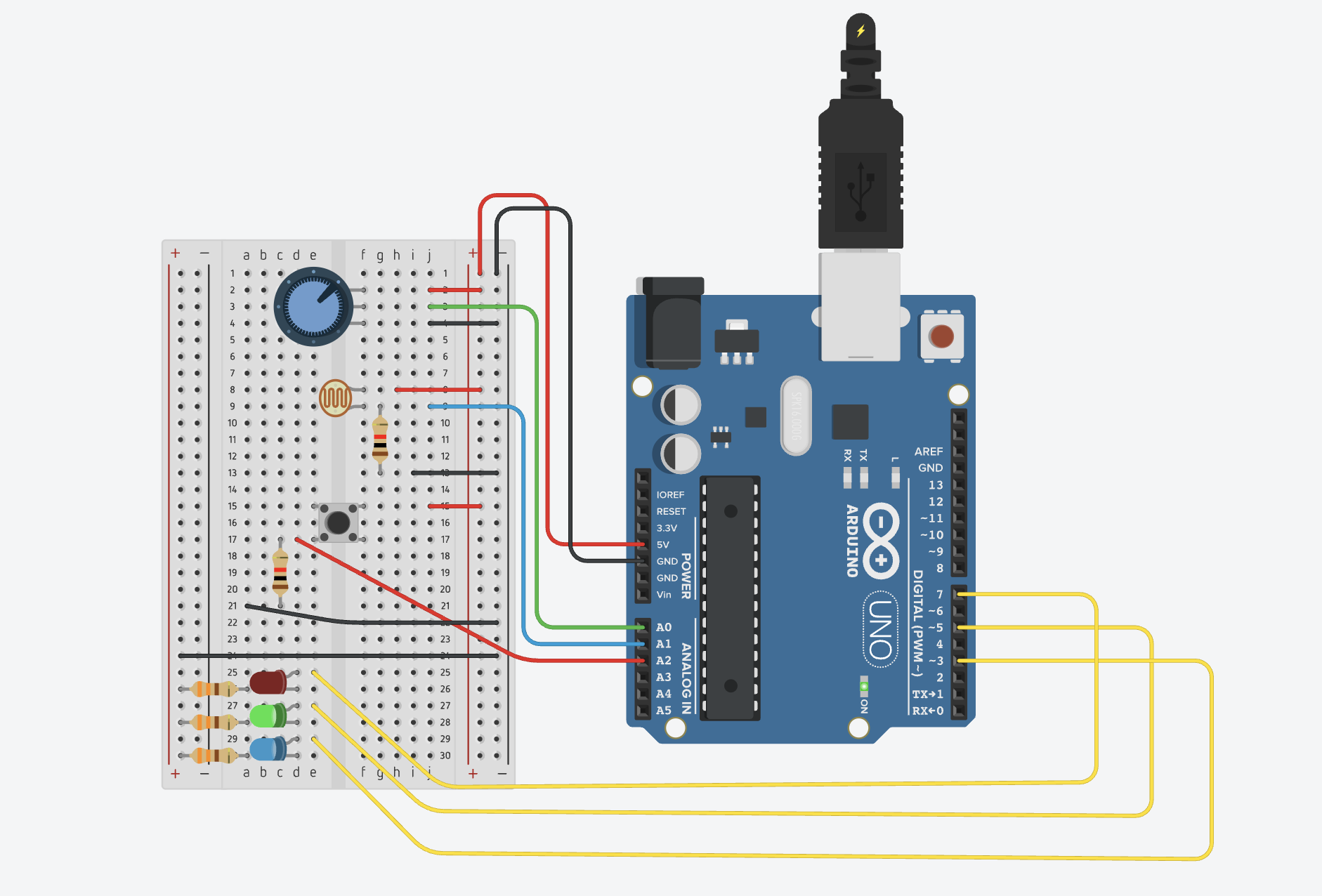
Schematic:
The components used are RGB lights, a photo resistor, a 2×16 LCD and a potentiometer.
#include <LiquidCrystal.h> // RS, E, D4, D5, D6, D7 LiquidCrystal lcd(12, 11, 5, 4, 3, 2); const int ldrPin = A0; const int btnPin = 7; // Button const int ledAnalog = 9; // The fading LED const int ledA = 13; // Light show LED const int ledB = 10; // Light show LED const int ledC = 8; // Light show LED int threshold = 600; unsigned long startMs = 0; bool charging = false; bool done = false;
Here we initialize everything, since LCD has its own module and example code, I took the initialization and syntax from there, we assign pins, the threshold and set everything to false since the program just began.
// Reset logic
if (digitalRead(btnPin) == LOW) {
// Set variables to original values
startMs = 0;
charging = false;
done = false;
// Turn off everything
digitalWrite(ledA, LOW);
digitalWrite(ledB, LOW);
digitalWrite(ledC, LOW);
analogWrite(ledAnalog, 0);
lcd.clear();
lcd.print("System Reset");
delay(500);
}
This is the reset code for when the button is pressed, it just turns off everything, and sets charging and done false to enter the mode it originally started with and just reset everything to the origin.
if (!done) {
// When light above threshold start counting
if (light > threshold) {
if (!charging) {
startMs = millis();
charging = true;
} ...
}
}
We have nested if statements here, to first check if the charging is done, if it isn’t we check if the light crosses the threshold, and if we aren’t already charging, we should start. If the light passes down the threshold, the charge goes to 0 and we restart.
// Light show time
lcd.setCursor(0, 0);
lcd.print("FULLY CHARGED! ");
lcd.setCursor(0, 1);
lcd.print(" 100 PERCENT ");
// Blink Pattern
digitalWrite(ledA, HIGH); delay(100);
digitalWrite(ledB, HIGH); delay(100);
digitalWrite(ledC, HIGH); delay(100);
digitalWrite(ledA, LOW); digitalWrite(ledB, LOW); digitalWrite(ledC, LOW);
delay(100);
}
When it has charged for 10 seconds or more, we set done to true, which calls the else commands and starts the light show till stopped by the button or simply turned off.
Code here:
GitHub link
Reflection:
Some ways I thought of improving this is having a proper choreography of the lights that go along with some music, maybe manually do it or write up an algorithm that works for any song, either way I think that would improve this project. It was fun learning about the LCD however, and I am glad that I am able to use it now.
Week 9 Reading
I really liked the second reading, because I am always curious about movies that leave things to the audience to interpret and also poetry; how everyone have their own meaning of the same couplet. The fear of not being able to convey what I am trying to convey is something I notice everyday everywhere. The author touched on the opposite where we ignite a thought and let other people drive anywhere. Thou this is a scary idea at the beginning, it uncover so many new possibilities which I might to have never thought about before. I wonder if I can in corporate in the Arduino assignments. In the P5, it was easy to let the audience contemplate but with this I think there it harder but can be done. And if done properly, it can have a far greater impact as we can have all the sensory inputs here.
On the other hand, the first reading highlighted something which I feel during every assignment, even thou room for creativity is infinite, one often feels limited with when working with primitive shapes or two LEDs. I understand it possible to create a mural out of primitive shapes but that also requires mastery in it. My take away from that reading is a quote by Martin Scorsese that is “The most creative is the most personal”
Lighting Loop or Disco
Concept
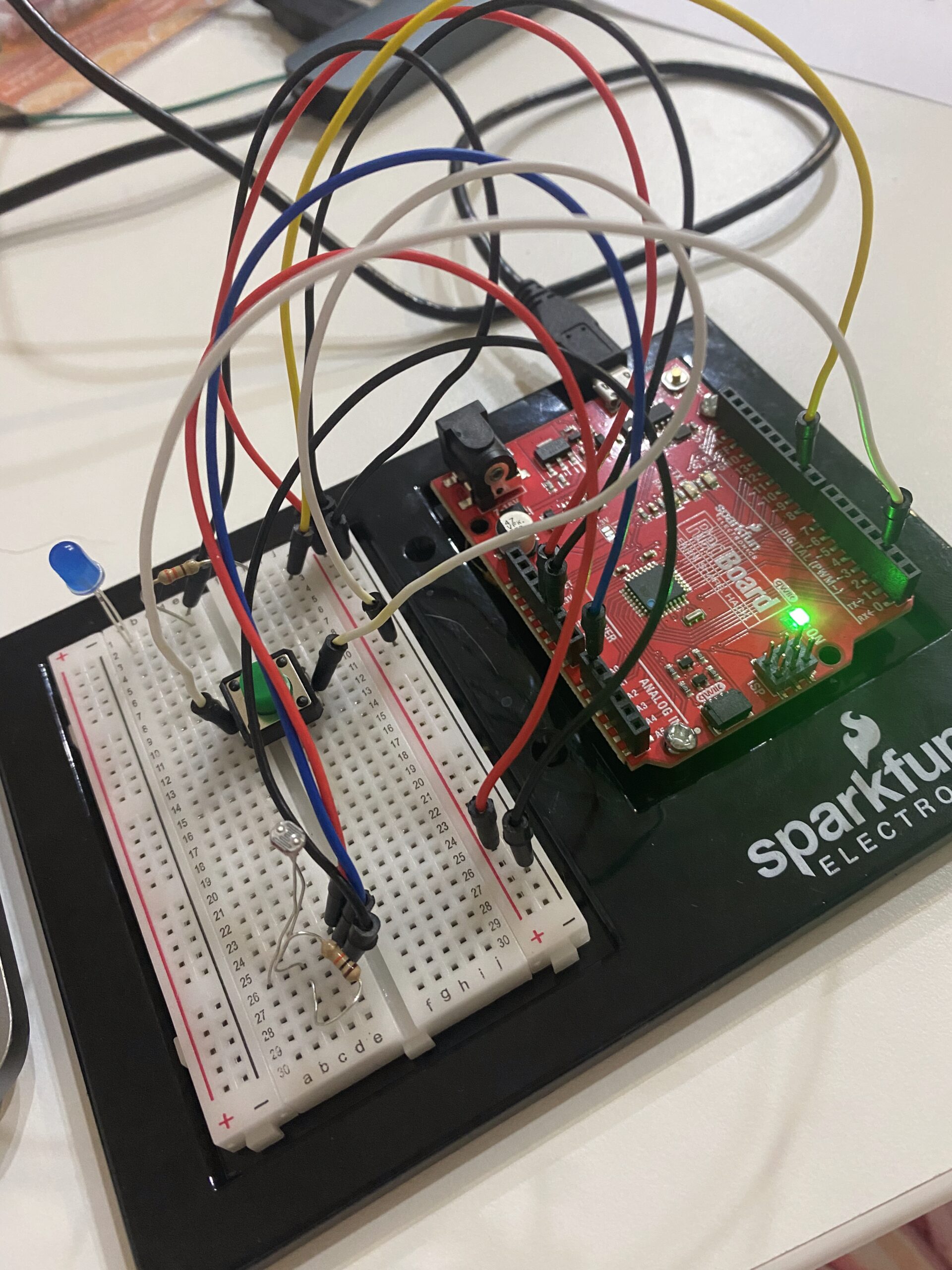
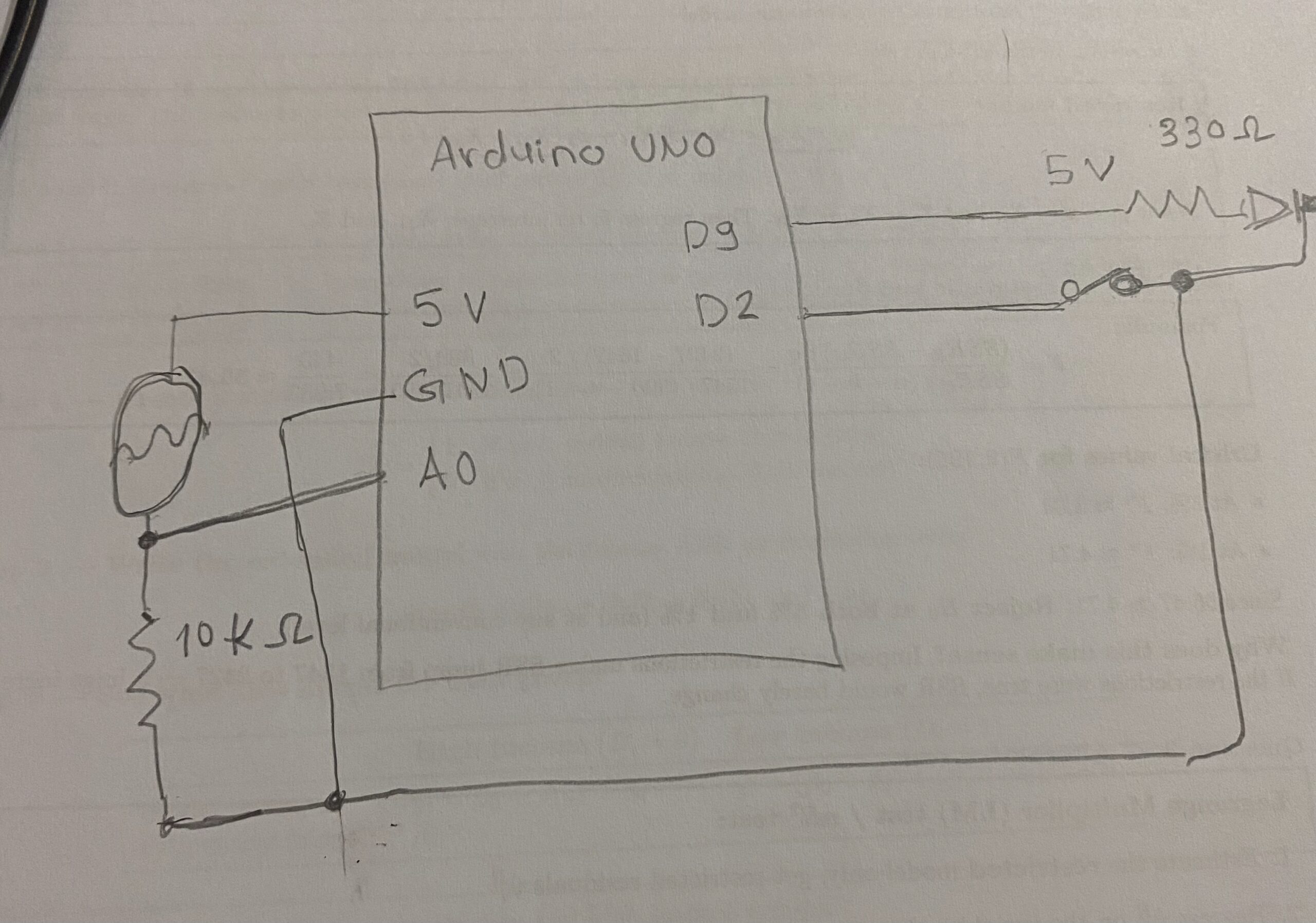
I was initially thinking of making a a lamp which turns on in dark and can be manually turned on. But that seemed very boring. Then I thought that why don’t I use a light from one LED and use it as an input to for the LDR which can ultimately effect a second LED. While thinking about this, I thought that I can just create a switch like that using code. Along the lines, It came to me what I can do is make the light light fluctuating by making it fade in and out. So the LDR reading will change within a range and I can make the second LED a blink. This reminded me a party or disco lights where different lights turn on and off at different rates.
Work
Both circuits were relatively simple as we did in the class, and the connection between them was through the code. To add more to it I used INPUT_PULLUP instead of a resistor. I had a conversation with GPT about this. It took me some time to get a grasp of regarding how it work. The next was putting the led close to the LDR. Now this was a bit tiring because the LDR was also detecting the room light. So I couldn’t have a fixed range, and the code needs to be updated if the location changes and new light in the room is introduced. I would regard this as the most challenging part.
On the other hand the part I am most proud of is dealing with multiple kinds of input. I was indeed relieving when my design did not require mapping of analog inputs and outputs. Initially I thought that I had to deal with all these multiple inputs but with just few lines of code, I was able to accomplish what I had in mind without nest if and loop blocks.
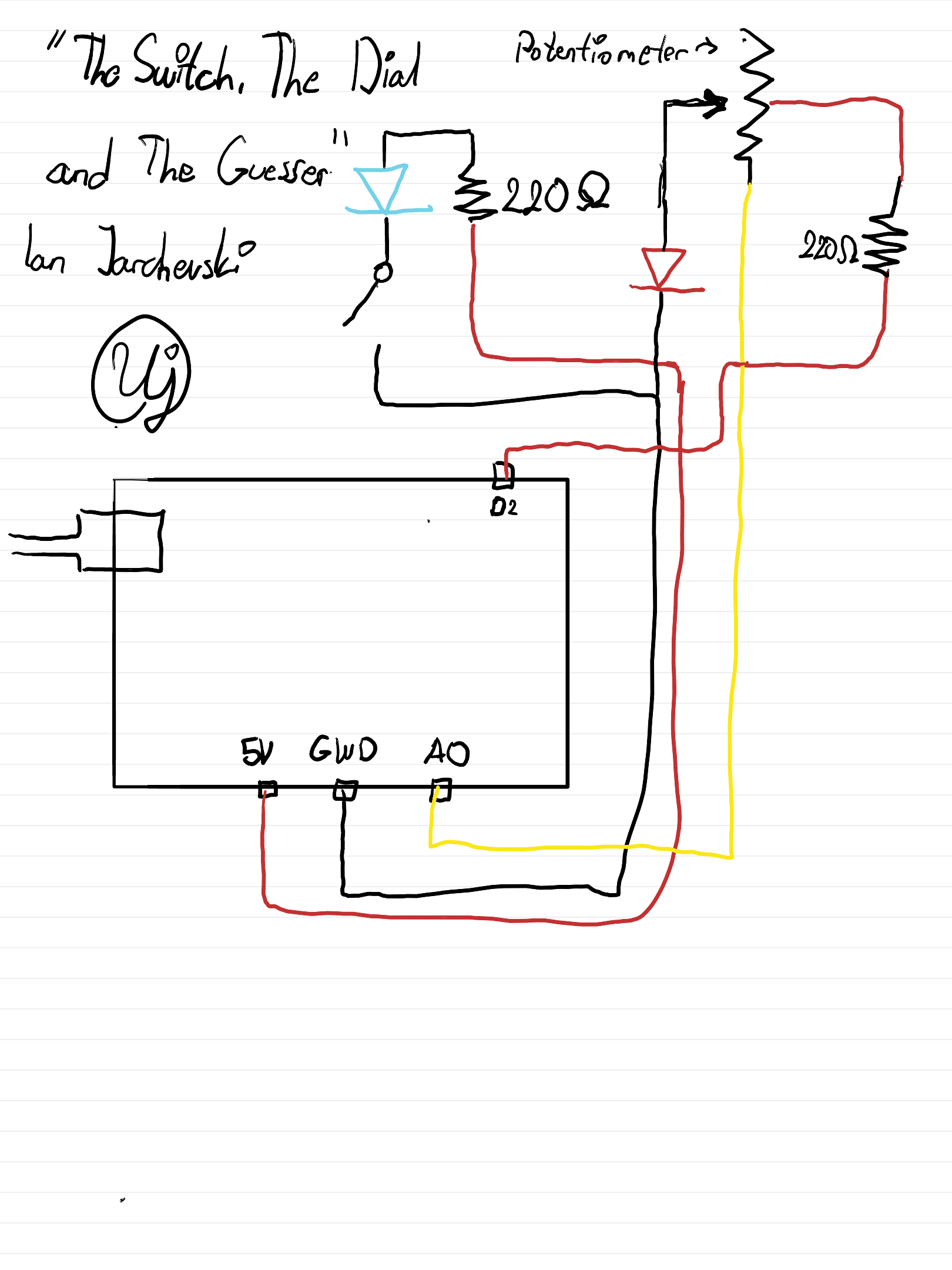
Sketch
Working Demo
Reading Response – Week 9
Norman,“Emotion & Design: Attractive things work better”
This is so interesting. I’ve thought about design quite often because it’s something I’m always interested in, but the way Norman explains it made me think about design outside the box. The idea that “attractive” or “pretty” things actually work better is something I never fully considered before. I used to think functionality comes first and that’s it, but now I’m realizing that looks and feelings can change how we experience it. One part I thought of was the idea of modernization. As someone with OCD, I used to want everything to be in a very specific and controlled way, at least the things I could control. Recently, though I’ve started to realize that a bit of chaos or imperfection can actually be better. Norman’s examples of teapots reminded me of older designs and advertisements. In the past, designs were mainly focused on solving problems and functioning well, while aesthetics didn’t matter as much. Now, because of technology and how easily we can solve everyday problems, aesthetics have become much more important.
Norman’s idea of feelings and the “science of emotions” explains how our emotions shape the way we interact with the world. At the same time, I think this idea can be tricky. A design might try to create a specific emotion for users, but not everyone will feel the same way? This is where design becomes complicated, because emotions are not universal. Still, we often rely on shared associations, like color symbolism, to guide those emotional responses. For example, European street lights have been trending recently on social media because of their yellow lights. Now, whenever people reference European streets or a certain “vibe,” it automatically connects to that lighting. Adding on to the city designs, streets and roads specifically, I usually think of New York and how the streets are structured. I used to believe that everything being clean, organized, and “perfect” was better, so I would compare it to how roads are designed in the UAE and imagine how beneficial it would be if they were more like New York. But now I realize that what looks visually appealing or aesthetic is not always what functions best.
Overall, this reading made me realize that design is not just about making something work, but about how it makes people feel while using it. In my future projects I want to experiment with this idea of ‘attractiveness’ as well as focusing on the feelings from my perspective as the artist/creator but also the audience’s perspective.
Her Code Got Humans on the Moon
I always think about fate and destiny, which I personally find very beautiful. If Margaret’s 4 year old daughter Lauren didn’t pre-launch the system, then they wouldn’t have discovered that flaw and she wouldn’t have been able to think about a solution. Thinking about Margaret’s perspective, I expected her to get mad over the “ruined” project, but instead she treated it as an opportunity to improve the system. That mindset really stood out to me because it shows how mistakes aren’t always setbacks, they can actually prevent bigger failures later.
I also found it interesting how people were punching holes into stacks of cards to represent code, and how everything had to be perfect before running it because there was no room for edits. This made me reflect on how different my experience with coding is today because I’m constantly editing, fixing, and experimenting with my code which I now am very thankful for this flexibility. Back then, one small mistake could cost so much time and effort, which means they had always think carefully. This connects a lot to my own work and even my daily habits. I always know that there is a command z button I can press and have everything how it used to be, and I know that I can always go back and fix things. But reading this made me question whether I’m sometimes too dependent on that flexibility instead of thinking things through more deeply from the start. Like I always say to my friends, I wish there was a command z button in life so I can go back.
Overall, I think Margaret’s story inspires me to be more aware of the “impossible” or unexpected scenarios, because there is always a possibility of things going wrong. I also want to start using bugs as opportunities for growth in a more intentional way because normally, I just fix the issue, learn from it, and move on, but now I’m thinking about how I can actually expand from a single mistake, whether that’s improving the system, adding new features, or preventing future errors. I guess I’ll have to experiment with that next time.
Week 9 reading
Reading 1(longer one):
One idea I got from the reading is that beauty is not just decoration. Attractive design can actually change how people feel, and that feeling can affect how well they use something.
I also thought it was interesting that people do not always choose things only because they are the most efficient. Sometimes we choose objects because they feel enjoyable, elegant, or comforting. That makes design feel more human, not just technical.
Another idea is that emotion affects thinking. When people feel relaxed and positive, they may become more open, creative, and flexible. But when they feel stressed, they focus more narrowly. This made me think that design should match the situation people are in.
The reading also made me think that usability and aesthetics should not be separated too much. A product may work well in a mechanical sense, but if it feels unpleasant, the whole experience is weaker. Good design should care about both function and feeling.
Reading 2(shorter one):
Margaret Hamilton did more than write programs. She helped make software into a serious field. At first, software was not even treated as an important part of the Apollo mission, but later it became central to success.
I also think the article has a strong message about responsibility. Hamilton understood that small mistakes in code could become huge real-life dangers. That makes her work feel very modern, because today we still depend on software in high-stakes situations.
The article also suggests that great inventions are not only about one person. Hamilton was a major leader, but Apollo software was built by a large team, including many women whose work is often forgotten. That makes the article partly about hidden labor and recognition.
WEEK 9 HAPPY BIRTHDAY CONCEPT
https://github.com/da3755-ui/intro-to-im/blob/904200aaa8c70e0606c6851ffc5c46abe5d63b96/BirthdayConcept_IntroToIM_Week9.ino
The Concept
For this week’s assignment, I decided to incorporate the concept of birthday candles (lighting them up and blowing them out). My LEDs act as my candles, my button acts as a lighter, and the LDR/photocell senses my blowing (will explain).
I used a button (digital input) to be able to control my 3 LEDs. Once I hit the button, the LEDs turn on one after the other. The blowing concept works through my photocell. When you put your face closer to the photocell and the LEDs to blow, the light from the LEDs reflects on your face; this light reflection is further read by the photocell, and the reading increases. Once my photocell takes in that higher reading, the candles/LEDs turn off one after the other as well.
Process and Challenges
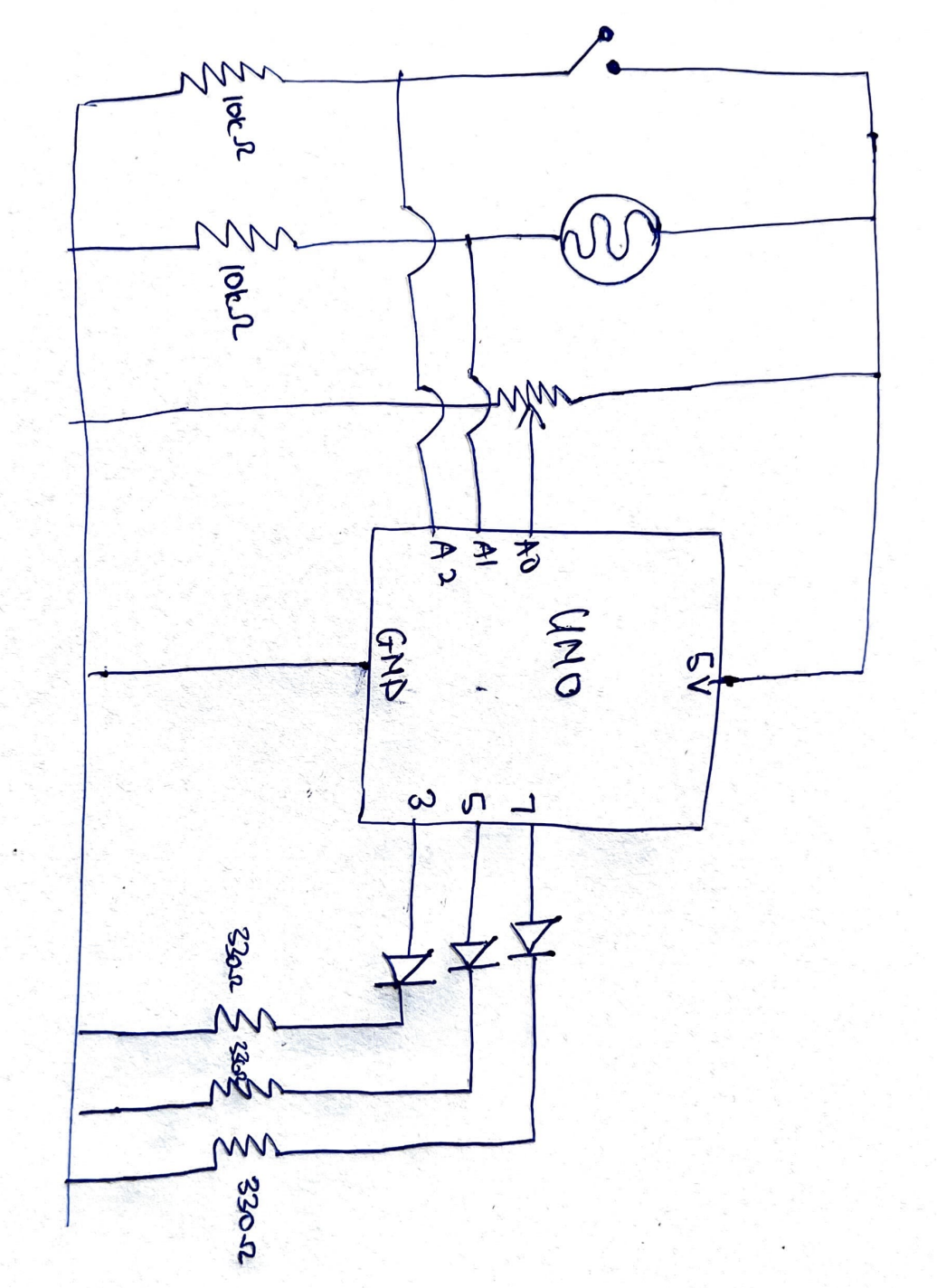
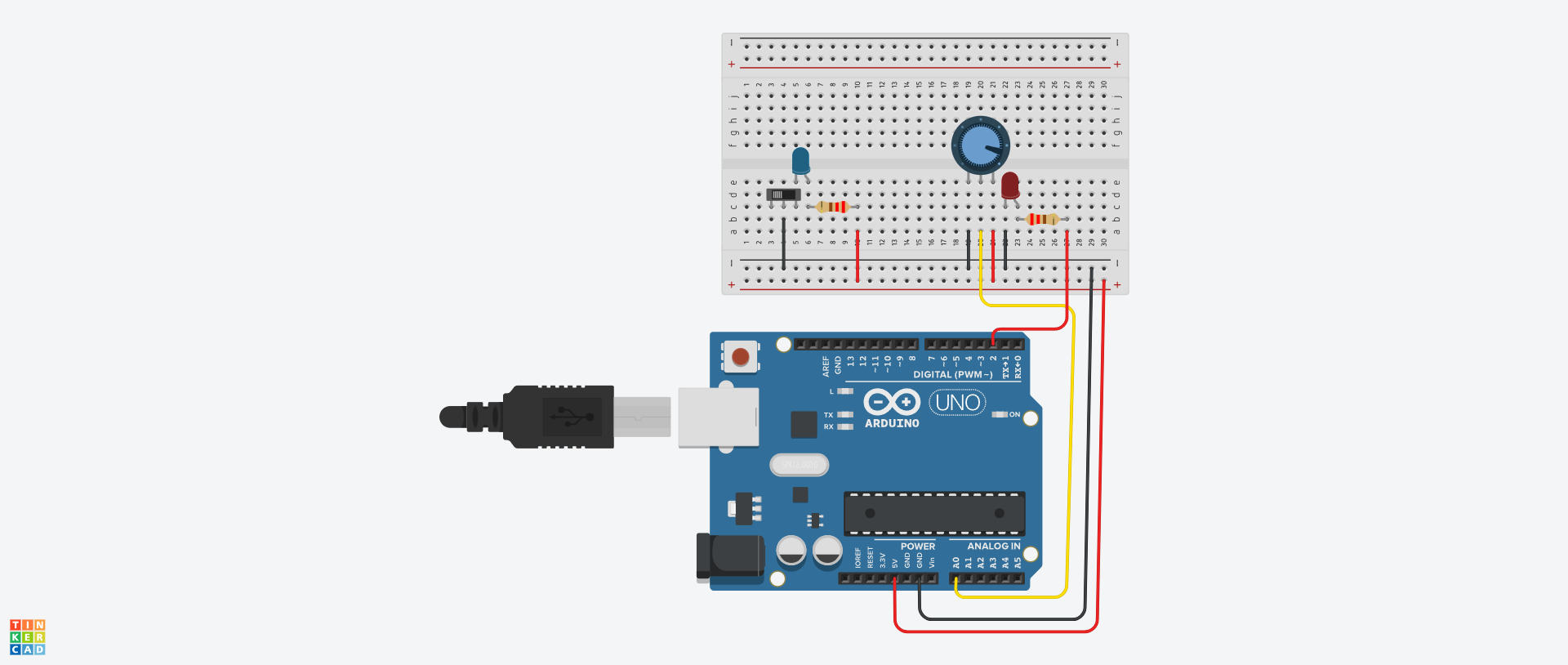
To do my led set-up, I followed a diagram I found online, but I altered some of it to how I wanted it to fit my set-up.
I first started by setting up my LED system before adding in my photocell, just to make sure the base part is working. I built the system successfully and moved on to add my photocell.
Adding in the photocell and getting its readings was the most challenging part of the process. I set up my photocell and connected it to a 10k resistor and an analog pin. However, the readings were not accurate at all. For example, covering the photocell would not decrease the reading. At that point, I decided that maybe because I’m testing it during the day, there is no dramatic shift in lighting for the photocell to read (that was wrong).
After a while had passed, I was thinking about my project, and I realized I had forgotten to attach a 5V pin to my photocell, and I forgot to attach my photocell to ground. That explained a lot of why the readings were inaccurate.
Once I plugged in the wires correctly, the readings were still inconsistent and inaccurate. Thats when I decided to fully take down the entire system and start with the photocell first.
I watched a YouTube video to ensure I have the right connectivity and rebuilt my voltage distributor and photocell system. The readings then became accurate. I added in my LED system that I removed and it worked.
I originally wanted each LED to light up after each singular clip so it would be:
- first button press = turn on first led
- second button press = keep first led on and turn on second led
- third button press = keep first and second leds on and turn on the third
but that would have required me to use specific array functions which were difficult for me to implement.
Code Highlight:
I’m happy with the way I let the led lights light up one after the other after hitting the button
if (state == LOW) { // if the button is pressed, the leds/candles will light up one after the other
digitalWrite(led1Pin, HIGH);
delay(2000);
digitalWrite(led2Pin, HIGH);
delay(2000);
digitalWrite(led3Pin, HIGH);
delay(2000);
}
Circuit Schematic
Circuit look
References
Because my photocell readings would only keep decreasing no matter what, I used Gemini AI to explain to me whether the reading from my photocell should increase or decrease when the area gets brighter. It also told me to check my connectivity, because if my photocell’s resistor was connected to one of the wires, the readings would be flipped, but that was not the case for me.