Week 10 – Production Assignment

Concept

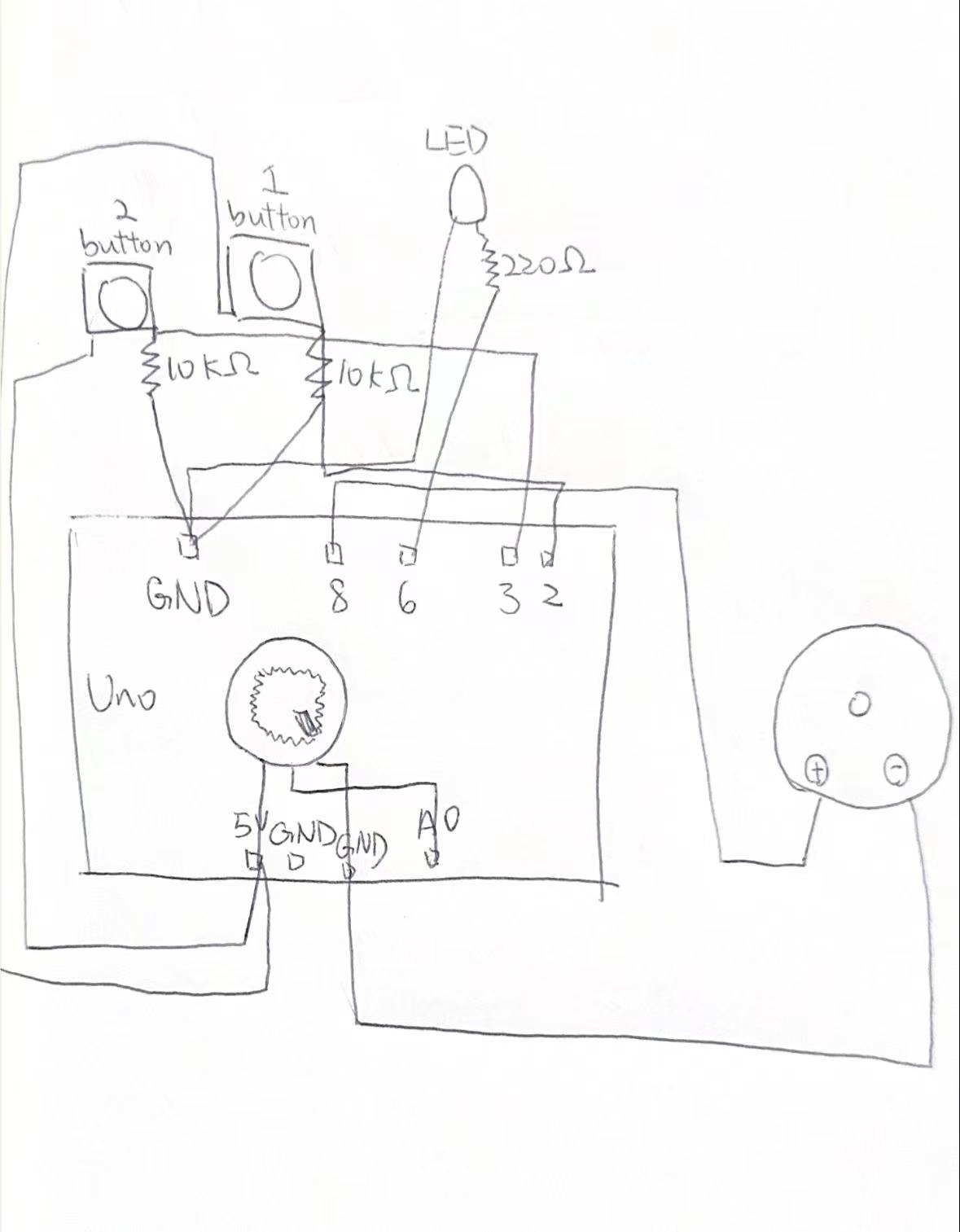
This project demonstrates how an arduino system uses both analog and digital inputs to control outputs in different ways. A digital sensor like a button provides simple on or off input to control an LED, while an analog sensor like a potentiometer provides a range of values that are mapped to adjust another LED’s brightness using PWM. So in simple words, the project shows how real world data can be read, processed and translated into responsive visual feedback.

Sketch

Code

const int ANALOG_SENSOR_PIN = A0;  // Potentiometer or photoresistor
const int DIGITAL_SENSOR_PIN = 2;  // Button/switch
const int DIGITAL_LED_PIN = 13;    // LED controlled digitally
const int ANALOG_LED_PIN = 9;      // LED controlled with PWM 

int analogValue = 0;
int digitalValue = 0;
int ledBrightness = 0;

void setup() {
  pinMode(DIGITAL_SENSOR_PIN, INPUT_PULLUP); 
  pinMode(DIGITAL_LED_PIN, OUTPUT);
  pinMode(ANALOG_LED_PIN, OUTPUT);
  
  Serial.begin(9600);
}

void loop() {
  analogValue = analogRead(ANALOG_SENSOR_PIN);
  
  digitalValue = digitalRead(DIGITAL_SENSOR_PIN);
  
  if (digitalValue == LOW) {  
    digitalWrite(DIGITAL_LED_PIN, HIGH);
  } else {
    digitalWrite(DIGITAL_LED_PIN, LOW);
  }

  ledBrightness = map(analogValue, 0, 1023, 0, 255);
  analogWrite(ANALOG_LED_PIN, ledBrightness);
  
  // Debug output
  Serial.print("Analog: ");
  Serial.print(analogValue);
  Serial.print(" | Digital: ");
  Serial.print(digitalValue);
  Serial.print(" | Brightness: ");
  Serial.println(ledBrightness);
  
  delay(10); // Small delay for stability
}

How it was made 

I built this project using an arduino, a button, a potentiometer, and two LEDs on a breadboard. The potentiometer was connected as an analog sensor to control the brightness of one LED, while the button was used as a digital sensor to turn the second LED on and off. I wrote the code to read both inputs, then used analog(Write) to adjust the LED brightness and digital(Write) to control the on/off LED. I also used the serial monitor to display the values for testing and debugging.

Reflection

Honestly, doing this project was very fun. Through this project, I learned how to use both analog and digital inputs with an arduino. I understood that analog inputs give a range of values which can be used to control things like brightness, while digital inputs only have two states. If I did this project again, I would try to make it more creative by adding more sensors or different types of outputs.

Week 10 – Production Assignment

Your concept

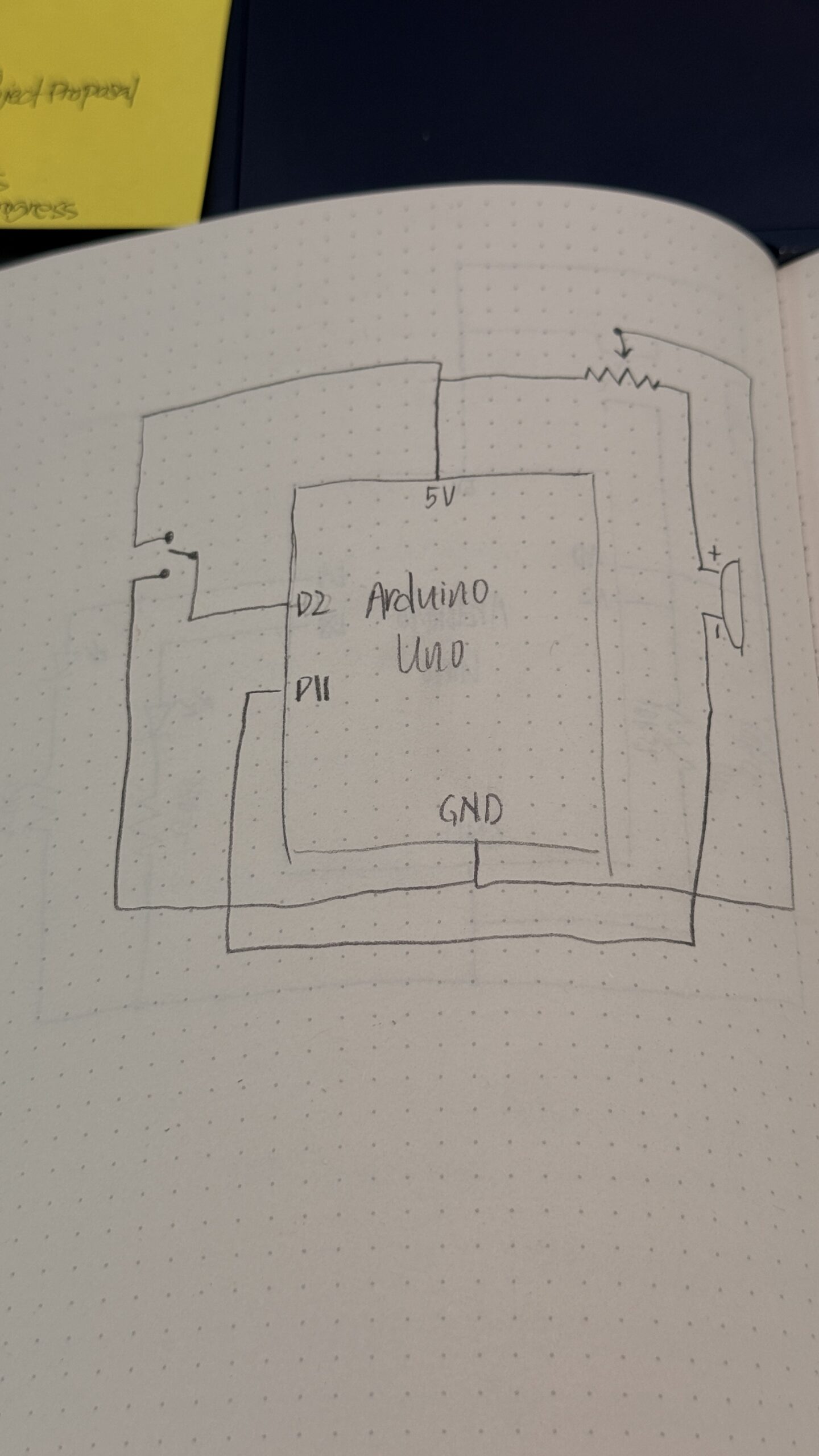
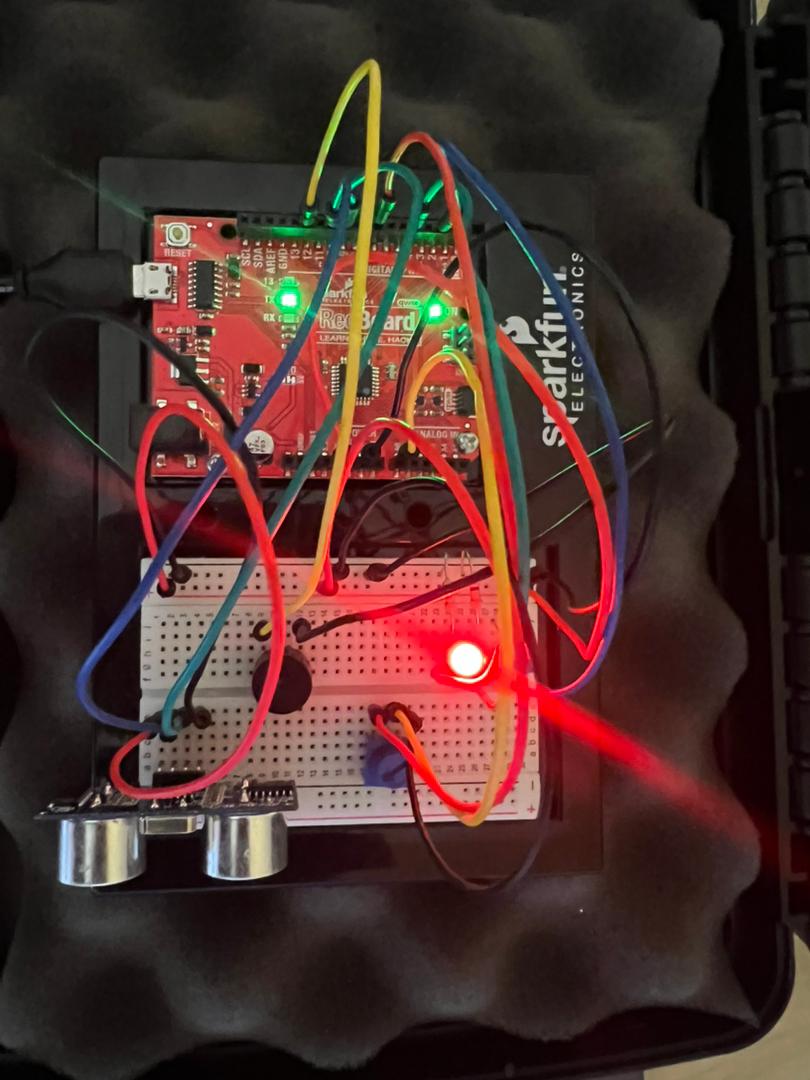
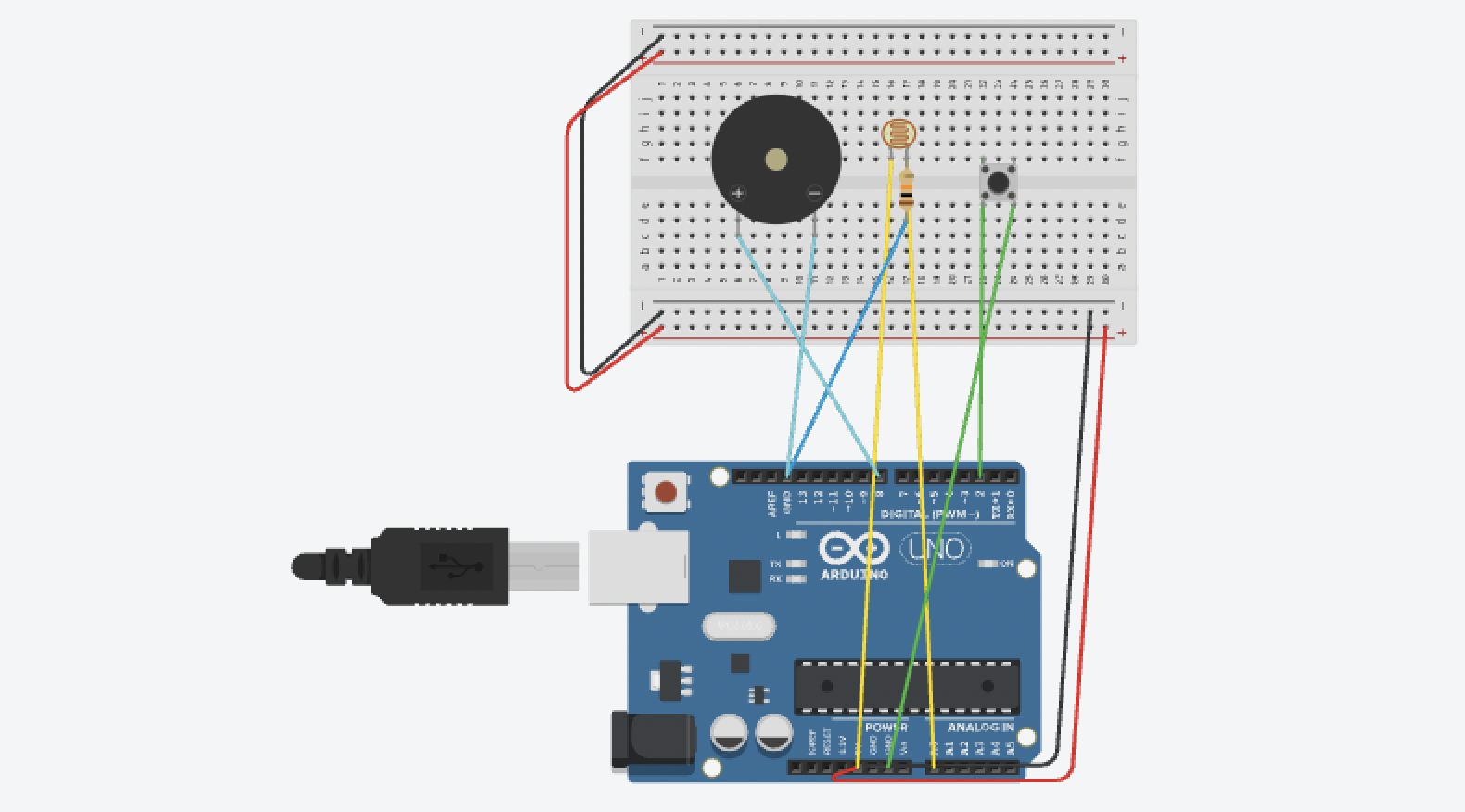
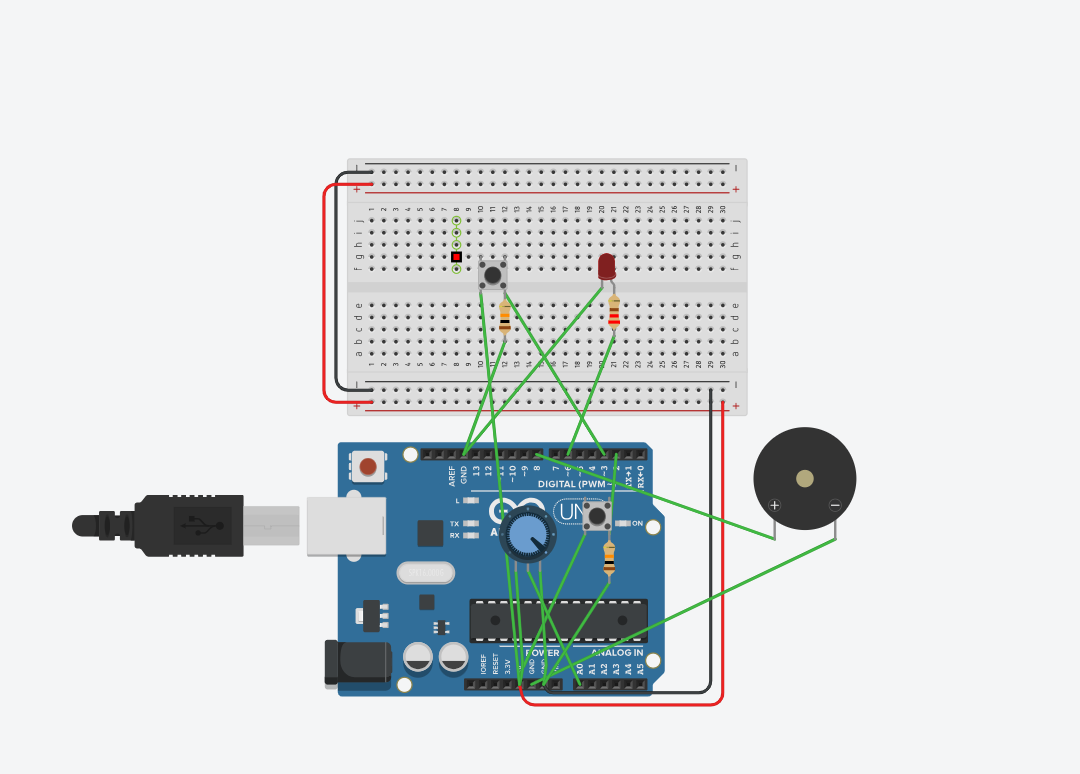
I created an arduino that responds to light using the photolight sensor. When the room is dark, the LEDs automatically turn on. Alternatively, the user can also press on the button to turn on the LEDs, however, they only remain lit up as long as the user presses on the button.

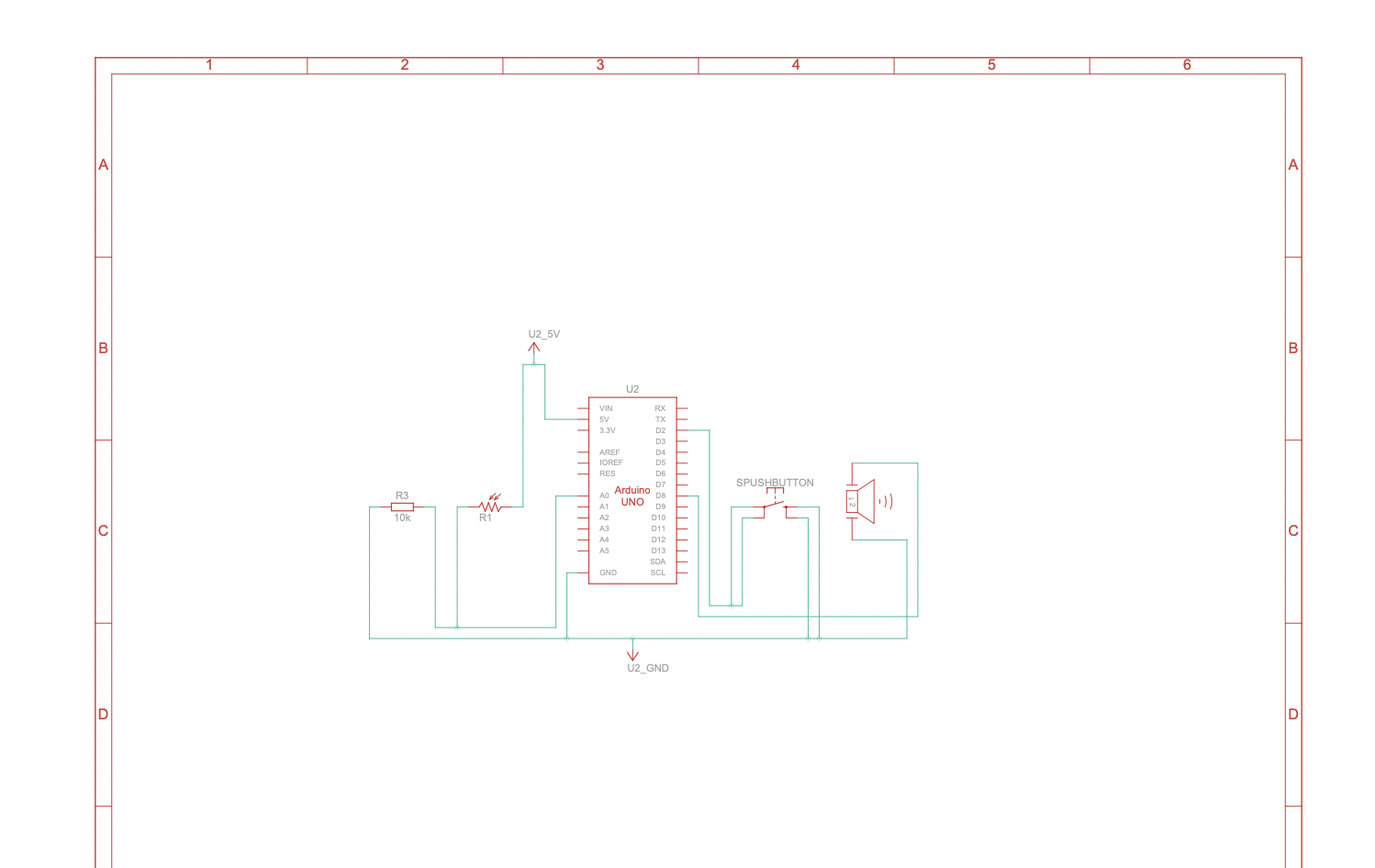
Schematic

Video of the circuit
IMG_7822
How this was made

I referred to the class notes and schematics to create the photolight sensor part of the circuit. Similarly, for the switch, I also referred to class notes. In order to get the response of the LEDs when the room gets dark, I put a specific threshold in the code, and when the the sensor reading is below that threshold, the LEDs turn on. The switches responsiveness was similar to exercises we did in class.

Code
int photoresistor = 0;              // this variable will hold a value based on the brightness of the ambient light
int threshold = 500;                // if the photoresistor reading is below this value the the light will turn on

void setup()
{
  Serial.begin(9600);              // starts a serial connection with the computer
  pinMode(A2, INPUT);             
  pinMode(8, OUTPUT);
  pinMode(9, OUTPUT);             // set pin 8 & 9 as an output that can be set to HIGH or LOW
  pinMode(13, OUTPUT);            // used pin 13 to troubleshoot since sometimes my LEDs wouldn't be connected correctly
}

void loop()
{
  //read the brightness of the ambient light
  photoresistor = analogRead(A0);   // sets photoresistor to a number between 0 and 1023 based on how bright the ambient light is
  int switchPosition = digitalRead(A2);

  Serial.println(photoresistor);    // print the value of photoresistor in the serial monitor on the computer

  if (switchPosition == HIGH || photoresistor < threshold) {
    digitalWrite(8, HIGH);   // turn the LED on (high voltage)
    digitalWrite(9, HIGH); 
    digitalWrite(13, HIGH);
  } else  { 
    digitalWrite(8, LOW); // turn the LED off by making the voltage LOW
    digitalWrite(9, LOW);
    digitalWrite(13, LOW);
  }
}


Reflection and ideas for future work or improvements

I’m proud that I was able to get the circuit to actually work and be responsive! As simple as it seems, I was really struggling to do a simple circuit with a switch and one LED, my connections were all not working and it was not being responsive at all. Hence, I’m really happy I was able to incorporate multiple inputs and outputs in the end.

There are a few improvements I can think of for this circuit. For starters, I think I should’ve used different components and edited the code so that when the user presses on the switch, the LEDs stay on until user presses again. Another possible improvement is allowing the user to turn off the LEDs using the switch when they’re on due to the photoresistor. I think this would require me to play around with the code more and possibly user others components from the kit. I also hope to get more creative with my circuits and have more unusual interactions in the future.

Week 10 – Production Assignment

Concept

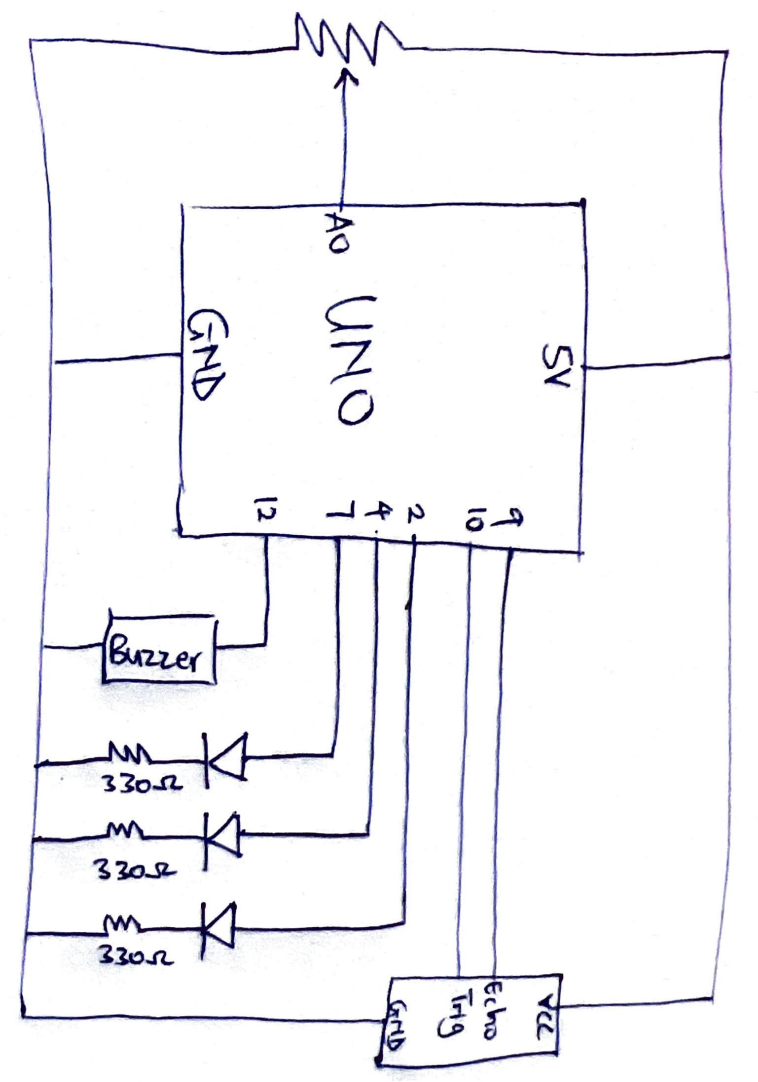
The concept of this project is to create an system can make light of any colour using rgb values. In the last class we learnt about analogue and digital input and output. Using this concept, I created a circuit that uses analogue input to control the brightness of a red, green and blue led to obtain a specific color, just as we could pick specific colors when coding in p5js.

A photo-resistor, potentiometer and push switch are used to control the rgb values of the LEDs and the lights were physically merged together so as to give the idea they were producing one light of a specified color.

Sketch

Code

// A0 = Potentiometer input
// A1 = Photoresistor input
// A2 = Push switch input
// 3 = Blue LED to resistor to GND
// 5 = Green LED to resistor to GND
// 7 = Red LED to resistor to GND

void setup() {
  pinMode(3, OUTPUT);
  pinMode(5, OUTPUT);
  pinMode(7, OUTPUT);

  // flash all LEDs
  digitalWrite(3, HIGH);
  digitalWrite(5, HIGH);
  digitalWrite(7, HIGH);
  delay(1000);

  digitalWrite(3, LOW);
  digitalWrite(5, LOW);
  digitalWrite(7, LOW);
}

void loop() {
  int potentiometer = analogRead(A0);
  int photoresistor = analogRead(A1);
  int pSwitch = digitalRead(A2);
  int pm = map(potentiometer, 0, 1023, 0, 255);
  int pr = map(photoresistor, 0, 1023, 155, 255);
  analogWrite(3, pr);
  analogWrite(5, pm);
  digitalWrite(7, pSwitch);
}

How It’s made

A potentiometer, photo resistor and a push switch were connected to 5V terminal. The analog input of each of these devices were read by the analog in pins A0, A1 and A2. LEDs were connected to pins 3, 5 and 7. The inputs from the potentiometer, photo resisters and push switches can be tuned to obtain the desired effect.

Physical Circuit

Digital Circuit

Reflection

This work was really fun to create. I enjoyed playing around with analog inputs and outputs. Possible improvements in the future are including codes to cause some flashing effects to show different color and state. More analog inputs can be included also to create different physical effects. More LEDs can also be added to create more visual effects.

Week 10 – Reading Response

Reading “Physical Computing’s Greatest Hits (and Misses)” made me feel exposed in a funny way, because I recognized so many of my own “original” project ideas in his list. I have thought about wearable sensors, glowing LEDs that react to touch, and emotional “helper” objects as if they were fresh directions, and seeing them framed as patterns that show up every semester forces me to admit how predictable I am as a beginner. At the same time, I agree with Igoe that giving up once you discover a similar project is a weak response, because what matters is the specific gesture, the context, and the meaning you build around a pattern, not the bare pattern itself. I think he is a bit biased toward downplaying the emotional impact of “shallow” projects like video mirrors or remote hugs, because for someone encountering them for the first time those can still feel meaningful, even if the interaction structure is simple. Still, his critique of projects that start and end at “wave your hand and watch something blink” matches what I have seen in exhibitions and online: I often remember the visual trick but not what I was supposed to feel or think. The reading pushes me to treat “greatest hits” gestures as starting points instead of endpoints, and to ask earlier in my own process what kind of bodily action I am inviting and why that action fits the idea, not only whether the sensor–actuator chain works.

“Making Interactive Art: Set the Stage, Then Shut Up and Listen” challenged a habit I have of over‑explaining my work to classmates. I go into detail about the concept, the symbolism, and the “correct” way to interact, because I am afraid people will miss what I intended, but Igoe argues that this kind of control kills the interaction and turns the piece into a lecture. I find his rule “do not interpret your own work” a bit extreme, and I do think he is biased toward audience freedom over author intention, yet his comparison to directing an actor makes sense to me. I have seen how different people behave in front of the same sketch or installation, and their “wrong” uses often reveal more interesting possibilities than my original script. This reading changes my view of success: instead of asking whether people understood my planned narrative, I want to pay more attention to the patterns of behavior that appear around my work, and treat those as data that should inform the next version rather than mistakes to correct. It also raises practical questions for me: how much ambiguity is productive before people give up, and when is a short label useful support rather than an unwanted explanation.

Reading reflection and thoughts

One thought is that this article changes the role of the artist. Usually, we think the artist’s job is to express a clear message. But in this reading, the artist is more like a designer of experience. The artist builds the situation, and the audience helps finish the work through their actions.

Another idea is that interactive art is not fully complete until people engage with it. This makes the artwork feel alive and open, not fixed like a painting with one meaning. I think this is interesting because it gives more power to the audience.

I also thought about the phrase “set the stage, then shut up.” It sounds strong, but the meaning is important. The artist should guide people through space, objects, and hints, but should not explain too much. Too much explanation can limit people’s feelings and reactions.

The article also made me think that misunderstanding is not always failure. If people use the work in unexpected ways, that can still be part of the conversation. Their confusion or surprise may reveal something important about the design.

Another idea is that interactive art needs good affordance. If you want people to touch something, the object should invite touch. If you do not want touch, it should not look touchable. So meaning is not only in words, but also in design, placement, and behavior.

I also thought this reading connects interactive art to performance. The audience is not just watching; they are acting. This makes the artwork closer to theatre or rehearsal, where meaning is discovered through action, not just given in advance.

Reading Response #? (feat. not one, but TWO articles from Tom Igoe)

Physical Computing’s Greatest Hits (and Misses)

Reading this was humbling, to say the least. I expected to find a list with cool projects I could maybe borrow and try to make for myself, but what I got instead was more like a map of every “original” idea a beginner is likely to have. Theremins, gloves, floor pads, things you yell at, fields of grass, the endless lure of blinking LEDs, mirrors that are digital to easily wow every person with a limited understanding of technology (and even those who have more than a limited understanding of technology), things to hug. Everything has already been charted out and accounted for. I do like that the author mentions that some students, upon realizing their idea has been done before, just give up. which he thinks is exactly the wrong reaction. His take is that these themes keep coming back because they leave room for genuine variation, and the interesting part is never the concept itself but what a particular person does with it.

Something that stuck with me was how unflinching he is about each theme’s weaknesses. A theremin is fun, yeah, but congrats on waving your hand, I guess. What does it mean? What now? Video mirrors are beautiful and also happen to offer almost zero structured interaction (hah, screen savers). Meditation helpers can’t read minds. Remote hugs don’t actually feel like hugs. He isn’t dunking on any of these ideas, but is rather saying that the baseline, easy version of each one is surface-level, and real design work is whatever comes AFTER you’ve built that surface and started asking harder questions.

That reframing is how my thought process usually works. Rather than creating something and wondering only if it works, I also like to ask myself if the gesture I’m asking for is actually worth asking for. Why use a button instead of a pull, or a wave or a shout? What does this action feel like in my body, and does it match what I want the piece to be about? Ultimately, despite us all learning the same coding language and basics of Arduino, we all end up with different projects because of how we individually come up with ideas. As long as you know the basics, you can bend the rules after as much as you want.

Making Interactive Art: Set the Stage, Then Shut Up and Listen

This reading opens up with a pretty blunt rule, “Don’t interpret your own work,” and then spends the rest of it explaining why this rule exists. To Igoe, interactive art isn’t something you deliver to an audience, but rather, is a conversation you’re starting with them. If you stand next to your piece telling people what each element represents and how they should feel about it, you’ve already pre-written their experience, and at that point, there’s no reason for them to actually engage with what you made. (For this reason, I like to read museum labels for paintings AFTER I’ve engaged with the piece, so I can experience it twice. I found that it doesn’t usually work the other way… thank you, anchoring bias!)

The analogy that made this click was directing an actor. You can’t tell a performer what to feel and expect anything real to come out. Rather, you arrange the space, place the props, suggest intentions, and let them figure out the emotions themselves. An interactive piece works the same way: put a handle on what you want touched, make unapproachable things unapproachable, drop hints towards what you want discovered, and then (with all due respect), back off. The catch, though, is you need to genuinely trust the audience, and trust that what you built is legible enough to speak for itself (scary!) for it to work. Igoe’s point is also that these reactions are also data, not failures to argue with.

An interactive piece is never really “done”. The object you build is just a stage, and the audience finishes the work every time they walk up to it, slightly different each time. That’s a pretty different mental model from traditional art, and I suspect it’s one of those things that doesn’t fully sink in until you’ve actually watched strangers misuse something you made.

And…

Back-to-back, these two readings feel like they have similar arguments made from two angles. The first is about what to make, while the second is how to present what you made. Both converge on a single idea, that you kind of… aren’t the point (sorry). The gesture is the point, and the person performing it is the point. We’re really putting the interaction (between our performer and the gestures in between to communicate with the work) in interactive media. Hahaha. Sorry.

Week 10 – Production and Reading Reflection Megan

Production: LED Lights Memory Game

Concept

The concept of my project was to create a memory-based LED game inspired by the small game we watched in class. In that example, a light would turn on and the first person to press the button on their side would win. I found that idea very engaging, so I wanted to build something similar but with a stronger focus on memory and sequence. While looking for ideas, I came across the concept of a “Simon Says” style memory game, which immediately reminded me of a toy I used to play with as a child, similar to a Pop It memory game with lights and patterns. This connection made the idea more personal and interesting to develop, so I decided to create a game where the Arduino generates a sequence of LED lights and the player must repeat it correctly using buttons.

Process

To build this project, I started by learning the basic components separately. I watched several tutorials by Paul McWhorter, which helped me understand more things on how LEDs and buttons can work, as well as how to structure Arduino code using functions, loops, and conditionals. I also explored the Arduino documentation to better understand how different functions work and how Arduino programming compares to tools like p5.js. The good thing is that both use similar logical structures, which made it easier for me to understand the code. I programmed the Arduino to generate a random sequence, display it using LEDs, and then check the user’s input through buttons. I also added a startup LED test to verify that the circuit was working correctly before the game begins.

// LED MEMORY GAME


// PIN SETUP

// LED pins
int redLED = 12;
int yellowLED = 9;
int greenLED = 6;
int blueLED = 3;

// Button pins
int redButton = 11;
int yellowButton = 8;
int greenButton = 5;
int blueButton = 2;


// GAME VARIABLES
int sequence[10];   // stores up to 10 steps
int level = 0;      // current level


// ==============================
// SETUP 
// ==============================
void setup() {

  // Set LED pins as OUTPUT
  pinMode(redLED, OUTPUT);
  pinMode(yellowLED, OUTPUT);
  pinMode(greenLED, OUTPUT);
  pinMode(blueLED, OUTPUT);

  // Set button pins as INPUT (with internal pull-up)
  pinMode(redButton, INPUT_PULLUP);
  pinMode(yellowButton, INPUT_PULLUP);
  pinMode(greenButton, INPUT_PULLUP);
  pinMode(blueButton, INPUT_PULLUP);

  // Start random generator
  randomSeed(analogRead(0));


  // ==============================
  // STARTUP LED TEST
  // ==============================

  // Turn on each LED one by one
  digitalWrite(redLED, HIGH);
  delay(300);
  digitalWrite(redLED, LOW);

  digitalWrite(yellowLED, HIGH);
  delay(300);
  digitalWrite(yellowLED, LOW);

  digitalWrite(greenLED, HIGH);
  delay(300);
  digitalWrite(greenLED, LOW);

  digitalWrite(blueLED, HIGH);
  delay(300);
  digitalWrite(blueLED, LOW);

  delay(500); // small pause before game starts
}


// ==============================
// MAIN LOOP 
// ==============================
void loop() {

  addStep();        // add new random color
  showSequence();   // show LED sequence

  bool correct = checkPlayer(); // check user input

  if (correct == false) {
    gameOver();     // if wrong → game over
    resetGame();    // restart
  }

  delay(1000);
}


// ==============================
// FUNCTIONS
// ==============================


// Add a new random step
void addStep() {
  sequence[level] = random(0, 4);
  level++;
}


// Show the sequence using LEDs
void showSequence() {

  for (int i = 0; i < level; i++) {

    turnOnLED(sequence[i]);
    delay(500);

    turnOffAll();
    delay(250);
  }
}


// Turn on the correct LED
void turnOnLED(int number) {

  if (number == 0) digitalWrite(redLED, HIGH);
  if (number == 1) digitalWrite(yellowLED, HIGH);
  if (number == 2) digitalWrite(greenLED, HIGH);
  if (number == 3) digitalWrite(blueLED, HIGH);
}


// Turn off all LEDs
void turnOffAll() {

  digitalWrite(redLED, LOW);
  digitalWrite(yellowLED, LOW);
  digitalWrite(greenLED, LOW);
  digitalWrite(blueLED, LOW);
}


// Check player input
bool checkPlayer() {

  for (int i = 0; i < level; i++) {

    int buttonPressed = waitForButton();

    // Show feedback
    turnOnLED(buttonPressed);
    delay(300);
    turnOffAll();

    // Check correctness
    if (buttonPressed != sequence[i]) {
      return false;
    }
  }

  return true;
}


// Wait for button press
int waitForButton() {

  while (true) {

    if (digitalRead(redButton) == LOW) {
      delay(200); // debounce
      return 0;
    }

    if (digitalRead(yellowButton) == LOW) {
      delay(200);
      return 1;
    }

    if (digitalRead(greenButton) == LOW) {
      delay(200);
      return 2;
    }

    if (digitalRead(blueButton) == LOW) {
      delay(200);
      return 3;
    }
  }
}


// Game over animation
void gameOver() {

  for (int i = 0; i < 3; i++) {

    digitalWrite(redLED, HIGH);
    digitalWrite(yellowLED, HIGH);
    digitalWrite(greenLED, HIGH);
    digitalWrite(blueLED, HIGH);

    delay(300);

    turnOffAll();

    delay(300);
  }
}


// Reset game
void resetGame() {
  level = 0;
}

Difficulties

One of the main difficulties I encountered was related to the physical design of the circuit, especially the buttons. It was challenging to make the buttons clearly visible and easy to press during gameplay. At times, the wires made the setup look cluttered and slightly uncomfortable to use. To improve this, I adjusted the layout of the breadboard and repositioned it to the left side instead of the right, which made the buttons more accessible. However, I still believe the design could be improved. A possible solution would be to use shorter wires, since the ones included in the kit are relatively long and make the circuit less organized.

Thing that I’m Proud Of

One aspect of the project that I am particularly proud of is the feedback system when the player loses. I programmed all the LEDs to blink simultaneously several times, creating a clear and satisfying visual indication that the game is over. This small detail enhances the user experience and makes the game feel more complete and interactive.

Reflection Overall

Overall, I found this project very enjoyable and rewarding. It allowed me to combine creativity with technical skills and to better understand how hardware and software interact. I especially liked how I could take a simple idea and gradually build it into a functional game. If I were to improve this project in the future, I would like to add sound effects, such as tones that play when each LED lights up, to make the experience more immersive. Although I have not yet implemented this feature, it is something I would like to explore next. This project helped me gain confidence in working with Arduino and problem-solving in both coding and physical design.

PHOTO OF PHYSICAL CIRCUIT

PHOTO OF SCHEMATIC

Reading Reflections

Making Interactive Art

Reading this text me rethink what art even is, especially interactive art, because I feel like I’ve always thought of art as something where the artist is trying to say something very specific, and the audience is supposed to understand that meaning. But here it’s kind of the opposite. It’s saying that if you control too much, if you explain too much, you’re actually limiting the experience. And I find that really interesting but also a bit uncomfortable, because it means you’re giving up control over your own work. Like, you create something, but then people might completely misunderstand it, or interact with it in a way you didn’t expect, and that’s supposed to be part of it. I think what stood out to me the most is this idea that the artwork is not the final product, but more like the beginning of a conversation, and the audience kind of finishes it. At the same time, I feel a bit conflicted, because I wonder if that means the artist’s intention doesn’t matter as much anymore, or if it just becomes too vague. But I do like the idea that interaction is more real when it’s not forced, when people figure things out on their own. It makes the experience more personal instead of just following instructions. So I think the main thing I take from this is that good interactive art is not about telling people what to think, but about creating a space where they can think for themselves, even if that means losing some control over what your work becomes.

Physical Computing’s Greatest Hits (and misses)

This article made me realize something that I hadn’t really thought about before, which is how much creativity is not about doing something completely new, but about how you reinterpret things that already exist. At first, I kind of agreed with that instinct of “if it’s already been done, it’s not original,” but reading this made me see that that idea is actually very limiting. The author shows how the same types of projects keep coming back, like gloves or sensors or interactive spaces, but what changes is how people give meaning to them. And I think that’s the part that stood out to me the most, because it’s not really about the technology itself, it’s about the interaction and what it makes people feel or do. At the same time, I also feel a bit conflicted, because some of these projects sound very repetitive or even a bit shallow, like things that look cool but don’t really have depth. So it made me question where the line is between something that is genuinely creative and something that is just visually interesting. I think overall the article is kind of saying that originality doesn’t come from the idea itself, but from the intention behind it, but I’m not sure if I fully agree, because I still feel like at some point things can become too repetitive. But I do like the idea that you shouldn’t immediately discard something just because it’s been done before, because that mindset probably stops a lot of good ideas before they even start.


Week 9: Reading Response

Emotion and Design: Attractive Things Work Better

The reading starts off with the author’s personal teapot collection and notes their unique qualities: one is functionally absurd, one is ugly yet charming, and one is elegantly engineered for the stages of tea brewing. He uses these very objects to back up his claim that usability need not to be in conflict, and that in fact, things that feel good to use and look at actually perform better in our minds because of the emotional state they put us in, and a beautiful product can help a user work through minor problems that the ugly (but functional) counterpart might not. I do agree with his point on prioritizing usability alone can lead to designs that work but feel sterile, and this reminds me of the function over aesthetics mindset that reinforced in architecture, where function almost overshadows how spaces feel for the consumer. However, while I think his argument fits everyday products well, I don’t think it mirrors the same way with how architecture operates under far greater constraints like structure, material, and safety, where poor functional decisions have serious consequences and it is, from what I can see, a context in which aesthetics can’t come first, though an architectural structure can be beautiful, it ultimately has to serve its purpose of being a safe and functional space to the user.

Her Code Got Humans on the Moon

The article follows mathematician Margaret Hamilton who took a programming job at MIT as something temporary while her husband finished law school, and ended up accidentally building the foundation of software engineering while helping land humans on the moon. There came a situation when her daughter crashed the simulator by triggering a program that no astronaut was ever supposed to activate mid flight and although she flagged it as a real issue and wanted to a kind of debugging code to prevent it, NASA pushed back and claimed that astronauts were too well trained for that. Months later, it happened. I think that kind of overconfidence in human perfection is something a lot of institutions fall into, and it actually reminded me of the Titanic. The ship was considered so structurally sound that the people in charge genuinely claimed it as the “unsinkable”, and that certainty is what made them careless about the lifeboats, the speed, and the warnings. I think both cases show the same thing, which is that when you convince yourself something will never happen, you stop preparing for it, and that is exactly when it does. I truly respected Hamilton for making sure, she stayed prepared and her team was ready to fix it when it did go wrong.

Assignment 10: The Switch, The Dial and The Guesser

“Turning on the light is easy if you know where the switch is” – Colin Wilson

Concept:

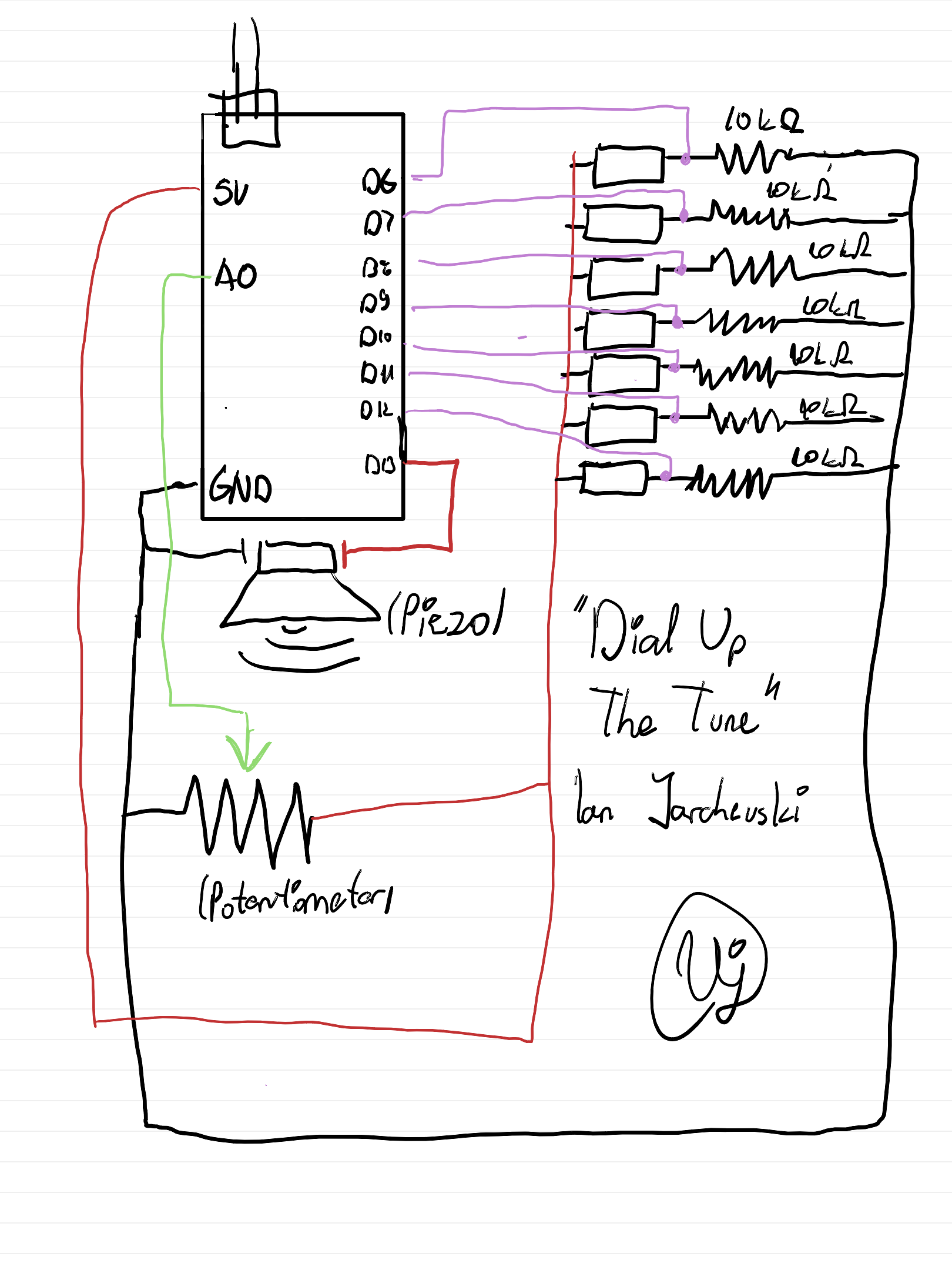
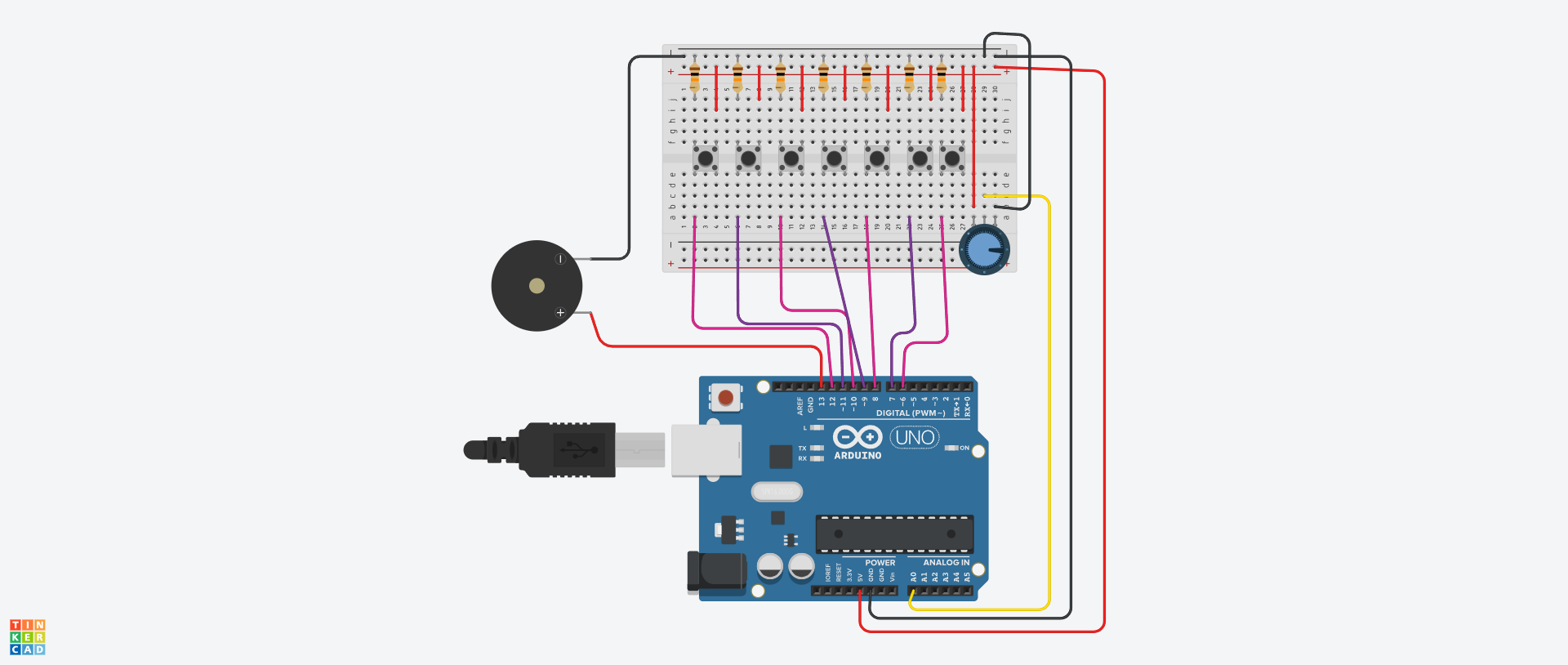
Finally we have reached the Arduino era of the class. So to start out, we were tasked to make a analog switch and a digital switch to turn on two LEDs in a digital and analog fashion. But as well, to add a bit of spice to it. Now being honest it took me some time to get my footing with Arduino as this is my first time using and tinkering with it. But I’ve managed to make something at least a bit fun. I’ve been fond of escape rooms and locks, and I thought, what if I make it so depending on where you twist the lock, the LED will shine.

Sketch:

Digital Circuit:

How it’s made:

In terms of designing, the Blue LED is a simple circuit, featuring a resistor set at 220 olms, and wires connecting it to the Ground and Power. The key thing added is a simple switch that the user can interact with to turn the LED on or off.

However the Red LED has instead a potentiometer. I chose it as it’s use as a dial is going to be key to solving what random value the LED is in. Basically, I have a random function that generates a random value between the lowest and highest value of the potentiometer. Then we read the current value of the potentiometer which uses the function analogRead(). And finally we use a simple if else statement to check if the value is the same, and if so the LED will shine. I’ve added a buffer just so it’s not too difficult to guess.

Highlighted bit of Code I’m proud of:

Outside of the regular struggles with making the digital design, I struggled figuring it out why the random value wasn’t truly random. It was confusing as I assumed somehow it was reading the value of the potentiometer and using that variable as a constant. But that wasn’t the case, so I was a bit dumbfounded as the result variable in the code below isn’t tied to anything.

I did a bit of googling and found out that if I use the random function then it will give me a random number. But, it will repeat everytime, practically serving as a constant, and that wasn’t helpful everytime I would start the simulation. So apparently, you are supposed to add a seed to a code to make it unique and it must be on a unconnected pin as it picks up different static which determines the randomness. Really interesting honestly, but a pain to figure that quirk out.

randomSeed(analogRead(A0));
result = random(0, 1022);

Reflection

Overall I’m pleased with my tinkering for now. I feel like just making the digital design on tinkercad was an experience in itself but also trying to find some sort of creative spin for the LEDs. I think potentially I could add more to it, but I’m fine this being a simple game and hopefully as the weeks go, we can try out different things.

Full Code:

int inputPin = 0;
int outputPin = 2;
int result = 0;

void setup(){
  
  Serial.begin(9600);
  
  randomSeed(analogRead(A0));
  result = random(0, 1022);
  
  pinMode(outputPin, OUTPUT);
  
}
  
void loop(){
 
  int potentialVal = analogRead(0);
  Serial.println(potentialVal);
  Serial.println(result);

  if (potentialVal >= result - 20 && potentialVal <= result + 20){
    digitalWrite(outputPin, HIGH);
  }
  else{
  	digitalWrite(outputPin, LOW);
  }
  
}


Week 10 – Creative Reading Response

Physical Computing’s Greatest hits and misses

I really enjoyed going through the different themes of physical computing in this article. I felt that I got a lot of inspiration and ideas about possible project ideas, and the explanations provided for each concept really simplified how implementing this idea in practice would look like. Looking through these examples felt like when I would look through past student’s projects on this WordPress. And I’ve also felt that everytime I see an idea that’s been done, it feels like I can’t do that idea anymore either. However, as the author pointed it out, it’s always nice to re-imagine ideas in new contexts, think of new interactions, and as a lot of us did for our midterm projects, link it back to our identity and cultures.

Some themes especially stuck out to me from this article, and I hope to be able to implement them in some way in my work in the future. First, Floor Pads! I love it when a coding project goes way beyond the screen or the usual hardware of wires and buttons. Especially when something is more prominent and unusual, it definitely captures more attention. And something like Floor Pads where there’s movement and a lot of viewer interaction involved can be especially fun. Likewise, Body-as-cursor and Hand-as-cursor are two other themes that stuck out to me for similar reasons. Finally, Things You Yell At was another fun theme, and something I’ve seen a lot at previous IM Showcases. I feel like another common aspect among these themes is that there is no learning curve to understand how it works, you kind of just experiment with it till you get it, usually it’s pretty straightforward.

Making Interactive Art: Set the Stage, Then Shut Up and Listen

This article made some great points, throughout this class, we’ve spoken a lot about interactive art, what makes it interactive and how to guide users through these interactions. I really appreciated the points it made about allowing your viewers to experiment with the art, rather than force them into the interactions you’ve planned out, allowing them to discover it themselves can be more fun. As the author states, an important part of interactive art is to listen. I think it can be eye-opening to see how viewers look at your art. Especially as most artists spend hours and hours just looking at their work, editing every little detail, and creating everything from scratch, it can be hard to zoom out and see the bigger picture and experience the art through fresh eyes. Hence why it’s important to see how others interact with your work, take it as feedback, maybe just by watching how others interact, you can get new ideas and make edits to your work.