Week 10: Reading Response

This week’s first reading, A Brief Rant On The Future Of Interaction Design, made me realize something deeper about the things I do, and what everyone does every day. Starting by watching the video, I initially thought it was just about technology, and I found it interesting, especially with all the futuristic functions they included such as the window screen and others. What I didn’t notice or really think about was the fact that everything was done on screens, because that is our reality and something we do every day for almost everything. After reading the text, I started to realize how true this is, and how most of what I do happens through flat screens using my fingers, even for things that could be done physically, such as the reading example. I did agree with that point, that some things do not have to be done on a screen. However, I also thought about how people do not actually do everything through screens, as we still move, go outside, and use our bodies for different tasks. But since the author is talking about the future, I do agree that this should be considered so it does not reach a point where everything is done through a flat screen.

This week’s second reading, the responses to the brief rant, clarified many of the thoughts I had while reading, and also introduced aspects I had not considered, which made me go from partially agreeing to agreeing more with the author’s concern. I did think about the common idea that devices can be harmful, especially for children, but the responses helped me understand that while current technology is useful, it could become problematic if it becomes too dominant in the future. I also found the hologram example very helpful, as it made the main idea clearer, that technology should continue to develop, but in a way that is more interactive and three-dimensional, matching the environment we live in. Additionally, the quote by neuroscientist Matti Bergström about the effects of constant touchscreen use from a young age made me realize that this could become harmful if it reaches the future vision being discussed.

Both readings were interesting to read, especially because they address real situations and possible future developments. They made me think more about how we use screens in everyday life and how many things have already shifted to digital formats, such as borrowing books or using services that were once physical. I also thought about how it would be interesting and beneficial if future technologies included more physical interaction and engagement with the human body. This connects to the work we do in this class, where our Arduino projects involve physical interaction, while our p5 sketches are mostly screen-based using buttons and touchpads. Since our final project will combine both, I feel like that is a strong example of how technology can be improved by balancing physical interaction with screen-based systems.
Reading Reflection – Week 10

A Brief Rant on the Future of Interaction Design + follow-up

Reading this article made me rethink how I usually imagine the future of technology. I realized that I tend to accept touchscreens and the sleek interfaces without really questioning whether they actually improve human interactions. I really liked the author’s idea of pictures under glass, because it reframes devices like phones and tablets as limiting rather than advanced. I had never really considered how much tactile feedback shapes my everyday actions, like holding a cup or turning a page, and how it completely disappears when interacting with digital screens. This made me more aware of how much current technology prioritizes visual simplicity over physical engagement.

I wonder whether designers will continue to rely on interfaces that ignore the full capabilities of the human body. If our hands and bodies are so complex and expressive, why is most technology reduced to tapping and swiping? His point about finger blindness really is scary to think about, especially if we lose the ability to feel and understand our objects. This makes me wonder whether convenience and market trends are prioritized over innovation, or if designing for full-body interactions is simply too difficult to do for every single person. It is interesting to see how we adapt to our devices rather than devices adapting to us. Overall, the reading challenged my assumption that technological progress is always linear and improving.

I think the follow-up was quite interesting. I understand that his goal was to highlight a problem and push others to explore it. I am not sure why people expect an immediate answer rather than seeing critique as the starting point for innovation. I was also surprised that removing the body from interaction, like through voice or brain interfaces, might actually reduce human experience. I had not thought about how much physical interaction shapes understanding. To be honest, this made me reflect on how passive I have become in using technology and whether easier always means better.

Reading Reflection – Week 10

When I thought about touchscreens before this assignment, I always felt they were fun and easy to use. I liked exploring things by touching the screen instead of using buttons or a mouse. Because of that, I assumed touchscreens were already the best version of future technology. After reading the texts, I started to notice how limited screens actually are. They only let me use one finger, even though my hands and body can do much more. This made me think about how technology does not really use our full abilities.

One idea that made me think was how the author described touchscreens as flat and numb. I never thought about how everything feels the same when I touch my phone. There is no real physical feedback. When I read that, I realized that I also feel limited by screens and I hope technology develops into something more than just glass surfaces. It made me wonder what it would feel like if my phone could respond physically, not just visually.

The readings also made me think about creativity. I believe creativity can be fully digital, like movies, where you do not need to touch anything to understand or enjoy it. But at the same time, I noticed that when I work on physical computing projects in class, using sensors and real materials feels more engaging. It uses more of my body, not just my eyes.

Another part that stayed with me was the idea of children using iPads. I think it can be bad because of radiation, but it can also be very educational if used the right way. The reading made me think more deeply about how screens might affect development, especially if kids only interact with flat surfaces.

Overall, these readings made me question my assumptions about future technology. I used to imagine better screens, but now I imagine tools that involve more of the body. It made me think that maybe the future should not be limited to touchscreens, and that we should explore new ways of interacting that feel more natural and physical.

Week 10 – Creative Reading

“Vision of the Future” videos have been a thing since the early 21st century, the amazing hologram screen, or people waving their hands in the air to move digital windows around (I mean we have augmented reality for that now). It looks futuristic, sophisticated and innovative, but from an interaction perspective, it is actually incredibly timid.

I agree with what Bret is saying, a tool is supposed to amplify human capabilities, converting what we can do into what we want to do, and if that entire principle is gone, then it isn’t just not a good tool, it is not a tool at all.

Most modern devices ignore the two things hands do best, feeling and manipulating, so how can we call these ideas revolutionary if its going backwards?

Bret’s point about “finger-blindness” is actually terrifying to think about, what we do for granted the future generation may struggle with. If we do not use our hands to feel texture, weight, and pliability, we lose the ability to understand the “inner meaning” of objects. We are building a world where we can spend our entire lives immobile, starting at a “hokey visual facade” that has no physical connection to the work we are doing.

If the future of interaction does not let us see, feel, and manipulate space simultaneously, then it is not a future worth building or investing it.

Week 10 – Piano

Demo Below:


Concept:

We came up with a piano that utilizes your keyboard presses and a buzzer, using keys from A-L allows you to play 9 different notes. We added an LCD that displays the note of each key and the frequency of that note.

Implementation:

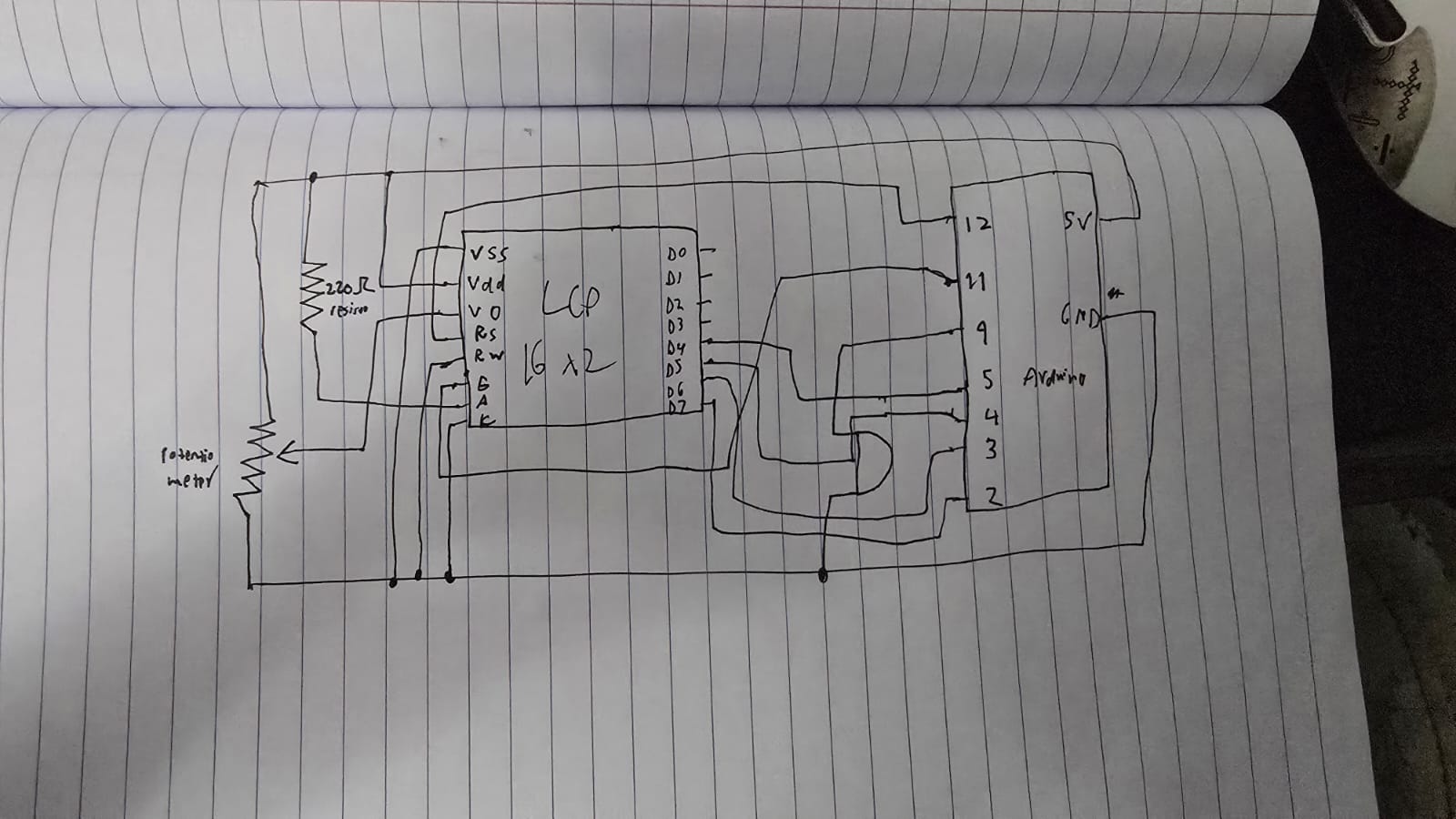
Schematic:

The components used are pretty simple, just being an LCD device and a buzzer. We wrote 2 files of code for this, a python file and an c++ file. As typing the letter into the serial monitor every time you wanted to play a note would be counter-intuitive, we wrote a python file that listens to your key presses, and if you press a key between A and L, then it will send that key press to the arduino which ends playing the note that correlates to that key press.

try:
    arduino = serial.Serial('COM11', 9600, timeout=1)
    ...
except:
    ...

while True:
    if keyboard.is_pressed('a'):
        arduino.write(b'A')
        time.sleep(0.15) 
    elif keyboard.is_pressed('s'):
        arduino.write(b'S')
        time.sleep(0.15)
    elif keyboard.is_pressed('d'):
        arduino.write(b'D')
        time.sleep(0.15)
    elif keyboard.is_pressed('f'):
        arduino.write(b'F')
        time.sleep(0.15)
    elif keyboard.is_pressed('g'): 
        arduino.write(b'G')
        time.sleep(0.15)
    elif keyboard.is_pressed('h'):
        arduino.write(b'H')
        time.sleep(0.15)
    elif keyboard.is_pressed('j'):
        arduino.write(b'J')
        time.sleep(0.15)
    elif keyboard.is_pressed('k'):
        arduino.write(b'K')
        time.sleep(0.15)
    elif keyboard.is_pressed('l'):
        arduino.write(b'L')
        time.sleep(0.15)

    if keyboard.is_pressed('esc'):
        print("Closing...")
        break

arduino.close()

Here we first try to connect to the arduino using the port and the buad rate that is on the arduino IDE, then until the program stops, we check for any key presses, and if it matches one of our conditional statements, we write that letter to the arduino.

switch (key) {
  case 'A': frequency = 262; noteName = "C4"; break;
  case 'S': frequency = 294; noteName = "D4"; break;
  case 'D': frequency = 330; noteName = "E4"; break;
  case 'F': frequency = 349; noteName = "F4"; break;
  case 'G': frequency = 392; noteName = "G4"; break;
  case 'H': frequency = 440; noteName = "A4"; break;
  case 'J': frequency = 494; noteName = "B4"; break;
  case 'K': frequency = 523; noteName = "C5"; break;
  case 'L': frequency = 587; noteName = "D5"; break;
  default: return; // Ignore any other keys
}

Here we have a switch statement which checks whether we got a matching letter, which then returns the respective frequency and note. We got these frequencies for each note from here: https://en.wikipedia.org/wiki/Piano_key_frequencies as we wanted it to sound as similar as possible to a piano. The LCD shows the note you play and the frequency of that note when you play it. A potentiometer is used to control the contrast of the LCD!

GitHub Link!

Reflection:

Currently this is a single press piano meaning you can’t play multiple multiple notes at once, so an improvement that can be made is to find some way to be able to play multiple notes at once, otherwise this works perfectly, and is simple and accessible to anyone!

Week 10 – Reading Response

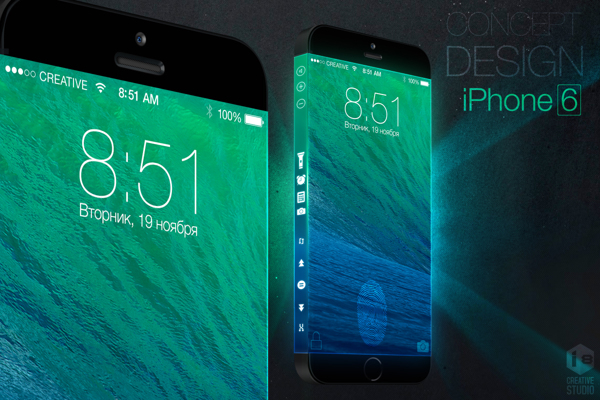
I found this week’s readings quite eye-opening. The video at the beginning of the article was accurately how I imagine the “future” of technology: exactly what it is now, but unlocks more gesture possibilities and projects onto anything. This reminds me of a rumored concept for the iPhone 6 that I got quite excited over in 2013, deeming it to be innovative and futuristic.

Video: iPhone 6 concept with Three-Sided Display that Apple will never  build - iPhone Hacks | #1 iPhone, iPad, iOS Blog — WordPress

While I was upset that Apple did not end up releasing this concept as the iPhone 6, this article made me hope they never release such a phone.

I feel like the article made me realize innovation has kind of paused in the last few years. My friends and I often discuss this question of “if we wanted to invent something new, what could we invent?” because we feel like everything we need, that has a realistic solution, has already been invented. However, this article made me think, what if videos and visions like the ones presented in the article are the reason we are unable to think outside of the box and invent new ideas. The vision for the future often consists of simply combining different existing technologies into one, or expanding current technologies, halting the invention of ground-breaking inventions. It almost feels like phones with a touch screen was the last time humanity witnessed a truly impressive and shocking invention.

Reading Response-Follow Up

It was interesting to see that the author wasn’t trying to provide a solution, but instead wanted to raise awareness of the problem and push further research. He emphasizes that current tools aren’t fully taking advantage of human capabilities, and when discussing things like physical keyboards or styluses, he dismisses them as not being “dynamic mediums.” This made me think about interactive media, where we experiment with more dynamic forms of interaction by combining physical inputs, sensors, and outputs to create systems that respond in real time.

However, I don’t fully agree with his view on voice. While he limits it to simple commands, I think voice has potential as a more dynamic form of interaction, especially when combined with other inputs. When he talks about the three categories of gestures, it reminded me of things like voice assistants, where we use a kind of “vocabulary” to communicate with the system, similar to saying commands like “Hey Siri.” The idea of spatial gestures at a distance also connects to examples we briefly saw in class, where movement controls objects on a screen, even if it can feel indirect. The last example, directly manipulating a virtual 3D space like Iron Man, was a bit confusing to me, but it shows a more ambitious and futuristic idea of interaction. Overall, even though he critiques these methods, I think they still have potential, especially when combined together, rather than being dismissed individually.

Reading Response-The future of interaction design

What stood out to me was the idea that tools should be designed around what humans are actually capable of doing, not just what technology can do. When he said “if a tool isn’t designed to be used by a person, it can’t be a very good tool” it made me think about how often we accept interfaces that don’t fully match how we naturally interact with the world.

For example, with touchscreens, most interactions are reduced to tapping or sliding, which feels limited compared to how expressive our hands actually are.

This connects to what we’ve been doing in class with circuits and Arduino, where interaction feels more physical and responsive. When building circuits, we’re not just coding something to appear on a screen we’re creating systems where human actions, like touching foil or changes in light, directly affect outputs like LEDs. In my project, I used inputs and conditions to map real world interactions to responses, which felt more aligned with how we naturally engage with objects. This reflects the idea of amplifying human capabilities, because the system responds to touch and environmental changes rather than limiting interaction to a flat surface. It also made me realize that even simple projects like ours explore more meaningful interaction than typical touchscreen interfaces, since they involve feedback, physical input, and a closer connection between the user and the technology.

Week 10- Group Assignment

Arduino GitHub File:

https://github.com/MouzaAlMheiri/Intro-to-IM/blob/main/sketch_ap12_Week10.2.ino

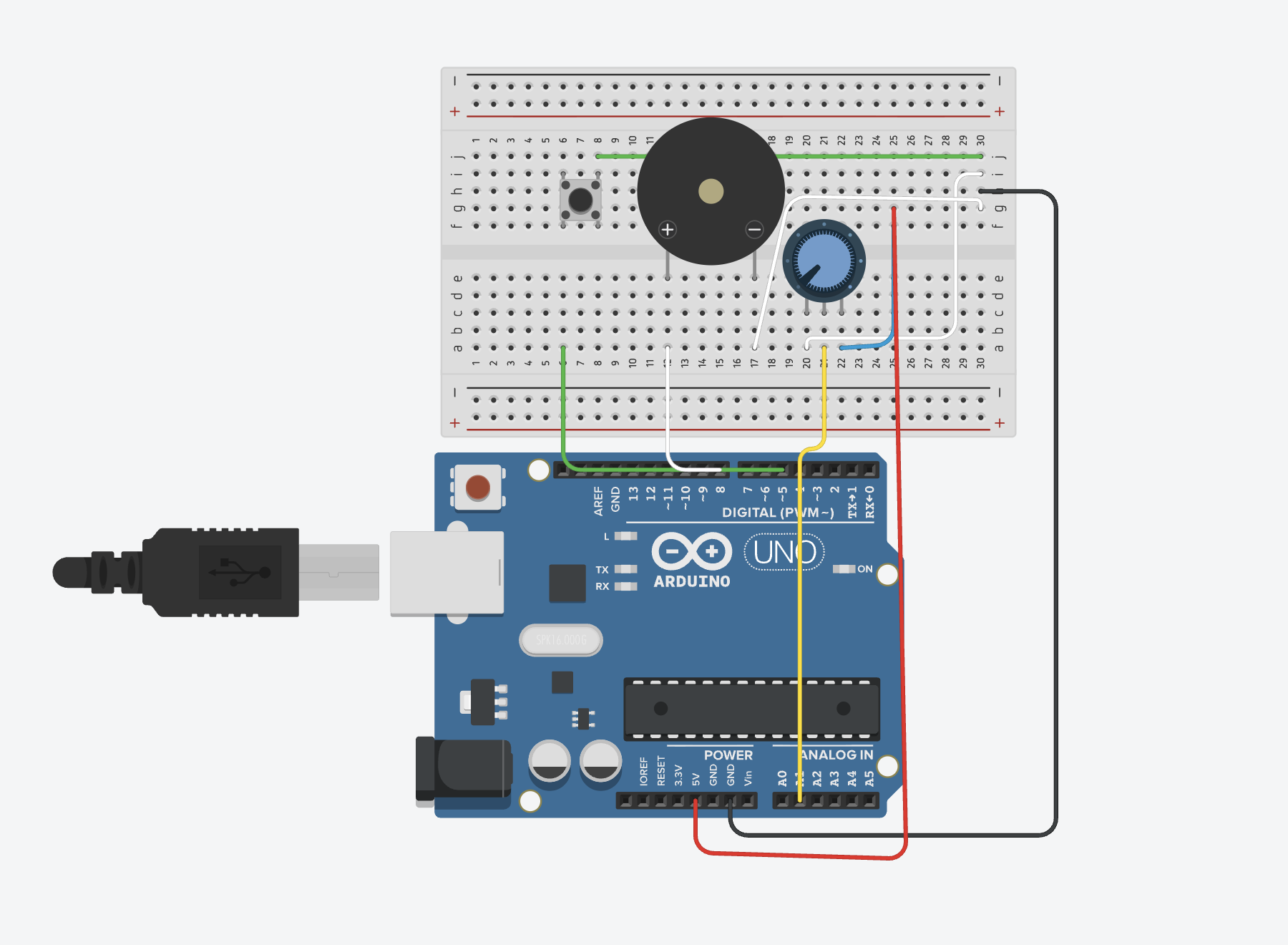
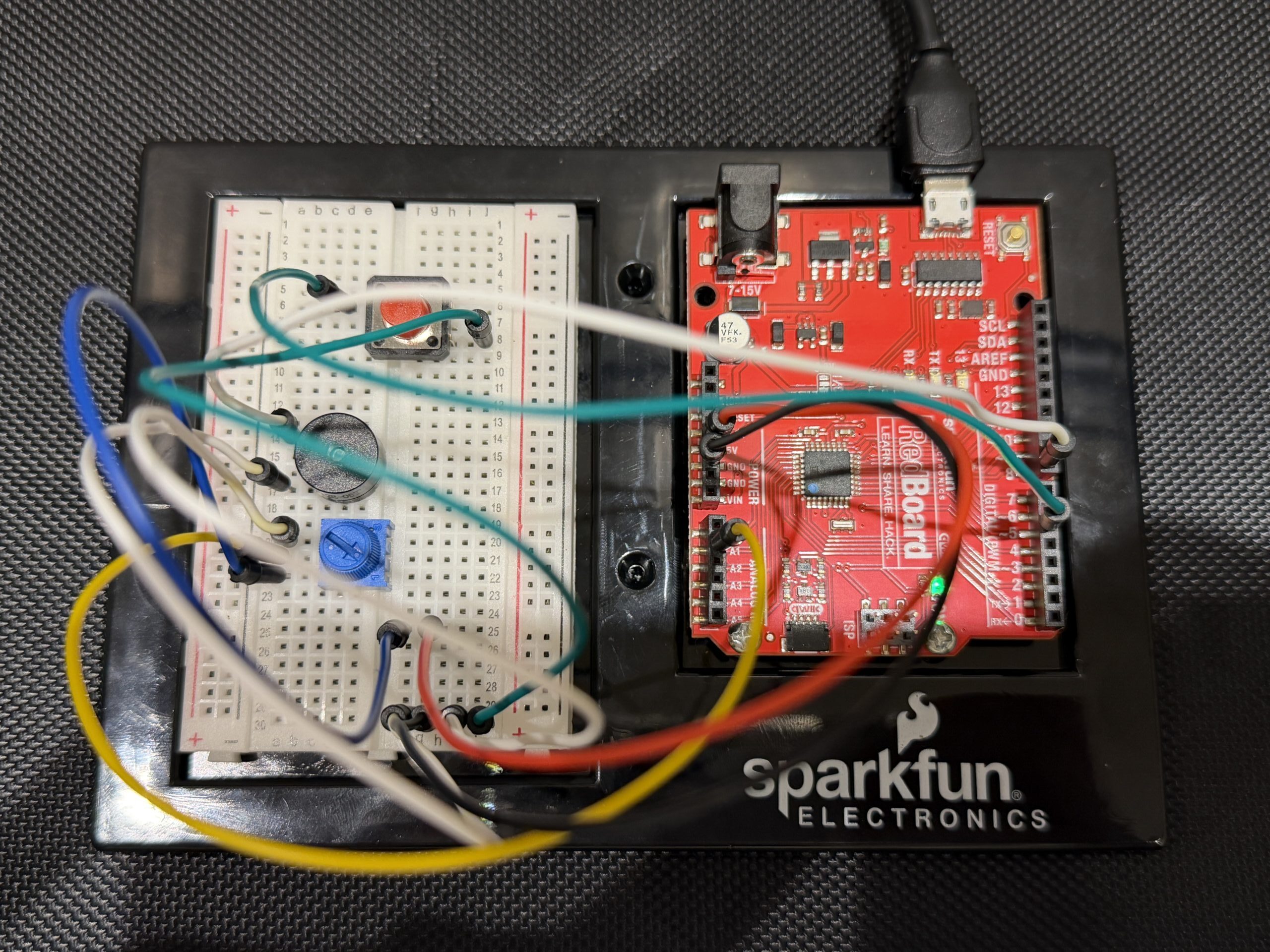
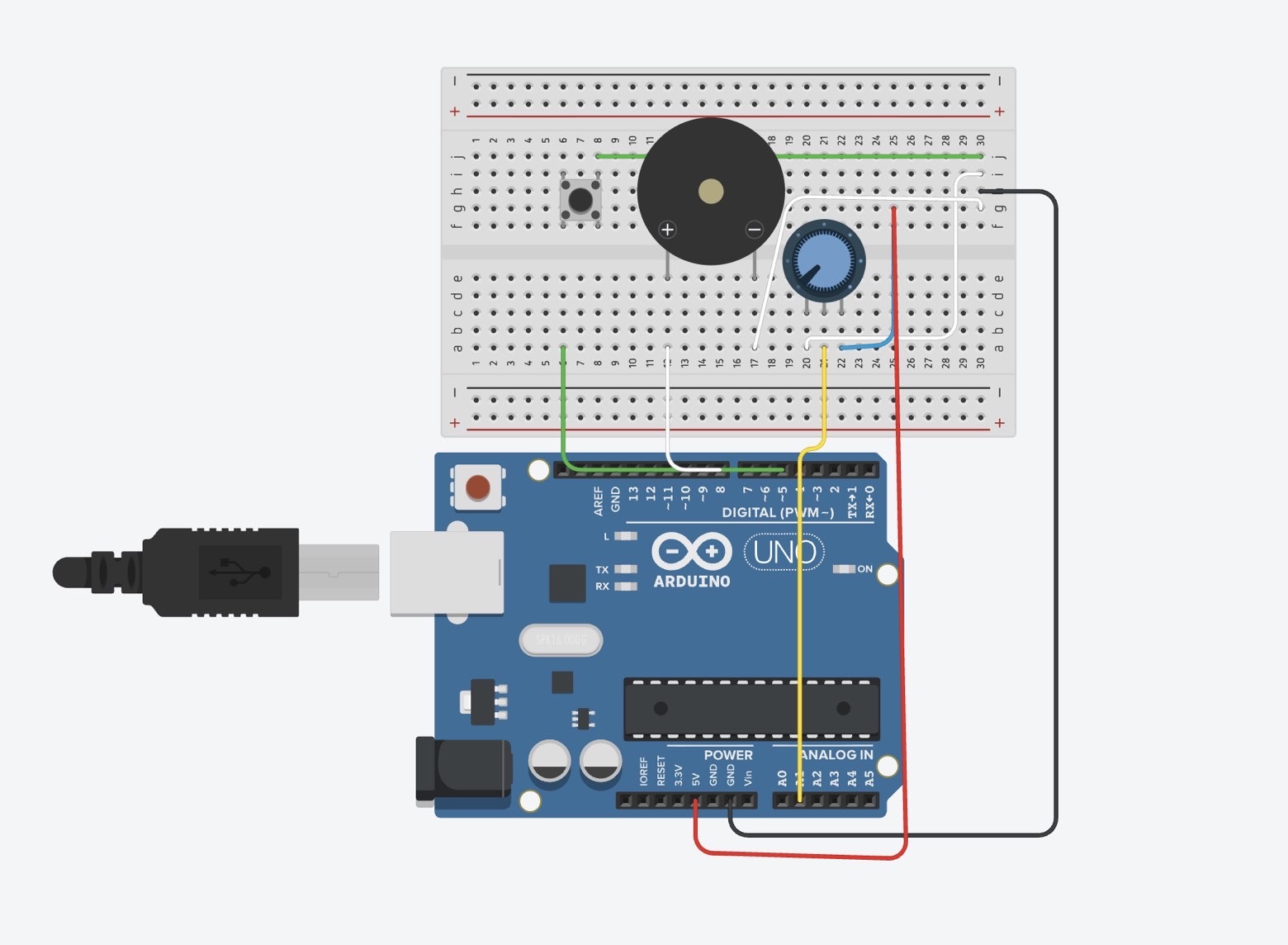
Arduino Set-up:


Project Demo:

Images

Concept

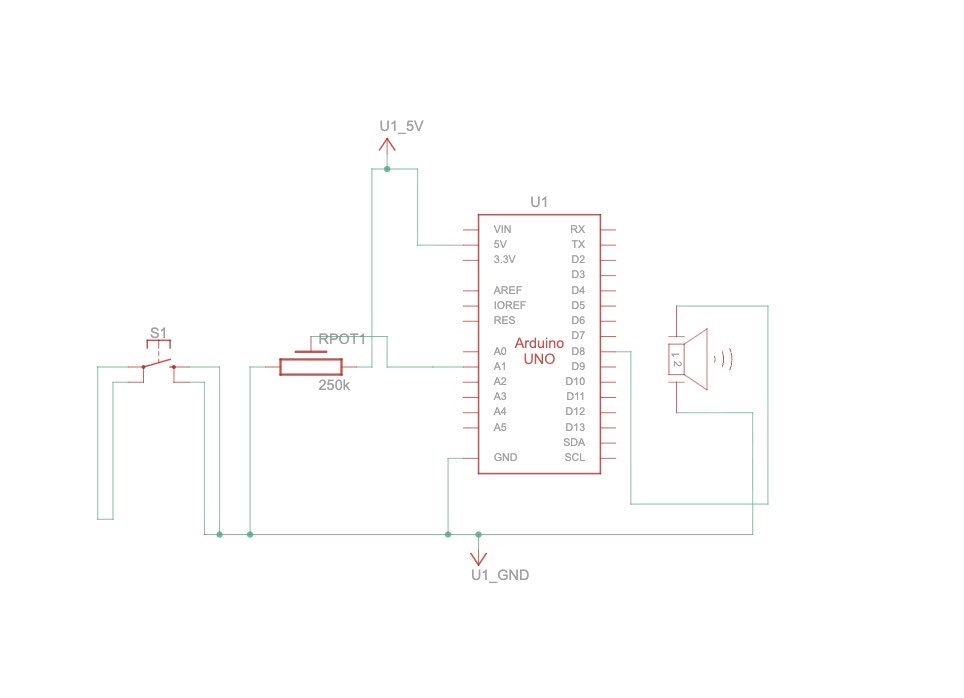
This project is a simple musical instrument that uses both digital and analog input at the same time.

The button acts as the digital sensor because it only has two states, either pressed or not pressed. When we press it, the sound plays, and when we release it, the sound stops.

The potentiometer acts as the analog sensor because it gives a continuous range of values instead of just two states. We used that range to select different musical notes, so turning the knob changes the pitch.

What we liked about this setup is that both inputs have completely different roles. The button controls when the instrument is played, while the potentiometer controls what sound is produced. It made the difference between digital and analog feel really clear and actually useful.

Code Snippet We’re Proud Of

int index = map(potValue, 0, 1023, 0, 7);

if (buttonState == LOW) {

  tone(buzzerPin, notes[index]);

} else {

  noTone(buzzerPin);

}


This part is where everything comes together. The potentiometer gives a value from 0 to 1023, and we use map() to convert that into a smaller range that matches the number of notes we have. Then we use that number to pick a note from the array.

At the same time, the button decides whether the note should actually play. So one input controls the pitch, and the other controls when the sound happens, which made it feel more like a real instrument instead of just a buzzer making random noise.

Problems Encountered

The biggest challenge was honestly the wiring. Even when everything looked right, one wire in the wrong row would break the whole circuit. We had to be really precise with the breadboard and double check every connection.

The button also gave us trouble at first. It either didn’t work or stayed on all the time, and we realized it was because of how it was placed across the gap and which rows we were using. Once we fixed that, it started behaving correctly.

Another challenge was understanding how the potentiometer connects to the sound. At first it felt random, but once we understood that the Arduino reads values from 0 to 1023 and that we needed to map that to our notes, it made a lot more sense.

Reflection

This project helped us actually understand the difference between digital and analog input instead of just memorizing it. The button made sense as something binary, while the potentiometer showed how values can change continuously.

It also made us more comfortable working with sound. Before this, the buzzer just felt like something that makes noise, but now we understand how pitch is controlled and how different inputs can affect it.

If we were to improve this project, we would probably expand the number of notes or organize them into a more structured scale so it feels more like a playable instrument.

Overall, it was a really successful assignment and working in pairs made it a lot easier to think and refine ideas and carry each other throughout the trial and error process of the entire project!

References

https://projecthub.arduino.cc/SURYATEJA/use-a-buzzer-module-piezo-speaker-using-arduino-uno-cf4191

Arduino Project | Play Melody with Passive buzzer using Arduino UnoYouTube · IoT Frontier3 Jul 2023

YouTube · Tech Explorations1.3K+ views  ·  1 year ago[240] Arduino Getting Started: Make noise and beeps with the passive buzzer

Week 10 – Musical Instrument

Arduino GitHub File

(pitches.h) file

Arduino Set-up:

Arduino Illustration:

Project Demo:


Concept

This project is a simple musical instrument that uses both digital and analog input at the same time.

The button acts as the digital sensor because it only has two states, either pressed or not pressed. When we press it, the sound plays, and when we release it, the sound stops.

The potentiometer acts as the analog sensor because it gives a continuous range of values instead of just two states. We used that range to select different musical notes, so turning the knob changes the pitch.

What we liked about this setup is that both inputs have completely different roles. The button controls when the instrument is played, while the potentiometer controls what sound is produced. It made the difference between digital and analog feel really clear and actually useful.

Code Snippet We’re Proud Of

int index = map(potValue, 0, 1023, 0, 7);

if (buttonState == LOW) {

  tone(buzzerPin, notes[index]);

} else {

  noTone(buzzerPin);

}

This part is where everything comes together. The potentiometer gives a value from 0 to 1023, and we use map() to convert that into a smaller range that matches the number of notes we have. Then we use that number to pick a note from the array.

At the same time, the button decides whether the note should actually play. So one input controls the pitch, and the other controls when the sound happens, which made it feel more like a real instrument instead of just a buzzer making random noise.

Problems Encountered

The biggest challenge was honestly the wiring. Even when everything looked right, one wire in the wrong row would break the whole circuit. We had to be really precise with the breadboard and double check every connection.

The button also gave us trouble at first. It either didn’t work or stayed on all the time, and we realized it was because of how it was placed across the gap and which rows we were using. Once we fixed that, it started behaving correctly.

Another challenge was understanding how the potentiometer connects to the sound. At first it felt random, but once we understood that the Arduino reads values from 0 to 1023 and that we needed to map that to our notes, it made a lot more sense.

Reflection

This project helped us actually understand the difference between digital and analog input instead of just memorizing it. The button made sense as something binary, while the potentiometer showed how values can change continuously.

It also made us more comfortable working with sound. Before this, the buzzer just felt like something that makes noise, but now we understand how pitch is controlled and how different inputs can affect it.

If we were to improve this project, we would probably expand the number of notes or organize them into a more structured scale so it feels more like a playable instrument.

Overall, it was a really successful assignment and working in pairs made it a lot easier to think and refine ideas and carry each other throughout the trial and error process of the entire project!

References 

https://projecthub.arduino.cc/SURYATEJA/use-a-buzzer-module-piezo-speaker-using-arduino-uno-cf4191

Arduino Project | Play Melody with Passive buzzer using Arduino UnoYouTube · IoT Frontier3 Jul 2023

YouTube · Tech Explorations1.3K+ views  ·  1 year ago[240] Arduino Getting Started: Make noise and beeps with the passive buzzer