
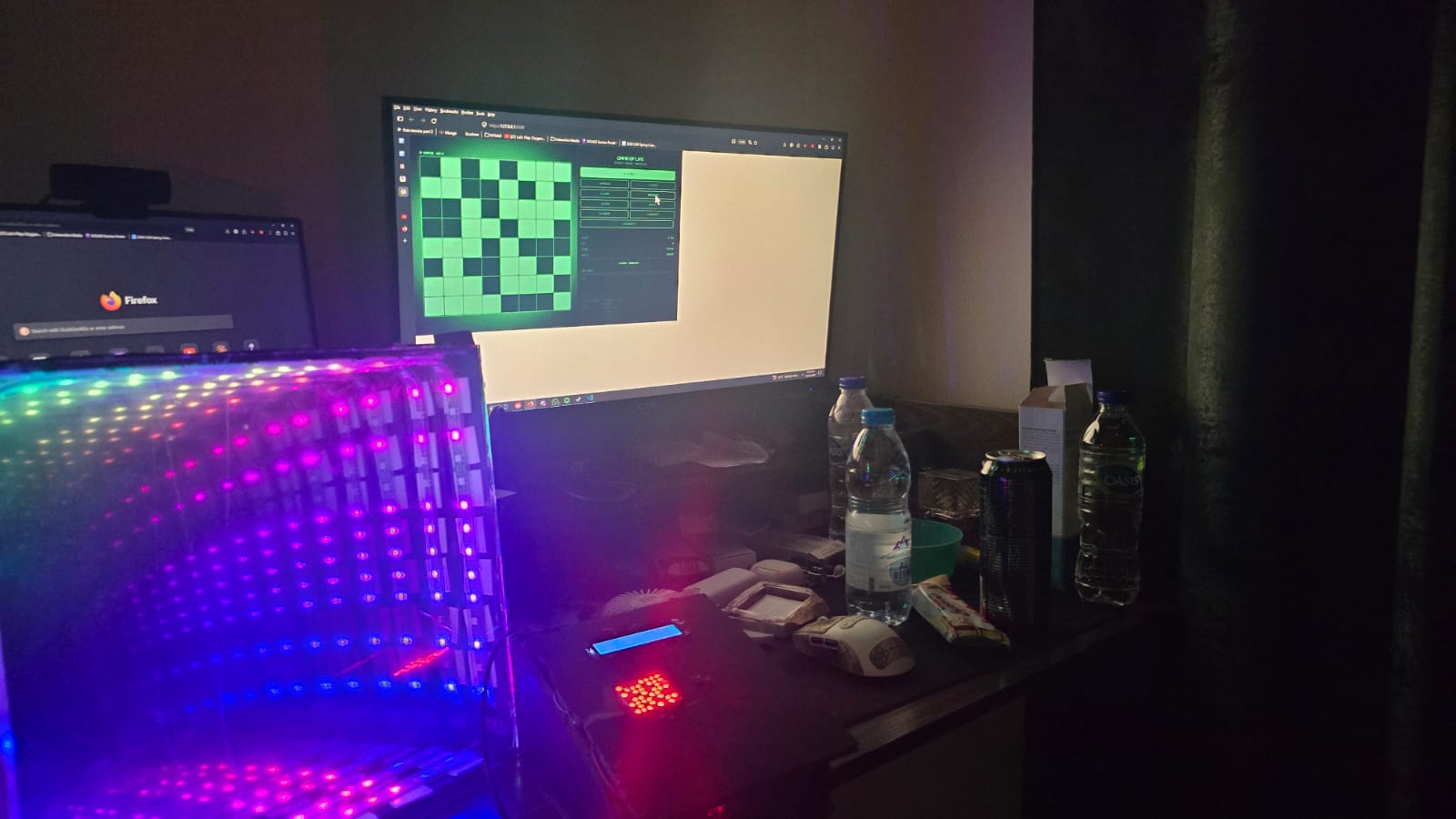
Concept:
Infinity Mirror’s are a cool thing I came across while scouring the internet for inspiration for my final project, but I needed to add some sort of spice to it, and not just leave it with some rainbow hue that rotates in the mirror. That’s where Conway’s game of life comes in, each LED strip acts as a cell, and there’s nothing more perfect for it than a Conway’s game of life visualization.
Demo:
Implementation:
Sketch:
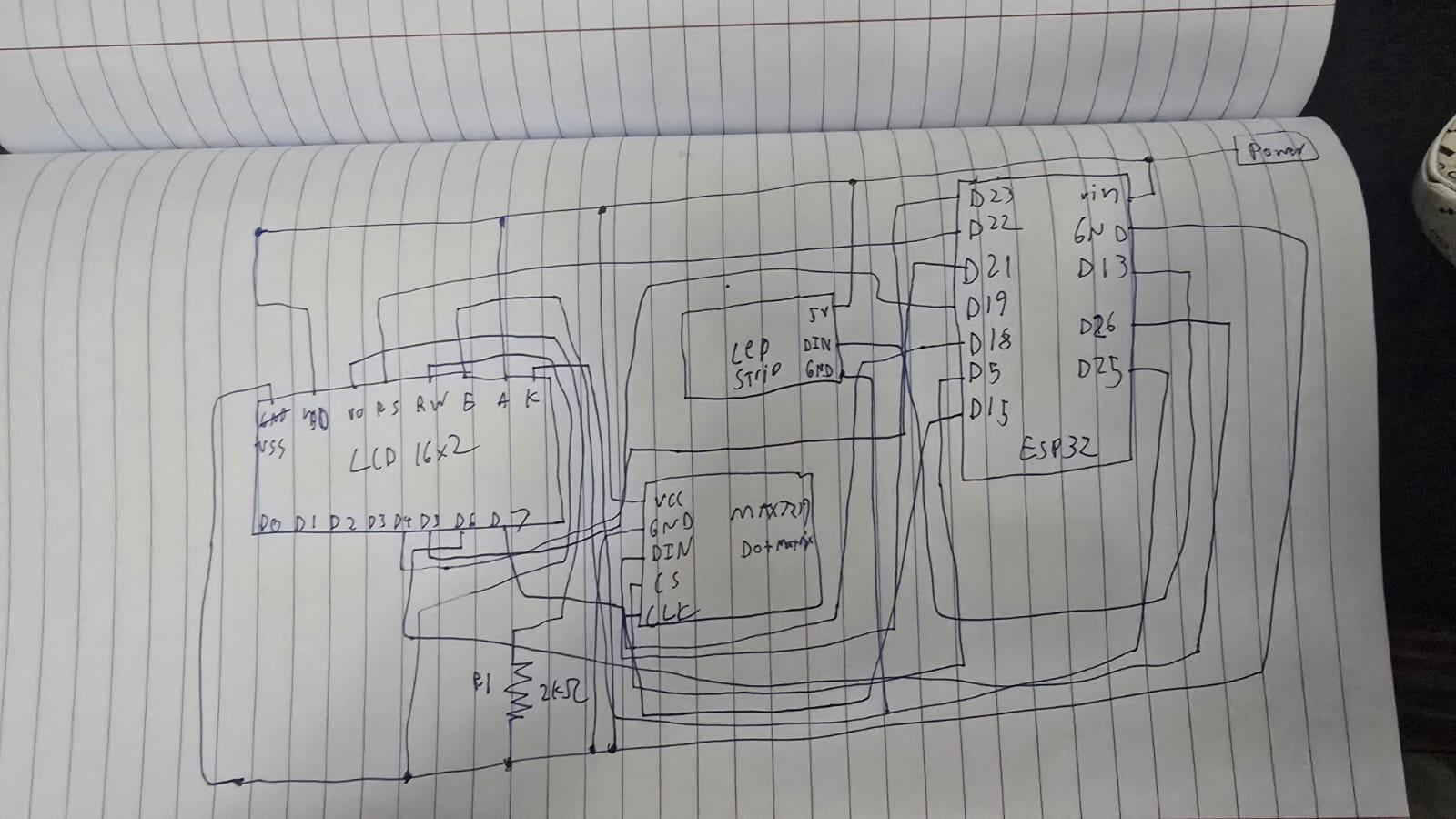
Schematic:
ESP32 Snippets:
WiFi.begin(SSID, PASSWORD);
while (WiFi.status() != WL_CONNECTED && tries < 30) {
    delay(500);
    tries++;
}
lcd.print(WiFi.localIP().toString());
The ESP32 connects to an exisiting Wi-Fi network and prints its assigned IP address on boot. The IP only needs to be read once and then hardcoded into sketch.js. The 30-attempt timeout prevents the firmware from hanging forever if credentials are wrong and returns and error message instead.
unsigned long lastLEDUpdate  = 0;
unsigned long lastLCDUpdate  = 0;
unsigned long lastMatrixBeat = 0;

if (now - lastLEDUpdate > 20)  { updateLEDs();   lastLEDUpdate = now; }
if (now - lastLCDUpdate > 500) { updateLCD();    lastLCDUpdate = now; }
if (now - lastMatrixBeat >
max(80, simSpeed / 4)) { updateMatrix(); lastMatrixBeat = now; }
There is 3 completely independant timers running concurrently with zero blocking. Each one records when it last fired and only acts again once enough time has elapsed. This is using the blink-without-delay pattern we learnt in class since delay would freeze the entire micro controller. With this approach the LEDs animate at 50fps, the LCD refreshes every 500ms, and the matrix beats at a rate derived from simulation speed.
if (now - lastMatrixBeat > max(80, simSpeed / 4)) {
    updateMatrix();
    lastMatrixBeat = now;
}
When paused, the matrix runs its own idle animation, a border with a pulsing center block. The rate of that animation is derived from simSpeed/4, meaning if you’ve set the simulation to run fast, the idle animation also pulses quickly. This makes the physical hardware feel responsive to your settings even when nothing is simulating. The max (80,…) floor prevents it from updating faster than ~12fps at maximum speed.
void onWSEvent(uint8_t num, WStype_t type, uint8_t* payload, size_t length) {
  switch (type) {
    case WStype_CONNECTED:
      wsServer.sendTXT(num, "HELLO:ESP32_READY");
      lcdFlash("p5.js Connected");
      matrixFlash();
      break;
    case WStype_DISCONNECTED:
      lcdFlash("Client Left    ");
      break;
    case WStype_TEXT:
      parseMessage(String((char*)payload));
      break;
  }
}
Websocket connections have lifecycle events. WStype_CONNECTED fires when p5.js first connects, and the ESP32 immediately sends a handshake back confirming its ready. WStype_DISCONNECTED fires if the browser closes or Wi-Fi drops, letting the hardware react gracefully rather than freezing on the last received frame. Only WStype_TEXT actually carries simulation data.
void parseMessage(String msg) {

  if (msg.startsWith("GRID:")) {
    int gridEnd  = msg.indexOf(',');
    String cells = msg.substring(5, gridEnd);

    int genStart = msg.indexOf("GEN:") + 4;
    int genEnd   = msg.indexOf(',', genStart);
    generation   = msg.substring(genStart, genEnd).toInt();

    int spStart = msg.indexOf("SPEED:") + 6;
    int spEnd   = msg.indexOf(',', spStart);
    simSpeed    = msg.substring(spStart, spEnd == -1 ? msg.length() : spEnd).toInt();

    int thStart = msg.indexOf("THEME:") + 6;
    if (thStart > 5) {
      themeIdx = constrain(msg.substring(thStart).toInt(), 0, 5);
    }

    // Decode the 64-char string into the grid array
    if (cells.length() == 64) {
      for (int r = 0; r < 8; r++)
        for (int c = 0; c < 8; c++)
          grid[c][r] = (cells[r * 8 + c] == '1') ? 1 : 0;
    }

    renderGridToLEDs();

  } else if (msg.startsWith("CMD:")) {
    String cmd = msg.substring(4);

    if (cmd == "PLAY") {
      simRunning = true;
      lcdFlash(">> RUNNING     ");
      matrixFlash();
    } else if (cmd == "PAUSE") {
      simRunning = false;
      lcdFlash("|| PAUSED      ");
    } else if (cmd.startsWith("SPEED:")) {
      simSpeed = cmd.substring(6).toInt();
    } else if (cmd.startsWith("THEME:")) {
      themeIdx = constrain(cmd.substring(6).toInt(), 0, 5);
    }
  }
}
This function is the backbone of the hardware side, it’s what parses the commands received from p5.js. The first part is “GRID: …”: This carries the full 64-character cell string plus metadata (generation step, or whenever the grid changes) The next part “CMD” is a lightweight command fired when a button is pressed in p5.js without a grid change, so pressing pause doesn’t redundantly re transmit all 64 cells. The ESP32 parses by prefix rather than a fixed schema, making it easy for me to extend with new commands later.
char genBuf[7];
sprintf(genBuf, "%06lu", generation % 1000000UL);
lcd.print(genBuf);
lcd.print(simRunning ? "  RUN" : "  PSE");
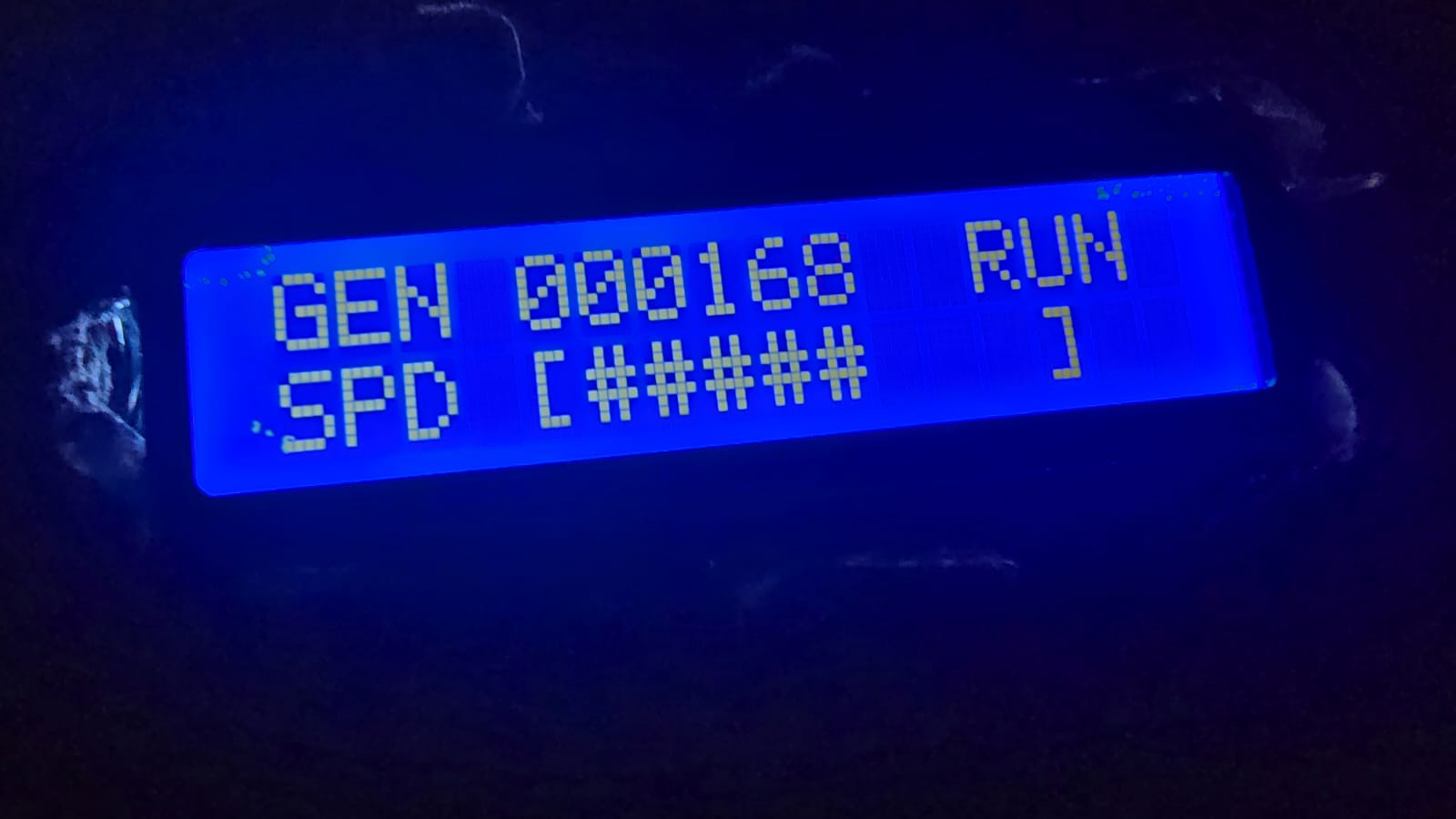
“%06lu” formats the generation count as exactly 6 zero-padded digits, so generation 42 displays as “000042” rather than shifting all the other text on the line (This fixes the issue where the LCD will keep past text if that specific position isn’t changed, so it will lead to a lot of gibberish if positions kept changing). The “% 1000000UL” wraps a tone million, preventing overflow on the display. For the speed part of the LCD, we print genBuf, which uses a map to convert the raw millisecond speed value into a visual bar of # characters (a progress bar).
if (simRunning) {
for (int r = 0; r < 8; r++)
for (int c = 0; c < 8; c++)
mx.setPoint(r, c, grid[c][r] == 1);
}
We take the grid we got from p5.js, and in the MAX7219 matrix, we simply turn on the point in that matrix wherever the grid is turned on to show the simulation on the dot matrix.
if (simRunning) {
    // mirror the actual grid
    for (int r = 0; r < 8; r++) { ... mx.setRow(0, r, rowByte); }
} else {
    // border + pulsing center block
    matrixFrame++;
    uint8_t f = matrixFrame % 16;
    mx.setRow(0, 0, 0xFF); mx.setRow(0, 7, 0xFF);
    if (f < 8) { mx.setPoint(3,3,true); mx.setPoint(3,4,true); ... }
}
When the simulation is paused the matrix doesn’t go blank, it switches to an idle animation: a solid border with a 2×2 block in the center that blinks at half the matrix update rate (f < 8 out of a 16 frame cycle). This makes it immediately obvious from the hardware alone whether the simulation is running or paused, without needing to read the LCD.
leds[i] = CHSV(baseHue + hue + (i * 6), 255, 255);
// dead cells:
leds[i] = CHSV(baseHue + hue + (i * 6), 200, 18);
Every LED gets a unique position in HSV colorspace, i*6 spreads 64 LEDs across 64×6 = 384 degrees of the color wheel, nearly a full rotation. As the global hue++ increments every 20ms the entire gradient rotates. baseHue shifts the starting color per-theme so each theme has its own dominant color family. Dead cells aren’t black, they get value:18, a very dim glow at the same hue, which inside an infinity mirror creates subtle depth between live and dead cells rather than a hard on/off contrast.
p5.js Snippets:
[grid, nextGrid] = [nextGrid, grid];
I took this optimization from my assignment 2 code, it has been a really long time so I will mention why this simple line really optimizes the algorithm by a lot. The GoL rules require all births and deaths to happen simultaneously, you can’t modify the grid you’re currently reading or updated cells corrupt neighbor counts of cells not yet processed. nextGrid is written during the step, then this single destructuring line swaps the two array references in O(1) with no copying. The old nextGrid becomes the write target for the next generation automatically.
let nc = (c + dc + COLS) % COLS;
let nr = (r + dr + ROWS) % ROWS;
Without wrapping, cells on the edge checking out-of-bounds neighbors return undefined, which correlates to 0 in arithmetic, silently giving border cells fewer neighbors than they should have. The “+ COLS” and “+ ROWS” before modulo is non-negotiable: in JavaScript -1 % 8 returns -1, not 7, so the addition ensures the value is always positive before wrapping. The top edge connects to the bottom, left to right, so the grid is a torus.
for (let [c, r] of born) {
    let px = GRID_X + c * CELL_SIZE + CELL_SIZE / 2;
    let py = GRID_Y + r * CELL_SIZE + CELL_SIZE / 2;
    for (let i = 0; i < 4; i++) particles.push(new Particle(px, py));
}
“born” is populated during “stepLife(),” only newly created cells (dead->alive) trigger particles, not cells that were already alive. Four particles spawn at the cell’s center pixel coordinates and fly outward. This gives the simulation visual feedback about where activity is happening, dense birth events create bursts of particles, stable still life produces nothing.
function sendStateToESP32() {
  let cells = "";
  for (let r = 0; r < ROWS; r++)
    for (let c = 0; c < COLS; c++)
      cells += grid[c][r];
  ws.send(`GRID:${cells},GEN:${generation},SPEED:${simSpeed},THEME:${themeIdx}`);
}

function sendCmd(cmd) {
  ws.send("CMD:" + cmd);
}
The grid is serialized as a flat 64-character string of 0 and 1s. A full state message looks like “GRID:0010011100…., GEN:42, SPEED:300, THEME:2.” Lightweight commands like “CMD:PAUSE” or “CMD:SPEED:180” skip the cell string entirely, pressing pause doesn’t re transmit the 64 characters redundantly. The ESP32 reads the prefix to know which parser to run.
let speedLabel = nf(map(simSpeed, 30, 900, 1, 0.03), 1, 2);
drawStat("SPEED", speedLabel + "x", ...);
Internally simSpeed is raw milliseconds between steps, easier to work with in timing logic. But displaying 300ms to a user is meaningless. map(0 convers the range 30-900ms to 1-0.03, so the UI shows a human-readable multiplayer like 0.50x or 1.00x. The inversion (low ms = higher multiplier) is intentional, fast simulation = high number feels intuitive.
function applyPreset() {
  initGrid();
  generation = 0;
  let key = presetKeys[presetIdx];
  if (key === "RANDOM") {
    for (let c = 0; c < COLS; c++)
      for (let r = 0; r < ROWS; r++)
        grid[c][r] = random() > 0.55 ? 1 : 0;
  } else {
    let pts = PRESETS[key];
    for (let [c, r] of pts) {
      if (c < COLS && r < ROWS) grid[c][r] = 1;
    }
  }
}
Each preset is stored as absolute [col, row] coordinates rather than offsets, sized to fit the 8xx grid. The “if (c < COLS && r < ROWS) guard means a badly defined preset can never write out of bounds and corrupt memory. RANDOM gets its own branch, each cell independently has a 45% chance of being alive. That specific threshold was tuned: lower than ~35% and the grid dies out almost immediately, higher than ~55% and it suffocates just as fast. 45% tends to produce a chaotic but sustainable starting population.
Proud moments:
Honestly I did not originally like this idea, it was like 3 am and I just wanted to put an idea and go to sleep. However it turned out so much better than I expected and I ended up really liking with what I came up with. Finishing the mirror and turning it on for the first time to see the effect actually working made me really happy and proud of myself, as well as running the code for the first time with p5js to see everything working just how I intended and look even better than I expected. Overall I am really happy and proud of this project.
Future improvement:
– Sound reactivity: I was considering using my microphone module on the ESP32 to inject new live cells in sync with audio, but I did not know if I had time.
– Saved patterns: Letting users save their favorite starting configurations to flash memory so they persist between sessions would be a really nice addition.
– HUD Tutorial: A real-time tutorial over the HUD would be a nice addition to get new users started with how a simulation works and how my simulation works.
– Population graph: I originally wanted to add an LED strip that would show the current population with different colors (green, yellow, red) but I did not have an LED strip connector, and my DIY attempts and connecting the wires to the copper pads did not work out successfully sadly.
Links:
github.com/Links2004/arduinoWebSockets
docs.espressif.com/projects/arduino-esp32/en/latest/api/wifi.html
https://developer.mozilla.org/en-US/docs/Web/API/WebSocket