Week 11 – Final Project Preliminary Concept

Driving Game with a Physical Steering Wheel (Steering Beyond the Keyboard)

For my final project, I want to create a simple driving game that is controlled using a real steering wheel instead of a keyboard. The idea is to change how we normally interact with games. Instead of pressing keys, the user will physically turn a steering wheel to control the car on the screen. I am interested in how this makes the experience feel more natural and more connected to the body.

I will be using an actual steering wheel that I can buy online and then connecting it to my Arduino setup. The steering wheel will be attached to a potentiometer so that when it rotates, the Arduino can read the change in position. This value will then be sent to p5.js using serial communication. I will also include a button that can be used to start or reset the game.

On the p5.js side, I will build a simple driving game. The player will control a car that can move left and right across the screen while the road moves forward. Obstacles will appear, and the player has to steer to avoid them. The position of the car will be directly linked to how much the steering wheel is turned, so the movement should feel smooth and responsive. I plan to include basic features like a score counter, a crash state, and a reset option.

The main focus of this project is not just the game itself, but the interaction. I want the system to feel clear and easy to understand. When the user turns the wheel, the car should immediately respond on the screen. This direct connection between input and output is important. It should feel like the user is actually controlling the movement in a physical way, not just pressing buttons.

I also want to make the setup look clean and intentional. I will build a simple base to hold the steering wheel and hide the wires. This will help the project feel more like a complete system rather than just loose components. I may also add small details like labels or lights to make the interaction clearer.

For inspiration, I looked at projects that use unconventional controllers and turn the interface into part of the experience. I also looked at previous student projects where the interaction was very clear and immediate. Those projects showed that even simple inputs can feel impressive if the response is well designed and easy to understand.

To build this, I will use basic Arduino tutorials for reading a potentiometer and sending data through serial communication. For p5.js, I will use examples that show how to read serial data and map values to movement on the screen. These will help me create a stable system before I focus on improving the visuals and overall experience.

Overall, this project is about making a simple but effective interactive system. By using a real steering wheel, I want to create a more engaging and physical way to play a digital game. The final result should feel responsive, intuitive, and easy for anyone to try without needing instructions.

Reading Reflection – Week 11

The Design Meets Disability reading made me rethink how I usually see design, because I realized I tend to treat accessibility as something separate from “good design,” like something added later to fix a problem instead of something considered from the start. Pullin challenges that idea by showing how assistive devices often aim to hide disability or make someone appear more “normal,” and I found myself questioning why that feels like the default goal. When I think about it, that approach says more about what society is comfortable with than what people need or want, and I had not really noticed how strong that assumption is until now.

What stayed with me is his focus on expression, because he suggests that assistive design does not have to disappear or blend in, it can reflect identity in a visible way, and that shift feels important. When I think about prosthetics designed to look exactly like a natural limb, I see how design tries to erase difference, but when I picture a prosthetic designed with color or shape or style, it changes the meaning of the object completely. It becomes something personal instead of something corrective. That made me realize how much design controls what gets seen as normal, and how easy it is to follow that without questioning it.

After reading this, I feel more aware of how I approach design decisions, even in small ways, because I see how choices about form, appearance, and function are never neutral. If you design for one type of user, you set a standard that excludes others without saying it directly, and I think that is what I will carry forward from this reading. I need to think about who is included from the beginning, not after, and I need to question why certain designs try so hard to hide difference instead of allowing it to exist openly.

Week 11 – Reading Response

The author claims that the strive toward the “discreetness” of medical devices enforces a stigma around them, sending a message that needing these devices is shameful. However, while the primary purpose of these devices is functional, on a social level, many people of determination who wear them simply want to feel included and navigate the world without drawing unwanted attention. While I certainly do not condone making people of determination feel left out, and I believe that eliminating stigma starts with changing society’s mindset rather than hiding a disability, I am also realistic. It is extremely difficult to change societal behavior and opinions overnight. Therefore, it can be highly beneficial to create devices that are discreet. Providing these options is ultimately about offering choice: it caters to those who prefer not to draw attention to themselves. Realistically, many people face intense social pressure and would rather blend in than stand out. Years down the line, I hope all medical devices can achieve a destigmatized success story like eyewear, where users have the agency to be as bold or as subtle as they wish. In the meantime, however, making discreet devices is not necessarily a negative thing; it is a necessary accommodation for the social realities people currently face.

Week 11 Reading Response

One idea that stuck with me even after the reading is that eyewear is a space where fashion and disability overlap. The text explains how glasses are no longer seen only as medical tools but also as items people wear to express themselves. This connects to my own experience. When I was younger, I saw my friend’s glasses as more of a fashion statement than something related to vision problems. I would even try them on because I thought they looked good on me. At that time, I didn’t really understand the difference between graded glasses and fashion glasses since they looked similar and came in many styles and colors. It was only later, when I developed farsightedness myself, that I realized their actual purpose. Looking back, I see that my experience reflects what the text describes, that glasses can function both as a medical tool and as a form of self-expression. I also noticed that, as mentioned in the reading, glasses are often visible and even desired, unlike many assistive devices that are designed to be hidden. This shows how eyewear challenges the idea that disability-related products should always be discreet.

On the other hand, I liked how the author pointed out that invisibility is not always the best approach for disability design. Instead of hiding, creating a positive and confident image can change how people see disability. This made me think that trying to make assistive devices invisible can make them seem like something to be embarrassed about. This also made me realize that design doesn’t just solve a problem, it also affects how people feel about themselves and how they are seen by others. A good example of this from the text is Aimee Mullins, who embraces her prosthetic legs and uses them to express herself, similar to how people choose different outfits. Through this example, I realized that design for disability goes beyond just function. It also plays an important role in someone’s confidence, identity, and how people choose to express themselves.

Reading Reflection- Design meets disability

One idea that really stood out to me from Design Meets Disability was the concept of the “golden hand,” especially in the contrast between traditional prosthetics and more expressive designs like Jacques Monestier’s.

What I found interesting is how this shifts prosthetics from something purely functional into something aesthetic and personal. It shows that design doesn’t have to choose between function and beauty it can combine both. As someone with a background in art, this made me think about how designers can transform assistive devices into something meaningful, almost like a canvas for self expression rather than just a medical tool.

Another thing that stood out to me was how the reading emphasizes that artists bring a different perspective to engineering. They focus not just on how something works, but on how it feels and what it represents. This made me reflect on our current Arduino project, where it’s easy to focus only on the technical side, but there’s also potential to incorporate materials and design to make it more visually and personally expressive. The reading also highlights that these designs shouldn’t just be treated as objects, but as personal belongings especially in the case of prosthetics, which are part of someone’s identity. That idea really shifted my thinking, because it suggests design should allow for individuality and expression, rather than trying to hide difference.

Final Project Concept: Echo Step

I was inspired by Color Twister, a game where players follow color-based instructions by placing their hands and feet on matching spots. I wanted to take that idea further and make it less about quick reactions and more about thinking, memory, and control, so I came up with Echo Step.


In this game, players are shown a sequence of visual signals on screen for a few seconds. Once it disappears, they have to recall and perform the sequence using their body on the “Echo Step Board,” which is connected to an Arduino. The challenge is to remember the information and use it accurately on time.

Echo Step doesn’t just tell where to step, it also tells the player how to interact. When the pink color appears in the sequence, the player should step into the zone and hold it until the level ends. If it’s yellow, the player should step once and remove it afterward. Holding too long or stepping on it again results in a loss. If it’s black, the player should be aware that it is only for deceit. They should avoid it completely, even if it appears in the sequence. Because of this, players have to interpret each signal before acting. It’s not just about memorizing positions, it’s about understanding instructions, timing movements, and controlling the body.

The game has four levels. Each level gets harder. It adds more complex sequences, tighter timing, and trickier signals. These elements test the player’s memory and decision-making skills.

Another key aspect is that the physical board itself has no colors, only neutral zones. All cues come from the screen, which means players must mentally map what they see onto the board. This adds abstraction. It forces them to turn visual cues into actions without direct help.

Final Project: Pressure-Based Digital Musical Instrument

Preliminary Concept: Pressure-Based Digital Instrument

For my final project, I plan to create a physically interactive musical instrument using Arduino and p5.js. The idea is to build a simple keyboard-like interface where users can play notes by touching pressure sensors.

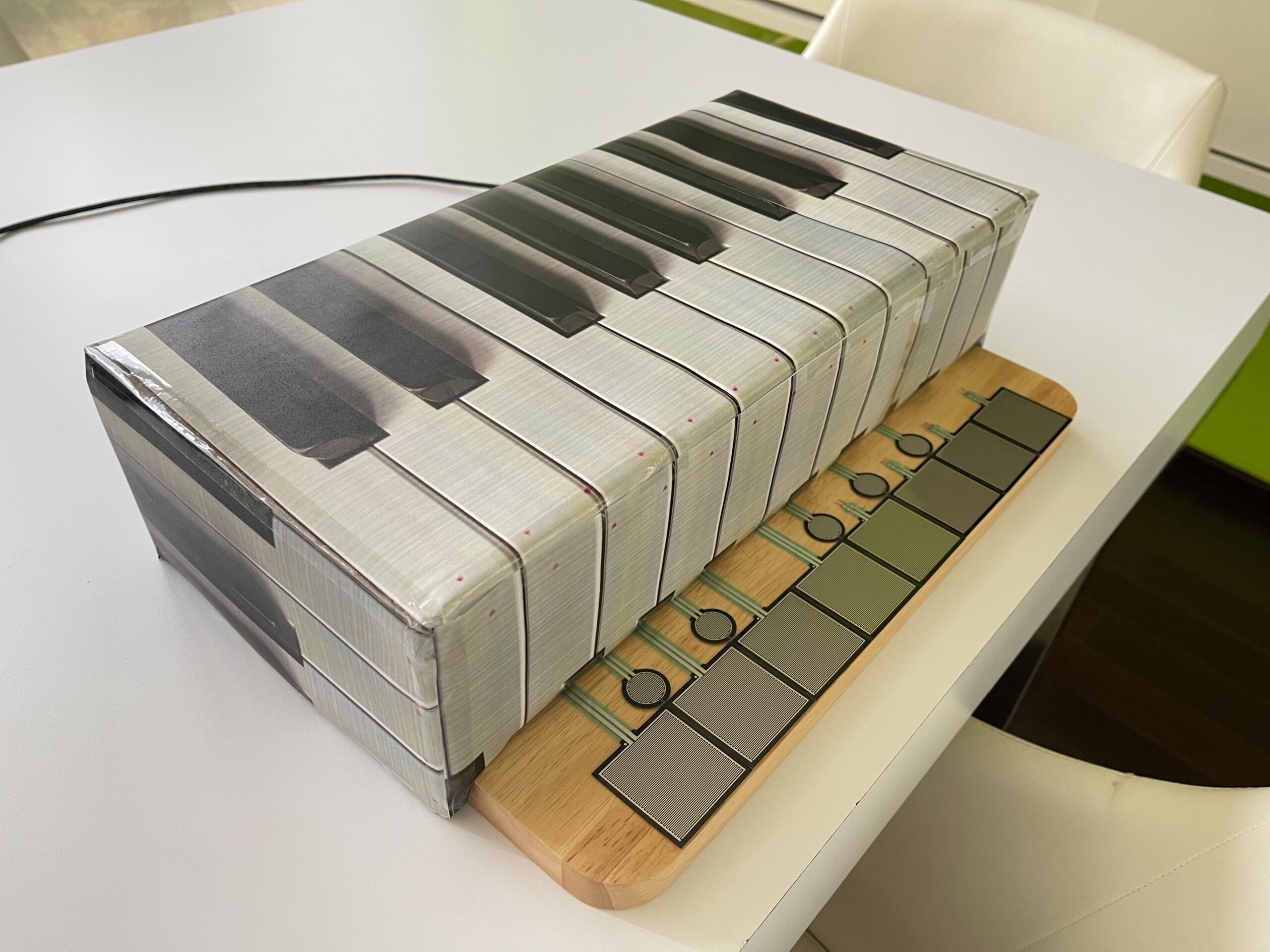
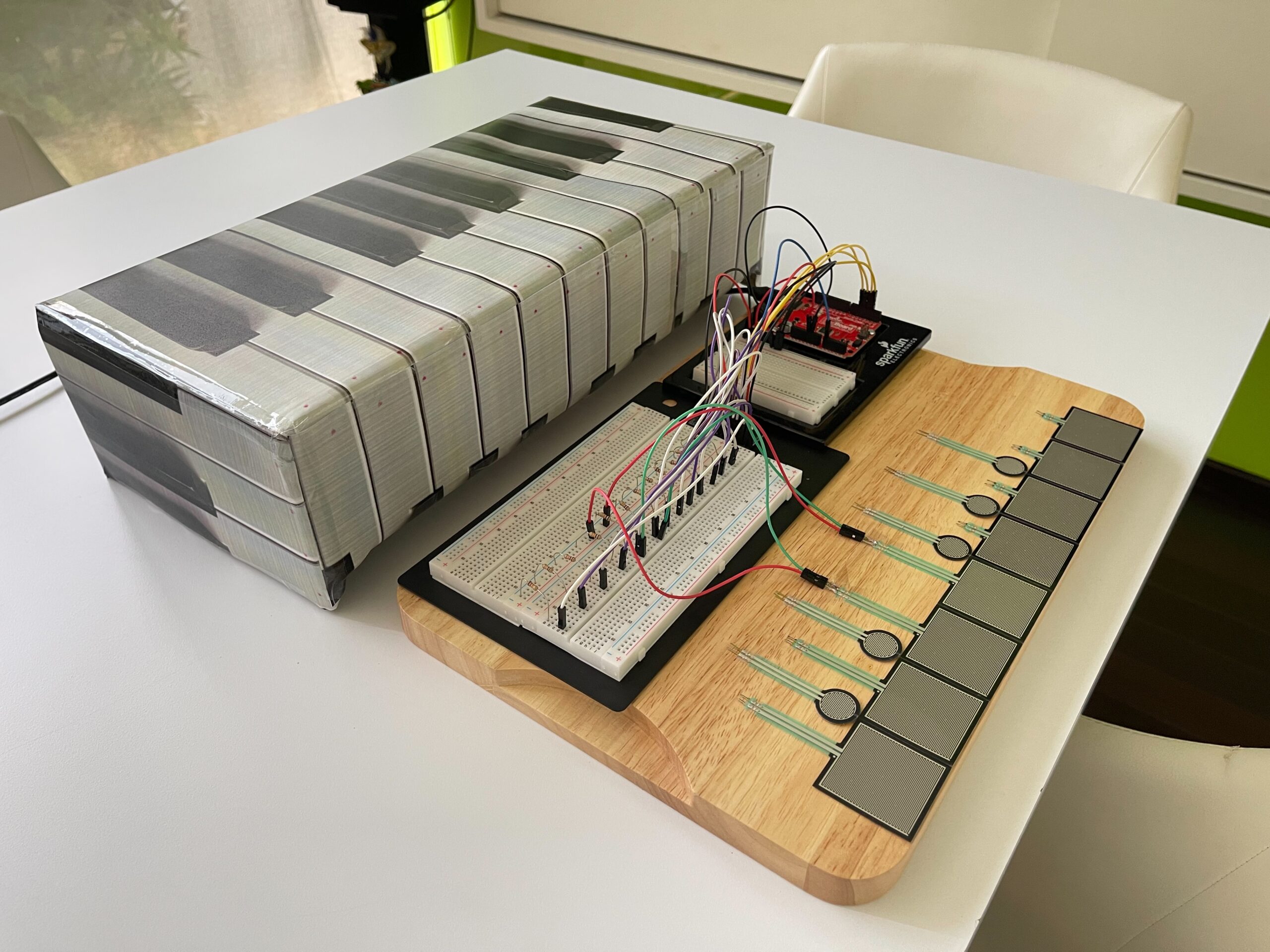
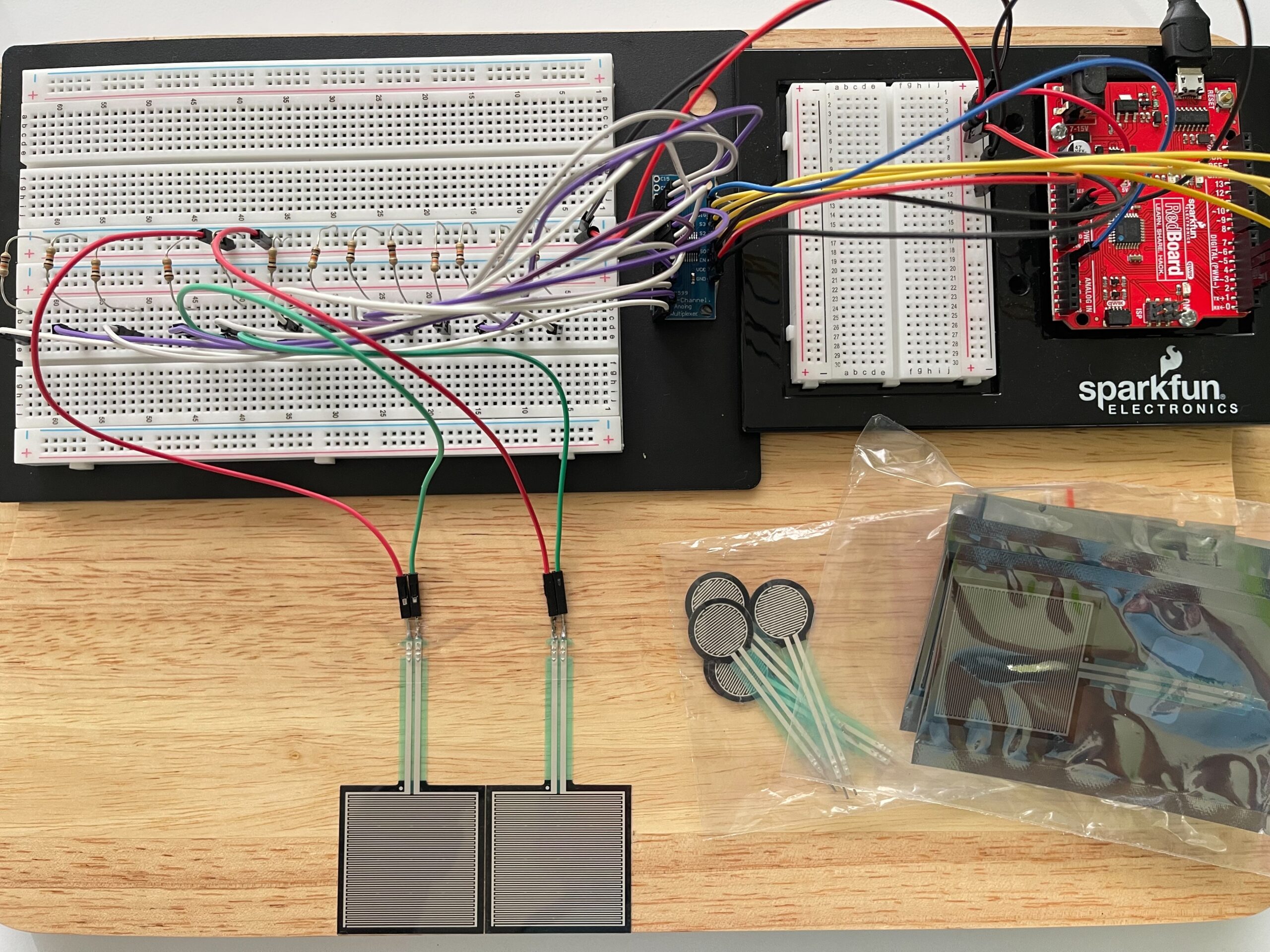
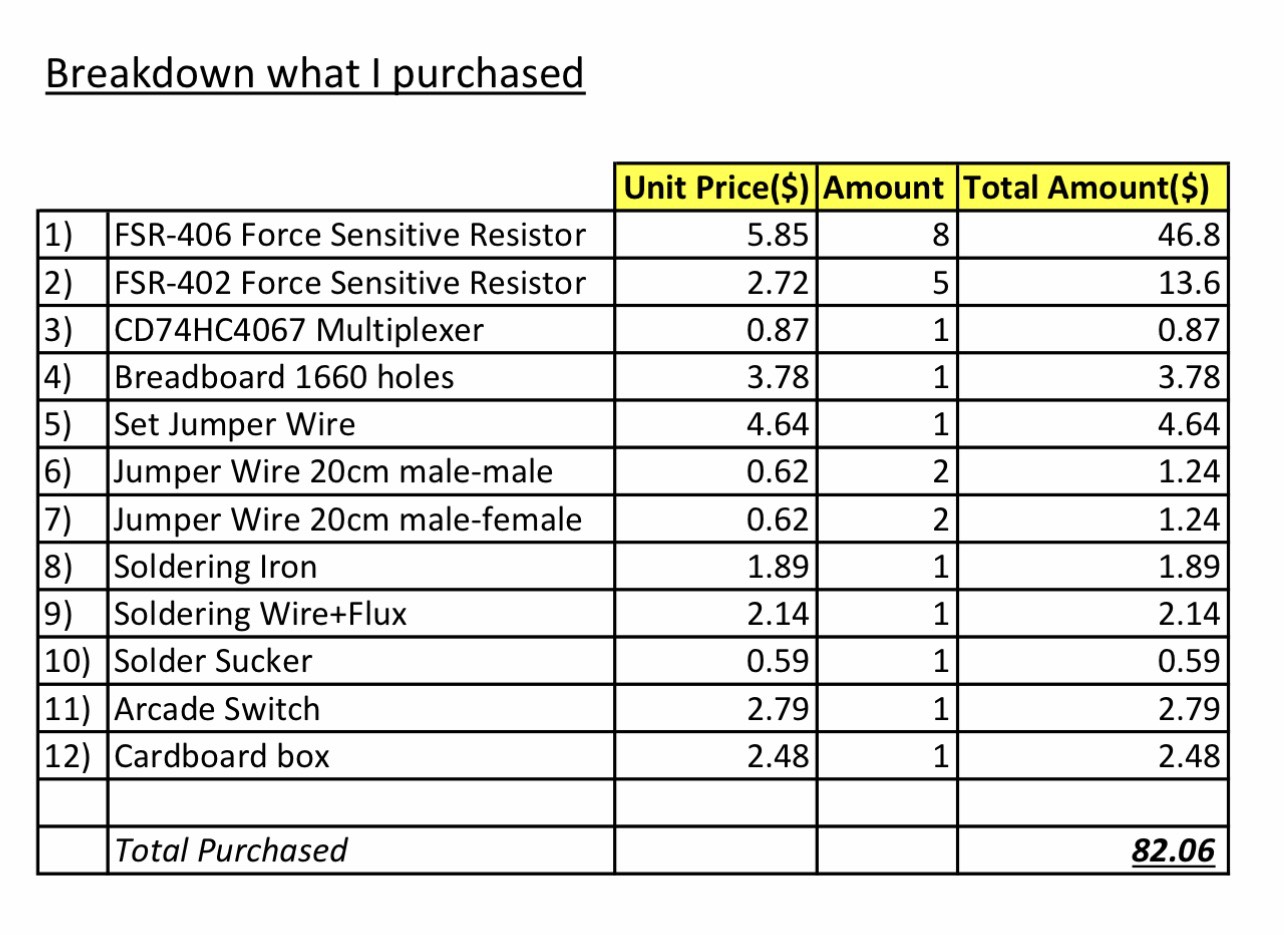
Instead of using buttons, I will use Force Sensitive Resistors (FSRs) so that the interaction feels softer and more natural, similar to placing fingers on a piano. Each sensor will represent one note (C, D, E, F, G, A, B, C, including sharps/flats).   Below picture will have only 4 FSR406 and 4 FSR402, I will buy them more and also 16 channel analog multiplexer to complete my project soon. 

Arduino will read the sensor values and send the data to p5.js through serial communication. In p5, the input will be used to generate sound and simple visual feedback. I will use the computer’s speaker for audio output instead of a buzzer to improve sound quality.

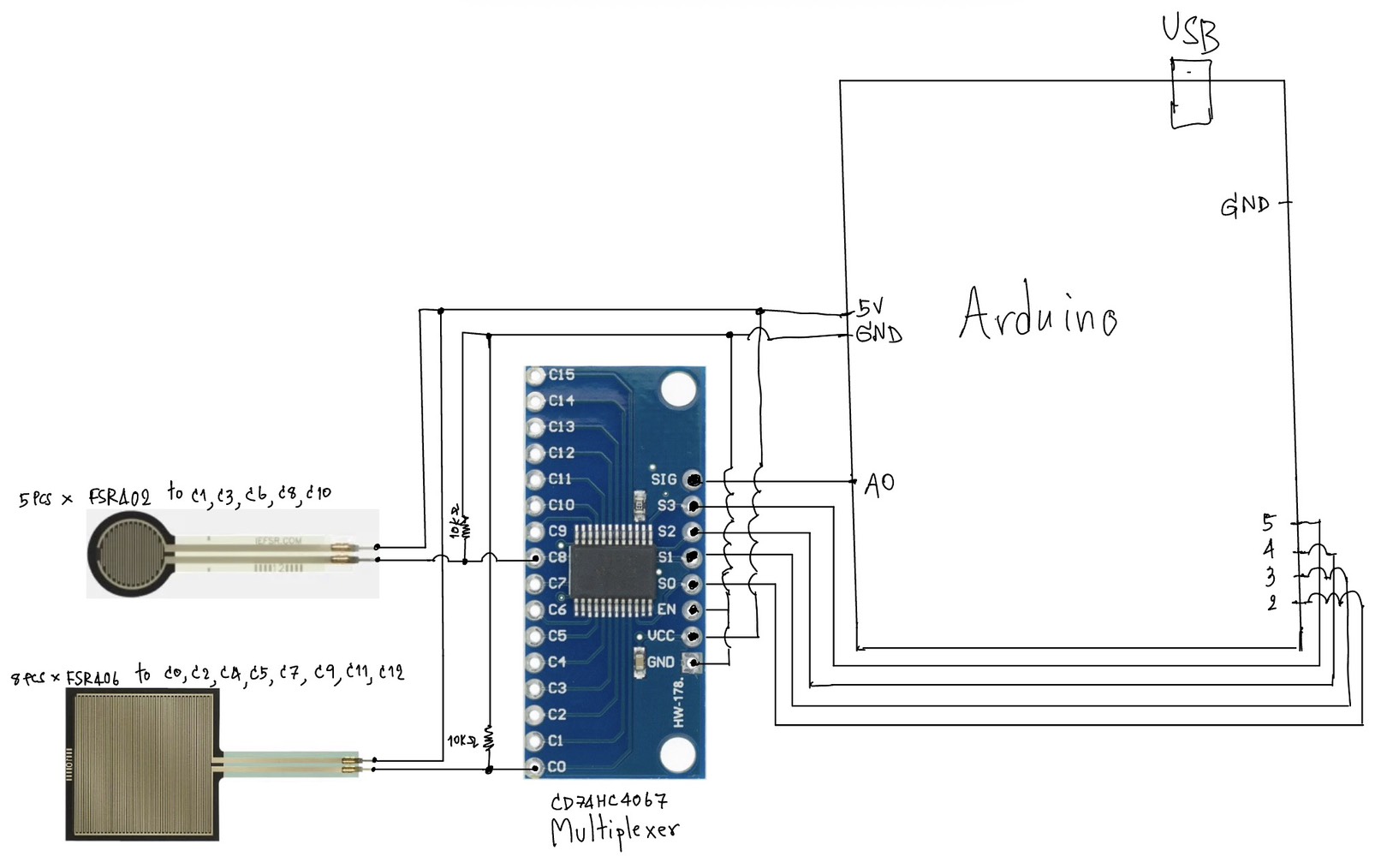
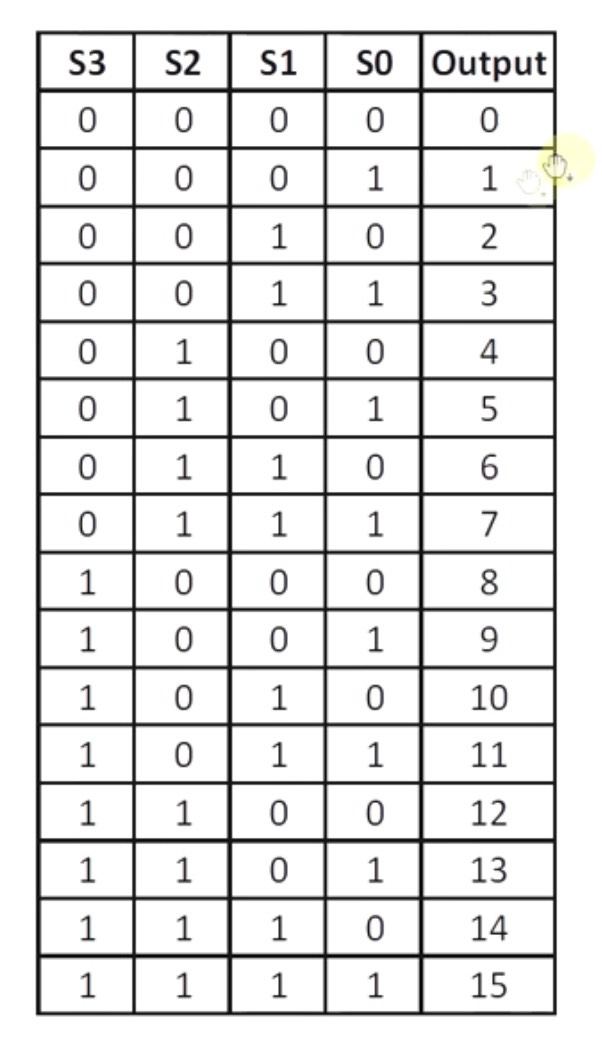
Since I need to use multiple sensors, I will use a CD74HC4067 multiplexer to expand the number of inputs. This allows Arduino to read many FSRs efficiently.

The system will also include a feedback loop. For example, when a note is played, p5 can send a signal back to Arduino to turn on an LED. This creates a simple two-way communication between Arduino and p5.

The goal of this project is to explore how physical touch can be translated into digital sound and visual feedback in a clear and responsive way.


Inspiration

This project is inspired by different types of interactive musical interfaces:

* Digital MIDI controllers and touch-based instruments
* Piano keyboards, especially the idea of soft and responsive touch
* Interactive installations where physical actions directly control sound
* Simple expressive systems that focus on user interaction rather than complexity

I am particularly interested in how small physical gestures, like lightly touching a surface, can create meaningful digital outputs such as sound.


References / Tutorials

Here are some references and tutorials that informed my idea:

* p5.js Sound Library (official reference)

https://p5js.org/reference/#/libraries/p5.sound

* Basic FSR (Force Sensitive Resistor) guide
https://learn.adafruit.com/force-sensitive-resistor-fsr

* Multiplexer (CD74HC4067) explanation
https://learn.sparkfun.com/tutorials/multiplexer-breakout-hookup-guide


Sketch Description

The system will be arranged like a simple keyboard:

* FSR406 → white keys (main notes)
* FSR402 → black keys (sharps/flats)

Final Project Proposal

For my final project, I am creating a physically interactive maze game that uses both Arduino and P5.js. So I decided to pick minnie mouse and mickey mouse as my two characters. The idea is to guide minnie mouse through a maze using two physical potentiometers instead of a keyboard or mouse. The player’s goal is to move minnie mouse from the start of the maze to the end, where mickey mouse is waiting.

The interaction works in a simple cycle of listening, thinking, and responding. The Arduino will be the “listener” because it reads the positions of the two potentiometers. One knob controls left andright movement, and the other controls up and down movement. When the player turns the knobs, Arduino senses the changes and sends those values to P5.js. P5. will be the “thinker,” because it takes those values and turns them into movement on the screen. The game then responds by moving the character in real time and showing whether the player is controlling minnie mouse in staying inside the maze or hitting the walls.

The maze itself will be drawn in P5 using simple shapes or a custom layout. I will have a start screen and instructions screen. The character will move smoothly through the pathways, and basic collision detection will prevent it from passing through walls. When the player reaches the goal area, the game will display a small celebration animation or visual cue to show that the objective has been completed. The experience is meant to feel playful, fun and slightly challenging, since the player must learn how to control movement using physical knobs instead of controlling it with the laptop. I will probably take photos of minnie mouse and mickey mouse of the internet and use them as my characters.

Reading Reflection – Week 9 Design meets disability

Reading Design Meets Disability made me rethink what I previously considered “good design.” I used to associate good design with aesthetics and general usability, but this reading challenged my assumption by showing how design is deeply tied to social attitudes toward disability. The section on “discretion” stood out to me, where assistive devices like hearing aids are designed to be hidden in order to avoid stigma. This made me question whether invisibility is actually a positive goal, or if it reinforces the idea that disability should be concealed. I found myself reflecting on how design choices are not neutral and that they reflect cultural values about what is considered “normal.” The tension between fashion and disability also left a strong impression on me. While making assistive devices more fashionable can empower users, it also risks emphasizing appearance over accessibility. This contradiction made me realize that design often operates between competing goals rather than clear solutions.

This reading also connected to my previous understanding of user-centered design but expanded it in a way I had not considered before. It made me realize that “the user” is often imagined as a narrow, able-bodied group, which doesn’t take into account many real experiences. The idea of “simple meets universal” raised an important question for me that is it actually possible to design something that works for everyone, or does inclusivity inevitably introduce complexity?   This challenges the assumption that simplicity is always better. Personally, this reading shifted my perspective from seeing design as purely functional problem-solving to understanding it as a more cultural and ethical practice that shapes how people are perceived and included. It also made me more aware of the limitations in the designs I encounter daily and how they really reflect broader biases rather than just technical decisions.

Week 11 Ex03 Bi-Directional Communication

Github:

https://github.com/skyorachorn/Intro-to-IM/blob/5c35d686b16c8ad6965f1755d6dd0e0c786ab2c4/Ex03_Bi_Directional_Com.ino


Youtube:

https://youtu.be/9bqEiR_zGJM?si=Mm7S7kV4fjWl15sk

Circuit:


Hand Written Circuit:

In this exercise, we extended our work from the previous tasks by implementing bi-directional communication between Arduino and p5.js. The goal was to use an analog sensor to control the wind force in a physics simulation, and at the same time send data back from p5 to Arduino to control an LED.

We started from the gravity and wind example provided in class and kept the structure mostly unchanged. Instead of using keyboard input to control the wind direction, we replaced it with a joystick connected to Arduino. The horizontal axis of the joystick was read using analogRead() and sent to p5 through serial communication.

On the p5 side, the incoming value was read using port.readUntil(“\n”), then converted into an integer. We mapped this value to a range between -1 and 1, which was used as the horizontal wind force. As a result, moving the joystick left or right directly influenced the movement of the ball in the simulation.

To complete the bi-directional interaction, we added a simple condition in p5 to detect when the ball bounces on the ground. Whenever a bounce occurs, p5 sends a value back to Arduino. On the Arduino side, this value is read using Serial.parseInt(), and the LED is turned on or off accordingly.

This allowed us to create a system where Arduino sends sensor data to p5, and p5 responds by sending control signals back to Arduino.

What We Learned:

* How to implement bi-directional serial communication
* How to use an analog sensor (joystick) to control a physics simulation
* How to send control signals from p5 back to Arduino
* How physical and digital systems can interact in both directions

Code I’m Proud Of:

One part we are particularly satisfied with is how the system detects a meaningful bounce and avoids triggering unnecessary signals.

p5.js (bounce detection + sending data)

let bounced = 0;
  let floorY = height - mass / 2;

  // bottom bounce
  if (position.y > floorY) {
    position.y = floorY;

    if (velocity.y > 2) {
      velocity.y *= -0.9;
      bounced = 1;
    } else {
      velocity.y = 0;
    }
  }

  // send LED state back to Arduino
  if (port.opened()) {
    port.write(bounced + "\n");
  }

This section is important because it defines what counts as a “real” bounce. By using a velocity threshold, we ensure that only stronger impacts trigger the LED, while small movements at the ground are ignored.

Arduino (receiving and controlling LED)

int ledState = Serial.parseInt();

    if (Serial.read() == '\n') {
      digitalWrite(ledPin, ledState);
    }

This part connects the digital signal from p5 to a physical output. It shows how a simple value sent through serial communication can directly control hardware.

Challenges:

One issue we encountered was that the LED flickered rapidly when the ball reached the ground. Even though the ball appeared to be at rest, the system continued to detect small movements due to gravity and drag.

At first, this made the LED stay on or flicker continuously, which was not the intended behavior.

To solve this, we introduced a simple velocity threshold. Instead of triggering a bounce whenever the ball touched the ground, we only considered it a valid bounce when the downward velocity was greater than a certain value. After testing, we found that using a condition of velocity.y > 2 provided a stable and clear result.

This helped us better understand how physics simulations can produce small continuous movements, and why additional conditions are sometimes needed to define meaningful events.

Future Improvements:

If we were to continue developing this project, we would consider:

* Adding a dead zone to the joystick to reduce unwanted drift
* Using both axes of the joystick to control more complex motion
* Adding more LEDs or outputs to represent different events
* Improving the visual feedback to better match the physical response


Reference:

https://youtu.be/6LkqhQ1-vJc?si=E_jhX4XUAnMQBCrY

https://youtu.be/pD2JUNUWJGU?si=xgiGR7X3Bhdkyi6W