The part about artists telling the participant what each element means instantly brought me back to my installation art class, where we talked a lot about the moment you have to let go of the work and allow the user to take over. The reading’s point that once you start explaining everything, you re basically telling the participant how to think and act felt very familiar. In class, we discussed how the artwork should guide the user through visual cues, placement, and logic, not through the artists explanations. The reading frames this as the beginning of a conversation you set the context, arrange the space, and design the behaviors, but then you step back. That idea aligns with what I learned before about trusting the user to make sense of the work on their own terms.
The emphasis on listening to how people interact with the piece also reminded me of earlier readings about the relationship between creator and audience. The author describes how the user’s actions whether they understand, misunderstand, or reinterpret what you designed become part of the artwork itself.
That perspective made me think about what makes a “proficient conversation” between the work and the user: clear affordances, intentional choices, and removing anything that distracts from the interaction. It reinforced the idea that interactive art isn’t a finished statement but an ongoing exchange, where the audience completes the work through what they do and how they respond.
The floor pad section reminded me strongly of my own midterm project, not because of dance, but because of the game like logic of stepping onto the correct color at the right moment. That mechanic simple, instinctive, and satisfying made me realize how powerful familiar actions can be in interactive design. Reading about how common these themes are in physical computing made me want to keep this in mind if I ever develop my project further. I’ve been thinking about exploring Al driven speech, so the idea of having the color appear on a screen and be spoken aloud feels like a natural extension. It could make the interaction more accessible, more dynamic, and more playful. I’m also open to developing completely new ideas, but this reading helped me see how my earlier work fits into a broader category of physical interaction games, and it introduced a perspective that encourages me to build on what I already created rather than dismiss it as “too simple.”
As someone who enjoys art and painting, the discussion about originality resonated with me on a personal level. In visual art, people constantly revisit the same subjects, styles, and techniques, yet each artist brings something distinct through their interpretation. I see the same pattern in interactive media: even if a theme has been explored many times, the expression is still unique because it reflects the designer’s perspective, intentions, and sensibilities. This reading made me think about how I can translate the mindset I use in painting experimenting, layering meaning, trusting my instincts into physical computing. Instead of worrying about whether an idea is new, I’m more interested in how my artistic intuition can shape the interaction, the atmosphere, and the emotional tone of a project. It makes me excited to explore how creativity moves across mediums, from canvas to sensors to screens.
Today’s readings cover different points. However, both texts urge creators to go beyond just technical skills. They encourage creators to make their works meaningful so that their audiences can have expressive experiences. The text by Tigoe about making interactive art made me realize that our creations don’t have to be perfect, because it’s really the audience’s experience that completes our creation. He also explains that our task is to create something that allows the audience to discover meaning on their own in a creative way, whether they end up enjoying it or not.
This connects to the other text by Tigoe about physical computing. I relate to this second reading because when I start a project, I often begin with an initial idea and do my research, only to realize that it has already been done by someone else. Because of that, I end up letting go of the idea and trying to come up with something new. This text helped me see that instead of giving up completely, I can still build on ideas and improve them by using different tools and approaches. Tigoe’s examples made this clearer, especially the dolls and pets example, which is something I would love to try in the future. Overall, both readings made me realize that creating is not just about coming up with something entirely original or technically perfect. It is more about making something meaningful and open enough for people to experience in their own way.
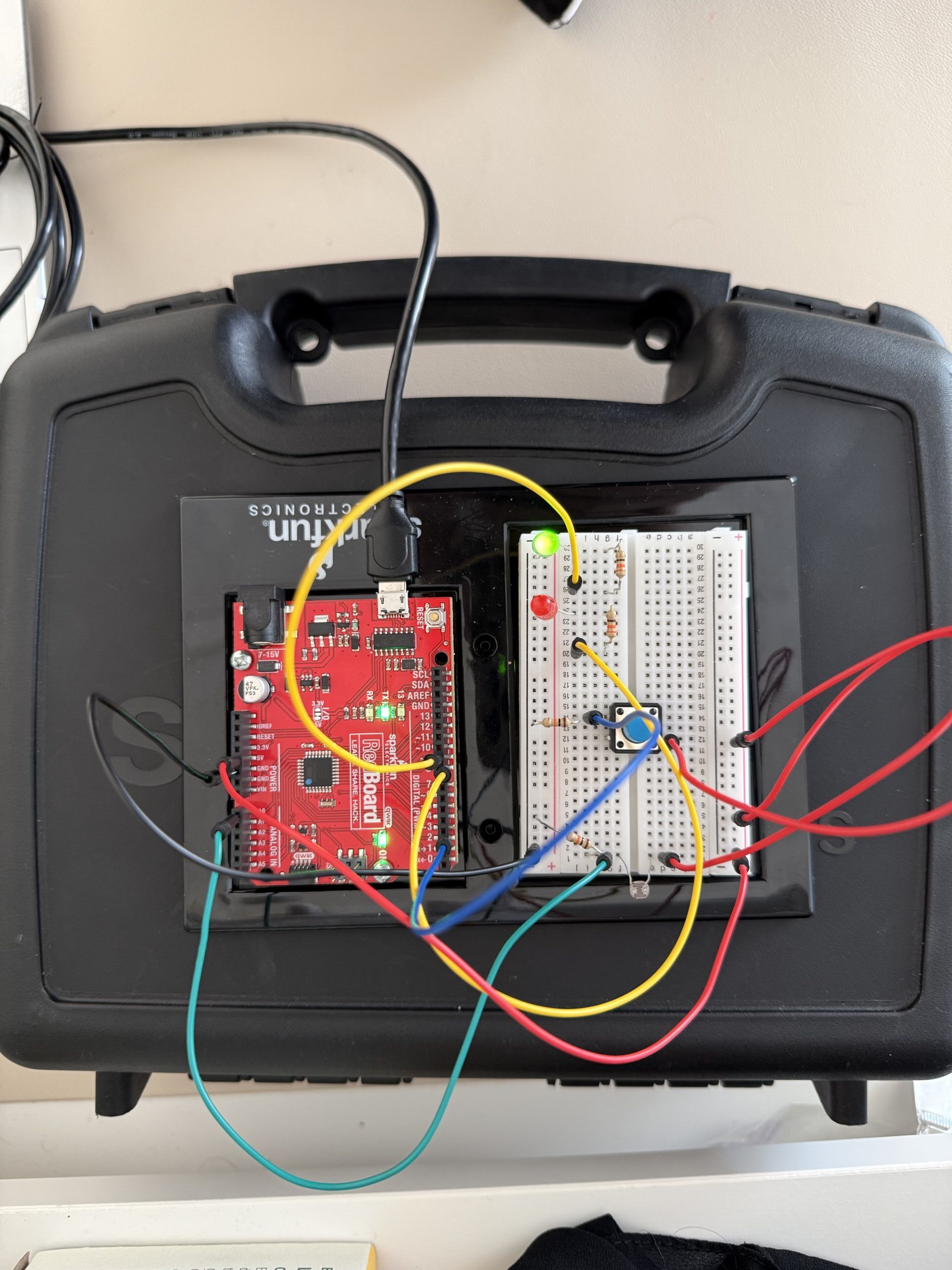
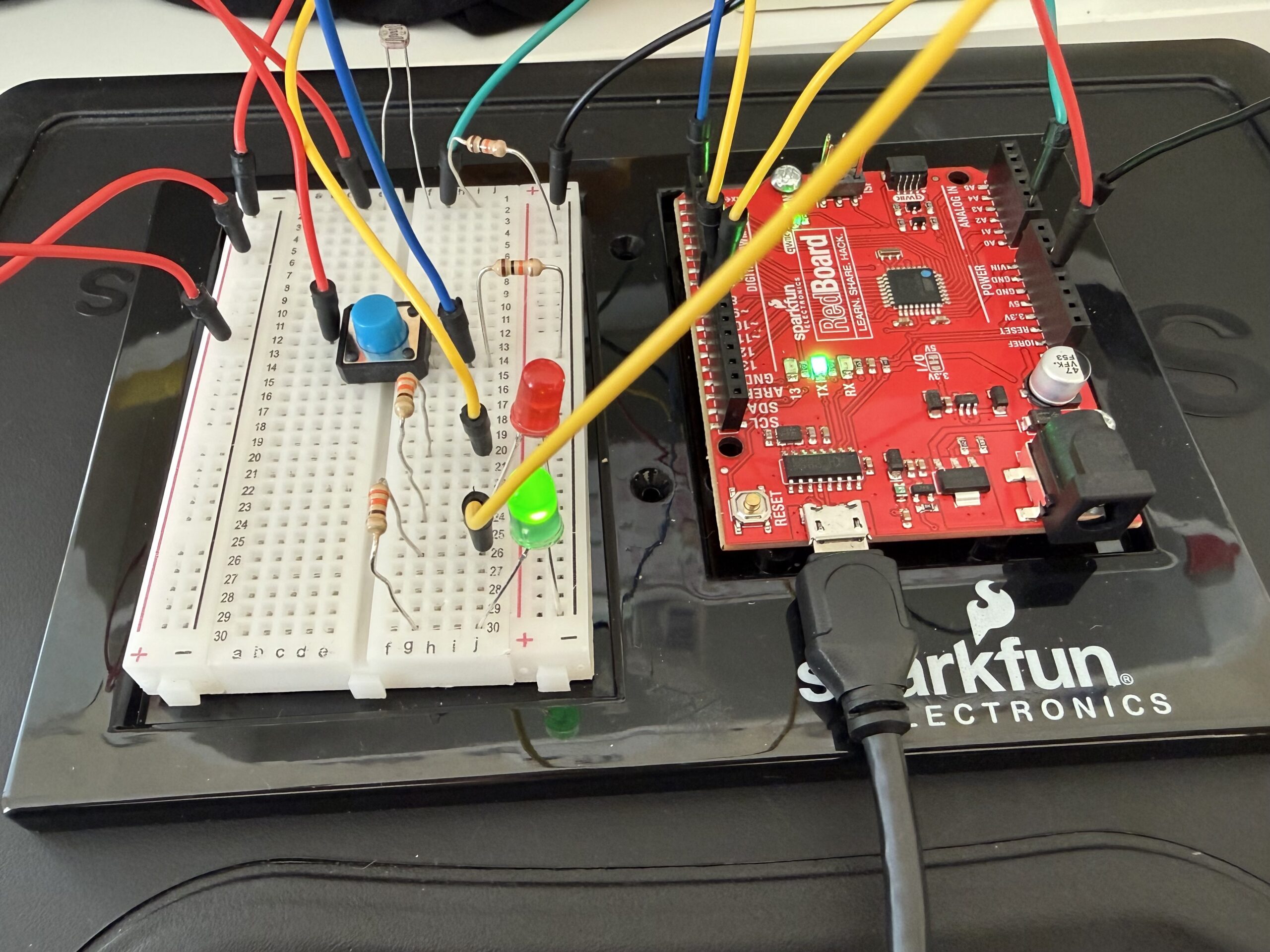
So, for this project, I wanted to make a system where red and green LEDs react to the light in the environment. I used a photoresistor to detect the amount of light in the environment. When it’s dark, the red LED turns on, and when it’s bright, the green LED lights up. There is also a button that lets you make the LEDs blink if you want.
Code Highlight
One part of the code that I am particularly proud of is where the LEDs respond to the light and button input, basically the logic that decides which LED to turn on. I used digitalWrite for the red LED to turn it fully on or off, and analogWrite for the green LED for brightness control using PWM. It also makes the LEDs blink if the button is pressed. Here is the code snippet:
//Dark Environment
  if (sensorValue < 790) {        //if the light level is below the midpoint value = dark
    digitalWrite(greenLED, LOW);  //turns the green led off in the dark
    if (buttonState == HIGH) {    //and if the button is pressed make the red led blink
      digitalWrite(redLED, HIGH);
      delay(50);
      digitalWrite(redLED, LOW);
      delay(50);
    } else {
      digitalWrite(redLED, HIGH);  //if the button is not pressed keep the red led on
    }
  }
  //Bright Environment
  else {                                  //if the light level is above the midpoint value = light
    digitalWrite(redLED, LOW);            //turn off the red led in the light
    if (buttonState == HIGH) {            //if the button is pressed make the green led blink
      analogWrite(greenLED, brightness);  //to set the brightness based on the mapped sensor values
      delay(50);
      analogWrite(greenLED, 0);
      delay(50);
    } else {                              //if the button is not pressed keep the green led on
      analogWrite(greenLED, brightness);  //to set the brightness based on the mapped sensor values
    }
  }
}
Reflection/Future work
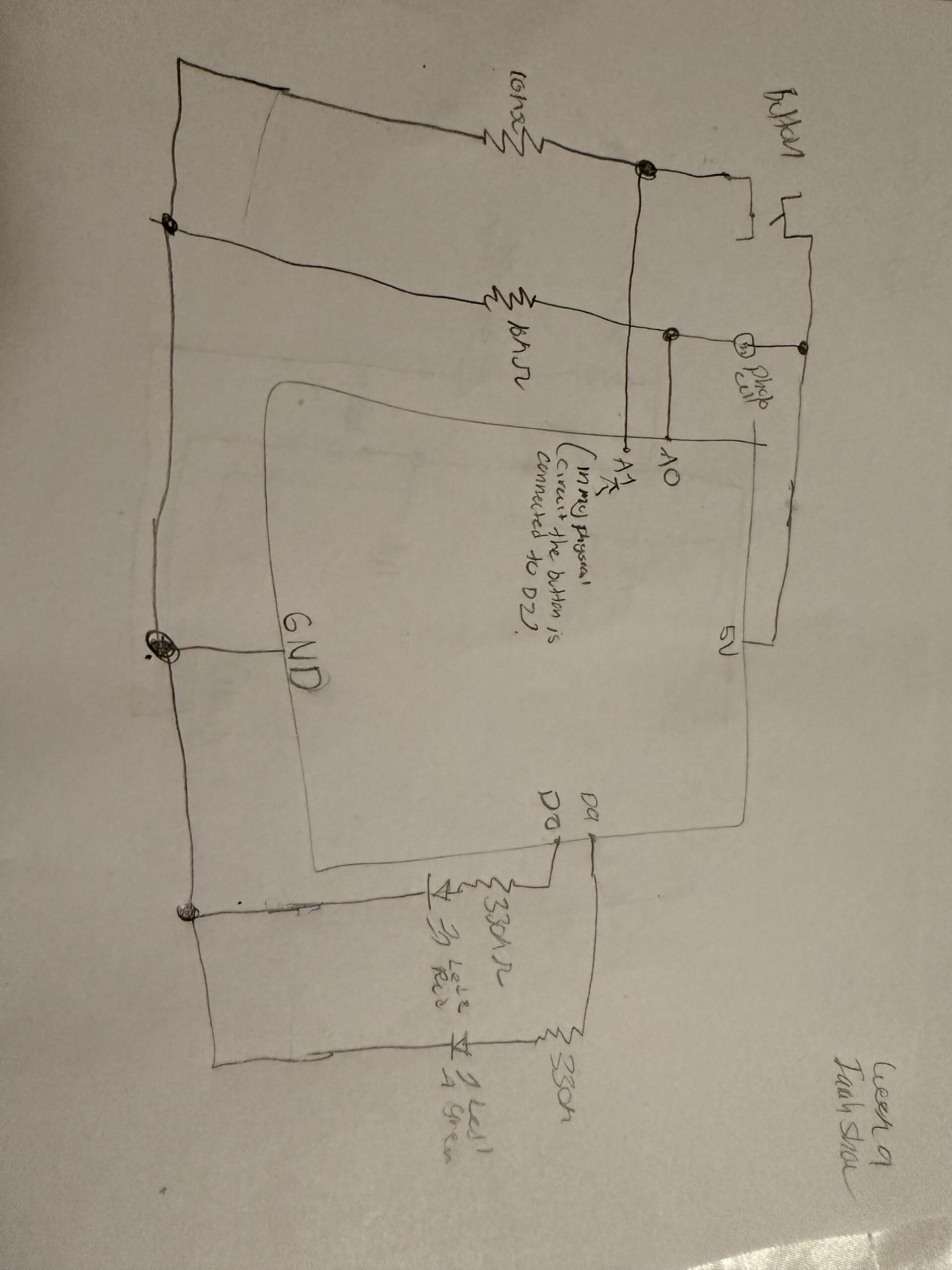
For the wiring, it was pretty straightforward. The photocell is connected to the analog pin A0 and reads the light level, and is connected to a 10k resistor. The red LED is connected to digital pin 8 because it only needs on/off control. The green LED is connected to PWM pin 9, allowing its brightness to be controlled through code using analogwrite. The button is connected to digital pin 2, and its state is read using digitalRead. In the code, the sensor values are first constrained to a usable range and then mapped to a PWM range of 0-255 using the map function. This allows the green LED’s brightness to adjust to the amount of light detected by the photocell. The code then checks whether it is dark or bright, turns the correct LED on, and makes it blink if the button is pressed.
This assignment was very helpful. I used the lecture slides for reference. It helped me learn how to combine the sensors leds and buttons. Using the PWM for the green LED allowed me to explore the brightness control instead of just turning the LED on and off. Also, looking at the photocell readings in the serial monitor helped me understand the sensor range and change it in the constrain and map functions.
For future improvements, I could add more LEDs and maybe make the blinking speed or brightness based on how dark or bright it is, or I could incorporate more sensors to make the system even more interactive.
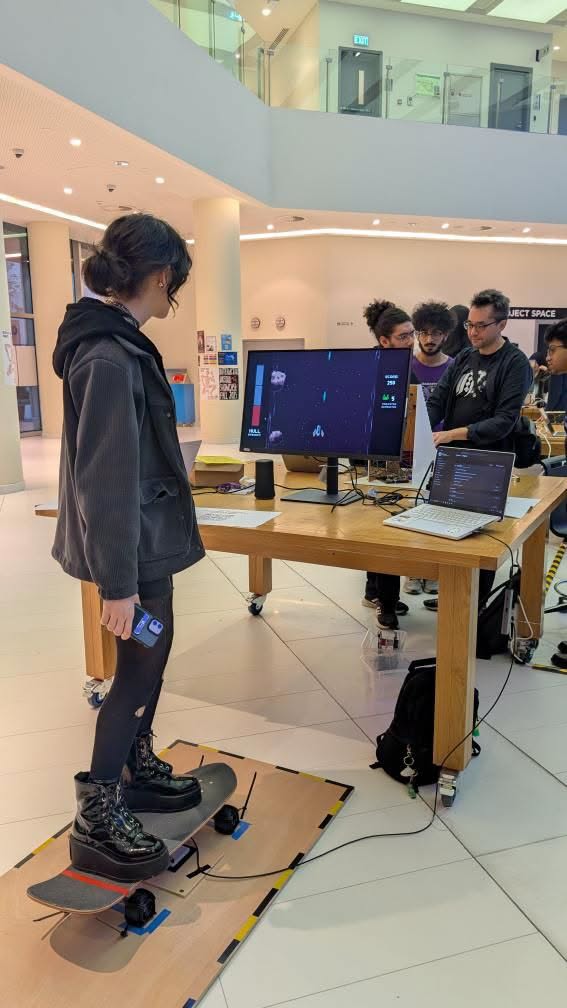
I attended the IM final exhibition last semester, and my absolute favorite one was this tilty stand by Hubert Chang where you had to stand on a skateboard and steer it to control a little spaceship in a video game. It was so much fun to play and the one I found the most engaging due to the full-body involvement. I really love skating so I had the highest score – until some girl cheated by keeping her hands on the table to balance herself.
I definitely agree with this, and I think it applies to art as a whole to some extent as well. I believe that artist interpretation matters less than the viewer’s, because one of the greatest things about art is the creativity and inspiration it can spark in people. Some of my favorite movies (listed below) are ones that are so confusing and surreal to the point where I have to construct my own narrative afterwards to put the pieces together. Like waking up and trying to recall a dream.
Possession (1891) (Also indirectly introduced me to Sonic Youth, my favorite band of all time, via a youtube edit)
Stay (2005)
I Saw the TV Glow (2024)
Climax (2018) (this one has a more defined plot, but it’s such a dizzying movie I had to include it)
Enter the Void (2009) (VERY mixed feelings abt this one..)
This was an interesting read, especially looking through all of the different projects. What stood out to me was the author’s point that many physical computing projects repeat the same themes every year. At first, this surprised me because I usually think that in creative fields, you are supposed to come up with something new and original. But reading this made me realize that originality does not always mean starting from scratch. It could be taking a familiar idea and just approaching it in a different way, which can still lead to something unique. I think this perspective makes me feel a bit better about the physical computing projects, because I was always afraid that my idea would have already been created or would be too similar to someone else’s concept. I also thought that these projects were too complex, but they actually come from simple concepts, some of which we even covered in class.
I also really liked the discussion about thescooby doo painting and the video mirror, where it was visually impressive but sometimes limited because people mostly just stand there and wave their hands. I thought this was interesting because it points out that something can look cool, but still does not create a very deep, meaningful interaction. Overall, I think this reading helped me think more about the relationship between creativity and physical interactions. It made me realize that the most interesting projects come from designing meaningful ways for people to interact with it. I think this reading also helped me get some inspiration from others for this week’s assignment.
Making Interactive Art: Set the Stage, Then Shut Up and Listen
This reading definitely made me think differently about what interactive art actually is. I loved how the author argued that artists should not interpret their own interactive work, it something I never thought about. I always assumed that explaining your concept was needed so the audience would understand what you mean, but it is the opposite. The artwork should allow people to form their own interpretations through their experience with the work. I found this idea interesting because it shifts the focus away from the artist and instead lets the audience become part of the creative process.
I also liked the way the author described interactive art as a conversation between the artwork and the participant. It reminds me of the constant point in my understanding IM class, where the artwork is not the finished piece, but it is only complete through the audience’s interaction. The end result of the artwork could be different for some people, even all of the small design choices, like whether something looks touchable or has indicators, can guide how people interact with the piece, and can influence the end result. So sometimes we should limit the guidance, if the goal is to make the experience full and meaningful for each person.
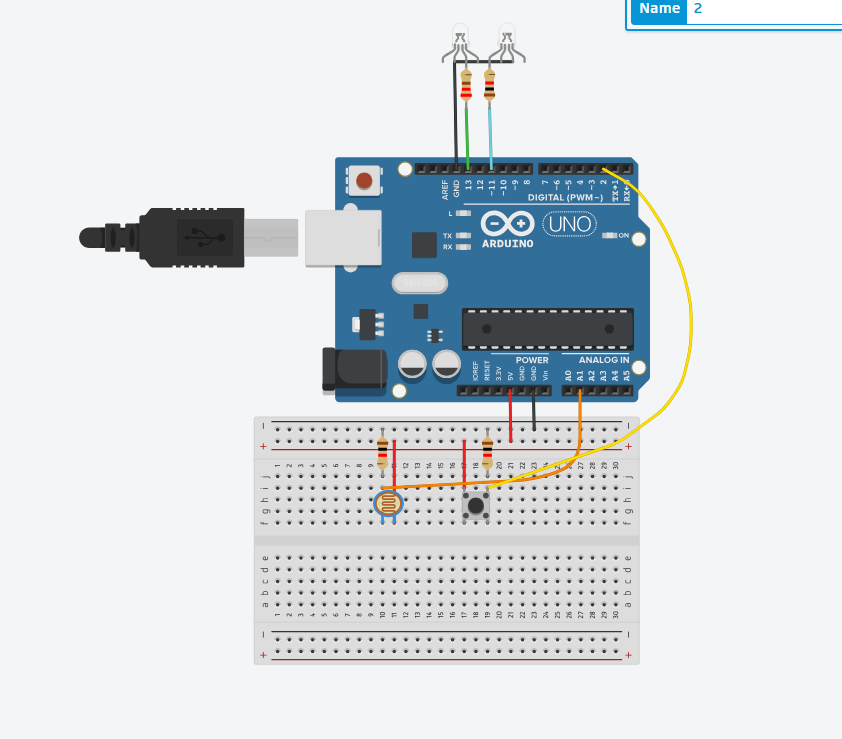
I don’t have my arduino yet, so i had to do this on tinkeCcad.
One led is triggered by a button, which acts as a digital sensor, and the other is controlled by a photoresistor, and increases in brightness the more light in the environment is detected. Not really creative, but I’m crunched on time.
UPDATE
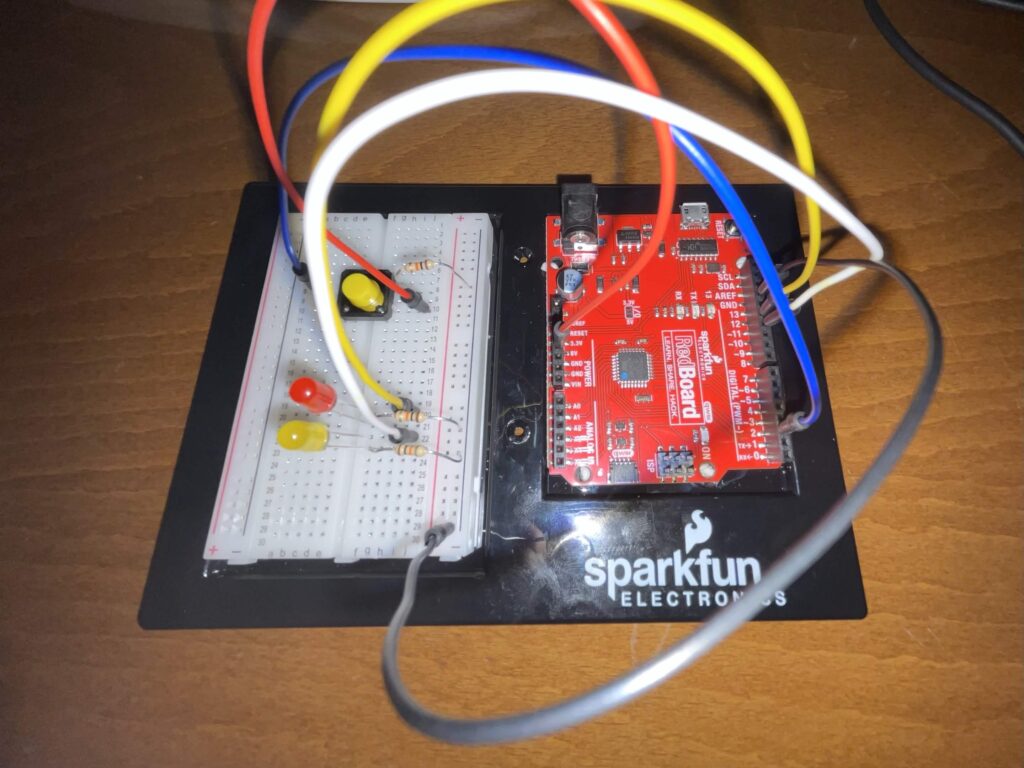
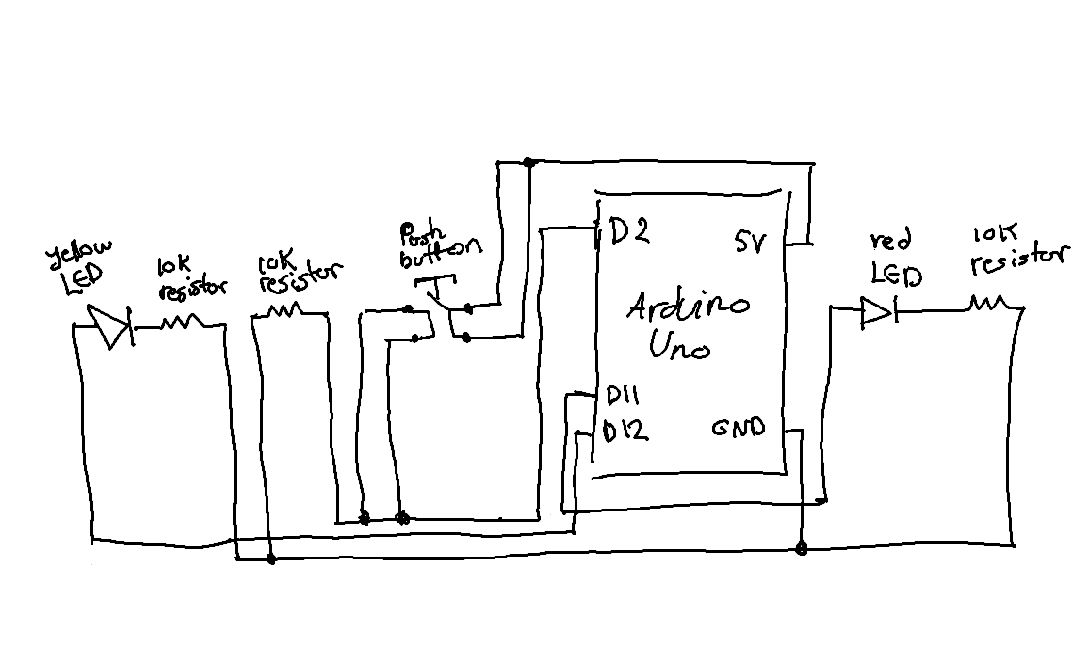
That was TERRIBLE, I didn’t know what I was doing. Anyways, I finally got my Arduino kit, so I made a quick alternative version:
I completely forgot there had to be two sensors, but I hope that the previous iteration can make up for that. Please have mercy.
One idea that stood out to me in Physical Computing’s Greatest Hits and misses is the author’s challenge to the assumption that how commonly used project ideas lack originality. Before reading, I often felt that repeating familiar interaction concepts such as sensors, mirrors, or gesture-based inputs was somehow “less creative.” However, the text argues the opposite that recurring themes actually provide a foundation for innovation, since variation and context are what make a project meaningful. This really shifted my perspective on creativity. Instead of just focusing on being completely original, I now see value in how a project frames interaction and meaning. For instance, the discussion of theremin-like instruments highlights how simple gestures (like waving a hand) can feel empty unless they are placed within a meaningful context. This made me reflect on my own projects, where I sometimes prioritize technical implementation over the meaning of interaction. The reading makes me think, am I designing interactions that actually “mean” something to the user, or just demonstrating functionality?
Another idea that I found particularly interesting is the critique of “low-structure interaction,” especially in examples like video mirrors or body-as-cursor systems. The author points out that while these projects are visually appealing, they often lack depth because they only mirror user input without really encouraging intentional or meaningful engagement. This made me rethink what really makes an interactive system successful. I used to assume that responsiveness alone such as tracking movement or generating visuals was enough. But now I realize that interaction design also requires structure, constraints, or a clear “language” of interaction, This connects to the guideline of reflecting critically rather than just describing, because it really challenges my assumption that having more technology = better interaction. But instead, the reading suggests that simplicity with intentional design can be more powerful. It leaves me with an important question: how can I design interactions that guide users toward meaningful experiences, rather than just reacting to their presence?
One idea that strongly challenged my assumptions in Making Interactive Art: Set the Stage, Then Shut Up and Listen is the argument that artists shouldn’t interpret their own work for the audience. The statement “don’t interpret your own work” (page 1) directly confronts how I usually approach creative projects, where I often need to explain my intentions to make sure people get it. This reading made me realize that over-explaining actually limits the audience’s freedom to engage with the work. If I pre-script how users should think or act, I am essentially controlling their experience rather than designing for interaction. This connects to my own experience in IMA projects, where I sometimes prioritize clarity over openness. The reading pushes me to rethink this balance instead of ensuring understanding through explanation, I should design interactions that naturally guide interpretation. But this leaves me with how much ambiguity is productive before the interaction becomes confusing rather than meaningful?
Another idea that stood out to me is the concept of interactive art as a “conversation” rather than a finished statement in pages 1-2. The author emphasizes that once the work is built, the creator should “shut up” and listen to how users respond through their actions, interpretations, and even misunderstandings. I found this particularly interesting because it reframes user interaction as something dynamic and evolving rather than something to be controlled. The comparison to directing actors in pages 2-3 helped me understand this more deeply just like actors must find their own emotional meaning whereas users must discover their own way of engaging with the work. This idea challenges my tendency to design interactions that are a bit too rigid.