
“It’s a pity to shoot the pianist when the piano is out of tune.” – Rene Coty
Concept:
Soo, when it comes to instruments, I thought right, let’s make a piano. Now due to the limitations from the Arduino Breadboard, I couldn’t make it so all of it the frequencies are in tune, whether they’re lower or higher. So I needed to think of a way how to make it so all of the frequencies could be represented on the project. That’s where our lovely, potentiometer comes into play.
Check the Tinkercad out here!
Sketch:
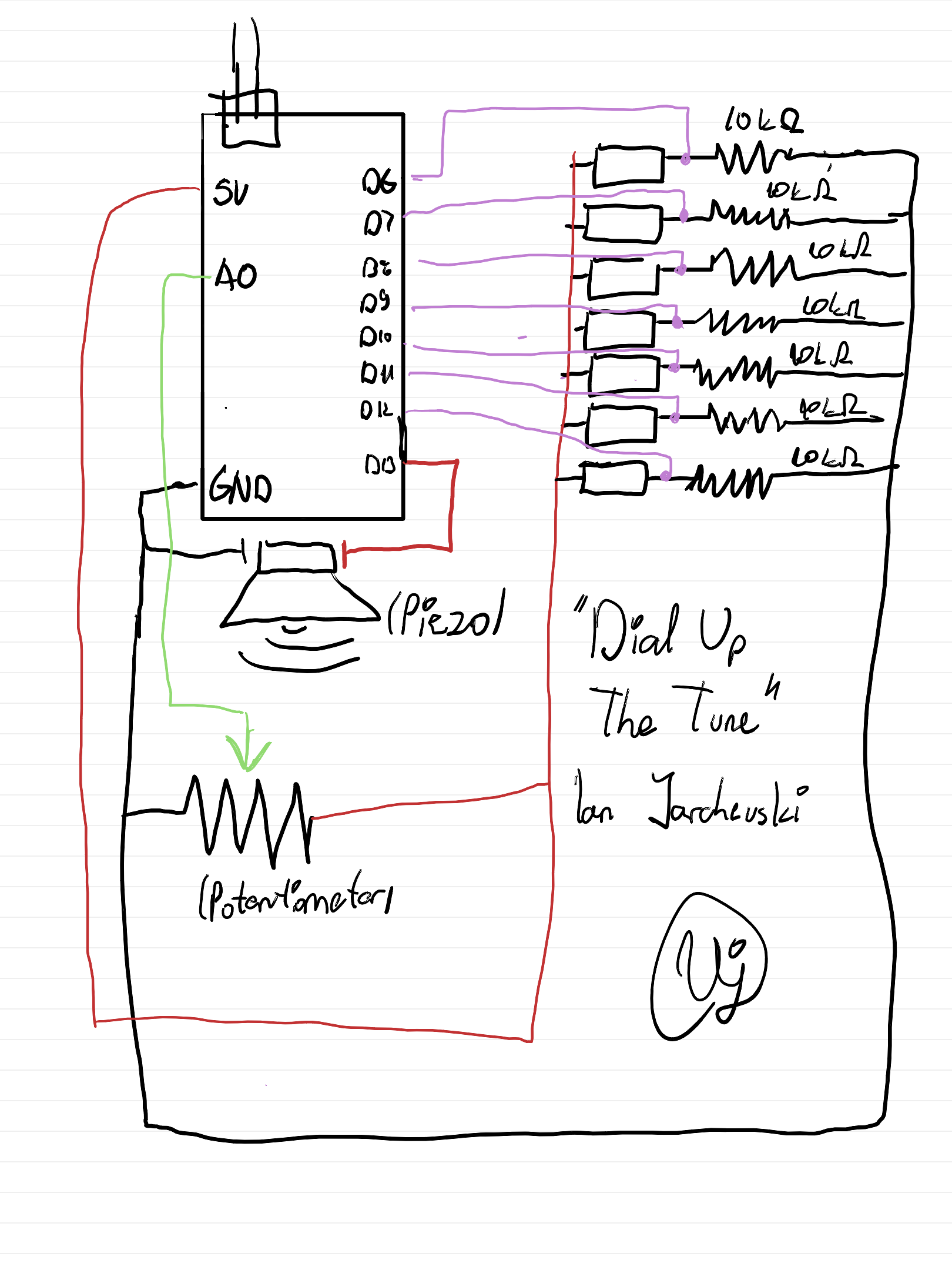
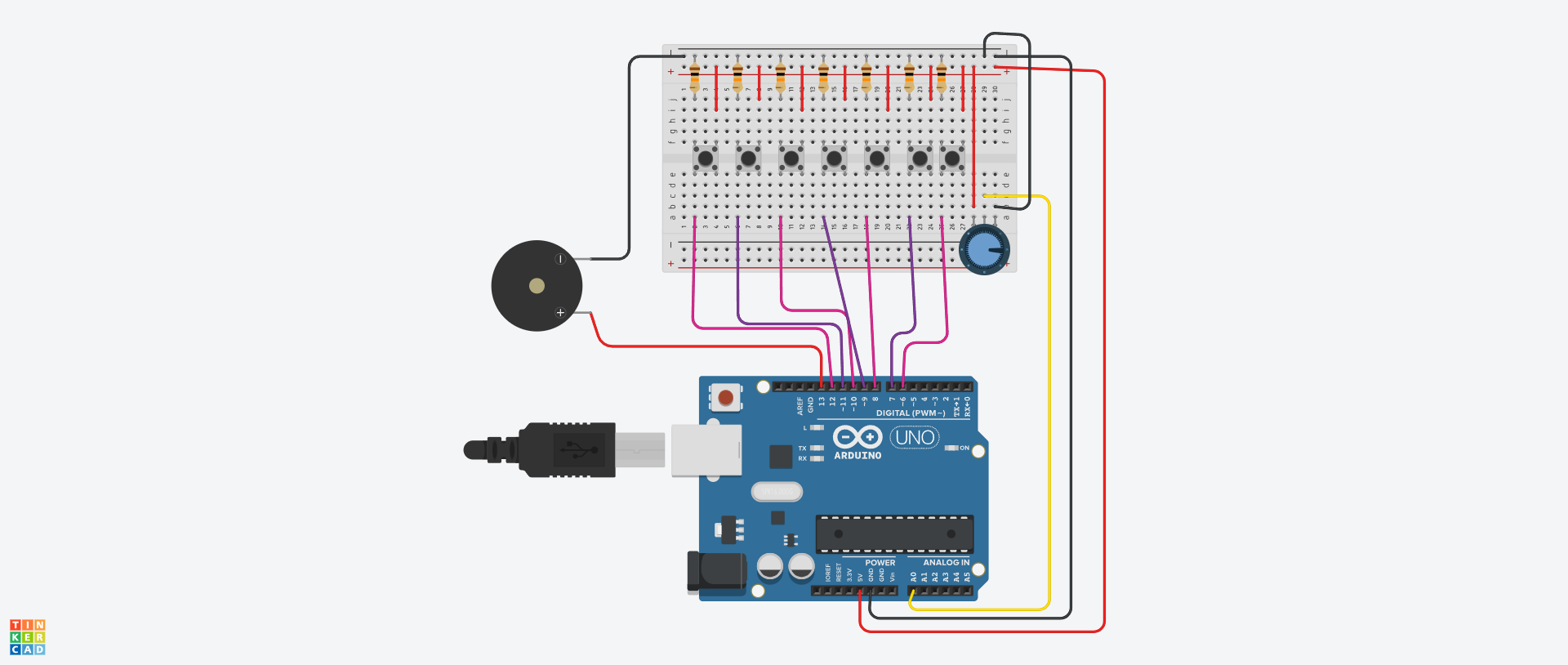
Digital Circuit: 
How it’s made:
Now for the design, I went with having the buttons in a line with each of them being connected to the digital input of the Arduino Uno. After adding to each a resistor, alongside a connection to the power, they were ready to go. Then we have a Piezo that is connected to the side and acts as our output for sound, or specifically frequencies.
But the special thing is our so called dial, represented by the Potentiometer. He is connected as an analog input and will serve the user as while it is rotated, the frequency will be increased or decreased. I will be honest, I actually had an issue intially with the Piezo constantly playing sound, but I figuered it out later after seeing that the resistors weren’t connected properly (always good to check this in case of any errors)
Highlighted bit of Code I’m proud of:
Now after that it was time to put it all together. The code itself is quite simple as we have read functions to take in our defined input. But what was interesting is trying to get it so each button having a different pitch. It was done by having the potentiometer’s value added on to a constant value which increases with each button. This gave way for the user to increase the pitch and then, always, it will be added to a specific constant which will give the sesne of a piano.
//potent variable is dependent on where the user slides the potentiometer
if (s1 == 1){
tone(buzzer, potent + 100, 100);
}
else if (s2 == 1){
tone(buzzer, potent + 200, 100);
}
else if (s3 == 1){
tone(buzzer, potent + 300, 100);
}
else if (s4 == 1){
tone(buzzer, potent + 400, 100);
}
else if (s5 == 1){
tone(buzzer, potent + 500, 100);
}
else if (s6 == 1){
tone(buzzer, potent + 600, 100);
}
else if (s7 == 1){
tone(buzzer, potent + 700, 100);
}
Reflection
I’m happy with this design and even using the Piezo for the first time was fun. I will be honest my ears didn’t like it as much but we got through it haha. I think an extension is to make it so you could have some sort of keyboard input or even make original songs with it. I saw some interesting ideas of how by getting specific frequencies in a loop, you could make a song which I’d love to experiement with this for my final project.
Full Code:
//Declaring every button to it's assgined digital value
int tone1 = 12;
int tone2 = 11;
int tone3 = 10;
int tone4 = 9;
int tone5 = 8;
int tone6 = 7;
int tone7 = 6;

//And here declaring the Piezo at Digital 13
int buzzer = 13;

void setup ()
{

//Starting up the Serial Connection on Arduino
  Serial.begin(9600);

//Making all of the buttons take in our Input
  pinMode(tone1,INPUT);
  pinMode(tone2,INPUT);
  pinMode(tone3,INPUT);
  pinMode(tone4,INPUT);
  pinMode(tone5,INPUT);
  pinMode(tone6,INPUT);
  pinMode(tone7,INPUT);

//Making the buzzer as our output
  pinMode(buzzer,OUTPUT);
}

void loop ()
{

//Defining a variable which is the value of the potentiometer
  int potent = analogRead(0);

//Outputing the value in the console
  Serial.println(potent);

//Reading a value for each pin
  int s1 = digitalRead(tone1);
  int s2 = digitalRead(tone2);
  int s3 = digitalRead(tone3);
  int s4 = digitalRead(tone4);
  int s5 = digitalRead(tone5);
  int s6 = digitalRead(tone6);
  int s7 = digitalRead(tone7);

//If else conditions where, when the button is on, it will output a sound
//potent variable is dependent on where the user slides the potentiometer
  if (s1 == 1){
  tone(buzzer, potent + 100, 100);
  }
  	else if (s2 == 1){
  tone(buzzer, potent + 200, 100);
  }
  	else if (s3 == 1){
  tone(buzzer, potent + 300, 100);
  }
  	else if (s4 == 1){
  tone(buzzer, potent + 400, 100);
  }
  	else if (s5 == 1){
  tone(buzzer, potent + 500, 100);
  }
  	else if (s6 == 1){
  tone(buzzer, potent + 600, 100);
  }
  	else if (s7 == 1){
  tone(buzzer, potent + 700, 100);
  }

//Just to give a short delay between presses
  delay(10);

}