
For this week’s assignment, I made a two-player musical instrument using Arduino. One person controls the pitch by moving their hand in front of the ultrasonic sensor, and the other person uses two buttons to trigger two different drum-like sounds. I liked this idea because it made the instrument feel more interactive, and it also made the difference between analog and digital input much clearer to me. For the demo, my sister acted as the second player so I could show how the instrument works with two people. While I controlled the ultrasonic sensor, she used the buttons to add the drum-like sounds.
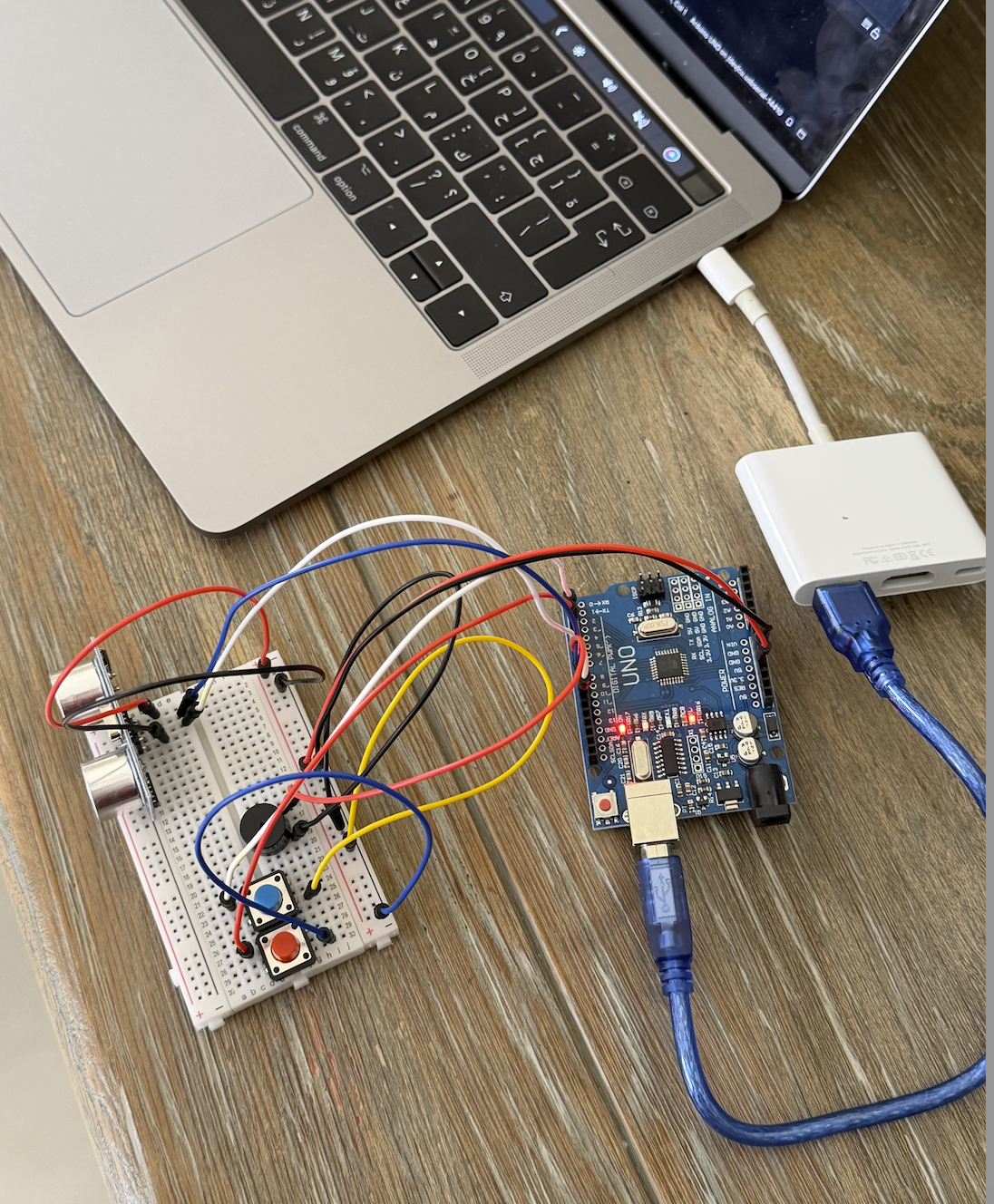
I used the ultrasonic sensor to control the pitch of the instrument. The closer the hand gets to the sensor, the higher the pitch becomes, and the farther the hand is, the lower the pitch becomes. The second player uses two buttons to trigger two different sounds. I did not use uploaded sound files for these. Instead, I created them directly in code by assigning different frequency values in hertz to the piezo speaker. One button produces a lower drum-like sound, and the other produces a higher and sharper drum-like sound.
The way the project works is that the ultrasonic sensor acts as the analog input because it gives a changing range of distance values, while the buttons act as digital inputs because they are either pressed or not pressed. The Arduino reads the distance from the ultrasonic sensor directly inside the loop() function and uses the map() function to convert that distance into pitch. At the same time, it also reads the two buttons and triggers the two drum-like sounds when they are pressed. All of that is sent to the piezo speaker, which acts as the output. I think this project made the difference between continuous input and on and off input much easier to understand because both were working in the same project.
For the circuit, the ultrasonic sensor is connected to 5V and GND, with the TRIG pin connected to pin 9 and the ECHO pin connected to pin 10. The two buttons are connected as digital inputs on pins 2 and 3, and they are also connected to ground. The piezo speaker is connected to pin 8 and ground, so it can play both the changing pitch and the two drum-like sounds. One problem I ran into was with the button wiring. At first, I connected both button wires to the top row of the breadboard, and the buttons did not work. I was confused because I thought the code was the issue, but later I realized the problem was actually the physical connection. Once I fixed the wiring and moved the ground connection to the correct place, the buttons started working properly.
The part of the code I am most proud of is the section where the ultrasonic sensor reading gets turned into pitch in real time. I like this part because it made the instrument feel much more alive and interactive. Instead of just choosing from fixed sounds, the player can move their hand and hear the pitch change immediately. That made the whole project feel closer to an actual instrument instead of just separate parts making sound.
if (blueButtonState == HIGH && redButtonState == HIGH) {

  // ultrasonic sensor
  digitalWrite(trigPin, LOW);
  delayMicroseconds(2);
  digitalWrite(trigPin, HIGH);
  delayMicroseconds(10);
  digitalWrite(trigPin, LOW);

  // echo time
  long duration = pulseIn(echoPin, HIGH);
  int distance = duration * 0.034 / 2;

  Serial.println(distance);

  if (distance > 5 && distance < 50) {
    int pitch = map(distance, 5, 50, 1500, 200);
    pitch = constrain(pitch, 200, 1500);
    tone(speakerPin, pitch);
  } else {
    noTone(speakerPin);
  }
}
I am proud of this part because it is what made the ultrasonic sensor actually useful in the project. The code triggers the sensor, measures how long the echo takes to return, and then converts that into distance. After that, the map() function changes the distance into a frequency range, so hand movement becomes sound. The constrain() function was also important because it kept the pitch within a usable range and stopped it from becoming too extreme. I think this was the part that made the project make the most sense.
If I had more time, I would improve the project by adding more sounds and making the instrument feel a little more musical overall instead of only experimental. I also think adding some visuals, like LEDs flashing when the buttons are pressed, would make it feel like a DJ game. Still, I think the final project worked well.
Reading Reflection:
This reading convincing in a lot of ways, but I also think the author pushes his argument too far at some points. I agreed with his main criticism that a lot of so-called future interaction design is not actually very futuristic if it still depends on flat glass screens and a very limited set of gestures. He compared digital interaction to the way we use ordinary objects with our hands, and that stood out to me because it made me think more about how much touch, grip, pressure, and movement matter in the way we understand and use things. I think this argument made even more sense to me, because it made me realize that interaction is not only visual. It is also physical, and a lot of current design does flatten that experience too much.
At the same time, I think the author is a little too extreme in the way he talks about current touchscreen technology. I understand why he sees it as limited, but I do not think that automatically makes it bad or meaningless. Touchscreens can still be practical, intuitive, and useful, even if they are not the most advanced or expressive form of interaction. So for me, the strongest part of the reading was not the idea that flat screens are a failure, but the idea that they should not be treated as the final version of interaction design. That is the part I agreed with most. I think the reading changed the way I think about future interfaces, but it also made me question how much the author’s argument depends on exaggerating the weakness of current technology in order to make his own point feel stronger.