I forget to drink water really often and always end up thirsty and dehydrated. So I thought of making a switch related to drinking water. This would make hydrating fun and mightg help people like me drink more water.
void setup() {
  // put your setup code here, to run once:
  pinMode(13, OUTPUT);
  pinMode(A2, INPUT);
}

void loop() {
  // put your main code here, to run repeatedly:
 int buttonState = digitalRead(A2);

  if (buttonState == HIGH) {
    //Not repeating the code uses the void loop and makes the LED blink as long as the circuit is connected.
    digitalWrite(13, HIGH);
    delay(200);
    digitalWrite(13, LOW);
    delay(200);
  } else  {
    digitalWrite(13, LOW);
  }
}
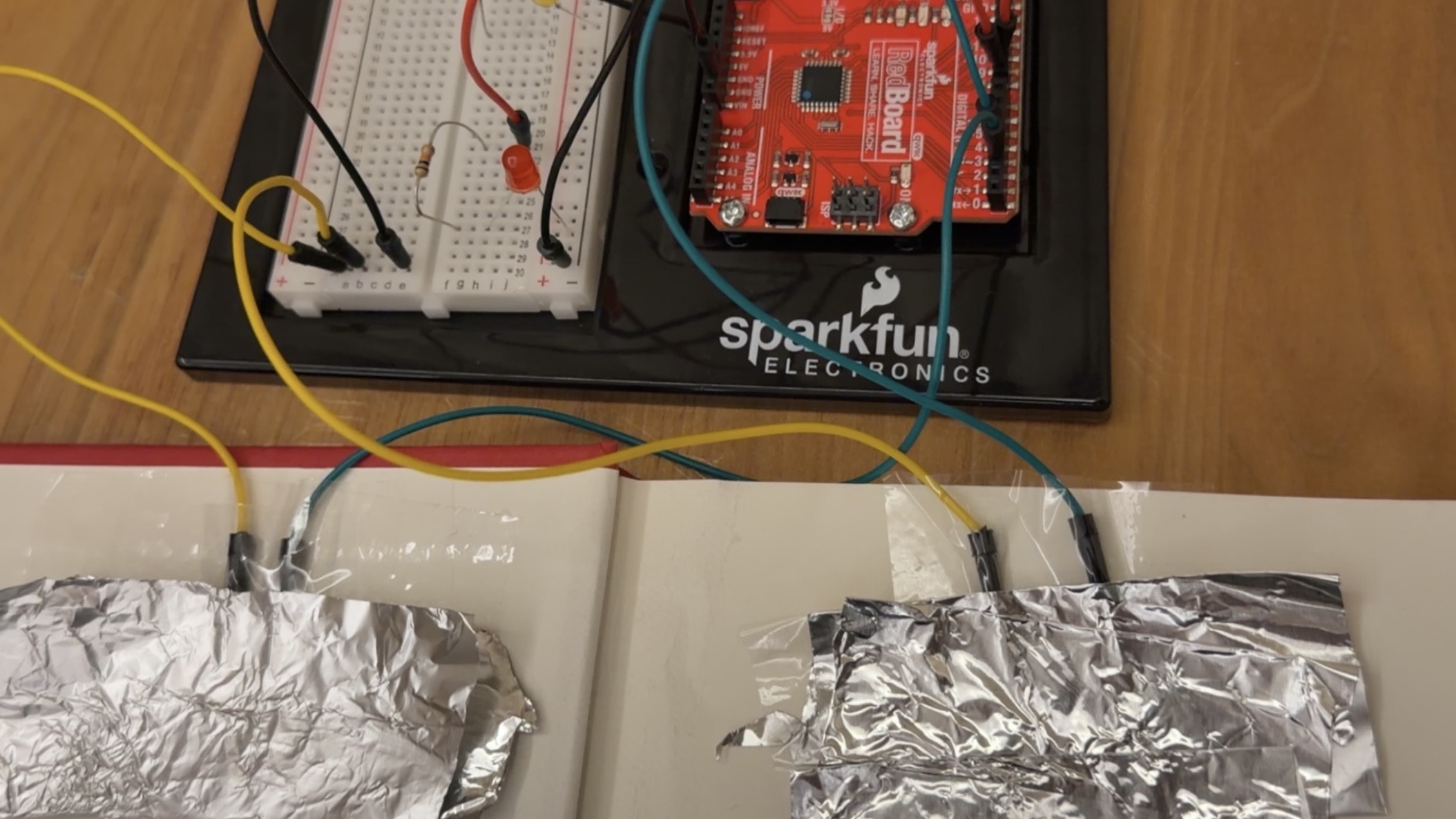
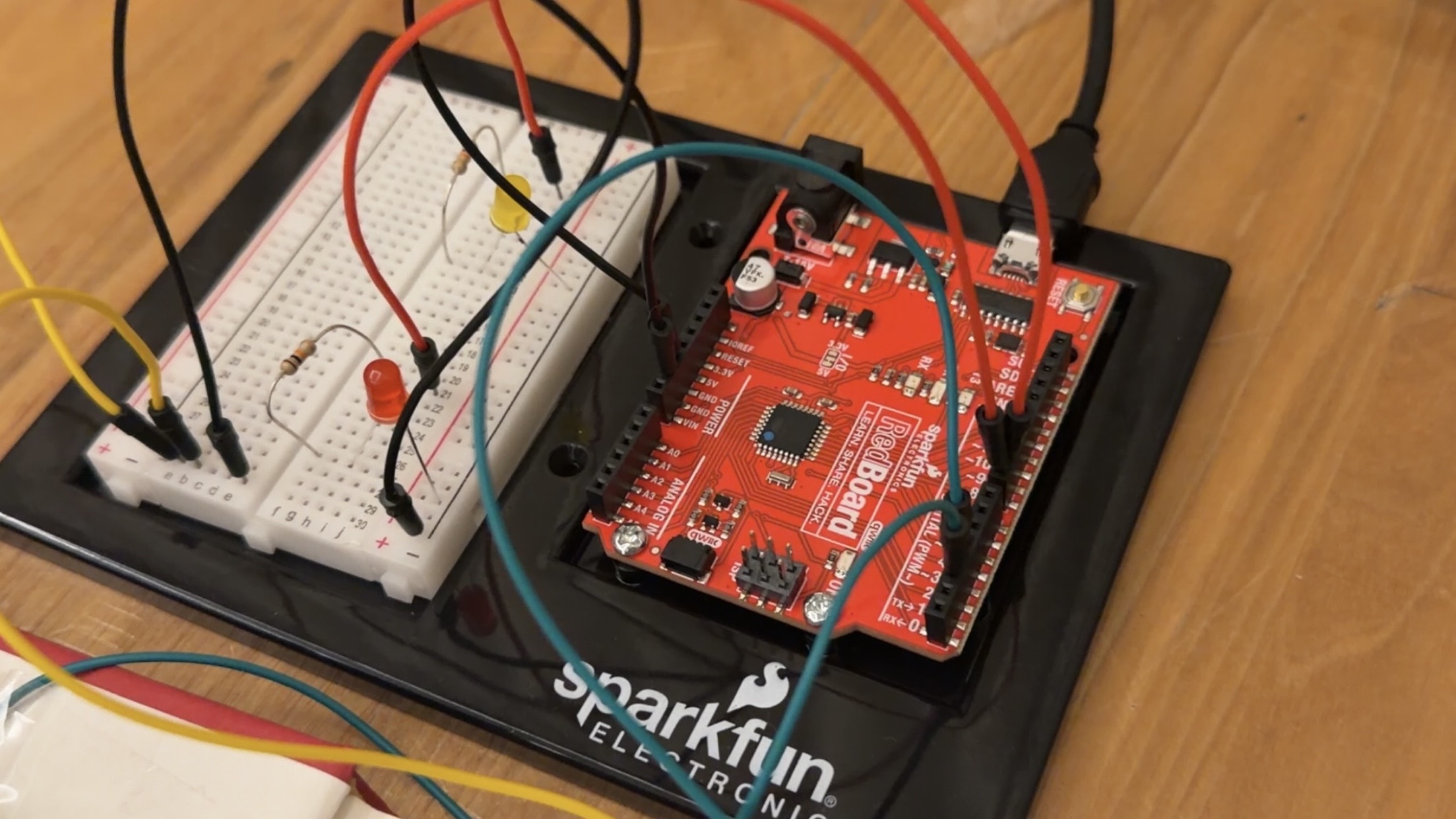
I used pin 13 as output to the LED and pin A2 as input from the switch circuit. The circut structure was the same as our practice input structure in class, except changing the switch to the cup. The 5v end was connected to one aluminum foil on the cup. the other piece of foil was inputted into pin A2 and connected to a 10k$\Omega$ pull down resistor. The LED was connected using normal circuit from pin 13.
The switch is connected when there is water conducting the electricity between the two aluminum foils, which is what happens when I drink water. This results in buttonState==HIGH and the LED running the code to blink. When the water is removed the circuit is disconnected, resulting in buttonState == LOW
Reflection
The first time I buit the circuit I put the foils too close to each other so water drops would stick between them even if I am not drinking, causing the circuit to be connected all the time. I solved this by moving the foil apart and also adding tape layer on top of the foils on bottom corner of the inside of the cup of where I would sip. This secured the foil in place and also served as a insulation for any small amounts of residue water whithout affecting the actual initiation of the circuit.
Norman’s central argument (that positive affect broadens thinking and makes people more tolerant of minor design flaws, while negative affect narrows it) is intuitive and reasonably well-supported by the psychological research he cites. The distinction between depth-first and breadth-first thinking is genuinely useful, and it reframes stress not as uniformly bad but as a cognitive mode that suits certain situations. That said, Norman is not entirely without bias. The essay reads partly as a self-correction, an attempt to walk back the “usability over beauty” reputation he’d earned from The Design of Everyday Things, and his anecdotal framing around his teapot collection, while charming, does a lot of heavy lifting for what is supposed to be a scientific argument. More importantly, he treats aesthetic pleasure as relatively universal without interrogating whose standards of beauty are being applied — a significant gap when design operates across cultures and contexts.
McMillan’s portrait of Hamilton is compelling and the Apollo 8 anecdote is particularly striking: Hamilton identifies a realistic failure scenario, NASA dismisses it as impossible, and then it happens on a live mission anyway. It’s a clean illustration of institutional overconfidence and the cost of ignoring people closest to the problem. However, the piece leans hagiographic — Hamilton is framed almost as a lone genius, while the broader collaborative effort, including the Raytheon seamstresses who physically hardwired the memory and engineers like Don Eyles, gets quietly sidelined. The bias is an understandable corrective given how long Hamilton’s contributions went unrecognized, but it’s worth naming. What the two readings share is an underlying tension about whose judgment gets trusted within institutions, and both suggest that the people with the clearest view are often the ones being overruled.
Read together, both texts circle the same problem: institutions tend to trust hierarchy over proximity. Norman’s supervisors dismissed color displays as scientifically valueless; NASA dismissed Hamilton’s error-checking as unnecessary. In both cases, the person closest to the work had the clearest picture. Norman resolves this through neuroscience — affect shapes judgment in ways we don’t always consciously recognize. McMillan resolves it through biography — one person’s persistence against institutional resistance changed the course of history. The question both readings leave open is how to build systems, whether design processes or space programs, that actually listen to the people who see the problems first.
For this assignment, I built a hands-free switch that uses the human body as a conductor. The project uses two aluminum foil patches — one taped to the floor, one to the sole of a shoe — to open and close a circuit through the act of jumping. An Arduino reads the state of the switch using digitalRead and communicates over USB serial to a Python script running on a laptop, which plays and stops a song based on the jumping rhythm. The music only plays while jumps are happening in close sequence, stopping if the user pauses for more than 1.5 seconds.
3. Concept
My goal was to turn the whole body into an instrument of interaction, removing the hands entirely and replacing them with something more physical and committed. The initial inspiration came from an unexpected source: my baby nephew, who kept interrupting my work sessions. Rather than fighting the disruption, I decided to include him in the project. Babies and toddlers are defined by their movement — bouncing, jumping, stomping — so building a switch that is activated by jumping felt like a natural way to design around him and his abnormal enthusiasm for dancing. The idea became about handing control to someone who couldn’t operate a traditional switch at all.
The music-as-reward mechanic adds another layer that felt personally fitting: the music only survives as long as the jumping continues, stopping if the user pauses for more than 1.5 seconds. For a restless toddler this creates an instinctive feedback loop between movement and sound. Stop jumping and the music dies. Keep going and it lives.
4. Process and Methods
I began with the physical circuit, using the INPUT_PULLUP mode on Pin 2 to avoid needing an external resistor. This keeps the pin held HIGH when the circuit is open, and pulls it LOW when the foil patches make contact through the body.
To filter out noise and false triggers — particularly the pin floating when only one foil patch was touched — I implemented a two-stage debounce. The code waits 50ms after detecting a change, then re-reads the pin to confirm the state change was real before acting on it.
On the software side, I wrote a Python script that listens on the serial port for LANDED and JUMP messages. Rather than toggling the music on a single event, I used a timeout system: every landing resets a timer, and the music stops only when that timer expires without a new landing.
The serial communication bridge between the Arduino and the laptop uses the pyserial library, and audio playback uses Mac’s built-in afplay command via Python’s subprocess module, keeping dependencies minimal.
5. Technical Details
The core of the switch detection relies on INPUT_PULLUP, which activates an internal ~50kΩ resistor inside the Arduino chip. This pulls Pin 2 to 5V (HIGH) by default. When the foil patches make contact, they create a conductive path through the human body to GND, pulling the pin LOW.
pinMode(jumpPin, INPUT_PULLUP);
The debounce reads the pin twice, separated by a 50ms delay, to confirm that a state change is genuine and not electrical noise or foil flutter on contact:
// Only act if the state has changed since the last loop
if (currentSwitchState != lastSwitchState) {

  // Wait 50ms before reading again — debouncing — one landing could trigger dozens of false readings.
  delay(50);
  currentSwitchState = digitalRead(jumpPin);

  // Re-check that the state still differs after the debounce delay.
  // If the reading went back to the original state, it was just noise — ignore it.
  if (currentSwitchState != lastSwitchState) {

    if (currentSwitchState == LOW) {
      // Foil patches are touching — the circuit is complete — user has landed
      digitalWrite(ledPin, HIGH);       // turn LED on as visual confirmation
      Serial.println("LANDED");        // notify the Python script to start music
    } else {
      // Foil patches are separated — the circuit is open — user is in the air
      digitalWrite(ledPin, LOW);        // turn LED off
      Serial.println("JUMP");          // notify the Python script
    }

    // Save the current state so we can detect the next change
    lastSwitchState = currentSwitchState;
  }
}
The Python timeout logic uses time.time() to track the moment of the last landing. The music continues as long as landings arrive within the threshold window:
    if line == "LANDED":
        # Foil patches made contact — reset the timer and start music
        last_landing = time.time()
        start_music()

# If music is playing but no landing has come in within TIMEOUT seconds, stop
if playing and (time.time() - last_landing > TIMEOUT):
    stop_music()
6. Reflection
This project pushed me to think about interaction in a much more physical way than usual. The main technical challenge was dealing with pin floating — when only one foil patch was touched, the unconnected pin would pick up ambient electrical noise from the environment and the body, triggering false readings. Understanding why INPUT_PULLUP solves this (by giving the pin a definite default state rather than leaving it undefined) was the key insight. The two-stage debounce was also a lesson in how unreliable physical contacts can be at the moment of touch — foil crinkles and makes intermittent contact before settling, and reading the pin twice filtered that out cleanly. Physically, the strain relief on the wires (taping them to the leg with slack at the ankle) turned out to be just as important as the electronics, since a pulled wire mid-jump would break the circuit unpredictably.
One thing I should have considered more carefully from the start was my nephew’s impatience. The whole project was inspired by him, but toddlers don’t wait; if the music doesn’t start immediately or cuts out too quickly between jumps, the experience breaks down fast. In hindsight, I would have tuned the TIMEOUT value with him in mind from the beginning, giving a little more grace time between landings to account for the unpredictable rhythm of a small child jumping rather than calibrating it around an adult’s pace.
This week’s first reading, Emotion and Design: Attractive Things Work Better by Norman, gave me a new perspective on how and when things can work better in different situations than I had thought before. At first, reading the title Attractive Things Work Better made me feel like I would disagree with the reading, since it gave the idea of prioritizing appearance, which does not sound right when trying to create something functional and useful. However, as I read through it, I was impressed by the number of ideas that made me realize things I had not thought of before, especially that we often use things based on how we feel, and those feelings are strongly influenced by design. This idea was clear in the example of the car, where we would prefer to drive it when it looks clean rather than when it looks dirty. It also made me think about how designers should consider the situations the user might be in, so they can adjust the design to create a smoother experience, like the idea of opening a push or pull door when being relaxed versus stressed. It also made me reflect on the things I create in this course, that I should make sure my work functions well, but also has a clear and attractive appearance that supports the user’s experience. It is almost like saying design is not only about physical appearance, but also a psychological aspect of the work.
This week’s second reading, Her Code Got Humans On The Moon and Invented Software Itself by McMillan, was very interesting to me because it was so different from the other readings we have done, including the one above. I was fascinated by how Margaret Hamilton was able to succeed and prove the importance of software and correct programming at a time when it was not fully developed or taken seriously. I was struck by her quote, “When I first got into it, nobody knew what it was that we were doing. It was like the Wild West. There was no course in it. They didn’t teach it,” as it made me realize that they had to create code and commands without references or guidance like we have today. It felt like coding from scratch, which is especially intense considering it was connected to astronauts and people’s lives. I was also inspired by her dedication, especially in the way she worked on preventing errors and thinking through different possible scenarios. This made me connect it to the work we do in our projects, for example when using if-else statements to control different outcomes.
Both readings were very different from each other, but they added a lot to my understanding of this course and my own work. One connection I was able to make was between Hamilton’s focus on error-preventing systems and Norman’s explanation of how people use things differently depending on their situation. For example, in a programmed website or interactive project, if a user is overwhelmed, they might start clicking the wrong things, so error-preventing code could help guide or correct their actions. I feel like these readings encouraged me to try new coding techniques and explore different ideas, while also paying attention to the appearance of my work, since it can affect how it is experienced and used.
Reading Don Norman’s “Emotion & Design: Attractive things work better” shifted my perspective on what makes an interactive project successful. I used to think usability was strictly about clear logic and zero errors. However, Norman argues that positive affect actually broadens our thought processes, making us more creative and more tolerant of minor design faults.
This applies to everything, one example I can bring up is satisfactory. An automation based game, so you already know it is going to have a lot of problem solving to automate materials efficiently. However, I strive to make my factories and farms aesthetic, I spend more time on aestheticizing the factory rather than just building a bare bone factory. The scenario I’m going to provide applies to practically anything.
When you look at a factory that is aesthetic and well-organized, your affective system sends positive signals. This puts you in a “breadth-first” state of mind, which Norman says is perfect for the creative, “out-of-the-box” thinking needed to solve complex automation loops.
The “bare-bones” factory focuses only on the math and the belts. While functional, if a problem arises and the environment is ugly or stressful, you might fall into “depth-first” processing. This leads to tunnel vision where you can’t see the simple solution because you are too focused on the “danger” of the inefficiency.
It isn’t just about looks, it creates a positive mental state, which can lead to better problem solving and making things more functional and work better rather than if you just went for pure functionality.
Her Code Got Humans Into the Moon:
The arrogance of the 1960s tech world was the belief that perfect engineering could override human nature. Hamilton’s higher-ups dismissed her error-checking code because they were blinded by the myth of the perfect astronaut who would never make a mistake. This was not just a technical disagreement. It was a fundamental misunderstanding of how people interact with systems. By allowing her daughter to play with the simulators, Hamilton gained a perspective her colleagues lacked: if a crash is physically possible, it is eventually inevitable.
What actually saved the Apollo 11 mission was Hamilton’s move toward asynchronous processing. In an era where computers were expected to just execute a linear list of tasks, she designed a system that could decide what was important. When the hardware was being overwhelmed by a documentation error during the moon landing, the software did not just freeze. It prioritized the landing maneuvers and ignored the rest. She essentially invented the concept of a fail safe for software, shifting the industry from just making things work to making things survive the people using them.
She paved the way for the mindset of never settling on bare minimum, and to go above and beyond so that no mistake could possibly happen, and to cover every case there is, whether it is a case you know about or you don’t know about.
Overall concept
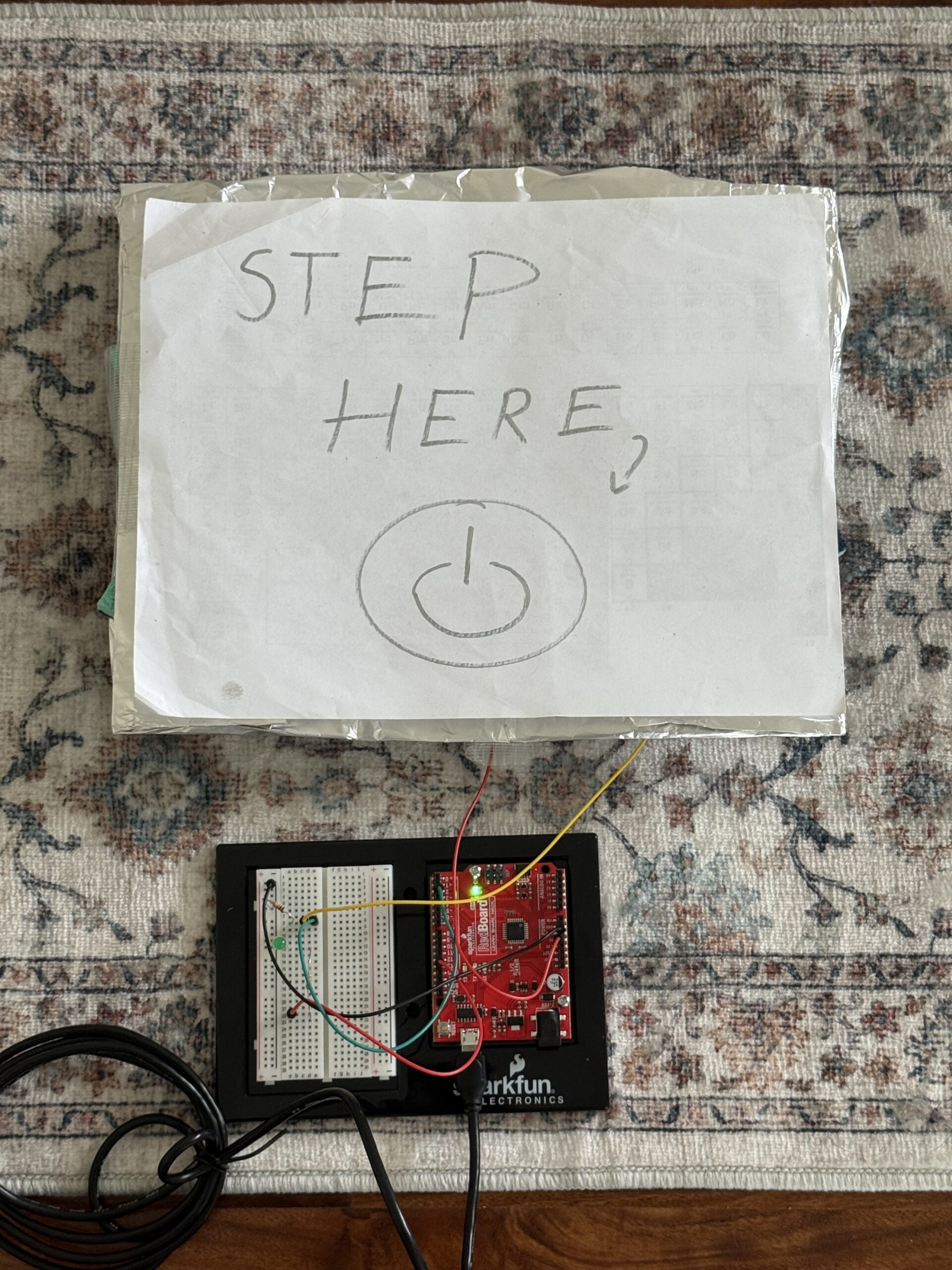
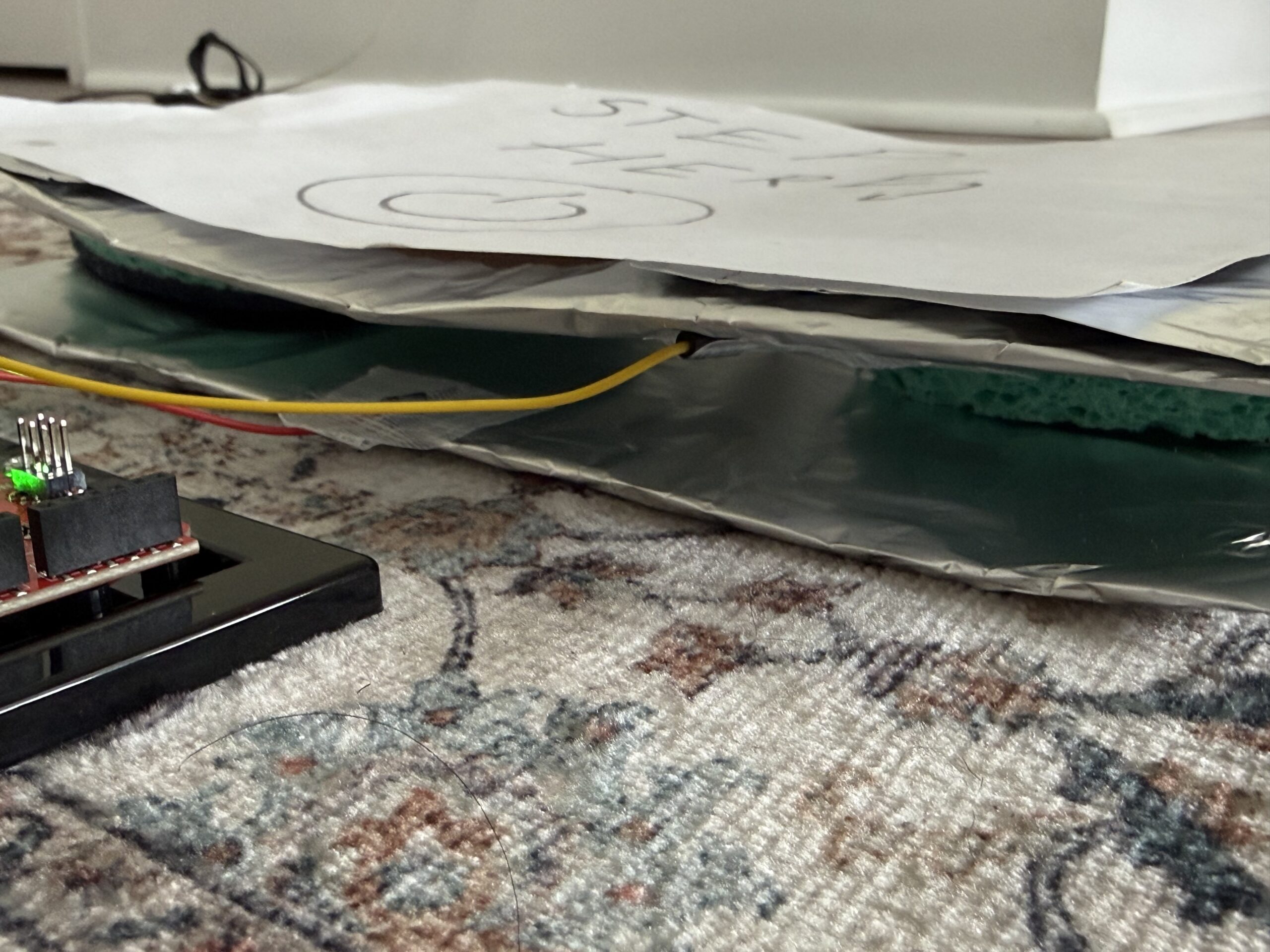
So for this project, I decided to create a foot-activated switch. When I press my foot on the pad I made with aluminium foil, tape, sponges, and cardboard, it completes the circuit and lights up the blinking LED. When I remove my foot, the LED turns off. I wanted something creative that uses the human body in a new way, and the foot switch, to me, felt unusual and fun to play with, even though it is a basic concept.
Code Highlight
The code that I am most proud of is the blinking effect. I wanted to incorporate it because we learned how to do it in class. I thought it wouldn’t be possible to put it in the if statement because I needed the light to turn off once you remove your foot. But by delaying it by 100 and turning the LED off and on quickly, it made a fast blinking effect when my foot presses the pad.
if (buttonState == HIGH) { //if the switch is pressed
digitalWrite (13,HIGH); //the LED turns on
delay(100); //cause a delay so I can produce a fast blinking effect
digitalWrite (13,LOW); //to turn the LED off for the blink effect
delay(100); //the fast delay to complete the blink full cycle
}
Reflection/Future work
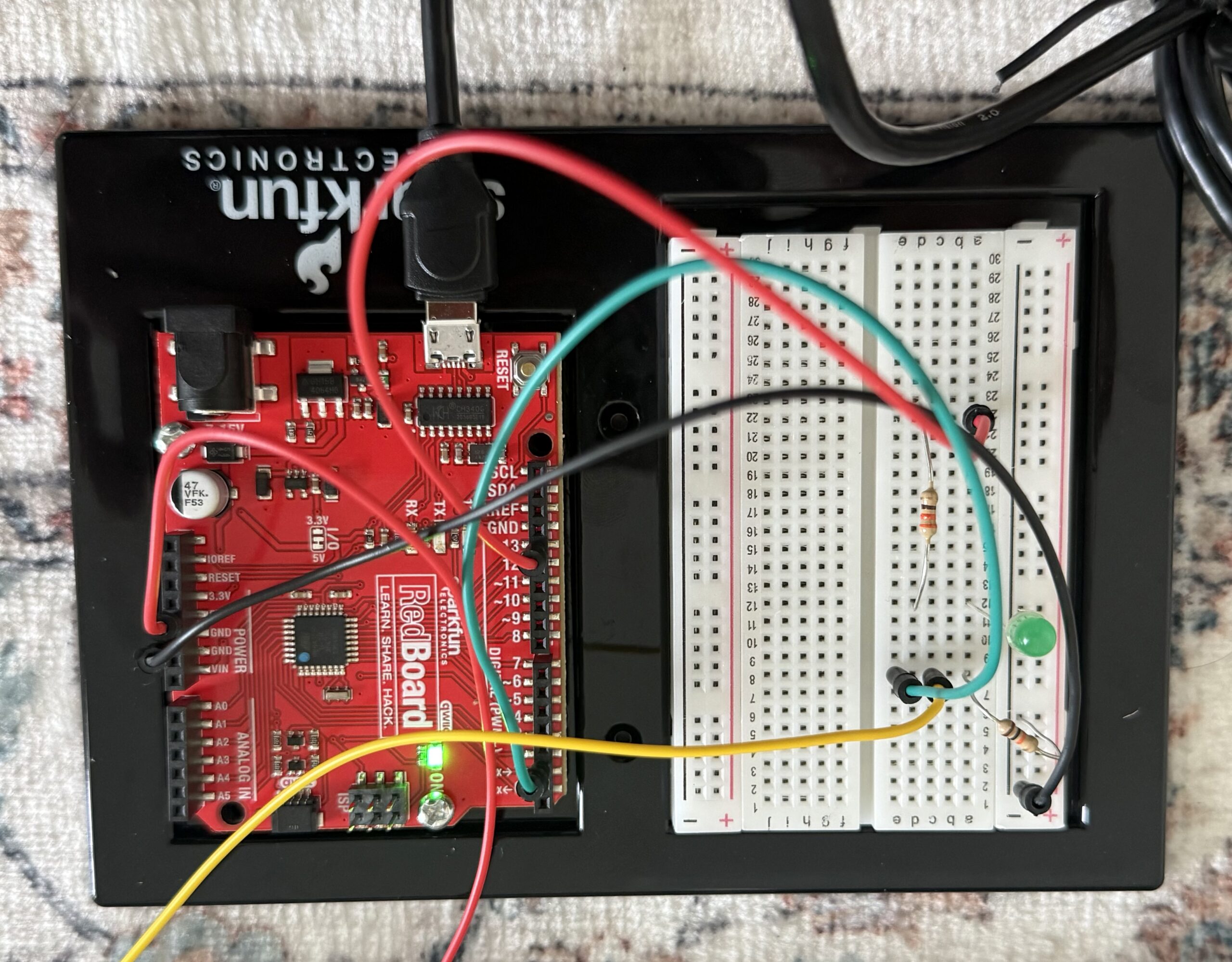
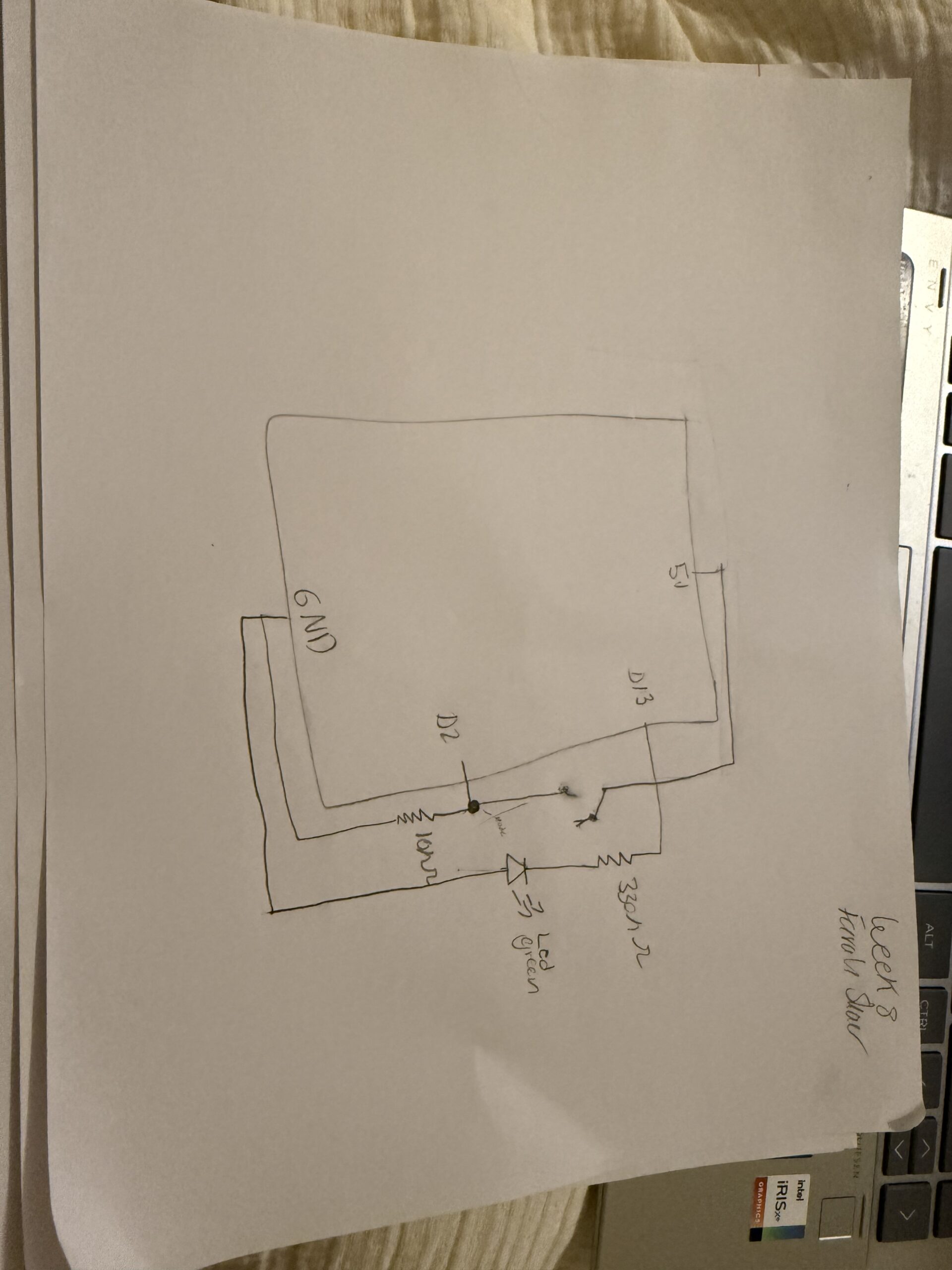
To build the circuit, I implemented basically the same thing we discussed in class. For the LED circuit, I connected pin 13 of the Arduino to a 330 resistor, which then connects to the long leg of the LED. The short leg of the LED connects to the ground row. For the switch circuit, I made a simple foot pad switch, which I took reference from a website. I used two pieces of aluminium foil on cardboard pieces, and in between them two sponges so I can easily turn it on and off. and separate the aluminium foils. One foil connects to 5V, and the other connects to pin 2. I also added a 10k resistor between pin 2 and ground. The resistor keeps the input stable when the pads aren’t pressed, so the Arduino doesn’t get floating values and burn out. I put the wires in specific rows on the breadboard. For example, the green wire goes from pin 2 to the row shared with the resistor and one foil pad. The yellow wire connects the other foil pad to the same row. This makes sure that when my foot presses the pads, pin 2 gets 5V, and when not pressed, the resistor pulls it down to 0V.
For future improvements, I would make the foot pad a bit more stable and try using multiple LEDs to make a pattern so the concept gets more creative. I would also experiment with different blink patterns to make it more interesting.
One idea from the reading that really stood out to me is how Margaret Hamilton’s work highlighted the importance of accounting for human error in design. Her insistence on adding error checking systems even when others believed “that would never happen” ultimately helped prevent serious failures and showed how crucial software was to the Apollo mission.
A moment that stuck with me was when “the software realized it didn’t have enough room to do all the functions it was supposed to be doing, it went through its error detection process and focused on the highest priority job.” This shows how the system was designed to think logically under pressure, prioritizing what mattered most instead of failing completely.
This really connects to how we write code in interactive media. For example, when we use it/ else statements, we’re also creating systems that make decisions based on different conditions basically preparing for different possible outcomes, including errors. It’s a similar mindset of anticipating what could go wrong and guiding the system to respond correctly.
I also found it interesting how they had to “simulate everything before it flew,” which reminds me of how we test our projects, especially with Arduino. Before fully running a system, we constantly test and debug to make sure everything works as expected. It shows that even at a much larger scale, the same fundamental process of testing, refining, and preparing for failure is essential.
One idea from the reading that really caught my eye is that products designed for relaxed situations can enhance usability through pleasant aesthetic design basically, that aesthetics matter. It made me think about how people often assume users only care about function, but in reality, there are emotional responses that aren’t always explicitly stated.
Even if something works perfectly, its appearance still affects how we experience it.
This connects to the idea that objects aren’t just functional they can also act as sculptural works that give satisfaction through their appearance. So design isn’t just about usability it’s also about how something feels to interact with.
I think this is especially relevant in interactive media. The visual design of a website or digital experience shouldn’t be chaotic or ignored it should be intentional and curated in a way that supports the user. Good aesthetics don’t distract from usability; they actually enhance it by making the experience more engaging and easier to navigate.
For this project, I designed a hands free switch instead of using hands, the interaction is activated by stepping on conductive foil placed inside a spare book I had. I used two separate foil areas to create two independent switches. Stepping on the left side triggers the red LED, while stepping on the right side triggers the yellow LED. Each LED has a different blinking pattern, with the red LED blinking faster and the yellow LED blinking slower. This creates a clear distinction between the two inputs. I was able to open and close a circuit without traditional interaction methods. By shifting control from hands to feet, the switch becomes more unusual and interactive.
How is works:
Each foil is connected to a digital input pin and configured with INPUT_PULLUP, which means the default state is HIGH. When the foil is not being touched, the circuit remains open and the input reads HIGH. When a person steps on the foil, their body helps complete the circuit by connecting the foil to ground (GND). This changes the input from HIGH to LOW. The Arduino detects this change and uses it to control the LEDs.
Each foil controls a different LED.Stepping on the left foil triggers the red LED connected to pin 8 Stepping on the right foil triggers the yellow
LED connected to pin 9. The LEDs are programmed with different blinking patterns using delay (). The red LED uses a shorter delay, causing it to blink faster, while the yellow LED uses a longer delay, making it blink slower. These different delay values create distinct visual responses for each input. Overall, the Arduino continuously reads the state of each foil switch and updates the LEDs in real time based on whether the input is HIGH (off) or LOW (activated).
Code Snippet:
Code I’m proud of:
  // LED 1 blinking pattern
  if (state1 == LOW) { // touching foil 1
    digitalWrite(led1, HIGH);// LED on
    delay(300);   //faster blink
    digitalWrite(led1, LOW); //LED off
    delay(300);
  } else {
    digitalWrite(led1, LOW);// Keep off when not touched
  }

  // LED 2 different blinking pattern
  if (state2 == LOW) { // touching foil 2
    digitalWrite(led2, HIGH); // on when touched
    delay(1000);  // slower blink
    digitalWrite(led2, LOW); //LED off
    delay(2000);
  } else {
    digitalWrite(led2, LOW); // :LED off
  }
}
The part of the code I am most proud of is the if statement that controls each LED. Initially, I programmed both LEDs to behave the same way, but I wanted to experiment more and make the interaction more interesting. I adjusted the delay times so that each LED has a different blinking pattern, with one blinking faster and the other slower. Through this process, I was able to better understand how if statements work in Arduino. I learned how the program checks the input state and decides whether to turn each LED on or off. This helped me see how simple logic can control different outputs and create variation in behavior.
Photos:
Video:
Arduino Setup:
Reflection:
This was my first time working with Arduino for a project independently, so it was really interesting to learn how digital pins function and how they can be used to control different parts of a circuit. One thing I found especially interesting was realizing that I could create two separate circuits within the same setup, where each foil input controlled a different LED. I also learned how the physical components and the code are connected. The foil acts as an input, which is read by the Arduino, and then the code determines how the LEDs respond through the breadboard. Seeing how a physical action, like stepping on the foil, could travel through the circuit and be translated into a digital response helped me better understand how hardware and software work together. Overall, this project helped me build confidence in using Arduino and understand how combing hardware and software can help create interactive elements.
References:
For INPUTPULLUP and genral code concept to understand more:
A paragraph that stood out to me in the reading on Margaret Hamilton was the one discussing how programmers used to write, run, and test code. Nowadays, we simply use a text editor to write code, compile it, and run it in a matter of seconds. Back then, however, code had to be punched into paper cards, fed into a machine to be compiled and run, which could take hours, and then, to insert the code into the spaceship, wires had to be hand-woven through rings. This made me reflect on how far the software industry has advanced since then.
As a current computer science student, I cannot imagine how difficult my university experience would have been if I were a student in the 1960s. Today, I can easily make changes to my code and test them immediately, which allows me to focus on efficiency, functionality, and aesthetics. Reflecting on the second reading about how attractive things work better, I imagine that in the 1960s, since code was much more difficult to develop, software engineers likely had to prioritize functionality over aesthetics. If they had to prioritize both, it would have made their work even more challenging than it already was.
Additionally, a large part of making software aesthetically pleasing involves constantly editing and testing the placement and design of elements such as buttons and images. Adjusting even a single button can require hundreds of recompilations and test runs. This process would have been extremely difficult in the 1960s, when every small change required going through the entire process of punching holes into cards, feeding them into a machine, and waiting hours for results.
The software industry is constantly evolving and improving. More recently, we have seen groundbreaking advancements in generative AI, which can assist in developing and running code. Many software engineers now use AI to address the challenge Don Norman discusses in “Attractive Things Work Better.” By using AI to help build the front end, they can shift more of their focus toward the functionality and theoretical aspects of software. This also speeds up the development process by providing a visual starting point.