
Inspiration
The WaveSynth project is inspired by the theremin, one of the first electronic instruments, invented in 1920 by Russian physicist Léon Theremin. Known for its eerie, vocal-like sound and its unique, touchless control, the theremin uses two antennas to detect the position of the player’s hands: one antenna controls pitch, and the other controls volume. By moving their hands through electromagnetic fields, players can create smooth, flowing sounds without touching the instrument. This expressive control has influenced generations of musicians and has become iconic in sci-fi, horror, and experimental music.
Concept
The WaveSynth is a gesture-controlled musical instrument that turns hand movements and environmental factors into dynamic sound. Designed to be both intuitive and expressive, the WaveSynth combines multiple sensors—ultrasonic, temperature, and a potentiometer—to create a cohesive interface.
The ultrasonic sensor detects hand distance, adjusting either pitch or volume based on the player’s proximity. The potentiometer serves as a mode selector, allowing the user to switch between pitch and volume control, as well as access different sound effects like vibrato, pulse, and temperature modulation. The temperature sensor adds an additional layer of subtlety, with ambient temperature shifts introducing slight pitch modulations, making the instrument responsive to its surroundings.
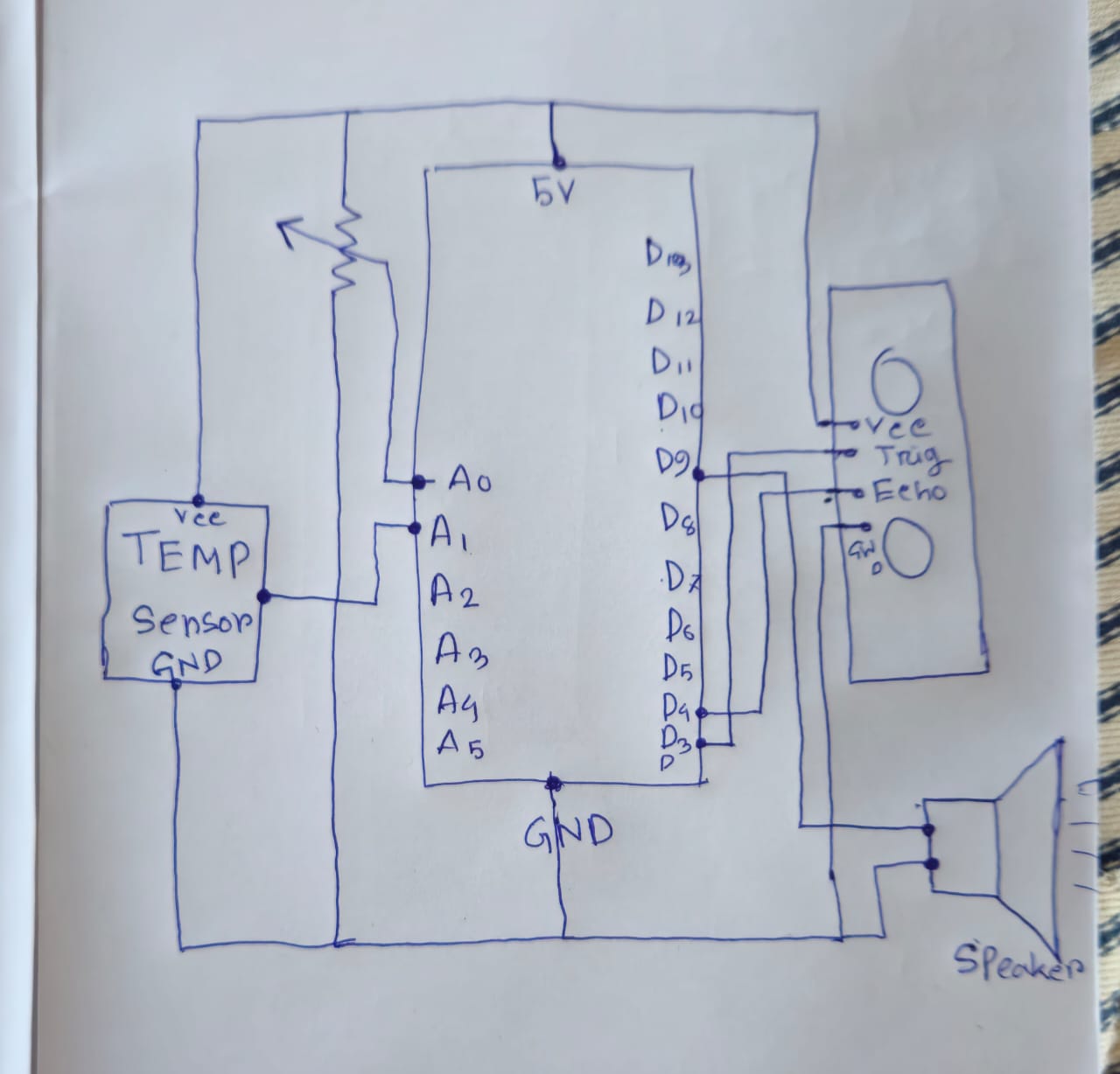
List of the hardware components used in the WaveSynth project:
- Arduino Uno
- HC-SR04 Ultrasonic Sonar Sensor (for gesture-based distance measurement)
- TMP36GZ Temperature Sensor (for ambient temperature-based modulation)
- 10k Ohm Potentiometer (for mode and effect selection)
- Piezo Speaker (for sound output)
- Connecting Wires (for connections between components and the Arduino)
- Breadboard (for prototyping and circuit connections)
- 310 Ohm Resistor (for LED circuit)
Schematic Diagram:
Code:
// Pin definitions
const int potPin = A0;            // Analog pin for potentiometer
const int tempPin = A1;           // Analog pin for TMP36GZ temperature sensor
const int trigPin = 3;            // Digital pin for sonar trigger
const int echoPin = 4;            // Digital pin for sonar echo
const int speakerPin = 9;         // Digital pin for speaker
const int ledPin = 5;             // Digital pin for LED (PWM-enabled)

// Variables
int effectType = 0;               // Tracks which effect is active (0: none, 1: vibrato, 2: pulse, 3: temperature modulation)

void setup() {
  pinMode(speakerPin, OUTPUT);      // Speaker as output
  pinMode(trigPin, OUTPUT);         // Sonar trigger as output
  pinMode(echoPin, INPUT);          // Sonar echo as input
  pinMode(ledPin, OUTPUT);          // LED as output
  Serial.begin(9600);               // For debugging output
}

// Function to read distance from the sonar sensor
long readDistance() {
  digitalWrite(trigPin, LOW);
  delayMicroseconds(2);
  digitalWrite(trigPin, HIGH);
  delayMicroseconds(10);
  digitalWrite(trigPin, LOW);

  // Measure the pulse duration on the echo pin
  long duration = pulseIn(echoPin, HIGH);

  // Calculate distance in centimeters
  long distance = duration * 0.034 / 2;
  return distance;
}

// Function to read temperature from the TMP36GZ
float readTemperature() {
  int tempReading = analogRead(tempPin);             // Read analog value from TMP36
  float voltage = tempReading * (5.0 / 1023.0);      // Convert reading to voltage (0-5V)
  float temperatureC = (voltage - 0.5) * 100.0;      // Convert voltage to temperature in Celsius
  return temperatureC;
}

void loop() {
  // Potentiometer to control mode and effect
  int potValue = analogRead(potPin);                  // Read potentiometer (0-1023)
  bool pitchMode = potValue < 512;                    // Below midpoint is pitch mode, above is volume mode

  // Determine the effect based on the potentiometer value ranges
  if (potValue < 256) {
    effectType = 0;                                   // No effect
  } else if (potValue < 512) {
    effectType = 1;                                   // Vibrato
  } else if (potValue < 768) {
    effectType = 2;                                   // Pulse
  } else {
    effectType = 3;                                   // Temperature modulation
  }

  // Read sonar distance and map to a lower pitch range for soothing tones
  long distance = readDistance();                     // Distance in cm
  int baseToneValue = pitchMode ? map(distance, 5, 50, 150, 600) : 440;  // Map distance to pitch if in Pitch Mode

  // Control LED brightness based on distance
  int ledBrightness = map(distance, 5, 50, 255, 0);   // Closer is brighter (5 cm = max brightness)
  ledBrightness = constrain(ledBrightness, 0, 255);   // Constrain within 0-255
  analogWrite(ledPin, ledBrightness);                 // Set LED brightness

  // Read temperature and map it to a gentle pitch effect
  float temperature = readTemperature();
  int tempEffect = map(temperature, 20, 35, 20, 80);  // Map temperature to subtle pitch modulation

  // Debug output to Serial Monitor
  Serial.print("Distance: ");
  Serial.print(distance);
  Serial.print(" cm, LED Brightness: ");
  Serial.print(ledBrightness);
  Serial.print(", Pot Value: ");
  Serial.print(potValue);
  Serial.print(", Effect Type: ");
  Serial.print(effectType);
  Serial.print(", Temperature: ");
  Serial.print(temperature);
  Serial.println(" C");

  // Play sound based on the selected effect type
  switch (effectType) {
    case 0: // No effect
      tone(speakerPin, baseToneValue); // Basic tone based on distance
      break;

    case 1: // Smooth Vibrato
      for (int i = 0; i < 20; i++) {
        int vibratoTone = baseToneValue + (sin(i * 0.3) * 10); // Soft vibrato effect with lower amplitude
        tone(speakerPin, vibratoTone, 50); // Short tone bursts for vibrato
        delay(20); // Slightly slower delay for soothing vibrato effect
      }
      break;

    case 2: // Gentle Pulse
      tone(speakerPin, baseToneValue);      // Play base tone continuously
      analogWrite(speakerPin, 128);         // Soft fade for pulse effect
      delay(100);                           // Adjust pulse duration for gentler effect
      noTone(speakerPin);                   // Turn off sound briefly to create pulse
      delay(100);                           // Wait before next pulse
      break;

    case 3: // Temperature Modulation
      int tempModulatedTone = baseToneValue + tempEffect;  // Adjust pitch slightly based on temperature
      tone(speakerPin, tempModulatedTone); // Continuous tone with slight modulation
      delay(200); // Keep tone smooth
      break;
  }

  delay(50); // Small delay for stability
}
Media:
Working Process:
- Initial Setup and Calibration:
- When powered on, the Arduino initializes all sensors and components, including the ultrasonic sensor, temperature sensor, potentiometer, and speaker.
- The potentiometer’s position is read to determine the initial mode (Pitch or Volume) and effect (Vibrato, Pulse, Temperature Modulation, or None). The instrument is ready to interpret the player’s gestures and environmental inputs to start producing sound.
- Gesture Detection and Distance Measurement:
- The player positions their hand near the ultrasonic sensor and moves it to change sound properties.
- The ultrasonic sensor measures the distance between the player’s hand and the sensor by sending out an ultrasonic pulse and timing how long it takes for the pulse to bounce back.
- The distance value is calculated and then mapped to control either pitch or volume based on the selected mode:
- Pitch Mode: The distance between the sensor and the player’s hand changes the pitch of the sound. Closer hand positions produce higher pitches, while farther positions result in lower pitches.
- Volume Mode: In this mode, the distance controls the volume of the sound. Closer distances yield louder sounds, and farther distances make the sound quieter.
- Sound Modification through Effects:
- The potentiometer serves as a selector for various sound effects that add dynamic layers to the base tone. Depending on the potentiometer’s position, the following effects are applied:
- No Effect (Basic Tone): The sound responds directly to the pitch or volume based on the hand distance with no additional modulation.
- Vibrato Effect: The instrument adds a wave-like oscillation to the pitch, producing a gentle, undulating sound. This effect is applied continuously, allowing the sound to vary smoothly.
- Pulse Effect: The sound output is pulsed, creating a rhythmic on-and-off pattern. This effect provides a percussive quality, ideal for rhythmic play.
- Temperature Modulation: Ambient temperature subtly adjusts the pitch, creating an atmospheric and evolving sound that changes with the surrounding environment. This effect responds more slowly, allowing the sound to naturally vary over time.
- The potentiometer serves as a selector for various sound effects that add dynamic layers to the base tone. Depending on the potentiometer’s position, the following effects are applied:
- Environmental Adaptation with Temperature Modulation:
- When Temperature Modulation is selected, the temperature sensor reads the ambient temperature. The Arduino then uses this temperature reading to modulate the pitch subtly.
- For example, warmer temperatures gradually increase the pitch, while cooler temperatures lower it. This effect is gradual and blends naturally with the other sound properties, adding a unique, ambient quality to the instrument’s sound.
- Real-Time Sound Output:
- The piezo speaker produces sound based on the interpreted data, transforming distance measurements, temperature readings, and selected effects into real-time audio.
- The speaker continuously updates its output to reflect the current settings and environmental conditions, providing an immediate response to hand movements and mode changes.
- As the player moves their hand closer or farther from the ultrasonic sensor, the sound changes instantly in pitch or volume. Additionally, adjustments to the potentiometer instantly modify the effect applied to the sound.
- Interactive Feedback Loop:
- The player continuously interacts with the WaveSynth by adjusting their hand position, changing the potentiometer setting, and experiencing the evolving sound.
- This interactive feedback loop allows the player to dynamically control and modify the instrument’s output, creating an immersive musical experience that feels responsive and alive.
Future Improvement and Challenges
One of the primary challenges encountered was calibrating the sensors to respond smoothly and accurately to the user’s hand movements. Fine-tuning the pitch range and ensuring that the effects—such as vibrato and pulse—blended naturally with the sound output took several iterations to achieve a pleasing result.
The temperature sensor was tough to work with on the Arduino board.
Additionally, integrating digital sound synthesis or MIDI compatibility would enable users to connect the WaveSynth with other musical devices or software, greatly expanding its versatility as a tool for music creation.
Another possible enhancement could be the inclusion of LEDs or other visual feedback elements to indicate mode selection and provide dynamic light effects that correspond to the sound output. This would enhance the visual aspect of the instrument, making it even more engaging for live performances.