Reading “The Art of Interactive Design” by Chris Crawford has got me thinking about the many aspects of digital interaction, from the narrow scope of game design and conventional software development to the larger social and technical context. Among the many interesting, thought-provoking points brought up by Crawford, the essence of interaction was something I never really got to think about in the way Crawford brought it up.Crawford’s exploration of interaction as a conversation between the user and the system prompts a reconsideration of what effective communication means in a digital context. It makes me think about how devices, apps, and platforms are not just tools but participants in a dialogue with users. This perspective challenges designers to create more empathetic and responsive systems that genuinely understand and adapt to user needs, or else it becomes useless as if a person is speaking to you in a different language than the one you know.
Reflecting on “The Art of Interactive Design” inspires a personal commitment to lifelong learning in the field of technology. The pace of change is rapid, and staying informed about new theories, tools, and methodologies is essential for anyone interested in creating meaningful interactive experiences. It reinforces the importance of curiosity, creativity, and critical thinking in navigating the complexities of interactive design.
When starting this assignment I set the goal of creating classes which behaved differently to each other. In my previous assignment I had a similar goal but wasn’t able to achieve it so I thought I would try again. When it came to the code I took inspiration from the car sketch, where the location of each car was stored as posX and posY. I also wanted to make something similar to what some of my other classmates were making without looking at their code and spending as much time figuring it out myself. I tried to replicate Snehil’s design with the use of what looked like snakes but I wanted a different color scheme. I found Darko’s color scheme more appealing. Then lastly, I wanted to make a class which I could easily repurpose or re-use if I wanted to make shapes which could move around almost randomly.
class snake {

  constructor(posX, posY, radius, magnitude, coefficient) {

    this.posX = posX;               // x-position of the shape
    this.posY = posY;               // y-position of the shape
    this.radius = radius;           // radius of the circle, could be changed if the shape is different
    this.magnitude = magnitude;     // magnitude refers to the amount the shape moves every frame
    this.coefficient = coefficient; // coefficient is the number that multiplies the frameCount in the noise function, I prefer it when it is the same for all snakes but it is a variable that can be changed regardless

  }

  // This class sets a new posX and posY based on a randomly generated heading
  update() {
    // update random heading

    let noiseRandom = noise(this.coefficient * frameCount);

    angleMode(RADIANS);

    let randomHeading = map(noiseRandom, 0, 1, -2*PI, 2*PI); //random heading

    // setting new posX, and posY based on the magnitude

    this.posX = this.posX + cos(randomHeading) * this.magnitude;
    this.posY = this.posY + sin(randomHeading) * this.magnitude;

    // The reason I used sin and cos is because setting the new values is similar to a right angle triangle: The magnitude can be represented as the hypotenuse, and the random heading an angle, then the adjacent value is the change in x, the opposite value is the change in y, then add said changes to the posX and posY respectively. Of course to calculate the new aformentioned values the formula sin(randomHeading) = x / magnitude has to be rearranged, and the same for cosine.

  }

  // this class just draws the shape, it could really be anything, it could even be modified to be a rectangle or an ellipse or anything else you can think of.
  drawShape() {

    circle(this.posX,this.posY,this.radius);

  }

}
Above is the entire class which I named snake. I only used 2 functions not including the constructor which was update and drawShape. the update function’s purpose was to create a new heading, and update the posX and posY variables based on the heading and the magnitude inputed when creating the class. I tried to explain how it’s done but I feel the long comment does not do it justice. Before I explain, originally I tried to use vectors and the translate method. What I realized was that the translate function could also move other shapes on the screen, and instead of trial and error-ing my way around, I decided to use posX and posY like what I remembered from the car-sketch.
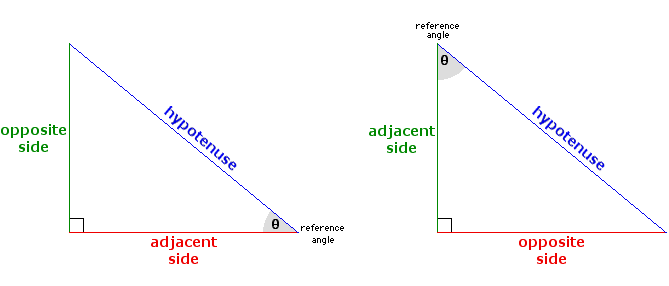
To do this I thought of a right angled triangle and using the trigonometric equations to find what the new coordinates for the shape would be.
While the math isn’t very complicated I felt it was worth explaining and documenting regardless. The hypotenuse is in this case the magnitude, the adjacent side (see left triangle) is the change in x, and the opposite side (left triangle) is the change in y, and theta is the randomHeading variable I generated in the update function. I knew the equations sin and cosine could be used as they had all the variables I needed and so by rearranging for x and y respectively, then adding the new values I got to the pre-existing posX and posY variables I could get the new posX and posY variables. This was the main problem I had, and it was what took me the most time to figure out since at the beginning I chose not to look directly into the code of others and to use what I knew already or what I remembered from class.
My third assignment started with experimentation rather than ideation. As I initially struggled to grasp the concept of OOP and how to implement it into my own work, I went through the examples provided and began to change different variables just to see how they affected the output.
After some time, I decided that I wanted to continue my theme of recreating natural experiences. I initially wanted to pursue this by expanding on the concept of my last assignment (sitting under trees) to “sitting under clouds”. The idea for this was to have clouds move smoothly with a Sine function and incorporate some interactivity using “if (mouseIsPressed == true)” such as lighting or rainfall. However, after implementing Sine movement to my object, I noticed that it felt more “alive” than something as passive as clouds. As I had already conceptually situated my idea in the sky, I decided to branch off from my original concept and create a scene which depicts the body of a dragon.
While I decided to only create the body as a result of my inexperience, I personally like the unique perspective of only viewing a small part of something that is intended to be big. I believe that films often use this technique of showing a small part of a large creature in order to produce a sense of scale without having to animate its whole body.
In terms of interactivity, I still incorporated “if (mouseIsPressed == true)” in order to simulate the (off-screen) effect of the dragon breathing fire. I did this by generating a random color palette within the range of a faded red – a greenish grey on the background when the user clicks on the mouse.
I a simple yet effective piece of code from this assignment which I am proud of would be the “shading” which I managed to produce on the dragon’s body by increasing the number of rectangles in the for loop and selecting two analogous colors for the fill and stroke. I have included the two examples together below.
 // spacing and for loop
 let spacing = width / 163;
  for (let i = 0; i < width; i += spacing) {
    manyRectangles.push( new SineRect(i, 10 + i * 2)  );
  }

/////////////////

// dragon's body color
  fill(140, 70, 70);
  stroke(80, 50, 50);
Some points of improvement going forward (beyond learning how to make a full dragon) could be to create a more realistic sky as the flat/cartoonish style of the clouds contradicts the smooth aesthetic of the dragon. I feel that I could have also made the sketch more interactive by allowing the user to interact with the dragons body in some way (e.g it moves when the mouse is pressed or it follows the mouse).
For this assignment, I drew inspiration from abstract paintings in general. That’s mostly because abstract paintings are essentially shapes layered on top of shapes, or at least that’s what we initially believed. The audience can learn that there’s more to an abstract artwork than meets the eye. which I attempted to include into my work.
Making this project more realistic in some manner and pushing myself to replicate at least one of Picasso’s paintings would be my best improvements, if there are any. But that will have to wait. The ellipses and circles that emerge when the mouse is clicked, which are larger than the squares themselves, is something I’m proud of.Overall, I’m somewhat proud of the outcome.
// Global variables to store the canvas and arrays of shapes and colors
let canvas;
let shapes = [];
let colors = [];
let numColors = 7; // Number of colors to generate

function setup() {
  createCanvas(600, 600);
  canvas = createGraphics(800, 600); // Create off-screen graphics buffer
  canvas.background(255); // Set background color of off-screen canvas

  // Draw background and shapes, generate colors, and apply colors to the off-screen canvas
  drawBackground();
  drawShapes();
  generateColors();
  tintColors();
}

// Function to draw the background of the off-screen canvas
function drawBackground() {
  canvas.noStroke();
  canvas.fill(255);
  canvas.rect(0, 0, 600, 600); // Draw white rectangle covering the canvas
}

// Function to randomly generate and draw shapes onto the off-screen canvas
function drawShapes() {
  let numShapes = 50; // Number of shapes to draw
  let maxSize = 400; // Maximum size of shapes

  // Loop to create and draw random shapes
  for (let i = 0; i < numShapes; i++) {
    let x = random(canvas.width);
    let y = random(canvas.height);

    let size = random(50, maxSize); // Random size for the shape

    // Generate random fill and stroke colors for the shape
    let fillColor = color(random(255), random(255), random(255));
    let strokeColor = color(random(255), random(255), random(255));

    // Creates an object to represent the shape and adds it to the shapes array
    let shape = {
      x: x,
      y: y,
      size: size,
      fillColor: fillColor,
      strokeColor: strokeColor,
      shapeType: int(random(3)) // Randomly choose shape type (0: ellipse, 1: rectangle, 2: polygon)
    };

    shapes.push(shape); // Add the shape object to the shapes array
  }

  // Loop through shapes array and draw each shape onto the off-screen canvas
  for (let shape of shapes) {
    canvas.fill(shape.fillColor);
    canvas.stroke(shape.strokeColor);
    canvas.strokeWeight(2);

    // Draw different types of shapes based on their shapeType property
    if (shape.shapeType === 0) {
      canvas.ellipse(shape.x, shape.y, shape.size, shape.size); // Draw ellipse
    } else if (shape.shapeType === 1) {
      canvas.rect(shape.x - shape.size / 2, shape.y - shape.size / 2, shape.size, shape.size); // Draws rectangle
    } else {
      // Draws polygon with random number of vertices
      let numVertices = int(random(3, 8)); // Random number of vertices between 3 and 7
      let angle = TWO_PI / numVertices; // Angle between vertices
      let halfSize = shape.size / 2; // Half the size of the shape
      canvas.beginShape(); // Begin drawing a custom shape
      for (let a = 0; a < TWO_PI; a += angle) {
        let sx = shape.x + cos(a) * halfSize; // Calculate x-coordinate of vertex
        let sy = shape.y + sin(a) * halfSize; // Calculate y-coordinate of vertex
        canvas.vertex(sx, sy); // Add vertex to the shape
      }
      canvas.endShape(CLOSE); // End drawing the custom shape
    }
  }
}

// Function to generate random colors and store them in the colors array
function generateColors() {
  colors = []; // Clear the colors array
  for (let i = 0; i < numColors; i++) {
    colors.push(color(random(255), random(255), random(255))); // Generate random color and add it to the colors array
  }
}

// Function to apply tinted colors to the off-screen canvas
function tintColors() {
  let colorIndex = 0; // Initialize color index
  // Loop through the canvas in a grid pattern
  for (let y = 0; y < canvas.height; y += 50) {
    for (let x = 0; x < canvas.width; x += 50) {
      let c = colors[colorIndex % colors.length]; // Get the color from the colors array
      canvas.tint(c); // Apply tint with the color
      canvas.image(canvas, x, y); // Draw the off-screen canvas onto itself with the applied tint
      colorIndex++; // Increment color index
    }
  }
}

// Function called when mouse is clicked
function mouseClicked() {
  generateColors(); // Regenerate colors
  canvas.clear(); // Clear off-screen canvas
  drawShapes(); // Redraw shapes on off-screen canvas
  tintColors(); // Apply tinted colors
}

// Function called when mouse is moved
function mouseMoved() {
  generateColors(); // Regenerate colors
  canvas.clear(); // Clear off-screen canvas
  drawShapes(); // Redraw shapes on off-screen canvas
  tintColors(); // Apply tinted colors
}

// Main draw function to display the off-screen canvas onto the main canvas
function draw() {
  image(canvas, 0, 0); // Display off-screen canvas on the main canvas
}
Reading Response:
In the book “The Art Of Interactive Design”, Crawford delves into the concept of interactivity by addressing the misinterpretations of the term “interactivity” itself. He emphasizes the importance of the quality of each subtask for successful interaction, distinguishing between the genuine interactivity and instances where the terms is diluted. Moreover, Crawford introduces the concept of and “interactivity designer,” highlighting the specialized skills and consideration required for designing interactive experiences. The chapter concludes by addressing the resistance faces by interactivity designers.
In essence, this chapter provides a thought-provoking and insightful exploration of interactivity, challenging conventional understandings and advocating for a more comprehensive approach to designing interactive experiences. Crawfords perspective redefines interactivity but also emphasizes the need for a paradigm shift and integration of diverse expertise in the evolving field of interactivity design.
For this assignment, I drew inspiration from the rainfall in the UAE this past weekend, a truly cherished occurrence. Given my lack of color perception, I aimed to infuse this natural phenomenon with a vibrant spectrum of colors.
The Sketch:
Description:
The sketch simulates colorful raindrops falling against a light lavender background, which Is meant to be a blue-tinted window on a foggy morning; at least, that’s the color I see when I look at it. Each ‘raindrop’ object tracks its position, speed, and color. The raindrops reset once they fall off the bottom of the canvas, simulating a continuous rainfall.
Script:
// Defing the Raindrop's class
class Raindrop {
  constructor() {
    this.x = random(width);
    this.y = 0; // Start from the top
    this.length = random(10, 20);
    this.speed = random(1, 5);
    this.color = color(random(255), random(255), random(255), 200);
    // Semi-transparent
  }

  // Method to update raindrop properties for each frame
  fall() {
    this.y += this.speed;
    // Reset the drop when it goes off screen
    if (this.y > height) {
      this.y = 0;
      this.x = random(width);
      this.color = color(random(255), random(255), random(255), 200);
    }
  }

  // Method to draw the raindrop
  show() {
    stroke(this.color);
    line(this.x, this.y, this.x, this.y + this.length);
  }
}

let raindrops = []; // Array to hold Raindrop objects
const numDrops = 400; // Total number of raindrops

function setup() {
  createCanvas(640, 684);
  // Initialize raindrops
  for (let i = 0; i < numDrops; i++) {
    raindrops.push(new Raindrop());
  }
}

function draw() {
  background(230, 230, 250); // Light lavender background
  // Update and draw each raindrop
  raindrops.forEach(drop => {
    drop.fall();
    drop.show();
  });
}
Problems Encountered:
The challenge was ensuring the raindrops’ continuous flow and dynamic color changes without creating visual clutter. To address this, I implemented a reset mechanism for each raindrop once it fell off the screen and used semi-transparent colors to soften the visual impact.
How can we define interactivity? I realize that the word “interactive” has been overused by many things that involve some kind of human’s action in it. However, I believe that similar to the reading, the human’s interaction with any object must also result in a response from the object. Hence, the object is interaction. To some sense, this is similar to having a conversation where the speaker expects a response from the listener. Furthermore, as in the reading mentioned, the interaction is just not simply the meaningless communication between communicators but it must involve the process of thinking in related to the given subject. It is worth noting that the level between the subjects in the interactive conversation should be similar.
Another aspect that interests me is the notion of whether interactivity is subjective. While the reading is trying define the term interactivity universally, I would like the think that interactivity is subjective. It does not limit to the functionality of the interaction, but I would rather argue that some interactivity are designed to target a certain group of people. For example, any interaction that requires a response from the text/quote questions without audio support could not consider as interactive to the young children who have not studied how to read yet. Each design for interaction seems to target a certain subject group, or all, but it is certain that interaction is not universal in my opinion.
Below is the p5 sketch, hover 👆 anywhere to interact with the robot.
In case p5js Editor website is down, below is the recording of working demo on YouTube.
TL;DR : Conceptualization
Pi’s Practicality Walker is an Inverse Kinematics powered procedurally animated simulation of a giant mechanical walker in p5.js. All the animations are not hard coded by Pi, but are calculated on the spot on demand. You can hover the mouse pointer to move around the body of the walker robot, and the leg movements will adjust to how it should be.
1) 🤔 Long-Winded Conceptualization
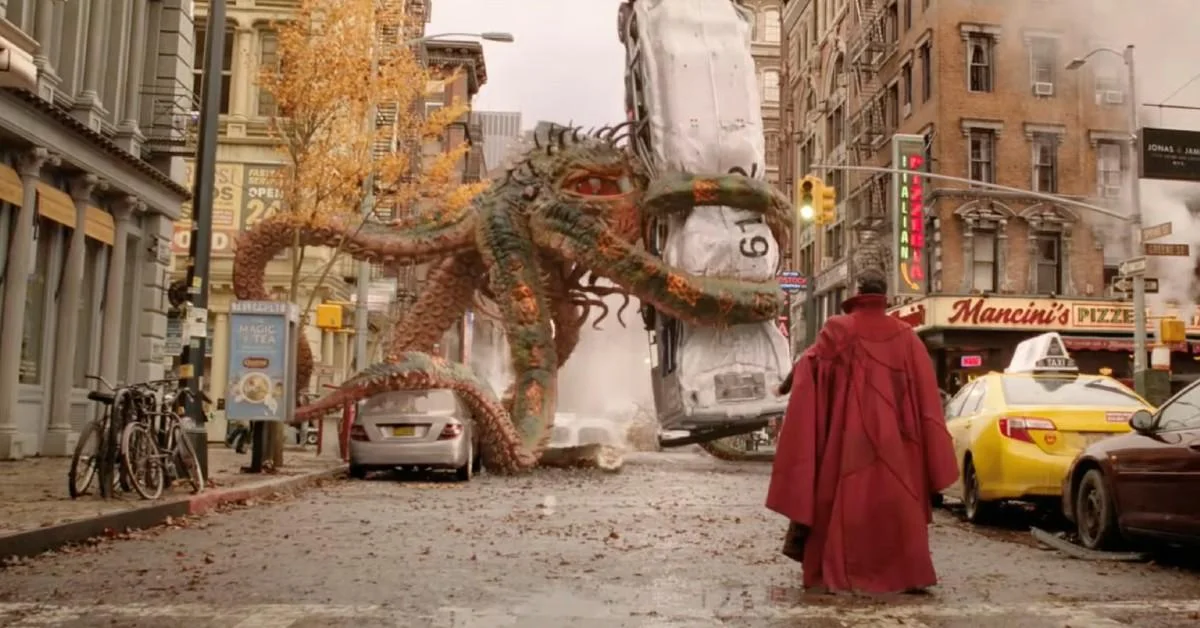
I was watching Doctor Strange in the Multiverse of Madness, and having a good time fantasizing myself deep in the movie…as Dr. Stephen StrangePi , the Sorcerer Engineer Supreme , the Master of the Mystic Arts Engineering Arts.
The only difference is that unlike Doctor Strange, I am the perfect boyfriend to all my ex-girlfriends.
And then I suddenly saw this delicious octopus.
In the class, we are learning Object Oriented Programming, and I am feeling the urge to write my own little mini game engine in p5js (in preparation for my midterm project). And I love mechanical things soooo sooo much. Hence, a giant mechanical octopus walking over the land, controllable with the mouse is a perfect idea.
Hence the piece “Pi’s Practicality Walker” is born.
To get such walking animation, Japanese Animation master Hayao Miyazaki will pour his heart and soul to his artwork and draw all the frames of the animation (that is 24 frames for 1 second of motion). But I am not Hayao Miyazaki.
But I am not Hayao Miyazaki.
~ Pi (2024)
Hence, I need to utilize my super lazy sneaky hacks to make this happen. Luckily, if you have a robotics background, the Inverse Kinematics and Procedural Animation techniques come in handy. Instead of going through the blood, sweat and tears of drawing/hard coding the animations, we can automatically generate animation in real-time to allow for a more diverse series of actions than would otherwise be tedious using predefined animations using these mathematical goodies.
2) ⚙️ Technical Plan of Attack & Implementation
The part of the code I am very proud of is of course, objectifying my octopus/spider 🕷️. Since they have a central body, which is composed of multiple legs, I can easily define the Mechanical Leg class, and the Body class as follows.
//This is the class for the individual legs
class MechanicalLeg {
  constructor(numSegments, segmentLength, isRightFacing = true) {
    this.numSegments = numSegments;
    this.segmentLength = segmentLength;
    this.isRightFacing = isRightFacing; // New parameter to determine the facing direction
    this.angleX = 0;
    this.angleY = 0;
    this.points = [];
    this.totalLength = this.segmentLength * (this.numSegments - 1);
  }

  update(targetX, targetY, canvasWidth, canvasHeight) {
    this.totalLength = this.segmentLength * (this.numSegments - 1);
    this.angleX = 0;
    this.angleY = 0;
    this.legLength = max(
      dist(targetX, targetY, canvasWidth / 2, canvasHeight / 2),
      2
    );

    let initialRotation = atan2(
      targetY - canvasHeight / 2,
      targetX - canvasWidth / 2
    );
    let rotation
// ... and so on
Then you just spawn the legs on the body, fulfilling the object and instance creation.
//Then, attach the legs to the body instance from the body class below
//Spider is walking and draggable
class SpiderBody {
  constructor(x, y) {
    this.position = createVector(x, y);
    this.baseY = y; // Base y-position to oscillate around
    this.dragging = false;
    this.dragOffset = createVector(0, 0);
    this.oscillationAmplitude = 30; // Amplitude of the up-and-down movement
    this.oscillationSpeed = 0.05; // Speed of the up-and-down movement
  }

  update() {
    this.position.x = mouseX - 50;
    // Apply a sin motion when not dragging
    this.position.y =
      mouseY +
      sin(frameCount * this.oscillationSpeed) * this.oscillationAmplitude;
  }
//...
As per project requirement, the arrays were used to hold the leg objects within the walker robot body instance.
// Line 436
function setup() {
  createCanvas(windowWidth, windowHeight);
  gaitHorizontalDistance = windowWidth / 0.7;
  spiderBody = new SpiderBody(width / 2, height / 2 + 100);
  // Initialize leg instances and add them to the legs array
  legs.push(new MechanicalLeg(4, 180, true)); // Right-facing leg
  legs.push(new MechanicalLeg(4, 180, false)); // Left-facing leg
  legs.push(new MechanicalLeg(5, 150, true)); // Another right-facing leg
  legs.push(new MechanicalLeg(5, 150, false)); // Another left-facing leg
  legs.push(new MechanicalLeg(4, 200, true)); // And so on...
  legs.push(new MechanicalLeg(4, 200, false));
Now we have a giant machine with legs, and the code is reusable and modular, but it is not moving yet. Inverse Kinematics is the art of calculating the joint angles so that given a particular end-effector coordinate in 3D space, the robot knows which joint angles it should move to to get to that target point. Hence, the animations can be automated thsi way.
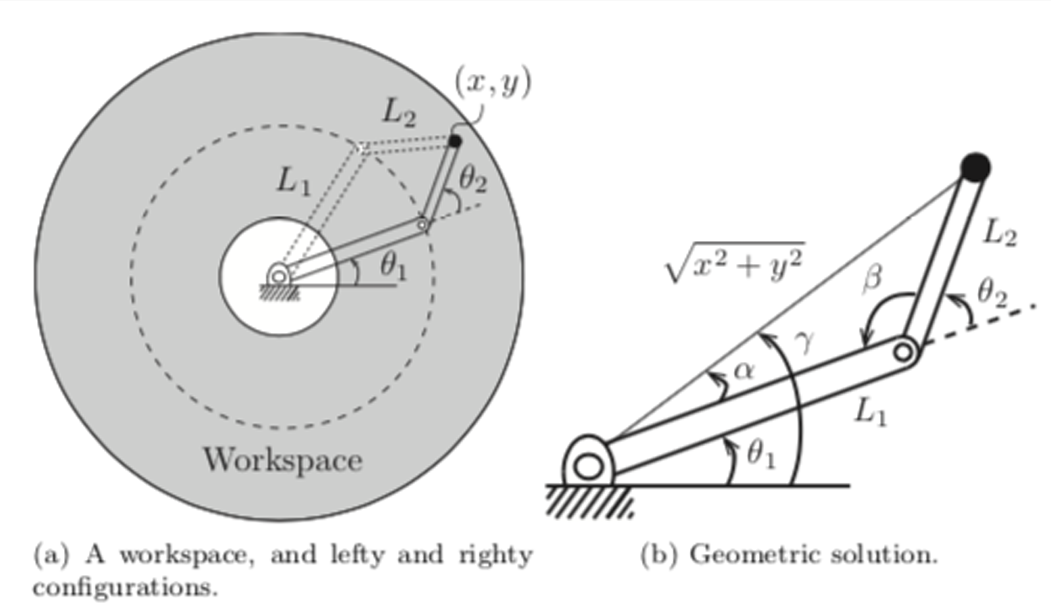
The key idea is to have an algorithm which will iteratively adjusts the angles of each segment to ensure the end effector reaches or points towards the target. The mathematics primarily involves trigonometry to calculate angles and positions of each segment in 2D space. The model I am using is below.
Step 1 : Initial Tangent Alignment
Step 2 : Desired Leg Length Calculation
Step 3 : Iterative Angle Adjustments
Initialize for all segments.
Iteratively adjust to stretch or contract the leg.
Incremental angle change:
Updatefor each segment.
Step 4 : Segment Position Calculation
Step 5 : Check Total Leg Length
The iterative process continues until the total length of the leg aligns with the desired length L, hence we keep checking. This is the stopping condition.
Step 6 : Rotation Adjustment
If the legs are at the back, we have to measure the angle in the mirrored way, so mirror the angles.
The formal definitions of funky symbols above are
Number of segments in the leg (numSegments).
Length of each segment (segmentLength).
Angle of theith segment.
Coordinates of the end of the ith segment.
Target coordinates (mouse position).
Width and height of the canvas (canvasWidth, canvasHeight).
Desired total length of the leg (legLength).
Initial rotation angle to point towards the target.
Total rotation angle of the leg.
Incremental angle change per iteration.
3) 🎨 Artistic Plan of Attack & Implementation
Once the robot is working, we enhance the aesthetics through adding a parallax grass, adding the previous swarms and gears, and playing a good old western slide guitar cowboy song and visualizing it through fast Fourier transform (FFT) in the style of Ryoichi Kurokawa .
4) 💪 Challenges
Again, no challenge. This was an enjoyable exercise.
5) 💡 Potential Improvements
To make the movements of the walker more realistic, as always, I could have used proportional–integral–derivative (PID) controllers. My current model goes with constant speed:
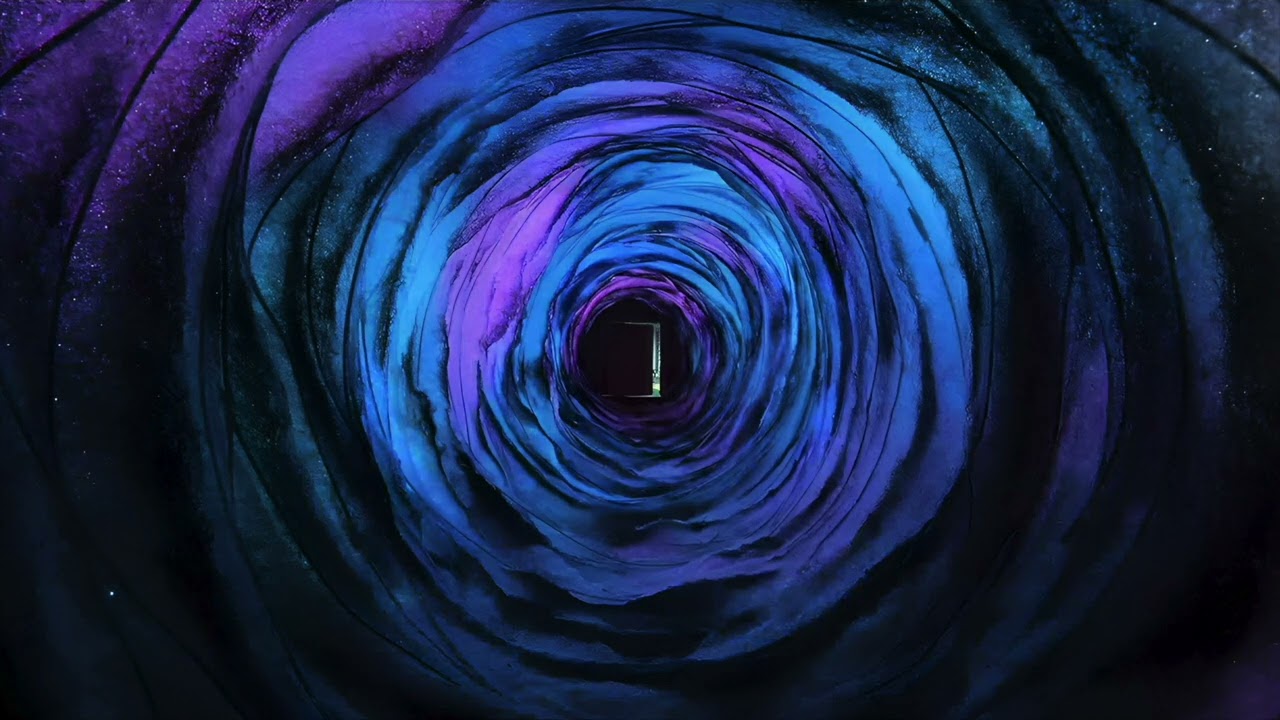
As a starting point, I decided to experiment with our class codes and test color palettes, and through that, I stumbled upon shades of blue and pink that immediately reminded me of a scene from the famous movie “Coraline.” With that in mind, I decided to recreate, or at least attempt to, the tunnel to the other world. In the movie, when Coraline is trying to escape the Other World, she notices that the tunnel feels longer each time she uses it, and steeper. That was my goal for this assignment, and using functions helped me achieve it.
Highlight
class RotatingPolygon {
  constructor(centerX, centerY, x, y) {
    this.centerX = centerX; //center x coordinate
    this.centerY = centerY; //center y coordinate
    this.x = x; //starting x coordinate
    this.y = y; //starting y coordinate
    this.angle = atan2(this.y - this.centerY, this.x - this.centerX); //calculate initial angle
    this.speed = random(0.01, 0.03); //set random rotation speed
    this.radius = dist(centerX-300, centerY-100, x+20, y-20); //calculate radius
    this.sides = int(random(5, 10)); //randomize number of sides for each polygon
  }
An aspect of the code that I take pride in is the usage of cosine, sine, tangent, and pi, along with the radius; they were very useful. Something new I learned was that atan() gives an angle value between -90 & 90, whereas atan2() gives an angle value between -180 & 180. I am also proud of how easy it has become to change the outcome with a simple adjustment, given that I have created a class for rotating polygons (I initially had circles/ellipses but that wasn’t accurate enough). Though I must admit that many of the elements have been the result of trial and error, and I am still exploring this very interesting idea of using OOP in creating graphics.
Reflection
Attempting to replicate the colors from the original scene was definitely challenging, especially since I had already included transparency/opacity components. I believe there is room for improvement in that aspect. In addition, it took some time to understand where and how to position all the shapes accordingly and in line with the original scene. Overall, I believe that I’ve created something worth sharing!
Once, a very thirsty traveler came to the bar and asked, “Water!”
The bartender, raising an eyebrow, says “Sure, sire, would you like room temperature or icy chill water 🥛?”
“Uh, cold please”
“Do you lean towards distilled, mineral, or perhaps a sparkling variety?”
The traveler scratching his head says, “Just regular water is fine”.
The bartender goes “In terms of regular water, we have classic spring regular water or purified tap…”
Judging by Chris Crawford’s Interactive Design definition, this is an interactive process.
There are two actors – the bartender and the traveler
They actively listen to each other,
and think (Whether bartender thinks or not is debatable)
and speak
The only catch here is that this interactivity “did not solve the problem”. They did interact, there is flow of information between them, but the problem remains unsolved.
Just like how Crawford ranted about people in that day and age re-brands “The Same Old Stuff” as “New Interactive Technology” with hype and criticized how the “plays” ranks about a 0.01 on a 10-point Crawford Scale of Interactivity, I am also going to use this writing to rant about how his interactivity definition ranks pretty low (say around 3.14ish) on the 100-point Pi’s scale of Aesthetic Practicality. This definition of [Interactivity = “two actors” AND “listen” AND “think” AND “speak”] ought to be, at least expanded to be applicable.
Expanding the definition of Interactivity
Personally, when I encounter “Interactivity” I see it not as a “process” (unless you are dealing with human to human problems, where you have to Talk It Out Loud ™). Normally in the context of Human-Software Interactions, UI/UX design, interactivity is about how efficiently you can give the user the complete tutorial so that they can utilize the system with minimal guidance.
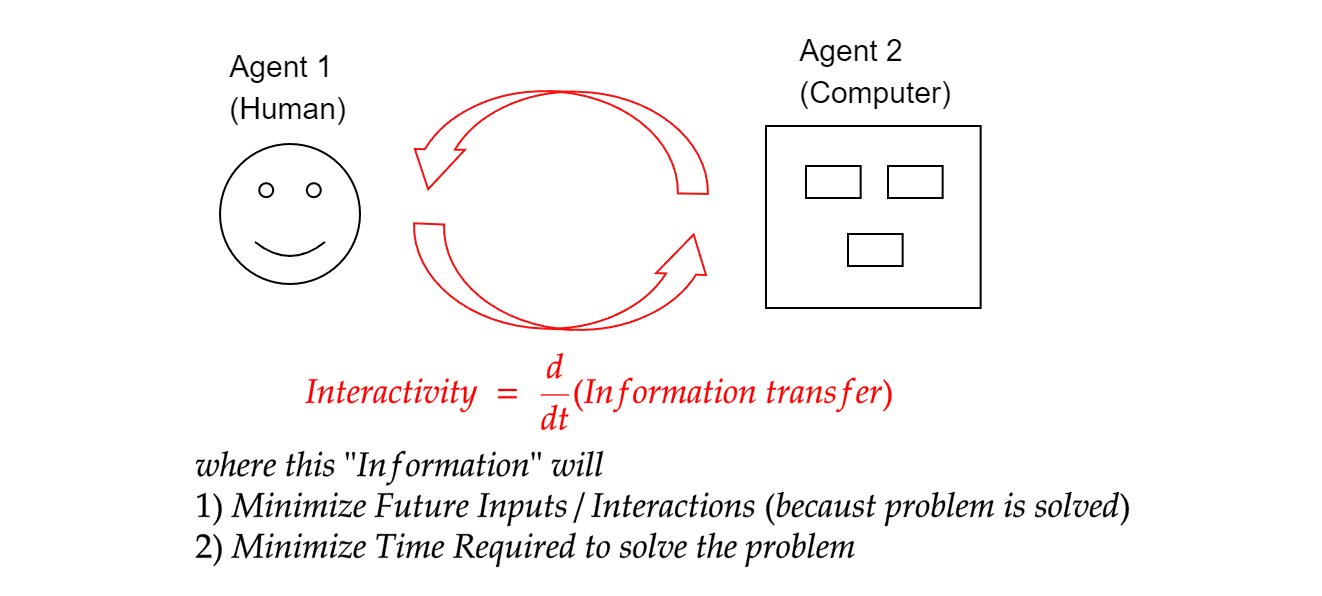
On more formal terms, if we ignore the video game industry (because by definition, games have to be interactive), I see interactivity as a measure of “the rate of transfer of information between two agents (i.e. Human-Computer), where this transferred information helps solve human problems using the computer with minimal input in minimal time.”just as in the diagram below.
Note that my definition explicitly states that the more interactive the system is,
the more time it saves and
the less guidance it needs to give the user in the future.
Otherwise if we go by Crawford’s definition, we fall into the danger of “Impractical Interactivity Deadlock Situation” where two parties keep on interacting without results, just like the bartender joke above.
In short, the holy grail of “Interactivity” is, ironically, to minimize more “interactivity” in the future. Because if you have to keep interacting… if you have to keep going to the bank because the bank customer service keeps tossing you back and forth with other departments and your credit card issue is still not solved, the “interactivity” is simply … not “interacting”.
In short, the holy grail of “Interactivity” is, ironically, to minimize more “interactivity” in the future.
~ Pi
Best Interactivity is Implicit Interactivity, change my mind
Personally, I agree with Crawford, that “Good Interactivity Design integrates form with function.” However, the only pebble in my shoe is that Crawford has the explicit “speak” component in his definition. In a well-designed software, you don’t necessarily have to explicitly speak. The good design speaks for itself, learning curve is so smooth such that the users enlightens themselves without any guidance and hitting F1 for user manuals.
There was a good old time in the UI design when “Skeuomorphism” – a user interface design which adds real-world design cues to virtual objects to make those objects more understandable.
This is the perfect marriage of form and function.
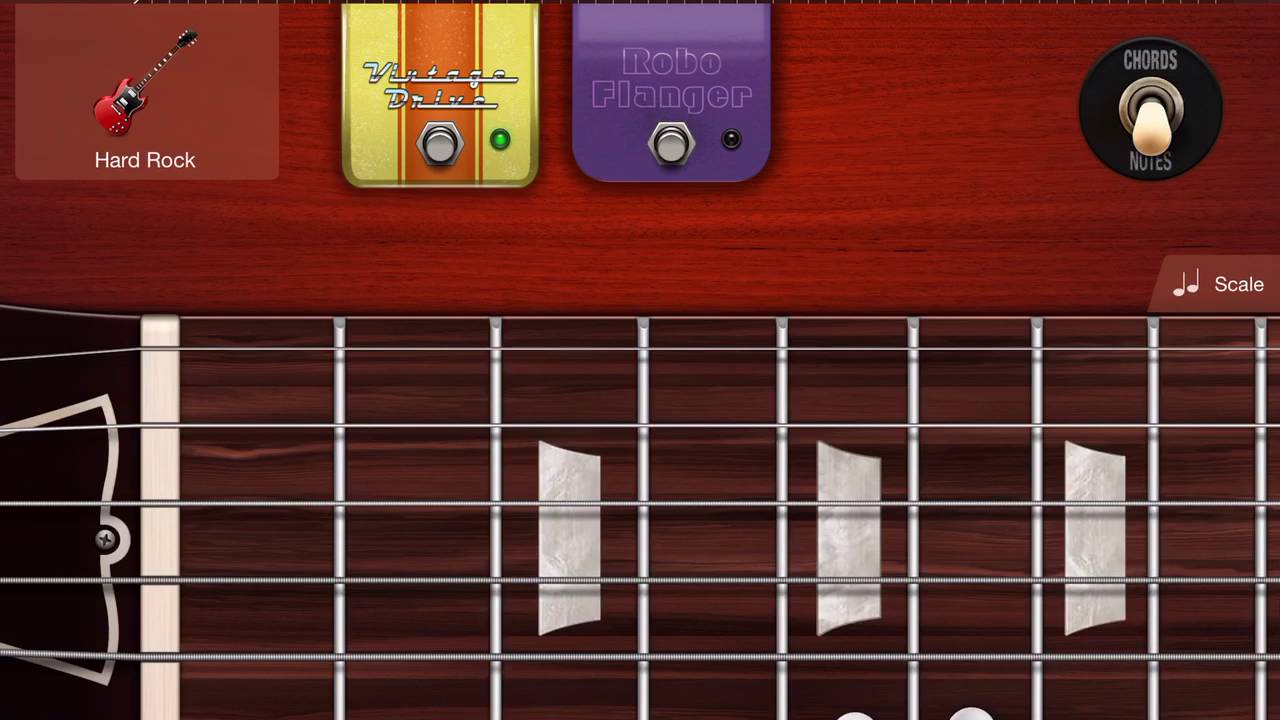
For instance, just look at the Garage Band guitar User Interface.
Super short, sweet and simple. Anyone who have intimately slid their fingers up the fretboard , do not need additional tutorial in order to play the Garage Band guitar. It is intuitive. There is no need to explicitly have the expanding speech bubble saying “In order to use the overdrive/flanger pedal, tap here.”
Also, the interface is just beauty in purest form 😌👌.
The design itself is already intuitive and interactive.
However, just like the average American marriage [source], after 8 years, the form and function got a divorce ☠️… and the entire world catches minimalism/flat design virus, to the extent that where intuition is murdered (Yes, I am looking at you, Material Design and Neumorphism).
The best example of the such worst UI nightmare is the audio mute/unmute icons.
After years of experience during COVID, and after using Zoom countless professional settings, my dad still cannot tell whether the audio is muted or not just by looking at the button. (Does red color mean that it is already muted? Or I click the red and it will mute?)
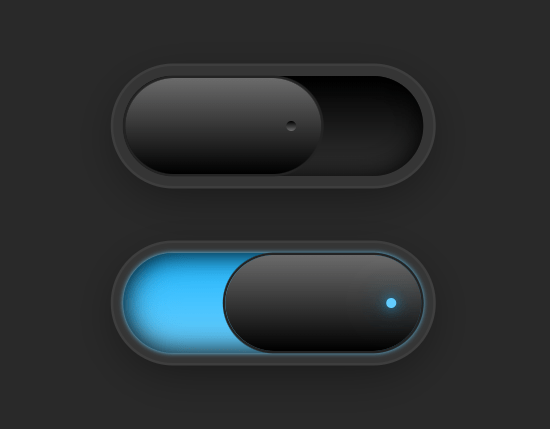
Whereas a sensible, more intuitive audio on/off button will look more like this.
(Flip the switch, light means it is currently on, no light means it’s currently off… Everyone know this from interacting with other electronic gadgets, there is no need to specially train the user)
Hence, when you don’t have this auto intuition built into the original design, explicit interactivity (a.k.a. helper texts here and there, or your IT support guy) has to come in unnecessarily. This interactivity is just a bloat in the system, and a waste of space, and resources.
Well, as they say “Communication is key”, I appreciate the importance of interactivity in human-software interactions. However, in the context of Good software, such “talk-back” explicit Interactivity should be the last resort a good designer should fall back to.
A good doctor doesn’t easily prescribe antibiotics… this is supposed to be the last resort.
Hence, from the artistic engineer point of view…. When designing anything, intuitive function has to come first, then the form, and only then throw in the “explicit” when there is no other way out.
Perhaps, it is time we rebrand Crawford’s definition to Practically-Aesthetic-Interactivity(abbreviates to PAI? Hahaha, very punny Pi, very punny.), and we may be…. just may be… see better intuitive software in the future.
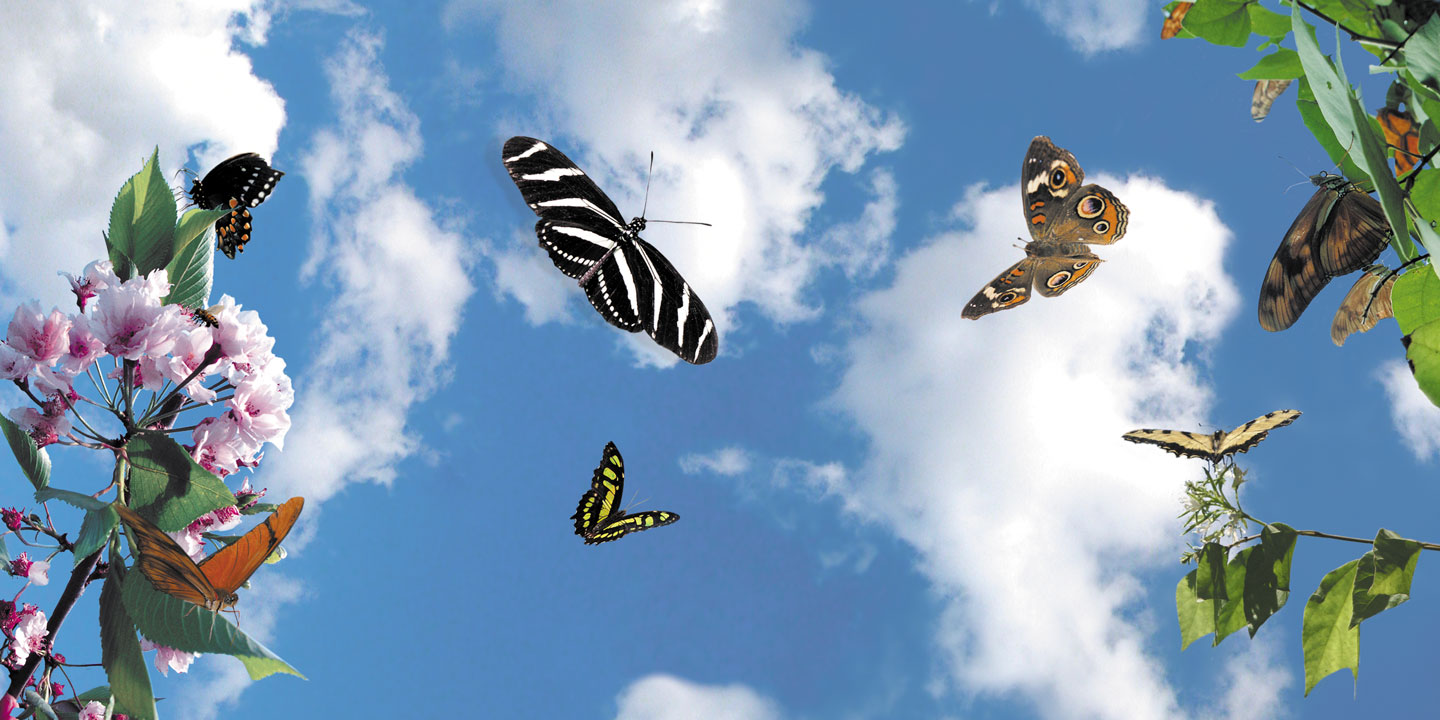
In this assignment, I developed a serene landscape populated by butterflies, clouds, and flowers, inviting viewers to immerse themselves in a tranquil virtual environment.
Key Elements:
– Butterflies: Colorful and graceful, the butterflies are the focal point of the scene. Programmed to flutter across the canvas, their movements are dynamic and captivating.
– Background: The canvas serves as a backdrop for the scene, featuring a gradient sky and soft, rolling clouds that drift lazily across the horizon.
– Flowers: Adding depth and detail to the landscape, flowers bloom sporadically, their vibrant colors contrasting against the lush greenery.
Conceptual Framework:
The project draws inspiration from the beauty and harmony found in the natural world. By combining artistic vision with computational techniques, the goal is to evoke a sense of wonder and serenity, inviting viewers to momentarily escape the confines of reality and immerse themselves in a digital oasis of creativity and beauty.
This assignment provided an opportunity to explore the intersection of art and technology, demonstrating how code can be used to create immersive digital experiences that transport viewers to captivating virtual worlds. Through careful design and implementation, the project aims to evoke a sense of wonder and appreciation for the beauty of nature in the digital realm.
code:
let butterflies = [];
let clouds = [];
let flowers = [];

function setup() {
  createCanvas(800, 600);

  // Create a flock of butterflies
  for (let i = 0; i < 10; i++) {
    let butterfly = new Butterfly(random(width), random(height));
    butterflies.push(butterfly);
  }

  // Create some clouds
  for (let i = 0; i < 5; i++) {
    let cloud = new Cloud(random(width), random(height));
    clouds.push(cloud);
  }

  // Create some flowers
  for (let i = 0; i < 20; i++) {
    let flower = new Flower(random(width), random(height));
    flowers.push(flower);
  }
}

function draw() {
  // Draw gradient sky background
  background(135, 206, 250); // Light blue
  for (let y = 0; y < height; y++) {
    let inter = map(y, 0, height, 0, 1);
    let c = lerpColor(color(135, 206, 250), color(255, 255, 255), inter);
    stroke(c);
    line(0, y, width, y);
  }

  // Display and update clouds
  for (let cloud of clouds) {
    cloud.display();
    cloud.update();
  }

  // Update and display each butterfly
  for (let i = 0; i < butterflies.length; i++) {
    butterflies[i].update();
    butterflies[i].display();
  }

  // Display flowers
  for (let flower of flowers) {
    flower.display();
  }
}

class Butterfly {
  constructor(x, y) {
    this.position = createVector(x, y);
    this.velocity = createVector(random(-1, 1), random(-1, 1));
    this.color = color(random(255), random(255), random(255));
    this.angle = random(TWO_PI);
    this.size = random(20, 40);
  }

  update() {
    // Update position
    this.position.add(this.velocity);

    // Change direction randomly
    if (random() < 0.01) {
      this.velocity.rotate(random(-PI / 4, PI / 4));
    }

    // Wrap around screen
    this.position.x = (this.position.x + width) % width;
    this.position.y = (this.position.y + height) % height;
  }

  display() {
    // Draw butterfly wings with pattern
    fill(this.color);
    noStroke();
    ellipse(this.position.x, this.position.y, this.size, this.size / 2);
    let wingOffset = this.size / 4;
    let wingSize = this.size / 2;
    push();
    translate(this.position.x, this.position.y);
    rotate(this.angle);
    fill(255, 100); // Semi-transparent white
    ellipse(-wingOffset, 0, wingSize, wingSize * 2);
    ellipse(wingOffset, 0, wingSize, wingSize * 2);
    fill(0, 100, 255); // Semi-transparent blue
    ellipse(-wingOffset, 0, wingSize / 2, wingSize);
    ellipse(wingOffset, 0, wingSize / 2, wingSize);
    pop();
  }
}

class Cloud {
  constructor(x, y) {
    this.position = createVector(x, y);
    this.velocity = createVector(random(-0.5, 0.5), 0);
    this.size = random(50, 100);
  }

  update() {
    this.position.add(this.velocity);
    if (this.position.x > width + this.size) {
      this.position.x = -this.size;
    }
    if (this.position.x < -this.size) {
      this.position.x = width + this.size;
    }
  }

  display() {
    noStroke();
    fill(255);
    ellipse(this.position.x, this.position.y, this.size * 1.5, this.size);
    ellipse(this.position.x - this.size / 3, this.position.y - this.size / 4, this.size, this.size * 0.8);
    ellipse(this.position.x + this.size / 3, this.position.y - this.size / 4, this.size, this.size * 0.8);
  }
}

class Flower {
  constructor(x, y) {
    this.position = createVector(x, y);
    this.size = random(10, 20);
    this.color = color(random(255), random(255), random(255));
  }

  display() {
    fill(this.color);
    noStroke();
    ellipse(this.position.x, this.position.y, this.size, this.size * 1.5);
    fill(255, 0, 0); // Red
    ellipse(this.position.x, this.position.y - this.size / 1.5, this.size * 0.8, this.size * 0.8);
  }
}
Reading Response:
The first chapter of “The Art of Interactive Design” presents a thorough and insightful exploration into the true essence of interactivity. The author, Chris Crawford, dismantles the common misuse and overuse of the term by defining interactivity as a cyclic process in which two actors alternately listen, think, and speak. This definition, grounded in the analogy of a conversation, strips away the ambiguity surrounding the concept and refocuses our attention on the quality of the engagement rather than mere action and reaction.
Crawford’s critical perspective on the buzzword nature of interactivity in the 1990s and the superficiality of its application to products and technologies drives home the importance of discernment when evaluating interactive experiences. His reference to the frenzied rat race for ‘new and improved’ interactivity, often without substance, highlights the need for more profound and meaningful interactions rather than mere novelty.
The conversation example between Fredegund and Gomer excellently illustrates Crawford’s definition of interactivity, emphasizing the importance of understanding and responding within the context of an exchange. Moreover, his critique of non-interactive activities, like books and movies, offers a clear boundary between passive and interactive experiences.
Crawford’s commentary on the degrees of interactivity is particularly thought-provoking. He challenges the binary view of interactivity as either present or absent, proposing instead a continuum where the depth and richness of the interactive experience can vary. This nuanced approach allows for a more sophisticated analysis of interactivity in various contexts, from refrigerator doors to video games.
In summary, Crawford’s elucidation on interactivity is not only eye-opening but also serves as a call to action for designers and users alike to aspire for deeper, more meaningful interactions. His insistence on the necessity of all three components of the interactive process (listening, thinking, and speaking) provides a clear framework for evaluating and designing interactive systems. The first chapter sets the stage for a deeper dive into the intricacies of interactivity design and its implications for technology and society.