Final Idea

I want to create an immersive experience with space. I want users to come to an empty canvas and use pressure sensors to add planets, meteors and stars. These stars can be added and let’s say we have a minimum of 5 stars, a star constellation will be created and can grow if the user adds more stars. These will be floating around or soaring by (meteors) and so it feels like you’re in space. I want to have a projector to project the P5 screen so users can really feel the grandeur of it.

The Interaction

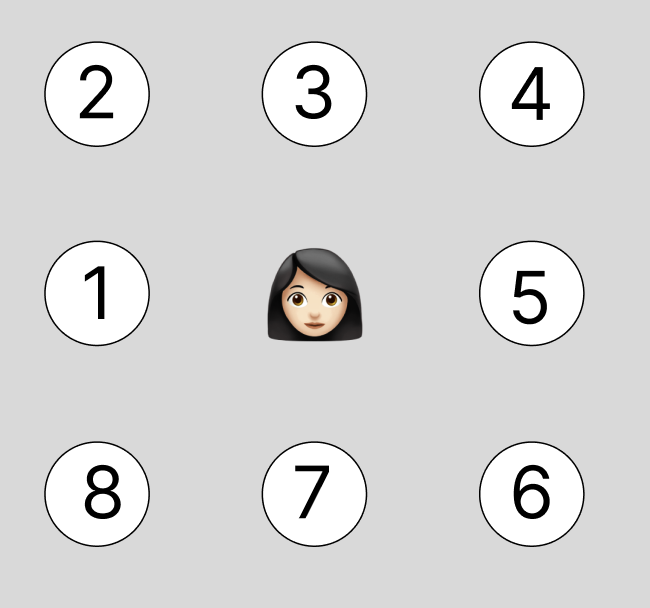
I will have 8 stepping stones on the floor that when the user steps on them they do different things:

Star Makers (Stones 1, 4, 6):

  • Quick tap: Adds one small white star to that stone’s constellation
  • Each stone creates its own independent star collection
  • When 5 stars are placed, they automatically connect with glowing lines to form a constellation
  • Can expand up to 9 stars, making the constellation more intricate and complex
  • Three unique constellations can exist simultaneously in different regions of the sky

Planet Makers (Stones 2, 5, 7):

  • Hold for 3+ seconds: Materializes a planet in space
  • Random planet type appears: gas giants, ringed planets, rocky worlds, ice planets, or mysterious alien worlds
  • Planets drift randomly through space, floating past your constellations
  • Creates a living, breathing solar system

Meteor Makers (Stones 3, 8):

  • Quick tap: Shoots one meteor across the sky in a random direction
  • Hold for 3+ seconds: Triggers a meteor shower with 5 meteors streaking across space
  • Adds dynamic movement and excitement to the scene

Atmosphere Control (Potentiometer dial):

  • Physical dial near the stepping area
  • Controls both the visual intensity and audio volume
  • Low: Clear, minimal space with silence
  • High: Rich nebula clouds, cosmic dust, and immersive ambient soundscape
  • Gives users creative control over the mood of their universe

The Experience

Users approach a darkened floor projection showing empty space. As they explore the stepping stones, they discover they can build their own universe, star by star, constellation by constellation. The moment when 5 stars connect into a glowing constellation creates a magical sense of achievement. Planets drift through the creations, meteors streak across the sky, and the atmosphere can be dialed from stark and minimal to rich and dramatic.
Week 11 – Final Project Prompt

My final project is an interactive installation titled “The Snail’s Journey to School.” The idea is inspired by the opening scenes of Monsters University, where a small character makes their way toward school. In my version, the user helps a robot snail travel through a physical obstacle course until it reaches its destination.

Arduino will control the physical movement of the robot snail using motors and buttons for directional input. It may also include an optional sensor, such as a photoresistor or distance sensor, to detect obstacles or the finish line. The snail robot and the obstacle course will be fabricated by me, either through 3D printing or hand-built materials.

p5.js will act as the narrative and feedback layer. It will display an introduction, instructions, and story elements that respond to the user’s physical interactions. As the user presses buttons to move the snail, Arduino will send messages to p5.js, which will update the visuals, play small animations or sounds, and react to progress in real time. When the snail reaches the “school” area, p5 will display the final scene.

The interaction loop centers on listening (reading the user’s button presses), thinking (moving the snail and sending corresponding data), and speaking (p5.js reacting immediately with feedback).

Week 11 – Reading Response

In Design Meets Disability, Graham Pullin challenges the way society frames disability by questioning why assistive devices are often treated as purely functional rather than expressive. He argues that design for disability should not be limited to medical necessity, it should also include aesthetics, identity, and personal preference. What stood out to me is how Pullin highlights the quiet power imbalance in design: mainstream objects like glasses or smartphones have endless variations and styles, while many assistive tools remain clinical and uniform. This difference reveals how disability is still seen as something to “fix” instead of a natural part of human diversity.

Pullin pushes the reader to consider that assistive devices could be opportunities for creativity rather than reminders of limitation. For example, he discusses the possibility of hearing aids becoming fashionable accessories instead of devices people feel pressured to hide. His argument reframes disability not as a deficit but as a design space full of potential innovation.

Overall, the reading invites designers to rethink their assumptions. Instead of designing for disabled people, Pullin encourages designing with them, treating disability as a source of insight and richness. The book ultimately suggests that inclusive design is not just ethical, it also expands the possibilities of design itself.

Lily pad

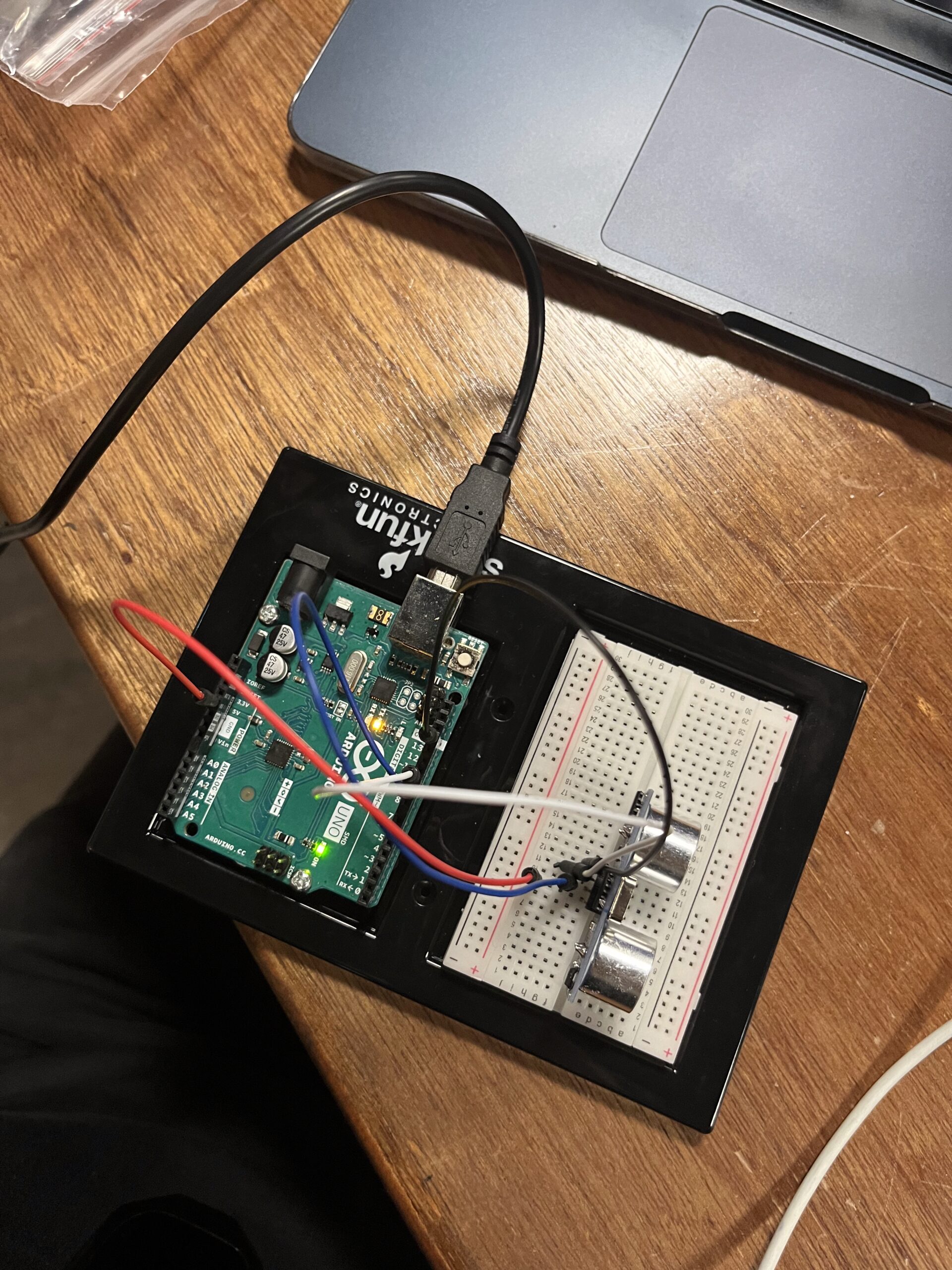
For this project, I wanted to recreate a peaceful scene of a frog sitting on a lily pad in a pond. Since I hadn’t worked much with sensors yet, I thought this would be the opportunity to incorporate one. I decided to use a distance sensor to control the ripples in the water, the closer your hand gets to the sensor, the more frequently the frog hops and creates ripples.

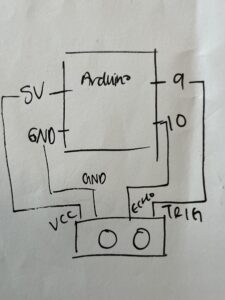
The Arduino codesimply measures how far away your hand is from the sensor and sends that data to the p5.js code. The Arduino code measures distance by sending an ultrasonic pulse and calculating how long it takes to bounce back, then converts that time into cms using the speed of sound (0.034 cm/microsecond) divided by 2 since the sound travels to the object and back.

The p5.j code then uses that distance data to dictate how often the ripples should occur. In the p5 code, I also hosted the visuals/art element of the project.

Next time, I think it would be fun to use a pressure sensor and have users actually jump up and down at different strengths and show that on p5.js.

// ARDUINO CODE
const int trigPin = 9;
const int echoPin = 10;

void setup() {
  Serial.begin(9600);
  pinMode(trigPin, OUTPUT);
  pinMode(echoPin, INPUT);
}

void loop() {
  // measure distance
  digitalWrite(trigPin, LOW);
  delayMicroseconds(2);
  digitalWrite(trigPin, HIGH);
  delayMicroseconds(10);
  digitalWrite(trigPin, LOW);
  
  long duration = pulseIn(echoPin, HIGH);
  int distance = duration * 0.034 / 2;
  
  // send distance to p5.js
  Serial.println(distance);
  
  delay(50);
}

IMG_2539

Week 11 – Reading Response

Design Meets Disability treats constraint more than a deficit. When a flow fails under limited vision or one‑hand use, the failure is a measurement of hidden demand, e.g., precision, memory, timing. Fixing those loads tends to make the product faster and safer for everyone.

The shift from accommodation to inclusive design is a key shift in the design workflow. An add‑on ramp or a screen reader retrofit treats accessibility as a patch. Building large hit targets, consistent structure, multimodal signals, and undo by default treats accessibility as a core requirement. The second approach reduces support costs and broadens use. Captions prove the point, becuase they serve deaf users first, but help viewers in noisy spaces, language learners, and anyone scanning a video on mute. Curb cuts started for wheelchairs, then made cities usable for strollers, carts, and bikes. The spillover is not an accident, but it is the direct result of “designing for constraints” that generalize. As Charles Eames believed, “design depends largely on constraints.” And I agree.

Inputs, perception, and cognition form a clear framework. Products assume hands with fine motor control, perfect vision and hearing, and uninterrupted attention. Alternatives (e.g., switch controls, eye‑tracking, high contrast, scalable text, haptics, chunked steps) lower friction and error rates across contexts. Voice control demonstrates its utility along this path—essential for limited mobility, valuable hands‑free while cooking or driving. Predictive text began as assistive technology, now it is an everyday efficiency feature, especially in coding today, a humorous but significant save of less efficient efforts. That’s why Cursor dominates.

I do have questions. Are there cases where inclusive design adds complexity that hurts clarity? For instance, voice, haptic, and visual signals can compete. The answer may be progressive disclosure. Maybe default to one strong signal, then let users layer or swap modes. But it raises another concern. How do we balance among options, and must we spend resources to develop all of them? How do teams budget for inclusive testing without turning it into a checkbox? We must tie success to task completion under constraint, not to the presence of features. If two flows pass under one‑hand use, low contrast, and divided attention, or even less for a more specific use case they are ready.

The actionable stance: Write constraints into requirements. Set minimum hit area sizes, enforce semantic structure, and require undo and confirmation for destructive actions. Prefer multimodal capability, but choose a clear default per context. Measure success as completion with minimal precision under time pressure.

Shahram Chaudhry – Final Project Brainstorm

I don’t know why I’m so obsessed with memories, even my midterm project was memory-themed. I guess that’s what happens when you don’t get to major in neuroscience but end up majoring in computer science instead.

For my final project, I want to create a physically interactive memory-sequence game that plays with the idea of “recovering a forgotten memory.”  I’ve always liked memory games, and I thought it would be interesting to turn that mechanic into a metaphor: every correct sequence helps restore a blurry image on the screen, as if the player is trying to remember something long lost.

The physical side of the project is intentionally minimal. I’m planning to use four LEDs (diff colours) paired with four corresponding buttons, wired to an Arduino. The Arduino will flash sequences of LEDs, starting easy and growing in complexity, and the user has to repeat them by pressing the buttons in the same order. When the user gets a sequence right, the p5 interface will respond instantly by revealing more detail in the image, for e.g. decreasing the blur.  If they get it wrong, the image  becomes more distorted, symbolizing the memory slipping further away. Only if the player successfully completes all three levels does the final clear image appear. Otherwise, the memory remains lost. I’m also considering having a different image each game, so even if the user replays the game, they can’t recover a memory they “failed”, reinforcing the idea that some memories can be lost forever. (Life is unfair , I know.)

On the p5 side, I want to focus on smooth feedback and atmosphere. The screen will always show the partially recovered image, and p5 will handle visualization, sound feedback (buzzer for wrong sequence) , tracking correctness, and the level progression. The project feels manageable for my current skill level, but I think it is still creative and expressive. 

Week 11: Final Project Preliminary Idea

From the very week of the semester when I learned what the final project would involve, I wanted to implement my skateboard into it as a controller.

The Digital Side of Things

I’m not quite sure of how the P5 side of things would look yet, but one of the ideas I had was to create an experience that commentates on the shaking feeling of anxiety and expresses it as speed wobbles going downhill. I’m not quite sure I can simulate that safely or even have a mechanism that provides movement to the board at all, but it could be a fun idea. You would have to balance the board at certain times but also lean in to either side to make decisions.

Another idea I had was to make a more simple arcade-styled game that uses the skateboard controller. For example, I could make a pong game with two skateboard controllers that have the same mechanics as my midterm project (the forward and backward velocity factors). This would definitely be a little easier on me on the programming side but I’m not sure how I would do two separate skateboard controllers, or if it’d even be fun.

The Physical Side of Things

I have actually thought extensively about how the board might be physically situated.

I want the skateboard to sit stationary so I’m probably going to create something like a wooden frame to hold the board either by the trucks or by the wheels. If I want the frame to hold onto the trucks, I would need to unscrew the wheels and create screw holes in the wooden frame. If I want to keep the wheels on, I would make a mold to hold the board with the wheels on.

For the input sensors, I would need a pair of two distance sensors, one for each side of the board. Each of them will be placed on the ground facing upward to detect how tilted the board is. If the distance between ground and board is closer on the left side than the right side, that means the rider is probably tilting left to turn left. I’m not sure if there’s a more efficient way of approaching this but that’s the idea I have so far.

I want to take advantage of resources we have in the IM lab and scene shop but I’ve never worked with physical materials on this scale before so I’m not sure where to start. That’s definitely one of the bigger pain points on the table right now.

Ultimately, there’s a good chance I might change the concept of my project entirely to fit a little closer to the scope of my current abilities. I realize there’s a lot of unfamiliar territory I want to explore here and it might be best to play it safer.

Week 11 Final Project Brainstorm

For my final project, I want to create a physically interactive AI Tamagotchi. A mini robot creature that the user can pat, touch, hold, and communicate with, but which responds in unexpectedly pessimistic ways. The project combines physical interaction through Arduino sensors with a character AI conversational system and visual interface built in p5.

I recently got obsessed with Tamagotchi, which is a small handheld digital pets that require constant attention: need users feed them, clean up after them, and respond to their needs. Tamagotchis reward human care with affection or happiness, but with the growing cultural anxieties around automation and AI as well as environmental destruction caused by human behavior, I want to  imagines this project in a future in which artificial no longer need, or even want, human caretaking.

The final project would be a mini physical pet built with neopixels and sensors(e.g., force sensor, knob) to react (e.g., twitch, turn away, glow, flash) when touched. Users interact with it through force sensors, knobs, and touch inputs connected to an Arduino. The p5 interface displays a larger animated avatar of the creature and handles generative dialogue and visual responses.

However, unlike typical virtual pets, this creature is intentionally negative and pessimistic toward the user.

  1. When patted, it snaps: “Go away, you silly little human.”
  2. When fed (via knob input), it complains: “Ugh, you call this food?”
  3. When left alone too long, it becomes sarcastic: “Finally. Peace without humans.”

Using an AI API, the creature can answer user questions and hold brief conversations, but it always maintains a consistent disrespectful personality, reflecting a world where robots might question human motives, or judge the damage humans have done to the environment.

Week 11 Exercises Documentation

Group Member: Yiyang

(Arduino codes are commented in the bottom of p5 links)

1. make something that uses only one sensor  on Arduino and makes the ellipse in p5 move on the horizontal axis, in the middle of the screen, and nothing on arduino is controlled by p5

p5 & arduino: https://editor.p5js.org/joyzheng/sketches/63Yg60k8D

Video Documentation: IMG_9638


2. make something that controls the LED brightness from p5

p5 & arduino: https://editor.p5js.org/yiyang/sketches/dtftbIzaK


3. take the gravity wind example (https://editor.p5js.org/aaronsherwood/sketches/I7iQrNCul) and make it so every time the ball bounces one led lights up and then turns off, and you can control the wind from one analog sensor

p5 & arduino: https://editor.p5js.org/joyzheng/sketches/v77Sd41K4

Video Documentation: IMG_9640

Week 11 Reading

This article reminds me of an idea I heard from my robots class: are we all augmented human or “half robots” if there are so many designs eliminate the disability of us. When we relate this concept to real life, we see that we are constantly relying on external design to bridge our own biological limitations, whether that involves wearing glasses to correct what is considered a “mild visual impairment” (a product that has evolved from a medical appliance to a core fashion accessory), or using an advanced hearing aid. The increasing sophistication of products designed to solve specific physical or cognitive problems suggests that human capability itself is often defined by the sophisticated tools we seamlessly integrate into our lives.

The readings’ idea of how specialized, constraint-driven design eventually becomes universal is also visible all around us. This “trickle-down effect” is not just a theory, it’s the logic behind some of the most successful products today. Many of the most intuitive interfaces we use, like large buttons on smartphone screens or voice assistants like Siri and Alexa, were originally developed for users who struggled with fine motor control or had visual impairments. Now they’ve become standard because they make life easier for everyone. The dementia-friendly radio mentioned in the reading is a perfect example: its extreme simplicity wasn’t a limitation, but a breakthrough. The need to create something gentle, forgiving, and easy to navigate forced designers to rethink what “good design” actually means, and the resulting object ended up being loved far beyond its intended audience. We see this again in curb cuts designed for wheelchair users, which now help parents with strollers, travelers with luggage, and delivery workers with carts. These real-world cases show that when designers begin with the most constrained user, they often uncover solutions that improve daily life for the entire population.