Week 2 – Generative ArtWork

For this assignment I wanted to create a small interactive starfield like looking at a moving night sky. Recently I have been very interested in space and how I can implement it in my works, so I used this sketch as a chance to try a simple space scene. My idea was to have many tiny stars drifting down the screen at different speeds, but also to make the scene respond to the viewer. When the mouse moves near a star, it reacts by changing color and size, so it feels like the user is activating and touching the star. I also added a speed mode that you can activate with the space bar, so that the whole field accelerates. The focus of the sketch is on motion and interaction.

Code highlight I am proud of

The part of the code I am most proud of is how I created multiple stars with random properties and then updated them in a loop. Instead of coding circles, I wrote a helper function that builds a star object with random position, size, brightness and speed, this is one of the ways I implemented randomness:

// randomness used, create a new star with random properties
function createStar() {
  let x = random(width);
  let y = random(-100, height);
  let size = random(1, 4);
  let brightness = random(150, 255);

  let xSpeed = random(-0.1, 0.1);
  let ySpeed = random(0.5, 1.2);

  return {
    x: x,
    y: y,
    size: size,
    brightness: brightness,
    xSpeed: xSpeed,
    ySpeed: ySpeed
  };
}

I like this part because I am generating many small data objects and storing them in an array. Each star gets slightly different random values, which makes the starfield look less repetitive. The cretestar() function also lets me recycle stars easily. When a star goes off‑screen, I just replace it with createstar() again, so there is a constant flow of new stars without writing another drawing code.

Another small piece I am happy with is the interaction that changes color and size when the mouse is close:

let distance = dist(mouseX, mouseY, star.x, star.y);

if (distance < 50) {
  // color and size change when mouse is close
  fill("magenta");
  ellipse(star.x, star.y, star.size * 2, star.size * 2);
} else {
  fill(255, star.brightness);
  ellipse(star.x, star.y, star.size, star.size);
}
}

Using dist() was also a new thing I learned in this sketch. In p5.js, dist( x1, y1; x2, y2) calculates the distance between two points, so I can easily measure how far the mouse is from each star. By checking if that distance is less than a certain value, I can define an interaction radius around every star. I think it makes the sketch feel more alive, because the stars react as soon as the cursor approaches them.

Embedded sketch:

I am happy with how this sketch turned out, especially because it let me bring a recent interest of mine, space, into my code. It is nice to see that something I am interested about visually can be translated into an artwork which is also interactive using programming. It boosts my confidence in connecting my personal themes and aesthetics with what I am learning in p5.js. In the future, I would like to move toward more advanced drawings and interactions. I want to explore new functions and techniques in the p5.js reference so I can build richer scenes, maybe with planets and nebulas. I am also interested in opening new things in code for myself as using voice and classes for my ease in code and so that each new sketch becomes a little step toward more expressive interactive artworks.

Reading Reflection – Week 2

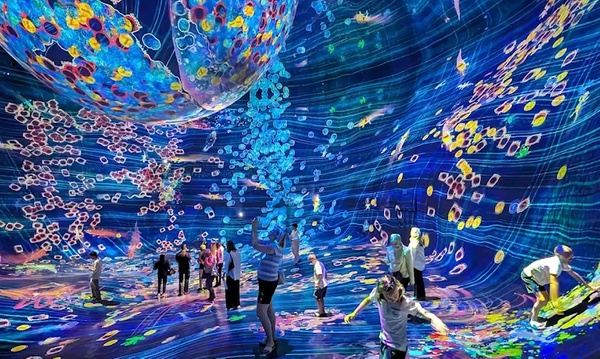
In Casey Reas’s talk, what interested me most was the idea that randomness can be a deliberate creative tool, I have never thought of it in that way. I like that randomness can surprise me and generate results I wouldn’t have drawn by hand, but I also feel a strong need to keep a clear structure that reflects my own decisions. For example, recently I am very drawn to space and astronomy, so I imagine an immersive, interactive “space” piece – something a bit like teamLab’s environments (which very much inspired me when I attended one in Abu Dhabi),  where I design the overall universe, but let random values control details as the exact placement and number of stars at any moment. In that sense, I realized what controlled randomness is; it opened up a new way of thinking about how I can build systems that feel alive while still being rooted in my own vision.

At the same time, I don’t fully agree with how positively Reas seems to talk about randomness, as if more randomness is always good. From my perspective, too much randomness can quickly become visual noise, and I am not comfortable handing over that much authorship to code or AI tools. My personal “sweet spot” is closer to 70% control and 30% randomness: I want the system to add variation and surprise, but I still want to feel that most of the choices especially the concept and mood come from me. This makes me skeptical of the idea that designing the system alone automatically solves all questions of authorship, but his examples still show useful ways to set rules and then allow variation inside them. His talk makes me more open to try out this new techniques for me and experiment with random elements in my own sketches.

Madina – my first p5.js self portrait

For my first Intro to Interactive Media assignment, I created a simple self-portrait using p5.js and basic geometric 2D shapes. My goal was to capture a few key things about myself: my long brown hair, pale skin, brown eyes, and my favorite color. I chose soft colors and a minimal one-color background so the focus stays on the face and shoulders, which feel the most “me.” One of my favorite parts of the code is how I drew the shoulders and upper body using an arc() instead of a rectangle. The code looks like this:

 // shoulders/body
fill("pink"); 
arc(300, 600, 400, 260, PI, 0);

At first I was not sure how to draw the upper body in a way that looked rounded and soft instead of like a flat block. While exploring “The Coding Train” Youtube tutorial’s reference for shapes, I found the arc() function and realized I could use it as a big curved shape at the bottom of the screen to suggest shoulders. The last two numbers in arc() are angles in radians: I used PI as the start angle and 0 as the end angle to draw a half-circle shape for the shoulders. As i learned, in p5.js, PI is a built-in constant that represents the mathematical value of π (about 3.14159), which is the ratio of a circle’s circumference to its diameter. By using PI and 0,  the arc draws from the left side of the circle to the right side, creating a smooth curved top edge that looks like a rounded shoulder line. I like this part because it looks nicer than a rectangle,  also because I filled it with pink, which is my favorite color, so this area feels very personal and represents my personality as a light color lover.

Embedded Portrait:

I built the self-portrait with shapes 2D drawing functions in p5.js such as ellipse(), rect(), line(), arc(). The face and eyes are made from ellipses, the body and neck use rectangles and the pink arc for the shoulders, and the hair is constructed from overlapping rectangles and ellipses to suggest long brown hair. I also adjusted the fill () colors for the skin tone, hair, and clothing, somewhere I used colors just typing them, other ones such as the shoulders, skin and hair I  tested different RGB values until the skin looked pale, the hair read as brown, and the pink for the shoulders matched the color I had in mind.

For learning how to code the portrait, I mainly used the official p5.js tutorials and followed Youtube tutorials from “The Coding Train” channel to get more comfortable with the general structure of a p5.js sketch. This assignment helped me get more comfortable with thinking in coordinates and breaking down a portrait into geometric shapes. Discovering that I could use arc() and the PI constant to create a curved shoulder shape was a small but important moment, because it made me realize how much control I have over shapes. In the future, I would like to add small details like accessories or texture in the hair using more line () and ellipse() shapes, experiment with simple interactivity, changing background colors or facial expressions when the mouse is pressed. Overall, the portrait is still quite minimal, but I feel it already captures some of my identity through the color choices and the simplified representation of my face and shoulders.