
Final Project: Flame Keeper
Flame Keeper is a browser-based game controlled by a physical Arduino. A potentiometer and a push button are the only inputs. There is no keyboard, no mouse, no touchscreen. Your hands are on hardware, and what happens on screen responds directly to what you do with them.
The goal is simple: keep a candle flame alive as long as possible. The flame slowly dies if you neglect it and gets destroyed quickly when wind gusts hit. Your job is to manage both threats at the same time using two very different physical actions.
Demo Video
Concept
A candle flame is fragile. It responds to the air around it, flickers under pressure, and goes out if conditions get bad enough. I wanted to recreate that fragility as a game mechanic where the player feels like they are genuinely tending to something.
The project is meant for anyone who picks it up with no instructions. The two inputs are immediately physical and tactile. Turning a knob and pressing a button are things people already know how to do. The challenge is learning what those actions mean on screen, and then staying coordinated under pressure.
It is a single-player survival game. There is no finish line. You survive as long as you can and your best time is saved so you can try to beat it.
How It Works
The system has two parts: an Arduino that reads sensors and sends data, and a p5.js sketch running in the browser that receives that data and runs the game.
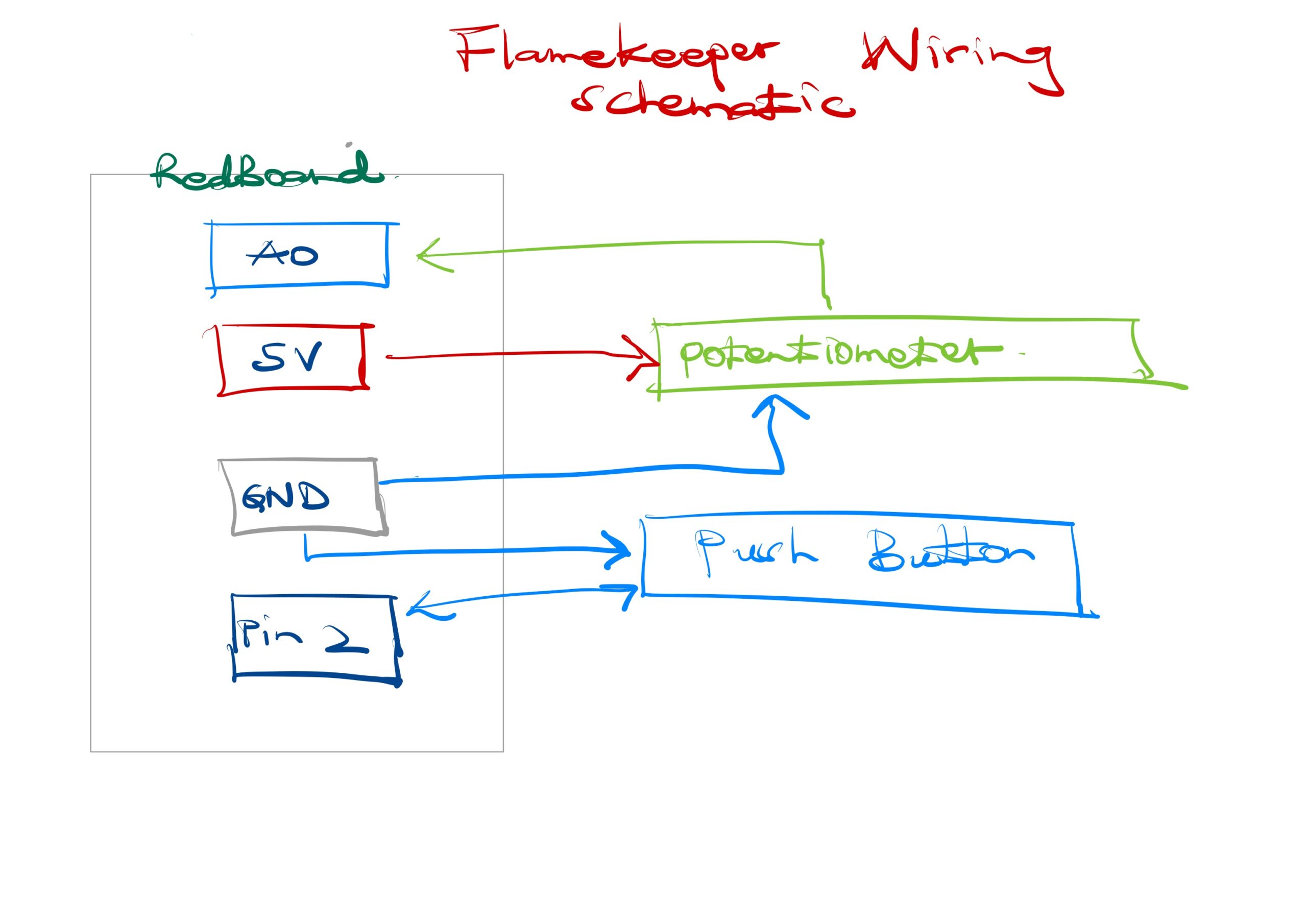
The Arduino reads a potentiometer on pin A0 and a push button on pin 2. Every 30 milliseconds it sends the potentiometer value as POT:value over serial. When the button is pressed or released it sends PRESS or RELEASE. The browser connects to the Arduino using the Web Serial API, available in Chrome and Edge. No app or driver is needed beyond a USB cable.
Inside the game, the potentiometer value maps to a cursor on a horizontal bar. A green zone moves slowly back and forth across that bar. If the cursor is inside the green zone, the flame heals. If it drifts out, the flame slowly loses health. Every 2 to 4 seconds a wind gust arrives. During a gust the flame loses health rapidly unless the player holds the button. Holding the button raises a shield that blocks all gust damage. Difficulty increases over time as gusts come more frequently.
Interaction Design
The two inputs are intentionally asymmetric. The potentiometer requires continuous attention and fine motor control. The button requires a fast reaction to a visual cue. During a gust the player must do both at once, which is where the tension of the game lives.
Feedback is layered so the player always knows what is happening without reading text. The flame shrinks visually as health drops. The screen edges pulse red when damage is being taken. Wind lines fly across the screen during gusts. Animated rings appear around the flame when the shield is active. A status pill at the top of the screen confirms the current threat and whether the shield is up.
The start screen shows both controls and what they do before the game begins, so no explanation from me is needed. The game over screen shows the player’s score and their all-time best, which gives a reason to replay.
Arduino Source Code
Full source code is on GitHub: github.com/EnockMagara/IM_FINAL
const int BUTTON_PIN = 2;
const int POT_PIN    = A0;

bool wasPressed = false;

void setup() {
  pinMode(BUTTON_PIN, INPUT_PULLUP);
  Serial.begin(9600);
}

void loop() {
  bool pressed = (digitalRead(BUTTON_PIN) == LOW);

  if (pressed && !wasPressed)  Serial.println("PRESS");
  if (!pressed && wasPressed)  Serial.println("RELEASE");
  wasPressed = pressed;

  Serial.print("POT:");
  Serial.println(analogRead(POT_PIN));

  delay(30);
}
Wiring Schematic
How This Was Made
The game runs entirely in the browser using p5.js 1.9.3 and the p5.sound addon, both loaded from CDN. The Web Serial API handles communication between the browser and the Arduino with no additional libraries.
The flame is drawn each frame using layered ellipses with positions driven by Perlin noise, which gives it organic flickering motion. The glow effect is a series of concentric ellipses drawn from the outside in with decreasing opacity. The shield uses sine-wave-animated rings. All color is in HSB mode so hue shifts naturally as flame health changes from red to amber to gold.
The sweet spot bar maps the raw potentiometer value (0 to 1023) to a pixel position on screen. The green zone has a target position that slowly lerps toward a new random target every four seconds, creating the moving challenge.
Audio uses two p5.Oscillator instances. A sine wave plays as an ambient hum tied to flame health. A sawtooth wave plays during gusts. Both are initialized on the first user click to satisfy browser autoplay policy.
Best score is stored in localStorage so it persists across page reloads without a server.
Libraries used: p5.js, p5.sound. Fonts: Cinzel and Cinzel Decorative from Google Fonts. Web Serial API documentation from MDN. AI (GitHub Copilot) was used throughout development for debugging serial communication, structuring the game loop, and designing the UI layer.
What I Am Proud Of
The physical-to-digital mapping feels genuinely tight. When you turn the potentiometer, the cursor on screen moves exactly as fast as your hand does. There is no noticeable lag. That responsiveness is what makes the interaction feel real rather than simulated.
I am also proud of how the difficulty curve works without any explicit levels. The gust interval shrinks by five frames every time you survive a gust, so the game gets harder the longer you last without me having to design separate stages.
The start screen and the game-over card both came together better than I expected. Having the controls explained before the game starts removed the need for me to stand next to it and explain anything, which was the main lesson from user testing.
Areas for Future Improvement
The potentiometer-to-cursor mapping is linear, which means the sweet spot is equally difficult everywhere on the bar. A nonlinear mapping that makes the center zone slightly easier and the edges harder would create more interesting tension.
I would add a second visual reading of flame health beyond the bar. Right now the flame shrinks as health drops, but that change is subtle. A visible glow radius that shrinks more dramatically would communicate danger faster.
The button currently has one function: shield during gusts. A second mechanic tied to a short button tap versus a long hold would add depth without adding more hardware.
The game has no sound design beyond two oscillators. Real flame crackling and wind sound effects would make the experience significantly more immersive.
Reflection
The biggest thing I learned is that physical input is unforgiving in a way that keyboard input is not. A keyboard always registers. A breadboard button that is rotated 90 degrees reads as permanently pressed and the game never starts. Debugging hardware and debugging software at the same time is a different skill from debugging software alone.
User testing taught me that what is obvious to the maker is not obvious to the user. I knew what the sweet spot bar meant because I built it. My tester had never seen it before. Adding one line of explanatory text on the start screen solved the confusion completely. It cost almost nothing to add and made the project function without me in the room.
If I had two more weeks I would add a two-player mode where one person controls the potentiometer and the other controls the button, forcing coordination between two people instead of one person managing both inputs alone.