
My concept is a cat feeder that uses a remote control to dispense cat food. I 3D printed the cat feeder as well as the gear attached to the servo.
This is the gear I also 3D printed to release the food attached to the servo motor: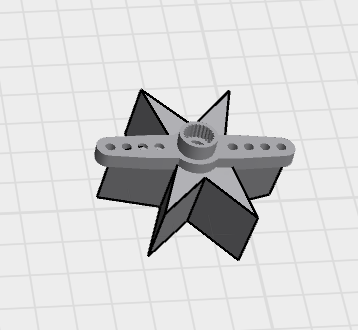
Video 1: This is a 360 video of the final product
The implementation works using an IR remote sensor, servo, Arduino Uno, LCD display, and battery. It works by using an Arduino Uno to communicate with the IR sensor, which then controls the servo to rotate the gear and release the food. The battery allows it to operate away from the laptop, making it more portable and accessible for the cats while keeping my laptop safe.
The interaction design creates a cat feeding experience. The user can press the “OK” button on the IR remote to activate the feeder, and the Arduino Uno responds by rotating the servo motor to dispense food. The LCD display provides feedback by showing messages such as the time, dispensing status, and feeding information, making the system easier to understand and interact with. The portable battery-powered design allows the feeder to be placed anywhere, giving the cats easier access to food. The interaction is designed to be quick, convenient, and stress-free for both users and cats. I also designed the 3D model inspired by bows, cats, and cute aesthetics.
Full Arduino source code
#include <Servo.h>

#include <LiquidCrystal.h>

#include <IRremote.h>

Servo myServo;

LiquidCrystal lcd(4, 5, A1, A2, A3, A4); // the connections from LCD //Display to UNO board

const int SERVO_PIN = 6; //servo connection to UNO

const int BUTTON_PIN = 2; //button connection to UNO, it was used as a //test before adding IR sensor and Remote

const int IR_PIN = 8; //IR sensor connection to UNO

const unsigned long IR_OK = 0xE31CFF00; // This is the signal the UNO receives when I click 'OK' on the remote. So, I saved it so UNO remembers it as use it to turn the sensor when clicked

//initialising variables; time, IR sensor cooling time, button, LCD //display 16*2

int currentHour = 23;

int currentMinute = 13;

int currentSecond = 30;

unsigned long lastMillis = 0;

unsigned long lastDisplay = 0;

unsigned long feedStart = 0;

unsigned long lastDebounce = 0;

unsigned long lastIR = 0;

const unsigned long DEBOUNCE_DELAY = 50;

const unsigned long IR_COOLDOWN = 300; // prevent repeat firing from held button

bool lastButtonState = HIGH;

bool stableButton = HIGH;

bool isFeeding = false;

void setup() {

Serial.begin(9600);

myServo.attach(SERVO_PIN);

pinMode(BUTTON_PIN, INPUT_PULLUP);

myServo.write(0);

lcd.begin(16, 2);

lcd.clear();

IrReceiver.begin(IR_PIN, DISABLE_LED_FEEDBACK);

}
//Time update

void updateTime() {

if (millis() - lastMillis >= 1000) {

lastMillis += 1000;

currentSecond++;

if (currentSecond >= 60) { currentSecond = 0; currentMinute++; }

if (currentMinute >= 60) { currentMinute = 0; currentHour++; }

if (currentHour >= 24) { currentHour = 0; }

}

}

//LCD display showing the time, specifically Doha Time, I manually //added it
void showTime() {

lcd.setCursor(0, 0);

lcd.print("Doha Time ");

lcd.setCursor(0, 1);

if (currentHour < 10) lcd.print("0");

lcd.print(currentHour); lcd.print(":");

if (currentMinute < 10) lcd.print("0");

lcd.print(currentMinute); lcd.print(":");

if (currentSecond < 10) lcd.print("0");

lcd.print(currentSecond);

lcd.print(" ");

}
//LCD display showing that the food is releasing or loading food

void showFeeding() {

lcd.setCursor(0, 0);

lcd.print("** FOOD ** ");

lcd.setCursor(0, 1);

lcd.print("RELEASING! ");

}
//LCD display showing that the food is being released

void startFeeding() {

if (!isFeeding) {

isFeeding = true;

feedStart = millis();

myServo.write(180);

lcd.clear();

showFeeding();

Serial.println("FEEDING");

}

}
//LCD display showing that the food has stopped
void stopFeeding() {

isFeeding = false;

myServo.write(0);

lcd.clear();

Serial.println("STOPPED");

}

// same with LCD and remote, but instead button, but when you release your finger from the button it immediately stops feeding
void handleButton() {

bool reading = digitalRead(BUTTON_PIN);

if (reading != lastButtonState) {

lastDebounce = millis();

lastButtonState = reading;

}

if (millis() - lastDebounce >= DEBOUNCE_DELAY) {

if (reading != stableButton) {

stableButton = reading;

if (stableButton == LOW) startFeeding(); // press

if (stableButton == HIGH) stopFeeding(); // release

}

}

}
//The IR sensor when a button is clicked it shows its code on the //serial monitor that I could later saved to use to move the servo to //release the food when button 'OK' is clicked

void handleIR() {

if (IrReceiver.decode()) {

unsignedlong code = IrReceiver.decodedIRData.decodedRawData;

Serial.print("IR CODE: 0x");

Serial.println(code, HEX);

// Cooldown to prevent repeated triggers from one press

if (millis() - lastIR >= IR_COOLDOWN) {

if (code == IR_OK) {

if (!isFeeding) startFeeding(); // first OK = start

elsestopFeeding(); // second OK = stop

lastIR = millis();

}

}

IrReceiver.resume();

}

}

void loop() {

updateTime();

handleButton();

handleIR();

if (Serial.available()) {

String msg = Serial.readStringUntil('\n');

msg.trim();

if (msg == "DISPENSE") startFeeding();

if (msg == "STOP") stopFeeding();

}

if (isFeeding && millis() - feedStart >= 3000) {

stopFeeding();

}

if (!isFeeding && millis() - lastDisplay >= 1000) {

lastDisplay = millis();

showTime();

Serial.print("TIME:");

Serial.print(currentHour); Serial.print(":");

Serial.print(currentMinute); Serial.print(":");

Serial.println(currentSecond);

}

}
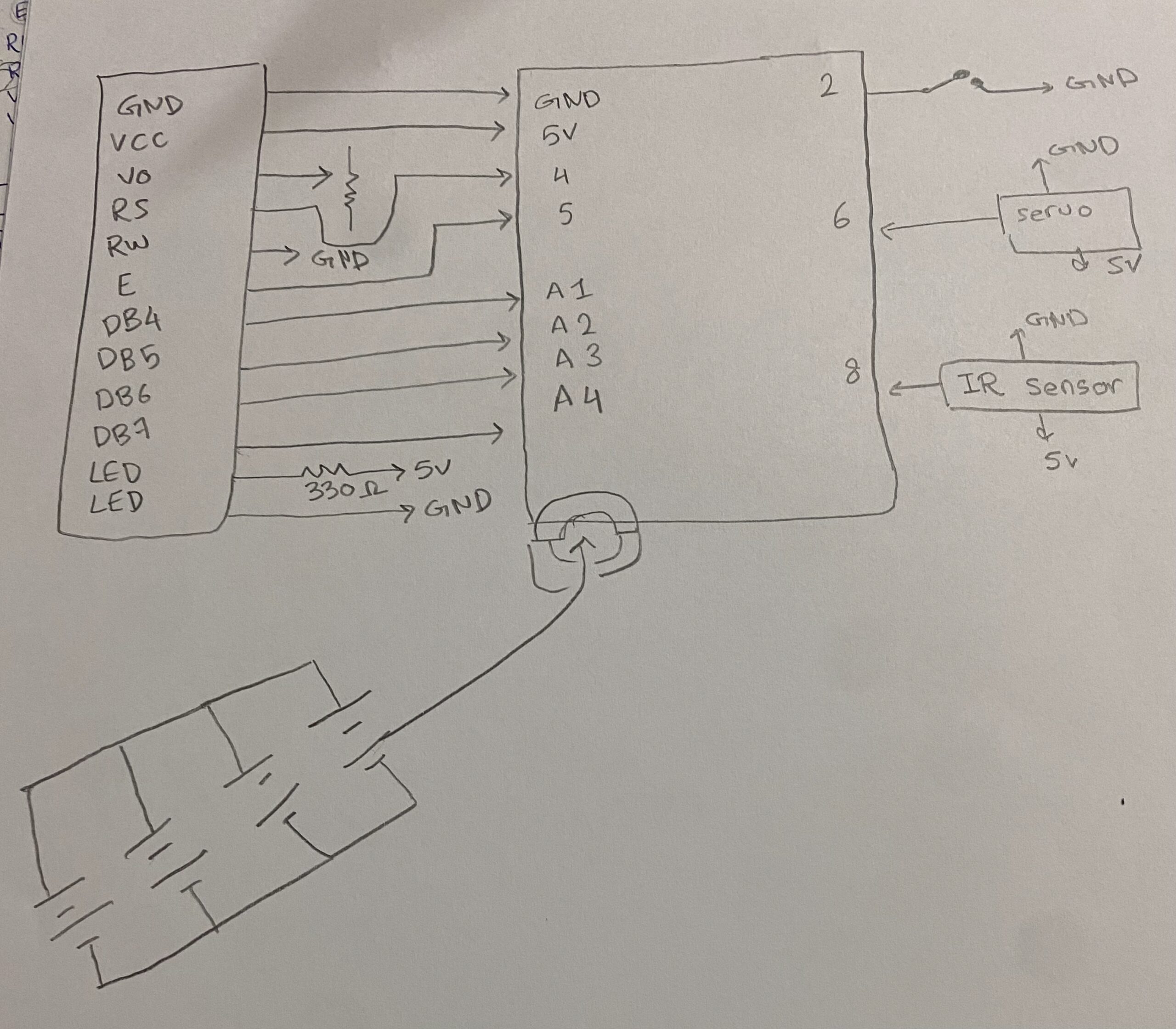
Image 1: Hand-drawn schematic
Demo with Oreo: They understood how it worked and whenever she wants food from it she meows at me and takes me to the cat feeder to give her the food.
Reminder from my user demo: Bella refused to interview