
The Concept
My idea for this stemmed from a desire to have instruments that among easy to operate; are tangible when it comes to playing around with them; and produce tones similar to that of a flute, which is actually remarkably difficult to reproduce digitally, due on part to how the actual flute material reverberates and deforms on a micro level to every finger placement and note produced.
For this task, a force sensor seemed to be the closest option to finger placements over a flute. Its ability to vary voltage across it based on applied force allowed for the ability to vary the sound produced depending on the pressure applied.
Since we are talking about electricity, I decided adding an oscilloscope across the piezo would enable for the user to ‘see’ the sound they are producing. I added a NeoPixel ring of lights around the pressure sensor as well, which subtly change color from a red-hue to a blue/purple hue as pressure increases.
How It’s Made
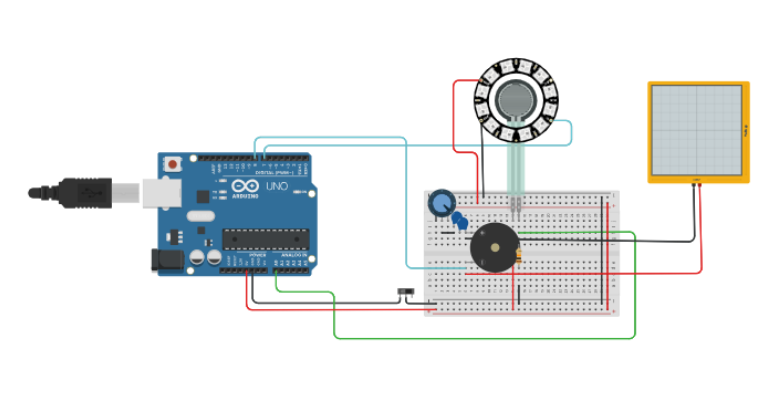
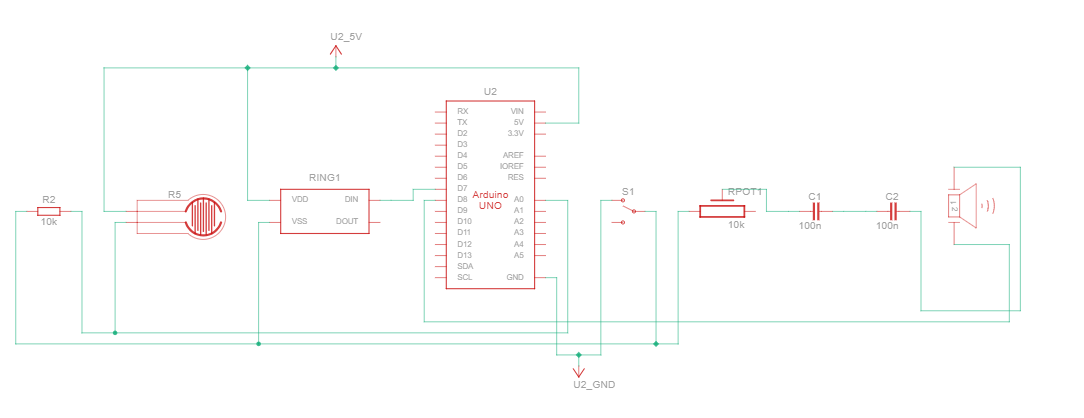
Decorations aside, the force sensor connects from the 5V port to the analogue port A0 with a resistor across it. The program measures if a change in force (voltage across the sensor) is present, and then emits a sound by using the voltage measured, thus allowing for a varied frequency.
The output given from the digital pin 8 connection to the Piezo passes first though a potentiometer to allow for volume control, and then through two capacitors to smooth the varying voltage out, producing a more cohesive sound, instead of something jumpy and discordant.
#include <Adafruit_NeoPixel.h>

Adafruit_NeoPixel pixels(12, 7, NEO_GRB + NEO_KHZ800);

float force = 0;
float oldForce = 0;

int curve = 50;
float reduce = 100.0;

int frame = 0;

void setup()
{
  pinMode(8, OUTPUT);
  pinMode(A0, INPUT);
  Serial.begin(9600);
  pixels.begin();
}

void loop()
{
  frame++;
  //noTone(8);
  force = analogRead(A0);

  for (int i=0; i < 12; i++) {
    pixels.setPixelColor(i, pixels.Color((int(force/914 * 255) + i * frame)%255, 0, 255 - (int(force/914 * 255) + i * frame)%255));
  }
  pixels.show();
  if (oldForce != force) {
    tone(8, 440 * pow(2.0, ((force * curve/914)) / reduce), 50);
    oldForce = force;
  }
  delay(50); // Delay a little bit to improve simulation performance
}
What I Like
I must confess, my favorite part is definitely the oscilloscope. Being able to see the sound one is producing as a wave is a cool feature I would love to expand in the future.
What I Could Do Better
I would like to make this in the real world, using real components, instead of using a simulator. For one, the simulator has audio issues and disruptions. Secondly, being able to actually feeling and interacting with the components would be better encompassing of my initial concept.