Concept:
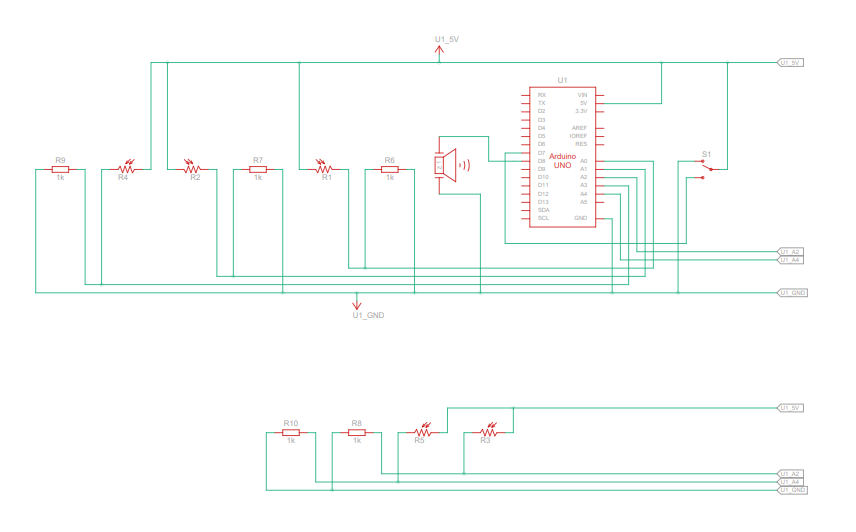
For this assignment, my partner Fasya and I designed a musical instrument that merges digital and analog elements to create an interactive, light-based piano. Our idea centers around a glowing wand that functions as a control interface. When moved over the keys, the wand activates notes from the C major scale (C, D, E, F, and G) like magic, and the brightness of its glow determines the octave. We integrated a potentiometer to adjust brightness, allowing users to easily shift the octave up or down. Additionally, we added a switch to toggle the instrument off, which prevents accidental note activation—particularly useful to avoid unintended sounds from ambient light sources like flashlights.
Highlight:
To bring our vision to life, we used five photoresistors to detect light from the wand and mapped each sensor’s range to specific notes (C, D, E, F, and G) and their octave scales. By setting sensor thresholds from a default minimum to a maximum value that a flashlight might produce, we could dynamically adjust the octave based on the brightness the photoresistor detects. Essentially, the brighter the wand, the higher the octave, allowing for an expressive range in tone.
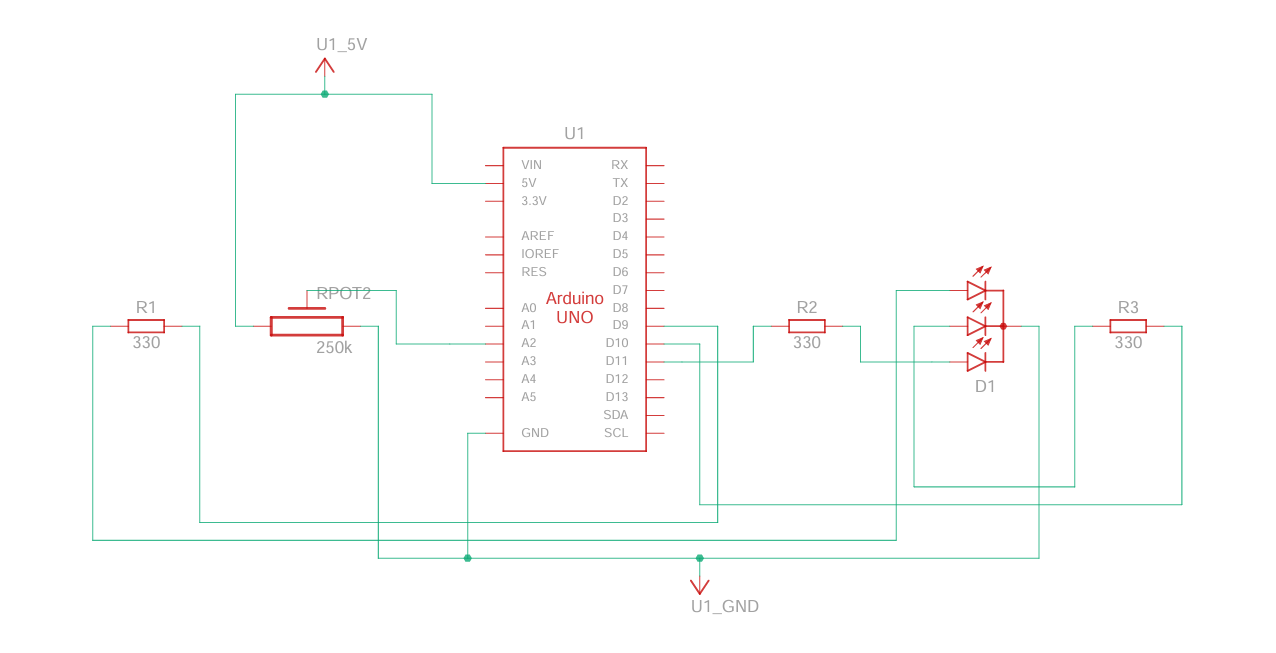
For the wand itself, we created a purple glow using a tricolored LED, giving the instrument an ethereal fairy-like visual quality. A potentiometer is attached to the LED to control brightness, making it easy for users to adjust octaves on the fly. The setup includes separate circuits for the keyboard and wand, creating flexibility for future enhancements, such as adding multiple wands for collaborative play.
Keyboard Code:
#include "pitches.h"
bool buttonState = false;
// Define the piezo buzzer pin
const int buzzerPin = 8;

// Define frequencies for each note across multiple octaves
const int fNotes[] = {NOTE_F4, NOTE_F5, NOTE_F6, NOTE_F7};  // Octaves of A
const int gNotes[] = {NOTE_G4, NOTE_G5, NOTE_G6, NOTE_G7};  // Octaves of B
const int cNotes[] = {NOTE_C4, NOTE_C5, NOTE_C6, NOTE_C7};  // Octaves of C
const int dNotes[] = {NOTE_D4, NOTE_D5, NOTE_D6, NOTE_D7};  // Octaves of D
const int eNotes[] = {NOTE_E4, NOTE_E5, NOTE_E6, NOTE_E7};  // Octaves of E

void setup() {
  // Initialize serial communication at 9600 bps for debugging
  Serial.begin(9600);
  pinMode(7,INPUT);
}

void loop() {
  // Array to store sensor values
  int sensorValues[5];
  int switchValue = digitalRead(7);
  if (switchValue == HIGH){
      buttonState = true;
  }


  // Read each sensor value and store in the array
  sensorValues[0] = analogRead(A3);  // f note
  sensorValues[1] = analogRead(A4);  // g note
  sensorValues[2] = analogRead(A0);  // C note
  sensorValues[3] = analogRead(A1);  // D note
  sensorValues[4] = analogRead(A2);  // E note

  // Play a note based on each sensor value
  for (int i = 0; i < 5; i++) {
    int note;
    if (sensorValues[i] < 850 || !buttonState) {
      // Stop any sound if the sensor value is below 900
      noTone(buzzerPin);
      continue;
    } else {
      // Map the sensor value (900 to 1100) to an index (0 to 3) for each note array
      int noteIndex = map(sensorValues[i], 850, 1100, 0, 3);

      // Assign the note based on the sensor index
      switch(i) {
        case 0: note = fNotes[noteIndex]; break;
        case 1: note = gNotes[noteIndex]; break;
        case 2: note = cNotes[noteIndex]; break;
        case 3: note = dNotes[noteIndex]; break;
        case 4: note = eNotes[noteIndex]; break;
      }

      // Play the mapped frequency on the piezo buzzer
      tone(buzzerPin, note);
    }

    // Delay to control the speed of tone change
    delay(100);
  }
}
Wand Code:
// *Interfacing RGB LED with Arduino
// * Author: Osama Ahmed

//Defining  variable and the GPIO pin on Arduino
int redPin= 9;
int greenPin = 10;
int  bluePin = 11;
int potPin = A2;
int sensorVal = 0;
double brightness = 0;

void setup() {
  Serial.begin(9600);
  //Defining the pins as OUTPUT
  pinMode(redPin,  OUTPUT);
  pinMode(greenPin, OUTPUT);
  pinMode(bluePin, OUTPUT);
}
void  loop() {
  sensorVal = analogRead(potPin);
  brightness = (double)sensorVal / 1023;
  Serial.println(brightness);

  setColor(170, 0, 255, brightness); // Purple Color
  // delay(1000);
}
void setColor(int redValue, int greenValue,  int blueValue, double brightValue) {
  analogWrite(redPin, (double) redValue * brightValue);
  analogWrite(greenPin,  (double) greenValue  * brightValue);
  analogWrite(bluePin, (double) blueValue  * brightValue);
}
Demonstration: