Reading Reflection – Week 2

In my work, I plan to incorporate randomness as a major element, as I believe having it consist solely of order and rigid structure will yield a boring, fixed outcome. As the speaker mentions in his talk, randomness breaks the artist’s habits, and I completely agree. Randomness allows for a more lively and lifelike outcome. Reas mentions that when an artist sticks to controlling evrything they tend to repeat patterns and styles, so randomness allows the artist to break free from patterns they plan. In my own work, I tend to be more satisfied with my outcomes when randomness is a strong component, as it adds an element of surprise and spontaneity, which, in my opinion, deepens the work through the unexpectedness of the results. Reas’s speech allowed me to appreciate randomness more and helped me understand my tendency to be more satisfied with my code when elements of randomness are involved.

Although I find randomness a very important and desired element of my work, I do believe there needs to be a balance between total randomness and complete control. When working on a piece, finding that sweet spot of fixed and spontaneous is important. If the code consists of too much randomness, it becomes too chaotic or even messy. However, if it is completely controlled by the artist, there is a sense of. rigid and repeated patterns. Finding the balance between the two depends on the specific work, but for the most part, an equal share of both elements allows for a perfectly balanced piece. Reas also agrees that pure randomness alone in art is not enough to make a good piece. Sure, it may improve a very rigidly structured piece, but some control is necessary. Reas’s speech supports the idea that randomness allows for variation and a less predictable outcome; however, order and structure are what make art artistic and not accidental. 

Is it me?

After all the classes, that made me go by the golden rule “If it works don’t touch it”, it was hard to register that I am to create something that should be looking good. In the absence of a well documented passing rubric, every choice had to be questioned. But against what; The effort I put in, the creativity I come up with, or what my person sitting next to me thinks of it? I began on the rather escaping choice, a computer screen. Indeed a typical computer science student’s choice, how I think of it as an escape. Giving myself some time by spending that drawing the keyboard, and mouse. Well that was the moment I had the first thought shouting “It should look good to me”. The Buttons. So many buttons, (I did that before we studied for loops). Initially I planned 2 big white blocks to represent the buttons. When I went from 2 to 57, its hard to point out. My best guess is when I looked as my laptop’s keyboard and it had all the character to it and one I drew in P5 did not.
//keyboard
  line(250, 600, 200, 400)


  fill(0)
  rect(20, 500, 470,140)
  fill(220)
  rect(25, 510, 20,20)
  rect(45, 510, 20,20)
  rect(65, 510, 20,20)
  rect(85, 510, 20,20)
  rect(105, 510, 20,20)
  rect(125, 510, 20,20)
  rect(145, 510, 20,20)
  rect(165, 510, 20,20)
  rect(185, 510, 20,20)
  rect(205, 510, 20,20)
  rect(225, 510, 20,20)
  rect(245, 510, 20,20)
  rect(265, 510, 20,20)
  rect(285, 510, 20,20)
  rect(325, 510, 20,20)
  rect(345, 510, 20,20)
  rect(365, 510, 20,20)
  rect(405, 510, 20,20)
  rect(425, 510, 20,20)
  rect(445, 510, 20,20)
  rect(465, 510, 20,20)
  
  rect(25, 540, 20,20)
  rect(45, 540, 220,20)
  rect(265, 540, 40,20)


  rect(25, 560, 20,20)
  rect(45, 560, 240,20)
  rect(285, 560, 20,20)
  
  rect(25, 580, 20,20)
  rect(45, 580, 220,20)
  rect(265, 580, 40,20)
  
  rect(25, 600, 20,20)
  rect(45, 600, 40,20)
  rect(85, 600, 120,20)
  rect(205, 600, 20,20)
  rect(225, 600, 20,20);
  rect(245, 600, 20,20);
  rect(265, 600, 40,20)
  
  
  rect(325, 540, 20,20)
  rect(345, 540, 20,20)
  rect(365, 540, 20,20)
  
  rect(325, 600, 20,20)
  rect(345, 600, 20,20)
  rect(365, 600, 20,20)
  rect(345, 580, 20,20)


  rect(405, 540, 20,20)
  rect(425, 540, 20,20)
  rect(445, 540, 20,20)
  rect(465, 540, 20,20)
  
  
  rect(405, 560, 20,20)
  rect(425, 560, 20,20)
  rect(445, 560, 20,20)
  rect(465, 560, 20,20)
  
  
  rect(405, 580, 20,20)
  rect(425, 580, 20,20)
  rect(445, 580, 20,20)
  rect(465, 580, 20,40)


  rect(405, 600, 40,20)
  rect(445, 600, 20,20)


Then came the scary part, what to draw inside the screen frame. I had a lot of interest in cybersecurity or to honest in HACKING. It’s funny to me that my sketch looked more of like a imprisoned thief. Well this reminded me of an other golden rule form the high school i.e. “Don’t get caught” and I just kept going on with that. Lastly the glasses, they felt like a creating something from nothing. Even thou I did them in the loving memory of my classes I lost last semester, I was a happy experience. For future I want to add more colors, I did not add them this time because I wanted to very specific about each color I am adding and what it will represent. Did I not do it out of laziness or lack of understanding of relationships of colors with emotions? My answer to this question is biased but as the semester proceeds, it will probably hopefully go away. here is the website I used to read p5.js documentation; https://p5js.org/reference/ The sketch

Assignment 2 :Loop Art

Your concept:

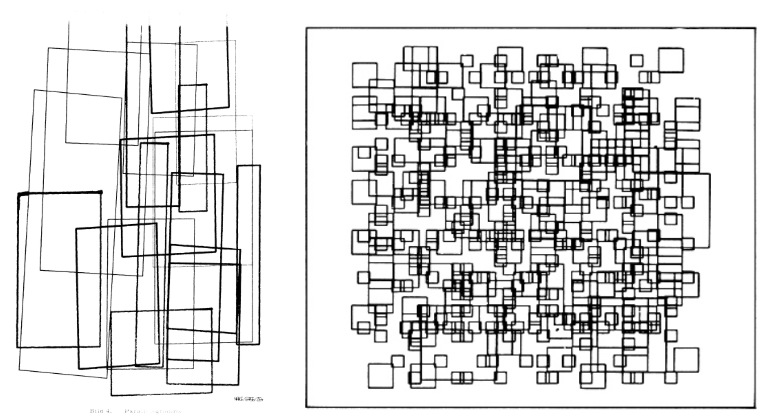
The concept of my drawing comes from the early generative art from the 1970s from the Computer Graphics magazine, specifically pages 14 and 30, which used simple geometric shapes and repetition. Something I liked specifically about this piece was how it used grids, and how I can envision myself using the grid coding we learned in class and apply it. I wanted to create a retro piece using the P5JS tool, focusing on grids, squares, and random variation. The artwork I created changes every 2 frames through random color, random line weight, and random square size, creating a  glitch like pattern. I watched a youtube tutorial which helped me understand how the random() code works which allowed me to apply it to my piece. Instead of static shapes, I wanted the grid to feel unpredictable and constantly changing, but I didn’t want it to be overwhelming, so I set the frame rate to 2.

Another thing I wanted to do was set the background as black, so when you hover over the squares, depending on which square you hover over, it will become black and essentially give the effect of it disappearing. This is the small interactive element of mouse hover, which I adapted from our class code.

Page 14 from the magazine that inspired my work:

A highlight of some code that you’re particularly proud of:

//random square size+lineWidth from youtube video + color from p5.js example
       let squareSize= random(20,45);
       let lineWidth= random(1,4);
       strokeWeight(lineWidth);
       stroke(random(255),random(255),random(255));
       
       
       //When mouse hovers inside the square boundaries the stroke changes to black using the same condition we learned in class
       if(mouseX > x&& mouseX <x + 50 && mouseY > y && mouseY < y +50) {
         stroke (0);
       }
       
       //draw square the first square is the main one for this grid and the second square is smaller and centered within the first square using simple math and experimentation to find the correct placement of the second square 
       rect(x,y,squareSize,squareSize);
       rect(x+10,y+10,squareSize-20,squareSize-20);


A part of the code I’m proud of specifically is how I was able to incorporate the random () effect, especially the part of the code where the squares have random size variation, as well as random stroke weight and color variation . All o these affects become more noticeable because my sketch runs at 2 frames per second.

I’m proud of this because I was able to learn the random size and line weight from a YouTube tutorial and successfully adapt it to my own square design. I used the random color idea from a p5.js example, but I changed it from fill() to stroke() to match my outline based work. By combining all three random elements size, line weight, and color the pattern becomes visually interesting, even though the grid structure stays the same. I’m proud of how I was able to mix what we learned in class with new techniques I found on my own. Im also proud of how I was able to adjust the square sizes using simple math adding to x/y and subtracting from some to create a clean square within square effect.

For the mouse hover condition I was able to adjust it to work inside the grid and change the stroke () to a fill(), as a beginner I was able to take a concept we learned in class and adapt I to my code. I referenced directly from what we coded during class but adjusted it to my code:

    (Code in class)

if (mouseX > 50 && mouseX < 400 && mouseY > 100 && mouseY < 200) {

    fill(‘pink’);

}

In my version I replaced the fixed numbers with the loop variables X and Y so the hover effect works for every square in the grid instead of just one rectangle

Embedded sketch:

Reflection and ideas for future work or improvements:

Working on the second P5JS assignment, I was able to understand how simple shapes can become interesting and how code can become more interesting when it is combined with randomness. Even though the grid I created is very structured, I think the addition of random size, color, and line weight makes every frame feel more unique. Through this assignment, I was able to mix different ideas from different places: inspiration from the 1977 Computer Graphics and Art magazine, the YouTube example, the p5.js example, and the hover condition from our class code. I was also able to acknowledge the importance of the draw loop. Because my sketch runs at two frames per second, I was able to clearly apply and see each new variation. An idea for a future improvement I can make is experimenting with different shapes or mixed geometry to see how randomness affects them. I could also try adding rotation or movement so the squares slowly shift or spin over time and experiment with more complex mathematical code. Another idea is adding more layers of shapes and seeing how I can adapt this style to more complex code.

References:

Inspiration from Graphic magazine:

COMPUTER GRAPHICS AND ART Aug1977 Page 14 and Page 30

Random Color from this example :

https://editor.p5js.org/aferriss/sketches/HJKCR03uG#:~:text=1,let%20shapeColor%3B&text=2,%E2%80%8B&text=3,function%20setup()%20%7B&text=4,createCanvas(400%2C%20400)%3B&text=5

Random Line weight and shape size :

https://youtu.be/POn4cZ0jL-o?si=D8w6gaTpVwLFj8qH

Week 2 Casey Reas Reading

What is randomness? The way people describe it will always be different from one another. Yet it boils down to the same general boiler phrase, “it is unpredictable.” We say it is, but at the same time, randomness can be predicted over a large sample. We say random often in day-to-day life, intentionally or unintentionally, like “oh! this randomly happened today!” or “I just thought to do this today randomly!” It never really is random, is it? There is always something behind an event. This brings me to something Casey Reas said, and that is true randomness. He mentions it multiple times, saying that it has been used. However, at most, it is pseudo-random, and we can delve deeper into this and discuss causation and so on, but that is not my point here. I am aware that I might be nitpicking here; however, to me, “random” implies a lack of a proper explanation relative to a model or an event. Or to simplify it, it’s lawful unpredictability.

For my second assignment, my sketch was a 3D version of Conway’s Game of Life. Which, funnily enough, is how cells interact when they are given a certain set of rules. I created this before watching the lecture, so while I was watching it, I kept thinking about the sketch. The result of running such a sketch may seem random to some person you choose off the street, but at a deep level, they are following a set of rules that the person may not know. And that is what randomness to me is, a “random” event or randomness is never truly random, as it will always follow a set rule; we call it random because we do not know what that rule is. The lecture made me realize that I was already treating randomness as epistemic, but I hadn’t articulated it this clearly until seeing generative systems framed this way.

Week 2 Reading Response

I see randomness as introducing freedom into structured codes when the main goal is to actually create art. When the code serves a practical purpose. However, randomness should remain a functional tool rather than a defining element. I am not interested in letting randomness dominate a work or become its central focus as it should only be a function tool. In my own work, I would incorporate randomness through variations like line density and spacing.

The video shows that randomness are novel artistic strategies, seen as a departure from traditional understandings of art. This contradicts with what I imagine about artistic creation. The speaker treats randomness in a pure, unbiased unpredictability. I find this definition too narrow. To me, randomness is not something just related to machines. But artists, especially abstractionists, embody a human form of randomness. This kind of randomness is enriched with emotion, intention, and expression, rather than just about meaning.

This relates to why I think I struggle to connect with how the speaker uses randomness in their work. As I believe art should exist beyond only certain shapes. Its beauty lies in the emotions it conveys, also the expressions it carries. There should be a sense of presence, or soul, behind the canvas, whether it is physical or digital. The speaker’s approach feels excessive, turning the work into an exploration of randomness rather than emotionally resonating artistic expressions.

In my opinion, the optimal balance is to be in the middle between complete control and randomness, and this is where unpredictability comes but it is always leading towards both emotional and expressive goals.

The scale of randomness I find meaningful is one that is guided towards expression. For example, a composition made of dense, chaotic lines which are generated through controlled code and being refined later could actually express the pressure of modern life more with moments of openness appearing as wider gaps in the structure. This balance of control and unpredictability represents what I think of randomness which is one that supports emotional meaning without overwhelming it.

Week 2 Reflection

I was inspired by the video presented by Casey Reas to think about the computer not only as a means to create art but also as a means to look outside my own creative habits. Randomness helps us create results we wouldn’t normally think of, even if we’re the ones stating the rules. Reas’ talk made me recognize that there’s something about that unpredictability that draws me in, and it makes me want to look more closely at every detail. In my future works, I want to incorporate randomness so that each time I press play in p5.js, my artwork will be slightly different. Instead of placing the object in a specific location on the screen, I could allow the computer to have a range, such as allowing a circle to be placed anywhere between the left and right sides of the screen. It’s a simple way to stay within my rules while still letting the outcome surprise me every time the code runs.

I believe that the best combination of total randomness and total control is to have a clear structure and still allow for unexpected events. Before viewing Reas’ presentation, I believed that art had to be carefully planned, and I did not understand how randomness could be meaningful or beautiful. But seeing how small and unpredictable changes could make a piece come alive changed my perspective. It interested me and engaged me. I enjoy knowing that I am in control but also that I can be surprised by the unexpected result. This is similar to the concept of the computer being an ‘obedient tool,’ as Michael Noll quoted that Reas has stated in 24:07 of the video. It follows my rules flawlessly but uses its power for ‘controlled randomness’ to create something entirely new that I could not have done myself.


Week 2: Loops

CONCEPT

While I was looking up tutorials and creative coding examples, I found a YouTube tutorial by Professor Chris. I used his tutorial for building the basic grid as my starting point. I used nested for loops to generate a grid of rows and columns, then added an interactive “spotlight” effect that measures the distance between the moving light and each shape (you can see it clearly through the trail it leaves behind). As the spotlight gets closer, I use the map() function to make the shapes grow, so the grid responds more dynamically, similar to the tutorial that I watched.

I added more by testing different values and adding my own features. I brought in what we did from our Week 2 exercise by making the spotlight move on its own and bounce when it hits the edges of the canvas. To make the motion feel smoother and more interesting, I adjusted the background opacity, which left a ghost trail effect, and I also experimented with other values to see how they changed the overall look. This effect helps create a smoother motion and makes the spotlight’s path more visible as it moves around.

HIGHLIGHT

One thing I accidentally did in my code was adding two values to background(), and I was surprised when it created a ghosting effect that followed my circle everywhere. But when I saw it happening, I decided to keep it because it honestly looked better and more interesting than my previous version.

  //background & ghost effect
function draw() {
  background(255, 8);

REFLECTION

Overall, even though I didn’t have a specific concept at first and I was mostly just playing around with it, I really loved how it turned out. I honestly didn’t expect the final result, so I’m proud of it. It surprised me how something that started as random experimenting ended up looking intentional and visually satisfying. At the same time, this project also took me a while because I kept testing and adjusting things until it felt right. Sometimes when I experiment with different values, my code ends up breaking, so I use ChatGPT to help me figure out why what I changed isn’t working. While I enjoyed the process, I learned that it would probably be easier if I had at least a simple concept or direction in mind first so I don’t get too lost while experimenting. One improvement I still want to try is adding more color, like a gradient trail, because I feel like it would make the piece look even more alive and add more personality to the piece. I tried thinking of ways to do it, but it felt a bit complicated for me this time, especially while I was still figuring out the main logic of the animation. Maybe next time, once I’m more confident with the code, I’ll push it further and make my work more colorful and expressive.

Sources: https://p5js.org/reference/ and  https://youtu.be/MzD7W6Vt6LA?si=EnNemvdZ7Goaw21a


Assignment 1: Self-Portrait

For my self-portrait, I decided to create a dancing flower instead of a literal portrait. I initially attempted to work on an actual self-portrait, but with the skills I have so far, it kept looking unrealistic, and my hair ended up looking like a mushroom (no, literally). Rather than forcing a mushroom-headed portrait, I chose to represent myself through a dancing flower. This allowed me to focus on practicing primitive shapes, simple animation, and overall composition.

The sketch shows a dancing flower in a simple grass field. The petals include four main petals and diagonal petals placed around the corners of the flower. I kept the background minimal, and focused mostly on the flower itself. I also tried to make the petals feel slightly more three-dimensional by changing their colors and shades, and I added a subtle border around the center of the flower to enhance that effect, but I don’t think it’s noticeable.

fill(245, 120, 160); //background petals color
 angleMode(DEGREES);
 rotate(45);
 ellipse(270 + Petals, -59 - Petals, 35, 55); //right base
 ellipse(270 - Petals, -59 - Petals, 35, 55); //right base
 ellipse(270 + Petals, -59 + Petals, 35, 55); //right top petals
 resetMatrix();
 rotate(145);
 ellipse(-60 + Petals, -225 - Petals, 35, 55); //left base
 ellipse(-60 - Petals, -225 - Petals, 35, 55); //left base
 ellipse(-60 + Petals, -220 + Petals, 35, 55); //left top petals


I’m proud of this section of my code because the most challenging part of the sketch was creating the diagonal petals. I learned that in p5.js, shapes are rotated by rotating the canvas itself rather than rotating individual ellipses. I figured out how to use angleMode(DEGREES) and rotate() by referencing this forum post: https://forum.code.org/t/ellipse-rotate-on-an-axis/35650 .

After that, I just experimented and adjusted the values manually to place each petal correctly. I also searched online to learn how to use resetMatrix(), since each group of petals needed a different rotation angle. Honestly, this part involved a lot of trial and error, but I got to understand how transformations work.

Embedded sketch:

I mainly used the concepts I learned in class, except for the diagonal petals, which I learned to do using the forum post I referenced earlier. I also google-searched how to reset the rotation so that I could adjust each group of petals seperately.

Overall, this assignment was a nice introduction to how p5.js works and how to use code to create and manipulate visual elements. While working on this assignment, I realized that there is more than one way to create something, and that sometimes the process involves a lot of trial and error. I’m excited to see what I come up with next in my sketches and how I (hopefully) continue to improve.

Week 2 Casey Reas Reading Reflection – Dina

While listening to Casey Reas’s talk, I felt that he was insinuating that his best work is the one that arises when no control is there and when there is an extent of randomness. I beg to differ. The idea of randomness, in my opinion, means allowing the randomness to guide you to another step towards your goal or towards something that satisfies you. This should not be misinterpreted as the idea that randomness is bad. I think that randomness is beneficial when you’re not going rampant without an objective in mind. It can help if let’s say you’re creating a painting with a goal in mind of what aesthetic you want to go for. If your colors mix to create one not intended, or if certain objects or designs are placed at random, that is good. It helps you alter your perspective on how to go next to achieve your goal. Complete order is not the best. Because then you would get stuck if something goes amiss, instead of figuring out how this mistake can actually change your path or even add a new perspective or way to go on about things. He usually, i realized, only speaks only about randomness in a very black and white perspective using only the dicitionary surface level definition. He describes it as something almost intentional. I’m not sure if I fully agree with that particular perspective he had. This may lead people to actually strive for randomness, which is, in my opinion, absolutely not what randomness is. I believe that if it’s intentional, it isn’t really random. Now he brought up something interesting, which was Marcel Duchamp’s work. That particular point was one of the few points in the talk that almost shifted my perspective or opinion regarding Reas’s stand on randomness and order, and where I myself stand on that topic.  After hearing about Duchamp’s work, I was intrigued by whether intentional randomness is considered randomness. Yet again, his work was a critique of order. So that raises the question of what randomness really is.

I wish to include randomness in my work by allowing things that go wrong in my work to simply guide me to a new perspective or way of doing things. For instance, if I were to make a mistake in a code for a project, instead of completely deleting or changing the code, I would see how I can actually use the error for my own benefit and use it to my advantage to give me a new idea, for example. I would not necessarily start a project blindly in the name of randomness; I would just use things that do not go according to my plan to help me find new ways to reach my target.

I believe randomness should not go uncontrolled. Uncontrolled randomness can lead you to forget about your objective, or it can completely go out of control, and you wouldn’t be able to fix certain things that went wrong and how to fix them, since everything happened randomly without a plan. If randomness is within a plan, I think that is optimal. If randomness is the sole driving force of a piece of work, I do not believe that is optimal or efficient.

Week 2 Art Assignment – Dina

My Concept:

When I first started thinking about this project, I wanted to build something mosaic-like or pixelated, but the coloring of each of the rows was too complicated and required certain tools on p5 that I was not particularly comfortable with using yet, especially since I’m a beginner. So I started thinking and reflecting on the computer art examples provided to us and decided to create an interactive static TV error page that looks like this:

I chose this because it was something I could create using for loops and grids, and it also resembled modern abstract art. I also added some interactive elements or game-like structures to the sketch, like a button that introduces the sketch.

This is the final result:

The Process:

I initially built the first layer of rectangles of the error page using a nested for loop. Something confusing happened: the rectangles I initially set extended beyond the limits I set, which I realized was because I set the condition to be <= rather than just <. Once I understood this, the separation of the blocks became much easier.

My initial plans for the coloring were for the colors just to be static, similar to the error pages, but after doing my research and watching tutorials, I realized I would have had to create arrays and many more variables, which were beyond my existing knowledge and information.

That was when my entire sketch got deleted, and I could not recover it.

I had to restart my sketch from scratch, which was frustrating, but since I had already created it before, I remembered exactly what I did, so all went well. This also allowed me to make some changes, which ultimately made my result and process much more efficient. Since error pages come in very particular dimensions, I altered the width of the page from 400 to 490 so the division and building process of the error page’s blocks could be easier

I still had to figure out how to integrate coloring into the page, which is when I decided to use Microsoft CoPilot when it reminded me that I could use the random() function we learned in class.

I integrated the random function to generate random colors across the rgb hex, which worked! I was surprised because I did not know I could use the random function for colors.

That was when I decided to create an interactive element to the mosaic/error page. I decided to make it so that if you press the page, an “error” appears or the “mosaic.” I realized afterwards that no one seeing the piece would think of randomly clicking the page, which would make all my work go to waste. This is why I opted to create a “do not touch” button, which would make people curious to touch it. I used the p5 reference page to figure out how to add text to the page.

What Didn’t Work:

I tried to make the button bounce across the frame if the mouse was pressed outside the button’s boundaries, but that just messed up the main function of the button. So if I clicked on the button after it moved around, it would not lead me to the error page. I think I would have needed to create more variables for it to work.

Snippet of Code I’m Proud of:

I don’t necessarily have a favorite section in my code that I’m particularly fond of. But that is because every nested for loop integrates an if function within it, which is what I am most proud of in my code, since I managed to figure it out with a few trials.

//creating the first layer of the error page
for(let x=0; x<=width; x+=70){
for(let y=0; y<270; y+=270){ 
  if(mouseIsPressed&&mouseX>=205&&mouseX<=285&&mouseY>=155&&mouseY<=245){
    fill(random(255), random(255), random(255)); //to generate the color effect of error page
    noStroke();
     rect(x, y, 70, 270);
  } 
}
}


Reflection/Future:

I am pretty satisfied with the outcome; my favorite part of it would probably be how the colors of the error page keep alternating and are never static (pretty ironic considering my initial plan was for the colors to be static). I do wish, however, that I could have created a more complex mosaic or motion across the sketch, but considering how the sketch turned out I’m quite happy. In future work I would like to create more complex grids with many more conditions and integrating other interative elements to it. Especially arrays. I would really like to learn more about how to use arrays since all of the tutorials I tried to watch included them.